ECU TOYOTA YARIS HATCHBACK 2018 Workshop Manual
[x] Cancel search | Manufacturer: TOYOTA, Model Year: 2018, Model line: YARIS HATCHBACK, Model: TOYOTA YARIS HATCHBACK 2018Pages: 520, PDF Size: 8.69 MB
Page 139 of 520
1394-1. Before driving
4
Driving
As shown in the example above, if the number of occupants
increases, the cargo and luggage load will be reduced by an amount
that equals the increased weight due to the additional occupants. In
other words, if an increase in the number of occupants causes an
excess of the total load capacity (combined weight of occupants plus
cargo and luggage load), you must reduce the cargo and luggage on
your vehicle.
WARNING
■Things that must not be carried in the luggage compartment
The following things may cause a fire if loaded in the luggage compart-
ment:
●Receptacles containing gasoline
●Aerosol cans
■Storage precautions
Observe the following precautions.
Failure to do so may prevent the pedals from being depressed properly,
may block the driver’s vision, or may result in items hitting the driver or
passengers, possibly causing an accident.
●Stow cargo and luggage in the luggage compartment whenever possi-
ble.
●Do not stack anything in the luggage compartment higher than the
seatbacks.
●Do not place cargo or luggage in or on the following locations:
• At the feet of the driver
• On the front passenger or rear seats (when stacking items)
• On the luggage cover
• On the instrument panel
• On the dashboard
●Secure all items in the occupant compartment.
●When you fold down the rear seats, long items should not be place
directly behind the front seats.
●Never allow anyone to ride in the luggage compartment. It is not
designed for passengers. They should ride in their seats with their seat
belts properly fastened. Otherwise, they are much more likely to suffer
death or serious bodily injury, in the event of sudden braking, sudden
swerving or an accident.
Page 160 of 520
1604-3. Operating the lights and wipers
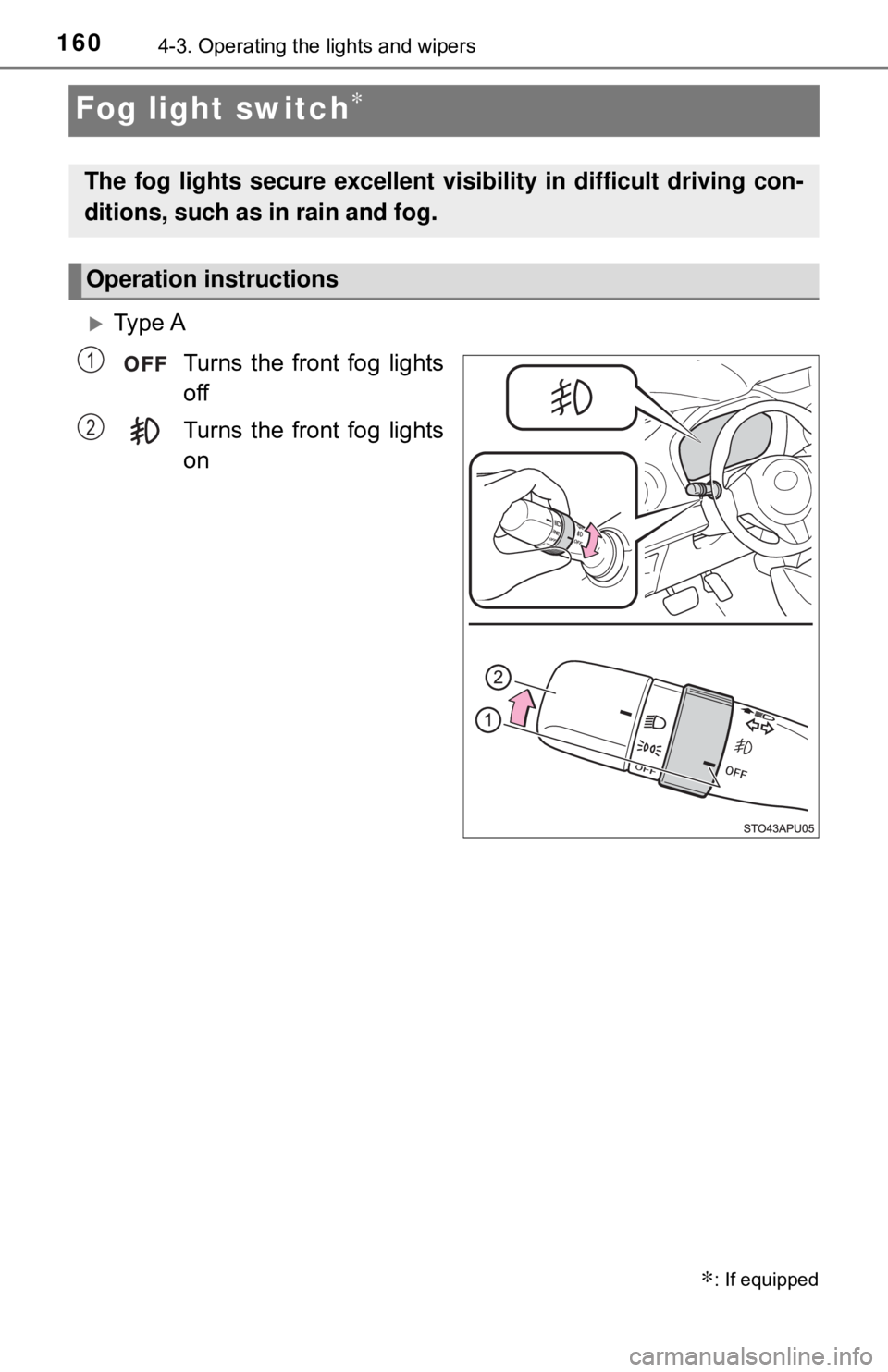
Fog light switch∗
Ty p e ATurns the front fog lights
off
Turns the front fog lights
on
∗: If equipped
The fog lights secure excellent visibility in difficult driving con-
ditions, such as in rain and fog.
Operation instructions
1
2
Page 169 of 520
1694-4. Refueling
4
Driving
WARNING
●Do not allow anyone that has not discharged static electricity from their
body to come close to an open fuel tank.
● Do not inhale vaporized fuel.
Fuel contains substances that are harmful if inhaled.
● Do not smoke while refueling the vehicle.
Doing so may cause the fuel to ignite and cause a fire.
● Do not return to the vehicle or touch any person or object that is statically
charged.
This may cause static electricity to build up, resulting in a possible ignition
hazard.
■ When refueling
Observe the following precautions to prevent fuel overflowing from the fuel
tank:
● Securely insert the fuel nozzle into the fuel filler neck.
● Stop filling the tank after the fuel nozzle automatically clicks off.
● Do not top off the fuel tank.
NOTICE
■Refueling
Do not spill fuel during refueling.
Doing so may damage the vehicle, such as causing the emission control
system to operate abnormally or damaging fuel system components or the
vehicle’s painted surface.
Page 269 of 520
2695-7. Connecting Bluetooth®
5
Multimedia system
Registering a Bluetooth® device
Display the “Bluetooth* Setup” screen. (→P. 266)
Select “Add Device”.
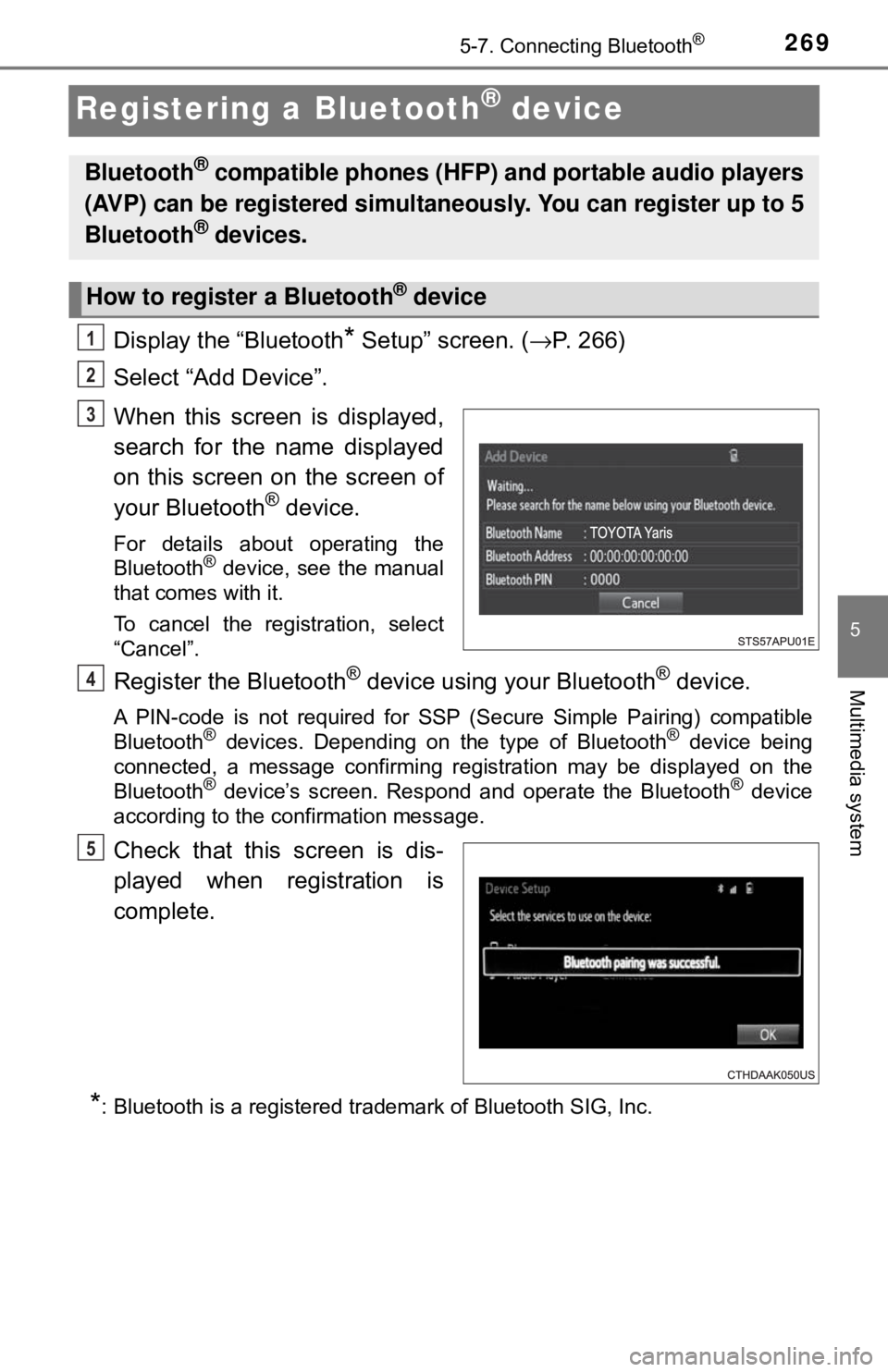
When this screen is displayed,
search for the name displayed
on this screen on the screen of
your Bluetooth
® device.
For details about operating the
Bluetooth® device, see the manual
that comes with it.
To cancel the registration, select
“Cancel”.
Register the Bluetooth® device using your Bluetooth® device.
A PIN-code is not required for SSP (Secure Simple Pairing) compatible
Bluetooth® devices. Depending on the type of Bluetooth® device being
connected, a message confirming registration may be displayed on the
Bluetooth
® device’s screen. Respond and operate the Bluetooth® device
according to the confirmation message.
Check that this screen is dis-
played when registration is
complete.
*: Bluetooth is a registered trademark of Bluetooth SIG, Inc.
Bluetooth® compatible phones (HFP) and portable audio players
(AVP) can be registered simultaneously. You can register up to 5
Bluetooth
® devices.
How to register a Bluetooth® device
1
2
3
4
5
Page 306 of 520
3065-9. Bluetooth® phone
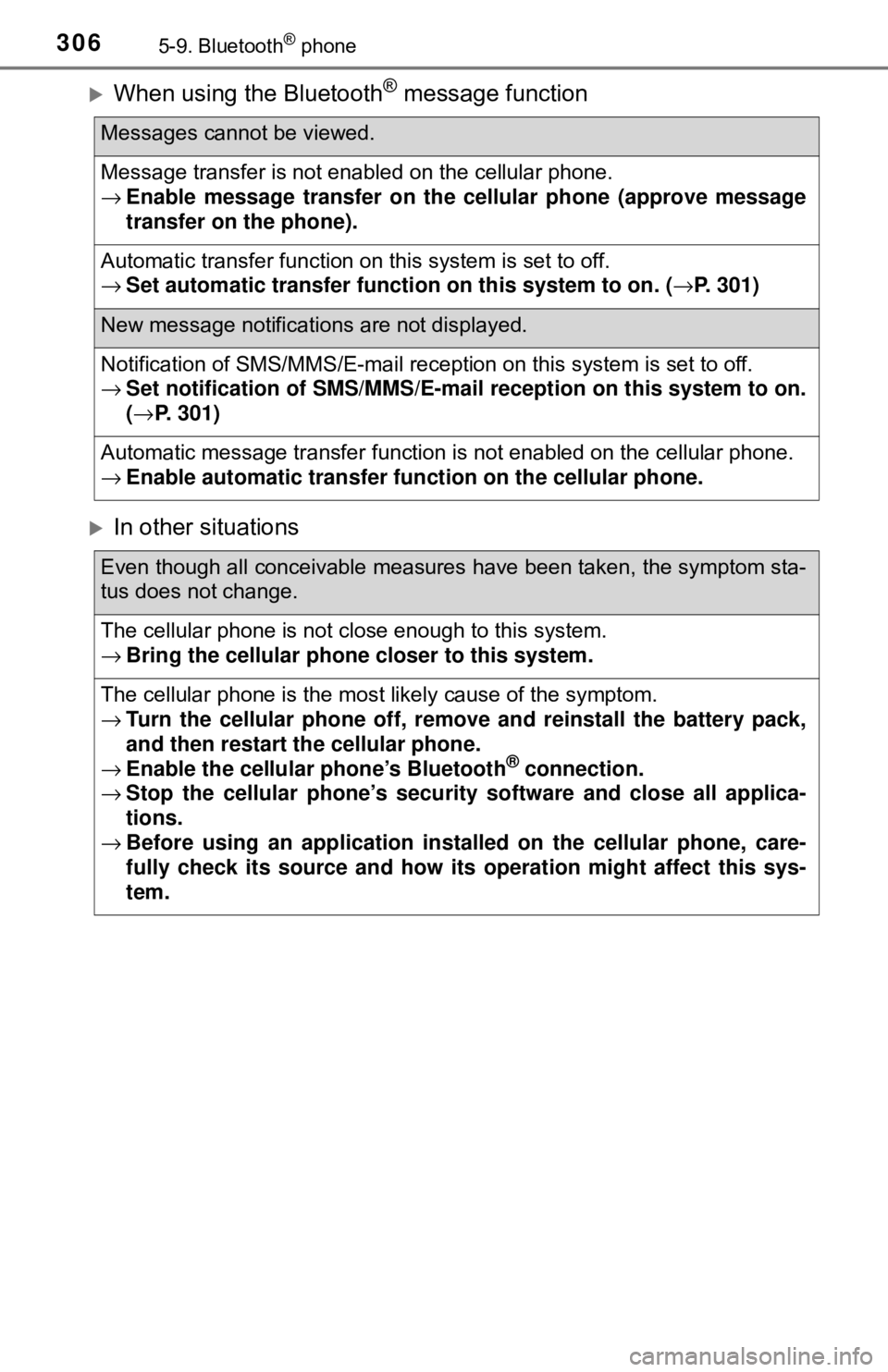
When using the Bluetooth® message function
In other situations
Messages cannot be viewed.
Message transfer is not enabled on the cellular phone.
→Enable message transfer on the cellular phone (approve message
transfer on the phone).
Automatic transfer function on this system is set to off.
→ Set automatic transfer functi on on this system to on. (→P. 301)
New message notifications are not displayed.
Notification of SMS/MMS/E-mail reception on this system is set to off.
→Set notification of SMS/MMS/E-mail reception on this system to on.
(→ P. 301)
Automatic message transfer function is not enabled on the cellular phone.
→ Enable automatic transfer fu nction on the cellular phone.
Even though all conceivable measures have been taken, the symptom sta-
tus does not change.
The cellular phone is not close enough to this system.
→Bring the cellular phone closer to this system.
The cellular phone is the most likely cause of the symptom.
→Turn the cellular phone off, remo ve and reinstall the battery pack,
and then restart the cellular phone.
→ Enable the cellular phone’s Bluetooth
® connection.
→ Stop the cellular phone’s security software and close all applica-
tions.
→ Before using an appli cation installed on the cellular phone, care-
fully check its source and how its operation might affect this sys-
tem.
Page 350 of 520
3507-2. Maintenance
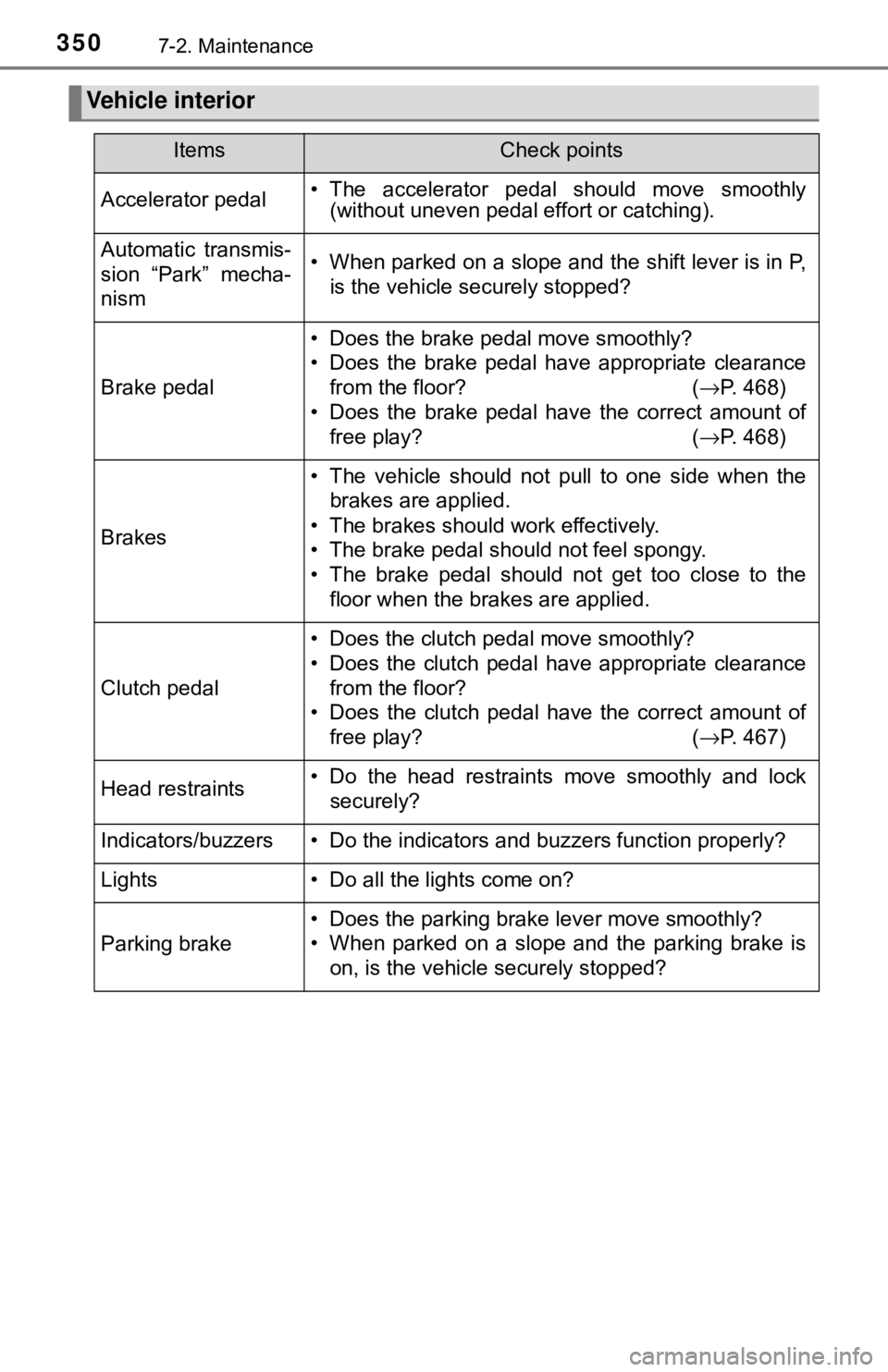
Vehicle interior
ItemsCheck points
Accelerator pedal• The accelerator pedal should move smoothly(without uneven pedal effort or catching).
Automatic transmis-
sion “Park” mecha-
nism• When parked on a slope and the shift lever is in P,
is the vehicle securely stopped?
Brake pedal
• Does the brake pedal move smoothly?
• Does the brake pedal have appropriate clearancefrom the floor? ( →P. 468)
• Does the brake pedal have the correct amount of free play? (→P. 468)
Brakes
• The vehicle should not pull to one side when the
brakes are applied.
• The brakes should work effectively.
• The brake pedal should not feel spongy.
• The brake pedal should not get too close to the floor when the brakes are applied.
Clutch pedal
• Does the clutch pedal move smoothly?
• Does the clutch pedal have appropriate clearancefrom the floor?
• Does the clutch pedal have the correct amount of
free play? ( →P. 467)
Head restraints• Do the head restraints move smoothly and lock
securely?
Indicators/buzzers• Do the indicators and buzzers function properly?
Lights• Do all the lights come on?
Parking brake
• Does the parking brake lever move smoothly?
• When parked on a slope and the parking brake ison, is the vehicle securely stopped?
Page 357 of 520
3577-3. Do-it-yourself maintenance
7
Maintenance and care
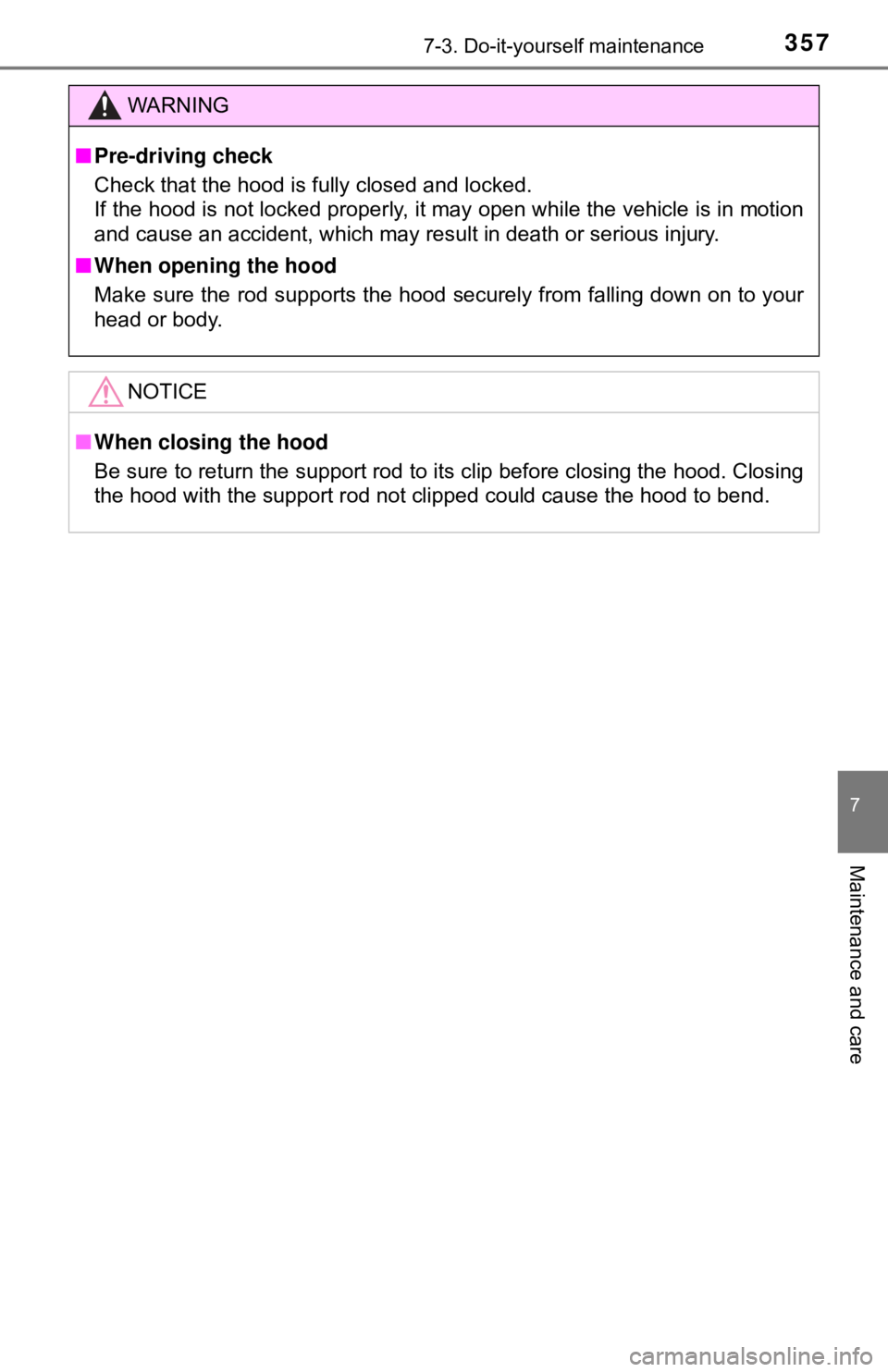
WARNING
■Pre-driving check
Check that the hood is fully closed and locked.
If the hood is not locked properly, it may open while the vehicle is in motion
and cause an accident, which may result in death or serious injury.
■ When opening the hood
Make sure the rod supports the hood securely from falling down on to your
head or body.
NOTICE
■When closing the hood
Be sure to return the support rod to its clip before closing the hood. Closing
the hood with the support rod not clipped could cause the hood to bend.
Page 399 of 520
3997-3. Do-it-yourself maintenance
7
Maintenance and care
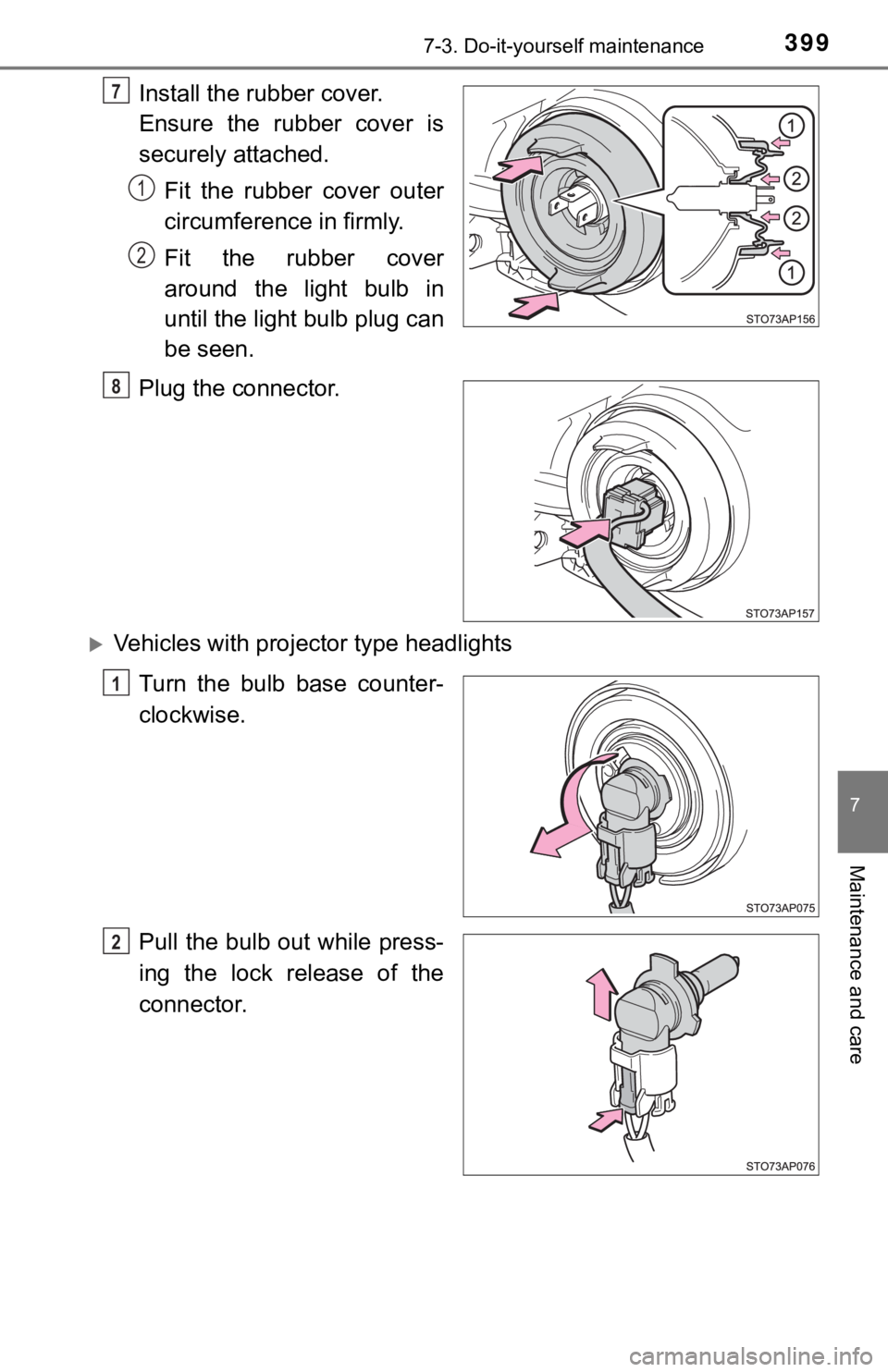
Install the rubber cover.
Ensure the rubber cover is
securely attached.Fit the rubber cover outer
circumference in firmly.
Fit the rubber cover
around the light bulb in
until the light bulb plug can
be seen.
Plug the connector.
Vehicles with proj ector type headlights
Turn the bulb base counter-
clockwise.
Pull the bulb out while press-
ing the lock release of the
connector.
7
1
2
8
1
2
Page 400 of 520
4007-3. Do-it-yourself maintenance
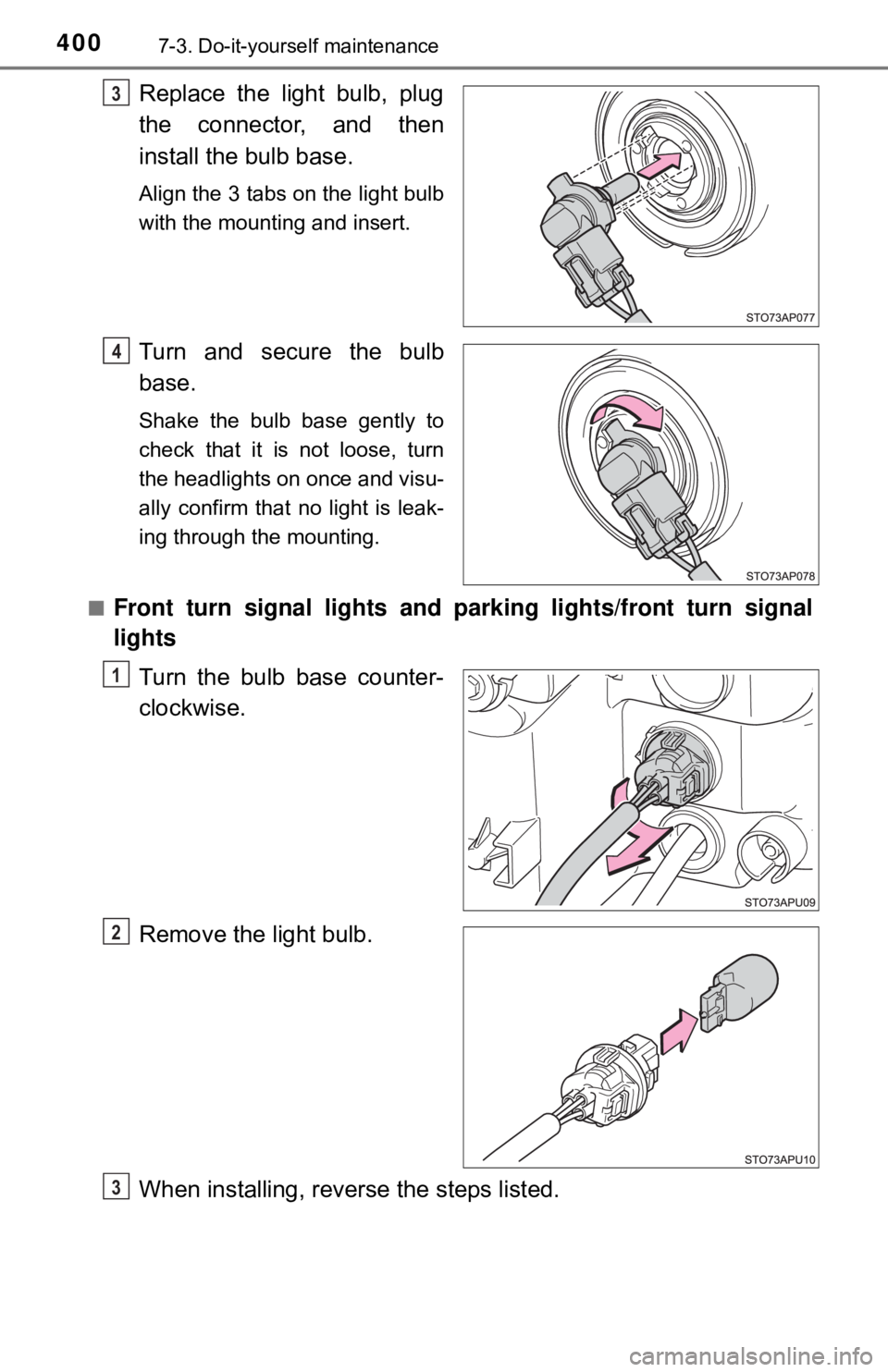
Replace the light bulb, plug
the connector, and then
install the bulb base.
Align the 3 tabs on the light bulb
with the mounting and insert.
Turn and secure the bulb
base.
Shake the bulb base gently to
check that it is not loose, turn
the headlights on once and visu-
ally confirm that no light is leak-
ing through the mounting.
■
Front turn signal lights and pa rking lights/front turn signal
lights
Turn the bulb base counter-
clockwise.
Remove the light bulb.
When installing, reve rse the steps listed.
3
14
1
2
3
Page 403 of 520
4037-3. Do-it-yourself maintenance
7
Maintenance and care
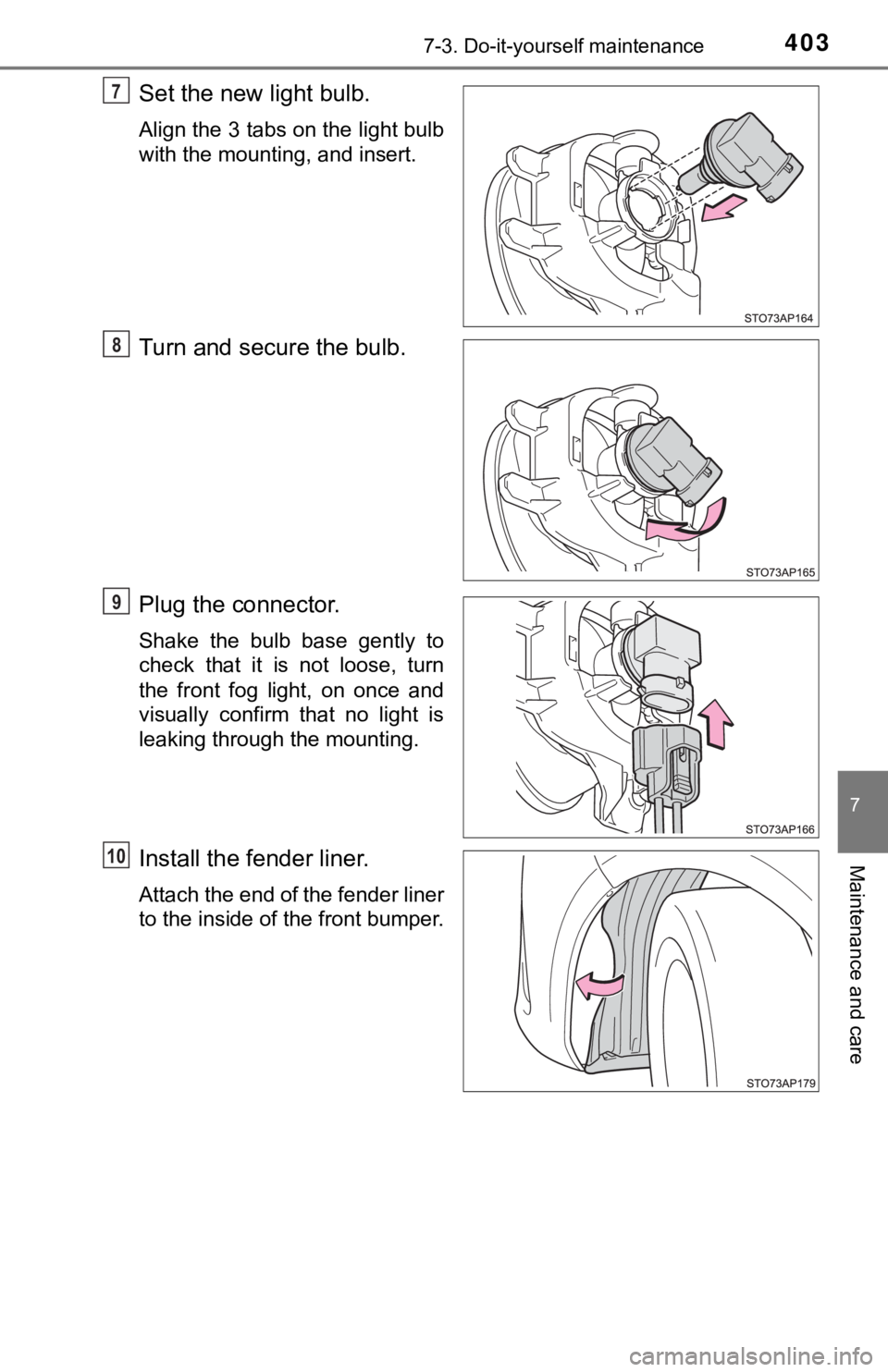
Set the new light bulb.
Align the 3 tabs on the light bulb
with the mounting, and insert.
Turn and secure the bulb.
Plug the connector.
Shake the bulb base gently to
check that it is not loose, turn
the front fog light, on once and
visually confirm that no light is
leaking through the mounting.
Install the fender liner.
Attach the end of the fender liner
to the inside of the front bumper.
7
78
79
10