warning TOYOTA YARIS HATCHBACK 2018 Manual Online
[x] Cancel search | Manufacturer: TOYOTA, Model Year: 2018, Model line: YARIS HATCHBACK, Model: TOYOTA YARIS HATCHBACK 2018Pages: 520, PDF Size: 8.69 MB
Page 181 of 520
1814-5. Toyota Safety Sense C
4
Driving
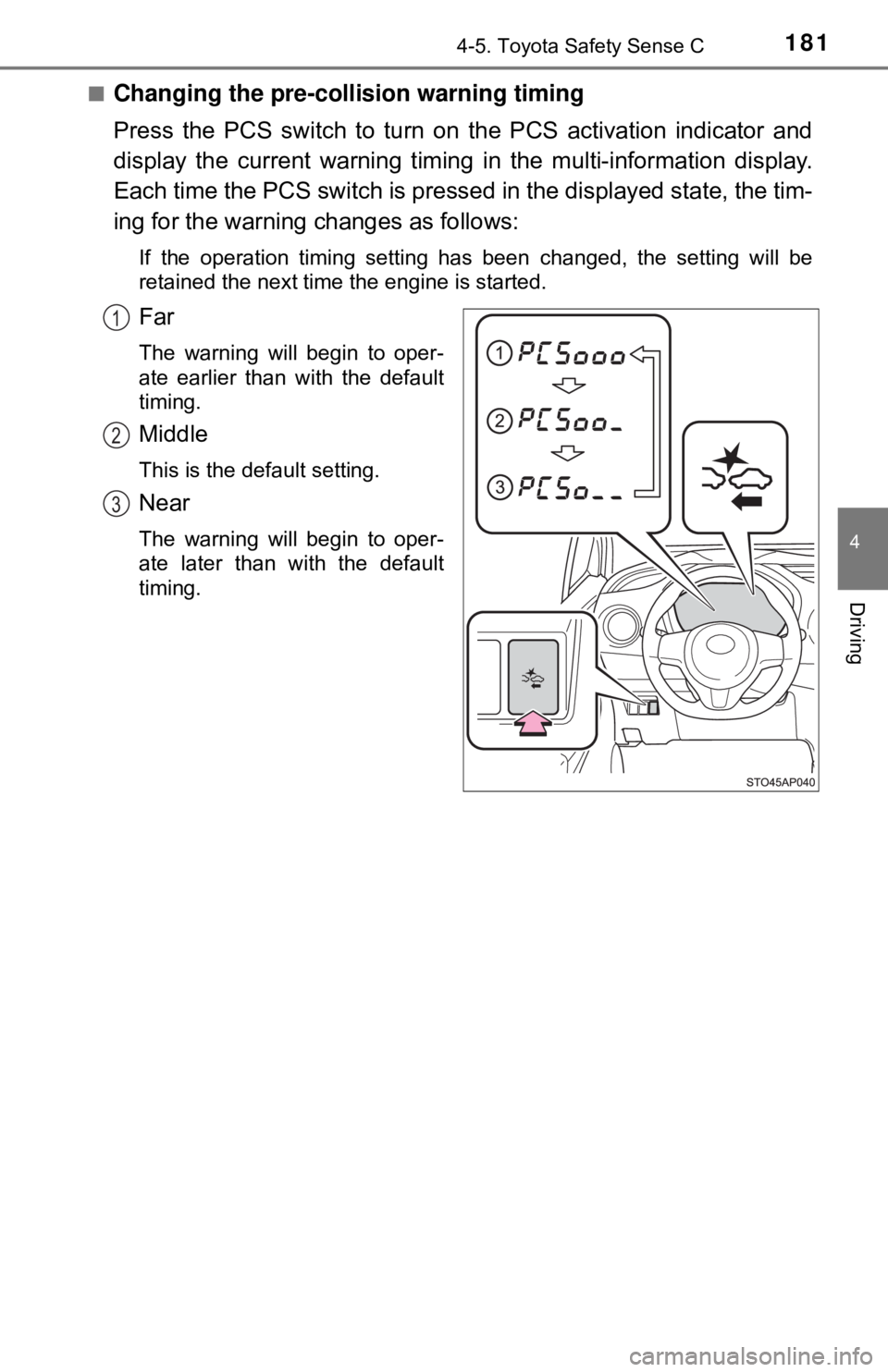
■Changing the pre-collision warning timing
Press the PCS switch to turn on the PCS activation indicator and
display the current warning timing in the multi-information display.
Each time the PCS switch is presse d in the displayed state, the tim-
ing for the warning changes as follows:
If the operation timing setting has been changed, the setting will be
retained the next time the engine is started.
Far
The warning will begin to oper-
ate earlier than with the default
timing.
Middle
This is the default setting.
Near
The warning will begin to oper-
ate later than with the default
timing.
1
2
3
Page 182 of 520

1824-5. Toyota Safety Sense C
■Operational conditions
The pre-collision system is enabled and determines that the possibility of a
frontal collision with a vehicle is high.
Each function is operational at the following speeds:
●Pre-collision warning:
• Vehicle speed is approximately 10 to 86 mph (15 to 140 km/h).
• The relative speed between your vehicle and a preceding vehicle is
approximately 10 mph (15 km/h) or more.
● Pre-collision brake assist:
• Vehicle speed is approximately 19 to 49 mph (30 to 80 km/h).
• The relative speed between your vehicle and a preceding vehicle is
approximately 19 mph (30 km/h) or more.
● Pre-collision braking:
• Vehicle speed is approximately 7 to 49 mph (10 to 80 km/h).
• The relative speed between your vehicle and a preceding vehicle is
approximately 7 mph (10 km/h) or more.
The system may not operate in the following situations:
● If a battery terminal has been disconnected and reconnected and then the
vehicle has not been driven for a certain amount of time
● If the shift lever is in R
● If VSC is disabled (only the pre-collision warning function will be opera-
tional)
■ Cancelation of the pre-collision braking
●If either of the following occur while the pre-collision braking function is
operating, it will be canceled:
• The accelerator pedal is depressed strongly.
• The steering wheel is turned sharply or abruptly.
● If the vehicle is stopped by the operation of the pre-collision braking func-
tion, the operation of the pre-collision braking function will be canceled after
the vehicle has been stopped for approximately 2 seconds.
Page 190 of 520

1904-5. Toyota Safety Sense C
■If the PCS warning light flashes or illuminates
The pre-collision system may be tempor arily unavailable or there may be a
malfunction in the system.
● In the following situations, the warning light will be cleared and the system
will become operational when normal operating conditions return:
• When the area around the front sensor is hot, such as after the vehicle
has been parked in the sun
• When the windshield is fogged up or covered with condensation or ice
• When the front sensor or the area around either sensor is cold, such as in an extremely cold environment
• If the area in front of the front sensor is obstructed, such as when the hood is open
● If the PCS warning light continues to flash or illuminate, the system may be
malfunctioning. Have the vehicle inspected by your Toyota dealer immedi-
ately.
■ If VSC is disabled
●If TRAC and VSC are disabled ( →P. 217), the pre-collision brake assist and
pre-collision braking functions are also disabled. However, the pre-collision
warning function will still operate.
● The PCS warning light illuminates.
Page 193 of 520

1934-5. Toyota Safety Sense C
4
Driving
■Temporary cancelation of the LDA system functions
If any of the following occurs, the LDA system functions will be temporarily
canceled. The functions will resume after the necessary operating conditions
have returned.
●The turn signal lever is operated.
● The vehicle speed deviates from the operating range of the LDA system
functions.
● When the lane lines cannot be recognized while driving.
● When the lane departure warning sounds.
The lane departure warning function will not operate again for a several sec-
onds after it has been activated, even if the vehicle leaves the lane again.
■ The lane departure warning
Depending on the audio system sound level or air conditioning fan noise
while the audio system or air conditioning system is in use, it may be difficult
to hear the warning sound.
■ After the vehicle has been parked in the sun
The LDA system may not be immediately available. When the temperature in
the cabin decreases and the temperature around the front sensor ( →P. 173)
becomes suitable for its operation, the functions will begin to operate.
■ If there are lane markers on only one side of the vehicle
The lane departure warning will not operate for the side on which lane mark-
ers could not be recognized.
■ Conditions in which the function may not operate correctly
In the following situations, the front sensor may be unable to recognize lane
markers causing the lane departure warning function to operate incorrectly.
However, this does not indicate a malfunction.
●When driving through an area, such as a tollbooth, a crossing or before a
ticket checkpoint
● When driving on a sharp curve
● When lane markers are extremely narrow or extremely wide
● When the vehicle leans to one side an unusual amount due to a heavy load
or improper tire inflation pressure
● When the following distance between your vehicle and the vehicle ahead is
extremely short
● When the lane markers are yellow (These may be more difficult for the sys-
tem to recognize compared to white markers.)
● When the lane markers are broken, Botts’ dots (raised pavement markers)
or stones
Page 195 of 520
1954-5. Toyota Safety Sense C
4
Driving
WARNING
■Before using the LDA system
Do not rely solely on the LDA system. The LDA system does not drive the
vehicle automatically, nor does it reduce the amount of care you need to
take. As such, the driver must always assume full responsibility for under-
standing his/her surroundings, for operating the steering wheel to correct
the driving line, and for driving safely.
Inappropriate or negligent driving could lead to an accident.
■ To avoid operating the LDA by mistake
Switch the LDA system off using the LDA switch when not in use.
NOTICE
■To prevent damage to or incorr ect operation of the LDA system
● Do not modify the headlights or attach stickers to the surface of the lights.
● Do not modify the suspension. If your suspension needs repairs, contact
your Toyota dealer.
● Do not install or place anything on the hood or the grille. Also, do not install
a grille guard (bull bars, kangaroo bar etc.).
Page 200 of 520
2004-5. Toyota Safety Sense C
■Temporarily lowering sensor sensitivity
The sensitivity of the sensor can be temporarily lowered.
Turn the engine switch off while the following conditions are met.
• The headlight switch is in .
• The headlight switch lever is in low beam position.
• Automatic High Beam switch is on.
Turn the engine switch to the “ON” position.
Within 30 seconds after , repeat pulling the headlight switch lever to the
original position then pushing it to the high beam position quickly 10 times,
then leave the lever in high beam position.
If the sensitivity is changed, the Automatic High Beam indicator is turned on
and off 3 times.
Automatic High Beam (headlights) may turn on even if the vehicle is stopped.
WARNING
■ Limitations of the Automatic High Beam
Do not rely on the Automatic High Beam. Always drive safely, taking care to
observe your surroundings and turning high beam on or off manually if nec-
essary.
NOTICE
■Notes when using the Au tomatic High Beam system
Observe the following to ensure that the Automatic High Beam functions
correctly.
● Do not overload the vehicle.
● Do not modify the vehicle.
1
2
32
4
Page 204 of 520

2044-6. Using the driving support systems
WARNING
■To avoid operating the cruise control by mistake
Switch the cruise control off using the “ON-OFF” button when not in use.
■ Situations unsuitable for cruise control
Do not use cruise control in any of the following situations.
Doing so may result in loss of control and could cause an accident resulting
in death or serious injury.
● In heavy traffic
● On roads with sharp bends
● On winding roads
● On slippery roads, such as those covered with rain, ice or snow
● On steep hills
Vehicle speed may exceed the set speed when driving down a steep hill.
● During emergency towing
Page 213 of 520
2134-6. Using the driving support systems
4
Driving
The fixed guide lines are very far out of alignment
The camera position is out of align-
ment.Have the vehicle inspected by your
Toyota dealer.
• The vehicle is tilted (there is a
heavy load on the vehicle, tire
pressure is low due to a tire punc-
ture, etc.)
• The vehicle is used on an incline.If this happens due to these causes,
it does not indicate a malfunction.
Back up while visually checking the
vehicle’s surroundings.
WARNING
■ When using the rear view monitor system
The rear view monitor system is a supplemental device intended to assist
the driver when backing up. When backing up, be sure to check visually
behind and all around the vehicle before proceeding.
Observe the following precautions to avoid an accident that could result in
death or serious injuries.
● Never depend on the rear view monitor system entirely when backing up.
The image and the position of the guide lines displayed on the screen may
differ from the actual state.
Use caution, just as you would when backing up any vehicle.
● Be sure to back up slowly, depressing the brake pedal to control vehicle
speed.
● The instructions given are only guide lines.
When and how much to turn the steering wheel will vary according to traf-
fic conditions, road surface conditions, vehicle condition, etc., when park-
ing. It is necessary to be fully aware of this before using the rear view
monitor system.
● When parking, be sure to check that the parking space will accommodate
your vehicle before maneuvering into it.
Likely causeSolution
Page 214 of 520
2144-6. Using the driving support systems
WARNING
●Do not use the rear view monitor system in the following cases:
• On icy or slick road surfaces, or in snow
• When using tire chains or the compact spare tire
• When the back door is not closed completely
• On roads that are not flat or straight, such as curves or slopes.
● In low temperatures, the screen may darken or the image may become
faint. The image could distort when the vehicle is moving, or you may
become unable to see the image on the screen. Be sure to check direct
visually and with the mirrors all around the vehicle before proceeding.
● If the tire sizes are changed, the position of the fixation guide lines dis-
played on the screen may change.
● The camera uses a special lens. The distances between objects and
pedestrians that appear in the image displayed on the screen will differ
from the actual distances. ( →P. 208)
NOTICE
■How to use the camera
● The rear view monitor system may not operate properly in the following
cases.
• If the back of the vehicle is hit, the position and mounting angle of the
camera may change.
• As the camera has a water proof construction, do not detach, disassem- ble or modify it. This may cause incorrect operation.
• When cleaning the camera lens, flush the camera with a large quantity
of water and wipe it with a soft and wet cloth. Strongly rubbing the cam-
era lens may cause the camera lens to be scratched and unable to
transmit a clear image.
• Do not allow organic solvent, car wax, window cleaner or a glass coat- ing to adhere to the camera. If this happens, wipe it off as soon as pos-
sible.
• If the temperature changes rapidly, such as when hot water is poured on the vehicle in cold weather, the system may not operate normally.
• When washing the vehicle, do not apply intensive bursts of water to the camera or camera area. Doing so may result in the camera malfunc-
tioning.
● Do not expose the camera to strong impact as this could cause a malfunc-
tion. If this happens, have the vehicle inspected by your Toyota dealer as
soon as possible.
Page 217 of 520
2174-6. Using the driving support systems
4
Driving
■Turning off both TRAC and VSC systems
To turn the TRAC and VSC systems off, press and hold for more than 3
seconds while the vehicle is stopped.
The “TRAC OFF” indicator light and the VSC off indicator light will come on.
Press again to turn the systems back on.
On vehicles with Pre-collision system, Pre-collision brake assist and Pre-colli-
sion braking will also be disabled. The PCS warning light will come on.
(→P. 190)
■ When the “TRAC OFF” indicator light comes on even if has not
been pressed
TRAC cannot be operated. Contact your Toyota dealer.
■ Sounds and vibrations caused by the ABS, brake assist, VSC, TRAC and
hill-start assist control systems
● A sound may be heard from the engine compartment when the brake pedal
is depressed repeatedly, when the engine is started or just after the vehicle
begins to move. This sound does not indicate that a malfunction has
occurred in any of these systems.
● Any of the following conditions may occur when the above systems are
operating. None of these indicates that a malfunction has occurred.
• Vibrations may be felt through the vehicle body and steering.
• A motor sound may be heard also after the vehicle comes to a stop.
• The brake pedal may pulsate slightly after the ABS is activated.
• The brake pedal may move down slightly after the ABS is activated.
■ EPS operation sound
When the steering wheel is operated, a motor sound (whirring sound) may be
heard. This does not indicate a malfunction.
■ Automatic reactivation of TRAC and VSC systems
After turning the TRAC and VSC systems off, the systems will be automati-
cally re-enabled in the following situations:
● When the engine switch is turned to the “LOCK” position
● If only the TRAC system is turned off, the TRAC will turn on when vehicle
speed increases
If both the TRAC and VSC systems are turned off, automatic re-enabling will
not occur when vehicle speed increases.