display TOYOTA YARIS HYBRID 2014 Owners Manual
[x] Cancel search | Manufacturer: TOYOTA, Model Year: 2014, Model line: YARIS HYBRID, Model: TOYOTA YARIS HYBRID 2014Pages: 464, PDF Size: 23.4 MB
Page 2 of 464

TABLE OF CONTENTS2
For your information .......................6
Reading this manual.....................10
How to search ..............................11
Pictorial index ...............................12
1-1. For safe use
Before driving.......................28
For safety drive ....................30
Seat belts .............................32
SRS airbags.........................39
Airbag manual on-off sys-
tem.................................... 50
Safety information for chil-
dren....................................52
Child restraint systems ........53
Installing child restraints ......63
Exhaust gas precautions .....72
1-2. Hybrid system
Hybrid system features ........73
Hybrid system precautions ..77
1-3. Theft deterrent system
Immobilizer system ..............82
Double locking system .........87
2. Instrument cluster
Warning lights and indica-
tor.......................................90
Gauges and meters .............95
Multi-information display ......98
Energy monitor/consumption
screen ..............................1023-1. Key information
Keys .................................. 108
3-2. Opening, closing and locking
the doors
Side doors ......................... 120
Back door .......................... 126
Smart entry & start system 132
3-3. Adjusting the seats
Front seats ........................ 147
Rear seats ......................... 149
Head restraints .................. 152
3-4. Adjusting the steering wheel
and mirrors
Steering wheel .................. 154
Inside rear view mirror....... 156
Outside rear view mirrors .. 158
3-5. Opening and closing the win-
dows
Power windows ................. 161
1For safety and security
2Instrument cluster
3Operation of each compo-
nent
Page 15 of 464
15Pictorial index
Multi-information display . . . . . . . . . . . . . . . . . . . . . . . . . . . . P. 98
Parking brake . . . . . . . . . . . . . . . . . . . . . . . . . . . . . . . . . . . . . P. 192
Applying/releasing . . . . . . . . . . . . . . . . . . . . . . . . . . . . . . . . . . P. 192
Precautions against winter season . . . . . . . . . . . . . . . . . . . . . P. 223
Warning buzzer . . . . . . . . . . . . . . . . . . . . . . . . . . . . . . . . . . . . P. 369
Turn signal lever . . . . . . . . . . . . . . . . . . . . . . . . . . . . . . . . . . P. 191
Headlight switch . . . . . . . . . . . . . . . . . . . . . . . . . . . . . . . . . . P. 193
Headlights/front position lights/tail lights . . . . . . . . . . . . . . . . . P. 193
Front fog lights
*2/rear fog light . . . . . . . . . . . . . . . . . . . . . . . . P. 198
Wiper and washer switch . . . . . . . . . . . . . . . . . . . . . . . P. 200, 204
Usage (front) . . . . . . . . . . . . . . . . . . . . . . . . . . . . . . . . . . . . . . P. 200
Usage (rear) . . . . . . . . . . . . . . . . . . . . . . . . . . . . . . . . . . . . . . P. 204
Adding washer fluid . . . . . . . . . . . . . . . . . . . . . . . . . . . . . . . . . P. 308
Emergency flasher switch . . . . . . . . . . . . . . . . . . . . . . . . . . P. 360
Hood lock release lever . . . . . . . . . . . . . . . . . . . . . . . . . . . . P. 298
Tilt and telescopic steering lock release lever . . . . . . . . . . P. 154
Air conditioning system . . . . . . . . . . . . . . . . . . . . . . . . . . . . P. 260
Usage . . . . . . . . . . . . . . . . . . . . . . . . . . . . . . . . . . . . . . . . . . . P. 260
Rear window defogger. . . . . . . . . . . . . . . . . . . . . . . . . . . . . . . P. 264
Audio system
*2. . . . . . . . . . . . . . . . . . . . . . . . . . . . . . . . . . . P. 226
Navigation/Multimedia system
*2, 3
*1: Vehicles with a smart entry & start system
*2: If equipped
*3: Refer to “Navigation and multimedia system Owner’s manual”.
4
5
6
7
8
9
10
11
12
Page 21 of 464
21Pictorial index
Multi-information display . . . . . . . . . . . . . . . . . . . . . . . . . . . . P. 98
Parking brake . . . . . . . . . . . . . . . . . . . . . . . . . . . . . . . . . . . . . P. 192
Applying/releasing . . . . . . . . . . . . . . . . . . . . . . . . . . . . . . . . . . P. 192
Precautions against winter season . . . . . . . . . . . . . . . . . . . . . P. 223
Warning buzzer . . . . . . . . . . . . . . . . . . . . . . . . . . . . . . . . . . . . P. 369
Turn signal lever . . . . . . . . . . . . . . . . . . . . . . . . . . . . . . . . . . P. 191
Headlight switch . . . . . . . . . . . . . . . . . . . . . . . . . . . . . . . . . . P. 193
Headlights/front position lights/tail lights . . . . . . . . . . . . . . . . . P. 193
Front fog lights
*2/rear fog light . . . . . . . . . . . . . . . . . . . . . . . . P. 198
Wiper and washer switch . . . . . . . . . . . . . . . . . . . . . . . P. 200, 204
Usage (front) . . . . . . . . . . . . . . . . . . . . . . . . . . . . . . . . . . . . . . P. 200
Usage (rear) . . . . . . . . . . . . . . . . . . . . . . . . . . . . . . . . . . . . . . P. 204
Adding washer fluid . . . . . . . . . . . . . . . . . . . . . . . . . . . . . . . . . P. 308
Emergency flasher switch . . . . . . . . . . . . . . . . . . . . . . . . . . P. 360
Hood lock release lever . . . . . . . . . . . . . . . . . . . . . . . . . . . . P. 298
Tilt and telescopic steering lock release lever . . . . . . . . . . P. 154
Air conditioning system . . . . . . . . . . . . . . . . . . . . . . . . . . . . P. 260
Usage . . . . . . . . . . . . . . . . . . . . . . . . . . . . . . . . . . . . . . . . . . . P. 260
Rear window defogger. . . . . . . . . . . . . . . . . . . . . . . . . . . . . . . P. 264
Audio system
*2. . . . . . . . . . . . . . . . . . . . . . . . . . . . . . . . . . . P. 226
Navigation/Multimedia system
*2, 3
*1: Vehicles with a smart entry & start system
*2: If equipped
*3: Refer to “Navigation and multimedia system Owner’s manual”.
4
5
6
7
8
9
10
11
12
Page 63 of 464
631-1. For safe use
1
For safety and security
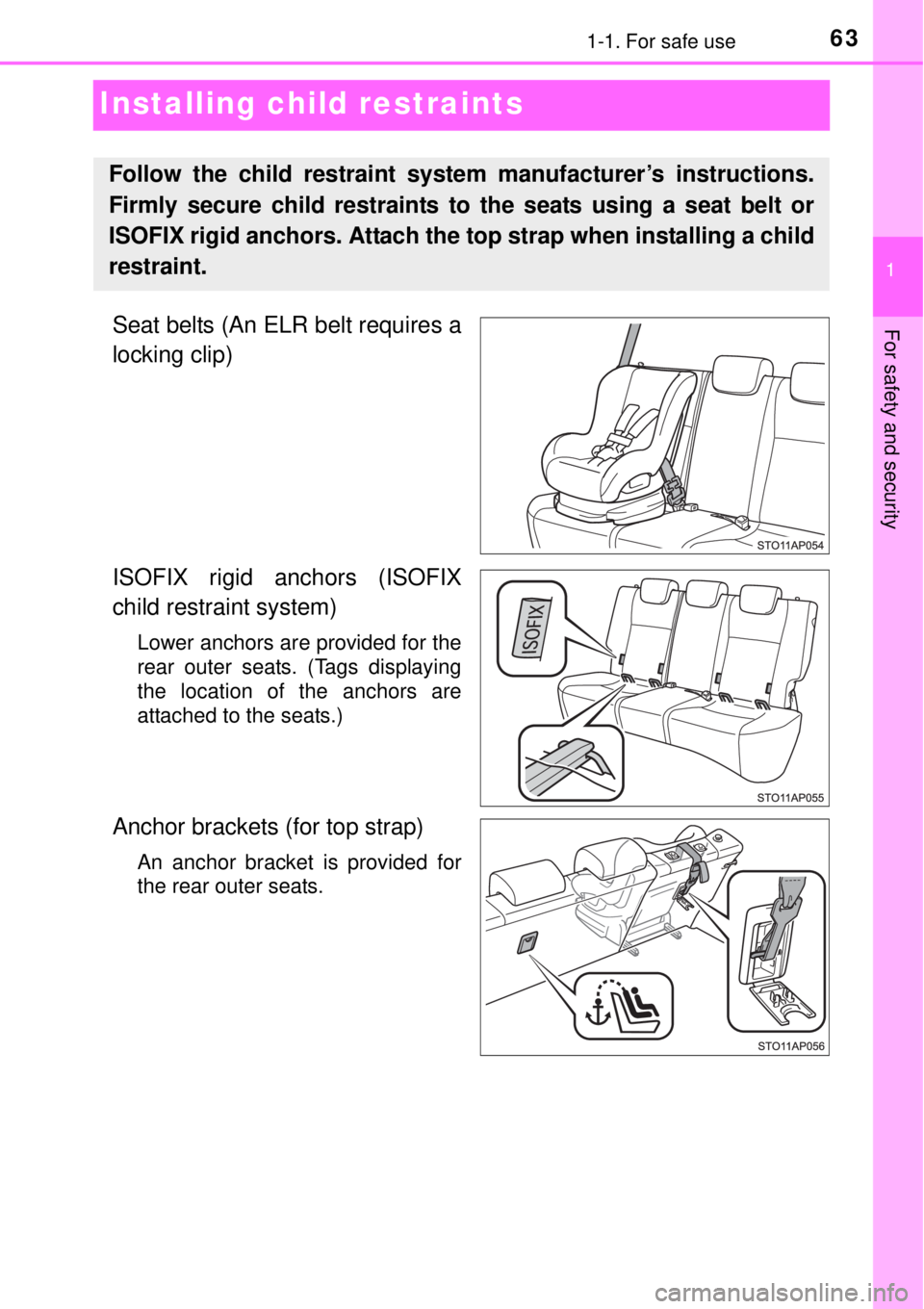
Installing child restraints
Seat belts (An ELR belt requires a
locking clip)
ISOFIX rigid anchors (ISOFIX
child restraint system)
Lower anchors are provided for the
rear outer seats. (Tags displaying
the location of the anchors are
attached to the seats.)
Anchor brackets (for top strap)
An anchor bracket is provided for
the rear outer seats.
Follow the child restraint system manufacturer’s instructions.
Firmly secure child restraints to the seats using a seat belt or
ISOFIX rigid anchors. Attach the top strap when installing a child
restraint.
Page 89 of 464

89
2Instrument cluster
2. Instrument cluster
Warning lights and
indicators ........................... 90
Gauges and meters ............. 95
Multi-information display ...... 98
Energy monitor/
consumption screen ........ 102
Page 95 of 464
95
2
2. Instrument cluster
Instrument cluster
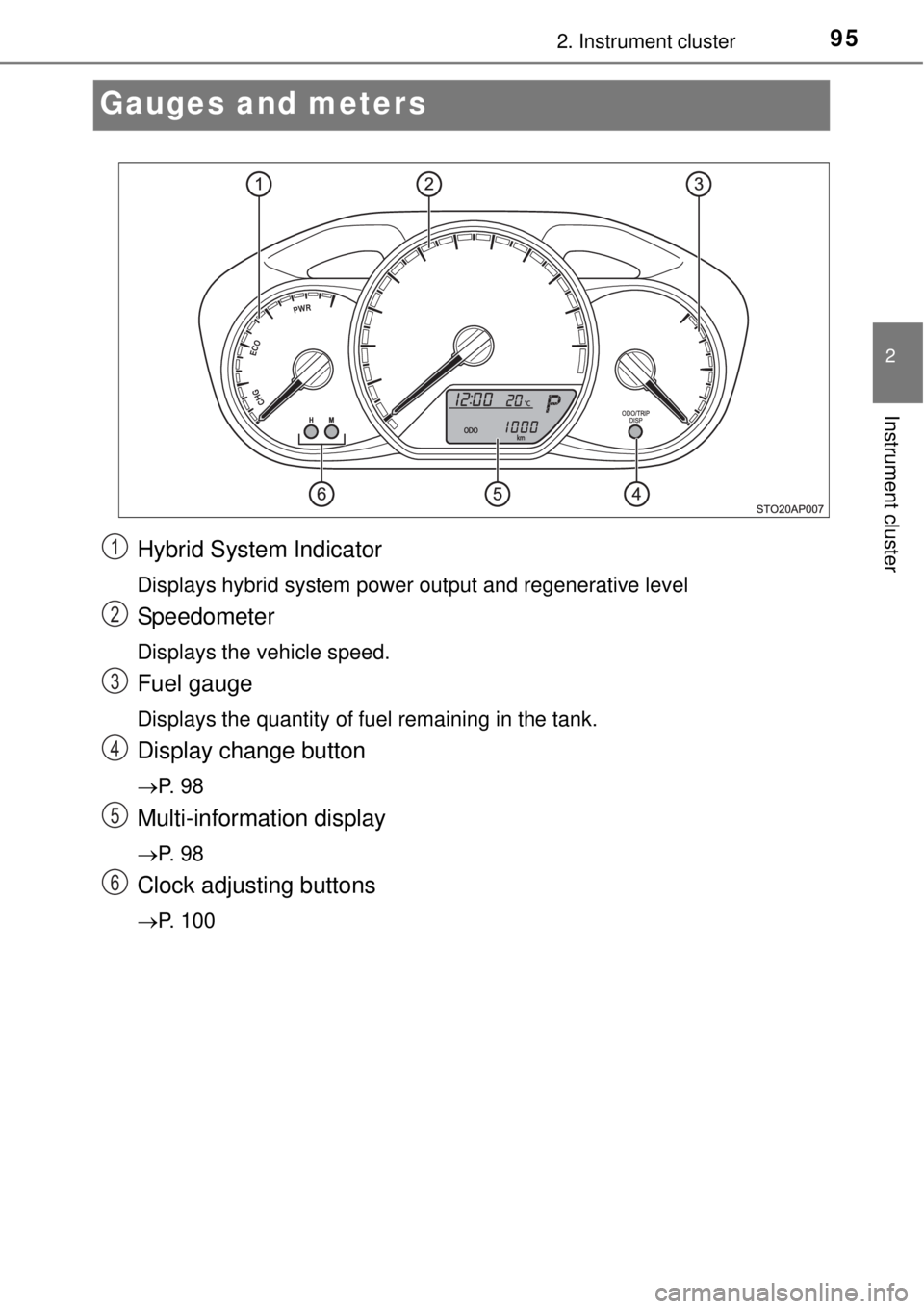
Gauges and meters
Hybrid System Indicator
Displays hybrid system power output and regenerative level
Speedometer
Displays the vehicle speed.
Fuel gauge
Displays the quantity of fuel remaining in the tank.
Display change button
P. 9 8
Multi-information display
P. 9 8
Clock adjusting buttons
P. 100
1
2
3
4
5
6
Page 96 of 464
962. Instrument cluster
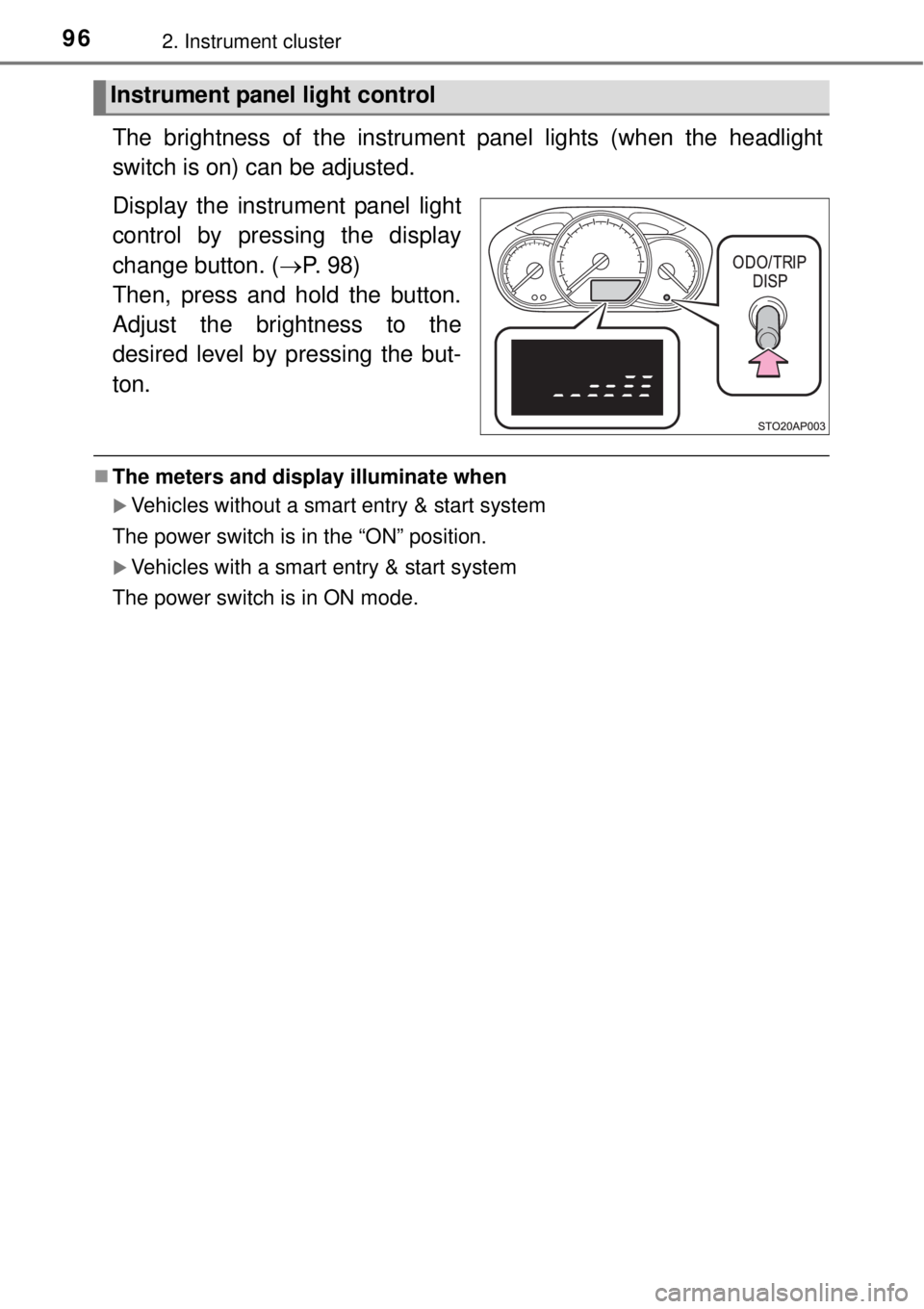
The brightness of the instrument panel lights (when the headlight
switch is on) can be adjusted.
Display the instrument panel light
control by pressing the display
change button. (P. 98)
Then, press and hold the button.
Adjust the brightness to the
desired level by pressing the but-
ton.
The meters and display illuminate when
Vehicles without a smart entry & start system
The power switch is in the “ON” position.
Vehicles with a smart entry & start system
The power switch is in ON mode.
Instrument panel light control
Page 98 of 464
982. Instrument cluster
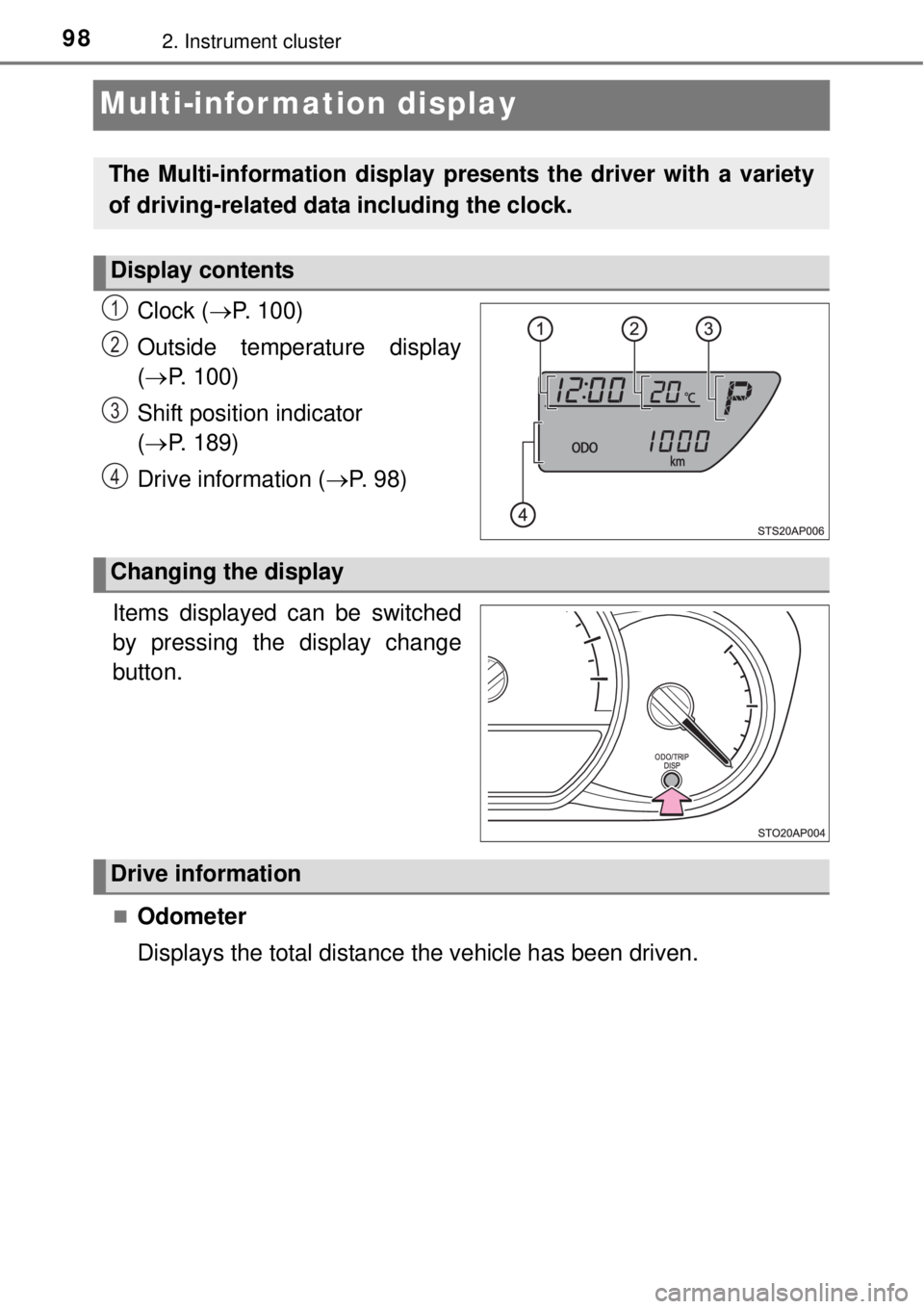
Multi-infor mation display
Clock (P. 100)
Outside temperature display
(P. 100)
Shift position indicator
(P. 189)
Drive information (P. 9 8 )
.
Items displayed can be switched
by pressing the display change
button.
Odometer
Displays the total distance the vehicle has been driven.
The Multi-information display presents the driver with a variety
of driving-related data including the clock.
Display contents
1
2
3
4
Changing the display
Drive information
Page 99 of 464

992. Instrument cluster
2
Instrument cluster
Tr i p m e t e r
Displays the distance the vehicle has been driven since the meter
was last reset. Trip meters A and B can be used to record and dis-
play different distances independently.
Press and hold the button for longer than 1 second to reset. Pressing and
holding the button while the trip meter is displayed will reset the trip meter
to “0”.
Instantaneous fuel consumption
Displays the instantaneous of fuel consumption.
• The function can be reset by pressing the button for longer than 1 sec-
ond when the instantaneous fuel consumption is displayed.
• Use the displayed instantaneous fuel consumption as a reference.
Average fuel consumption
Displays the average rate of fuel consumption.
• The function can be reset by pressing the button for longer than 1 sec-
ond when the average fuel consumption is displayed.
• Use the displayed average fuel consumption as a reference.
Driving range
Displays the estimated maximum distance that can be driven with
the quantity of fuel remaining.
• This distance is computed based on your average fuel consumption. As
a result, the actual distance that can be driven may differ from that dis-
played.
• When only a small amount of fuel is added to the tank, the display may
not be updated.
When refueling, turn the power switch to the “LOCK” position (vehicles
without a smart entry & start system) or off (vehicles with a smart entry &
start system). If the vehicle is refueled without turning the power switch to
the “LOCK” position or off, the display may not be updated.
Average vehicle speed
Displays the average vehicle speed since the hybrid system was
last started or the function was reset.
The function can be reset by pressing the button for longer than 1 second
when the average vehicle speed is displayed.
Page 100 of 464
1002. Instrument cluster
EV indicator can be activated or deactivated by pressing the display
change button when the EV indicator customization display is dis-
played.
To change the EV indicator customization display, display the odometer
and press and hold the display change button until the display changes.
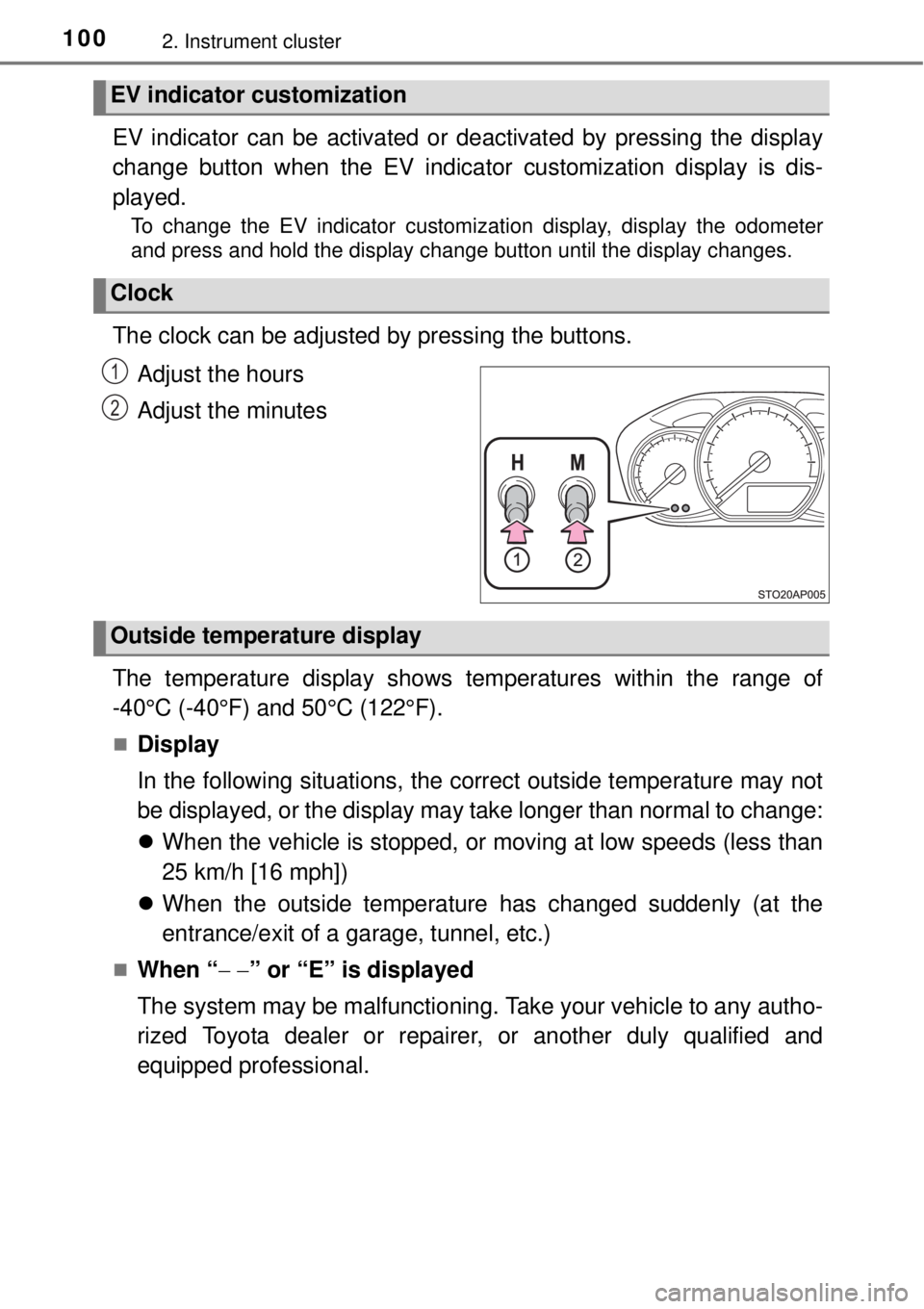
The clock can be adjusted by pressing the buttons.
Adjust the hours
Adjust the minutes
The temperature display shows temperatures within the range of
-40°C (-40°F) and 50°C (122°F).
Display
In the following situations, the correct outside temperature may not
be displayed, or the display may take longer than normal to change:
When the vehicle is stopped, or moving at low speeds (less than
25 km/h [16 mph])
When the outside temperature has changed suddenly (at the
entrance/exit of a garage, tunnel, etc.)
When “” or “E” is displayed
The system may be malfunctioning. Take your vehicle to any autho-
rized Toyota dealer or repairer, or another duly qualified and
equipped professional.
EV indicator customization
Clock
1
2
Outside temperature display