battery TOYOTA YARIS LIFTBACK 2020 Accessories, Audio & Navigation (in English)
[x] Cancel search | Manufacturer: TOYOTA, Model Year: 2020, Model line: YARIS LIFTBACK, Model: TOYOTA YARIS LIFTBACK 2020Pages: 164, PDF Size: 3.77 MB
Page 16 of 164
STATUS DISPLAY
16
1. CONTROLS AND FEATURES
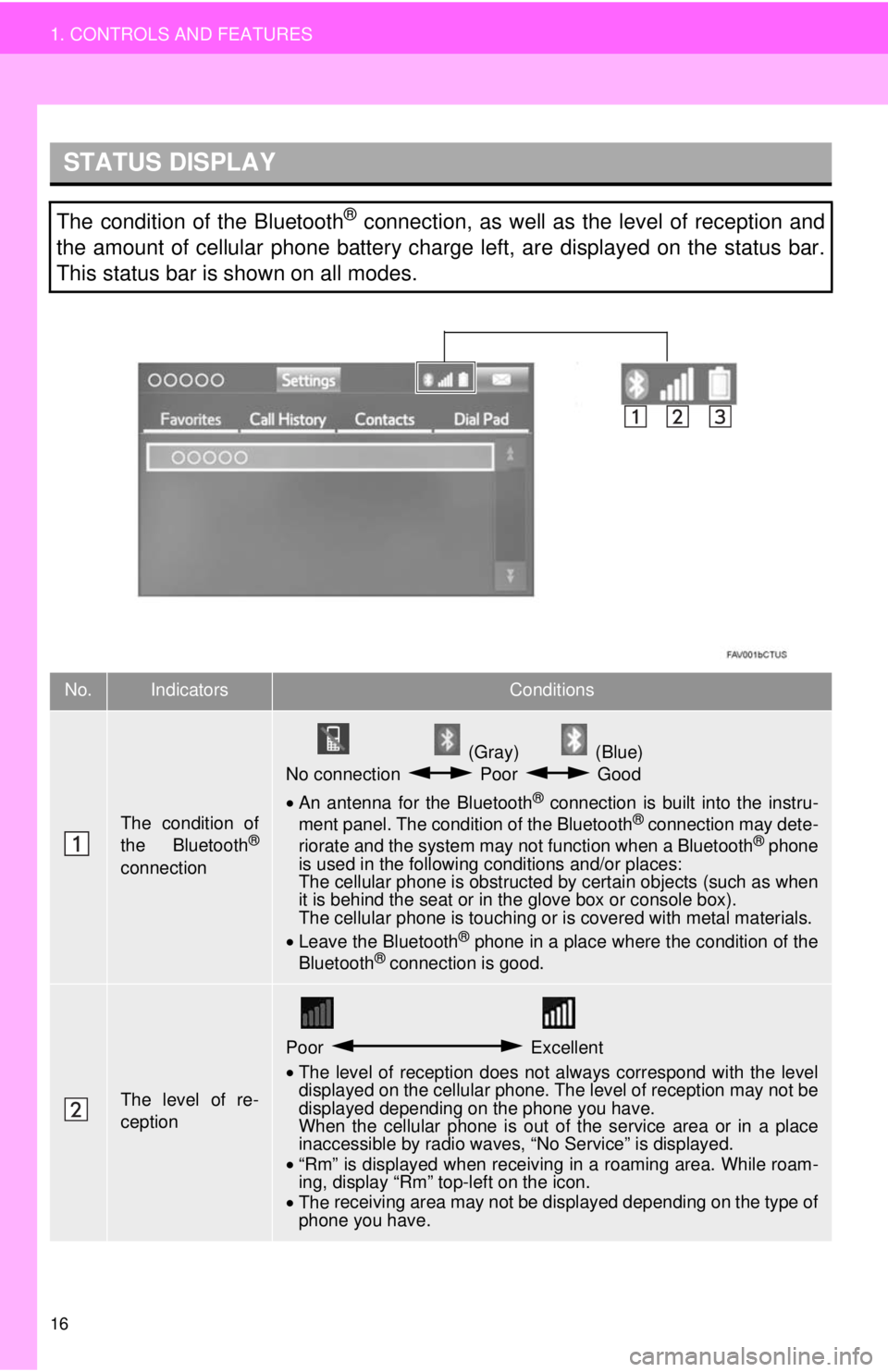
The condition of the Bluetooth® connection, as well as the level of reception and
the amount of cellular phone battery charge left, are displayed on the status bar.
This status bar is shown on all modes.
No.IndicatorsConditions
The condition of
the Bluetooth®
connection
(Gray) (Blue)
No connection Poor Good
• An antenna for the Bluetooth® connection is built into the instru -
ment panel. The condition of the Bluetooth® connection may dete -
riorate and the system may not function when a Bluetooth® phone
is used in the following conditions and/or places:
The cellular phone is obstructed by certain ob
jects (such as when
it is behind the seat or in the glove box or console box).
The cellular phone is touching or is covered with metal materials.
• Leave the Blu etooth
® phone in a place where the condition of the
Bluetooth® connection is good.
The level of re-
ception
Poor Excellent
•The level of reception does not always correspond with the level
displayed on the cellular phone. The level of reception may not be
displayed depending on the phone you have.
When the cellular phone is out of the
service area or in a place
inaccessible by radio waves, “No Service” is displayed.
• “Rm” is displayed when receiving in a roaming area. While roam -
in
g, display “Rm” top-left on the icon.
• The receiving area may not be displayed depending on the type of
phone you have.
Page 17 of 164
17
1. CONTROLS AND FEATURES
QUICK GUIDE
1
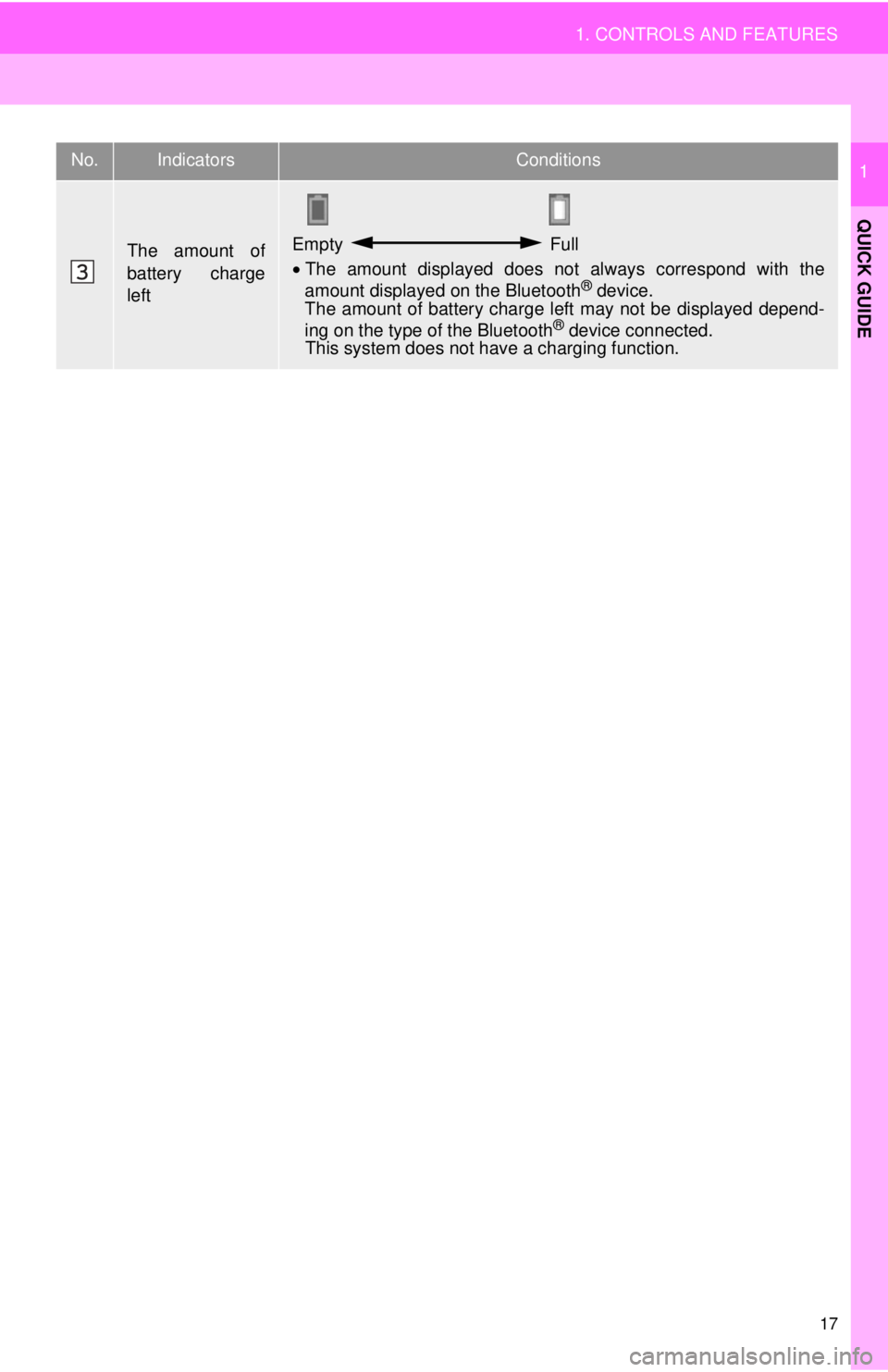
The amount of
battery charge
leftEmpty Full
•The amount displayed does not always correspond with the
amount displayed on the Bluetooth® device.
The amount of battery charge left may not be displayed depend -
ing on the type of the Bluetooth
® device connected. This system does not have a charging function.
No.IndicatorsConditions
Page 53 of 164
53
1. BASIC OPERATION
AUDIO SYSTEM
3
2. SOME BASICS
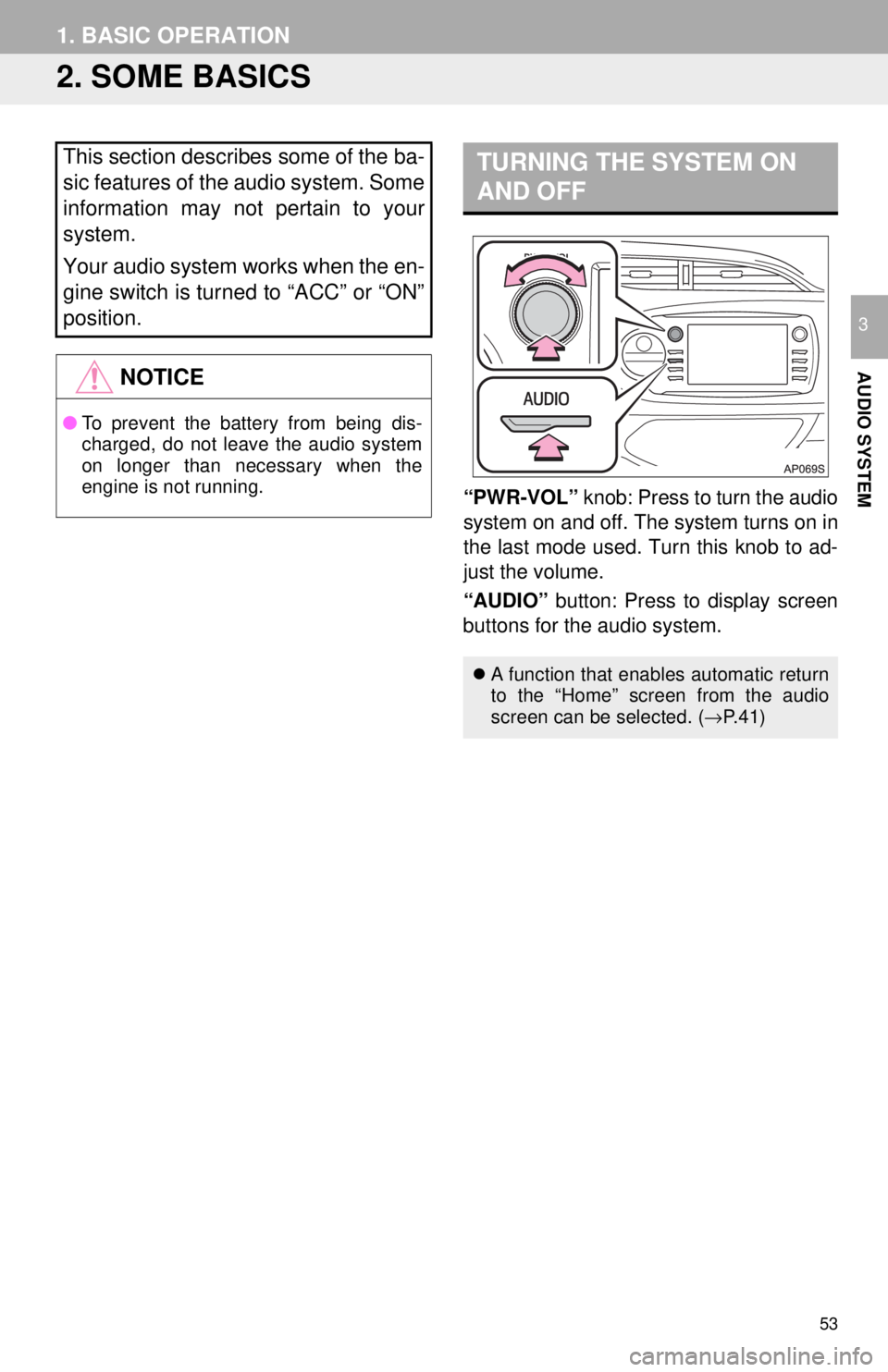
TURNING THE SYSTEM ON
AND OFF
“PWR-VOL” knob: Press to turn the audio
system on and off. The system turns on in
the last mode used. Turn this knob to ad-
just the volume.
“AUDIO” button: Press to display screen
buttons for the audio system.
This section describes some of the ba-
sic features of the audio system. Some
information may not pertain to your
system.
Your audio system works when the en-
gine switch is turned to “ACC” or “ON”
position.
NOTICE
● To prevent the battery from being dis-
charged, do not leave the audio system
on longer than necessary when the
engine is not running.
A function that enables automatic return
to the “Home” screen from the audio
screen can be selected. ( →P.41)
Page 84 of 164
●Do not operate the player’s controls or connect to the Bluetooth® audio system while driv -
ing.
● Your audio unit is fitted with Bluetooth
® antennas. People with implantable cardiac pace-
makers, cardiac resynchronization therapy-pacemakers or implantable cardioverter
d efi
brillators should maintain a reasonable distance between themselves and the Blue -
tooth
® antennas. The radio waves may affect the operation of such devices.
● Bef ore using Bluetooth
® devices, users of any electrical medical device other than
implantable cardiac pacemakers, cardiac resynchronization therapy-pacemakers or
implantable cardioverter defibrillators should consult the manufacturer of the device for
information about its operation under the influence of radio waves. Radio waves could
have unexpected effects on the operation of such medical devices.
●Do not leave your portable player in the vehicle. In particular, high temperatures inside
the vehicle may damage the portable player.
●Depending on the Bluetooth® device that is connected to the system, the music may start
playing when selecting
while it is paused. Conversely, the music may pause when
selecting
while it is playing.
● In the following conditions, the system may not function:
● It may take time to connect the phone when Blueto oth
® audio is being played.
● For operating the portable player, see the instruction manual that comes with it.
● If the Bluetooth
® device is disconnected due to poor reception from the Bluetooth® net -
work when the engine switch is turned to the “ACC” or “ON” position, the system auto-
matically reconnects the portable player.
● If the system is attempting to connect to a Bluetooth
® device and the Bluetooth® device is
turned off and then back on, the system will attempt to reconnect.
● Bluetooth
® device information is registered when the Bluetooth® device is connected to
the Blueto oth® audio system. When selling or disposing of the vehicle, remove the
Blueto oth® audio information from the system. ( →P. 4 5 )
84
3. MEDIA OPERATION
WA R N I N G
NOTICE
INFORMATION
• The Bluetooth® device is turned off.
• The Bluetooth
® device is not connected.
• The Bluetooth
® device has a low battery.
Page 123 of 164
123
1. PHONE OPERATION (HANDS-FREE SYSTEM FOR CELLULAR PHONES)
PHONE
7
2. SOME BASICS
REGISTERING/CONNECTING
A Bluetooth® PHONE
The hands-free system enables calls
to be made and received without hav-
ing to take your hands off the steering
wheel.
This system supports Bluetooth
®.
Bluetooth® is a wireless data system
that enables cellular phones to be used
without being connected by a cable or
placed in a cradle.
The operating procedure of the phone
is explained here.
WA R N I N G
● While driving, do not use a cellular
phone or connect the Bluetooth® phone.
● Your audio unit is fitted with Bluetooth
®
antennas. People with implantable car-
diac pacemakers, cardiac resynchroni-
zation therapy-pacemakers or
implantable cardioverter defibrillators
should maintain a reasonable distance
between themselves and the Bluetooth
®
antennas. The radio waves may affect
the operation of such devices.
● Before using Bluetooth
® devices, users
of any electrical medical device other
than implantable cardiac pacemakers,
cardiac resynchronization therapy-pace-
makers or implantable cardioverter
defibrillators should consult the manu-
facturer of the device for information
about its operation under the influence
of radio waves. Radio waves could have
unexpected effects on the operation of
such medical devices.
NOTICE
● Do not leave your cellular phone in the
vehicle. The temperature inside may rise
to a level that could damage the phone.
INFORMATION
● If your cellular phone does not support
Bluetooth®, this system cannot function.
● In the following conditions, the system
may not function:
• The cellular phone is turned off.
• The current position is outside the
communication area.
• The cellular phone is not connected.
• The cellular phone has a low battery.
● When using Bluetooth
® audio and
hands-free at the same time, the follow-
ing problems may occur:
• The Bluetooth
® connection may be
cut.
• Noise may be heard on the Bluetooth
®
audio playback.
To use the hands-free system for cellu-
lar phones, it is necessary to register a
cellular phone with the system.
( → P.29)
Bluetooth® PHONE CONDITION
DISPLAY
The condition of the Bluetooth
® phone
appears on the upper right side of the
screen. ( →P.16)