service reset TOYOTA YARIS LIFTBACK 2020 Accessories, Audio & Navigation (in English)
[x] Cancel search | Manufacturer: TOYOTA, Model Year: 2020, Model line: YARIS LIFTBACK, Model: TOYOTA YARIS LIFTBACK 2020Pages: 164, PDF Size: 3.77 MB
Page 65 of 164
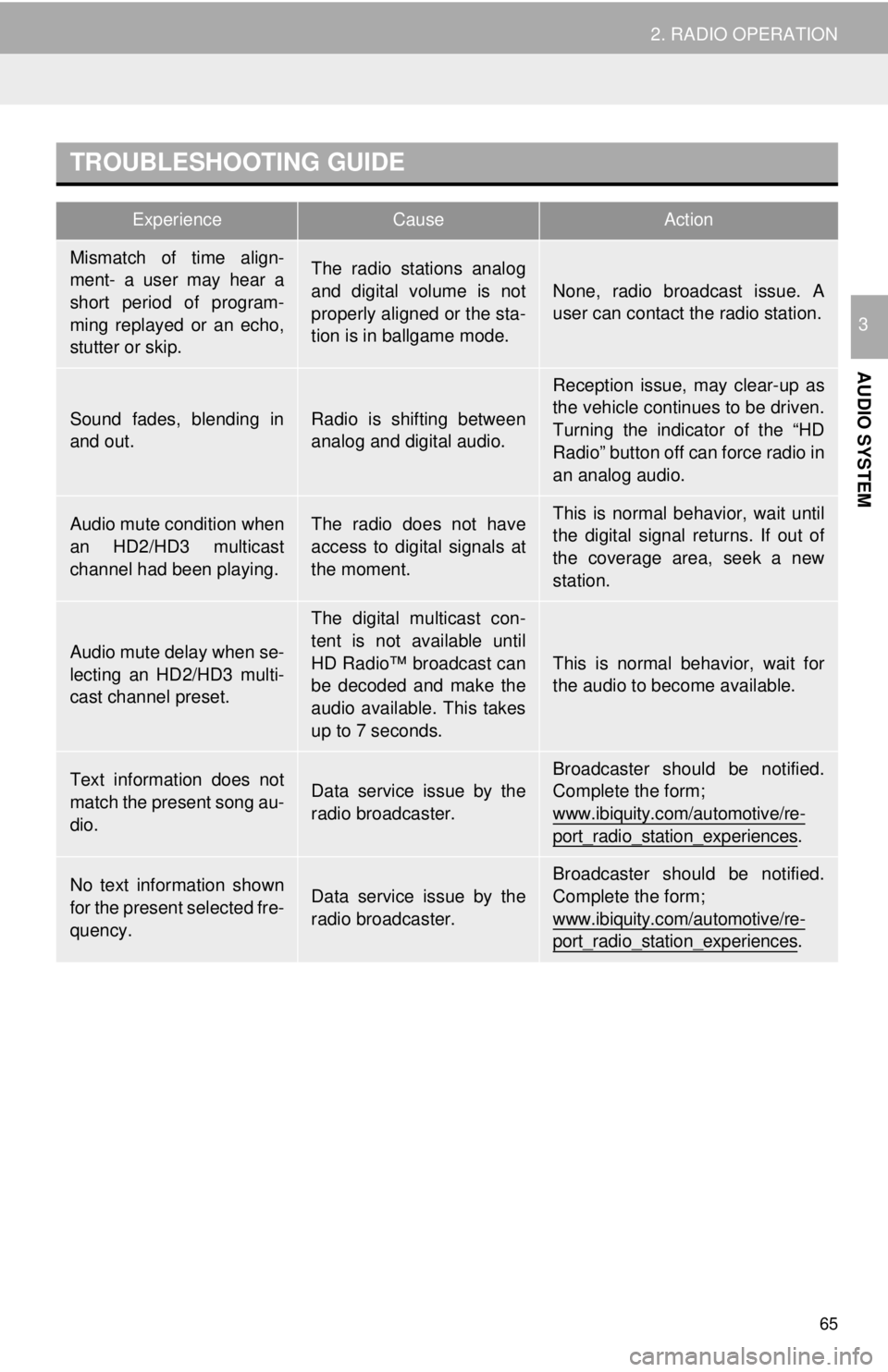
TROUBLESHOOTING GUIDE
ExperienceCauseAction
65
2. RADIO OPERATION
AUDIO SYSTEM
3
Mismatch of time align-
ment- a user may hear a
short period of program-
ming replayed or an echo,
stutter or skip.The radio stations analog
and digital volume is not
properly aligned or the sta-
tion is in ballgame mode.
None, radio broadcast issue. A
user can contact the radio station.
Sound fades, blending in
and out.Radio is shifting between
analog and digital audio.
Reception issue, may clear-up as
the vehicle continues to be driven.
Turning the indicator of the “HD
Radio” button off can force radio in
an analog audio.
Audio mute condition when
an HD2/HD3 multicast
channel had been playing.The radio does not have
access to digital signals at
the moment.This is normal behavior, wait until
the digital signal returns. If out of
the coverage area, seek a new
station.
Audio mute delay when se-
lecting an HD2/HD3 multi-
cast channel preset.
The digital multicast con-
tent is not available until
HD Radio™ broadcast can
be decoded and make the
audio available. This takes
up to 7 seconds.
This is normal behavior, wait for
the audio to become available.
Text information does not
match the present song au-
dio.Data service issue by the
radio broadcaster.
Broadcaster should be notified.
Complete the form;
www.ibiquity.com/automotive/re-
port_radio_station_experiences.
No text information shown
for the present selected fre-
quency.Data service issue by the
radio broadcaster.
Broadcaster should be notified.
Complete the form;
www.ibiquity.com/automotive/re-
port_radio_station_experiences.
Page 70 of 164
DISPLAYING THE RADIO ID
70
2. RADIO OPERATION
If “Ch 000” is selected using the
“TUNE-SCROLL” knob, the ID code,
which is 8 alphanumeric characters, will
be displayed. If another channel is
selected, the ID code will no longer be dis-
played. The channel (000) alternates
bet we
en displaying the radio ID and the
specific radio code.
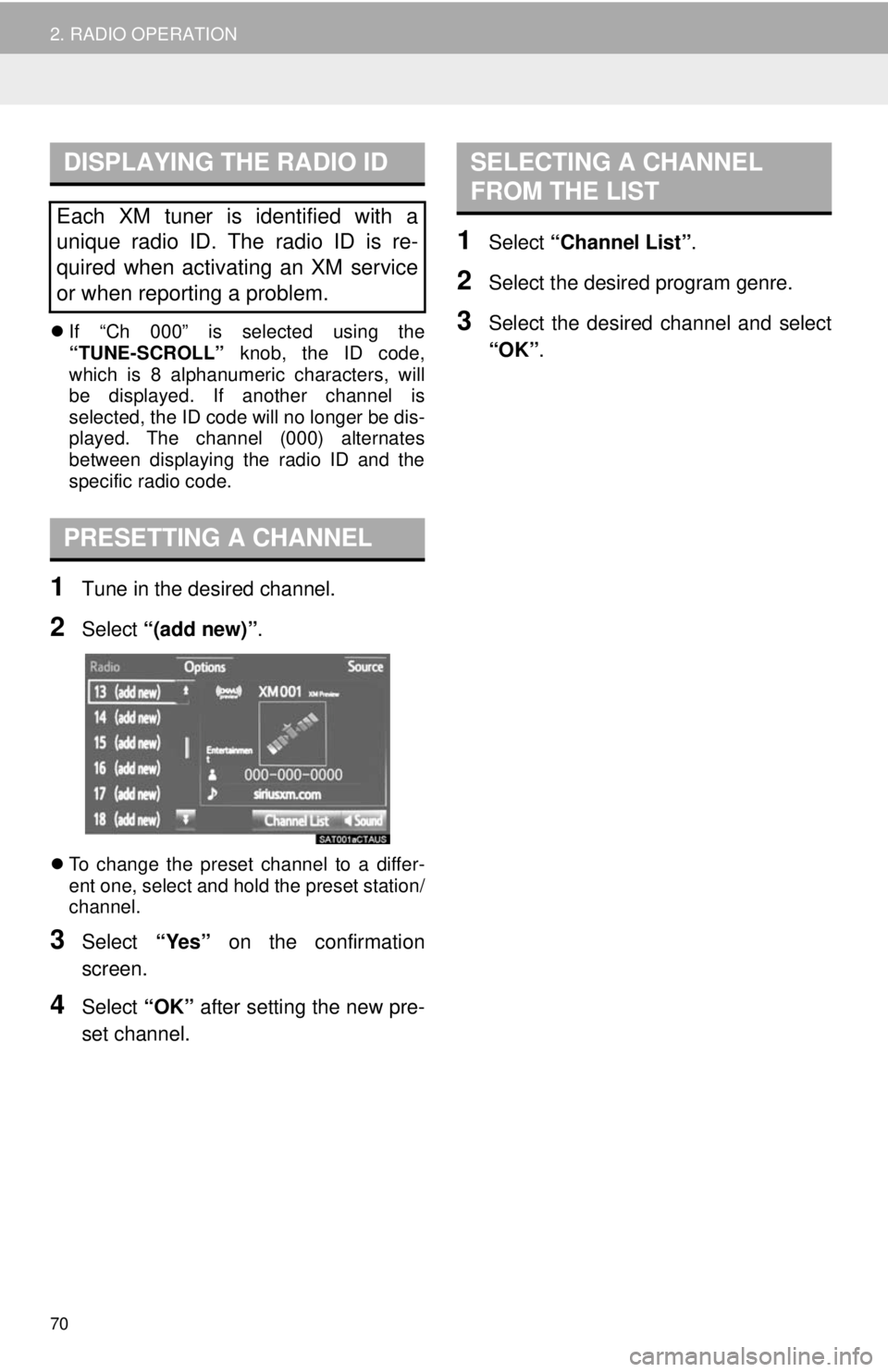
PRESETTING A CHANNEL
1Tune in the desired channel.
2Select “(add new)” .
To change the preset channel to a differ -
ent one, select and hold the preset station/
chann el.
3Select “Yes” on the confirmation
screen.
4Select “OK” after setting the new pre -
set channel.
SELECTING A CHANNEL
FROM THE LIST
1Select “Channel List” .
2Select the desired program genre.
3Select the desired channel and select
“OK” .
Each XM tuner is identified with a
unique radio ID. The radio ID is re-
quired when activating an XM service
or when reporting a problem.
Page 134 of 164
134
1. PHONE OPERATION (HANDS-FREE SYSTEM FOR CELLULAR PHONES)
■BY SELECTING “Release Tones”
1Select “Release Tones” .
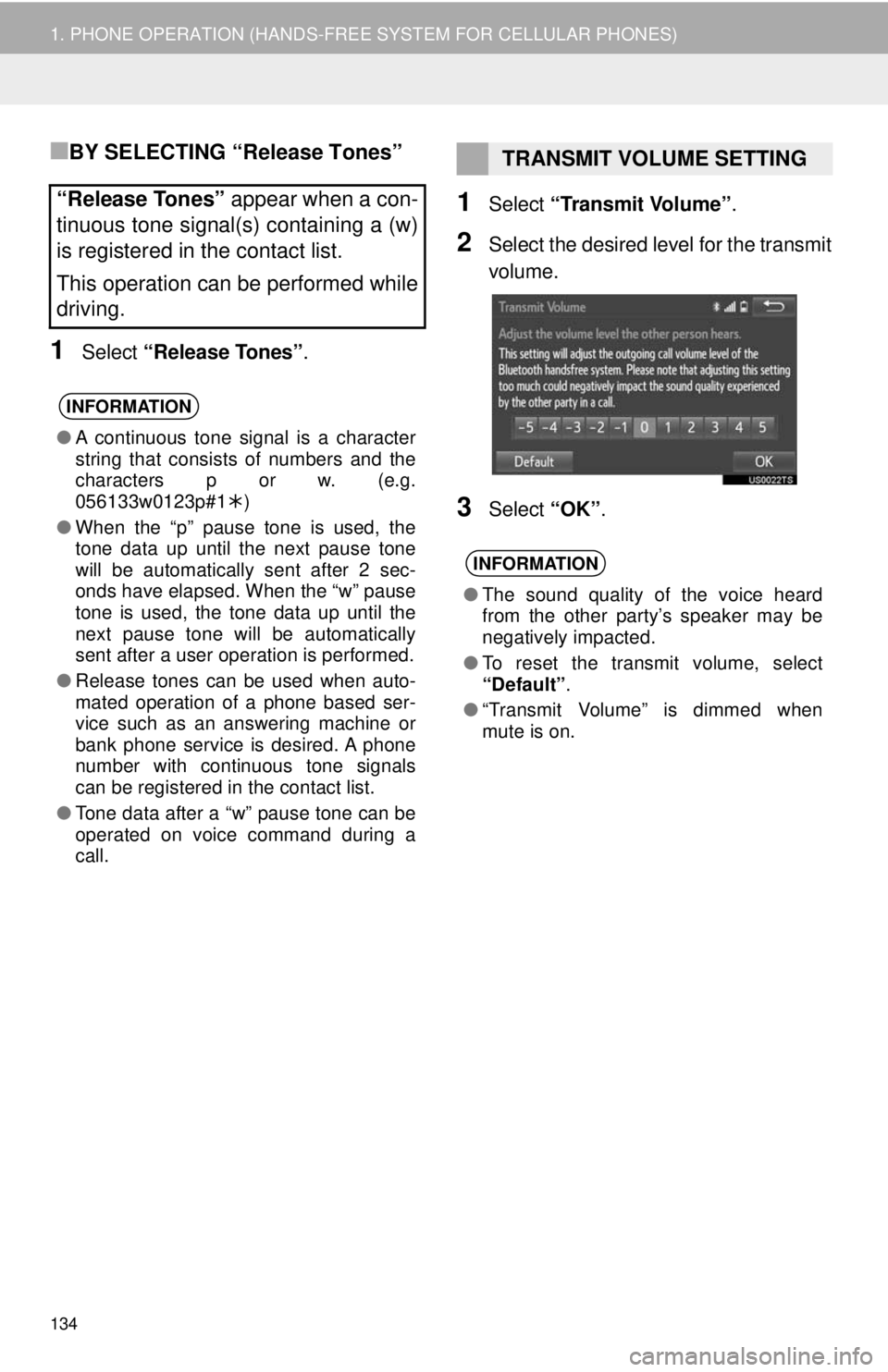
1Select “Transmit Volume” .
2Select the desired level for the transmit
volume.
3Select “OK”.
“Release Tones” appear when a con-
tinuous tone signal(s) containing a (w)
is registered in the contact list.
This operation can be performed while
driving.
INFORMATION
● A continuous tone signal is a character
string that consists of numbers and the
characters p or w. (e.g.
056133w0123p#1 )
● When the “p” pause tone is used, the
tone data up until the next pause tone
will be automatically sent after 2 sec-
onds have elapsed. When the “w” pause
tone is used, the tone data up until the
next pause tone will be automatically
sent after a user operation is performed.
● Release tones can be used when auto-
mated operation of a phone based ser-
vice such as an answering machine or
bank phone service is desired. A phone
number with continuous tone signals
can be registered in the contact list.
● Tone data after a “w” pause tone can be
operated on voice command during a
call.
TRANSMIT VOLUME SETTING
INFORMATION
● The sound quality of the voice heard
from the other party’s speaker may be
negatively impacted.
● To reset the transmit volume, select
“Default”.
● “Transmit Volume” is dimmed when
mute is on.