wheel TOYOTA YARIS LIFTBACK 2020 (in English) Workshop Manual
[x] Cancel search | Manufacturer: TOYOTA, Model Year: 2020, Model line: YARIS LIFTBACK, Model: TOYOTA YARIS LIFTBACK 2020Pages: 520, PDF Size: 8.71 MB
Page 284 of 520
2845-9. Bluetooth® phone
■Release Tones
●A continuous tone signal is a character string that consists of numbers and
the characters “p” or “w”. (e.g.056133w0123p#1 ∗)
● When the “p” pause tone is used, the tone data up until the next pause tone
will be automatically sent after 2 seconds have elapsed. When the “w”
pause tone is used, the tone data up until the next pause tone will be a\
uto-
matically sent after a user operation is performed.
● Release tones can be used when automated operation of a phone based
service such as an answering machine or bank phone service is desired. A
phone number with continuous tone signals can be registered in the contact
list.
● Tone data after a “w” pause tone can be operated on voice command during
a call.
Select “Handset Mode” to on from a hands-free call to a cellular
phone call.
Select “Handset Mode” to off from a cellular phone call to a hands-free
call.
Select “Transmit Volume”.
Select the desired level for the transmit volume.
Select “OK”.
Press the switch on the steering wheel or select .
To transfer a call
Transmit volume setting
To hang up
1
2
3
Page 285 of 520
2855-9. Bluetooth® phone
5
Multimedia system
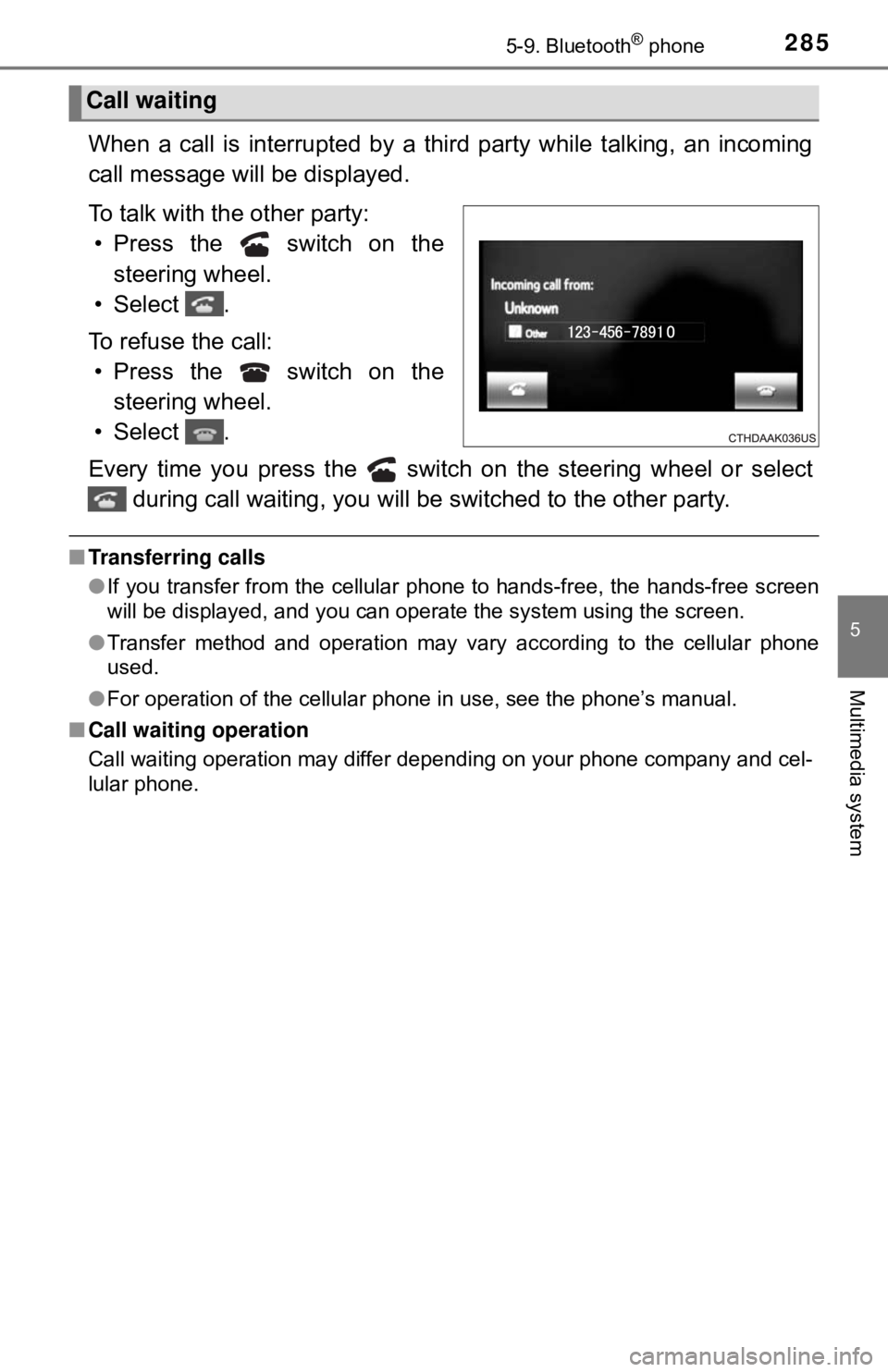
When a call is interrupted by a third party while talking, an incoming
call message will be displayed.
To talk with the other party: • Press the switch on the steering wheel.
• Select .
To refuse the call: • Press the switch on the steering wheel.
• Select .
Every time you press the switch on the steering wheel or select during call waiting, you will be switched to the other party.
■Transferring calls
●If you transfer from the cellular phone to hands-free, the hands-free screen
will be displayed, and you can operate the system using the screen.
● Transfer method and operation may vary according to the cellular phone
used.
● For operation of the cellular phone in use, see the phone’s manual.
■ Call waiting operation
Call waiting operation may differ depending on your phone company and cel-
lular phone.
Call waiting
Page 288 of 520
2885-9. Bluetooth® phone
■Check the messages
●Depending on the type of Bluetooth® phone being connected, it may be nec-
essary to perform additional steps on the phone.
● Messages are displayed in the appropriate connected Bluetooth
® phone’s
registered mail address folder.
Select the tab of the desired folder to be displayed.
● Only received messages on the connected Bluetooth
® phone can be dis-
played.
● The text of the message is not displayed while driving.
● When “Automatic Message Readout” is set to on, messages will be auto-
matically read out. ( →P. 301)
● Turn the “PWR ⋅VOL” knob, or use the volume switch on the steering wheel
to adjust the message read out volume.
● The message read out function is available even while driving.
Display the message inbox screen. (→ P. 286)
Select the desired message from the list.
Select “Quick Message”.
Select the desired message.
Select “Send”.
■Editing quick reply message Select “Quick Message”.
Select corresponding to the desired message to edit.
Select “OK” when editing is completed.
Replying to a message
1
2
3
4
5
1
2
3
Page 290 of 520
2905-9. Bluetooth® phone
Using the steering wheel switches
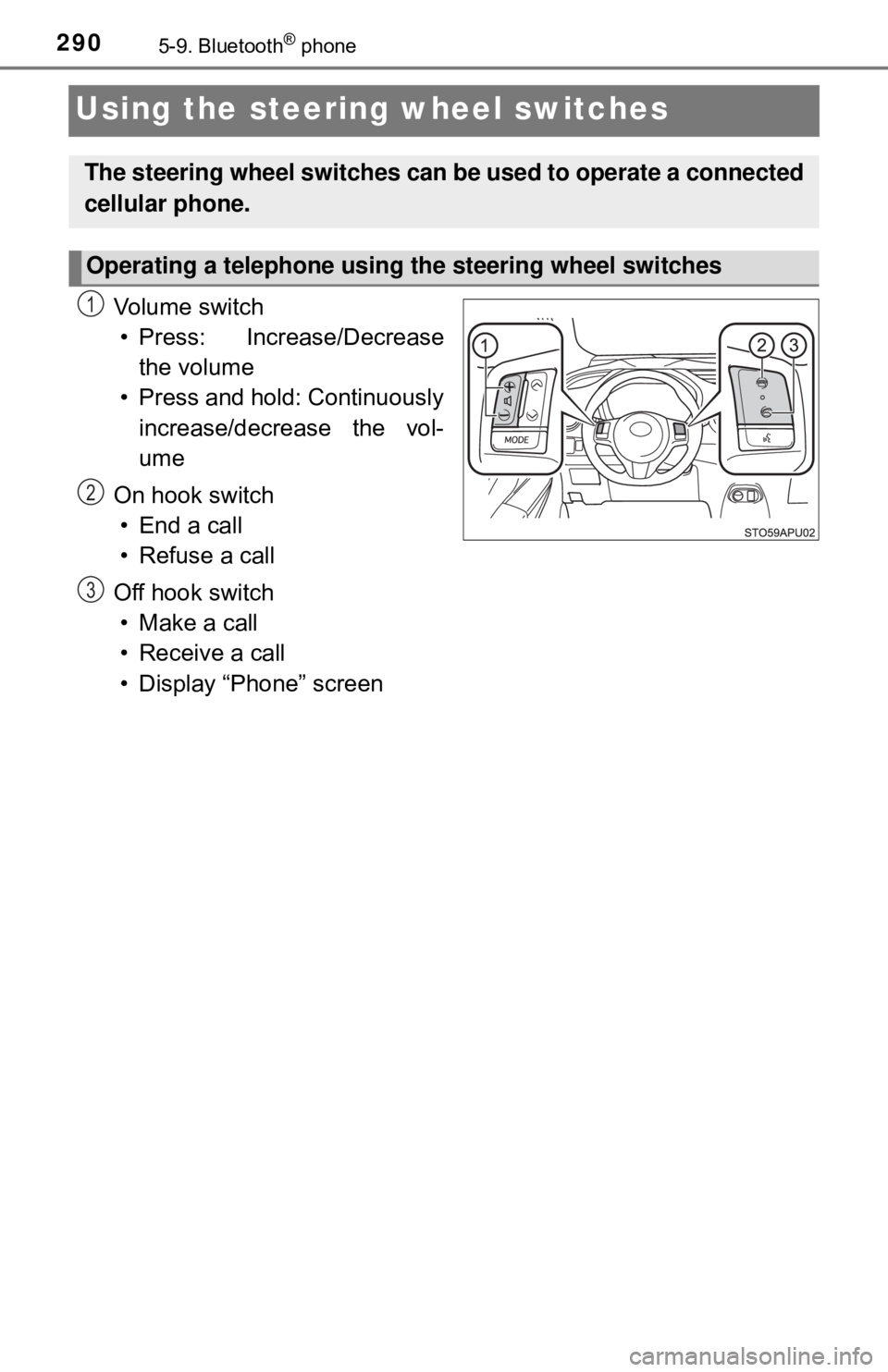
Vo l u m e s w i t c h
• Press: Increase/Decrease the volume
• Press and hold: Continuously increase/decrease the vol-
ume
On hook switch • End a call
• Refuse a call
Off hook switch • Make a call
• Receive a call
• Display “Phone” screen
The steering wheel switches can be used to operate a connected
cellular phone.
Operating a telephone using the steering wheel switches
1
2
3
Page 314 of 520
3145-11. Using the voice command system
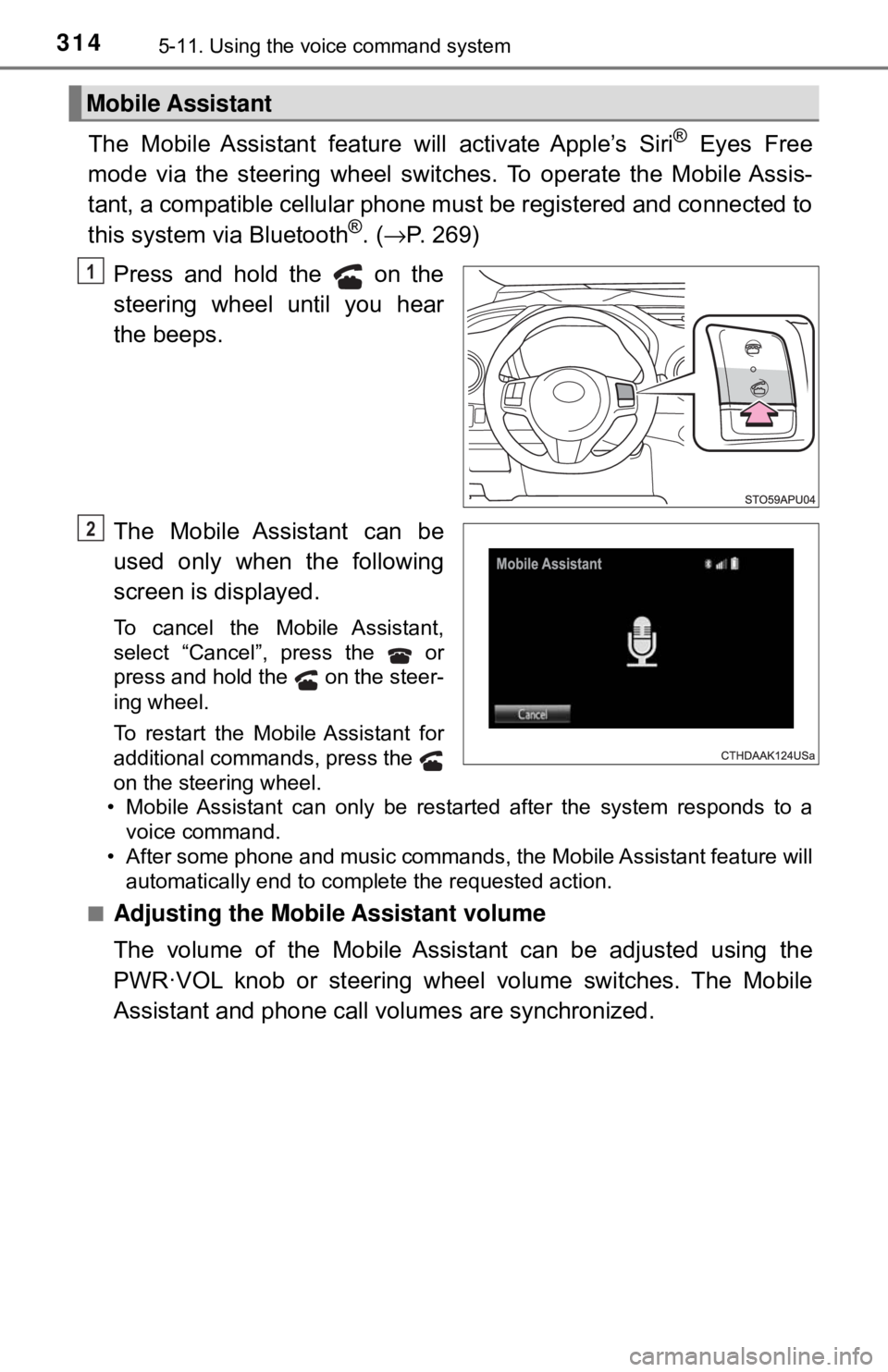
The Mobile Assistant feature will activate Apple’s Siri® Eyes Free
mode via the steering wheel switc hes. To operate the Mobile Assis-
tant, a compatible cellular phone must be registered and connected to
this system via Bluetooth
®. ( → P. 269)
Press and hold the on the
steering wheel until you hear
the beeps.
The Mobile Assistant can be
used only when the following
screen is displayed.
To cancel the Mobile Assistant,
select “Cancel”, press the or
press and hold the on the steer-
ing wheel.
To restart the Mobile Assistant for
additional commands, press the
on the steering wheel.
• Mobile Assistant can only be restarted after the system responds to a voice command.
• After some phone and music commands, the Mobile Assistant feature will automatically end to complete the requested action.
■
Adjusting the Mobile Assistant volume
The volume of the Mobile Assistant can be adjusted using the
PWR·VOL knob or steering wheel volume switches. The Mobile
Assistant and phone call volumes are synchronized.
Mobile Assistant
1
2
Page 339 of 520

339
7Maintenance and care
7-1. Maintenance and careCleaning and protecting the vehicle exterior .......... 340
Cleaning and protecting the vehicle interior ........... 344
7-2. Maintenance Maintenance requirements ................... 347
General maintenance........ 349
Emission inspection and maintenance (I/M)
programs......................... 352
7-3. Do-it-yourself maintenance Do-it-yourself service precautions ..................... 353
Hood ................................. 356
Positioning a floor jack ...... 358
Engine compartment ......... 360
Tires .................................. 370
Tire inflation pressure ....... 378
Wheels .............................. 382
Air conditioning filter.......... 385
Wireless remote control battery ............................. 388
Checking and replacing fuses ............................... 391
Light bulbs......................... 396
Page 340 of 520
3407-1. Maintenance and care
Cleaning and protecting the vehicle exterior
●Working from top to bottom, liber ally apply water to the vehicle
body, wheel wells and underside of the vehicle to remove any dirt
and dust.
● Wash the vehicle body using a sponge or soft cloth, such as a
chamois.
● For hard-to-remove marks, use car wash soap and rinse thoroughly
with water.
● Wipe away any water.
● Wax the vehicle when the wate rproof coating deteriorates.
If water does not bead on a clean surface, apply wax when the vehicle
body is cool.
■Automatic car washes
●Fold the mirrors and remove the antenna before washing the vehicle. Start
washing from the front of the vehicle. Make sure to re-install the antenna
and extend the mirrors before driving.
● Brushes used in automatic car washes may scratch the vehicle surface and
harm your vehicle’s paint.
● Rear spoiler (if equipped) may not be washable in some automatic car
washes. There may also be an increased risk of damage to vehicle.
■ High pressure car washes
●Do not allow the nozzles of the car wash to come within close proximity of
the windows and door borders, and high mounted stoplight.
● Before using the car wash, check that the fuel filler door on your vehicle is
closed properly.
Perform the following to protect the vehicle and maintain it in
prime condition:
Page 341 of 520

3417-1. Maintenance and care
7
Maintenance and care
■Aluminum wheels (if equipped)
●Remove any dirt immediately by using a neutral detergent. Do not use hard
brushes or abrasive cleaners. Do not use strong or harsh chemical clean-
ers.
Use the same mild detergent and wax as used on the paint.
● Do not use detergent on the wheels when they are hot, for example after
driving for long distance in the hot weather.
● Wash detergent from the wheels immediately after use.
● To preserve the wheels’ luster, do not allow hot water, such as from steam
cleaning, to contact them directly.
■ Bumpers
Do not scrub with abrasive cleaners.
WARNING
■When cleaning the windshield
Installation area of front sensor on windshield: → P. 176
■ When washing the vehicle
Do not apply water to the inside of the engine compartment. Doing so may
cause the electrical components, etc. to catch fire.
■ Precautions regarding the exhaust pipes
Exhaust gases cause the exhaust pipes to become quite hot.
When washing the vehicle, be careful not to touch the pipes until they have
cooled sufficiently, as touching hot exhaust pipes can cause burns.
Page 342 of 520

3427-1. Maintenance and care
NOTICE
■To prevent paint deterioration and corrosion on the body and compo-
nents (aluminum wheels etc.)
● Wash the vehicle immediately in the following cases:
• After driving near the sea coast
• After driving on salted roads
• If coal tar or tree sap is present on the paint surface
• If dead insects, insect droppings or bird droppings are present on the
paint surface
• After driving in an area contaminated with soot, oily smoke, mine dust,
iron powder or chemical substances
• If the vehicle becomes heavily soiled with dust or mud
• If liquids such as benzene and gasoline are spilled on the paint surface
● If the paint is chipped or scratched, have it repaired immediately.
● To prevent the wheels from corroding, remove any dirt and store in a place
with low humidity when storing the wheels.
■ Cleaning the exterior lights
● Wash carefully. Do not use organic substances or scrub with a hard brush.
This may damage the surfaces of the lights.
● Do not apply wax to the surfaces of the lights.
Wax may cause damage to the lenses.
■ Antenna installation and removal precautions
● Before driving, ensure that the antenna is installed.
● When the antenna is removed, such as before entering an automatic car
wash, make sure to store it in a suitable place so as not to lose it. Also,
before driving, make sure to reinstall the antenna in its original position.
■ To prevent damage to the antenna
Remove the antenna in the following situations:
● When the antenna will touch the ceiling of a garage or other such places
● When a car cover is to be used to cover the vehicle
Page 351 of 520
3517-2. Maintenance
7
Maintenance and care
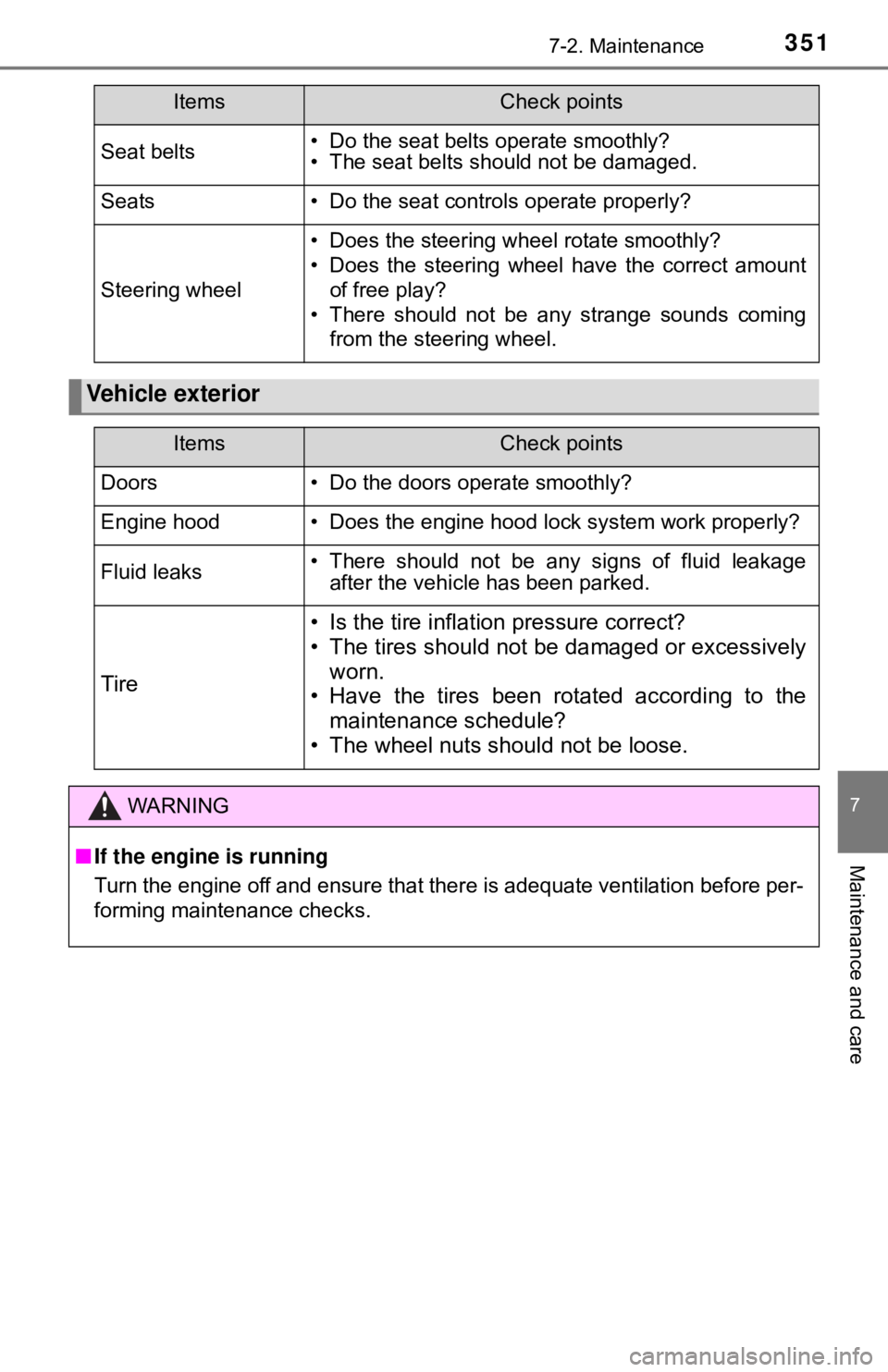
Seat belts• Do the seat belts operate smoothly?
• The seat belts should not be damaged.
Seats• Do the seat controls operate properly?
Steering wheel
• Does the steering wheel rotate smoothly?
• Does the steering wheel have the correct amountof free play?
• There should not be any strange sounds coming from the steering wheel.
Vehicle exterior
ItemsCheck points
ItemsCheck points
Doors• Do the doors operate smoothly?
Engine hood• Does the engine hood lock system work properly?
Fluid leaks• There should not be any signs of fluid leakageafter the vehicle has been parked.
Tire
• Is the tire inflation pressure correct?
• The tires should not be damaged or excessively
worn.
• Have the tires been rotated according to the maintenance schedule?
• The wheel nuts should not be loose.
WARNING
■ If the engine is running
Turn the engine off and ensure that there is adequate ventilation before per-
forming maintenance checks.