phone VAUXHALL ANTARA 2015 Infotainment system
[x] Cancel search | Manufacturer: VAUXHALL, Model Year: 2015, Model line: ANTARA, Model: VAUXHALL ANTARA 2015Pages: 151, PDF Size: 2.82 MB
Page 113 of 151
![VAUXHALL ANTARA 2015 Infotainment system Radio113
announcement. To do this, on
standby for traffic announcements
must be enabled.
During the phone call the radio or
audio source are muted.
External In and [TP] appear on the
display.
Informa](/img/38/19317/w960_19317-112.png "VAUXHALL ANTARA 2015 Infotainment system Radio113
announcement. To do this, on
standby for traffic announcements
must be enabled.
During the phone call the radio or
audio source are muted.
External In and [TP] appear on the
display.
Informa")
Radio113
announcement. To do this, on
standby for traffic announcements
must be enabled.
During the phone call the radio or
audio source are muted.
External In and [TP] appear on the
display.
Information on traffic announcements
in DAB mode 3 113.
During a traffic announcement the
message A traffic message is just
received is displayed.
The phone call is not interrupted.
Select menu item Reject to reject the
traffic announcement.
Select menu item Accept to listen to
the traffic announcement.
Digital audio broadcastingDigital audio broadcasting (DAB) is
an innovative and universal
broadcast system.
DAB stations are indicated by the
programme name instead of the
broadcasting frequency.General information
■ With DAB, several radio programmes (services) can bebroadcast on a single frequency(ensemble).
■ As long as a given DAB receiver can pick up the signal sent out by a
broadcasting station (even if the
signal is very weak), sound
reproduction is ensured.
■ There is no fading (weakening of the sound) that is typical of AM or
FM reception. The DAB signal is
reproduced at a constant volume.
■ If the DAB signal is too weak to be picked up by the receiver, reception
is interrupted completely. This can
be avoided by activating DAB AF
and/or DABFM in the DAB settings
menu.
■ Interference caused by stations that are on nearby frequencies (a
phenomenon that is typical of AM
and FM reception) does not occur
with DAB.
■ If the DAB signal is reflected by natural obstacles or buildings, the
reception quality of DAB isimproved, whereas AM or FM
reception is considerably impaired
in such cases.
■ The radio is also capable of receiving DAB+ and DMB-Audio.
■ When DAB reception is enabled, the FM tuner of the Infotainmentsystem remains active in the
background and continually
searches for the best receivable FM stations. If TP 3 109 is activated,
traffic announcements of the FM
station which is currently best
receivable are issued. Deactivate
TP if you do not wish DAB reception to be interrupted by FM traffic
announcements.
Ensembles Several programmes are alwayscombined into a so-called ensembleon a frequency.
Scrolling through ensembles
You can scroll through ensembles
which you have already received
once (the ensembles must be
receivable).
Page 129 of 151

Introduction................................ 130
Voice recognition .......................143
Index .......................................... 148Mobile phone portal
Page 130 of 151

130IntroductionIntroductionGeneral information...................130
Connection ................................. 133 Bluetooth connection .................134
Emergency call .......................... 136
Operation ................................... 137
Mobile phones and CB radio equipment .................................. 141General information
The Mobile phone portal offers the opportunity to hold telephone
conversations using the mobile
phone via a vehicle microphone and vehicle loud speaker system and to
operate the most important mobile telephone functions via the
Infotainment system in the vehicle.
The Mobile phone portal is operated
via the steering wheel remote control
system, a speech recognition system
and a multifunction button on the
radio. The menu-driven operations
and status are shown via the info
display.
The fact that the most important
content on the telephone display is
shown on the info display enables you to operate the whole portal
comfortably.
The mobile phone should be
operated via an exterior aerial by
clicking it into a telephone-specific
adapter.When a telephone connection is active, the radio sound is switched off.
When the telephone connection has
ended, the radio sound is switched on
again.
General advice on these operating instructions
You can find detailed functional
descriptions for your Infotainment
system in the operating instructions
included with your Infotainment
system.
Information on telephone-specific
adapters for the mobile telephone is
available from your Vauxhall
Authorised Repairer.
Not all Mobile phone portal functions
are supported by every phone. The
telephone functions possible depend
on the mobile telephone used and the
network operator. Further information is given in the operating instructions
for the mobile telephone and in the
instructions for the telephone-specific adapter, and can be obtained from
the network operator.
Page 131 of 151
Introduction1319Warning
The Infotainment system has to be
used so that the vehicle can bedriven safely at all times. If in doubt
stop your vehicle and operate the Infotainment system while the
vehicle is stationary.
Operating the mobile telephone
Mobile telephones affect your
environment. This is the reason why
safety rules and regulations were
drawn up. You should find out about
the relevant regulations before you
use the telephone function.
9 Warning
Use of the hands-free facility while
driving can be dangerous because
your concentration is reduced
when telephoning. Park your
vehicle before you use the hands-
free facility. Follow the stipulations
of the country in which you find
yourself at present.
Do not forget to follow the special
regulations that apply in specific areas and always switch off the
mobile phone if the use of mobile
phones is prohibited, if
interference is caused by the
mobile phone or if dangerous
situations can occur.
Bluetooth™
The Mobile telephone portal supports
Bluetooth™ Handsfree Profile V. 1.5
and is specified to Bluetooth™
Special Interest Group (SIG).
Further information on the
specification can be found on the
interned under
http://qualweb.bluetooth.org. The Bluetooth™ qualification code of the
Mobile phone portal is B02237.
When devices are being paired, a
random PIN code of at least four digits should be selected for reasons of
safety.
Declaration of conformity
We hereby declare that the Mobile
phone portal is compliant with the
basic requirements and other
relevant stipulations of the guideline
1999/5/EC.
Operating the speech
recognition system Do not use the speech recognition
system in emergencies because your voice can change so much in stressful situations that you can no longer be
sufficiently recognised in order for the
desired connection to be created
quickly enough.
Base plate for the telephone
support
Keep the base plate contacts free
from dust and dirt.
Charging the telephone
batteries As soon as the Mobile phone portal
has been switched on and the
telephone has been slotted into the
telephone-specific adapter, the
telephone's batteries are charging.
Page 132 of 151
132Introduction
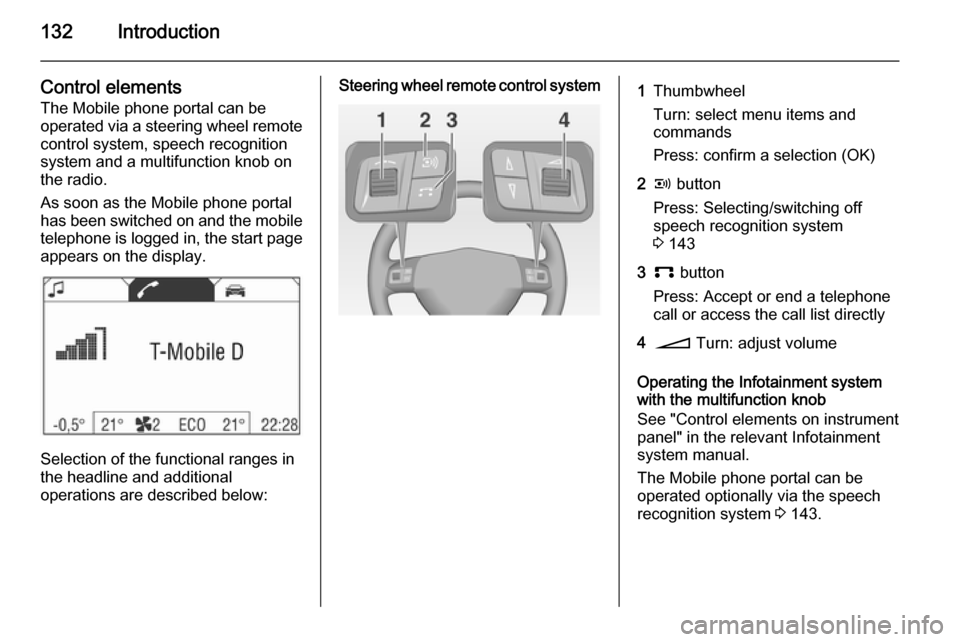
Control elementsThe Mobile phone portal can be
operated via a steering wheel remote
control system, speech recognition
system and a multifunction knob on
the radio.
As soon as the Mobile phone portal
has been switched on and the mobile
telephone is logged in, the start page appears on the display.
Selection of the functional ranges in
the headline and additional
operations are described below:
Steering wheel remote control system1Thumbwheel
Turn: select menu items and
commands
Press: confirm a selection (OK)2q button
Press: Selecting/switching off
speech recognition system
3 1433p button
Press: Accept or end a telephone
call or access the call list directly4o Turn: adjust volume
Operating the Infotainment system
with the multifunction knob
See "Control elements on instrument
panel" in the relevant Infotainment
system manual.
The Mobile phone portal can be
operated optionally via the speech
recognition system 3 143.
Page 133 of 151
Introduction133Connection
A connection can be created between a mobile telephone and the
Infotainment system via:
■ a telephone-specific adapter
■ a Bluetooth™ connection as long as the mobile telephone and the
Mobile telephone portal support
this function
In order for a connection to be
created, the Mobile telephone portal
must be switched on and the mobile
telephone logged in. The Mobile telephone portal switches itself on
and off via the battery. If the battery is switched off, you can switch the
mobile telephone on and off via the
Infotainment system. When the
battery is switched off, the operating
time is limited to one hour.
On many mobile telephones, the
adapter is only used as a charging
station. In this case, the connection
must be created via Bluetooth™
3 134.You can obtain information on
available telephone-specific adapters
for your mobile telephone from your
Vauxhall Authorised Repairer.
For information on the Bluetooth™
function for your mobile telephone,
see the operating instructions for the
mobile telephone.
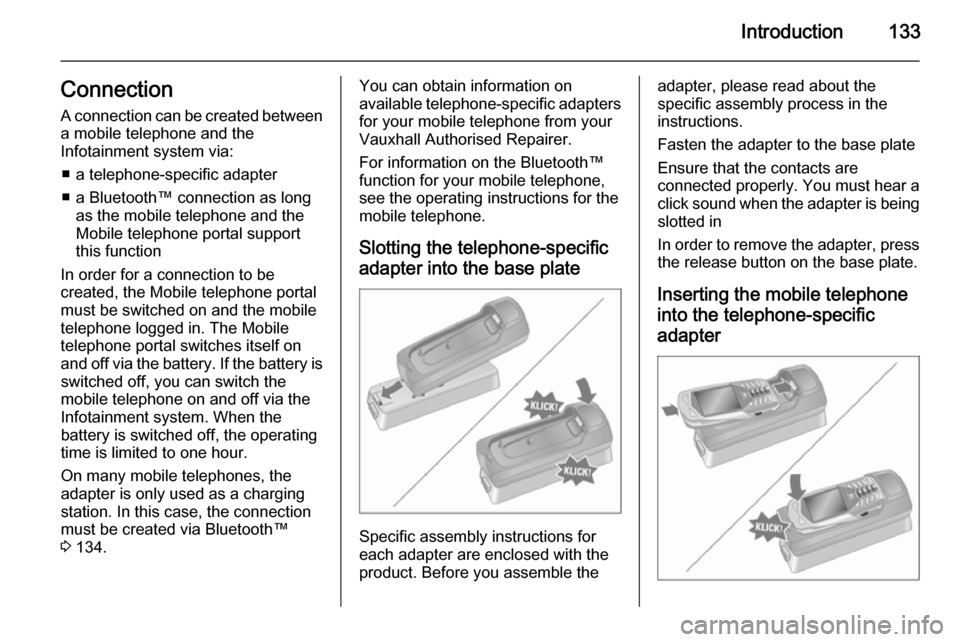
Slotting the telephone-specific adapter into the base plate
Specific assembly instructions for
each adapter are enclosed with the
product. Before you assemble the
adapter, please read about the
specific assembly process in the
instructions.
Fasten the adapter to the base plate
Ensure that the contacts are
connected properly. You must hear a click sound when the adapter is being
slotted in
In order to remove the adapter, press the release button on the base plate.
Inserting the mobile telephone
into the telephone-specific adapter
Page 134 of 151
134Introduction
Insert the mobile telephone into the
adapter
Ensure that the contacts are
connected properly. You must hear a
click sound when the mobile
telephone is being inserted
In order to remove the mobile
telephone, press the release button
on the adapter.
Bluetooth connection
The Bluetooth™ function on the
mobile telephone must be activated,
see operating instructions for the
mobile phone.
Bluetooth™ is a radio standard for
wireless connection of e.g. a mobile
telephone to other equipment.
Information such as the phone book,
call list, network operator and field
intensity can be transmitted.
Depending on type of equipment, the functions may be restricted.
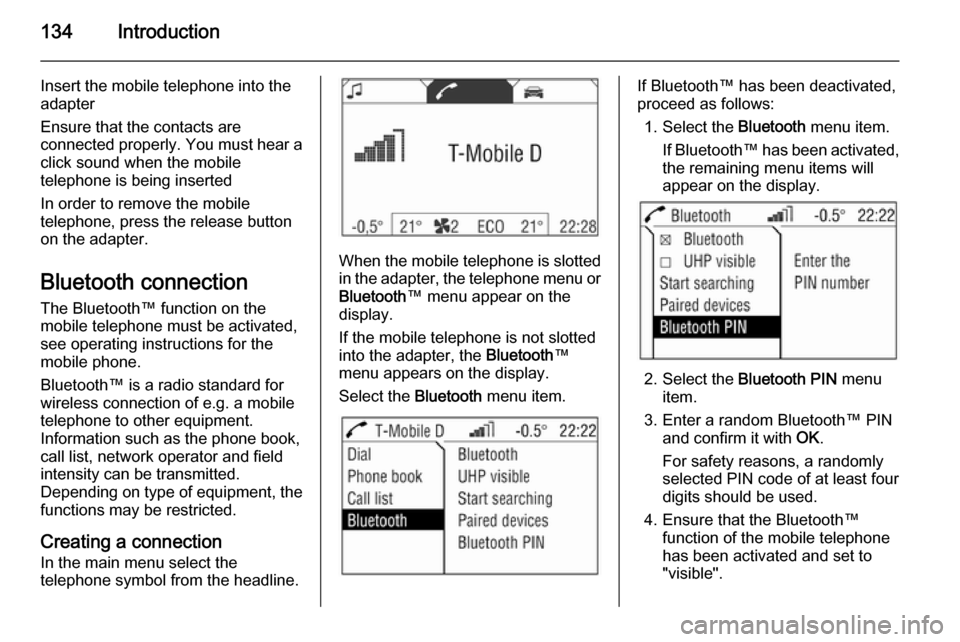
Creating a connection
In the main menu select the
telephone symbol from the headline.
When the mobile telephone is slotted
in the adapter, the telephone menu or
Bluetooth ™ menu appear on the
display.
If the mobile telephone is not slotted
into the adapter, the Bluetooth™
menu appears on the display.
Select the Bluetooth menu item.
If Bluetooth™ has been deactivated,
proceed as follows:
1. Select the Bluetooth menu item.
If Bluetooth™ has been activated,
the remaining menu items will
appear on the display.
2. Select the Bluetooth PIN menu
item.
3. Enter a random Bluetooth™ PIN and confirm it with OK.
For safety reasons, a randomly
selected PIN code of at least four digits should be used.
4. Ensure that the Bluetooth™ function of the mobile telephone
has been activated and set to
"visible".
Page 135 of 151
Introduction135
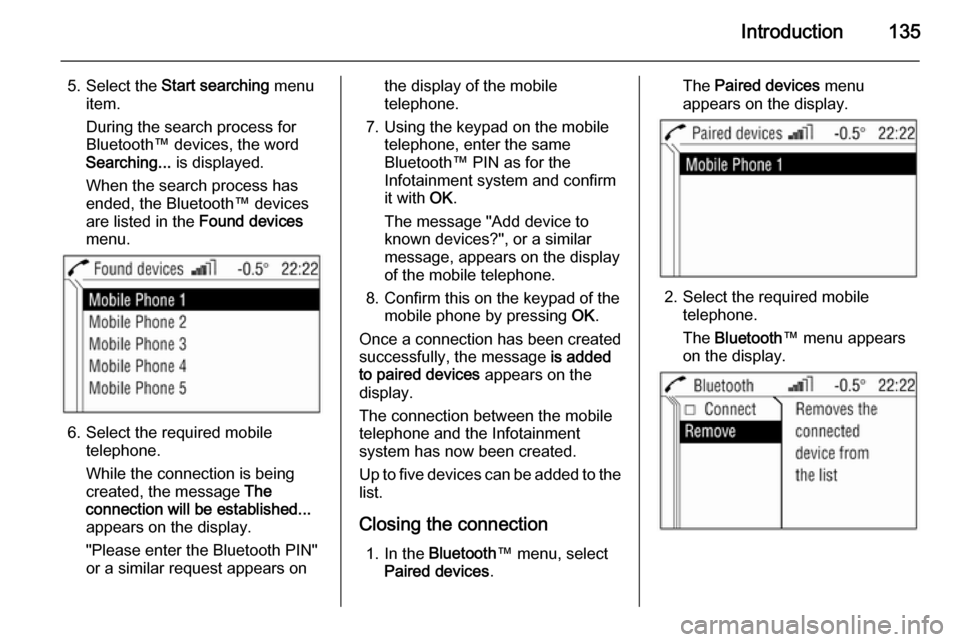
5. Select the Start searching menu
item.
During the search process for
Bluetooth™ devices, the word
Searching... is displayed.
When the search process has
ended, the Bluetooth™ devices
are listed in the Found devices
menu.
6. Select the required mobile telephone.
While the connection is being
created, the message The
connection will be established...
appears on the display.
"Please enter the Bluetooth PIN"
or a similar request appears on
the display of the mobile
telephone.
7. Using the keypad on the mobile telephone, enter the same
Bluetooth™ PIN as for the
Infotainment system and confirm
it with OK.
The message "Add device to
known devices?", or a similar
message, appears on the display
of the mobile telephone.
8. Confirm this on the keypad of the mobile phone by pressing OK.
Once a connection has been created successfully, the message is added
to paired devices appears on the
display.
The connection between the mobile
telephone and the Infotainment
system has now been created.
Up to five devices can be added to the
list.
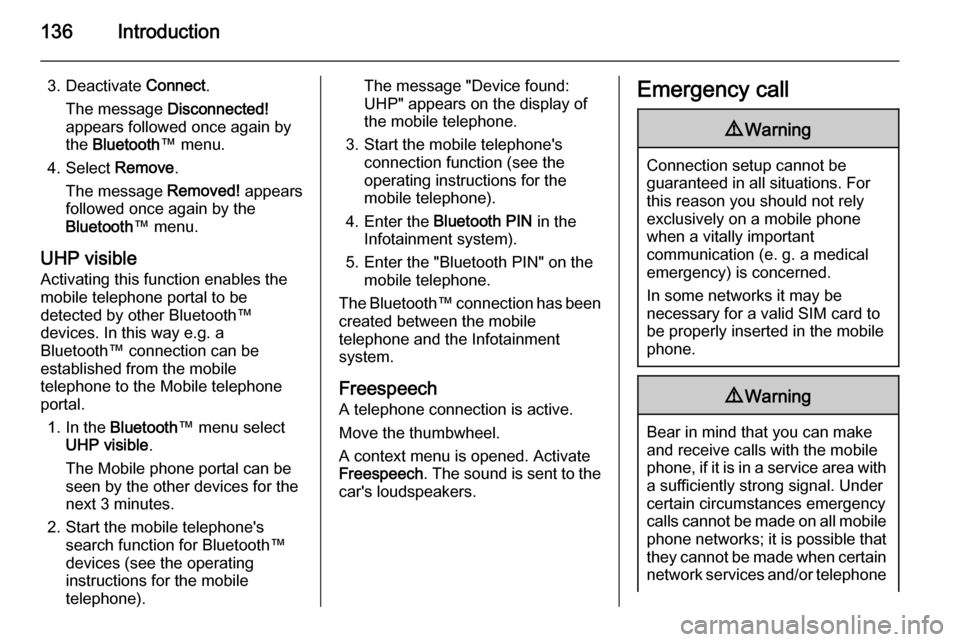
Closing the connection 1. In the Bluetooth ™ menu, select
Paired devices .The Paired devices menu
appears on the display.
2. Select the required mobile telephone.
The Bluetooth ™ menu appears
on the display.
Page 136 of 151
136Introduction
3. Deactivate Connect.
The message Disconnected!
appears followed once again by
the Bluetooth ™ menu.
4. Select Remove.
The message Removed! appears
followed once again by the
Bluetooth ™ menu.
UHP visible Activating this function enables the
mobile telephone portal to be
detected by other Bluetooth™
devices. In this way e.g. a
Bluetooth™ connection can be
established from the mobile
telephone to the Mobile telephone portal.
1. In the Bluetooth ™ menu select
UHP visible .
The Mobile phone portal can be
seen by the other devices for the next 3 minutes.
2. Start the mobile telephone's search function for Bluetooth™
devices (see the operating
instructions for the mobile telephone).The message "Device found:
UHP" appears on the display of
the mobile telephone.
3. Start the mobile telephone's connection function (see the
operating instructions for the
mobile telephone).
4. Enter the Bluetooth PIN in the
Infotainment system).
5. Enter the "Bluetooth PIN" on the mobile telephone.
The Bluetooth™ connection has been created between the mobile
telephone and the Infotainment
system.
Freespeech
A telephone connection is active.
Move the thumbwheel.
A context menu is opened. Activate
Freespeech . The sound is sent to the
car's loudspeakers.Emergency call9 Warning
Connection setup cannot be
guaranteed in all situations. For
this reason you should not rely
exclusively on a mobile phone
when a vitally important
communication (e. g. a medical
emergency) is concerned.
In some networks it may be
necessary for a valid SIM card to
be properly inserted in the mobile
phone.
9 Warning
Bear in mind that you can make
and receive calls with the mobile
phone, if it is in a service area with
a sufficiently strong signal. Under
certain circumstances emergency
calls cannot be made on all mobile
phone networks; it is possible that
they cannot be made when certain network services and/or telephone
Page 137 of 151

Introduction137functions are active. You can
enquire about this with the local
network operators.
The emergency call number can
differ depending on the region and country. Please enquire
beforehand about the correct
emergency call number for the
relevant region.
Making emergency calls
Dial the emergency number (e.g.
112).
The connection to the emergency call centre is created.
Answer if the service staff ask you
about the emergency.
Ending emergency calls Select the Hang-up menu item.
Or:
Press the p key.
9Warning
Do not end the call until you are
requested to do so by the
emergency call centre.
Operation
Introduction As soon as a connection is created
between the mobile telephone and
the Infotainment system via the
telephone-specific adapter or via Bluetooth™, you can also operate
many of the mobile telephone's
functions via the Infotainment system.
For example, via the Infotainment
system you can create a connection
with the telephone numbers saved in
the mobile telephone or change the
telephone numbers.
As a rule, you can also continue
operating the system using the
mobile telephone, e.g. by accepting a call or setting the sound level.
After a connection has been created
between the mobile telephone and
the Infotainment system, data is
transferred from the mobile telephone to the Infotainment system. This may
take some time, depending on the
brand of telephone. During this period
of time, the mobile telephone can only be operated to a limited extent via the Infotainment system.
Some telephones do not support all of
the Mobile phone portal's functions.
As a result of this, these specific
telephones may work differently from
the functional content described in
the manual. For further information,
see the instructions on the telephone- specific adapter.
Calls which arrive or are being made
when the mobile telephone is being
slotted into the telephone-specific
adapter, are kept and are transmitted
as soon as the mobile telephone has
been slotted into the adapter.