phone VAUXHALL ANTARA 2015 Infotainment system
[x] Cancel search | Manufacturer: VAUXHALL, Model Year: 2015, Model line: ANTARA, Model: VAUXHALL ANTARA 2015Pages: 151, PDF Size: 2.82 MB
Page 138 of 151
138Introduction
In addition to operating using the
steering wheel remote control
system, some functions can also be
operated using a speech recognition
system 3 143.
If a connection has been created via
the telephone-specific adapter, the
functionality of the mobile telephone
can be limited (in this respect, see
instructions enclosed with the
adapter).
When a Bluetooth™ connection
exists, the functional scope of the
mobile telephone can also be limited.
Entering PIN codes
When the mobile telephone is
switched on after being slotted into
the telephone-specific adapter, the
PIN code must still be entered.
The Infotainment system is switched
on.
No PIN appears on the display. Select
the telephone symbol from the
headline.
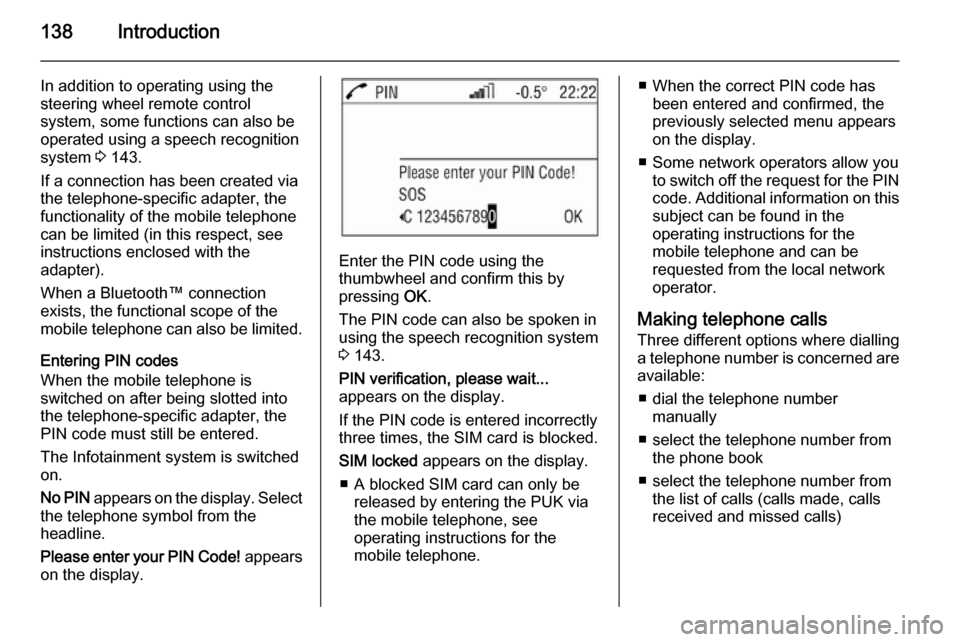
Please enter your PIN Code! appears
on the display.
Enter the PIN code using the
thumbwheel and confirm this by
pressing OK.
The PIN code can also be spoken in using the speech recognition system
3 143.
PIN verification, please wait...
appears on the display.
If the PIN code is entered incorrectly
three times, the SIM card is blocked.
SIM locked appears on the display.
■ A blocked SIM card can only be released by entering the PUK via
the mobile telephone, see
operating instructions for the
mobile telephone.
■ When the correct PIN code has been entered and confirmed, the
previously selected menu appears
on the display.
■ Some network operators allow you to switch off the request for the PIN
code. Additional information on this subject can be found in the
operating instructions for the
mobile telephone and can be
requested from the local network
operator.
Making telephone calls Three different options where dialling
a telephone number is concerned are available:
■ dial the telephone number manually
■ select the telephone number from the phone book
■ select the telephone number from the list of calls (calls made, calls
received and missed calls)
Page 139 of 151
Introduction139
DialDialling the telephone number
manually
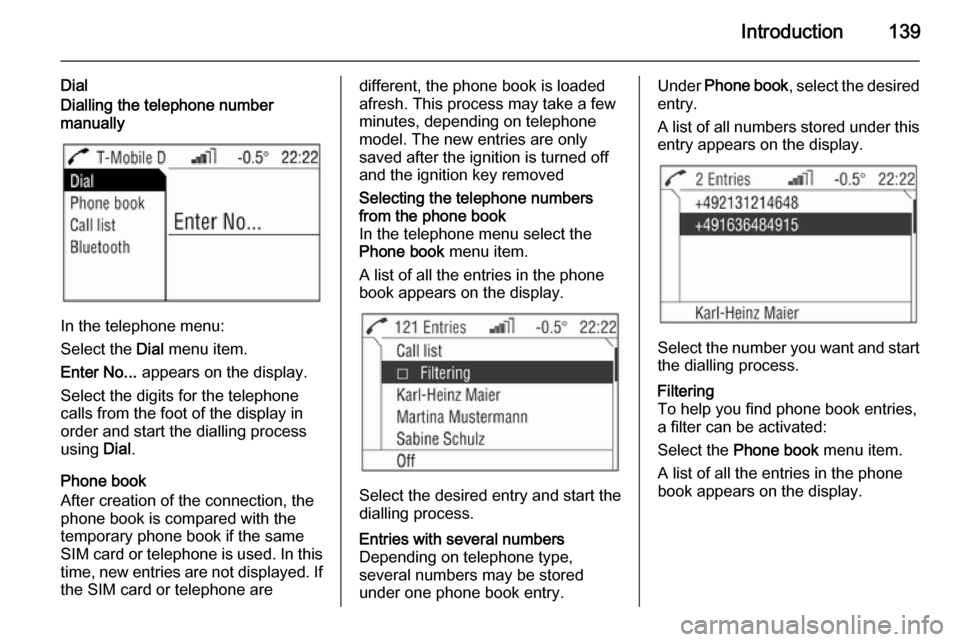
In the telephone menu:
Select the Dial menu item.
Enter No... appears on the display.
Select the digits for the telephone
calls from the foot of the display in
order and start the dialling process
using Dial.
Phone book
After creation of the connection, the
phone book is compared with the
temporary phone book if the same
SIM card or telephone is used. In this time, new entries are not displayed. If
the SIM card or telephone are
different, the phone book is loaded
afresh. This process may take a few
minutes, depending on telephone
model. The new entries are only
saved after the ignition is turned off
and the ignition key removedSelecting the telephone numbers
from the phone book
In the telephone menu select the
Phone book menu item.
A list of all the entries in the phone book appears on the display.
Select the desired entry and start the
dialling process.
Entries with several numbers
Depending on telephone type,
several numbers may be stored
under one phone book entry.Under Phone book , select the desired
entry.
A list of all numbers stored under this
entry appears on the display.
Select the number you want and start
the dialling process.
Filtering
To help you find phone book entries,
a filter can be activated:
Select the Phone book menu item.
A list of all the entries in the phone
book appears on the display.
Page 140 of 151
140Introduction
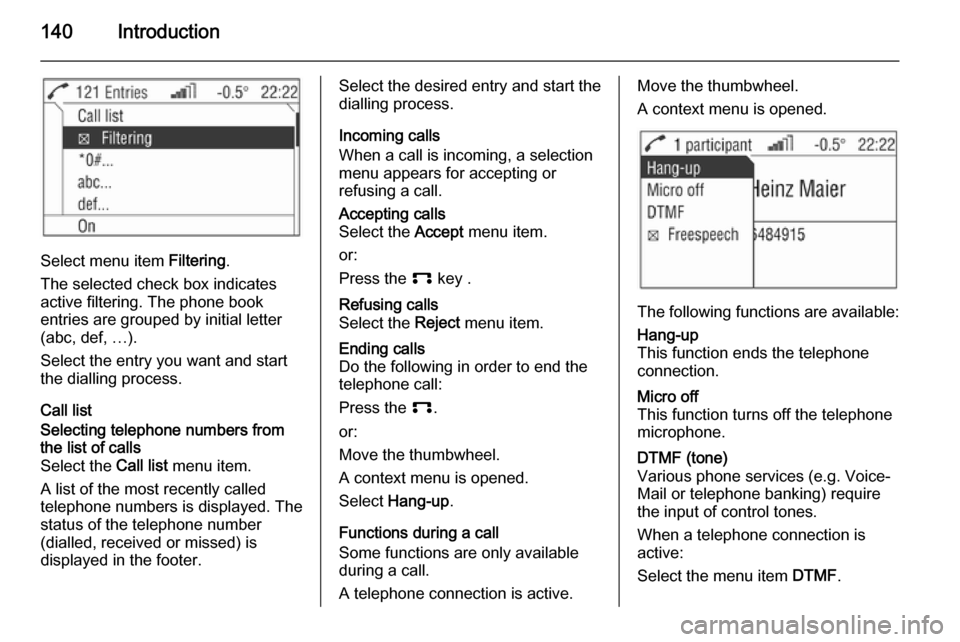
Select menu item Filtering.
The selected check box indicates
active filtering. The phone book
entries are grouped by initial letter
(abc, def, …).
Select the entry you want and start
the dialling process.
Call list
Selecting telephone numbers from
the list of calls
Select the Call list menu item.
A list of the most recently called
telephone numbers is displayed. The
status of the telephone number
(dialled, received or missed) is
displayed in the footer.Select the desired entry and start the
dialling process.
Incoming calls
When a call is incoming, a selection
menu appears for accepting or
refusing a call.Accepting calls
Select the Accept menu item.
or:
Press the p key .Refusing calls
Select the Reject menu item.Ending calls
Do the following in order to end the
telephone call:
Press the p.
or:
Move the thumbwheel.
A context menu is opened.
Select Hang-up .
Functions during a call
Some functions are only available during a call.
A telephone connection is active.
Move the thumbwheel.
A context menu is opened.
The following functions are available:
Hang-up
This function ends the telephone
connection.Micro off
This function turns off the telephone
microphone.DTMF (tone)
Various phone services (e.g. Voice- Mail or telephone banking) require the input of control tones.
When a telephone connection is active:
Select the menu item DTMF.
Page 141 of 151
Introduction141
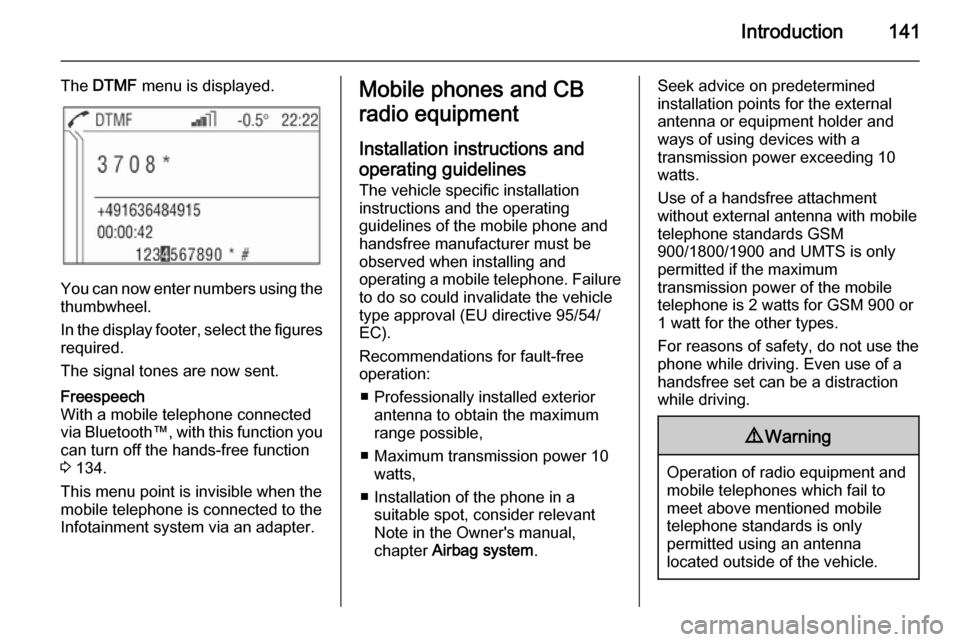
The DTMF menu is displayed.
You can now enter numbers using the
thumbwheel.
In the display footer, select the figures required.
The signal tones are now sent.
Freespeech
With a mobile telephone connected
via Bluetooth™, with this function you
can turn off the hands-free function
3 134.
This menu point is invisible when the
mobile telephone is connected to the
Infotainment system via an adapter.Mobile phones and CB
radio equipment
Installation instructions and operating guidelines The vehicle specific installation
instructions and the operating
guidelines of the mobile phone and
handsfree manufacturer must be observed when installing and
operating a mobile telephone. Failure to do so could invalidate the vehicle
type approval (EU directive 95/54/
EC).
Recommendations for fault-free
operation:
■ Professionally installed exterior antenna to obtain the maximum
range possible,
■ Maximum transmission power 10 watts,
■ Installation of the phone in a suitable spot, consider relevant
Note in the Owner's manual,
chapter Airbag system .Seek advice on predetermined
installation points for the external
antenna or equipment holder and
ways of using devices with a
transmission power exceeding 10
watts.
Use of a handsfree attachment
without external antenna with mobile
telephone standards GSM
900/1800/1900 and UMTS is only
permitted if the maximum
transmission power of the mobile
telephone is 2 watts for GSM 900 or
1 watt for the other types.
For reasons of safety, do not use the
phone while driving. Even use of a handsfree set can be a distraction
while driving.9 Warning
Operation of radio equipment and
mobile telephones which fail to
meet above mentioned mobile
telephone standards is only
permitted using an antenna
located outside of the vehicle.
Page 142 of 151

142IntroductionCaution
Mobile telephones and radio
equipment may lead to
malfunctions in the vehicle
electronics when operated inside
the vehicle with no exterior
antenna, unless the above
mentioned regulations are
observed.
Page 143 of 151

Voice recognition143Voice recognitionVoice recognition.......................143Voice recognition
The speech recognition system
enables you to operate some of the
mobile telephone's functions by voice
input. It recognises commands and
sequences of numbers independently of the person speaking. The
commands and sequences of
numbers can be spoken without a
break between the individual words.
You can also save telephone
numbers using a name randomly
chosen (voice tag). The telephone
connection can be created using this
name.
If the speech recognition system fails
to operate properly or fails to
recognise your voice, it provides you with acoustic messages and asks you
to input the command you want again. The speech recognition system also
provides an answer to important
commands and, if required, makes
enquiries.
Stop the voice dialogue at any time by
re-pressing q.Before you dial a telephone number,
the following preconditions must
exist:
■ The mobile telephone must be ready for operation and slotted intothe telephone-specific adapter, or aBluetooth™ connection must exist.
■ The mobile telephone must be logged in.
To prevent conversations being held
in the interior of the vehicle from
causing inadvertent control of the mobile telephone or audio system,
the speech recognition system only
starts once it has been activated.
Activating the speech
recognition system By pressing q, the speech
recognition system is activated and
the symbol q appears on the display.
The radio is switched to "silent" for the duration of the dialogue. Any traffic
news coming in will be interrupted.
The functions can only then be
operated if the mobile telephone is
logged into a network.
Page 144 of 151

144Voice recognition
Ending the dialogue
There are various ways to deactivate
the speech recognition system and
end the dialogue:
■ By pressing q
■ Time-outs: if nothing has been input for a certain period of time
The speech recognition system is
also interrupted by an incoming call.
Operation With the aid of the speech recognition
system, the mobile telephone can be
operated very comfortably using the
voice input function. Simply activate
the speech recognition system and
say the desired command. Once the
command has been input, you will be
led through the dialogue with the
corresponding questions and
messages in order to reach the
required action.
Say the commands and digits in a
normal voice, without any artificial
pauses between the numbers.
Recognition is most successful when
you pause for at least half a second
after every three to five numbers.The Infotainment system
simultaneously reacts to commands with voice messages and displays.
SIM card If no SIM card has been inserted, the
following message appears: Please
insert a SIM card!
Once you have inserted a SIM card,
you will be asked to enter the PIN
code. For more on this, see the next
section.
PIN code
If the PIN code has not been entered, the following message appears:
Please enter the PIN code! .
Now say the PIN code in a normal
voice, without any artificial pauses
between the numbers.
The following commands are
available:
■ " Accept ": The PIN code is
confirmed.
■ " Change ": The number last entered
is deleted.■ " Delete ": The PIN code is deleted.
■ " Additional digits ": Additional
numbers can be entered.
Example of a dialogue whereby a PIN
code is entered:
Voice output: " Please enter the PIN
code! "
User: " One Two Three Four – Accept "
Voice output: " The PIN code is
incorrect! "
User: " Four Three Two One – Accept "
Voice output: " The PIN code has
been accepted "
Main commands After the speech recognition system
has been activated, you will hear a
short sound, which is a signal to
inform you that the speech
recognition system is waiting for an
input.
The following commands are
available:
■ " Call "
■ " Redial "
■ " Save "
Page 145 of 151

Voice recognition145
■ "Delete "
■ " Phonebook "
■ " Help "
■ " Cancel "
Detailed description of these
commands see below.
"Call"
Using this command, you can input a telephone number which has been
saved in the phone book under a name (voice tag) or which is to be
used to create a connection. After this
command, the following commands
are available:
■ " Number ": The connection is
created using the number entered.
■ " Name ": The connection is created
using the voice tag."Number"
After this command has been given,
you will be asked to enter the number. The Infotainment system repeats the
recognised numbers. You can then input additional numbers or the
following commands:■ " Call " or " Accept ": The inputs are
accepted.
■ " Change ": The last block of
numbers has been deleted.
■ " Delete ": The complete input has
been deleted.
■ " Help ": The dialogue is ended and
all commands available in this
context are listed.
■ " Plus ": A plus is placed before the
number for foreign calls.
■ " Additional digits ": Additional digits
are being added.
■ " Cancel ": Ending the dialling
process. After the request for a
correction, all blocks of numbers
previously entered are repeated
with the exception of the last block. If all inputs have been deleted, you
are once again asked to input a
telephone number.
If there is a voice pause of more than one second between the individual
numbers, the Infotainment system
assumes that the process of inputting
the block of numbers has ended and
repeats the block of numbers.In order to make a foreign call, you
can say the word " Plus" (+) in front of
the number. The plus allows you to
make a call from that country without
knowing the foreign dialling code for
the country in question. Then say the
country code.
The country code corresponds to the
conventional format, i.e. 49 for
Germany, 44 for Great Britain, etc.
The "0" must be left out of the local
network code (dialling code) except in Italy.
Example of a dialogue between the
user and voice output to dial a
telephone number:
User: " Call"
Voice output: " Name or Number? "
User: " Number "
Voice output: " The number, please! "
User: " Plus Four Nine "
Voice output repeats: " Plus Four
Nine "
User: " Seven Three One "
Voice output repeats: " Seven Three
One "
Page 146 of 151

146Voice recognition
User: "One One Nine Nine "
Voice output repeats: " One One Nine
Nine "
User:" Change "
Voice output repeats the blocks of numbers previously input: " Plus Four
Nine – Seven Three One "
User:" One One Nine One "
Voice output repeats: " One One Nine
One "
User: " Call"
Voice output:" The number is being
dialled ""Name"
Using this command, you can select
a telephone number under a name
(voice tag).
If the system recognises a name entry
already available, it is shown on the
display. The symbol q representing
a voice tag appears to the right of the name. The connection is created
using the voice tag."Redial"
Using the " Redial" command, the
number most recently dialled can be
redialled.
"Save"
Using this command, you can save a
telephone number under a voice tag.
Additionally the previously input voice tag in the phone book can be
included.
Voice tags can only be included in the
phone book if they are saved in the
Infotainment system.
A maximum of 25 voice tags can be
stored in the phone book. If 25 voice
tags are already stored, the message
is given " The speech memory is full! ".
Voice tags are dependent on the
speaker, which means that only the
person who has spoken in the voice
tag can select it.
After three invalid attempts, the
speech recognition system is turned
off automatically.It can happen that the two names
input are too different for the speech recognition system, which then
rejects them. You can then decide if
you want to input the names again or end the process:
■ " Yes ": Input the names again.
■ " No "/" Cancel ": The dialogue is
ended without anything being saved.
In order to prevent a cut-off at the
beginning of the recording when
names are being saved, a short
pause should be left after the request
for an input.
In order to be able to use the voice tag independently of the location, i.e. in
other countries, all telephone
numbers should be entered with a
" Plus " and the country code.
Example of a name being saved as a voice tag:
User: " Call"
Voice output: " Name or Number? "
User: " Name"
Voice output:" The name, please! "
Page 147 of 151

Voice recognition147
User:
Voice output:" The number, please! ".
User: " Plus Four Nine "
Voice output:" Plus Four Nine "
User: " Seven Three One ".
Voice output:" Seven Three One "
User:" One One Nine One "
Voice output:" One One Nine One "
User:" Save"
Instead of " Save" you can also use
the command " Accept".
"Delete"
Using the " Delete" command, you can
delete a previously saved voice tag.
"Phonebook"
Using the command " Phonebook",
you can dial a previously saved voice
tag which you have included in the
phonebook. You can also delete a
voice tag. After inputting the
" Phonebook " command, you will be
asked to input a name.After the recognised name has been
output, you can input the following
commands:
■ " Call ": The connection to the saved
number is created.
■ " Delete ": The voice tag is deleted.
■ " Cancel ": The dialogue is ended.
■ " Help ": The dialogue is ended and
all commands available in this
context are listed.
Example of how to dial a telephone
number saved in the directory:
User: " Phonebook ".
Voice output:
Voice output:
Voice output:
User: " Call"
Instead of " Call" you can also use the
command " Accept".
Voice output: " The number is being
dialled "
"Help"
Using the " Help" command, all of the
commands available in this particular
context are listed."Cancel"
Using the " Cancel" command, the
speech recognition system can be switched off.
Changing language Change the language shown
The Infotainment system supports 12
pre-set languages to be shown on the display. Contact your Vauxhall
Authorised Repairer to activate a
different language from that preset.
Change the language spoken
The speech recognition system
supports the following 6 languages:
■ German
■ (British) English
■ French (EU)
■ Italian
■ Spanish (EU)
■ Dutch
Contact your Vauxhall Authorised
Repairer to activate a different
language from that preset.