lock VAUXHALL ASTRA J 2014 Workshop Manual
[x] Cancel search | Manufacturer: VAUXHALL, Model Year: 2014, Model line: ASTRA J, Model: VAUXHALL ASTRA J 2014Pages: 329, PDF Size: 10.07 MB
Page 179 of 329
Driving and operating177Interactive driving system
Flex Ride Flex Ride driving system allows the
driver to select between three driving
modes:
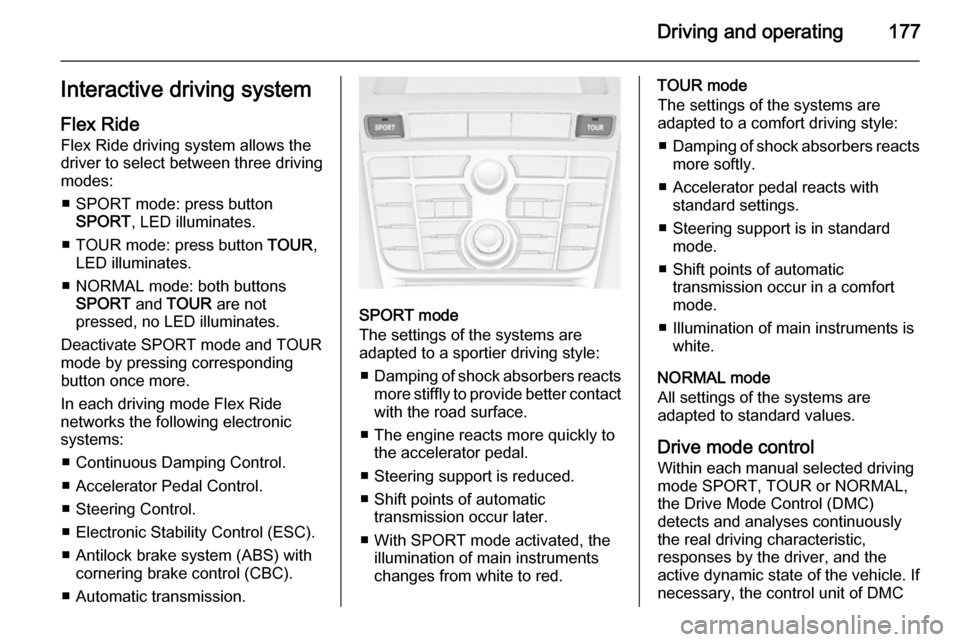
■ SPORT mode: press button SPORT , LED illuminates.
■ TOUR mode: press button TOUR,
LED illuminates.
■ NORMAL mode: both buttons SPORT and TOUR are not
pressed, no LED illuminates.
Deactivate SPORT mode and TOUR
mode by pressing corresponding
button once more.
In each driving mode Flex Ride
networks the following electronic systems:
■ Continuous Damping Control.
■ Accelerator Pedal Control.
■ Steering Control.
■ Electronic Stability Control (ESC).
■ Antilock brake system (ABS) with cornering brake control (CBC).
■ Automatic transmission.
SPORT mode
The settings of the systems are
adapted to a sportier driving style:
■ Damping of shock absorbers reacts
more stiffly to provide better contact
with the road surface.
■ The engine reacts more quickly to the accelerator pedal.
■ Steering support is reduced.
■ Shift points of automatic transmission occur later.
■ With SPORT mode activated, the illumination of main instruments
changes from white to red.
TOUR mode
The settings of the systems are
adapted to a comfort driving style:
■ Damping of shock absorbers reacts
more softly.
■ Accelerator pedal reacts with standard settings.
■ Steering support is in standard mode.
■ Shift points of automatic transmission occur in a comfort
mode.
■ Illumination of main instruments is white.
NORMAL mode
All settings of the systems are
adapted to standard values.
Drive mode control
Within each manual selected driving
mode SPORT, TOUR or NORMAL,
the Drive Mode Control (DMC)
detects and analyses continuously
the real driving characteristic,
responses by the driver, and the
active dynamic state of the vehicle. If
necessary, the control unit of DMC
Page 180 of 329
178Driving and operating
automatically changes the settings
within the selected driving mode or, when recognising greater variations,
the driving mode is changed for the
length of variation.
If, for example, NORMAL mode is
selected and DMC detects a sporty
driving behaviour, DMC changes
several settings of the Normal mode
into sporty settings. The DMC
changes to SPORT mode in case of
very sporty driving behaviour.
If, for example, TOUR mode is
selected and whilst driving on a
winding road a sudden hard brake is
necessary, DMC will detect the
dynamic vehicle condition and
changes the settings for suspension
to SPORT mode to increase vehicle
stability.
When the driving characteristic or the
dynamic vehicle state returns to
former state, DMC will change the
settings to the preselected driving
mode.Personalised settings in the
Sport mode The driver can select the functions of
the SPORT mode when SPORT
button is pressed. These settings can
be changed in the menu Settings in
the Info-Display. Vehicle
personalisation 3 132.
Flex Ride - VXR Version
The VXR Version of Flex Ride system works in the same way as the
standard Flex Ride system with the
difference that the modes have a
more sporty characteristic.VXR Flex Ride driving system allows
the driver to select between three
driving modes:
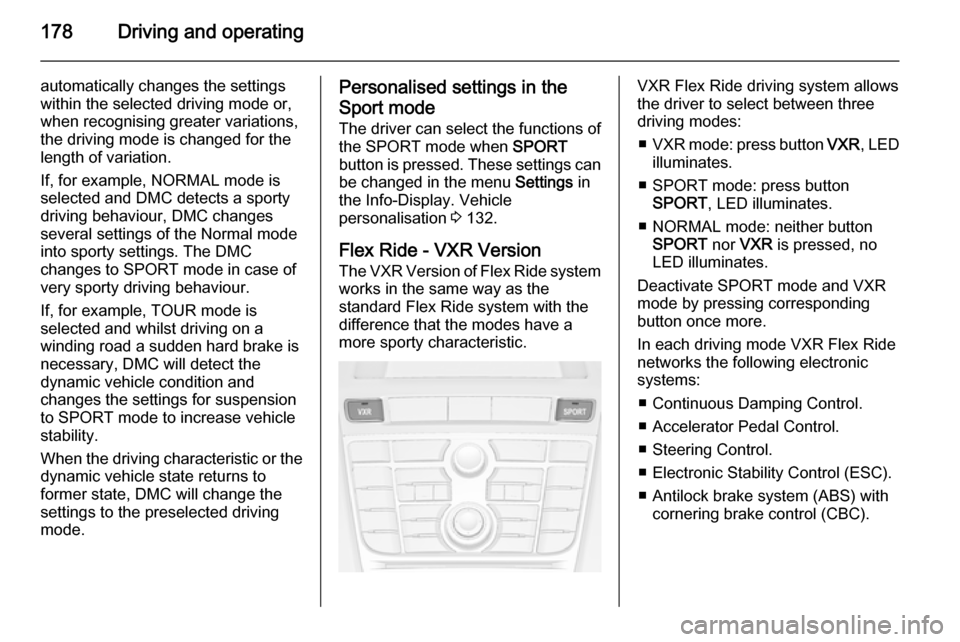
■ VXR mode: press button VXR, LED
illuminates.
■ SPORT mode: press button SPORT , LED illuminates.
■ NORMAL mode: neither button SPORT nor VXR is pressed, no
LED illuminates.
Deactivate SPORT mode and VXR
mode by pressing corresponding
button once more.
In each driving mode VXR Flex Ride
networks the following electronic
systems:
■ Continuous Damping Control.
■ Accelerator Pedal Control.
■ Steering Control.
■ Electronic Stability Control (ESC).
■ Antilock brake system (ABS) with cornering brake control (CBC).
Page 188 of 329

186Driving and operating
■ Electronic Stability Control isoperating,
■ there is no traffic and nothing detected on the road sides for
several minutes. In this case there are no radar echoes and the sensor may report that it is blocked,
■ collision imminent braking is applying the brakes,
■ radar sensor is blocked by an ice or
water film,
■ fault is detected in the radar, engine
or brake system.
When adaptive cruise control is
deactivated automatically, the control
indicator m illuminates white and a
warning symbol is displayed as a pop- up in the Driver Information Centre.
The stored speed is maintained.
9 Warning
When adaptive cruise control is
deactivated, the driver must take
over full brake and engine control.
Switching off
Press button C to switch off adaptive
cruise control. The control indicator
m extinguishes. The stored speed is
deleted.
Switching off the ignition also
switches off adaptive cruise control
and deletes the stored speed.
Driver's attention
■ Use adaptive cruise control carefully on bends or mountain
roads, as it can lose the vehicle
ahead and need time to detect it
again.
■ Do not use the system on slippery roads as it can create rapid
changes in tyre traction (wheel
spinning), so that you could lose
control.
■ Do not use adaptive cruise control during rain, snow or heavy dirt, as
the radar sensor can be covered by a water film, dust, ice or snow. This
reduces or suppresses completely
the visibility. In case of sensor
blockage, clean the sensor cover.
System limits ■ The system's automatic brake force
does not permit hard braking and
the braking level may not be
sufficient to avoid a collision.
■ After a sudden lane change, the system needs a certain time todetect the next preceding vehicle.
Page 190 of 329

188Driving and operating
Hill and trailer considerations
System performance on hills and
when towing a trailer depends on your
vehicle speed, vehicle load, traffic
conditions and the road gradient. It
may not detect a vehicle in your path
while driving on hills. On steep hills,
you may have to use the accelerator
pedal to maintain your vehicle speed. When going downhill, especially
when towing a trailer, you may have
to brake to maintain or reduce your
speed.
Note that applying the brake
deactivates the system. It is not
recommended to use adaptive cruise
control on steep hills especially when towing a trailer.
Radar unit
The radar unit is mounted behind the
radiator grille below the brand
emblem.
9 Warning
The radar unit was aligned
carefully during manufacture.
Therefore, after a frontal accident, do not use the system. The front
bumper may appear to be intact,
however the sensor behind can be
out of position and react
incorrectly. After an accident,
consult a workshop to verify and
correct the adaptive cruise control
sensor position.
Settings
Settings can be changed in the Auto
collision preparation menu in the
vehicle personalisation, 3 132.
Fault If the adaptive cruise control does not
work due to temporary conditions
(e.g. blockage by ice) or if there is a
permanent system error, then a
message is displayed in the Driver
Information Centre.
Page 194 of 329

192Driving and operating
Deactivation
The system can be deactivated.
Press button V repeatedly until the
following message appears in the
Driver Information Centre.
General information for both
variants of forward collision alert
9 Warning
Forward collision alert is just a
warning system and does not
apply the brakes. When
approaching a vehicle ahead too
rapidly, it may not provide you
enough time to avoid a collision.
The driver accepts full
responsibility for the appropriate
following distance based on traffic, weather and visibility conditions.
The complete attention of the
driver is always required while
driving. The driver must always be
ready to take action and apply the
brakes.
System limitations
The system is designed to warn only for vehicles, but may react also to
other metallic objects.
In the following cases, forward
collision alert may not detect a vehicle ahead or sensor performance is
limited:
■ on winding roads,
■ when weather limits visibility, e.g. fog, rain, or snow,
■ when the sensor is blocked by snow, ice, slush, mud, dirt, or
windscreen damage.
Following distance
indication
The following distance indication
displays the distance to a preceding
moving vehicle. The system uses,
depending on the vehicle equipment,
either the radar behind the radiator
grille or the front camera in the
windscreen to detect the distance of
a vehicle directly ahead in your lane.
It is active at speeds above 25 mph.
When a preceding vehicle is detected
ahead, the distance is indicated in
seconds, displayed on a page in the
Driver Information Centre 3 119.
Press the MENU button on the turn
signal lever to select Vehicle
Information Menu X and turn the
adjuster wheel to choose following distance indication page.
Page 196 of 329

194Driving and operating
results immediately in a strong
braking. This function helps the driver brake quicker and stronger before theimminent collision.9 Warning
Active emergency braking is not
designed to apply strong
autonomous braking or to avoid automatically a collision. It is
designed to reduce the vehicle
speed before collision. It may not
react on stopped vehicles,
pedestrians or animals. After a
sudden lane change, the system
needs a certain time to detect the
next preceding vehicle.
The complete attention of the
driver is always required while
driving. The driver shall always be ready to take action and apply the brakes and steer to avoid
collisions. The system is designed
to work with all occupants wearing their seat belts.
System limitations
The active emergency braking has
limited or no function during rain,
snow or heavy dirt, as the radar
sensor can be covered by a water
film, dust, ice or snow. In case of
sensor blockage, clean the sensor
cover.
In some seldom cases the active
emergency braking system may
provide a short automatic braking in
situations that seem to be
unnecessary, for instance due to
traffic signs in a curve or due to
vehicles in another lane. This is
acceptable operation, the vehicle
does not need service. Firmly apply
the accelerator pedal to override the
automatic braking.
Settings Settings can be changed in the Auto
collision preparation menu in the
vehicle personalisation, 3 132.
Fault
In the event of a system service
requirement, a message is displayed
in the Driver Information Centre.
If the system does not work as it
should do, vehicle messages are
displayed in the Driver Information
Centre.
Vehicle messages 3 126.
Page 213 of 329

Driving and operating211
Turn the thumb wheel clockwise.
If no further gas odour is perceptible
when the manual shut-off valve is
closed, the vehicle can be used in
petrol mode. If the gas odour persists, do not start the engine. Have the
cause of the fault remedied by a workshop.
When using underground car parks,
follow the instructions of the operator
and local laws.
Notice
In the event of an accident, switch off
the ignition and lights. Close the
manual shut-off valve on multivalve.
Refuelling9 Danger
Before refuelling, switch off engine
and any external heaters with
combustion chambers. Switch off
any mobile phones.
Follow the operating and safety
instructions of the filling station
when refuelling.
9 Danger
Fuel is flammable and explosive.
No smoking. No naked flames or
sparks.
If you can smell fuel in your
vehicle, have the cause of this
remedied immediately by a
workshop.
Caution
In case of misfuelling, do not
switch on ignition.
Fuel filler flap is located at right rear
side of the vehicle.
Page 214 of 329

212Driving and operating
The fuel filler flap can only be opened
if the vehicle is unlocked. Release the
fuel filler flap by pushing the flap.
To open, turn the cap slowly to the left.The fuel filler cap can be retained in
the bracket on the fuel filler flap.
For refuelling, fully insert the pump
nozzle and switch it on.
After automatic cut-off, it can be
topped up with max. two doses of fuel.
Caution
Wipe off any overflowing fuel
immediately.
To close, turn the fuel filler cap to the right until it clicks.
Close the flap and let engage.
Liquid gas refuelling
Follow the operating and safety
instructions of the filling station when
refuelling.
The filling valve for the liquid gas is
behind the fuel filler cap.
Unscrew protective cap from the filler
neck.
Page 215 of 329

Driving and operating213
Screw the required adapter hand-
tight onto the filler neck.
ACME Adapter: Screw the nut of the
filling nozzle onto the adapter. Press
locking lever on filler nozzle down.
DISH (Italy) filler neck: Place the filler
nozzle into the adapter. Press locking lever on filler nozzle down.
Bayonet filler neck: Place filler nozzle
on the adapter and turn to the left or
right through one quarter turn. Pull
locking lever of filler nozzle fully.
EURO filler neck: Press the filler
nozzle onto the adapter until it
engages.
Press the button of the liquid gas supply point. The filling system stops
or begins to run slowly when 80% of
the tank volume is reached
(maximum fill level).
Release button on filling system and
the filling process stops. Release the
locking lever and remove the filler
nozzle. A small quantity of liquid gas
can escape.
Remove adapter and stow in vehicle.
Fit protective cap to prevent the
penetration of foreign bodies into the
filler opening and the system.9 Warning
Due to the system design, an
escape of liquid gas after
releasing the locking lever is
unavoidable. Avoid inhaling.
9 Warning
The liquid gas tank may only be
filled to 80% for safety reasons.
The multivalve on the liquid gas tank
automatically limits the fill quantity. If
a larger quantity is added, we
recommend not exposing the vehicle
to the sun until the excess amount
has been used up.
Filling adapter
As filling systems are not
standardised, different adapters are
required which are available from
Vauxhall Distributors and from
Vauxhall Authorised Repairers.
Page 220 of 329

218Driving and operating
Checking the tensioning of the
coupling ball bar
■ Red marking on rotary knob must
point towards green marking on
coupling ball bar.
■ The gap between the rotary knob and the coupling ball bar must beapprox. 6 mm.
■ The key must be in position c.
Otherwise, the coupling ball bar must be tensioned before being inserted:
■ Unlock coupling ball bar by turning key to position c.
■ Pull out rotary knob and turn
clockwise as far as it will go.
Inserting the coupling ball bar
Insert the tensioned coupling ball bar
in the opening and push firmly
upwards until it audibly engages.
The rotary handle snaps back into its
original position resting against the
coupling ball bar without a gap.9 Warning
Do not touch rotary handle during
insertion.
Lock the coupling ball bar by turning
the key to position e. Remove the key
and close the protective flap.