mic VAUXHALL ASTRA J 2014 Owner's Manual
[x] Cancel search | Manufacturer: VAUXHALL, Model Year: 2014, Model line: ASTRA J, Model: VAUXHALL ASTRA J 2014Pages: 329, PDF Size: 10.07 MB
Page 125 of 329
Instruments and controls123
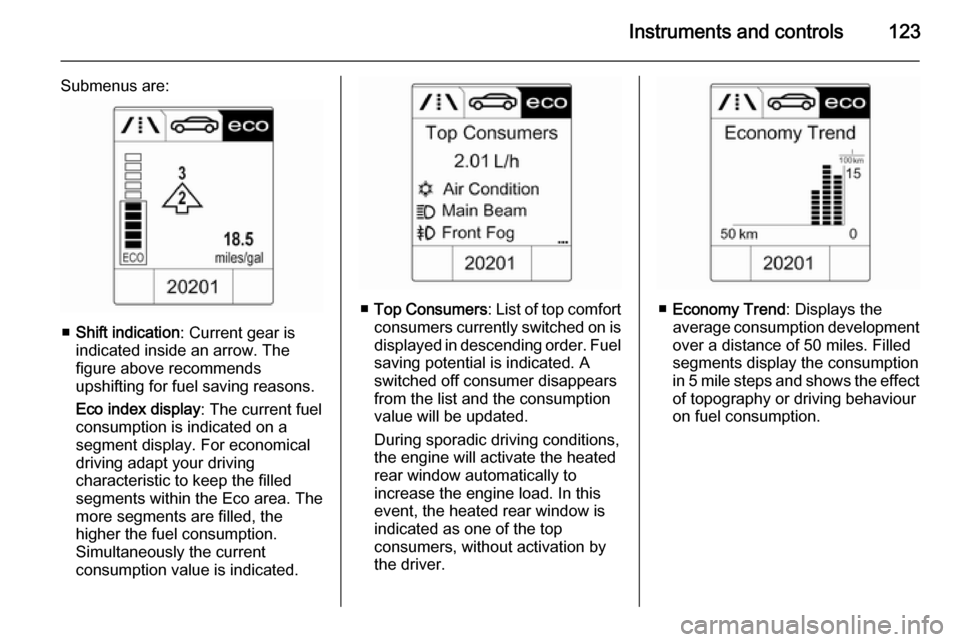
Submenus are:
■Shift indication : Current gear is
indicated inside an arrow. The
figure above recommends
upshifting for fuel saving reasons.
Eco index display : The current fuel
consumption is indicated on a segment display. For economical
driving adapt your driving
characteristic to keep the filled
segments within the Eco area. The
more segments are filled, the
higher the fuel consumption.
Simultaneously the current
consumption value is indicated.
■ Top Consumers : List of top comfort
consumers currently switched on is displayed in descending order. Fuel
saving potential is indicated. A
switched off consumer disappears
from the list and the consumption value will be updated.
During sporadic driving conditions,
the engine will activate the heated
rear window automatically to
increase the engine load. In this
event, the heated rear window is
indicated as one of the top
consumers, without activation by
the driver.■ Economy Trend : Displays the
average consumption development
over a distance of 50 miles. Filled
segments display the consumption
in 5 mile steps and shows the effect of topography or driving behaviour
on fuel consumption.
Page 143 of 329

Lighting141
Dynamic automatic headlight
levelling 3 141.
Headlights when driving
abroad
The asymmetrical headlight beam
extends visibility at the edge of the
road at the passenger side.
However, when driving in countries
where traffic drives on the opposite
side of the road, adjust the headlights
to prevent dazzling of oncoming
traffic.
Vehicles with halogen headlight
system The headlights do not have to be
adjusted.Vehicles with Xenon headlight
system
1. Key in ignition switch.
2. Pull turn signal lever and hold (headlight flash).
3. Switch on ignition.
4. After approx. 5 seconds the control indicator f starts flashing
and an acoustic signal sounds.
Control indicator f 3 118.
Every time the ignition is switched on,
f flashes as a reminder for approx. 4
seconds.
For deactivation operate the same
procedure as described above. f will
not flash when function is
deactivated.
Daytime running lights
Daytime running lights increase
visibility of the vehicle during daylight.
They are switched on automatically
when ignition is on.
If the vehicle is equipped with
automatic light control function, the
system switches between daytime running light and low/high beam
automatically depending on the
lighting conditions and information
given by the rain sensor system.
Automatic light control 3 139.
Adaptive forward lighting
The Adaptive forward lighting
functions are only available with Bi-
Xenon headlights. Light range, light
distribution and intensity of light are
variably triggered depending on the
light conditions, weather and road
type.
Page 144 of 329

142Lighting
With the light switch in position
AUTO all lighting functions are
available.
The following functions are available
also with light switch in position 9:
■ Dynamic curve lighting
■ Cornering light
■ Reversing function
■ Dynamic automatic headlight levelling
Playstreet lighting
Activated automatically at low speed
up to approx. 20 mph. The light beam is turned at an angle of 8° to the
roadside.
Town lighting
Activated automatically at a speed
range between approx. 25 and
34 mph and when street lights are
detected by the light sensor. The light range is reduced by an extended light
distribution.Country lighting
Activated automatically at a speed
range between approx. 34 and
70 mph. The beam of light and the
brightness is different between the left and the right side.
Motorway lighting
Activated automatically at a speed
above approx. 70 mph and minimal
steering movements. It switches on
after a delay or directly when the
vehicle is powerfully accelerated. The
light beam is longer and brighter.
Adverse weather lighting
Activated automatically up to a speed of approx. 43 mph, when the rain
sensor recognizes condensation or the wiper operates continuously. The
range, distribution and light intensity
is regulated variably depending on visibility.Dynamic curve lighting
The light beam pivots based on
steering wheel angle and speed,
improving lighting in curves.
Control indicator f 3 118.
Corner lighting
On tight bends or when turning off,
depending on the steering angle or
the turn signal light, an additional left
or right reflector is switched on which illuminates the road at a right angle to
the direction of travel. It is activated
up to a speed of 25 mph.
Page 146 of 329
144Lighting
If there are no restrictions detected,the system switches back to high
beam.
When the system is active, the front
camera monitors the area ahead of
the vehicle and ensures an optimum
light distribution for maximum driver
vision during almost all conditions.
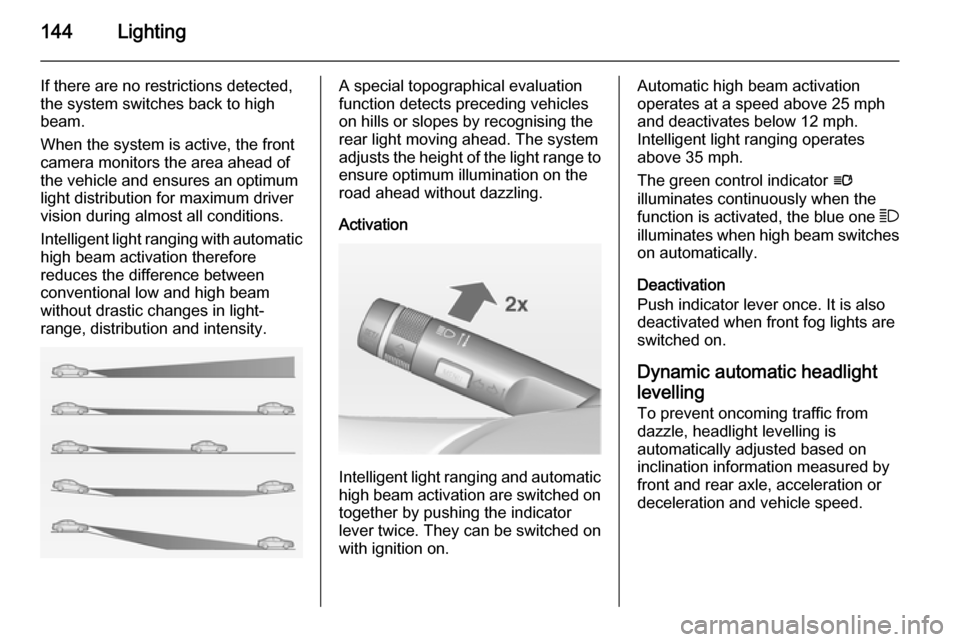
Intelligent light ranging with automatic
high beam activation therefore
reduces the difference between
conventional low and high beam without drastic changes in light-
range, distribution and intensity.A special topographical evaluation
function detects preceding vehicles
on hills or slopes by recognising the
rear light moving ahead. The system
adjusts the height of the light range to
ensure optimum illumination on the
road ahead without dazzling.
Activation
Intelligent light ranging and automatic
high beam activation are switched on together by pushing the indicator
lever twice. They can be switched on
with ignition on.
Automatic high beam activation
operates at a speed above 25 mph
and deactivates below 12 mph.
Intelligent light ranging operates
above 35 mph.
The green control indicator l
illuminates continuously when the
function is activated, the blue one 7
illuminates when high beam switches
on automatically.
Deactivation
Push indicator lever once. It is also
deactivated when front fog lights are
switched on.
Dynamic automatic headlight
levelling
To prevent oncoming traffic from dazzle, headlight levelling is
automatically adjusted based on
inclination information measured by
front and rear axle, acceleration or
deceleration and vehicle speed.
Page 175 of 329

Driving and operating173
Electric parking brake
Applying when vehicle is stationary
Pull switch m for approx.
one second, the electric parking
brake operates automatically with an adequate force. For maximum force,
e.g. parking with trailer or on inclines,
pull switch m twice.
The electric parking brake is applied
when control indicator m illuminates
3 115.
The electric parking brake can always
be activated, even if the ignition is off.
Do not operate electric parking brake
system too often without engine
running because this will discharge
the vehicle battery.
Before leaving the vehicle, check the
electric parking brake status. Control
indicator m 3 115.
Releasing
Switch on ignition. Keep brake pedal
depressed and then push switch m.
Drive away function
Depressing clutch pedal (manual
transmission) or engaging drive gear
(automatic transmission) and then
depressing the accelerator pedal
releases the electric parking brake
automatically. This is not possible
when the switch is pulled at the same
time.
This function also helps driving away
on inclines.
Aggressive drive away may reduce life time of wear parts.Dynamic braking when vehicle is
moving
When the vehicle is moving and the
switch m is kept pulled, the electric
parking brake system will decelerate
the vehicle, but will not apply
statically.
As soon as the switch m is released,
dynamic braking will be stopped.
Fault
Failure mode of electric parking brake
is indicated by control indicator j and
by a code number or a vehicle message which is displayed in the
Driver Information Centre. Vehicle
messages 3 126.
Apply electric parking brake: pull and
hold the switch m for more than
5 seconds. If control indicator m
illuminates, electric parking brake is
applied.
Release electric parking brake: push
and hold the switch m for more than
2 seconds. If control indicator m
extinguishes, electric parking brake is released.
Page 179 of 329
Driving and operating177Interactive driving system
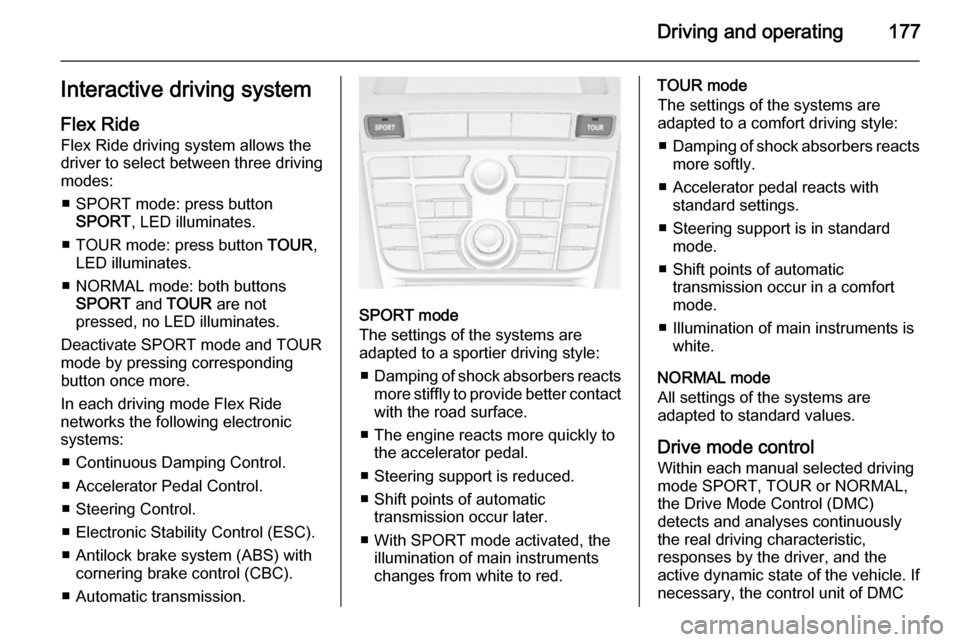
Flex Ride Flex Ride driving system allows the
driver to select between three driving
modes:
■ SPORT mode: press button SPORT , LED illuminates.
■ TOUR mode: press button TOUR,
LED illuminates.
■ NORMAL mode: both buttons SPORT and TOUR are not
pressed, no LED illuminates.
Deactivate SPORT mode and TOUR
mode by pressing corresponding
button once more.
In each driving mode Flex Ride
networks the following electronic systems:
■ Continuous Damping Control.
■ Accelerator Pedal Control.
■ Steering Control.
■ Electronic Stability Control (ESC).
■ Antilock brake system (ABS) with cornering brake control (CBC).
■ Automatic transmission.
SPORT mode
The settings of the systems are
adapted to a sportier driving style:
■ Damping of shock absorbers reacts
more stiffly to provide better contact
with the road surface.
■ The engine reacts more quickly to the accelerator pedal.
■ Steering support is reduced.
■ Shift points of automatic transmission occur later.
■ With SPORT mode activated, the illumination of main instruments
changes from white to red.
TOUR mode
The settings of the systems are
adapted to a comfort driving style:
■ Damping of shock absorbers reacts
more softly.
■ Accelerator pedal reacts with standard settings.
■ Steering support is in standard mode.
■ Shift points of automatic transmission occur in a comfort
mode.
■ Illumination of main instruments is white.
NORMAL mode
All settings of the systems are
adapted to standard values.
Drive mode control
Within each manual selected driving
mode SPORT, TOUR or NORMAL,
the Drive Mode Control (DMC)
detects and analyses continuously
the real driving characteristic,
responses by the driver, and the
active dynamic state of the vehicle. If
necessary, the control unit of DMC
Page 180 of 329
178Driving and operating
automatically changes the settings
within the selected driving mode or, when recognising greater variations,
the driving mode is changed for the
length of variation.
If, for example, NORMAL mode is
selected and DMC detects a sporty
driving behaviour, DMC changes
several settings of the Normal mode
into sporty settings. The DMC
changes to SPORT mode in case of
very sporty driving behaviour.
If, for example, TOUR mode is
selected and whilst driving on a
winding road a sudden hard brake is
necessary, DMC will detect the
dynamic vehicle condition and
changes the settings for suspension
to SPORT mode to increase vehicle
stability.
When the driving characteristic or the
dynamic vehicle state returns to
former state, DMC will change the
settings to the preselected driving
mode.Personalised settings in the
Sport mode The driver can select the functions of
the SPORT mode when SPORT
button is pressed. These settings can
be changed in the menu Settings in
the Info-Display. Vehicle
personalisation 3 132.
Flex Ride - VXR Version
The VXR Version of Flex Ride system works in the same way as the
standard Flex Ride system with the
difference that the modes have a
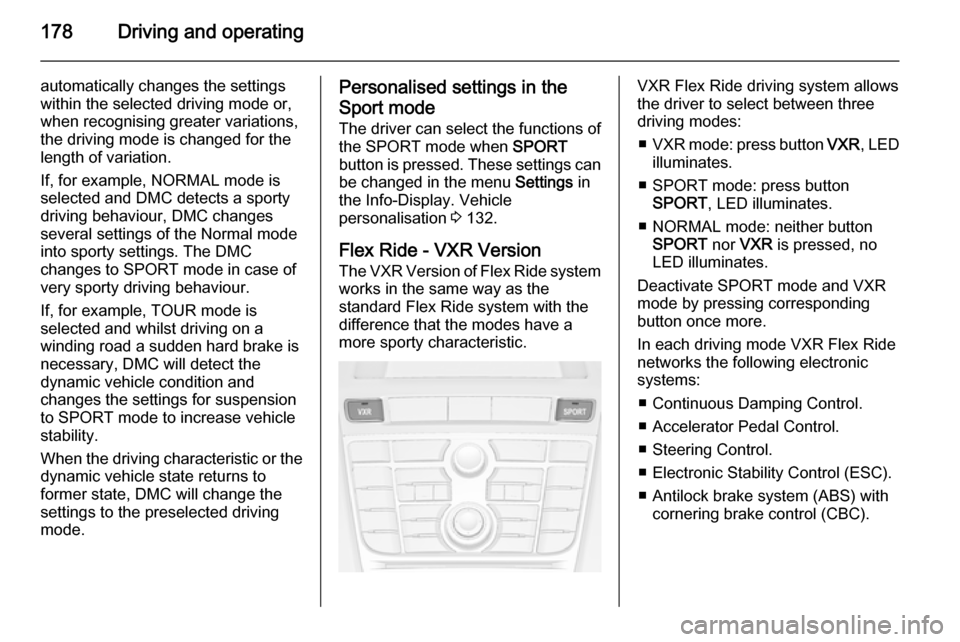
more sporty characteristic.VXR Flex Ride driving system allows
the driver to select between three
driving modes:
■ VXR mode: press button VXR, LED
illuminates.
■ SPORT mode: press button SPORT , LED illuminates.
■ NORMAL mode: neither button SPORT nor VXR is pressed, no
LED illuminates.
Deactivate SPORT mode and VXR
mode by pressing corresponding
button once more.
In each driving mode VXR Flex Ride
networks the following electronic
systems:
■ Continuous Damping Control.
■ Accelerator Pedal Control.
■ Steering Control.
■ Electronic Stability Control (ESC).
■ Antilock brake system (ABS) with cornering brake control (CBC).
Page 181 of 329
Driving and operating179
NORMAL mode
In NORMAL mode, when neither
SPORT nor VXR button is pressed,
all settings of the systems are
adapted to standard values.
SPORT mode
The settings of the systems are
adapted to a sportier driving style.
VXR mode
The drive dynamic characteristics are adapted to high performance
settings.
In this mode the illumination of main
instruments is switched to red.
Personalised settings in the VXR
mode
The driver can select the functions of
the VXR mode when VXR button is
pressed. These settings can be changed in the menu Settings in the
Info-Display. Vehicle personalisation 3 132.Driver assistance
systems9 Warning
Driver assistance systems are
developed to support the driver
and not to replace the driver's
attention.
The driver accepts full
responsibility when driving the
vehicle.
When using driver assistance
systems, always take care
regarding the current traffic
situation.
Cruise control
The Cruise control can store and
maintain speeds of approx. 20 to
120 mph. Deviations from the stored
speeds may occur when driving uphill or downhill.
For safety reasons the cruise controlcannot be activated until the foot
brake has been operated once.
Activating in first gear is not possible.
Do not use the cruise control if it is not advisable to maintain a constant
speed.
With automatic transmission, only
activate cruise control in automatic
mode.
Control indicator m 3 119.
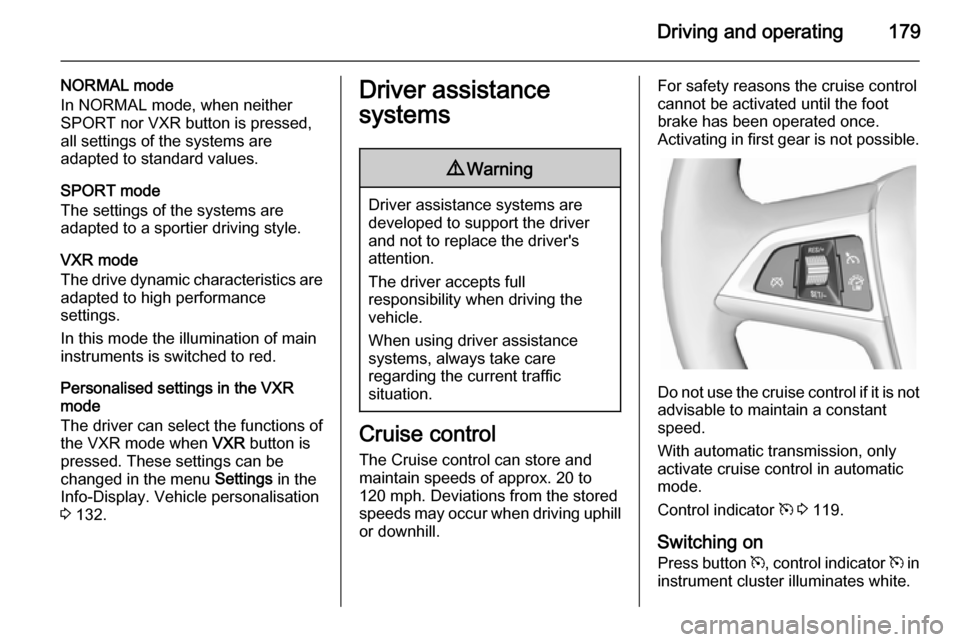
Switching on Press button m, control indicator m in
instrument cluster illuminates white.
Page 283 of 329

Service and maintenance281Service and
maintenanceGeneral information ...................281
Recommended fluids, lubricants and parts .................................... 282General information
Service information In order to ensure economical and
safe vehicle operation and to
maintain the value of your vehicle, it
is of vital importance that all
maintenance work is carried out at the proper intervals as specified.
The detailed, up-to-date service
schedule for your vehicle is available
at the workshop.
Service display 3 110.
European service intervals
Maintenance of your vehicle is
required every 20,000 miles or after
1 year , whichever occurs first, unless
otherwise indicated in the service
display.
The European service intervals are
valid for the following countries:
Andorra, Austria, Belgium, Bosnia-
Herzegovina, Bulgaria, Croatia,
Cyprus, Czech Republic, Denmark,
Estonia, Finland, France, Germany,
Greece, Greenland, Hungary,Iceland, Ireland, Italy, Latvia,
Lithuania, Luxembourg, Macedonia,
Malta, Montenegro, Netherlands,
Norway, Poland, Portugal, Romania,
Serbia, Slovakia, Slovenia, Spain,
Sweden, Switzerland, United
Kingdom.
Service display 3 110.
International service intervals Maintenance of your vehicle is
required every 10,000 miles or after
1 year , whichever occurs first, unless
otherwise indicated in the service
display.
The international service intervals are
valid for the countries which are not listed in the European service
intervals.
Service display 3 110.
Confirmations
Confirmation of service is recorded in the Service and Warranty Booklet.
The date and mileage is completed
with the stamp and signature of the
servicing workshop.