light VAUXHALL ASTRA J 2015 Owner's Manual
[x] Cancel search | Manufacturer: VAUXHALL, Model Year: 2015, Model line: ASTRA J, Model: VAUXHALL ASTRA J 2015Pages: 343, PDF Size: 10.16 MB
Page 3 of 343

Introduction.................................... 2
In brief ............................................ 6
Keys, doors and windows ............20
Seats, restraints ........................... 37
Storage ........................................ 59
Instruments and controls .............99
Lighting ...................................... 136
Climate control ........................... 149
Driving and operating .................159
Vehicle care ............................... 221
Service and maintenance ..........283
Technical data ........................... 286
Customer information ................330
Index .......................................... 336Contents
Page 9 of 343
In brief7
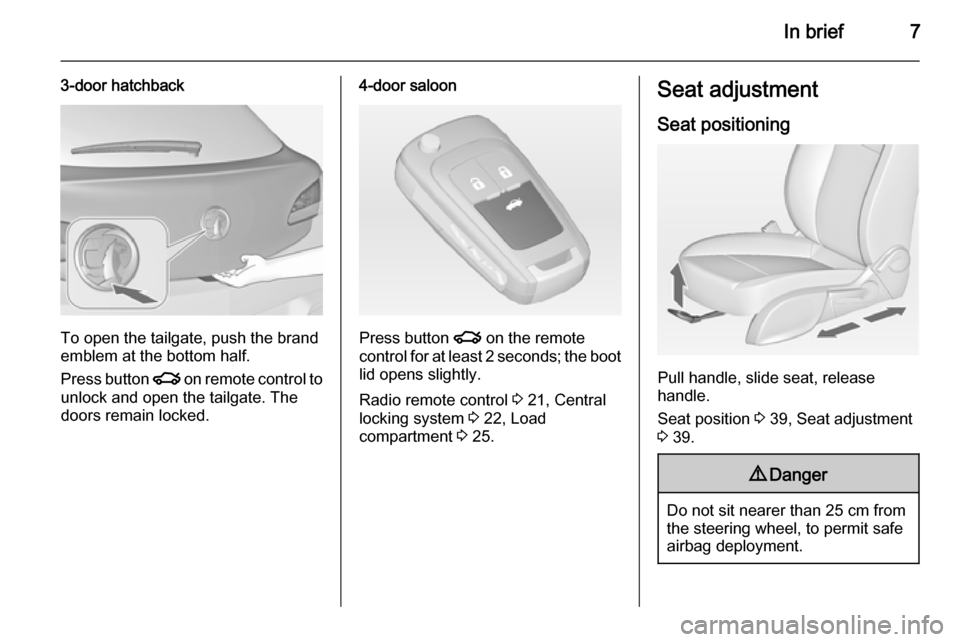
3-door hatchback
To open the tailgate, push the brand
emblem at the bottom half.
Press button x on remote control to
unlock and open the tailgate. The
doors remain locked.
4-door saloon
Press button x on the remote
control for at least 2 seconds; the boot lid opens slightly.
Radio remote control 3 21, Central
locking system 3 22, Load
compartment 3 25.
Seat adjustment
Seat positioning
Pull handle, slide seat, release
handle.
Seat position 3 39, Seat adjustment
3 39.
9 Danger
Do not sit nearer than 25 cm from
the steering wheel, to permit safe
airbag deployment.
Page 14 of 343

12In brief
1Power windows .....................32
2 Exterior mirrors .....................30
3 Cruise control .....................178
Speed limiter ....................... 180
Adaptive cruise control .......181
Forward collision alert .........188
4 Side air vents ...................... 157
5 Windscreen wiper,
windscreen washer
system, headlight washer
system, rear wiper, rear
washer system ....................101
6 Instruments ........................ 107
7 Steering wheel controls .......99
8 Driver Information Centre .... 118
9 Turn and lane-change
signals, headlight flash,
low beam and high beam,
high beam assist .................143
Exit lighting ......................... 147
Parking lights ...................... 144
Buttons for Driver
Information Centre ..............11810Sport mode ........................ 176
Central locking system ..........22
Hazard warning flashers ....143
Fuel selector ....................... 108
Control indicator for airbag
deactivation ........................ 112
Control indicator for front
passenger seat belt ...........112
Tour mode .......................... 176
11 Info-Display ........................ 123
12 Anti-theft alarm system
status LED ........................... 28
13 Centre air vents .................. 157
14 Glovebox .............................. 59
15 Sport mode ........................ 176
Tour mode .......................... 176
Traction Control system .....173
Electronic Stability Control . 174
Parking assist systems .......194Lane departure warning .....208
Eco button for stop-start
system ................................. 162
16 Climate control system ........ 149
17 AUX input, USB input ..........11
18 Power outlet ........................ 105
19 Selector lever, manual
transmission ....................... 170
Automatic transmission ......166
20 Electric parking brake .........171
21 Ignition switch with
steering wheel lock ............160
22 Horn ................................... 100
Driver airbag ........................ 49
23 Bonnet release lever ..........223
24 Storage compartment,
fuse box ............................. 252
25 Steering wheel adjustment ..99
26 Light switch ........................ 136
Headlight range
adjustment ......................... 138
Front fog lights ...................143
Page 15 of 343
In brief13
Rear fog light ...................... 144
Instrument illumination .......145Exterior lighting
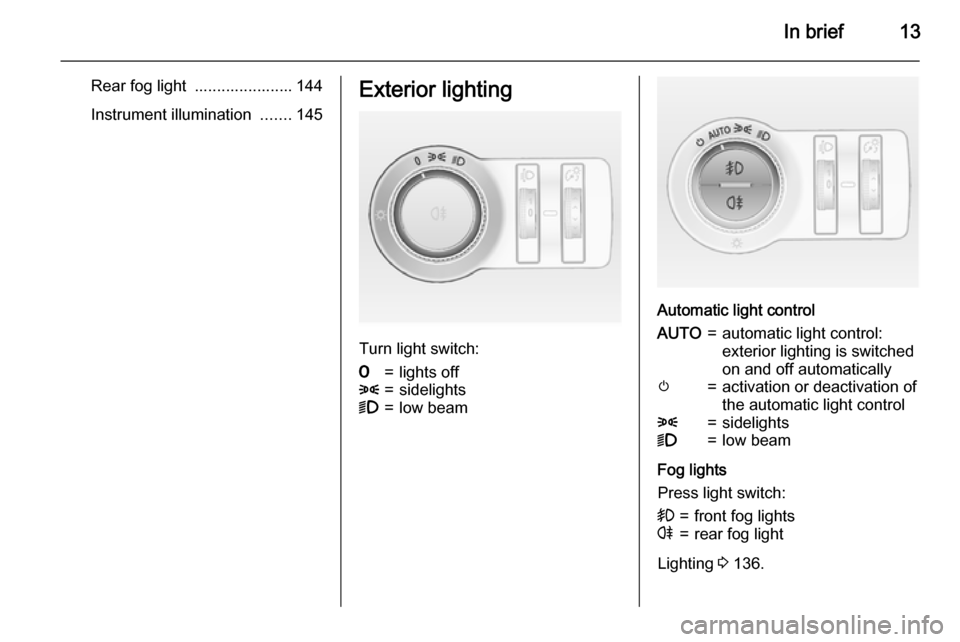
Turn light switch:
7=lights off8=sidelights9=low beam
Automatic light control
AUTO=automatic light control:
exterior lighting is switched
on and off automaticallym=activation or deactivation of
the automatic light control8=sidelights9=low beam
Fog lights
Press light switch:
>=front fog lightsr=rear fog light
Lighting 3 136.
Page 16 of 343
14In brief
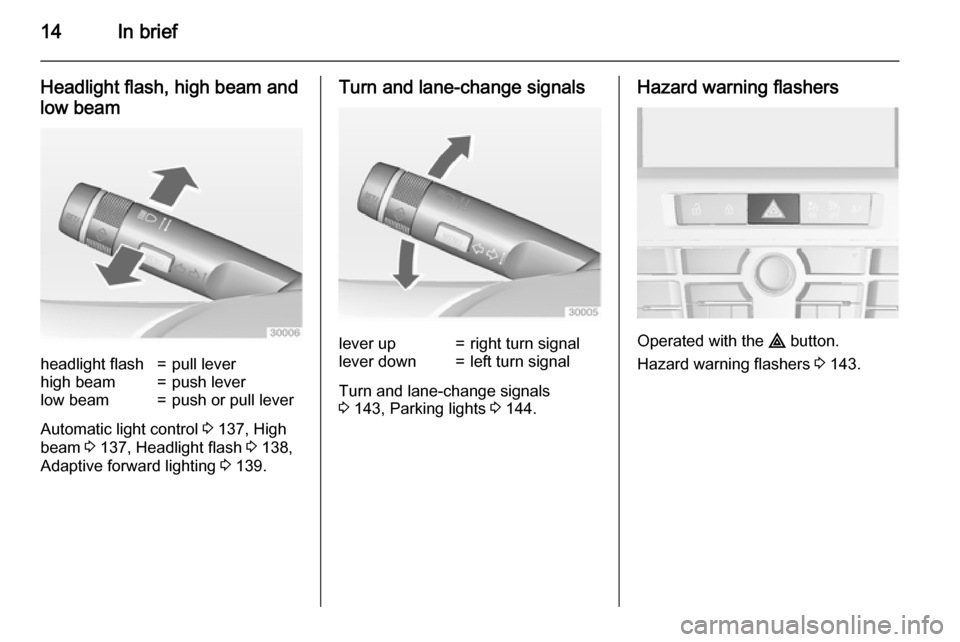
Headlight flash, high beam and
low beamheadlight flash=pull leverhigh beam=push leverlow beam=push or pull lever
Automatic light control 3 137, High
beam 3 137, Headlight flash 3 138,
Adaptive forward lighting 3 139.
Turn and lane-change signalslever up=right turn signallever down=left turn signal
Turn and lane-change signals
3 143, Parking lights 3 144.
Hazard warning flashers
Operated with the ¨ button.
Hazard warning flashers 3 143.
Page 17 of 343

In brief15Horn
Press j.
Washer and wiper systems
Windscreen wiperHI=fastLO=slowINT=interval wiping or automatic
wiping with rain sensorOFF=off
For a single wipe when the
windscreen wiper is off, press the
lever down to position 1x.
Windscreen wiper 3 101, Wiper
blade replacement 3 228.
Windscreen and headlight
washer
Pull lever.
Windscreen and headlight washer
system 3 101, Washer fluid 3 226.
Page 20 of 343
18In briefStarting offCheck before starting off ■ Tyre pressure and condition 3 258,
3 308.
■ Engine oil level and fluid levels 3 223.
■ All windows, mirrors, exterior lighting and number plates are free
from dirt, snow and ice and are
operational.
■ Proper position of mirrors, seats, and seat belts 3 30, 3 39,
3 47.
■ Brake function at low speed, particularly if the brakes are wet.Starting the engine
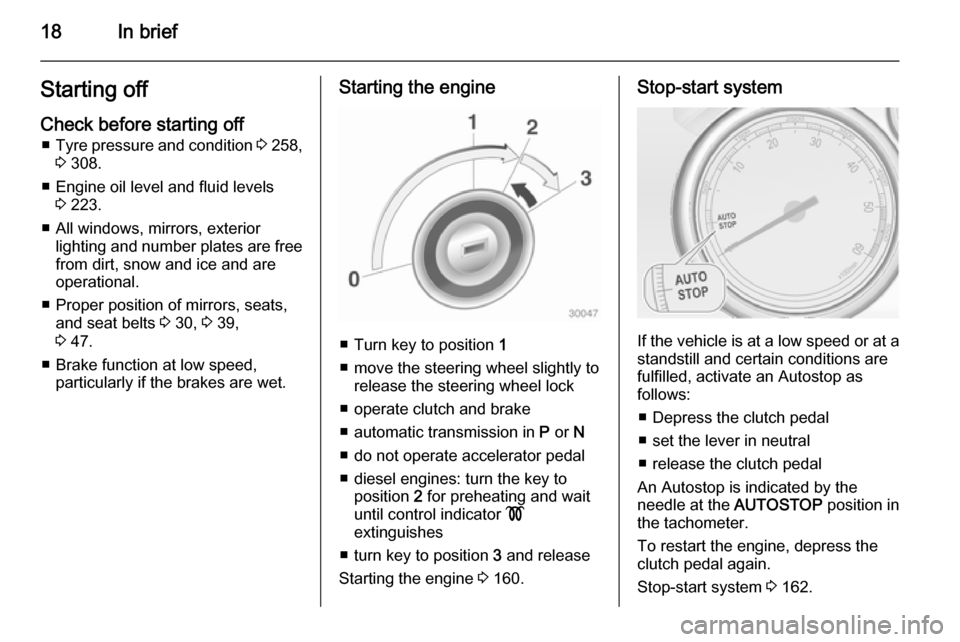
■ Turn key to position 1
■ move the steering wheel slightly to release the steering wheel lock
■ operate clutch and brake
■ automatic transmission in P or N
■ do not operate accelerator pedal
■ diesel engines: turn the key to position 2 for preheating and wait
until control indicator !
extinguishes
■ turn key to position 3 and release
Starting the engine 3 160.
Stop-start system
If the vehicle is at a low speed or at a
standstill and certain conditions are
fulfilled, activate an Autostop as
follows:
■ Depress the clutch pedal
■ set the lever in neutral
■ release the clutch pedal
An Autostop is indicated by the
needle at the AUTOSTOP position in
the tachometer.
To restart the engine, depress the
clutch pedal again.
Stop-start system 3 162.
Page 24 of 343
22Keys, doors and windows
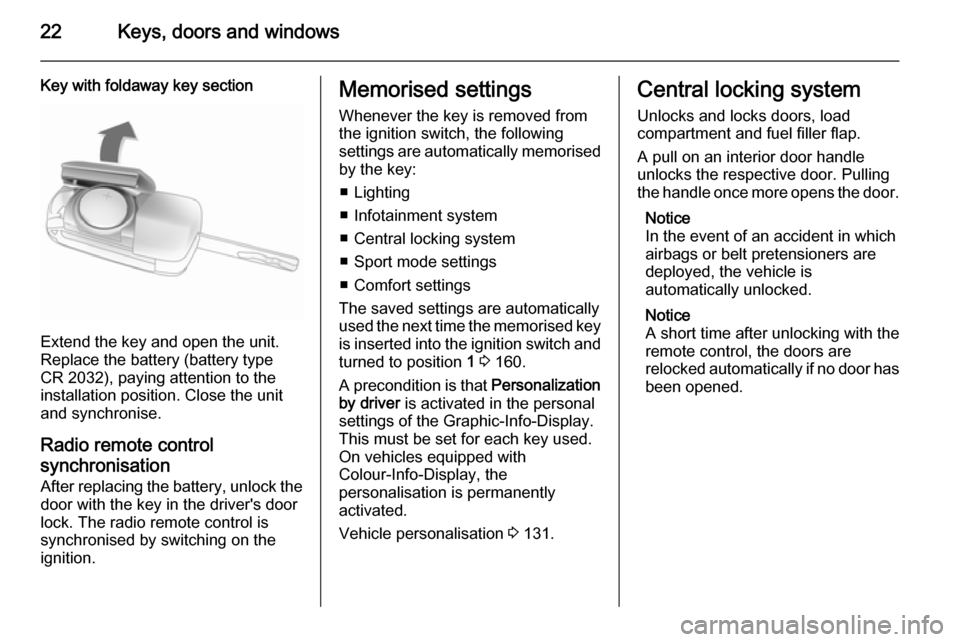
Key with foldaway key section
Extend the key and open the unit.
Replace the battery (battery type CR 2032), paying attention to the
installation position. Close the unit
and synchronise.
Radio remote controlsynchronisation
After replacing the battery, unlock the
door with the key in the driver's door
lock. The radio remote control is
synchronised by switching on the
ignition.
Memorised settings
Whenever the key is removed from
the ignition switch, the following
settings are automatically memorised
by the key:
■ Lighting
■ Infotainment system
■ Central locking system
■ Sport mode settings
■ Comfort settings
The saved settings are automatically
used the next time the memorised key is inserted into the ignition switch and
turned to position 1 3 160.
A precondition is that Personalization
by driver is activated in the personal
settings of the Graphic-Info-Display.
This must be set for each key used.
On vehicles equipped with
Colour-Info-Display, the
personalisation is permanently
activated.
Vehicle personalisation 3 131.Central locking system
Unlocks and locks doors, load
compartment and fuel filler flap.
A pull on an interior door handle
unlocks the respective door. Pulling the handle once more opens the door.
Notice
In the event of an accident in which
airbags or belt pretensioners are
deployed, the vehicle is
automatically unlocked.
Notice
A short time after unlocking with the
remote control, the doors are
relocked automatically if no door has
been opened.
Page 28 of 343

26Keys, doors and windows
Pressing button x opens the
tailgate even if the doors are locked.
Sports tourer
After unlocking, push the touchpad
switch under the tailgate moulding
and open the tailgate.
Central locking system 3 22.4-door saloon
To unlock the boot lid, press button
x on the remote control for at least
2 seconds, or, to open from the inside, press button x in the centre
console; the boot lid is opened
slightly.
With the doors centrally locked, the
boot lid cannot be opened with button
x in the centre console.
Page 31 of 343
Keys, doors and windows29
1. Close tailgate, bonnet, windowsand sunroof.
2. Press button o. LED in the
button o illuminates for a
maximum of 10 minutes.
3. Close doors.
4. Activate the anti-theft alarm system.
Status message is displayed in the
Driver Information Centre.
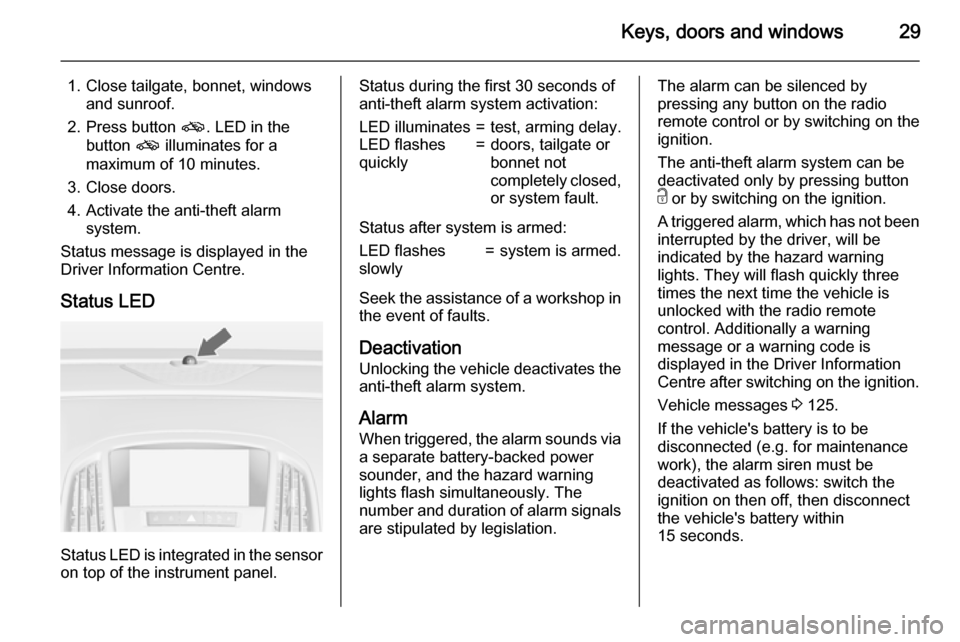
Status LED
Status LED is integrated in the sensor
on top of the instrument panel.
Status during the first 30 seconds of
anti-theft alarm system activation:LED illuminates=test, arming delay.LED flashes
quickly=doors, tailgate or
bonnet not
completely closed,
or system fault.
Status after system is armed:
LED flashes
slowly=system is armed.
Seek the assistance of a workshop in the event of faults.
Deactivation
Unlocking the vehicle deactivates the
anti-theft alarm system.
AlarmWhen triggered, the alarm sounds via
a separate battery-backed power
sounder, and the hazard warning
lights flash simultaneously. The
number and duration of alarm signals are stipulated by legislation.
The alarm can be silenced by
pressing any button on the radio
remote control or by switching on the
ignition.
The anti-theft alarm system can be
deactivated only by pressing button
c or by switching on the ignition.
A triggered alarm, which has not been interrupted by the driver, will be
indicated by the hazard warning
lights. They will flash quickly three
times the next time the vehicle is
unlocked with the radio remote
control. Additionally a warning
message or a warning code is
displayed in the Driver Information
Centre after switching on the ignition.
Vehicle messages 3 125.
If the vehicle's battery is to be
disconnected (e.g. for maintenance
work), the alarm siren must be
deactivated as follows: switch the
ignition on then off, then disconnect
the vehicle's battery within
15 seconds.