radio VAUXHALL ASTRA J 2016.5 Infotainment system
[x] Cancel search | Manufacturer: VAUXHALL, Model Year: 2016.5, Model line: ASTRA J, Model: VAUXHALL ASTRA J 2016.5Pages: 163, PDF Size: 2.95 MB
Page 65 of 163

Speech recognition65Interrupting a voice prompt
As an experienced user, you can
interrupt a voice prompt by briefly
pressing w on the steering wheel.
A beep is heard immediately, the
speech recognition symbol changes
to red, and a command can be stated
without having to wait.
Cancelling a dialogue sequence
There are various possibilities to
cancel a dialogue sequence and to
deactivate the speech recognition:
● Say " Cancel" or "Exit".
● Press n on the steering wheel.
● If the speech recognition session
was started via the VOICE
screen button on the centre
display, you may alternatively:
● Press HOME on the control
panel.
● Select m or Exit in the help
menu.In the following situations, a dialogue
sequence is automatically cancelled:
● If you do not say any command for a certain period of time (by
default you are prompted three
times to say a command).
● If you say commands that are not
recognised by the system (by
default you are prompted three
times to say a correct command).
Operation via speech commands
The speech recognition can
understand commands that are either naturally stated in sentence form, or
direct commands stating the
application and the action.
For best results: ● Listen for the voice prompt and wait for the beep before saying a
command or replying.
● Say " Help" or read the example
commands on the screen.● The voice prompt can be interrupted by pressing w again.
● Wait for the beep and then speak
the command naturally, not too
fast, not too slow. Use short and
direct commands.
Usually commands can be spoken in
a single command. For example,
"Call David Smith at work", "Play"
followed by the artist or song name,
"Tune to" followed by the radio
waveband and frequency/station
name, or "Find address" followed by
the address e.g. "123 Main Road,
London".
In case of complex commands or
when information are missing, the
system starts a dialogue sequence.
When searching for a "Place of
Interest", only major chains may be
selected by name. Chains are
businesses with at least 20 locations.
For other POIs, say the name of a
category like "Restaurants",
"Shopping centres", or "Hospitals".
If you say "Phone" or "Phone
commands", the system understands
that a phone call is requested and
responds with respective questions
Page 67 of 163

Phone67PhoneGeneral information.....................67
Bluetooth connection ...................68
Emergency call ............................ 70
Operation ..................................... 70
Text messages ............................ 74
Mobile phones and CB radio equipment .................................... 76General information
The Phone portal provides you with
the possibility of having mobile phone conversations via a vehicle
microphone and the vehicle
loudspeakers as well as operating the
most important mobile phone
functions via the Infotainment system in the vehicle. To be able to use the
Phone portal, the mobile phone must
be connected to the Infotainment
system via Bluetooth.
Not all Phone functions are supported by every mobile phone. The usable
phone functions depend on the
relevant mobile phone and network
provider. You will find further
information on this in the operating
instructions for your mobile phone, or you can enquire about them with your
network provider.Important information for
operation and traffic safety9 Warning
Mobile phones have effects on
your environment. For this reason, safety regulations and directions
have been prepared. You should
be familiar with the related
directions before you use the
telephone function.
9 Warning
Use of the hands-free facility while
driving can be dangerous because
your concentration is reduced
when telephoning. Park your
vehicle before you use the hands- free facility. Follow the stipulations
of the country in which you find
yourself at present.
Do not forget to follow the special
regulations that apply in specific
areas and always switch off the
mobile phone if the use of mobile
phones is prohibited, if
Page 68 of 163

68Phoneinterference is caused by the
mobile phone or if dangerous
situations can occur.
Bluetooth
The Phone portal is certified by the
Bluetooth Special Interest Group
(SIG).
You will find further information about the specification on the Internet at
http://www.bluetooth.com
Bluetooth connection
Bluetooth is a radio standard for the
wireless connection of e.g. mobile
phones, iPod/iPhone models, or other devices.
To be able to set up a Bluetooth
connection to the Infotainment
system, the Bluetooth function of the
Bluetooth device must be activated.
For further information, please
consult the user guide of the
Bluetooth device.
Via the Bluetooth settings menu,
pairing (PIN code exchange between
Bluetooth device and Infotainment
system) and connecting of the
Bluetooth devices to the Infotainment
system are carried out.
Bluetooth settings menu
Press HOME and then select the
SETTINGS icon.
Select Bluetooth to display the
respective submenu.
Pairing a device
Important information ● Up to five devices can be paired to the system.
● Only one paired device can be connected to the Infotainment
system at a time.
● Pairing normally only needs to be
carried out once, unless the
device is deleted from the list of
paired devices. If the device has
been connected previously, theInfotainment system
automatically establishes a
connection.
● Bluetooth operation considerably
drains the device's battery.
Therefore, connect the device to
the USB port for charging.
Pairing via the Settings application 1. Press HOME and then select the
SETTINGS icon.
Select Bluetooth to display the
respective submenu.
2. Select Pair Device .
Alternatively, select Device
Management to display the
device list and then select Pair
Device .
3. A message is displayed on the Infotainment system indicating
the name and PIN code of the
Infotainment system.
4. Start Bluetooth searching on the Bluetooth device to be paired.
5. Confirm the pairing procedure: ● If SSP (secure simple pairing) is supported:
Page 72 of 163
72Phone
Notice
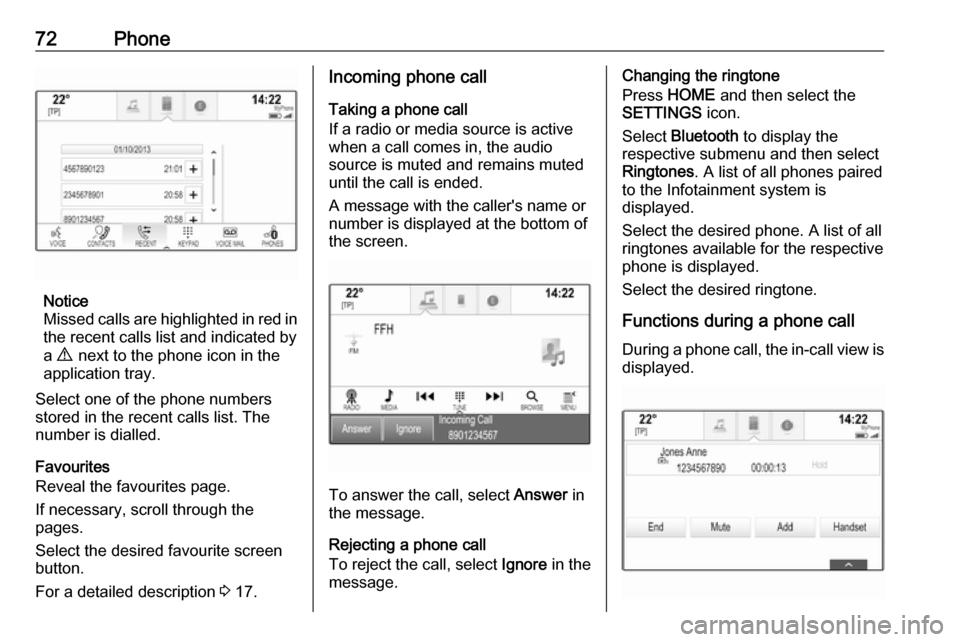
Missed calls are highlighted in red in the recent calls list and indicated by
a 9 next to the phone icon in the
application tray.
Select one of the phone numbers
stored in the recent calls list. The
number is dialled.
Favourites
Reveal the favourites page.
If necessary, scroll through the
pages.
Select the desired favourite screen
button.
For a detailed description 3 17.
Incoming phone call
Taking a phone call
If a radio or media source is active
when a call comes in, the audio
source is muted and remains muted
until the call is ended.
A message with the caller's name or
number is displayed at the bottom of
the screen.
To answer the call, select Answer in
the message.
Rejecting a phone call
To reject the call, select Ignore in the
message.
Changing the ringtone
Press HOME and then select the
SETTINGS icon.
Select Bluetooth to display the
respective submenu and then select Ringtones . A list of all phones paired
to the Infotainment system is
displayed.
Select the desired phone. A list of all
ringtones available for the respective
phone is displayed.
Select the desired ringtone.
Functions during a phone call During a phone call, the in-call view is displayed.
Page 76 of 163
76PhoneDevice listSelect PHONES to display the device
list.
For a detailed description 3 68.
Text settings
Select Settings to enter the settings
menu.
Text Alerts
If you wish an alert to pop-up when a
new text message is received, set
Text Alerts - On .
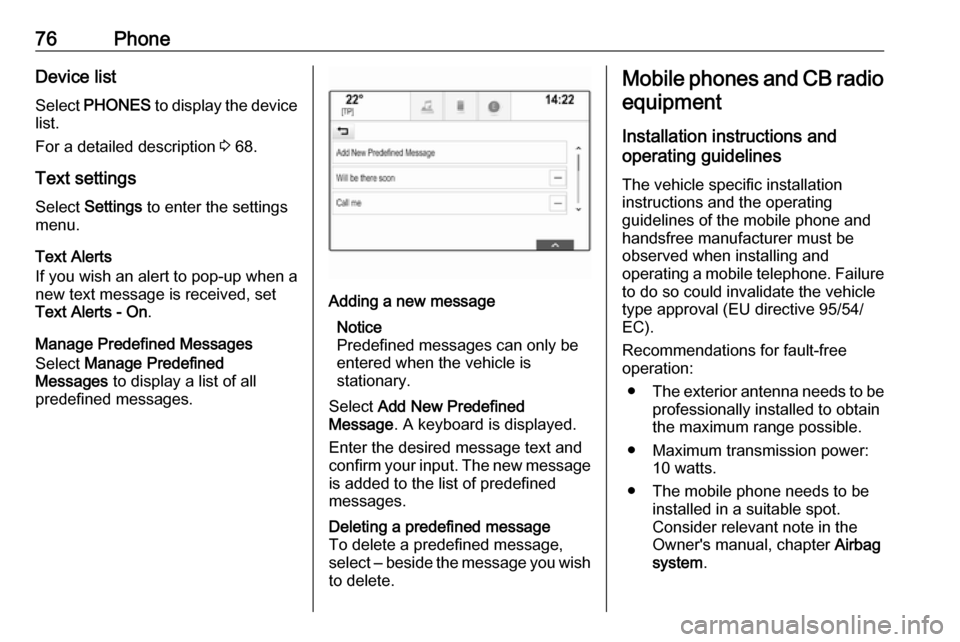
Manage Predefined Messages
Select Manage Predefined
Messages to display a list of all
predefined messages.Adding a new message
Notice
Predefined messages can only be entered when the vehicle is
stationary.
Select Add New Predefined
Message . A keyboard is displayed.
Enter the desired message text and
confirm your input. The new message is added to the list of predefined
messages.Deleting a predefined message
To delete a predefined message,
select ‒ beside the message you wish
to delete.Mobile phones and CB radio
equipment
Installation instructions and
operating guidelines
The vehicle specific installation
instructions and the operating
guidelines of the mobile phone and
handsfree manufacturer must be
observed when installing and
operating a mobile telephone. Failure to do so could invalidate the vehicle
type approval (EU directive 95/54/
EC).
Recommendations for fault-free
operation:
● The exterior antenna needs to be
professionally installed to obtain
the maximum range possible.
● Maximum transmission power: 10 watts.
● The mobile phone needs to be installed in a suitable spot.
Consider relevant note in the
Owner's manual, chapter Airbag
system .
Page 77 of 163

Phone77Seek advice on predetermined
installation points for the external
antenna or equipment holder and
ways of using devices with a
transmission power exceeding
10 watts.
Use of a handsfree attachment without external antenna with mobile
telephone standards GSM
900/1800/1900 and UMTS is only
permitted if the maximum
transmission power of the mobile
telephone is 2 watts for GSM 900 or
1 watt for the other types.
For reasons of safety, do not use the
phone while driving. Even use of a handsfree set can be a distractionwhile driving.9 Warning
Operation of radio equipment and
mobile telephones which fail to
meet above mentioned mobile
telephone standards is only
permitted using an antenna
located outside of the vehicle.
Caution
Mobile telephones and radio
equipment may lead to
malfunctions in the vehicle
electronics when operated inside
the vehicle with no exterior
antenna, unless the above
mentioned regulations are
observed.
Page 78 of 163

78Frequently asked questionsFrequently asked
questionsFrequently asked questions .........78Frequently asked
questions
Phone? How can I pair my phone with the
Infotainment system?
! In order to pair a phone, press
HOME , select the PHONE icon
and then select Pair Device.
Follow the instructions on your
device and make sure Bluetooth is enabled.
Detailed description 3 68.? How can I access my phone book
contacts and recent calls?
! In order to access the contacts or
calls list, press HOME, select the
PHONE icon and then select
CONTACTS or RECENT . Make
sure access to the phone book and recent calls list is allowed on the
phone. Depending on the phone,
loading the phone book and recent
calls list might take a few minutes.
Detailed description 3 70.Favourites? What can be stored as a favourite?
! Up to 60 favourites of almost all
elements can be stored, e.g.
destinations, phone contacts,
playlists, radio stations, etc.
Detailed description 3 17.? How can I store a new favourite?
! Activate the respective application
and touch and hold a favourite
screen button to store a new
favourite in this location. A short
beep sound confirms storing. In
some cases, it is required to select a specific item.
Detailed description 3 17.? How can I rename, delete or move
my favourites?
! Press
HOME , select the
SETTINGS icon on the Home
screen, Radio in the settings list
and then Manage Favourites in
order to rename, delete or move
the favourites.
Detailed description 3 17.
Page 79 of 163

Frequently asked questions79?Where are the favourites stored
and how can I recall them?
! The favourites are stored in the
favourites list. To recall a favourite, select the respective screen button
on the favourites row displayed.
On certain screens, the favourites list is hidden to extend the main
content view. On these screens,
select n on the lower right of the
screen or drag the interaction
selector bar upwards with a finger.
Detailed description 3 17.
Navigation? After entering a destination
address, an error message is
shown. What am I doing wrong?
! For full address entry, the
navigation system expects a
certain input order. Depending on
the country in which the entered
address is located, a different input
order might be required. Add the
country name at the end of the
entry, if a destination in another
country has been entered.
Detailed description 3 50.? How can I cancel active route
guidance?
! To cancel route guidance, select
MENU in the interaction selector
bar and then select Cancel Route.
Detailed description 3 56.
Audio? How can I change the audio
source?
! By pressing
RADIO repeatedly,
you can toggle through all
available radio sources (AM/FM/
DAB). By pressing MEDIA
repeatedly, you can toggle through all available media sources (USB,
iPod, Bluetooth audio, CD, AUX).
Detailed description for radio 3 30,
CD 3 35, external devices 3 38.? How can I browse radio stations or
media music?
! To browse radio stations or media
music, such as playlists or albums, select BROWSE on the audio
screen.
Detailed description for radio 3 30,
CD 3 36, external devices 3 39.Other? How can I improve the
performance of the voice
recognition?
! The voice recognition is designed
to understand naturally
pronounced voice commands.
Wait for the beep tone and speak
afterwards. Try to speak naturally,
not too fast or too loud.
Detailed description 3 62.? How can I improve the touch
screen's performance?
! The touch screen is pressure-
sensitive. Especially when doing
drag gestures, try to apply more
pressure with the finger.
Detailed description 3 13.
Page 80 of 163

80IndexAActivating AUX.............................. 39
Activating Bluetooth music ...........39
Activating CD player .....................36
Activating phone projection ..........41
Activating radio ............................. 30
Activating the Infotainment system 11
Activating the navigation system ..44
Activating the phone portal ...........70
Activating USB........................ 39, 41
Address book................................ 50
Application tray ............................. 15
Audio files ..................................... 38
Automatic volume adjustment Auto volume .............................. 26
Auto Set ........................................ 26
Auto volume.................................. 26
AUX .............................................. 38
B
Balance......................................... 25
Basic operation ............................. 13
Application tray.......................... 15
Character recognition pane .......16
Contacts .................................... 21
Favourites ................................. 17
Home screen ............................. 15
Interaction selector bar .............15
Keyboard ................................... 16
Keypad ...................................... 16Bass.............................................. 25
Bluetooth connection ....................68
Bluetooth music ............................ 38
C
Category list.................................. 30
CD player...................................... 35
Character modifiers ......................16
Character recognition pane ..........16
Clock display ................................ 26
Contacts ................................. 21, 50
Modifying ................................... 21
Retrieving .................................. 21
Storing ....................................... 21
Control elements Infotainment system ....................8
Steering wheel ............................ 8
Control elements overview .............8
D DAB .............................................. 33
DAB linking ................................... 33
Date .............................................. 26
Destination input ..........................50
Digital audio broadcasting ............33
Displaying favourites ....................17
Display mode ................................ 26
Page 81 of 163

81EEmergency call ............................. 70
EQ ................................................ 25
Equaliser....................................... 25
F Fader ............................................ 25
Favourites ..................................... 17
Cluster display........................... 17
Deleting ..................................... 17
Displaying.................................. 17
Renaming .................................. 17
Retrieving .................................. 17
Storing ....................................... 17
File formats Audio files.................................. 38
Movie files ................................. 38
Forgotten PIN ............................... 26
Frequency list ............................... 30
Frequently asked questions .........78
G
General information 35, 38 , 43 , 62 , 67
AUX ........................................... 38
Bluetooth music......................... 38
CD ............................................. 35
Infotainment system ....................6
Navigation ................................. 43
Phone portal .............................. 67Radio......................................... 30
USB ........................................... 38
Guidance ..................................... 56
H Home button ................................. 15
Home screen ................................ 15
I
Individual POIs ............................. 44
Infotainment control panel ..............8
Intellitext ....................................... 33
Interaction selector bar .................15
K Keyboard Letter keyboard ......................... 16
Symbol keyboard ......................16
Keyboards .................................... 16
Keypad ......................................... 16
L
Language ..................................... 26
L-Band .......................................... 33
M
Maps ............................................. 44
Maximum startup volume .............26
Menu operation............................. 15
Messages ..................................... 15
Midrange....................................... 25Mobile phones and CB radio equipment ................................ 76
Movie files..................................... 38
Movies .......................................... 41
Mute.............................................. 11
N
Navigation..................................... 56 Contacts .............................. 21, 50
Current location ......................... 44
Destination input .......................50
Favourites ................................. 17
Individual POIs .......................... 44
Map display ............................... 44
Map manipulation ......................44
Map update ............................... 43
OVERVIEW screen button ........44
Recent destinations ..................50
Route guidance ......................... 56
Route guidance menu ...............56
TMC stations ....................... 43, 56
Traffic incidents ......................... 56
Turn list ..................................... 56
Voice prompts ........................... 56
Waypoint list .............................. 56
Waypoint trip ............................. 50
O
Operation ...................................... 70
AUX ........................................... 39
Bluetooth music......................... 39