audio VAUXHALL ASTRA J 2016.5 Infotainment system
[x] Cancel search | Manufacturer: VAUXHALL, Model Year: 2016.5, Model line: ASTRA J, Model: VAUXHALL ASTRA J 2016.5Pages: 163, PDF Size: 2.95 MB
Page 145 of 163

External devices145Notice
Some files may not be played
properly. This might be due to a
different recording format or the
condition of the file.
Files from online shops to which
Digital Rights Management (DRM)
has been applied cannot be played.
The playable audio file formats are
MP3, WMA, AAC and AIF.
When playing a file with ID3 tag
information, the Infotainment system
can display information, e.g. on the
track title and artist.
Playing audio Starting playback
Connect the device 3 143.
Repeatedly press MEDIA to activate
the desired media source.
Example: USB source.
Notice
The following operation functions
are not available for AUX devices.
Function buttons
Skipping to previous or next file
Press t or v to play the previous
or next track.
If t is pressed within the first five
seconds of the song playing, the
system skips to the beginning of the
current track.
Fast forwarding or rewinding
Press and hold t or v to rewind or
fast forward.
Playback order
Press MENU in the respective audio
source and scroll through the list to
Shuffle Songs .
To play the songs on the device in
random order, set Shuffle Songs to
On .
To play the songs in normal order, set
Shuffle Songs to Off.
Browsing for a song
Depending on the device, you may
browse for songs in categories and
subcategories or a folder structure.
Notice
For this function to be available, the
indexing process must be
completed.
Categories
To browse for a song, press MENU in
the respective audio source and then select Browse .
Navigate through the browse
structure and select the desired track.
Folders
To browse a song, press MENU and
then select Folder View . The folder
structure on the respective device is displayed.
Navigate through the folder structure and select the desired track.
Page 150 of 163
150Phone9Warning
Do not end the call until you are
requested to do so by the
emergency call centre.
Operation
As soon as a connection via
Bluetooth has been set up between
your mobile phone and the
Infotainment system, you can operate many functions of your mobile phone
via the Infotainment system.
Notice
Not every mobile phone supports all
functions of the Phone portal.
Therefore, deviations from the range
of functions described below are
possible.
Initiating a phone call
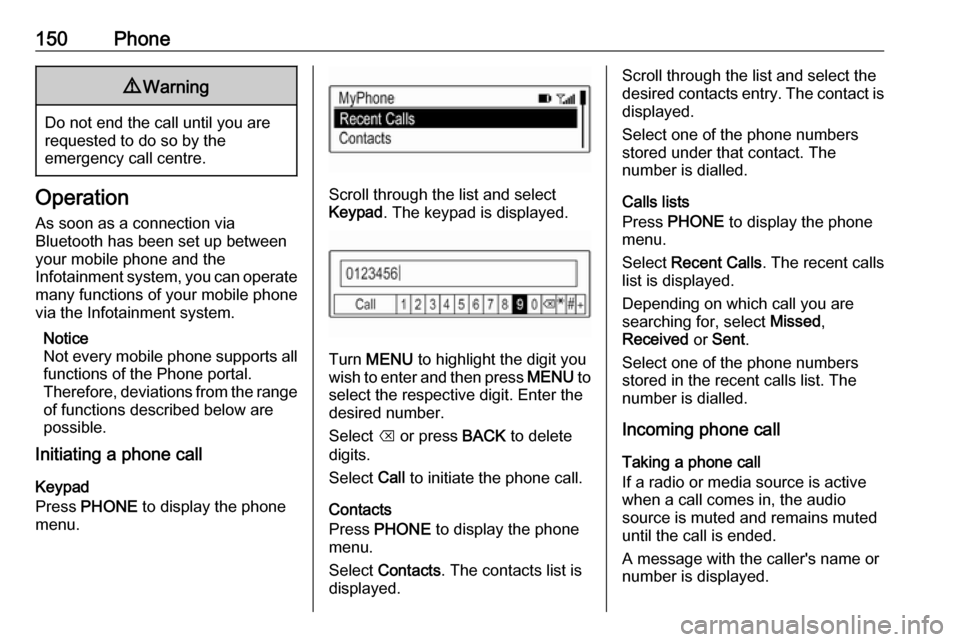
Keypad
Press PHONE to display the phone
menu.Scroll through the list and select
Keypad . The keypad is displayed.
Turn MENU to highlight the digit you
wish to enter and then press MENU to
select the respective digit. Enter the
desired number.
Select k or press BACK to delete
digits.
Select Call to initiate the phone call.
Contacts
Press PHONE to display the phone
menu.
Select Contacts . The contacts list is
displayed.
Scroll through the list and select the
desired contacts entry. The contact is displayed.
Select one of the phone numbers
stored under that contact. The
number is dialled.
Calls lists
Press PHONE to display the phone
menu.
Select Recent Calls . The recent calls
list is displayed.
Depending on which call you are searching for, select Missed,
Received or Sent .
Select one of the phone numbers
stored in the recent calls list. The
number is dialled.
Incoming phone call
Taking a phone call
If a radio or media source is active
when a call comes in, the audio
source is muted and remains muted
until the call is ended.
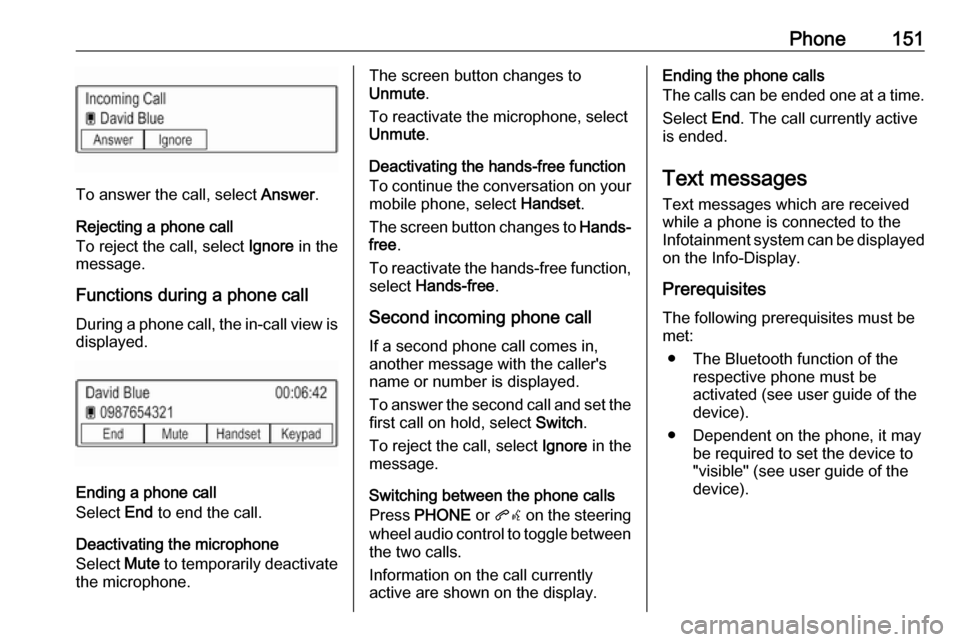
A message with the caller's name or
number is displayed.
Page 151 of 163
Phone151
To answer the call, select Answer.
Rejecting a phone call
To reject the call, select Ignore in the
message.
Functions during a phone call During a phone call, the in-call view is displayed.
Ending a phone call
Select End to end the call.
Deactivating the microphone
Select Mute to temporarily deactivate
the microphone.
The screen button changes to
Unmute .
To reactivate the microphone, select
Unmute .
Deactivating the hands-free function
To continue the conversation on your mobile phone, select Handset.
The screen button changes to Hands-
free .
To reactivate the hands-free function,
select Hands-free .
Second incoming phone call If a second phone call comes in,
another message with the caller's
name or number is displayed.
To answer the second call and set the
first call on hold, select Switch.
To reject the call, select Ignore in the
message.
Switching between the phone calls
Press PHONE or qw on the steering
wheel audio control to toggle between the two calls.
Information on the call currently
active are shown on the display.Ending the phone calls
The calls can be ended one at a time.
Select End. The call currently active
is ended.
Text messages
Text messages which are received
while a phone is connected to the
Infotainment system can be displayed
on the Info-Display.
Prerequisites
The following prerequisites must be
met:
● The Bluetooth function of the respective phone must be
activated (see user guide of the
device).
● Dependent on the phone, it may be required to set the device to"visible" (see user guide of the
device).
Page 154 of 163

154IndexAActivating AUX............................ 145
Activating Bluetooth music .........145
Activating radio ........................... 138
Activating the Infotainment system ..................................... 132
Activating the phone portal .........150
Activating USB............................ 145
Audio files ................................... 143
Auto Set ...................................... 135
Auto volume control ....................135
AUX ............................................ 143
B BACK button ............................... 134
Basic operation ........................... 134
Control panel ........................... 134
Bluetooth connection ..................148
Bluetooth music .......................... 143
C Category list................................ 138
Control elements Infotainment system ................130
Steering wheel ........................ 130
Control elements overview .........130
D
DAB ............................................ 140
DAB linking ................................. 140
Digital audio broadcasting ..........140E
Emergency call ........................... 149
F Favourite lists ............................. 139
Retrieving stations................... 139
Storing stations .......................139
File formats Audio files................................ 143
Frequency list ............................. 138
G
General information ....143, 146, 147
AUX ......................................... 143
Bluetooth music....................... 143
Infotainment system ................128
Phone ...................................... 147
Radio ....................................... 138
USB ......................................... 143
I
Infotainment control panel ..........130
Intellitext ..................................... 140
L
Language ................................... 135
L-Band ........................................ 140
M
Maximum startup volume ...........135
MENU knob ................................ 134
Menu operation .......................... 134
Page 155 of 163

155Mobile phones and CB radioequipment .............................. 152
Mute............................................ 132
O Operation .................................... 150
AUX ......................................... 145
Bluetooth music....................... 145
Infotainment system ................132
Menu ....................................... 134
Phone ...................................... 150
Radio ....................................... 138
USB ......................................... 145
P Pairing ........................................ 148
Phone Bluetooth ................................. 147
Bluetooth connection ..............148
Emergency calls ......................149
General information ................147
Handsfree mode .....................150
Phone book ............................. 150
Recent calls............................. 150
Ringtone .................................. 150
Text messages ........................ 151
Phone book ................................ 150Phone call
Initiating ................................... 150
Rejecting ................................. 150
Taking ..................................... 150
Playing audio .............................. 145
R Radio Category list ............................ 138
DAB ......................................... 140
DAB announcements ..............140
DAB menu ............................... 140
Digital audio broadcasting .......140
Favourite lists .......................... 139
FM menu ................................. 139
Frequency list .......................... 138
Intellitext .................................. 140
L-Band..................................... 140
Radio data system ..................139
RDS......................................... 139
Region ..................................... 139
Regionalisation ....................... 139
Retrieving stations................... 139
Station list................................ 138
Station search ......................... 138
Storing stations .......................139
TP............................................ 139
Traffic programme ...................139
Waveband ............................... 138
Radio data system (RDS) ..........139Region ........................................ 139
Regionalisation ........................... 139
Restore factory settings ..............135
Retrieving stations ......................139
Ringtone ..................................... 150
S Speech recognition .....................146
Station list ................................... 138
Station search............................. 138
Storing stations ........................... 139
Switching the Infotainment system on ................................ 132
System settings .......................... 135
Language ................................ 135
Restore factory settings ..........135
Time and date ......................... 135
Valet mode .............................. 135
T
Text messages ........................... 151
Theft-deterrent feature ..............129
Time............................................ 135
Tone settings .............................. 134
TP ............................................... 139
Traffic programme ......................139
U
Usage ......................... 132, 138, 146
AUX ......................................... 145
Bluetooth music....................... 145