light VAUXHALL ASTRA J 2016.5 Repair Manual
[x] Cancel search | Manufacturer: VAUXHALL, Model Year: 2016.5, Model line: ASTRA J, Model: VAUXHALL ASTRA J 2016.5Pages: 343, PDF Size: 10.44 MB
Page 190 of 343

188Driving and operating
Change speed limit
With speed limiter active, turn thumb
wheel to RES/+ to increase or SET/-
to decrease the desired maximum
speed.
Exceeding the speed limit
In the event of an emergency, it is
possible to exceed the speed limit by
depressing the accelerator pedal
firmly beyond the point of resistance.
The limited speed will flash in the
Driver Information Centre and
(depending on vehicle) additionally a
chime sounds during this period.
Release the accelerator pedal and the speed limiter function is
reactivated once a speed lower than
the limit speed is obtained.
Deactivation Press y: speed limiter is deactivated
and the vehicle can be driven without speed limit.
The limited speed is stored and a corresponding message appears in
the Driver Information Centre.
Resume limit speed
Turn thumb wheel to RES/+. The
stored speed limit will be obtained.
Switching off
Press L, the speed limit indication in
the Driver Information Centre
extinguishes. The stored speed is
deleted.
By pressing m to activate cruise
control or adaptive cruise control or
by switching off the ignition, speed
limiter is also deactivated and the
stored speed is deleted.Adaptive cruise control
Adaptive cruise control is an
enhancement to traditional cruise control with the additional feature of
maintaining a certain distance behind the vehicle ahead.
Adaptive cruise control automatically
decelerates the vehicle when
approaching a slower moving vehicle. It then adjusts the vehicle speed to
follow the vehicle ahead at the
selected following distance. The
vehicle speed increases or decreases
to follow the vehicle in front, but will
not exceed the set speed. It may
apply limited braking with activated
brake lights.
The adaptive cruise control can store and maintain speeds over approx.
31 mph and brakes automatically to
follow a slower vehicle driving ahead
to a minimum speed of 18 mph.
Page 195 of 343

Driving and operating193● After a sudden lane change, thesystem needs a certain time to
detect the next preceding
vehicle. So if a new vehicle is
detected, the system may
accelerate instead of braking.
● Adaptive cruise control does ignore the oncoming traffic.
● Adaptive cruise control does not brake for stopped vehicles,
pedestrians or animals.
Bends
The adaptive cruise control calculates
a predicted path based on the
centrifugal force. This predicted path
considers the current bend
characteristic, but cannot consider a
future bend change. The system may lose the current vehicle ahead or
consider a vehicle which is not in the
actual lane. This can happen when
entering or exiting a bend or if the
bend gets stronger or weaker. If it no
longer detects any vehicle ahead,
then control indicator A will
extinguish.
If the centrifugal force is too high in a bend, the system slows down the vehicle slightly. This braking level is
not designed to avoid spinning off the bend. The driver is responsible for
reducing the selected speed before
entering a bend and in general to
adapt the speed to the road type and
to existing speed limits.
Motorways
On motorways, adapt the set speed
to the situation and the weather.
Always consider that adaptive cruise
control has a limited visibility range, a
limited braking level and a certain
reaction time to verify if a vehicle is on
the driving path or not. Adaptive
cruise control may not be able to
brake the vehicle in time to avoid a
collision with a much slower vehicle or after a lane change. This is
particularly true if driving fast or if the
visibility is reduced due to weather
conditions.
While entering or exiting a motorway,
adaptive cruise control may lose the
vehicle ahead and accelerate up to
the set speed. For this reason,
decrease the set speed before the
exit or before the entry.
Vehicle path changes
If another vehicle enters your driving
path, adaptive cruise control will first
consider the vehicle when it is
completely in your path. Be ready to
take action and depress the brake
pedal, if you need to brake more
quickly.
Page 201 of 343
Driving and operating199
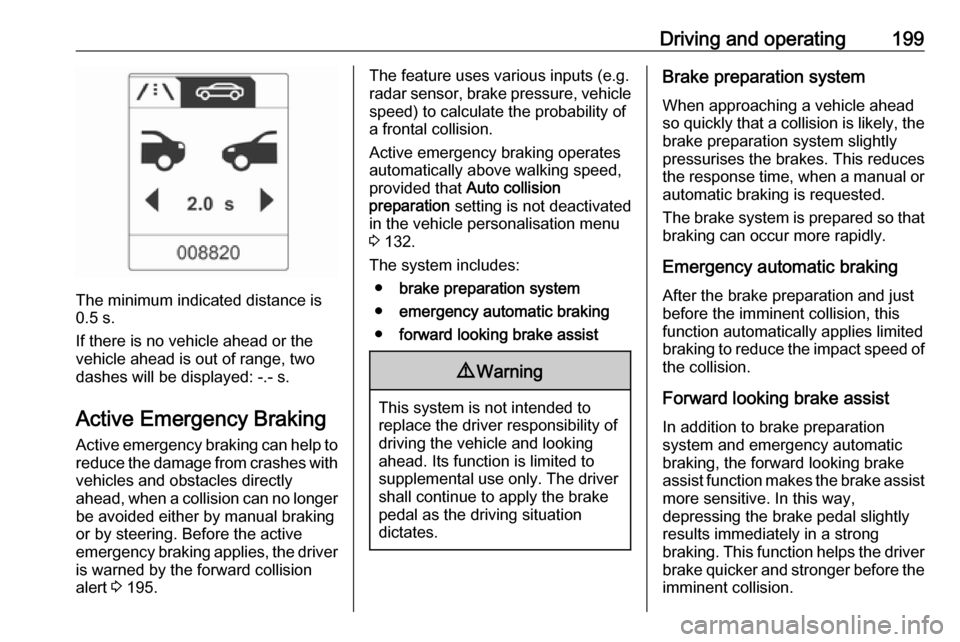
The minimum indicated distance is
0.5 s.
If there is no vehicle ahead or the vehicle ahead is out of range, two
dashes will be displayed: -.- s.
Active Emergency Braking
Active emergency braking can help to reduce the damage from crashes with vehicles and obstacles directly
ahead, when a collision can no longer be avoided either by manual braking
or by steering. Before the active
emergency braking applies, the driver
is warned by the forward collision
alert 3 195.
The feature uses various inputs (e.g.
radar sensor, brake pressure, vehicle speed) to calculate the probability of
a frontal collision.
Active emergency braking operates automatically above walking speed,
provided that Auto collision
preparation setting is not deactivated
in the vehicle personalisation menu
3 132.
The system includes: ● brake preparation system
● emergency automatic braking
● forward looking brake assist9Warning
This system is not intended to
replace the driver responsibility of driving the vehicle and looking
ahead. Its function is limited to
supplemental use only. The driver shall continue to apply the brake
pedal as the driving situation
dictates.
Brake preparation system
When approaching a vehicle ahead
so quickly that a collision is likely, the
brake preparation system slightly
pressurises the brakes. This reduces
the response time, when a manual or automatic braking is requested.
The brake system is prepared so that braking can occur more rapidly.
Emergency automatic braking
After the brake preparation and just
before the imminent collision, this
function automatically applies limited
braking to reduce the impact speed of the collision.
Forward looking brake assist
In addition to brake preparation
system and emergency automatic
braking, the forward looking brake
assist function makes the brake assist more sensitive. In this way,
depressing the brake pedal slightly
results immediately in a strong
braking. This function helps the driver
brake quicker and stronger before the imminent collision.
Page 211 of 343
Driving and operating209
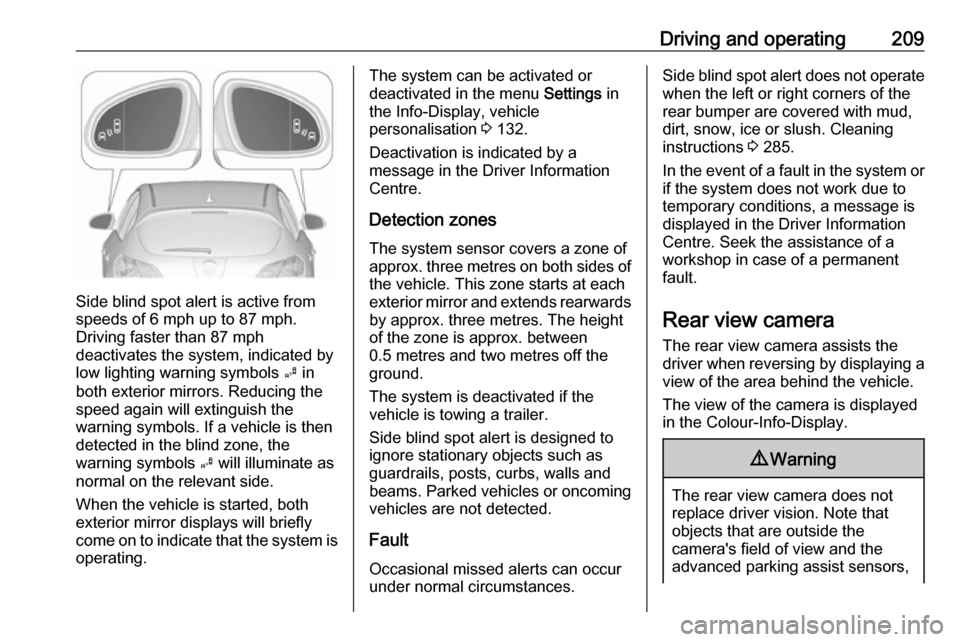
Side blind spot alert is active from
speeds of 6 mph up to 87 mph.
Driving faster than 87 mph
deactivates the system, indicated by
low lighting warning symbols B in
both exterior mirrors. Reducing the speed again will extinguish the
warning symbols. If a vehicle is then
detected in the blind zone, the
warning symbols B will illuminate as
normal on the relevant side.
When the vehicle is started, both exterior mirror displays will briefly
come on to indicate that the system is operating.
The system can be activated or
deactivated in the menu Settings in
the Info-Display, vehicle
personalisation 3 132.
Deactivation is indicated by a
message in the Driver Information
Centre.
Detection zones The system sensor covers a zone of
approx. three metres on both sides of
the vehicle. This zone starts at each
exterior mirror and extends rearwards by approx. three metres. The height
of the zone is approx. between
0.5 metres and two metres off the
ground.
The system is deactivated if the
vehicle is towing a trailer.
Side blind spot alert is designed to ignore stationary objects such as
guardrails, posts, curbs, walls and
beams. Parked vehicles or oncoming
vehicles are not detected.
Fault
Occasional missed alerts can occur
under normal circumstances.Side blind spot alert does not operate when the left or right corners of the
rear bumper are covered with mud,
dirt, snow, ice or slush. Cleaning
instructions 3 285.
In the event of a fault in the system or if the system does not work due to
temporary conditions, a message is
displayed in the Driver Information
Centre. Seek the assistance of a
workshop in case of a permanent
fault.
Rear view camera The rear view camera assists the
driver when reversing by displaying a
view of the area behind the vehicle.
The view of the camera is displayed
in the Colour-Info-Display.9 Warning
The rear view camera does not
replace driver vision. Note that
objects that are outside the
camera's field of view and the
advanced parking assist sensors,
Page 213 of 343

Driving and operating211Display settings
Navi 650/Navi 950 : Brightness can be
set by first pressing and then turning
the outer ring of the multifunction
knob.
CD 600 : Brightness can be set by first
pressing and then turning the
multifunction knob.
Deactivation The camera is deactivated when acertain forward speed is exceeded or
if reverse gear is not engaged for
approx. ten seconds.
Activation or deactivation of the rear
view camera can be changed in the Settings menu in the Info-Display.
Vehicle personalisation 3 132.
Fault
Fault messages are displayed with a 9 on the top line of the Info-Display.
The rear view camera may not
operate properly when:
● The surrounding is dark.
● The sun or the beam of headlights is shining directly into
the camera lens.
● Ice, snow, mud, or anything else covers the camera lens. Clean
the lens, rinse it with water, and
wipe it with a soft cloth.
● The tailgate is not closed correctly.
● The vehicle had a rear end accident.
● There are extreme temperature changes.Traffic sign assistant
Functionality
The traffic sign assistant system detects designated traffic signs via a
front camera and displays them in the Driver Information Centre.
Traffic signs which will be detected
are:
Limit and no passing signs ● speed limit
● no passing
● end of speed limit
● end of no passing
Page 214 of 343
212Driving and operatingRoad signs
Beginning and end of:
● motorways
● A-roads
● play streetsAdd-on signs ● additional hints to traffic signs
● restriction of trailer towing
● tractor constraints
● wet warning
● ice warning
● direction arrows
Speed limit signs are displayed in the
Driver Information Centre until the
next speed limit sign or end of speed
limit is detected or up to a defined sign timeout.
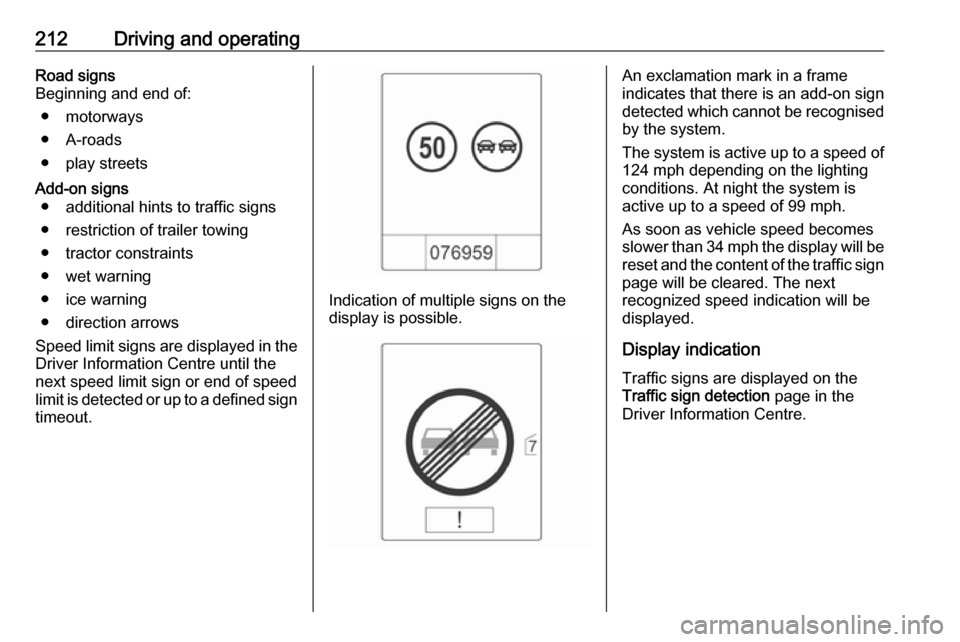
Indication of multiple signs on the
display is possible.
An exclamation mark in a frame
indicates that there is an add-on sign detected which cannot be recognised
by the system.
The system is active up to a speed of 124 mph depending on the lighting
conditions. At night the system is
active up to a speed of 99 mph.
As soon as vehicle speed becomes
slower than 34 mph the display will be
reset and the content of the traffic sign
page will be cleared. The next
recognized speed indication will be
displayed.
Display indication
Traffic signs are displayed on the Traffic sign detection page in the
Driver Information Centre.
Page 216 of 343

214Driving and operatingWhen the Settings page is displayed,select Off to deactivate alert function.
Reactivate by selecting On.
When switching on the ignition, alert function is deactivated.
Pop-up indication is displayed for approx. eight seconds in the Driver
Information Centre.
System reset The content of the traffic sign memory
can be cleared in the Settings menu
of the traffic sign assistant page by
pressing and holding SET/CLR on the
turn signal lever. Upon successful
reset, a chime will sound and the
following symbol is indicated until the next traffic sign is detected.
In some cases, traffic sign assistant is
reset automatically by the system.
Fault
The traffic sign assistant system may
not operate correctly when:
● The area of the windscreen, where the front camera is
located, is not clean.
● Traffic signs are completely or partially covered or difficult to
discern.
● There are adverse environmental
conditions, e.g. heavy rain, snow,direct sunlight or shadows. In this
case No Traffic Sign Detection
due to Weather is indicated in the
Driver Information Centre.
● Traffic signs are incorrectly mounted or damaged.
● Traffic signs do not comply with the Vienna Convention on traffic
signs (Wiener Übereinkommen
über Straßenverkehrszeichen).Caution
The system is intended to help the driver within a defined speed
range to discern certain traffic
signs. Do not ignore traffic signs
which are not displayed by the
system.
The system does not discern any other than the conventional traffic
signs that might give or end a
speed limit.
Do not let this special feature
tempt you into taking risks when
driving.
Always adapt speed to the road
conditions.
Page 217 of 343

Driving and operating215The driver assistance systems donot relieve the driver from full
responsibility for vehicle
operation.
Lane departure warning
The lane departure warning system
observes the lane markings between
which the vehicle is driving via a front camera. The system detects lane
changes and warns the driver in the
event of an unintended lane change
via visual and acoustic signals.
Criteria for the detection of an
unintended lane change are:
● No operation of turn signals.
● No brake pedal operation.
● No active accelerator operation or speeding-up.
● No active steering.
If the driver is active, no warning will
be issued.
Activation
The lane departure warning system is activated by pressing ). The
illuminated LED in the button
indicates that the system is switched
on. When control indicator ) in the
instrument cluster illuminates green, the system is ready to operate.
The system is only operable at
vehicle speeds above 35 mph and if lane markings are available.
When the system recognises an
unintended lane change, the control
indicator ) changes to yellow and
flashes. Simultaneously a chime
sound is activated.
Deactivation
The system is deactivated by
pressing ), the LED in the button
extinguishes.
At speeds below 35 mph the system
is inoperable.
Fault The lane departure warning system
may not operate properly when:
● The windscreen is not clean.
● There are adverse environmental
conditions like heavy rain, snow,
direct sunlight or shadows.
Page 220 of 343

218Driving and operatingThe selected fuel mode is stored andreactivated at the next ignition cycle if
conditions allow.
As soon as the liquid gas tanks are
empty, petrol operation is
automatically engaged until the
ignition is switched off.
When switching automatically
between petrol or gas operation, a
brief delay of engine tractive power
may be noticeable.
Every six months, run the petrol tank
down until control indicator i
illuminates, then refuel. This helps
maintain fuel quality and system
function for petrol operation.
Fill the tank completely at regular
intervals to prevent corrosion in the
tank.
Faults and remedies
If gas mode is not possible, check the following:
● Is there enough liquid gas present?
● Is there enough petrol present for
starting?Due to extreme temperatures in
combination with the gas
composition, it may take slightly
longer before the system switches
from petrol to gas mode.
In extreme situations, the system may
also switch back to petrol mode if the
minimum requirements are not
fulfilled. If conditions allow, it might be
possible to manually switch back to
liquid gas operation.
Seek the assistance of a workshop in the event of all other faults.Caution
Repairs and adjustments may onlybe made by trained specialists in
order to maintain the safety and
warranty on the LPG system.
Liquid gas is given a particular odour
(odorised) so that any leaks can be
detected easily.
9 Warning
If you smell gas in the vehicle or in
the immediate vicinity, switch to petrol mode immediately. No
smoking. No naked flames or
ignition sources.
If possible, close the manual shut-off
valve on the multivalve. The
multivalve is located on the liquid gas
tank in the load compartment,
underneath the rear floor cover.
Turn the thumb wheel clockwise.
Page 221 of 343
Driving and operating219If no further gas odour is perceptiblewhen the manual shut-off valve is
closed, the vehicle can be used in
petrol mode. If the gas odour persists,
do not start the engine. Have the
cause of the fault remedied by a workshop.
When using underground car parks,
follow the instructions of the operator
and local laws.
Notice
In the event of an accident, switch off
the ignition and lights. Close the
manual shut-off valve on multivalve.
Refuelling9 Danger
Before refuelling, switch off
ignition and any external heaters
with combustion chambers.
Switch off any mobile phones.
Follow the operating and safety
instructions of the filling station
when refuelling.
9 Danger
Fuel is flammable and explosive.
No smoking. No naked flames or
sparks.
If you can smell fuel in your
vehicle, have the cause of this
remedied immediately by a
workshop.
Caution
In case of misfuelling, do not
switch on ignition.
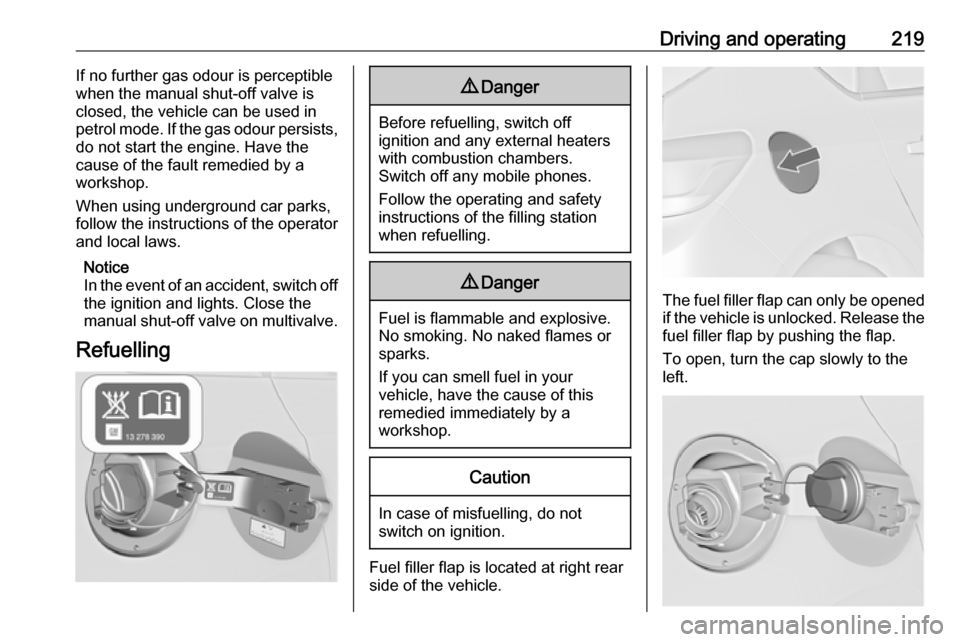
Fuel filler flap is located at right rear
side of the vehicle.
The fuel filler flap can only be opened
if the vehicle is unlocked. Release the
fuel filler flap by pushing the flap.
To open, turn the cap slowly to the left.