engine oil VAUXHALL ASTRA J 2016.5 Owner's Manual
[x] Cancel search | Manufacturer: VAUXHALL, Model Year: 2016.5, Model line: ASTRA J, Model: VAUXHALL ASTRA J 2016.5Pages: 343, PDF Size: 10.44 MB
Page 20 of 343
18In briefStarting off
Check before starting off ● Tyre pressure and condition 3 264, 3 308.
● Engine oil level and fluid levels 3 231.
● All windows, mirrors, exterior lighting and number plates are
free from dirt, snow and ice and
are operational.
● Proper position of mirrors, seats, and seat belts 3 30, 3 39,
3 50.
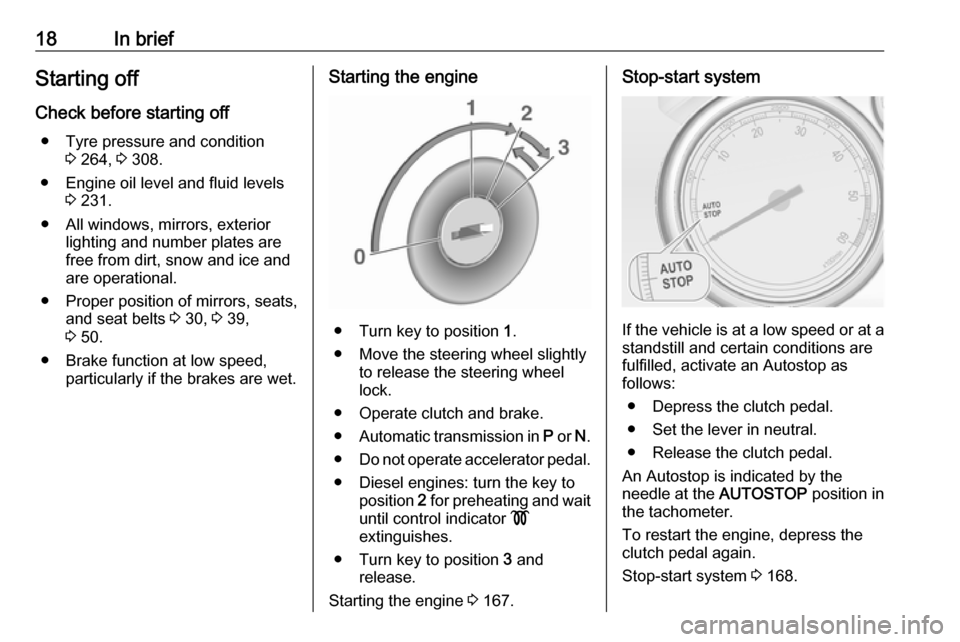
● Brake function at low speed, particularly if the brakes are wet.Starting the engine
● Turn key to position 1.
● Move the steering wheel slightly to release the steering wheel
lock.
● Operate clutch and brake.
● Automatic transmission in P or N.
● Do not operate accelerator pedal.
● Diesel engines: turn the key to position 2 for preheating and wait
until control indicator !
extinguishes.
● Turn key to position 3 and
release.
Starting the engine 3 167.
Stop-start system
If the vehicle is at a low speed or at a
standstill and certain conditions are
fulfilled, activate an Autostop as
follows:
● Depress the clutch pedal.
● Set the lever in neutral.
● Release the clutch pedal.
An Autostop is indicated by the
needle at the AUTOSTOP position in
the tachometer.
To restart the engine, depress the
clutch pedal again.
Stop-start system 3 168.
Page 102 of 343

100Instruments and controlsInstruments and
controlsControls ..................................... 101
Steering wheel adjustment ......101
Steering wheel controls ...........101
Heated steering wheel .............101
Horn ......................................... 102
Windscreen wiper/washer .......102
Rear window wiper/washer .....104
Outside temperature ................104
Clock ....................................... 105
Power outlets ........................... 106
Cigarette lighter .......................107
Ashtrays .................................. 107
Warning lights, gauges and indi‐ cators ......................................... 108
Instrument cluster ....................108
Speedometer ........................... 108
Odometer ................................ 108
Trip odometer .......................... 108
Tachometer ............................. 108
Fuel gauge .............................. 109
Fuel selector ............................ 109
Engine coolant temperature gauge ..................................... 109
Service display ........................ 110Control indicators ....................111
Turn signal ............................... 114
Seat belt reminder ...................114
Airbag and belt tensioners .......114
Airbag deactivation ..................114
Charging system .....................115
Malfunction indicator light ........115
Service vehicle soon ...............115
Brake and clutch system .........115
Operate pedal .......................... 115
Electric parking brake ..............115
Electric parking brake fault ......116
Antilock brake system (ABS) ...116
Upshift ..................................... 116
Power steering ........................ 116
Lane departure warning ..........116
Ultrasonic parking assist .........117
Electronic Stability Control off . 117
Electronic Stability Control and Traction Control system .........117
Traction Control system off .....117
Preheating ............................... 117
Diesel particle filter ..................117
Tyre pressure monitoring system .................................... 118
Engine oil pressure ..................118
Low fuel ................................... 118
Immobiliser .............................. 119
Reduced engine power ...........119
Exterior light ............................ 119High beam............................... 119
High beam assist .....................119
Adaptive forward lighting .........119
Fog light ................................... 119
Rear fog light ........................... 119
Low washer fluid ......................119
Cruise control .......................... 119
Adaptive cruise control ............119
Vehicle detected ahead ...........120
Door open ................................ 120
Information displays ...................120
Driver Information Centre ........120
Graphic-Info-Display, Colour- Info-Display ............................ 124
Smartphone controller .............126
Vehicle messages ......................126
Warning chimes .......................129
Battery voltage ........................ 129
Trip computer ............................. 130
Vehicle personalisation ..............132
OnStar ....................................... 137
Page 112 of 343
110Instruments and controlsDisplays the coolant temperature.left area:engine operating
temperature not yet
reachedcentral
area:normal operating
temperatureright area:temperature too highCaution
If engine coolant temperature is
too high, stop vehicle, switch off
engine. Danger to engine. Check
coolant level.
Service display
The engine oil life system lets you
know when to change the engine oil
and filter. Based on driving
conditions, the interval at which an
engine oil and filter change will be
indicated can vary considerably.
To display the remaining engine oil
life duration use turn signal lever
buttons:
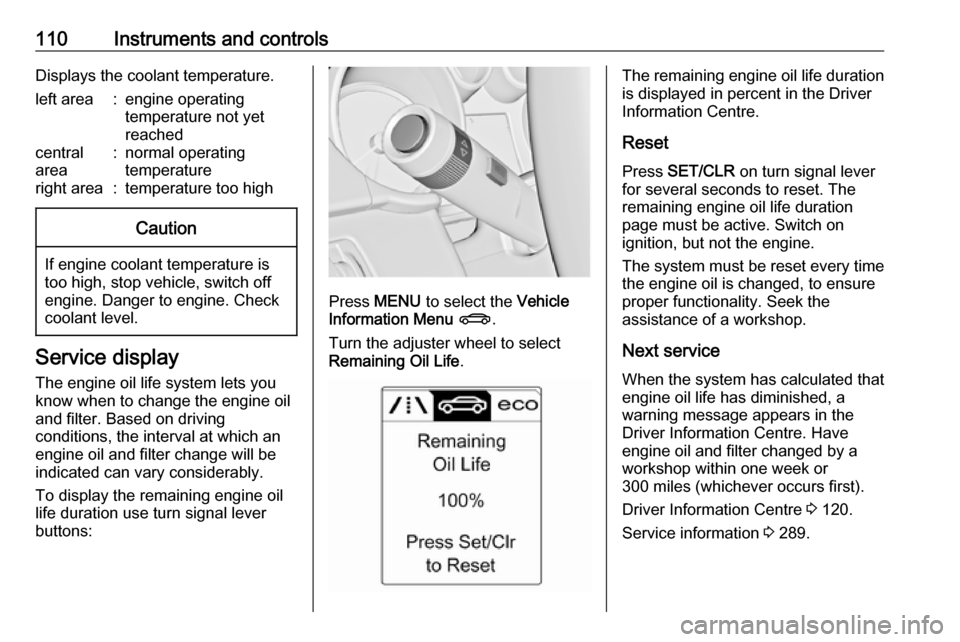
Press MENU to select the Vehicle
Information Menu X .
Turn the adjuster wheel to select
Remaining Oil Life .
The remaining engine oil life duration
is displayed in percent in the Driver
Information Centre.
Reset Press SET/CLR on turn signal lever
for several seconds to reset. The
remaining engine oil life duration
page must be active. Switch on
ignition, but not the engine.
The system must be reset every time
the engine oil is changed, to ensure
proper functionality. Seek the
assistance of a workshop.
Next service When the system has calculated that
engine oil life has diminished, a
warning message appears in the
Driver Information Centre. Have
engine oil and filter changed by a
workshop within one week or
300 miles (whichever occurs first).
Driver Information Centre 3 120.
Service information 3 289.
Page 115 of 343
Instruments and controls113Control indicators in the centre
console
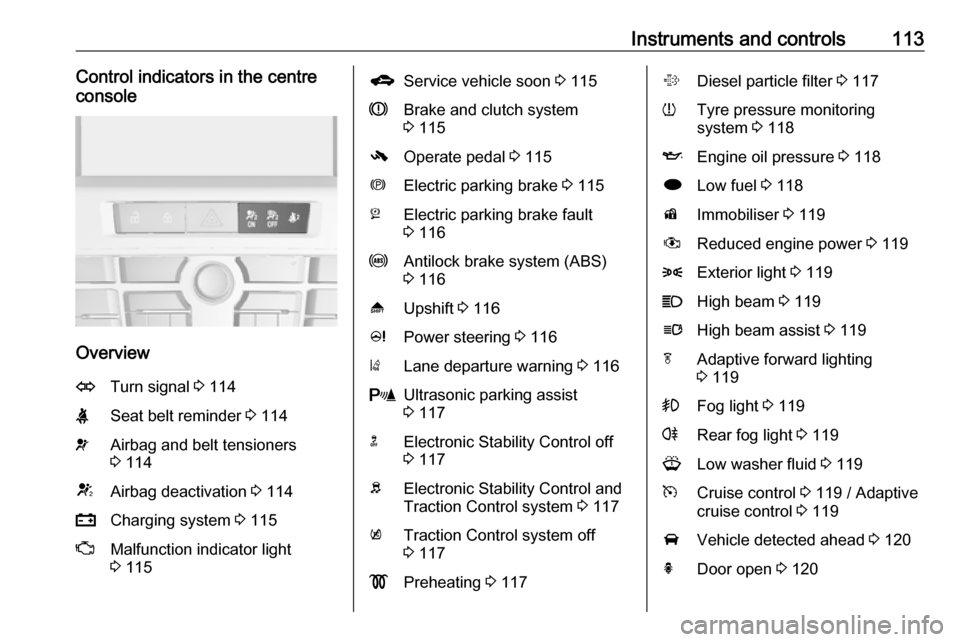
Overview
OTurn signal 3 114XSeat belt reminder 3 114vAirbag and belt tensioners
3 114VAirbag deactivation 3 114pCharging system 3 115ZMalfunction indicator light
3 115gService vehicle soon 3 115RBrake and clutch system
3 115-Operate pedal 3 115mElectric parking brake 3 115jElectric parking brake fault
3 116uAntilock brake system (ABS)
3 116[Upshift 3 116cPower steering 3 116)Lane departure warning 3 116rUltrasonic parking assist
3 117nElectronic Stability Control off
3 117bElectronic Stability Control and
Traction Control system 3 117kTraction Control system off
3 117!Preheating 3 117%Diesel particle filter 3 117wTyre pressure monitoring
system 3 118IEngine oil pressure 3 118iLow fuel 3 118dImmobiliser 3 119#Reduced engine power 3 1198Exterior light 3 119CHigh beam 3 119lHigh beam assist 3 119fAdaptive forward lighting
3 119>Fog light 3 119rRear fog light 3 119GLow washer fluid 3 119mCruise control 3 119 / Adaptive
cruise control 3 119AVehicle detected ahead 3 120hDoor open 3 120
Page 120 of 343
118Instruments and controlsFlashes
The maximum filling level of the filter is reached. Start cleaning process
immediately to avoid damage to the
engine.
Diesel particle filter 3 171, Stop-start
system 3 168.
Tyre pressure monitoring
system
w illuminates or flashes yellow.
Illuminates
Tyre pressure loss. Stop immediately
and check tyre pressure.
Flashes
Fault in system or tyre without
pressure sensor mounted ( e.g. spare
wheel). After 60-90 seconds the control indicator illuminates
continuously. Consult a workshop.
Engine oil pressure
I illuminates red.Illuminates when the ignition is
switched on and extinguishes shortly
after the engine starts.
Illuminates when the engine is
runningCaution
Engine lubrication may be
interrupted. This may result in
damage to the engine and/or
locking of the drive wheels.
1. Depress clutch.
2. Select neutral gear, set selector lever to N.
3. Move out of the flow of traffic as quickly as possible without
impeding other vehicles.
4. Switch off ignition.
9 Warning
When the engine is off,
considerably more force is needed
to brake and steer. During an
Autostop the brake servo unit will still be operational.
Do not remove key until vehicle is stationary, otherwise the steeringwheel lock could engage
unexpectedly.
Check oil level before seeking the
assistance of a workshop 3 231.
Low fuel
i illuminates or flashes yellow.
Illuminates
Level in fuel tank is too low.
Flashes
Fuel used up. Refuel immediately.
Never run the tank dry.
Catalytic converter 3 172.
Bleeding the diesel fuel system
3 236.
Page 124 of 343
122Instruments and controls
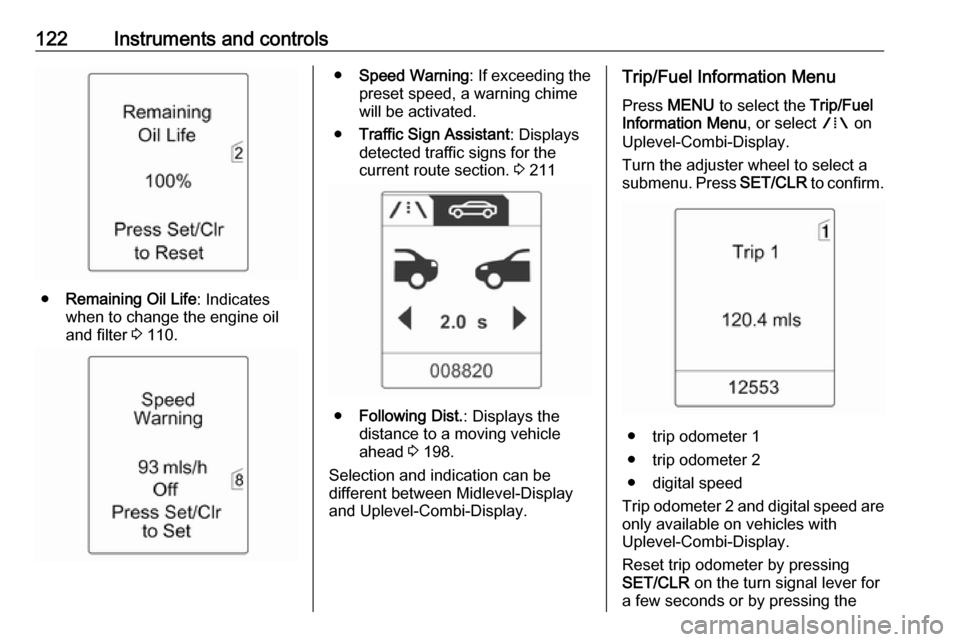
●Remaining Oil Life : Indicates
when to change the engine oil and filter 3 110.
● Speed Warning : If exceeding the
preset speed, a warning chime will be activated.
● Traffic Sign Assistant : Displays
detected traffic signs for the
current route section. 3 211
● Following Dist. : Displays the
distance to a moving vehicle ahead 3 198.
Selection and indication can be
different between Midlevel-Display
and Uplevel-Combi-Display.
Trip/Fuel Information Menu
Press MENU to select the Trip/Fuel
Information Menu , or select W on
Uplevel-Combi-Display.
Turn the adjuster wheel to select a
submenu. Press SET/CLR to confirm.
● trip odometer 1
● trip odometer 2
● digital speed
Trip odometer 2 and digital speed are
only available on vehicles with
Uplevel-Combi-Display.
Reset trip odometer by pressing
SET/CLR on the turn signal lever for
a few seconds or by pressing the
Page 130 of 343

128Instruments and controlsNo.Vehicle message56Tyre pressure imbalance on
front axle57Tyre pressure imbalance on
rear axle58Tyres without TPMS sensors
detected59Open then close driver window60Open then close front
passenger window61Open then close rear left
window62Open then close rear right
window65Theft attempted66Service anti-theft alarm system67Service steering wheel lock68Service power steering69Service suspension system70Service level control systemNo.Vehicle message71Service rear axle74Service AFL75Service air conditioning76Service side blind spot alert
system77Service lane departure warning79Top up engine oil81Service transmission82Change engine oil soon83Service adaptive cruise control84Engine power is reduced89Service vehicle soon94Shift to park position before
exiting95Service airbag128Bonnet open134Park assist fault, clean bumper136Service parking assistNo.Vehicle message145Check washer fluid level174Low vehicle battery258Parking assist off
Vehicle messages on the
Uplevel-Combi-Display
The vehicle messages are displayed
as text. Follow the instructions given
in the messages.
Page 141 of 343

Instruments and controls139Wi-Fi hotspot
The Wi-Fi hotspot of the vehicle
provides internet connectivity with a
maximum speed of 4G/LTE.
Notice
The Wi-Fi hotspot functionality is not
available for all markets.
Up to seven devices may be
connected.
To connect a mobile device with the
Wi-Fi hotspot:
1. Press j and then select Wi-Fi
settings on the Info-Display. The
settings displayed include the Wi- Fi hotspot name (SSID),
password and connection type.
2. Start a Wi-Fi network search on your mobile device.
3. Select your vehicle hotspot (SSID) when listed.
4. When prompted, enter the password on your mobile device.
Notice
To change the SSID or password, press Z and talk to an advisor or log
in to your account.To switch off the Wi-Fi hotspot
functionality, press Z to call an
advisor.
Smartphone app
With the My Vauxhall smartphone
app, some vehicle functions can be
operated remotely.
The following functions are available: ● Lock or unlock vehicle.
● Honk horn or flash lights.
● Check fuel level, engine oil life and tyre pressure (only with tyre
pressure monitoring system).
● Send navigation destination to the vehicle, if equipped with a
built-in navigation system.
● Locate vehicle on a map.
● Manage Wi-Fi settings.
To operate these functions, download
the app from Apple's App Store or
Google Play Store.Remote control
If desired, use any phone to call an
advisor, who can remotely operate
specific vehicle functions. Find the
respective OnStar phone number on
our country-specific website.
The following functions are available: ● Lock or unlock vehicle.
● Provide information on the vehicle location.
● Honk horn or flash lights.
Stolen vehicle assistance
If the vehicle is stolen, report the theft
to the authorities and request OnStar
stolen vehicle assistance. Use any
phone to call an advisor. Find the
respective OnStar phone number on
our country-specific website.
OnStar can provide support in
locating and recovering the vehicle.Theft alert
When the anti-theft alarm system is
triggered, a notification is sent to
OnStar. You are then informed about
this event by text message or email.
Page 168 of 343

166Driving and operatingDriving hints
Control of the vehicle
Never coast with engine not
running (except during Autostop)
Many systems will not function in this
situation (e.g. brake servo unit, power steering). Driving in this manner is a
danger to yourself and others. All
systems function during an Autostop,
but there will be a controlled reduction
in power steering assist and vehicle
speed is reduced.
Stop-start system 3 168.
Idle boost
If charging of the vehicle battery is
required due to battery condition, the
power output of the generator must
be increased. This will be achieved by an idle boost which may be audible.
A message is displayed in the Driver
Information Centre.Pedals
To ensure the pedal travel is
uninhibited, there must be no mats in
the area of the pedals.
Use only floor mats which fit properly and are fixed by the retainers on the
driver's side.
Steering
If power steering assist is lost
because the engine stops or due to a system malfunction, the vehicle can
be steered but may require increased
effort.
Control indicator c 3 116.Caution
Vehicles equipped with hydraulic
power steering:
If the steering wheel is turned until it reaches the end of its travel, and
is held in that position for more
than 15 seconds, damage may
occur to the power steering
system and there may be loss of
power steering assist.
Starting and operating
New vehicle running-in
Do not brake unnecessarily hard for
the first few journeys.
During the first drive, smoke may
occur because of wax and oil
evaporating off the exhaust system.
Park the vehicle in the open for a
while after the first drive and avoid
inhaling the fumes.
During the running-in period fuel and engine oil consumption may be
higher and the cleaning process of the diesel particle filter may take
place more often. Autostop may be
inhibited to allow for charging the
battery.
Diesel particle filter 3 171.
Page 169 of 343

Driving and operating167Ignition switch positions0:ignition off1:steering wheel lock released,
ignition off2:ignition on, for diesel engine:
preheating3:starting
Retained power off
The following electronic systems can
work until the driver's door is opened
or at the latest for ten minutes after the ignition is switched off:
● power windows
● sunroof
● power outlets
Power to the Infotainment system will continue to operate for 30 minutes or
until the key is removed from the ignition switch, regardless of whether
any door will be opened.
Starting the engine
Manual transmission: operate clutch.
Automatic transmission: operate
brake and move the selector lever to
P or N.
Do not operate the accelerator pedal.
Diesel engine: turn the key to position 2 for preheating until control
indicator ! extinguishes.
Turn the key briefly to position 3 and
release: an automatic procedure
operates the starter with a short delay
as long as the engine is running, see
Automatic Starter Control.
Before restarting or to switch off the
engine, turn the key back to position
0 .
During an Autostop, the engine can
be started by depressing the clutch
pedal.
Starting the vehicle at low
temperatures
Starting the engine without additional
heaters is possible down to -25 °С for diesel engines and -30 °C for petrol
engines. Required is an engine oil
with the correct viscosity, the correct
fuel, performed services and a
sufficiently charged vehicle battery.
With temperatures below -30 °C the
automatic transmission needs a
warming phase of approx. five
minutes. The selector lever must be
in position P.