wheel VAUXHALL ASTRA J 2016 Owner's Guide
[x] Cancel search | Manufacturer: VAUXHALL, Model Year: 2016, Model line: ASTRA J, Model: VAUXHALL ASTRA J 2016Pages: 341, PDF Size: 10.35 MB
Page 78 of 341
76Storage
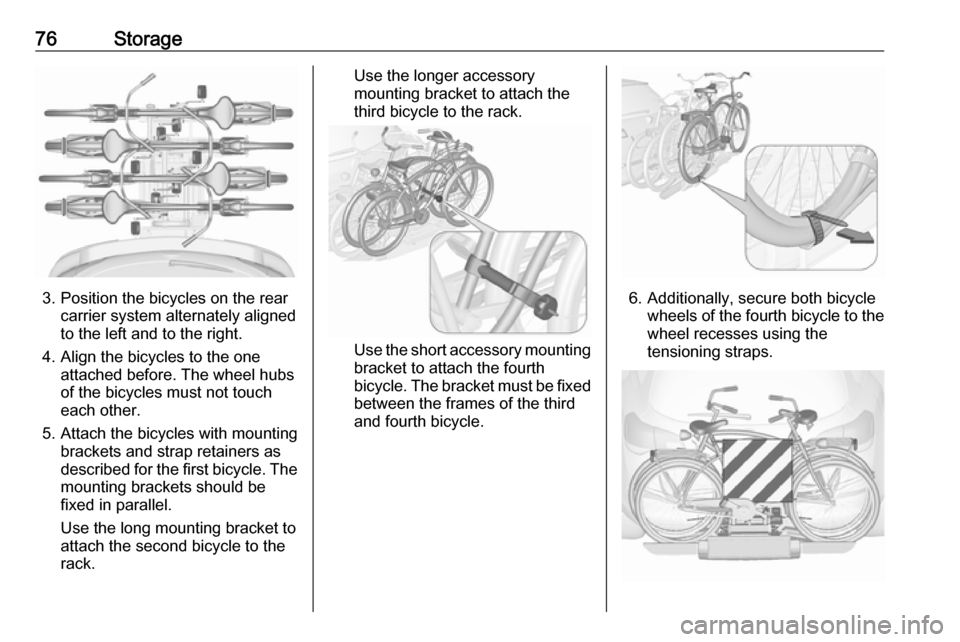
3. Position the bicycles on the rearcarrier system alternately aligned
to the left and to the right.
4. Align the bicycles to the one attached before. The wheel hubsof the bicycles must not touch
each other.
5. Attach the bicycles with mounting brackets and strap retainers as
described for the first bicycle. The
mounting brackets should be
fixed in parallel.
Use the long mounting bracket to
attach the second bicycle to the
rack.
Use the longer accessory
mounting bracket to attach the
third bicycle to the rack.
Use the short accessory mounting
bracket to attach the fourth
bicycle. The bracket must be fixed
between the frames of the third
and fourth bicycle.
6. Additionally, secure both bicycle wheels of the fourth bicycle to thewheel recesses using the
tensioning straps.
Page 79 of 341
Storage77It is recommended to attach a
warning sign at the rearmost bicycle
to increase visibility.
Fold the rear carrier system
backwards
The rear carrier system can be folded
backwards to get access to the load
compartment.
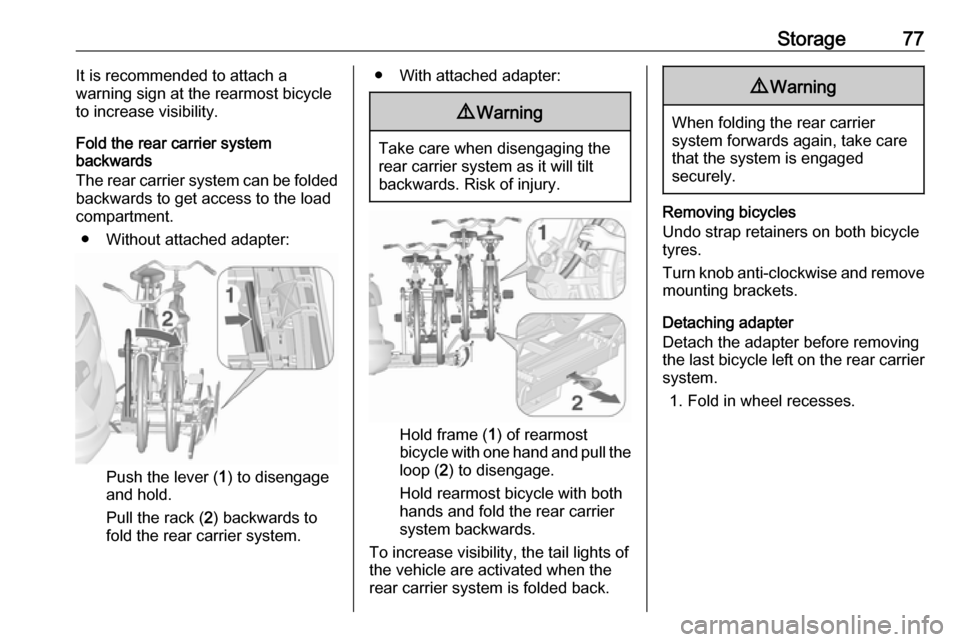
● Without attached adapter:
Push the lever ( 1) to disengage
and hold.
Pull the rack ( 2) backwards to
fold the rear carrier system.
● With attached adapter:9 Warning
Take care when disengaging the
rear carrier system as it will tilt
backwards. Risk of injury.
Hold frame ( 1) of rearmost
bicycle with one hand and pull the
loop ( 2) to disengage.
Hold rearmost bicycle with both
hands and fold the rear carrier
system backwards.
To increase visibility, the tail lights of
the vehicle are activated when the
rear carrier system is folded back.
9 Warning
When folding the rear carrier
system forwards again, take care that the system is engaged
securely.
Removing bicycles
Undo strap retainers on both bicycle
tyres.
Turn knob anti-clockwise and remove
mounting brackets.
Detaching adapter
Detach the adapter before removing the last bicycle left on the rear carrier
system.
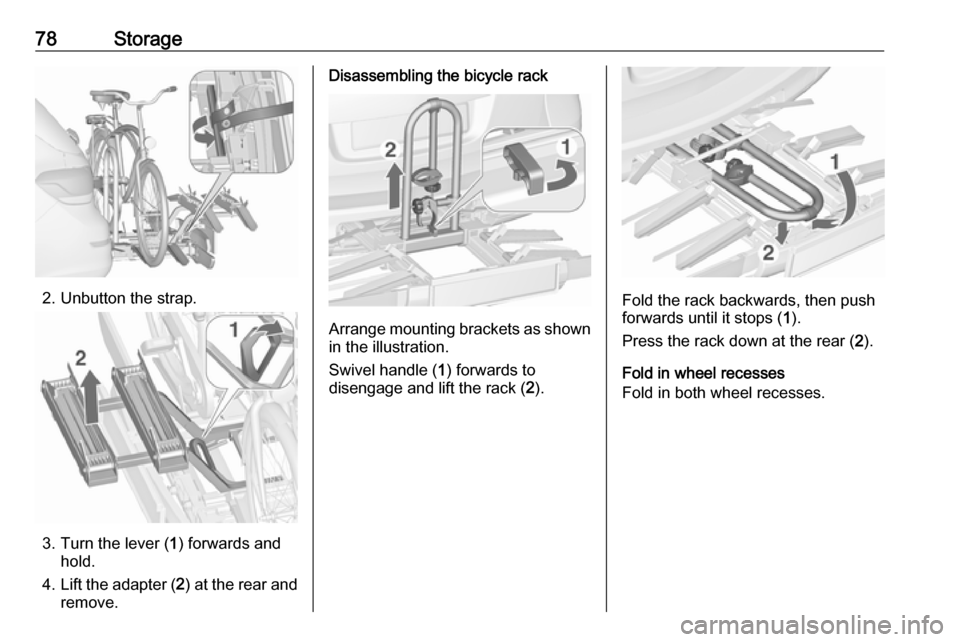
1. Fold in wheel recesses.
Page 80 of 341
78Storage
2. Unbutton the strap.
3. Turn the lever (1) forwards and
hold.
4. Lift the adapter ( 2) at the rear and
remove.
Disassembling the bicycle rack
Arrange mounting brackets as shown in the illustration.
Swivel handle ( 1) forwards to
disengage and lift the rack ( 2).
Fold the rack backwards, then push
forwards until it stops ( 1).
Press the rack down at the rear ( 2).
Fold in wheel recesses
Fold in both wheel recesses.
Page 81 of 341

Storage79
Stow the strap retainers accurately.
Unlock the rear carrier system
Swivel both clamping levers inwards
as far as they will go.
Fold in tail lamps
Swivel in both tail lamps.
Fold in number plate holder
Lift the number plate holder and fold
it forwards.
Retracting the rear carrier systemCaution
Take care that all foldable parts,
e.g. wheel recesses and mounting
brackets, are stowed accurately.
Otherwise the rear carrier system
may get damaged when trying to
retract it.
Push the release lever up and hold.
Lift the system slightly and push it into the bumper until it engages.
Release lever must return to original
position.
9 Warning
If the system cannot be correctly
engaged, please seek the
assistance of a workshop.
Page 100 of 341

98Instruments and controlsInstruments and
controlsControls ....................................... 99
Steering wheel adjustment ........99
Steering wheel controls .............99
Heated steering wheel ...............99
Horn ......................................... 100
Windscreen wiper/washer .......100
Rear window wiper/washer .....102
Outside temperature ................102
Clock ....................................... 103
Power outlets ........................... 104
Cigarette lighter .......................105
Ashtrays .................................. 105
Warning lights, gauges and indi‐ cators ......................................... 106
Instrument cluster ....................106
Speedometer ........................... 106
Odometer ................................ 106
Trip odometer .......................... 106
Tachometer ............................. 106
Fuel gauge .............................. 107
Fuel selector ............................ 107
Engine coolant temperature gauge ..................................... 107
Service display ........................ 108Control indicators ....................109
Turn signal ............................... 112
Seat belt reminder ...................112
Airbag and belt tensioners .......112
Airbag deactivation ..................112
Charging system .....................113
Malfunction indicator light ........113
Service vehicle soon ...............113
Brake and clutch system .........113
Operate pedal .......................... 113
Electric parking brake ..............113
Electric parking brake fault ......114
Antilock brake system (ABS) ...114
Upshift ..................................... 114
Power steering ........................ 114
Lane departure warning ..........114
Ultrasonic parking assist .........115
Electronic Stability Control off . 115
Electronic Stability Control and Traction Control system .........115
Traction Control system off .....115
Preheating ............................... 115
Diesel particle filter ..................115
Tyre pressure monitoring system .................................... 116
Engine oil pressure ..................116
Low fuel ................................... 116
Immobiliser .............................. 117
Reduced engine power ...........117
Exterior light ............................ 117High beam............................... 117
High beam assist .....................117
Adaptive forward lighting .........117
Fog light ................................... 117
Rear fog light ........................... 117
Low washer fluid ......................117
Cruise control .......................... 117
Adaptive cruise control ............117
Vehicle detected ahead ...........118
Door open ................................ 118
Information displays ...................118
Driver Information Centre ........118
Graphic-Info-Display, Colour- Info-Display ............................ 122
Smartphone controller .............124
Vehicle messages ......................124
Warning chimes .......................127
Battery voltage ........................ 127
Trip computer ............................. 128
Vehicle personalisation ..............130
OnStar® system ........................135
Page 101 of 341
Instruments and controls99Controls
Steering wheel adjustment
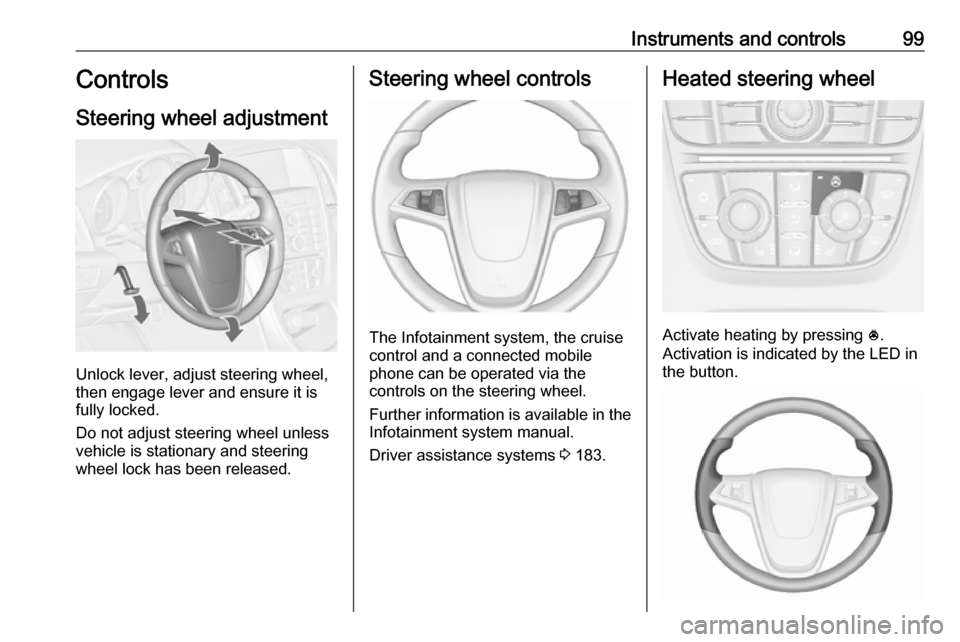
Unlock lever, adjust steering wheel,
then engage lever and ensure it is
fully locked.
Do not adjust steering wheel unless
vehicle is stationary and steering
wheel lock has been released.
Steering wheel controls
The Infotainment system, the cruise
control and a connected mobile
phone can be operated via the
controls on the steering wheel.
Further information is available in the
Infotainment system manual.
Driver assistance systems 3 183.
Heated steering wheel
Activate heating by pressing *.
Activation is indicated by the LED in
the button.
Page 102 of 341

100Instruments and controlsThe recommended grip areas of the
steering wheel are heated quicker
and to a higher temperature than the
other areas.
Heating is operational when the
engine is running and during an
Autostop.
Stop-start system 3 166.
Horn
Press j.
Windscreen wiper/washer
Windscreen wiperHI:fastLO:slowINT:interval wiping or automatic
wiping with rain sensorOFF:off
For a single wipe when the
windscreen wiper is off, press the
lever down to position 1x.
Do not use if the windscreen is frozen.
Switch off in car washes.
Adjustable wiper interval
Wiper lever in position INT.
Turn the adjuster wheel to adjust the
desired wipe interval:
short interval:turn adjuster
wheel upwardslong interval:turn adjuster
wheel downwards
Page 103 of 341

Instruments and controls101Automatic wiping with rain sensorINT:automatic wiping with rain
sensor
The rain sensor detects the amount of water on the windscreen and
automatically regulates the frequency
of the windscreen wiper.
If the wiper frequency is above
20 seconds, the wiper arm moves
slightly down to the park position.
Adjustable sensitivity of the rain
sensor
Turn the adjuster wheel to adjust the
sensitivity:
low sensitivity:turn adjuster
wheel downwardshigh sensitivity:turn adjuster
wheel upwards
Keep the sensor free from dust, dirt
and ice.
Windscreen and headlight
washer
Page 110 of 341
108Instruments and controlsDisplays the coolant temperature.left area:engine operating
temperature not yet
reachedcentral
area:normal operating
temperatureright area:temperature too highCaution
If engine coolant temperature is
too high, stop vehicle, switch off
engine. Danger to engine. Check
coolant level.
Service display
The engine oil life system lets you
know when to change the engine oil
and filter. Based on driving
conditions, the interval at which an
engine oil and filter change will be
indicated can vary considerably.
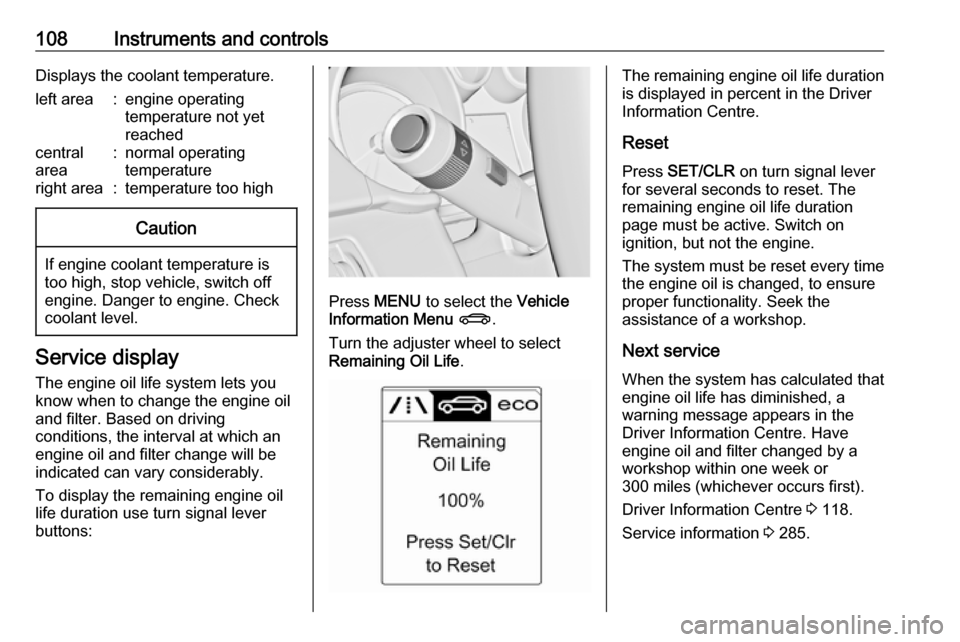
To display the remaining engine oil
life duration use turn signal lever
buttons:
Press MENU to select the Vehicle
Information Menu X .
Turn the adjuster wheel to select
Remaining Oil Life .
The remaining engine oil life duration
is displayed in percent in the Driver
Information Centre.
Reset Press SET/CLR on turn signal lever
for several seconds to reset. The
remaining engine oil life duration
page must be active. Switch on
ignition, but not the engine.
The system must be reset every time
the engine oil is changed, to ensure
proper functionality. Seek the
assistance of a workshop.
Next service When the system has calculated that
engine oil life has diminished, a
warning message appears in the
Driver Information Centre. Have
engine oil and filter changed by a
workshop within one week or
300 miles (whichever occurs first).
Driver Information Centre 3 118.
Service information 3 285.
Page 118 of 341
116Instruments and controlsFlashes
The maximum filling level of the filter is reached. Start cleaning process
immediately to avoid damage to the
engine.
Diesel particle filter 3 169, Stop-start
system 3 166.
Tyre pressure monitoring
system
w illuminates or flashes yellow.
Illuminates
Tyre pressure loss. Stop immediately
and check tyre pressure.
Flashes
Fault in system or tyre without
pressure sensor mounted ( e.g. spare
wheel). After 60-90 seconds the control indicator illuminates
continuously. Consult a workshop.
Engine oil pressure
I illuminates red.Illuminates when the ignition is
switched on and extinguishes shortly
after the engine starts.
Illuminates when the engine is
runningCaution
Engine lubrication may be
interrupted. This may result in
damage to the engine and/or
locking of the drive wheels.
1. Depress clutch.
2. Select neutral gear, set selector lever to N.
3. Move out of the flow of traffic as quickly as possible without
impeding other vehicles.
4. Switch off ignition.
9 Warning
When the engine is off,
considerably more force is needed
to brake and steer. During an
Autostop the brake servo unit will still be operational.
Do not remove key until vehicle is stationary, otherwise the steeringwheel lock could engage
unexpectedly.
Check oil level before seeking the
assistance of a workshop 3 228.
Low fuel
i illuminates or flashes yellow.
Illuminates
Level in fuel tank is too low.
Flashes
Fuel used up. Refuel immediately.
Never run the tank dry.
Catalytic converter 3 170.
Bleeding the diesel fuel system
3 233.