navi VAUXHALL ASTRA K 2020 Infotainment system
[x] Cancel search | Manufacturer: VAUXHALL, Model Year: 2020, Model line: ASTRA K, Model: VAUXHALL ASTRA K 2020Pages: 85, PDF Size: 5.78 MB
Page 17 of 85
Navigation17NavigationNavigation system.......................17
Connected navigation ..................18Navigation system
This application is only applicable to
Multimedia Navi Pro.
For each profile, the terms and
conditions and a privacy statement of
the navigation function need to be
accepted when starting the
navigation application for the first
time. After a short introduction about
the connected navigation feature,
also a privacy statement of the
predictive navigation function needs
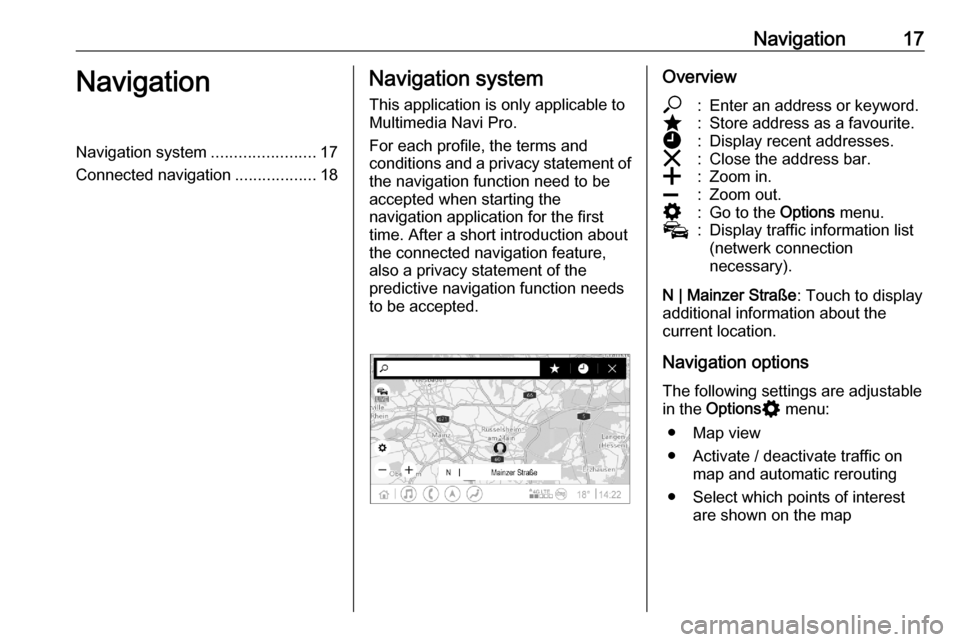
to be accepted.Overview*:Enter an address or keyword.;:Store address as a favourite.':Display recent addresses.&:Close the address bar.g:Zoom in.h:Zoom out.%:Go to the Options menu.v:Display traffic information list
(netwerk connection
necessary).
N | Mainzer Straße : Touch to display
additional information about the
current location.
Navigation options
The following settings are adjustable
in the Options % menu:
● Map view
● Activate / deactivate traffic on map and automatic rerouting
● Select which points of interest are shown on the map
Page 18 of 85
18Navigation●Select the routing options and the
map colours, look for map
updates, change the volume of
the voice prompts, change home
and work address, etc.
● Indicate routes that should be avoided
● Edit destinations
Starting a route guidance 1. Touch * to display the keyboard.
2. Enter an address, choose a favourite or choose a point of
interest.
Points of interest are sorted by
different categories (fuel, parking,
food, etc.).
3. Touch Go and the route guidance
is started.
Different routes can also be
displayed before touching Go.
It is possible to enter a second
destination which will be added
before the first destination. The order
of the destinations can be changed in the Options % menu.Active route guidance
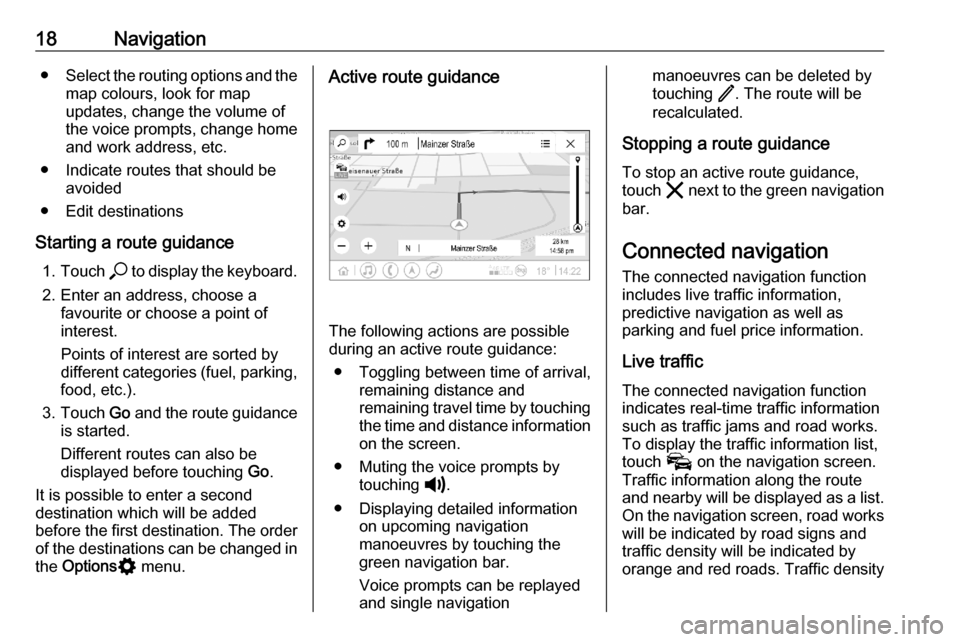
The following actions are possible
during an active route guidance:
● Toggling between time of arrival, remaining distance and
remaining travel time by touching
the time and distance information on the screen.
● Muting the voice prompts by touching ?.
● Displaying detailed information on upcoming navigation
manoeuvres by touching the
green navigation bar.
Voice prompts can be replayed
and single navigation
manoeuvres can be deleted by
touching /. The route will be
recalculated.
Stopping a route guidance To stop an active route guidance,
touch & next to the green navigation
bar.
Connected navigationThe connected navigation function
includes live traffic information,
predictive navigation as well as
parking and fuel price information.
Live traffic The connected navigation function
indicates real-time traffic information
such as traffic jams and road works.
To display the traffic information list,
touch v on the navigation screen.
Traffic information along the route and nearby will be displayed as a list.
On the navigation screen, road works
will be indicated by road signs and
traffic density will be indicated by
orange and red roads. Traffic density
Page 19 of 85

Navigation19will also be indicated when the traffic
information list is empty due to no
incidents like road works or accidents.
Notice
Using the connected navigation
function consumes mobile data.
Additional costs could emerge.
Network connection
To use the connected navigation
function, a network connection is
necessary. A mobile hotspot, e.g.
mobile phone or mobile Wi-Fi stick,
can be used.
When connected to a hotspot, y will
appear in the bottom bar. If a mobile
phone is connected via Bluetooth,
y will only appear for a few seconds
but y will appear in the extended
status view.
Connected navigation will be
indicated by the word LIVE on the
traffic symbol v on the navigation
screen.
Notice
When no traffic information are
available although LIVE is indicated
on the traffic symbol v, thenetwork connection might be
interrupted. Wait some minutes until
the network connection is built up
again.
In some countries, traffic information
can also be received via FM TMC and DAB+ TPEG when no network
connection is available.
Predictive navigationPredictive navigation is a
personalised and increasingly useful
function that detects common
destinations like home and work.
Additionally, the predictive navigation
function understands the driver's
patterns and uses historical driving
and traffic data to predict usual traffic conditions.
To activate or deactivate the
predictive navigation function, go to
the homescreen and select
Navigation I Options % I Settings .
Parking and fuel price information
Depending on the country, the
connected navigation function
indicates parking and fuel price
information. When the vehicle isreaching a densely populated
destination, and if the system
determines that parking may be
limited then it will attempt to display
nearby parking destinations with price information if available. The function
also indicates real-time fuel prices of participating petrol stations.
To display the parking and fuel prices
as well as opening hours and
telephone numbers, if available,
touch the point of interest on the map or see the results of the points of
interest search.
Due to different update rates of the
petrol stations and the navigation
system, the fuel prices can
temporarily vary.
Online map updates
The navigation map can be updated
up to four times a year. The updates
are based on the driving patterns by
considering updates of typically
driven areas and overlapping
countries.
To update the navigation map, a
network connection is necessary. To check for updates, go to the
Page 20 of 85

20Navigationhomescreen and select Navigation I
Options % I Settings . If desired,
automatic map updates can be
activated. Additionally, a message
will be displayed if the update
exceeds 250 MB.
Updating the whole continent is not possible via online map updates. A
new SD card is necessary due to the
data volume.
Navigation map card port
The map data will be delivered on a
SD card. The SD card slot is only to
be used for navigation map SD cards.
The SD card slot is located in the
centre console or below a foldable
armrest.
Page 21 of 85

Speech recognition21Speech recognitionGeneral information.....................21
Usage .......................................... 22General information
Embedded speech recognition
This application is only applicable to Multimedia Navi Pro.
The embedded speech recognition of
the Infotainment system enables
operation of various functions of the
Infotainment system via voice input. It recognises commands and numeric
sequences. The commands and
numeric sequences can be spoken
without a voice pause between the
individual words.
In the event of incorrect operation or commands, the speech recognition
gives visual and / or acoustic
feedback and requests to re-enter the
desired command. Apart from this,
the speech recognition
acknowledges important commands
and will enquire if necessary.
In general, there are different ways to
speak commands for performing the
desired actions.Notice
To ensure that conversations inside the vehicle do not lead to
unintentional triggering of the
system functions, the speech
recognition does not start until it has
been activated.
The system can only be operated by the driver.
Important informationLanguage support ● Not all languages available for the Info Display are also
available for the speech
recognition.
● If the display language currently selected is not supported by the
speech recognition, speech
recognition is not available.
In such a case, selecting another language is necessary to control
the Infotainment system via voice input.Address input of destination
Address input is only possible in the
language of the country of the
destination.
Page 28 of 85

28IndexAActivating phone projection ..........27
Android Auto ................................. 27
Apple CarPlay............................... 27
Audio ............................................ 15
Audio files ..................................... 15
B Basic operation ............................. 10
Bluetooth connection ....................25
Bottom bar ...................................... 6
C
Connected navigation ...................18
Connecting a phone .....................25
Control elements ............................ 6
D DAB announcements ...................15
DAB-DAB linking .......................... 15
DAB-FM linking............................. 15
Display operation ..........................10
E Extended status view...................... 6
F
Fuel price information ...................18
G General information ................21, 25H
Homescreen ................................... 6
I
Introduction .................................... 6
L Live traffic ..................................... 18
M
Mainscreen ..................................... 6
Map updates ................................. 18
N Navigation system .......................17
P Pairing a phone ............................ 25
Parking information....................... 18
Phone Bluetooth connection ................25
Phone projection .......................... 27
Playing audio ................................ 15
Predictive navigation ....................18
Profiles.......................................... 13
R Radio ............................................ 15
Route guidance ............................ 17
Page 31 of 85

Introduction.................................. 32
Basic operation ............................ 39
Radio ........................................... 45
External devices .......................... 51
Navigation .................................... 58
Speech recognition ......................72
Phone .......................................... 73
Index ............................................ 82Multimedia Navi
Page 34 of 85

34Introduction1Info Display / home screen ...39
2 Home menu .......................... 39
Screen buttons for access to:
Audio : audio functions
Gallery : picture and movie
functions
Phone : mobile phone functions
Projection : phone projection
or Nav : BringGo ®
app
Navigation : embedded
navigation
Settings : system settings
3 Time, date and
temperature indicators ..........42
4 w
Short press: open phone
menu ..................................... 76
or open phone projection
function (if activated) .............56
Long press: activate
speech recognition ................725e
Short press: skip to next
station when radio active ......45
or skip to next track when
external devices active .........53
Long press: seek up when
radio active ............................ 45
or fast forward when
external devices active .........53
6 )
Short press: switch on
Infotainment system if
turned off ............................... 35
or mute system if turned on . 35
Long press: switch off
Infotainment system ..............35
Turn: adjust volume ..............35
7 d
Short press: skip to
previous station when
radio active ............................ 45or skip to previous track
when external devices
active ..................................... 53
Long press: seek down
when radio active ..................45
or fast rewind when
external devices active .........53
8 !
Short press: display the
home screen ......................... 35
Long press: open phone
projection function (if
activated) .............................. 56
Page 37 of 85

Introduction37For a detailed description of:● picture functions 3 54
● movie functions 3 55
Phone
Before the phone function can be
used, a connection has to be
established between the Infotainment system and the mobile phone.
For a detailed description of
preparing and establishing a
Bluetooth connection between the
Infotainment system and a mobile
phone 3 73.
If the mobile phone is connected,
select Phone to display the main
menu.
For a detailed description of mobile
phone operation via the Infotainment
system 3 76.
Projection
To show specific apps of a
smartphone displayed on the
Infotainment system, connect the
smartphone.
Select Projection to start the
projection function.
Depending on the smartphone
connected, a main menu with
different selectable apps is displayed.
For a detailed description 3 56.
Navigation
(embedded navigation system)
Press ! to display the home screen.
Select Navigation to display the
navigation map showing the area
around the current location.
For a detailed description of the
navigation functions 3 58.
Nav
(if embedded navigation system and
Projection not available)
To start the BringGo navigation
application, select Nav.
For a detailed description 3 56.
Page 40 of 85

40Basic operationMoving items on the home screen
Touch and hold the element until red
boxes appear around the icons. Move it to the desired location and release
the element.
Notice
Constant pressure must be applied and the finger must be moved at a
constant speed.
All other items are rearranged.
Press one of the buttons on the
control panel to exit edit mode.
Notice
Edit mode exits automatically after
30 seconds of inactivity.
Scrolling lists
If there are more items available than
presentable on the screen, the list
must be scrolled.
To scroll through a list, swipe the
page or use the arrows.
To return to the top of the list, touch
the list title.
Scrolling pages
To scroll from one page to another,
swipe the page or use the arrows.
Quick-jumping to the Audio and
Navigation application
Use the k or j symbols displayed in
the top line of some menus to directly jump to a different application.