turn signal VAUXHALL CASCADA 2016.5 Owner's Guide
[x] Cancel search | Manufacturer: VAUXHALL, Model Year: 2016.5, Model line: CASCADA, Model: VAUXHALL CASCADA 2016.5Pages: 263, PDF Size: 7.72 MB
Page 164 of 263

162Driving and operating
General information
9Warning
Forward collision alert is just a
warning system and does not
apply the brakes. When
approaching a vehicle ahead too
rapidly, it may not provide you
enough time to avoid a collision.
The driver accepts full
responsibility for the valid
following distance based on traffic, weather and visibility conditions.
The complete attention of the
driver is always required while
driving. He shall always be ready to take action and apply the
brakes.
System limitations
The system is designed to warn only for vehicles, but may react also on
other objects.
In the following cases, forward
collision alert may not detect a vehicle
ahead or sensor performance is
limited:
● On winding roads.
● When weather limits visibility, e.g. fog, rain, or snow.
● When the sensor is blocked by snow, ice, slush, mud, dirt, or
windscreen damage.
Following distance indication
The following distance indication
displays the distance to a preceding
moving vehicle. The front camera in
the windscreen is used to detect the
distance of a vehicle directly ahead in the vehicle's path. It is active at
speeds above 25 mph.
When a preceding vehicle is detected
ahead, the distance is indicated in
seconds, displayed on a page in the
Driver Information Centre 3 95 . Press
MENU on the turn signal lever to
select Vehicle Information Menu
X and turn the adjuster wheel to
choose following distance indication
page.
The minimum indicated distance is
0.5 seconds.
Page 167 of 263

Driving and operating165Button logic to operate the systems is
as follows:
● Front-rear parking assist is active: short press deactivates
front-rear parking assist.
● Front-rear parking assist is active: long press activates
advanced parking assist if a
forward gear is engaged.
● Advanced parking assist is active: short press activates
front-rear parking assist.
● Advanced parking assist is active: long press deactivates
advanced parking assist.
● Advanced parking assist and front-rear parking assist are
active: short press deactivates
both systems.
Activation
When reverse gear is engaged, the
front and rear parking assist is ready to operate.
The front parking assist is also
activated automatically at a speed up to 7 mph.An illuminated LED in the parking
assist button r or D indicates that
the system is ready to operate.
If the vehicle exceeds a speed of
7 mph, the front parking assist is
deactivated. The front parking assist
is always reactivated when vehicle
speed drops below 7 mph.
Indication
The system warns the driver with acoustic signals against potentially
hazardous obstacles behind and in
front of the vehicle. Depending on
which side of the vehicle is closer to
an obstacle, you will hear acoustic warning signals on the respective
side of the vehicle. The interval
between the sounds becomes shorter as the vehicle gets closer to that
obstacle. When the distance is less
than approx. 30 cm, the sound is
continuous.
Additionally, the distance to obstacles is shown in the Driver Information
Centre 3 95.
The distance to a front and rear
obstacle is indicated by changing
distance lines around the vehicle.
Rear obstacles are indicated
acoustically and visually at the same
time.
Front obstacles are indicated visually
first. At distances less than 80 cm an
acoustic signal also sounds.
The distance indication in the Driver
Information Centre can be inhibited
by vehicle messages with a higher
priority. After approving the message
by pressing SET/CLR on the turn
signal lever, distance indication
appears again.
Page 171 of 263

Driving and operating169As soon as turn indicator is switchedoff, the system searches for parking
slots on the passenger side again.
Display priorities
After activating the advanced parking
assist, a message appears in the
Driver Information Centre. Advanced
parking assist indication in the Driver
Information Centre can be inhibited
by vehicle messages with a higher
priority. After approving the message
by pressing SET/CLR on the turn
signal lever, advanced parking assist
instructions appear again and the
parking manoeuvre can be continued.
Deactivation
The system is deactivated by:
● short press of D if advanced
parking assist and front-rear
parking assist are activated
● long press of D if advanced
parking assist is activated
● successfully ending parking manoeuvre
● driving faster than 18 mph
● switching off the ignitionDeactivation by the driver or by the
system during manoeuvring will be indicated by Parking Deactivated in
the Driver Information Centre.
Fault
A message appears in the Driver
Information Centre when:
● there is a fault in the system● the driver did not successfully complete the parking manoeuvre
● the system is not operational
If an object is detected during parking instructions, Stop is indicated in the
Driver Information Centre. Removing
the object will resume the parking
manoeuvre. If the object is not
removed, the system will be
deactivated. Press D for approx.
one second to activate the system
and search for a new parking slot.Basic notes on parking assist
systems9 Warning
Under certain circumstances,
various reflective surfaces on
objects or clothing as well as
external noise sources may cause the system to fail to detect
obstacles.
Special attention must be paid to
low obstacles which can damage
the lower part of the bumper.
Caution
Performance of the system can be reduced when sensors are
covered, e.g. by ice or snow.
Performance of the parking assist
system can be reduced due to
heavy loading.
Special conditions apply if there
are taller vehicles in the vicinity
(e.g. off-road vehicles, mini vans,
vans). Object identification and
Page 172 of 263

170Driving and operatingcorrect distance indication in the
upper part of these vehicles
cannot be guaranteed.
Objects with a very small reflection
cross-section, e.g. objects of
narrow size or soft materials, may
not be detected by the system.
Parking assist systems do not
detect objects outside the
detection range.
Notice
The parking assist system can be
activated and deactivated by
changing the settings in the
Info-Display. If a trailer coupling is
attached, it must be selected in the
menu.
Vehicle personalisation 3 103.
Notice
The parking assist system
automatically detects factory-fitted
towing equipment. It is deactivated
when the connector is plugged in.
It is possible that the sensor detects
a non-existing object (echo
disturbance) caused by external acoustical or mechanic
disturbances.
Advanced parking assist system
may not respond to changes in the
parking space after initiating a
parallel parking manoeuvre.
Notice
After use the advanced parking
assist requires a calibration. For
optimal parking guidance, a driving
distance of at least 22 miles,
including a number of bends, is
required.
Side blind spot alert The Side blind spot alert system
detects and reports objects on either
side of the vehicle, within a specified
"blind spot" zone. The system alerts
visually in each exterior mirror, when
detecting objects that may not be
visible in the interior and exterior
mirrors.
The system's sensors are located in
the bumper on the left and right side
of the vehicle.9 Warning
Side blind spot alert does not
replace driver vision.
The system does not detect:
● Vehicles outside the side blind zones which may be rapidly
approaching.
● Pedestrians, cyclists or animals.
Before changing a lane, always
check all mirrors, look over the
shoulder and use the turn signal.
When the system detects a vehicle in the side blind zone while driving
forward, either while passing a
vehicle or being passed, an amber warning symbol B will illuminate in
the relevant exterior mirror. If the
driver then activates the turn signal,
the warning symbol B starts flashing
amber as a warning not to change
lanes.
Page 177 of 263

Driving and operating175
Select Settings X by pressing
MENU and select Traffic sign
detection entry via the adjuster wheel
on the turn signal lever 3 95.
When another function in the Driver
Information Centre menu was
selected then Traffic sign detection
page is chosen again, the last
recognised traffic sign will be
displayed.
Alert function
Once activated, speed limit and no
passing signs are displayed as pop-
up alerts in the Driver Information
Centre.
The alert function can be activated or
deactivated in the setting menu of the
traffic sign assistant page by pressing SET/CLR on the turn signal lever.
Page 178 of 263

176Driving and operatingWhen the setting page is displayed,
select Off to deactivate alert function.
Reactivate by selecting On.
When switching on the ignition, alert
function is deactivated.
Pop-up indication is displayed for
approx. 8 seconds in the Driver
Information Centre.
System reset
The content of the traffic sign memory can be cleared in the setting menu of
the traffic sign assistant page by
pressing and holding SET/CLR on the
turn signal lever. Upon successful reset, a chime will sound and the
following symbol is indicated until the next traffic sign is detected.
In some cases, traffic sign assistant is
reset automatically by the system.
Fault
The traffic sign assistant system may
not operate correctly when:
● The area of the windscreen, where the front camera is
located, is not clean.
● Traffic signs are completely or partially covered or difficult to
discern.
● There are adverse environmental
conditions, e.g. heavy rain, snow,direct sunlight or shadows. In this
event, No Traffic Sign Detection
due to Weather is indicated in the
Driver Information Centre.
● Traffic signs are incorrectly mounted or damaged.
● Traffic signs do not comply with the Vienna Convention on traffic
signs (Wiener Übereinkommen
über Straßenverkehrszeichen).Caution
The system is intended to help the driver within a defined speed
range to discern certain traffic
signs. Do not ignore traffic signs
which are not displayed by the
system.
The system does not discern any other than the conventional traffic
signs that might give or end a
speed limit.
Do not let this special feature
tempt you into taking risks when
driving.
Always adapt speed to the road
conditions.
Page 179 of 263

Driving and operating177The driver assistance systems donot relieve the driver from full
responsibility for vehicle
operation.
Lane departure warning
The lane departure warning system
observes the lane markings between
which the vehicle is driving via a front camera. The system detects lane
changes and warns the driver in the
event of an unintended lane change
via visual and acoustic signals.
Criteria for the detection of an
unintended lane change are:
● no operation of turn signals
● no brake pedal operation
● no active accelerator operation or
speeding-up
● no active steering
If the driver is performing these
actions, no warning will be issued.
Activation
The lane departure warning system is activated by pressing ). The
illuminated LED in the button
indicates that the system is switched
on. When the control indicator ) in
the instrument cluster illuminates
green, the system is ready to operate.
The system is only operable at
vehicle speeds above 35 mph and if
lane markings are available.
When the system recognises an
unintended lane change, the control
indicator ) changes to yellow and
flashes. Simultaneously a chime
sound is activated.
Deactivation
The system is deactivated by
pressing ), the LED in the button
extinguishes.
At speeds below 35 mph the system
is inoperable.
Fault
The lane departure warning system
may not operate properly when:
● the windscreen is not clean
● there are adverse environmental conditions like heavy rain, snow,
direct sunlight or shadows
Page 189 of 263

Vehicle care187Vehicle careGeneral Information...................188
Accessories and vehicle modifications .......................... 188
Vehicle storage ........................188
End-of-life vehicle recovery .....189
Vehicle checks ........................... 189
Performing work ......................189
Bonnet ..................................... 189
Engine oil ................................. 190
Engine coolant ......................... 191
Washer fluid ............................ 192
Brakes ..................................... 193
Brake fluid ............................... 193
Vehicle battery ......................... 193
Diesel fuel system bleeding .....195
Wiper blade replacement ........195
Bulb replacement .......................195
Halogen headlights ..................196
Adaptive forward lighting .........197
Fog lights ................................. 198
Front turn signal lights .............199
Tail lights ................................. 200
Side turn signal lights ..............202
Number plate light ...................202Interior lights ............................ 203
Instrument panel illumination ...203
Electrical system ........................203
Fuses ....................................... 203
Engine compartment fuse box . 204
Instrument panel fuse box .......206
Load compartment fuse box ....207
Vehicle tools .............................. 209
Tools ........................................ 209
Wheels and tyres .......................210
Winter tyres ............................. 210
Tyre designations ....................210
Tyre pressure monitoring
system .................................... 211
Tyre pressure .......................... 214
Tread depth ............................. 215
Changing tyre and wheel size . 216
Wheel covers ........................... 216
Tyre chains .............................. 216
Tyre repair kit .......................... 217
Wheel changing .......................220
Spare wheel ............................ 222
Jump starting ............................. 226
Towing ....................................... 227
Towing the vehicle ...................227
Towing another vehicle ...........228Appearance care .......................229
Exterior care ............................ 229
Interior care ............................. 231
Page 199 of 263
Vehicle care197Sidelight/Daytime running light
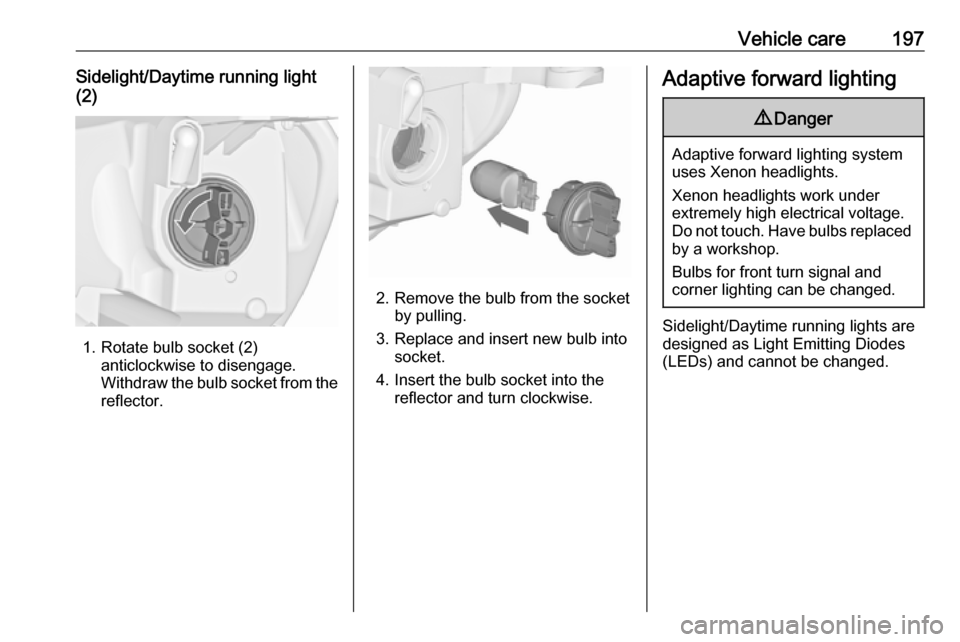
(2)
1. Rotate bulb socket (2) anticlockwise to disengage.
Withdraw the bulb socket from the
reflector.
2. Remove the bulb from the socket by pulling.
3. Replace and insert new bulb into socket.
4. Insert the bulb socket into the reflector and turn clockwise.
Adaptive forward lighting9 Danger
Adaptive forward lighting system
uses Xenon headlights.
Xenon headlights work under
extremely high electrical voltage.
Do not touch. Have bulbs replaced by a workshop.
Bulbs for front turn signal and
corner lighting can be changed.
Sidelight/Daytime running lights are
designed as Light Emitting Diodes
(LEDs) and cannot be changed.
Page 201 of 263
Vehicle care199
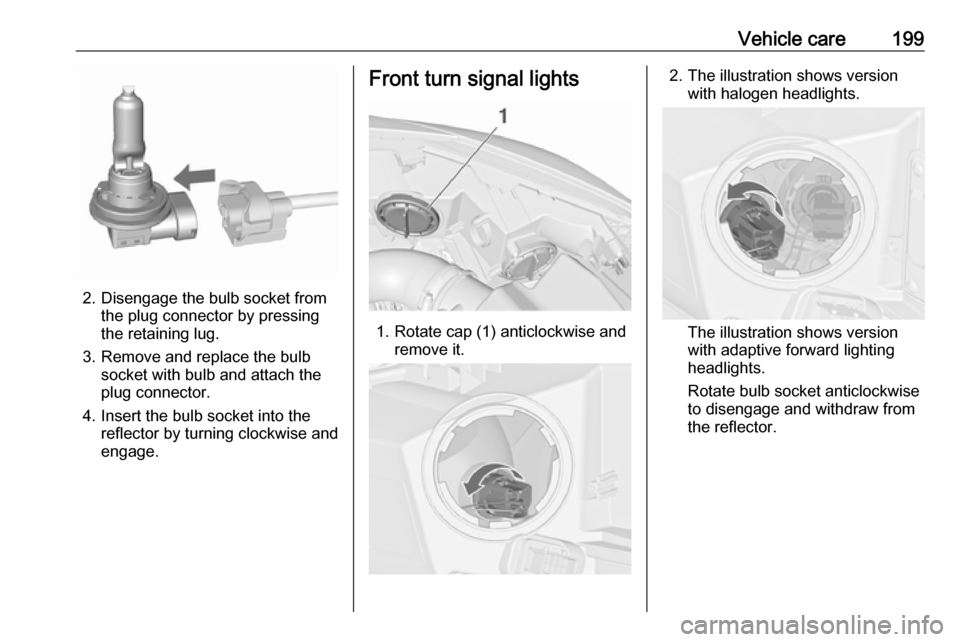
2. Disengage the bulb socket fromthe plug connector by pressing
the retaining lug.
3. Remove and replace the bulb socket with bulb and attach the
plug connector.
4. Insert the bulb socket into the reflector by turning clockwise and
engage.
Front turn signal lights
1. Rotate cap (1) anticlockwise and remove it.
2. The illustration shows versionwith halogen headlights.
The illustration shows version
with adaptive forward lighting
headlights.
Rotate bulb socket anticlockwise
to disengage and withdraw from
the reflector.