warning light VAUXHALL COMBO 2016 User Guide
[x] Cancel search | Manufacturer: VAUXHALL, Model Year: 2016, Model line: COMBO, Model: VAUXHALL COMBO 2016Pages: 189, PDF Size: 4.47 MB
Page 86 of 189

84Instruments and controlsDepending on version, a warning
message may also be displayed in
the Driver Information Centre (DIC)
3 85.
Seek the assistance of a workshop.
Stop-start system Æ illuminates yellow.
A fault is present in the system. Have the cause of the fault remedied by a
workshop.
Control indicator 9 will illuminate as
an alternative if control indicator Æ is
not present.
Depending on version, a warning
message may also be displayed in
the Driver Information Centre (DIC)
3 85.
Generic warning 9 3 76.
Stop-start system 3 110.
Exterior light 8 illuminates green.
The exterior lights are on 3 94.Control indicator 8 also illuminates
when the exit lighting feature has
been switched on 3 99.
Exterior light failure
µ illuminates yellow.
Failure of one or more of the exterior lights or associated fuse.
Control indicator 9 will illuminate as
an alternative if µ is not present.
Depending on version, a warning
message may also be displayed in
the Driver Information Centre (DIC) 3 85.
Generic warning 9 3 76.
Bulb replacement 3 140.
High beam
C illuminates blue.
Illuminated when high beam is on and
during headlight flash 3 94.
Fog light
> illuminates green.
The front fog lights are on 3 96.Rear fog light
r illuminates yellow.
The rear fog light is on 3 96.
Cruise control
m illuminates green.
The system is switched on.
Depending on version, a message
may also be displayed in the Driver
Information Centre (DIC) 3 85.
Cruise control 3 122.
Door open
( illuminates red.
Illuminates when a door, the bonnet
or the tailgate is open.
Depending on version, a warning
message may also be displayed in
the Driver Information Centre (DIC)
3 85.
When the vehicle starts to move, a
warning chime also sounds.
Page 88 of 189
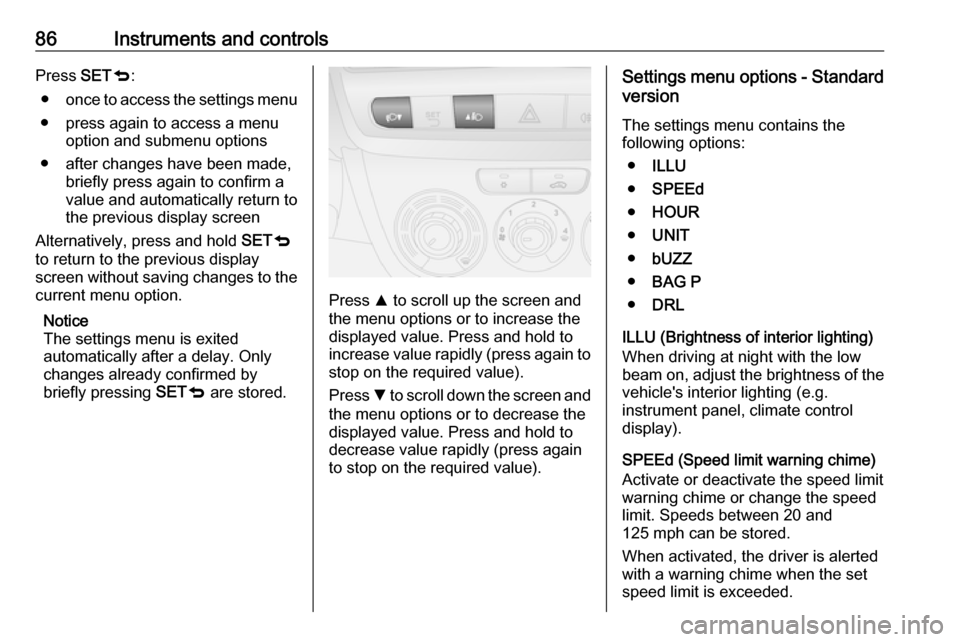
86Instruments and controlsPress SETq:
● once to access the settings menu
● press again to access a menu option and submenu options
● after changes have been made, briefly press again to confirm a
value and automatically return to
the previous display screen
Alternatively, press and hold SETq
to return to the previous display
screen without saving changes to the
current menu option.
Notice
The settings menu is exited
automatically after a delay. Only
changes already confirmed by
briefly pressing SETq are stored.
Press R to scroll up the screen and
the menu options or to increase the
displayed value. Press and hold to
increase value rapidly (press again to stop on the required value).
Press S to scroll down the screen and
the menu options or to decrease the
displayed value. Press and hold to
decrease value rapidly (press again
to stop on the required value).
Settings menu options - Standard
version
The settings menu contains the
following options:
● ILLU
● SPEEd
● HOUR
● UNIT
● bUZZ
● BAG P
● DRL
ILLU (Brightness of interior lighting)
When driving at night with the low
beam on, adjust the brightness of the
vehicle's interior lighting (e.g.
instrument panel, climate control display).
SPEEd (Speed limit warning chime) Activate or deactivate the speed limit
warning chime or change the speed
limit. Speeds between 20 and
125 mph can be stored.
When activated, the driver is alerted
with a warning chime when the set
speed limit is exceeded.
Page 89 of 189
Instruments and controls87After accessing this menu option,
activate or deactivate the function
(set to On or Off) and confirm.
Press SETq when activated ( On) to
access the current set speed. Adjust
as required and confirm.
Warning chimes 3 90.
HOUR (Setting the clock)
Adjust the hours setting (flashing
value) and confirm. Adjust minutes
setting (flashing value) and confirm.
Clock 3 67.
UNIT (Unit of measurement)
Set the unit of measurement to km or
miles .
bUZZ (Warning chime volume)
Adjust the volume of warning chimes
and confirm. 8 volume levels are
available.
A chime is also sounded every time
SET q, R or S is pressed.
Warning chimes 3 90.BAG P (Passenger front and side
airbags activation/deactivation)
Activate the front passenger airbags
if an adult is occupying the front
passenger seat. Deactivate airbags
when a child restraint system is
installed on this seat.9 Danger
Risk of fatal injury for a child using
a child restraint system on a seat
with activated front passenger
airbag.
Risk of fatal injury for an adult
person on a seat with deactivated
front passenger airbag.
After accessing this menu option,
activate or deactivate the airbags
( BAG P On or BAG P Off ) and
confirm; a confirmation message
appears in the display. Select YES (to
confirm changes) or No (to cancel
changes).
Airbag deactivation 3 49.
DRL (Daytime running lights)
Activate the daytime running lights to
increase visibility of the vehicle during
daylight (set to On). Deactivate when
not required (set to Off).
Daytime running lights 3 95.
Settings menu options -
Multifunction version
The settings menu contains the
following options:
● Lighting
● Speed beep
● Trip B data
● Set time
● Set date
● Radio info
● Autoclose
● Unit of measurement
● Language
● Warning volume
● Button volume
● Seat belt buzzer
● Service
● Passenger airbag
Page 90 of 189

88Instruments and controls●Daytime running lights
● Exit menu
LIGHTING (Brightness of interior
lighting)
When driving at night with the low
beam on, adjust the brightness of the
vehicle's interior lighting (e.g.
instrument panel, climate control
display).
It is also possible to adjust the
brightness by pressing R or S
without accessing the settings menu.
SPEED BEEP (Speed limit warning
chime)
Activate or deactivate the speed limit
warning chime or change the speed
limit. Speeds between 20 and
125 mph can be stored.
When activated, the driver is alerted
with a warning chime when the set
speed limit is exceeded.
After accessing this menu option,
activate or deactivate the function
(set to On or Off) and confirm.
Press SETq when activated ( On) to
access the current set speed. Adjust
as required and confirm.Warning chimes 3 90.
TRIP B DATA
Activate or deactivate the second trip
computer (set to On or Off).
Trip B records average consumption, distance travelled, average speed
and travel time (driving time). The
measurement can be restarted at any
time. Trip computer 3 91.
SET TIME (Setting the clock and clock mode)
After accessing this menu option, it is possible to either set the time or
change the clock mode between 12
hour and 24 hour clock.
Select Time and confirm. Adjust the
hours setting (flashing value) and
confirm. Adjust minutes setting
(flashing value) and confirm.
Select Mode and confirm. Select
12h or 24h and confirm.
Clock 3 67.SET DATE
Adjust the year setting (flashing
value) and confirm. Adjust month
setting (flashing value) and confirm.
Adjust the day setting (flashing value)
and confirm.
RADIO INFO (Display audio and
radio information)
Activate radio info (set to On) to
display audio and radio information (e.g. station frequency, RDS
messages, track number). Deactivate
when not required (set to Off).
AUTOCLOSE (Automatic central
locking when driving)
Activate the autoclose feature (set to
On ) to automatically lock the doors
when vehicle speed exceeds
12 mph. Deactivate when not
required (set to Off).
UNIT OF MEASUREMENT (for
Distance, Fuel consumption and
Temperature)
After accessing this menu option, it is
possible to set the unit of
measurement for distance, fuel
consumption and temperature.
Page 92 of 189

90Instruments and controlsappears in the display. Select YES (to
confirm changes) or No (to cancel
changes).
Airbag deactivation 3 49.
DAYTIME RUNNING LIGHTS
Activate the daytime running lights to
increase visibility of the vehicle during daylight (set to On). Deactivate when
not required (set to Off).
Daytime running lights 3 95.
EXIT MENU
Select this menu option to exit the
settings menu.Vehicle messages
Warning chimes Only one warning chime will sound at
a time.
The warning chime regarding
unfastened seat belts has priority
over any other warning chime.
When starting the engine or whilst
driving
● If seat belt is not fastened.
● If a certain speed is exceeded with the parking brake applied.
● If the parking assist detects an object.
● If a fault is detected in the parking
assist.
● If a door, the bonnet or the tailgate is not fully closed when
starting-off.
● If the vehicle speed briefly exceeds a set limit.
● If the stop-start system cannot restart the engine automatically.● Vehicles with manual transmission automated; brake
pedal has not been depressed
when starting the engine.
● Vehicles with manual transmission automated; an
incorrect gear has been selected when starting-off or during
driving.
● Vehicles with manual transmission automated; whenthe vehicle is at a standstill, if
engine is running and a gear is
engaged; transmission
automatically shifts to N in certain
situations.
● If the clutch temperature is too high in vehicles with manual
transmission automated.
● If a transmission fault is detected
in vehicles with manual
transmission automated.
● If a warning message, e.g. low tyre pressure, appears in the
Driver Information Centre (DIC).
Page 96 of 189
94LightingLightingExterior lighting............................ 94
Light switch ................................ 94
High beam ................................. 94
Headlight flash ........................... 94
Headlight range adjustment ......95
Headlights when driving abroad ...................................... 95
Daytime running lights ...............95
Hazard warning flashers ............95
Turn and lane-change signals ...96
Front fog lights ........................... 96
Rear fog lights ........................... 96
Reversing lights .........................96
Misted light covers .....................97
Interior lighting ............................. 97
Instrument panel illumination control ....................................... 97
Interior lights .............................. 97
Load compartment lighting ........98
Lighting features ..........................99
Exit lighting ................................ 99
Battery discharge protection ....100Exterior lighting
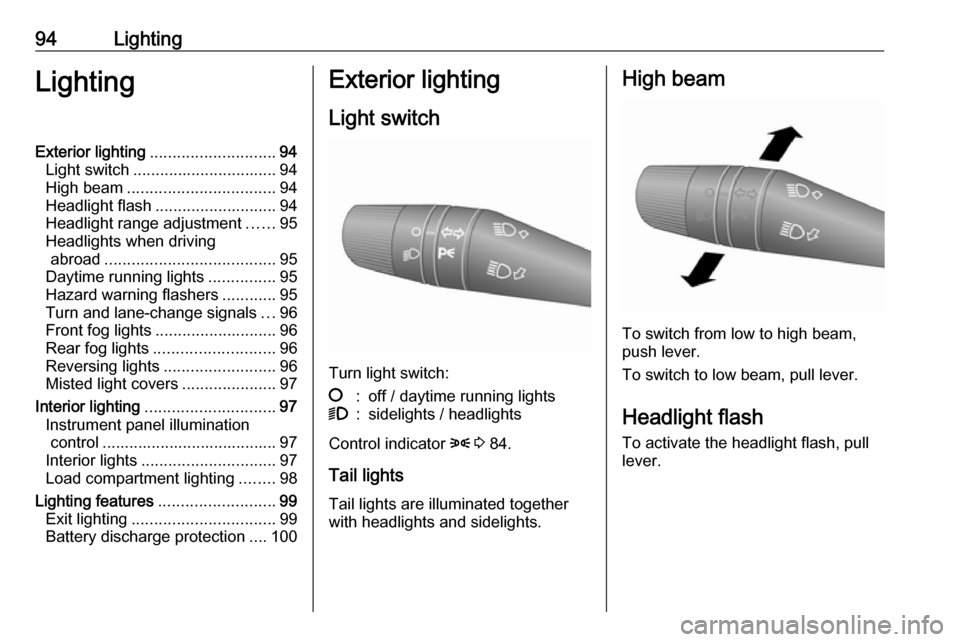
Light switch
Turn light switch:
§:off / daytime running lights9:sidelights / headlights
Control indicator 8 3 84.
Tail lights Tail lights are illuminated together
with headlights and sidelights.
High beam
To switch from low to high beam,
push lever.
To switch to low beam, pull lever.
Headlight flash
To activate the headlight flash, pull
lever.
Page 97 of 189
Lighting95Headlight range adjustment
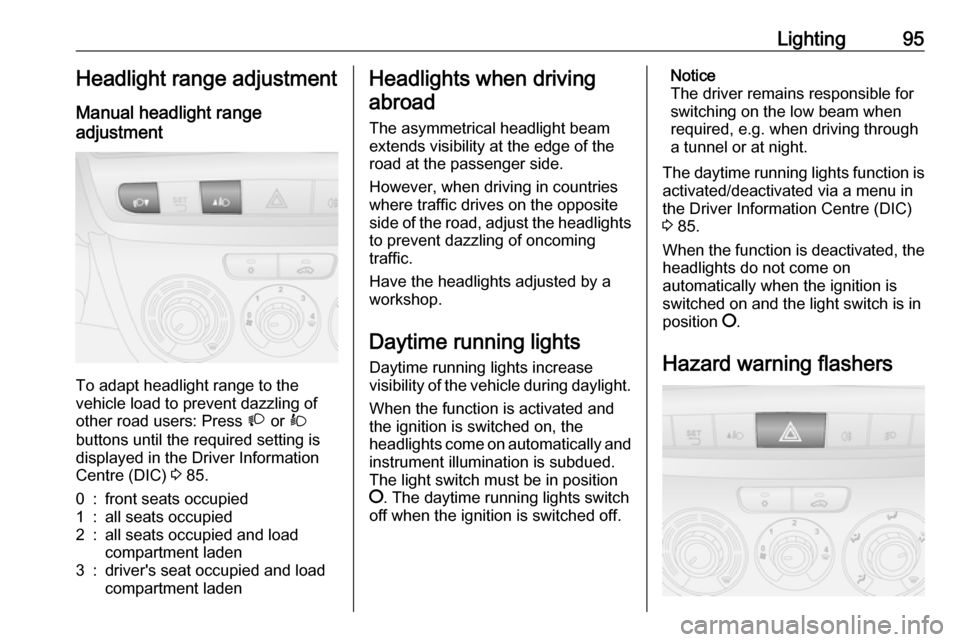
Manual headlight range
adjustment
To adapt headlight range to the
vehicle load to prevent dazzling of
other road users: Press À or Á
buttons until the required setting is displayed in the Driver Information
Centre (DIC) 3 85.
0:front seats occupied1:all seats occupied2:all seats occupied and load
compartment laden3:driver's seat occupied and load
compartment ladenHeadlights when driving
abroad
The asymmetrical headlight beam
extends visibility at the edge of the
road at the passenger side.
However, when driving in countries
where traffic drives on the opposite
side of the road, adjust the headlights to prevent dazzling of oncoming
traffic.
Have the headlights adjusted by a
workshop.
Daytime running lights Daytime running lights increase
visibility of the vehicle during daylight.
When the function is activated and the ignition is switched on, the
headlights come on automatically and instrument illumination is subdued.
The light switch must be in position
§ . The daytime running lights switch
off when the ignition is switched off.Notice
The driver remains responsible for
switching on the low beam when
required, e.g. when driving through
a tunnel or at night.
The daytime running lights function is activated/deactivated via a menu in
the Driver Information Centre (DIC)
3 85.
When the function is deactivated, the
headlights do not come on
automatically when the ignition is
switched on and the light switch is in
position §.
Hazard warning flashers
Page 102 of 189

100LightingThis action can be repeated up to
seven times to a maximum period of
210 seconds.
Control indicator 8 3 84 illuminates
in the instrument cluster during use.
Depending on version, a warning
message may also be displayed in
the Driver Information Centre (DIC)
3 85.
Deactivation Pull turn signal lever for more than
2 seconds to deactivate.
Battery discharge protection To ensure reliable engine restarts,
several battery discharge protection
features are implemented as part of
the stop-start system.
Stop-start system 3 110.
Page 111 of 189
Driving and operating109Starting the engine
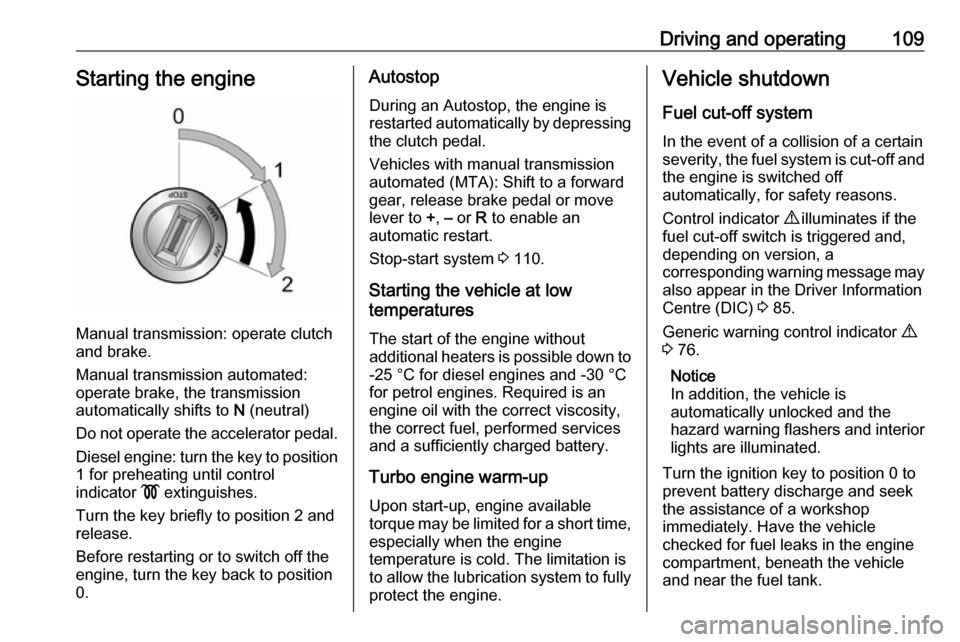
Manual transmission: operate clutch
and brake.
Manual transmission automated: operate brake, the transmission
automatically shifts to N (neutral)
Do not operate the accelerator pedal. Diesel engine: turn the key to position1 for preheating until control
indicator ! extinguishes.
Turn the key briefly to position 2 and release.
Before restarting or to switch off the engine, turn the key back to position
0.
Autostop
During an Autostop, the engine is
restarted automatically by depressing
the clutch pedal.
Vehicles with manual transmission
automated (MTA): Shift to a forward
gear, release brake pedal or move
lever to +, – or R to enable an
automatic restart.
Stop-start system 3 110.
Starting the vehicle at low
temperatures
The start of the engine without
additional heaters is possible down to -25 °С for diesel engines and -30 °C
for petrol engines. Required is an engine oil with the correct viscosity,
the correct fuel, performed services
and a sufficiently charged battery.
Turbo engine warm-up
Upon start-up, engine available
torque may be limited for a short time, especially when the engine
temperature is cold. The limitation is
to allow the lubrication system to fully protect the engine.Vehicle shutdown
Fuel cut-off system In the event of a collision of a certain
severity, the fuel system is cut-off and
the engine is switched off
automatically, for safety reasons.
Control indicator 9 illuminates if the
fuel cut-off switch is triggered and, depending on version, a
corresponding warning message may
also appear in the Driver Information
Centre (DIC) 3 85.
Generic warning control indicator 9
3 76.
Notice
In addition, the vehicle is
automatically unlocked and the
hazard warning flashers and interior lights are illuminated.
Turn the ignition key to position 0 to
prevent battery discharge and seek
the assistance of a workshop
immediately. Have the vehicle
checked for fuel leaks in the engine
compartment, beneath the vehicle
and near the fuel tank.
Page 117 of 189
Driving and operating115Caution
It is not advisable to drive with thehand resting on the selector lever.
When gearshifting is recommended
to improve fuel economy, control
indicator [ or Ò illuminates in the
Driver Information Centre (DIC) 3 80.
Manual transmission
automated
The manual transmission automated (MTA) permits manual (manual
mode) or automatic gear shifting
(automatic mode), both with
automatic clutch control.
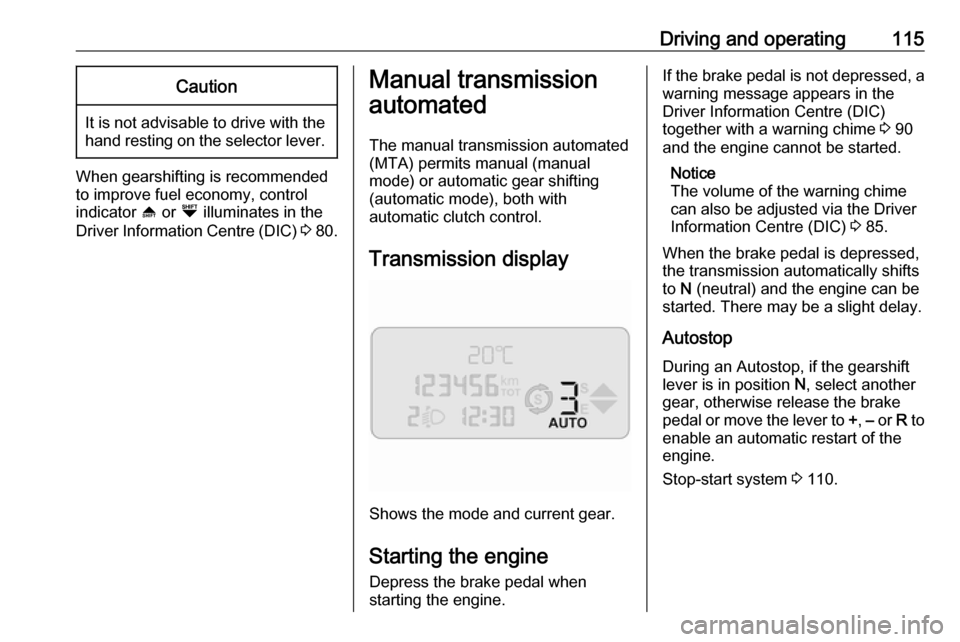
Transmission display
Shows the mode and current gear.
Starting the engine
Depress the brake pedal when
starting the engine.
If the brake pedal is not depressed, a
warning message appears in the
Driver Information Centre (DIC)
together with a warning chime 3 90
and the engine cannot be started.
Notice
The volume of the warning chime
can also be adjusted via the Driver
Information Centre (DIC) 3 85.
When the brake pedal is depressed,
the transmission automatically shifts
to N (neutral) and the engine can be
started. There may be a slight delay.
Autostop
During an Autostop, if the gearshift
lever is in position N, select another
gear, otherwise release the brake
pedal or move the lever to +, – or R to
enable an automatic restart of the
engine.
Stop-start system 3 110.