light VAUXHALL COMBO E 2019.75 Owner's Guide
[x] Cancel search | Manufacturer: VAUXHALL, Model Year: 2019.75, Model line: COMBO E, Model: VAUXHALL COMBO E 2019.75Pages: 281, PDF Size: 10.44 MB
Page 98 of 281
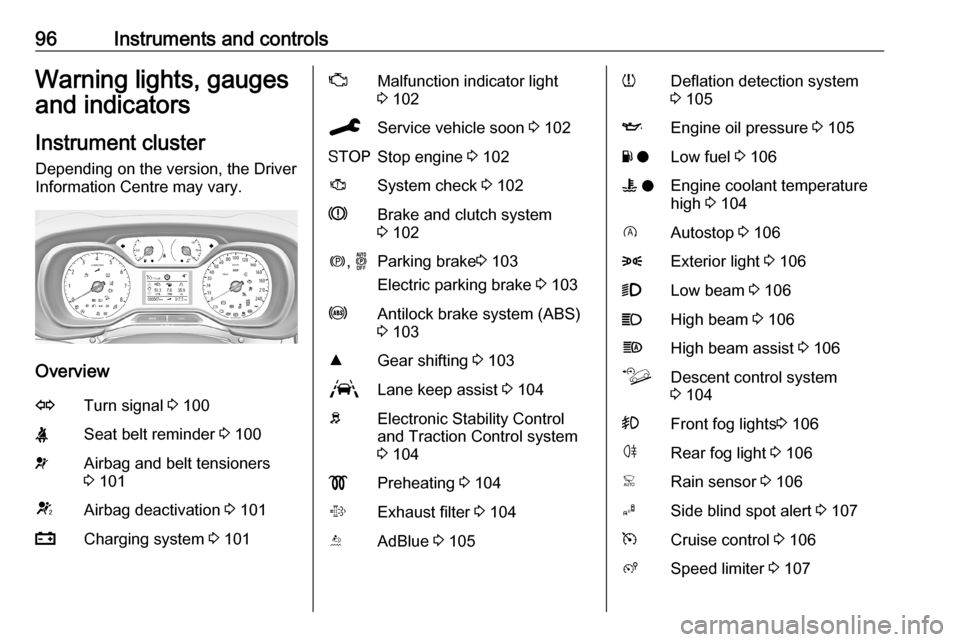
96Instruments and controlsWarning lights, gauges
and indicators
Instrument cluster
Depending on the version, the Driver
Information Centre may vary.
Overview
OTurn signal 3 100XSeat belt reminder 3 100vAirbag and belt tensioners
3 101VAirbag deactivation 3 101pCharging system 3 101ZMalfunction indicator light
3 102CService vehicle soon 3 102YStop engine 3 102JSystem check 3 102RBrake and clutch system
3 102m , oParking brake 3 103
Electric parking brake 3 103uAntilock brake system (ABS)
3 103RGear shifting 3 103LLane keep assist 3 104bElectronic Stability Control
and Traction Control system
3 104!Preheating 3 104%Exhaust filter 3 104YAdBlue 3 105wDeflation detection system
3 105IEngine oil pressure 3 105Y oLow fuel 3 106W oEngine coolant temperature
high 3 104DAutostop 3 1068Exterior light 3 1069Low beam 3 106CHigh beam 3 106fHigh beam assist 3 106òDescent control system
3 104>Front fog lights 3 106øRear fog light 3 106
Page 101 of 281

Instruments and controls99Caution
If engine coolant temperature is
too high, stop vehicle, switch off
engine. Danger to engine. Check
coolant level.
Engine oil level monitor
The state of the engine oil level is
displayed in the Driver Information
Centre for a few seconds following
the service information after switching
on the ignition.
A proper state of engine oil level is
indicated by the message Oil level
correct .
If engine oil level is low, I flashes
and Oil level incorrect is indicated,
accompanied by C. Confirm
engine oil level by using the oil
dipstick and top up engine oil
respectively.
Engine oil 3 213.
A fault of measurement is indicated
by the message Oil level
measurement invalid . Check engine
oil level manually by using the
dipstick.
Service display
The service system informs when to
change the engine oil and filter or a
vehicle service is required. Based on
driving conditions, the interval at
which an engine oil and filter change
is required can vary considerably.
Service information 3 251.
A required service due is displayed in the Driver Information Centre for
seven seconds after switching on the
ignition.
If no service is required for the next
1800 miles or more no service
information appears in the display.
If service is required within the next
1800 miles, the remaining distance or
time duration is indicated for several
seconds. Simultaneously C lights
up permanently as reminder.
If service is required in less than
600 miles, C flashes and then
lights up permanently. Remaining
distance or time duration is indicated
for several seconds.
Overdued service is indicated by a
message in the Driver Information
Centre which indicates the overdueddistance. C flashes and then lights
up permanently until service is
executed.
Reset of service interval After each service, the service
indicator must be reset to ensure
proper functionality. It is
recommended to seek the assistance
of a workshop.
If service is executed by yourself,
operate as following:
● switch off ignition
● press and hold button CHECK
● switch on ignition, the distance indication begins a countdown
● when the display indicates =0,
release the button
C disappears
Page 102 of 281
100Instruments and controlsRetrieving service information
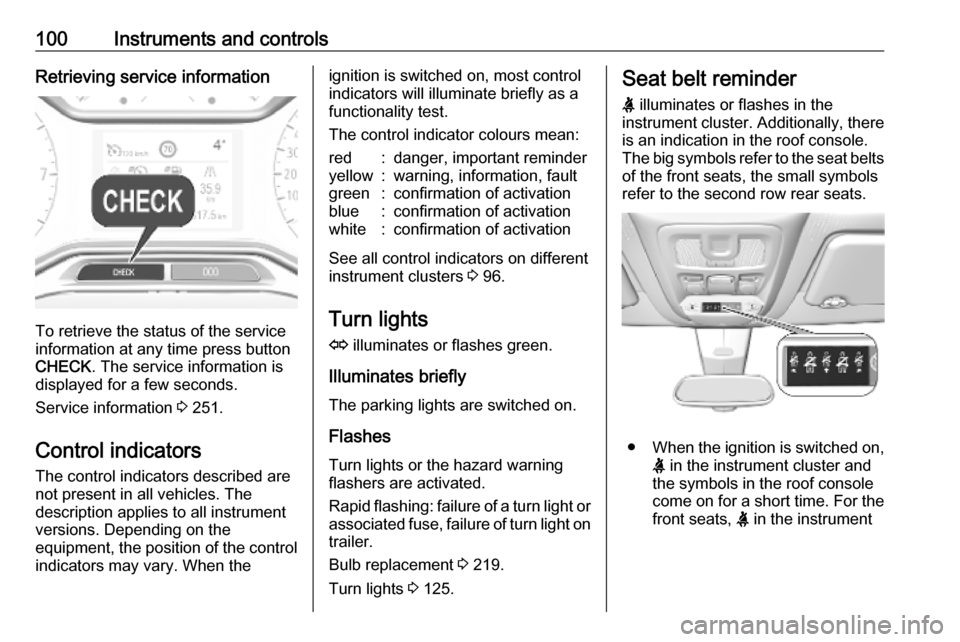
To retrieve the status of the service
information at any time press button
CHECK . The service information is
displayed for a few seconds.
Service information 3 251.
Control indicators The control indicators described are
not present in all vehicles. The
description applies to all instrument
versions. Depending on the
equipment, the position of the control indicators may vary. When the
ignition is switched on, most controlindicators will illuminate briefly as afunctionality test.
The control indicator colours mean:red:danger, important reminderyellow:warning, information, faultgreen:confirmation of activationblue:confirmation of activationwhite:confirmation of activation
See all control indicators on different
instrument clusters 3 96.
Turn lights
O illuminates or flashes green.
Illuminates briefly The parking lights are switched on.
Flashes
Turn lights or the hazard warning
flashers are activated.
Rapid flashing: failure of a turn light or associated fuse, failure of turn light on
trailer.
Bulb replacement 3 219.
Turn lights 3 125.
Seat belt reminder
X illuminates or flashes in the
instrument cluster. Additionally, there
is an indication in the roof console.
The big symbols refer to the seat belts of the front seats, the small symbols
refer to the second row rear seats.
● When the ignition is switched on,
X in the instrument cluster and
the symbols in the roof console
come on for a short time. For the
front seats, X in the instrument
Page 104 of 281

102Instruments and controlsIlluminates when the engine is
running
Stop, switch off engine. Vehiclebattery is not charging. Engine
cooling may be interrupted. The
brake servo unit may cease to be
effective. Seek the assistance of a
workshop.
Malfunction indicator light
Z illuminates or flashes yellow.
Illuminates when the ignition is
switched on and extinguishes shortly
after the engine starts.
Illuminates when the engine is
running
Fault in the emission control system.
The permitted emission limits may be
exceeded. Seek the assistance of a
workshop immediately.Flashes when the engine is
running
Fault that could lead to catalytic converter damage. Ease up on the
accelerator until the flashing stops.
Seek the assistance of a workshop
immediately.
Service vehicle soon C illuminates yellow.
Illuminates briefly when the ignition is
switched on.
May illuminate together with other
control indicators and a
corresponding message in the Driver
Information Centre.
Seek the assistance of a workshop
immediately.
Stop engine
Y illuminates red.
Illuminates briefly when the ignition is switched on.Illuminates together with other control
indicators, accompanied by a warning chime and a corresponding message
in the Driver Information Centre.
Stop engine immediately and seek
the assistance of a workshop.
System check J illuminates yellow or red.
Illuminates yellow A minor engine fault has been
detected.
Illuminates red A major engine fault has been
detected.
Stop engine as soon as possible and seek the assistance of a workshop.
Brake and clutch system
R illuminates red.
The brake and clutch fluid level is too
low.
Page 106 of 281

104Instruments and controlsDescent control systemò illuminates or flashes green.
Iluminates green
The system is switched on and ready
to operate.
Flashes green
The system is in operation.
Lane keep assist
a illuminates green or yellow, or
flashes yellow.
Illuminates green
The system is switched on and ready to operate.
Illuminates yellow
The system approaches a detected
lane marking without using the turn
light in that direction.
Flashes yellow The system recognizes that the lane
is departed significantly.Lane keep assist 3 198.
Electronic Stability Control and Traction Control system
b illuminates or flashes yellow.
Illuminates
A fault in the system is present.
Continued driving is possible. Driving stability, however, may deteriorate
depending on road surface
conditions.
Have the cause of the fault remedied
by a workshop.
Flashes
The system is actively engaged.
Engine output may be reduced and
the vehicle may be braked
automatically to a small degree.
Electronic Stability Control and
Traction Control system 3 163.
Selective ride control 3 165.
Engine coolant temperature o illuminates red.Illuminates when the engine is
running
Stop, switch off engine.Caution
Coolant temperature too high.
Check coolant level immediately
3 214.
If there is sufficient coolant, consult a workshop.
Preheating
! illuminates yellow.
Preheating of diesel engine is
activated. Only activates when
outside temperature is low. Start the
engine when control indicator
extinguishes.
Exhaust filter
% or C illuminates yellow,
accompanied by a message in the
Driver Information Centre.
The exhaust filter requires cleaning.
Page 108 of 281

106Instruments and controls9Warning
When the engine is off,
considerably more force is needed
to brake and steer. During an
Autostop the brake servo unit will still be operational.
Do not remove key until vehicle is stationary, otherwise the steeringwheel lock could engage
unexpectedly.
Keep engine turned off and let the
vehicle be towed to a workshop.
Low fuel o illuminates yellow.
Level in fuel tank is too low.
Refuelling 3 204.
Bleeding the diesel fuel system
3 218.
Autostop D illuminates or flashes green.
Illuminates green
Engine is in an Autostop.
Flashes green
Autostop is temporarily unavailable,
or Autostop mode is invoked
automatically.
Stop-start system 3 147.
Exterior light 8 illuminates green.
The exterior lights are on 3 121.
High beam
C illuminates blue.
Illuminates when high beam is on,
during headlight flash 3 122.
Low beam
9 illuminates green.
Illuminated when low beam is on.
High beam assist
f illuminates green.The high beam assist is activated
3 122.
LED headlights
C illuminates and a warning
message is displayed in the Driver
Information Centre.
Seek the assistance of a workshop.
Front fog lights
> illuminates green.
The front fog lights are on 3 125.
Rear fog light
r illuminates yellow.
The rear fog light is on 3 126.
Rain sensor
< illuminates green.
Illuminated when rain sensor position on wiper lever is selected.
Cruise control
m illuminates white or green.
Page 115 of 281

Instruments and controls113when it is dark outside. Be sure tokeep the head-up display imagedim and placed low in your field of view.
Adjust brightness
The head-up display image will
automatically dim and brighten to
compensate for outside lighting.
Brightness can also be adjusted
manually as needed:
Press e to brighten the display. Press
æ to dim the display.
The image can temporarily light up
depending on angel and position of
sunlight.
Switching off Press æ and hold to turn the head-up
display off.
Language Preferred language can be set invehicle personalisation menu 3 115.
Units
Units can be changed in vehicle
personalisation menu 3 115.
Care of head-up display Clean the screen of the head-updisplay with a soft cloth sprayed withglass cleaner. Wipe the lens gently,
then dry it.
System limitations Head-up display may not operate
properly when:
● The lens in the instrument panel is covered by objects or not
clean.
● Display brightness is too dim or bright.
● Image is not adjusted to the proper height.
● The driver wears polarized sunglasses.
If the head-up image is not correct for
other reasons, contact a workshop.Rear view display
The rear view display is located at the position of the interior mirror.
It provides the following views: ● standard rear view 3 39
● close rear view 3 196
● passenger side view 3 193
Switching on
Press m and confirm the message
with p.
Page 117 of 281

Instruments and controls115● If a warning message appears inthe Driver Information Centre.
● If the electronic key is not in the passenger compartment.
● If the parking assist detects an object.
● If an unintended lane change occurs.
● If the exhaust filter has reached the maximum filling level.
When the vehicle is parked and / or the driver's door is opened
● With exterior lights on.
During an Autostop ● If the driver's door is opened.
● If any condition for a restart of the
engine is not fulfilled.Vehicle personalisation
The vehicle's behaviour can be
personalised by changing the settings
in the Info Display.
Depending on vehicle equipment and
country-specific regulations some of
the functions described below may
not be available.
Some functions are only displayed or
active when the engine is running.
Graphic Info Display
Press MENU to open the menu page.
Use four-way button to operate the
display:
Select Personalisation-configuration ,
I OK .
Unit settings
Select Display configuration , I OK .
Select Choise of units , I OK .
Select desired settings, I OK .
Language settings
Select Display configuration , I OK .
Select Choise of language , I OK .
Select desired language, I OK .
Vehicle settings
Select Define vehicle parameters , I
OK .
In the corresponding submenus the
following settings can be changed:
● Lamps
Follow me home headlamps :
Activates or deactivates the
function and adjusts its duration.
Welcome lighting : Activates or
deactivates the function and
adjusts its duration.
Directional headlights : Activates
or deactivates the function.
Page 118 of 281

116Instruments and controls●Comfort
Ambient lighting : Adjusts the
brightness of the ambient
lighting.
Rear wiper in reverse gear :
Activates or deactivates
automatic switching on of the
rear window wiper when reverse
gear is engaged.
● Vehicle
Unlocking boot only : Activation /
deactivation.
Plip action : Driver / all doors.
● Security
Fatigue Detection system :
Activates or deactivates the
driver drowsiness system.
● Driving assistance
Speed recommendation :
Activates or deactivates the
function.Colour Info Display Multimedia
Press : to open settings menu.
Use touch buttons to operate the
display.
Unit settings
Select System configuration .
Change units for Distance and fuel
consumption and Temperature .
Language settings
Select Language .
Change language by touching the
respective entry.
Driving function
Press Í.
Select Driving function .
In the corresponding submenus the
following settings can be changed:
● Park Assist : Activates advanced
park assist, a parking maneuver
can be selected.
● Parking sensors : Activates or
deactivates the parking sensors.
● Blind spot sensors : Activates or
deactivates side blind spot alert.
● Under-inflation initialization :
Initialises the tyre under-inflation
detection system.
● Diagnostic : Shows alert
messages of the diagnostic
system.
Page 119 of 281

Instruments and controls117Vehicle settings
Press Í.
Select Vehicle settings .
In the corresponding submenus the
following settings can be changed:
● Parking
Prevention of door mirror folding :
Activates or deactivates the
automatic folding of the exterior
mirrors.
Rear wiper in reverse : Activates
or deactivates automatic
switching on of the rear window
wiper when reverse gear is
engaged.
● Headlights
Guide-me-home lighting :
Activates or deactivates the
function and adjusts its duration.
Welcome lighting : Activates or
deactivates the function and
adjusts its duration.
Directional headlamps : Activates
or deactivates the cornering
lights.
● Comfort
Mood lighting : Adjusts the
brightness of the ambient
lighting.
● Safety
Speed reading/recommendation :
Activates or deactivates the
speed limit information by traffic sign recognition.
Active safety brake : Activates or
deactivates active emergency
braking, the alert distance for risk of collision can be selected.
Mirror adaptation in reverse :
Adjusts the exterior mirrors if
reverse gear is engaged to
facilitate sidewalks visibility.Driver's attention warning :
Activates or deactivates the
driver drowsiness system.
Colour Info Display
Multimedia Navi Pro
Press : to open settings menu.
Use touch buttons to operate the
display.
Unit settings
Select System settings .
Change units for Distance and fuel
consumption and Temperature .
Confirm with G.