Settings VAUXHALL CORSA 2014.5 Infotainment system
[x] Cancel search | Manufacturer: VAUXHALL, Model Year: 2014.5, Model line: CORSA, Model: VAUXHALL CORSA 2014.5Pages: 177, PDF Size: 2.97 MB
Page 97 of 177

Introduction97
Settings pages
Settings pages are menu pages
where settings can be made, e.g.
sound settings, etc.
The CD Extras menu is an example of
a settings page.
Menu levels
The menus of the Infotainment
system are divided into levels. The
current menu level is shown by
vertical lines at the edge of the screen
(e.g. main display = no line, feature
page radio = 1 line, etc.).
Selecting from a menu
The items within a menu are selected by using a cursor moved by turning
the multifunction knob. The cursor
has the shape of a frame (bar). The
cursor indicates which menu item is
being selected.
Turn the multifunction knob until the
desired menu item is marked.
Press the multifunction knob.
The associated function is performed
or another menu is displayed.
■ In the following chapters of the operating instructions, the requests
for action described above are
summarised into the following
request for action:
Select the menu item.
■ In some menus, settings are made by turning the multifunction knob.
■ Active functions are identified by a ticked box or a selected option fieldin front of the menu item.
■ Functions, which are switched off, are identified by an unticked box oran empty option field in front of the
menu item.
Selecting from a list
Some menus are displayed in the
form of lists.
Move cursor up or down by turning
the multifunction knob.
Press the multifunction knob to
confirm your selection.
Page 100 of 177
100Introduction
This option is not available in lists,
input menus and the main menu.
Using the function buttons to exit from menu
You can use the MEDIA, TUNER ,
SETTINGS , SOUND or MAIN
function buttons to exit from a menu.
■ Press MEDIA button.
An audio source menu is displayed.
■ Press TUNER button.
The radio menu is displayed.
■ Press SETTINGS button.
The Settings menu is displayed.
Menus opened via the SETTINGS
button can also be left via that
button.
■ Press SOUND button.
The Sound menu is displayed.
■ Press MAIN button.
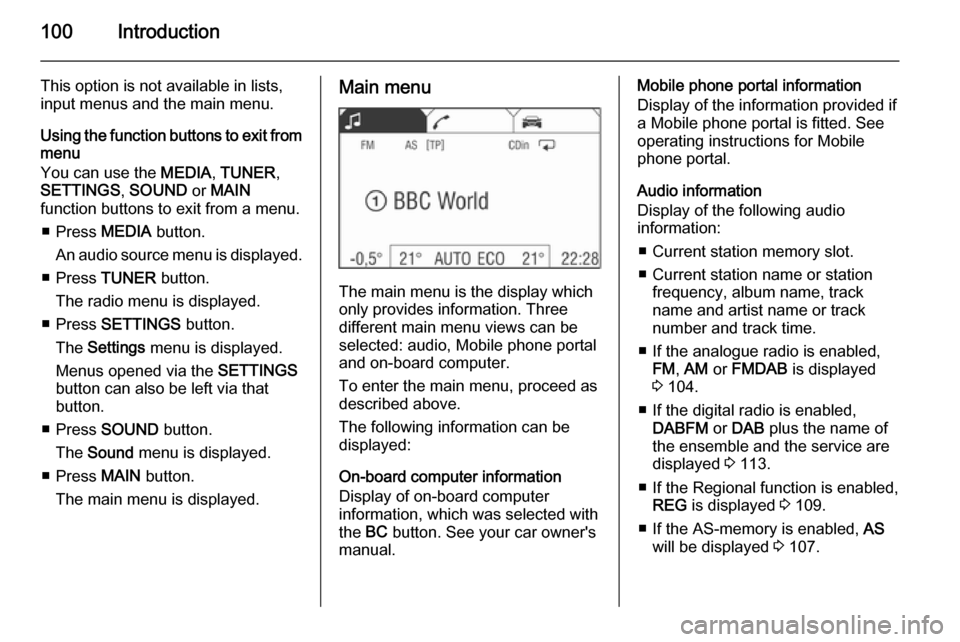
The main menu is displayed.Main menu
The main menu is the display which
only provides information. Three
different main menu views can be
selected: audio, Mobile phone portal
and on-board computer.
To enter the main menu, proceed as
described above.
The following information can be
displayed:
On-board computer information
Display of on-board computer
information, which was selected with
the BC button. See your car owner's
manual.
Mobile phone portal information
Display of the information provided if
a Mobile phone portal is fitted. See
operating instructions for Mobile
phone portal.
Audio information
Display of the following audio
information:
■ Current station memory slot.
■ Current station name or station frequency, album name, track
name and artist name or track
number and track time.
■ If the analogue radio is enabled, FM , AM or FMDAB is displayed
3 104.
■ If the digital radio is enabled, DABFM or DAB plus the name of
the ensemble and the service are
displayed 3 113.
■ If the Regional function is enabled, REG is displayed 3 109.
■ If the AS-memory is enabled, AS
will be displayed 3 107.
Page 101 of 177
![VAUXHALL CORSA 2014.5 Infotainment system Introduction101
■ The programme name is indicatedif the RDS function is active
3 109.
■ If traffic announcements are enabled, [TP] or [ ] will be displayed
3 109.
■ If a CD is inserted, CD i](/img/38/19421/w960_19421-100.png "VAUXHALL CORSA 2014.5 Infotainment system Introduction101
■ The programme name is indicatedif the RDS function is active
3 109.
■ If traffic announcements are enabled, [TP] or [ ] will be displayed
3 109.
■ If a CD is inserted, CD i")
Introduction101
■ The programme name is indicatedif the RDS function is active
3 109.
■ If traffic announcements are enabled, [TP] or [ ] will be displayed
3 109.
■ If a CD is inserted, CD in will be
displayed. If a CD with MP3 music
files is being played, MP3 is also
displayed 3 117.
■ If Random CD , Random USB or
Random Album is enabled g is
displayed 3 117.
■ If Repeat Track is enabled i is
displayed 3 117.
■ If Scan CD or Scan USB is enabled
k is displayed 3 117.
Outside Temperature
Indication of the current outside
temperature. See your car owner's
manual.
Time
Display of the current time. See your car owner's manual.Information on the climate control
system
See car owner's manual.
Tone settings
In the Sound menu, which is called up
via the SOUND button, the following
menu items are listed:
■ Treble and Bass
■ Balance and Fader
■ Sound
Setting Treble and Bass
The settings apply to the currently selected audio source and are stored
separately for each available
waveband and audio source.
1. Select the menu items Treble or
Bass .
2. Turn the multifunction knob until the desired value is set.
3. Press the multifunction knob.
4. If desired: select Treble or Bass .
5. Proceed as described above.
Bass tones are automatically
adjusted to the driving speed to
compensate for rolling and ambient
noise. The setting cannot be
changed.
Setting the volume distribution
between right - left or front - rear
1. Select the menu items Balance or
Fader .
2. Turn the multifunction knob until the desired value is set.
3. Press the multifunction knob.
4. If desired: select Balance or
Fader .
5. Proceed as described above.
Page 102 of 177
102Introduction
Sound
If you prefer a preset sound style
there are five options to select from.
Select menu item Sound.
The following options are available:
User (user-defined sound colour),
Jazz , Speech , Pop , Classic and
Rock .
Activate the desired sound style.
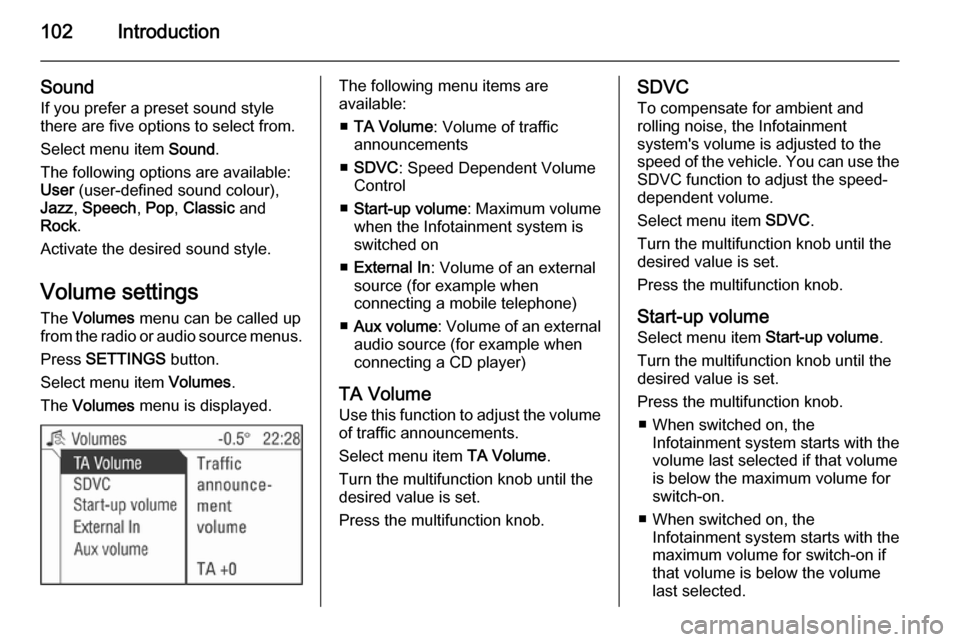
Volume settings The Volumes menu can be called up
from the radio or audio source menus.
Press SETTINGS button.
Select menu item Volumes.
The Volumes menu is displayed.The following menu items are
available:
■ TA Volume : Volume of traffic
announcements
■ SDVC : Speed Dependent Volume
Control
■ Start-up volume : Maximum volume
when the Infotainment system is
switched on
■ External In : Volume of an external
source (for example when
connecting a mobile telephone)
■ Aux volume : Volume of an external
audio source (for example when
connecting a CD player)
TA Volume
Use this function to adjust the volume
of traffic announcements.
Select menu item TA Volume.
Turn the multifunction knob until the
desired value is set.
Press the multifunction knob.SDVC
To compensate for ambient and
rolling noise, the Infotainment
system's volume is adjusted to the
speed of the vehicle. You can use the SDVC function to adjust the speed-
dependent volume.
Select menu item SDVC.
Turn the multifunction knob until the
desired value is set.
Press the multifunction knob.
Start-up volume Select menu item Start-up volume.
Turn the multifunction knob until the
desired value is set.
Press the multifunction knob. ■ When switched on, the Infotainment system starts with the
volume last selected if that volume
is below the maximum volume for
switch-on.
■ When switched on, the Infotainment system starts with the
maximum volume for switch-on if
that volume is below the volume
last selected.
Page 109 of 177
Radio109
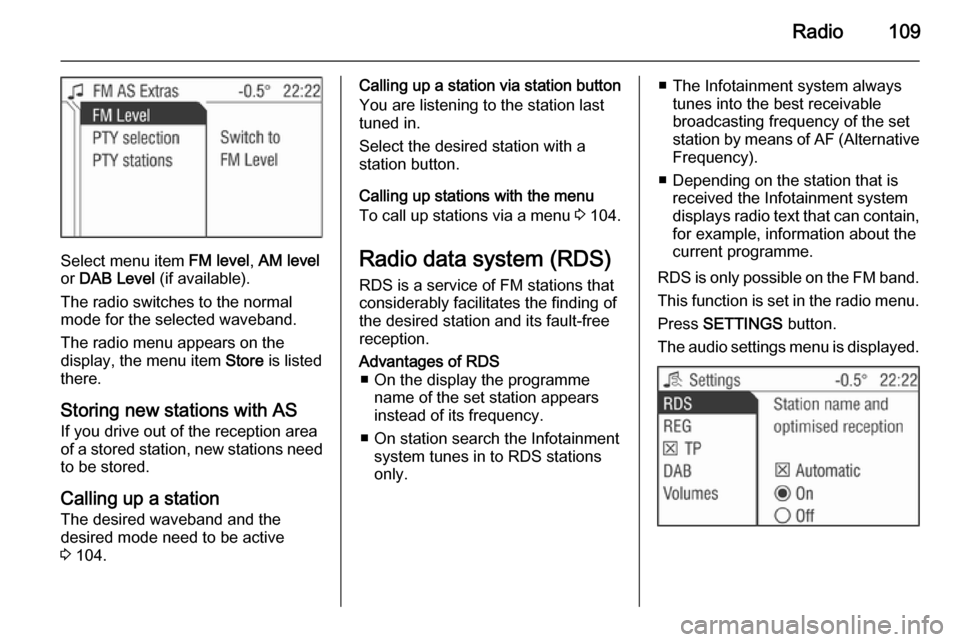
Select menu item FM level, AM level
or DAB Level (if available).
The radio switches to the normal mode for the selected waveband.
The radio menu appears on the
display, the menu item Store is listed
there.
Storing new stations with AS
If you drive out of the reception area
of a stored station, new stations need
to be stored.
Calling up a station The desired waveband and the
desired mode need to be active
3 104.
Calling up a station via station button
You are listening to the station last
tuned in.
Select the desired station with a
station button.
Calling up stations with the menu
To call up stations via a menu 3 104.
Radio data system (RDS) RDS is a service of FM stations that
considerably facilitates the finding of
the desired station and its fault-free
reception.Advantages of RDS ■ On the display the programme name of the set station appears
instead of its frequency.
■ On station search the Infotainment system tunes in to RDS stations
only.■ The Infotainment system always tunes into the best receivable
broadcasting frequency of the set
station by means of AF (Alternative
Frequency).
■ Depending on the station that is received the Infotainment systemdisplays radio text that can contain,
for example, information about the
current programme.
RDS is only possible on the FM band.
This function is set in the radio menu.
Press SETTINGS button.
The audio settings menu is displayed.
Page 111 of 177

Radio111
If no PTY station can be received, No
station available is displayed. Select
this message to access the radio
menu.
Select the station desired.
The new station tuned in is marked
with an arrow.
You will hear the station found.
Regional programmes Some RDS stations transmit different
regional programmes over different
frequencies at certain times.
■ Regionalisation is only possible in the FM waveband.
■ The RDS function must be switched
on.
■ This function is set in the radio menu.
Press SETTINGS button.
Select menu item REG.
Three option fields are available for
regionalisation.
On
The radio remains tuned to the
regional programme while seeking
the best receivable station frequency.
Off
The radio allows switching to another
regional programme.
Automatic
The radio remains tuned to the
regional programme while seeking
the transmission frequency with the
strongest reception (AF) for a radio
programme until the programme can
no longer be received without
interference.
If the reception quality of the regional
programme is no longer sufficient for
interference-free reception, the radio
switches to another regional
programme.
Switching regionalisation on, off,
automatic
Select menu item REG.
Select the option field Automatic / On /
Off .
Traffic programme (TP)
Traffic programme stations are FM
RDS stations which broadcast traffic
news.
Page 112 of 177
![VAUXHALL CORSA 2014.5 Infotainment system 112Radio
Traffic stations can be recognised by
the TP symbol in the display.
Switching traffic programme on/off ■ If on standby for traffic announcement is enabled, [TP] or
[ ] is displayed in th](/img/38/19421/w960_19421-111.png "VAUXHALL CORSA 2014.5 Infotainment system 112Radio
Traffic stations can be recognised by
the TP symbol in the display.
Switching traffic programme on/off ■ If on standby for traffic announcement is enabled, [TP] or
[ ] is displayed in th")
112Radio
Traffic stations can be recognised by
the TP symbol in the display.
Switching traffic programme on/off ■ If on standby for traffic announcement is enabled, [TP] or
[ ] is displayed in the upper display
line.
■ If the current station is a traffic programme station, [TP] appears in
the upper line of the display.
■ This function is set with the TP
button.
Press TP button to enable/disable
on standby for traffic
announcement.
If on standby for traffic
announcement is enabled, [ ] is
displayed. If on standby for traffic
announcement is disabled, [ ] is not
displayed.
Or:
Press SETTINGS button.
The audio settings menu is displayed.
Enable/disable the TP tick box.
If on standby for traffic announcement
is enabled, [ ] is displayed.
If on standby for traffic announcement is disabled, [ ] is not displayed.
■ If on standby for traffic announcement is switched on, thenplayback of an audio source or DAB
reception are interrupted during a
traffic announcement.
■ Traffic announcements are played at the preset traffic announcement
volume 3 102.
Traffic programme station search
This function is only possible within
the FM waveband.
Enable the TP tick box.
Keep the rocker switch m or n
pressed until Seek is displayed.
The radio only searches for traffic
programme stations.
Hearing traffic announcements only
Being on standby for traffic
announcements must be enabled.
Turn the knob e to the left to reduce
the volume to zero.
Deactivating traffic announcements
To switch off a traffic announcement,
e. g. during playback of an audio
source, proceed as follows:
Press TP button.
The traffic announcement is stopped.
On standby for traffic announcement
remains switched on.
Traffic announcement while an
external source is active
The external source (e. g. mobile
phone) has priority over traffic
announcements. However, if
necessary you can hear a traffic
Page 113 of 177
![VAUXHALL CORSA 2014.5 Infotainment system Radio113
announcement. To do this, on
standby for traffic announcements
must be enabled.
During the phone call the radio or
audio source are muted.
External In and [TP] appear on the
display.
Informa](/img/38/19421/w960_19421-112.png "VAUXHALL CORSA 2014.5 Infotainment system Radio113
announcement. To do this, on
standby for traffic announcements
must be enabled.
During the phone call the radio or
audio source are muted.
External In and [TP] appear on the
display.
Informa")
Radio113
announcement. To do this, on
standby for traffic announcements
must be enabled.
During the phone call the radio or
audio source are muted.
External In and [TP] appear on the
display.
Information on traffic announcements
in DAB mode 3 113.
During a traffic announcement the
message A traffic message is just
received is displayed.
The phone call is not interrupted.
Select menu item Reject to reject the
traffic announcement.
Select menu item Accept to listen to
the traffic announcement.
Digital audio broadcastingDigital audio broadcasting (DAB) is
an innovative and universal
broadcast system.
DAB stations are indicated by the
programme name instead of the
broadcasting frequency.General information
■ With DAB, several radio programmes (services) can bebroadcast on a single frequency(ensemble).
■ As long as a given DAB receiver can pick up the signal sent out by a
broadcasting station (even if the
signal is very weak), sound
reproduction is ensured.
■ There is no fading (weakening of the sound) that is typical of AM or
FM reception. The DAB signal is
reproduced at a constant volume.
■ If the DAB signal is too weak to be picked up by the receiver, reception
is interrupted completely. This can
be avoided by activating DAB AF
and/or DABFM in the DAB settings
menu.
■ Interference caused by stations that are on nearby frequencies (a
phenomenon that is typical of AM
and FM reception) does not occur
with DAB.
■ If the DAB signal is reflected by natural obstacles or buildings, the
reception quality of DAB isimproved, whereas AM or FM
reception is considerably impaired
in such cases.
■ The radio is also capable of reveicing DAB+ and DMB-Audio.
Ensembles Several programmes are alwayscombined into a so-called ensemble
on a frequency.
Scrolling through ensembles
You can scroll through ensembles
which you have already received
once (the ensembles need to be
receivable).
Press the rocker switch c or d.
The previous or next occupied
memory level appears briefly on the
display.
After that the ensemble stored on the memory level and its first available
programme are displayed.
The first available programme of the
ensemble is played.
Page 114 of 177
114Radio
Selecting an ensemble
You can select ensembles directly
which you have already received
once (the ensemble needs to be
receivable).
This function is set in the radio menu.
Select the arrow next to the ensemble
name.
Select the desired ensemble.
The radio menu is displayed.
The desired ensemble and its first
available programme are displayed.
The first available programme of the
ensemble is played.
Automatic ensemble search
Keep rocker switch c or d pressed
until the ensemble search starts.
The radio is muted until an ensemble
is found.
The first available programme of the
ensemble is played.
Or:
This function is set in the radio menu.
Select the arrow next to the ensemble
name.Select menu item Search available
ensembles .
The DAB Ensemble menu is
displayed.
The entire waveband is displayed.
The automatic ensemble search
starts.
After going through the wavelength,
the system changes back to the
ensemble list.
You will hear the program available
from the first ensemble. This is
marked with an arrow.
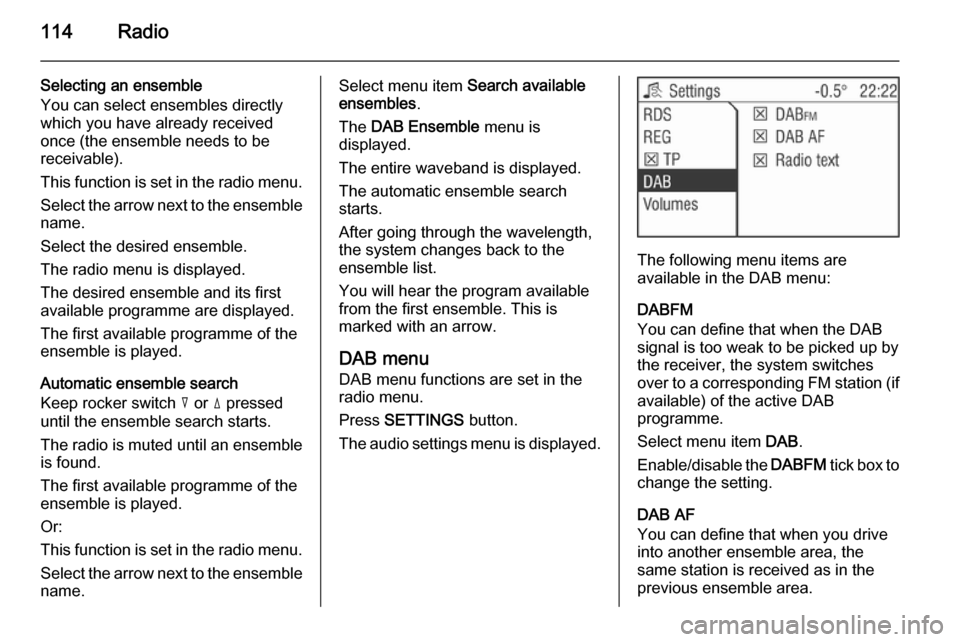
DAB menu
DAB menu functions are set in the
radio menu.
Press SETTINGS button.
The audio settings menu is displayed.
The following menu items are
available in the DAB menu:
DABFM
You can define that when the DAB
signal is too weak to be picked up by the receiver, the system switches
over to a corresponding FM station (if
available) of the active DAB
programme.
Select menu item DAB.
Enable/disable the DABFM tick box to
change the setting.
DAB AF
You can define that when you drive into another ensemble area, the
same station is received as in the
previous ensemble area.
Page 127 of 177

127
Position....................................... 101
Programme type .........................109
PTY............................................. 109
R Radio data system (RDS) ..........109
Radio text ................................... 113
Random ...................................... 117
Random album ........................... 117
Regional programmes ................109
Repeat track ............................... 117
S Scan CD ..................................... 117
SDVC.......................................... 102
Setting the volume ........................94
Show title .................................... 117
Sound settings ............................ 101
Speed dependent volume control (SDVC) ........................ 102
Starting CD replay ......................117
Start-up volume .......................... 102
Station list ................................... 104
Station memory .......................... 104
Station menu .............................. 104
Station search............................. 104
Store ........................................... 104
Subwoofer .................................. 101
Switching the Infotainment system on or off......................... 94T
TA volume .................................. 102
Theft-deterrent feature ................. 91
Tone settings .............................. 101
TP ............................................... 109
Traffic announcements ...............109
Traffic programme ......................109
Treble ......................................... 101
U
Update stations........................... 104
Usage ......................... 104, 117, 121
USB port important information ..............122
playing saved audio files .........123
User ............................................ 101
Using the AUX input ...................121
Using the CD player ...................117
Using the Infotainment system .....94
Using the USB port .....................122
V Volume ......................................... 94
Volume settings .......................... 102