radio VAUXHALL CORSA 2014.5 Infotainment system
[x] Cancel search | Manufacturer: VAUXHALL, Model Year: 2014.5, Model line: CORSA, Model: VAUXHALL CORSA 2014.5Pages: 177, PDF Size: 2.97 MB
Page 133 of 177

Introduction133
1RDS .................................... 143
Display programme name
or transmission frequency
of the station ....................... 143
Update station list ...............141
2 AS....................................... 142
Activate/deactivate AS
level ..................................... 142
Automatic station store .......142
3 TP....................................... 143
Traffic programme ............... 143
4 REG .................................... 143
Regional programme on/off 143
5 TUNER ................................ 141
Switch between FM, AM
and DAB (if available) .........141
6 SOUND ............................... 137
Enter sound settings ...........1377oe knob....................... 135
Press: Switch on/off
Infotainment system ............135
Turn: Adjust volume ............135
8 MEDIA ................................. 149
CD/MP3 mode ....................149
Display CD/MP3
information .......................... 149
Activate/deactivate
random playback ................149
AUX input: Switch audio
source to the external input 141
9 SETTINGS .......................... 139
Audio settings .....................139
System settings ................... 135
Confirm selection or page
forward in settings menu .....135
10 1...9 ..................................... 141
Station buttons ....................14111n....................................... 141
Radio: Page forward in
station memory, manual
and automatic station
search ................................. 141
CD/MP3: Next track, fast
forward ................................ 149
Change menu values ..........135
12 Audio/MP3 CD slot .............. 149
13 m....................................... 137
Radio: Page back in
station memory, manual
and automatic station
search ................................. 141
CD/MP3: Previous track,
fast rewind ........................... 149
Change menu values ..........135
14 j......................................... 149
Eject CD .............................. 149
Page 134 of 177

134Introduction
Steering wheel audio controls
1Thumbwheel ....................... 135
Turn: TID (Triple-Info-
Display): Manual station
search ................................. 135
Turn: GID (Graphic-Info-
Display): Previous/next
trip computer entry,
manual station search
(when combined with a trip
computer, turning the
thumbwheel has no radio
function) .............................. 135
Press: TID: no function .......135
Press: GID: call up/reset
trip computer, select a trip
computer entry ....................135
2 q button ............................. 141
Radio: Next stored station ..141
CD: Start CD playback ........149
MP3: Next album ................149
3 p button ............................ 149
Switch between radio/CD/
MP3 and AUX mode ...........149
4 d button ............................... 141
Radio: search up, scroll
forwards through station
memory ............................... 141
CD: Short press: Skip one
track forwards .....................149
CD: Long press: fast
forward ................................ 1495c button ............................... 141
Radio: search down, scroll
back through station
memory ............................... 141
CD: Short press: Skip one
track backwards ..................149
CD: Long press: fast rewind 149
6 o ................................... 135
Turn: adjust volume ............135
Hold: adjust volume
continuously ........................ 135
Page 135 of 177

Introduction135
The steering wheel remote control
has other functions in conjunction
with the Mobile phone portal, see
chapter for Mobile phone portal.
Operation Control elements
The Infotainment system is operated
optionally via:
■ the central control unit in the instrument panel 3 132
■ controls on the steering wheel 3 132.
The operation of the Infotainment
system can vary with the information
display type. There are two different
information displays available: Triple- Info-Display (TID) and Graphic-Info-
Display (GID). See "Information
displays" in the Owner's manual for
further information.
Switching the Infotainment
system on or off
Press the e knob.
The audio source last set is played.Switching on and off with the ignition
key (automatic switch-on)
If the automatic switch-on is enabled,
the Infotainment system can also be
switched off and on again via the
ignition.
This link between the radio and
ignition is preset in the factory, but this can be disabled.
■ If the automatic switch-on is disabled, the Infotainment system
can only be switched on with the
e button or by inserting a CD and
off with the e button.
■ If the Infotainment system is switched off when the ignition is
switched off, regardless of the
current setting of the automatic
switch-on it, can only be switched
on via the e button and by inserting
a CD.
■ The automatic start is always enabled after the Infotainment
system has been disconnected
from the operating voltage and re-
connected.Enable/Disable Ignition Logic
TID only:
1. Press SETTINGS button to
display Audio.
2. Press n button to display
System .
3. Press SETTINGS button
repeatedly until Ign.Logic ON or
OFF (depending on the current
setting) is displayed.
4. Select the desired status with the m n buttons.
After a few seconds Audio is
displayed, followed by the relevant
audio source.
Or:
Press one of the function buttons
TUNER or MEDIA to display the
relevant function.
GID only: 1. Press SETTINGS button to
display the Settings menu.
2. Press n button to select
System .
Page 136 of 177

136Introduction
3.Press SETTINGS button and then
repeatedly n button to select
Ign. logic .
4. Press SETTINGS button to
change the current setting.
After changing the setting:
Press n button and then
SETTINGS button to leave the
Settings menu.
Or:
Press one of the function buttons
TUNER or MEDIA to display the
relevant function.
Automatic switch-off
The Infotainment system switches
itself off automatically after one hour
if you switch it on with the ignition off.
Setting the volume
Turn the o knob.
■ The Infotainment system plays at the volume last set, provided the
volume was below the maximum
switch-on volume 3 139.■ Traffic announcements and
external audio sources are inserted
at a preset minimum volume
3 139.
■ The volume of an audio source connected via the AUX input can beadjusted to suit the volumes of the
other audio sources (e.g. radio)
3 139.
■ If the respective source is enabled,
the volume of the traffic
announcements, the external audio
sources and the radio and CD can
be adjusted separately.
Speed dependent volume control
(SDVC)
When SDVC is activated 3 139, the
volume is adapted automatically to
make up for the road and wind noise
when driving.
External source
An external source, e.g. a mobile
phone or a navigation system, can be
connected to the Infotainment
system.The external source is automatically
transferred through via a control
signal from the device connected,
even when the Infotainment system is
off. In this case External In is
displayed.
We recommend having appliances
installed by a Vauxhall Authorised
Repairer.
AUX input
An external audio source, e.g. a
portable CD player, can be connected via the AUX input of your vehicle.
Stereo sound from this source is
played back via the loudspeakers of
the Infotainment system.
The connector is located in the area
of the centre console.
Always ensure that the AUX input
remains clean and dry.
For the best possible audio quality,
the external audio source should be
set to maximum volume. On units with
line-out, the output signal is available
at a fixed audio level and cannot be
changed.
Page 139 of 177

Introduction139Volume settingsPress SETTINGS button.
The following menu items are
available:
■ AUX Vol. AUX input volume, e.g. a
portable CD player
■ TA Volume : Volume of traffic
announcements
■ SDVC : Speed Dependent Volume
Control
■ On Volume : Maximum volume
when the Infotainment system is
switched on
■ Ext. In Vol. : Volume of an external
source (for example when
connecting a mobile telephone)
AUX Vol.
Use this function to adjust the AUX
input level in relation to other audio sources (e.g. radio). This function is
only available when the AUX audio
source is enabled.1. Set the external audio source to maximum volume.
2. Press SETTINGS button to
display the Settings menu.
3. Press SETTINGS button
repeatedly until the relevant
function is displayed.
4. Adjust the value with m or n .
After a few seconds the Settings
menu reappears.
5. Press m button and then
SETTINGS button to return to the
most recent display.
Or:
Press one of the function buttons
TUNER or MEDIA to display the
relevant function.
TA Volume If the TP function is switched on, the
system increases the volume for
traffic announcements by default.
This function allows setting a
minimum volume for traffic
announcements.1. Press SETTINGS button to
display the Settings menu.
2. Press SETTINGS button
repeatedly until the relevant function is displayed.
3. Adjust the value with m or n .
After a few seconds the Settings
menu reappears.
4. Press m button and then
SETTINGS button to return to the
most recent display.
Or:
Press one of the function buttons
TUNER or MEDIA to display the
relevant function.
The volume is only set to a minimum
for announcements if the current
volume setting is lower than the
minimum announcement volume
selected.
SDVC
To compensate for ambient and
rolling noise, the Infotainment
system's volume is adjusted to the
Page 141 of 177

Radio141RadioUsage........................................ 141
Station search ............................ 141
Autostore lists ............................ 142
Radio data system (RDS) ..........143
Digital audio broadcasting .........146Usage
Radio mode
Switch from CD or AUX mode to radio mode as shown below:
Press TUNER button.
You are listening to the station last tuned in.
Selecting a waveband
The Infotainment system provides the following wavebands: FM, AM or DAB (if available). In addition, each of the
wavebands has an autostore memory
location (AS) where stations can be
automatically stored 3 142.
The radio is on.
Press TUNER button briefly.
The radio switches between FM, FM- AS, AM, AM-AS, DAB and DAB-AS.
The station last selected on the
waveband is heard and displayed.Station search
Station selection, automatic
search FM waveband is selected and RDS
3 143 switched on.
Or:
DAB waveband is selected (if
available) and AS 3 142 switched on.
Press m or n to play the next
station in the station memory.
If no station can be found in the
station memory, Seek is displayed
and an automatic search for radio
stations is started.
The radio is muted until a station is
found.
If the radio cannot find a station, it
switches automatically to a more
sensitive search level (not DAB). If it
Page 142 of 177

142Radio
still cannot find a station, the last
active frequency (FM) or ensemble
(DAB) will be set.
Manual station search The manual station search is used to
tune in to stations of known
frequencies (AM, FM) or ensembles
(DAB).
Keep m or n pressed until MAN is
displayed.
■ Coarse tuning:
Hold m or n down until the
desired frequency (AM, FM) or ensemble (DAB) is almost reached.
■ Fine tuning: Tap m or n until the exact
frequency/ensemble is reached.
If RDS 3 143 is deactivated in the FM
waveband or the AM waveband is active, tapping m or n moves the
frequency by on increment.
Station memory
Separate memory slots are available
for each wavelength (FM, AM):
9 memory slots are available for each of the following wavelength:
FM, FM-AS (automatically stored FM
stations), AM, AM-AS (automatically
stored AM stations), DAB, DAB-AS
(automatically stored DAB stations).
The memory slots can be selected
directly in the respective wavelength
via the station buttons.
Manual storing
Tune in to the desired station.
Keep the station button pressed on
which the tuned-in station is to be
stored.
The radio is muted for a short while
and displays the station previously
stored in the memory slot.
The station tuned-in is audible again and is displayed.The station is stored in the desired
memory slot.
RDS on or RDS off 3 143 are stored
together with the station.
FM station list
The Infotainment system stores all
receivable FM stations in the
background.
The list of receivable stations is
updated automatically if the radio
searches for a TP station 3 143 or an
automatic storage run is performed
using the Autostore (AS) function
3 142.
RDS stations 3 143 are sorted by
radio company in the station list (HR1, HR2...)
Autostore listsActivate/deactivate AS level
Tap the AS button.
When the AS level is active, the
display shows AS.
Page 143 of 177

Radio143
The AS level can also be activated
and deactivated using the FM/AM
button 3 141.
Autostore (AS)
Automatic storing (AS) of any
receivable station is possible in all
wavebands. These stations are
stored in a separate AS memory.
To automatically store stations,
proceed as follows:
1. Select the required waveband.
2. Enable/disable on standby for traffic announcements if desired
3 143.
3. Hold down the AS button until you
hear the confirmation signal.
The radio changes over to the AS
level of the selected waveband (FM-
AS or AM-AS).
The automatic station storing is
started.
The 9 best receivable stations in the selected waveband are stored to
memory slots 1 to 9.After the stations have been stored,
the desired station can be selected by pressing the appropriate station
button.
RDS is switched on automatically
when automatic storing is enabled.
First, all receivable RDS stations are
stored.
If on standby for traffic announcement is switched on prior to or during
automatic storing, the radio will select a memory slot with a traffic
announcement station on completion
of the automatic station search.
If on standby for traffic announcement
is switched on during automatic
storing, then the automatic station
search will remain active until at least one traffic programme is found.
Storing new stations with AS If you drive out of the reception area
of a stored station, new stations need
to be stored.Calling up a station
The desired waveband and the
desired mode need to be active
3 141.
Press the AS button to activate the AS
level.
Select the storage location with the storage buttons.
Radio data system (RDS)
RDS is a service of FM stations that
considerably facilitates the finding of
the desired station and its fault-free
reception.Advantages of RDS ■ On the display the programme name of the set station appears
instead of its frequency.
■ On station search the Infotainment system tunes in to RDS stations
only.
Page 144 of 177
144Radio
■ The Infotainment system alwaystunes into the best receivable
broadcasting frequency of the set station by means of AF (Alternative Frequency).
■ Depending on the station that is received the Infotainment system
displays radio text that can contain,
for example, information about the
current programme.
RDS is only possible on the FM band.
Switching RDS on/off
If RDS is switched on, the RDS
functions are enabled and only RDS
stations are sought during the
automatic station search.
If you switch RDS off, the RDS
functions will be disabled and the
automatic station search will not only
look for RDS stations.
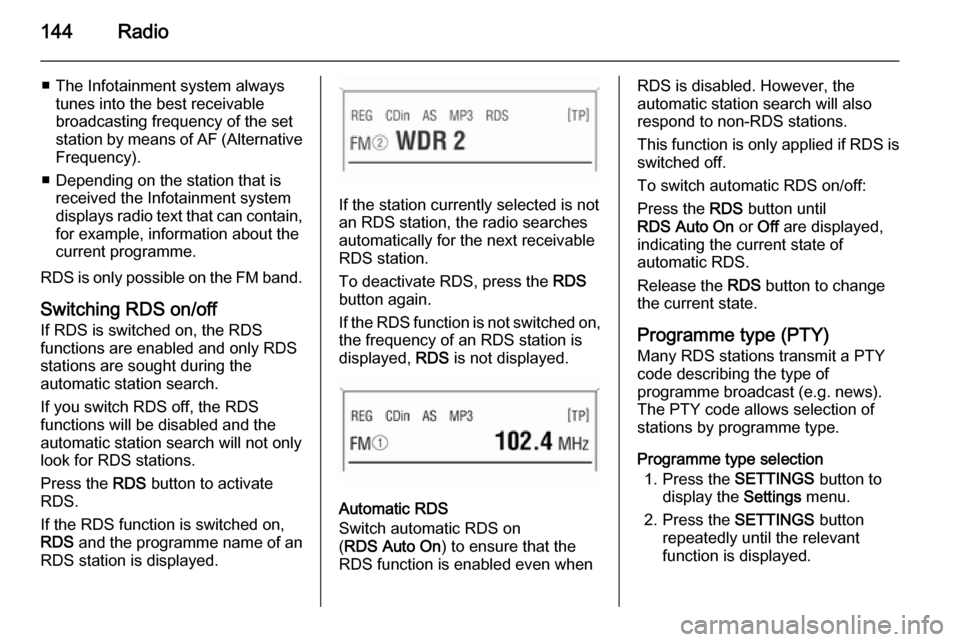
Press the RDS button to activate
RDS.
If the RDS function is switched on, RDS and the programme name of an
RDS station is displayed.
If the station currently selected is not an RDS station, the radio searches
automatically for the next receivable
RDS station.
To deactivate RDS, press the RDS
button again.
If the RDS function is not switched on,
the frequency of an RDS station is
displayed, RDS is not displayed.
Automatic RDS
Switch automatic RDS on
( RDS Auto On ) to ensure that the
RDS function is enabled even when
RDS is disabled. However, the
automatic station search will also
respond to non-RDS stations.
This function is only applied if RDS is switched off.
To switch automatic RDS on/off:
Press the RDS button until
RDS Auto On or Off are displayed,
indicating the current state of
automatic RDS.
Release the RDS button to change
the current state.
Programme type (PTY)
Many RDS stations transmit a PTY
code describing the type of
programme broadcast (e.g. news).
The PTY code allows selection of
stations by programme type.
Programme type selection 1. Press the SETTINGS button to
display the Settings menu.
2. Press the SETTINGS button
repeatedly until the relevant
function is displayed.
Page 145 of 177

Radio145
3. Select one of the 29 programmetypes e.g. News or
Entertainment with m or n .
4. Hold down m or n until the
station search begins.
After station search starts the radio
display appears.
If the radio does not find an
appropriate station, it plays the
station to which the radio was most
recently tuned.
Regional programmes Some RDS stations transmit different
regional programmes over different
frequencies at certain times.
Switching on/off regionalisation
The RDS function must be switched
on.
Press the REG button briefly to switch
regionalisation on or off.
If regionalisation is switched on,
REG is shown on the display.
The radio remains tuned to the
regional programme while seeking
the best receivable station frequency.If regionalisation is switched off (no
REG on display), the radio allows
switching to another regional
programme.
Automatic regionalisation
If automatic regionalisation is
switched on ( REG Auto On ): the radio
remains tuned to the regional
programme while seeking the
transmission frequency with the
strongest reception (AF) for a radio
programme until the programme can no longer be received without
interference.
If the reception quality of the regional programme is no longer sufficient for
interference-free reception, the radio
switches to another regional
programme.
To switch automatic regionalisation
on/off:
Press the REG button until
REG Auto On or Off are displayed,
indicating the current state of
automatic regionalisation.
Release the REG button to change
the current state.Traffic programme (TP)
Traffic programme stations are FM
RDS stations which broadcast traffic
news.
Traffic stations can be recognised by
the TP symbol in the display.
Switching traffic programme on/off ■ If radio traffic announcement is enabled, [TP] or [ ] is displayed.
■ If the current station is a traffic programme station, [TP] appears in
the display.
■ If the current station is a not traffic programme station, the radio will
automatically search for the traffic
station with the best reception.
[ ] does not appear on the display.
Press the TP button to switch on
TP.
[ ] is displayed.
■ The automatic station search feature searches only for traffic
announcements.
■ During automatic search or if reception of a traffic programme isnot possible, [ ] is displayed.