service VAUXHALL CORSA 2016.5 User Guide
[x] Cancel search | Manufacturer: VAUXHALL, Model Year: 2016.5, Model line: CORSA, Model: VAUXHALL CORSA 2016.5Pages: 265, PDF Size: 7.81 MB
Page 110 of 265

108Instruments and controlsthe driver's door or the whole
vehicle whilst unlocking.
Relock Remotely Unlocked
Doors : Activates or deactivates
the automatic relock function
after unlocking without opening
the vehicle.OnStar
OnStar is a personal connectivity and
service assistant with integrated
Wi-Fi hotspot. The OnStar service is
available 24 hours a day, seven days
a week.
Notice
OnStar is not available for all
markets. For further information,
contact your workshop.
Notice
In order to be available and
operational, OnStar needs a valid
OnStar subscription, functioning
vehicle electrics, mobile service and
GPS satellite link.
To activate the OnStar services and
set up an account, press Z and speak
with an advisor.
Depending on the equipment of the vehicle, the following services areavailable:
● Emergency services and support
in the case of a vehicle
breakdown
● Wi-Fi hotspot● Smartphone application
● Remote control, e.g. location of the vehicle, activation of horn and
lights, control of central locking system
● Stolen vehicle assistance
● Vehicle diagnostics
● Destination download
Notice
The OnStar module of the vehicle is
deactivated after ten days without an
ignition cycle. Functions requiring a
data connection will be available
again after switching on the ignition.
OnStar buttons
Page 111 of 265

Instruments and controls109Privacy button
Press and hold j until a message is
heard to activate or deactivate the transmission of the vehicle location.
Press j to answer a call or to end a
call to an advisor.
Press j to access the Wi-Fi settings.
Service button
Press Z to establish a connection to
an advisor.
SOS button
Press [ to establish a priority
emergency connection to a specially
trained emergency advisor.
Status LED
Green: The system is ready.
Green flashing: The system is on a
call.
Red: A problem arose.
Off: System is in standby mode.
Red / green flashing for a short period
of time: Transmission of the vehicle
location has been deactivated.OnStar services
General services
If you need any information
concerning e.g. opening hours, points
of interest and destinations or if you need any support e.g. in the case of a vehicle breakdown, a flat tyre and
empty fuel tank, press Z to establish
a connection to an advisor.
Emergency services
In the case of an emergency situation,
press [ and talk to an advisor. The
advisor then contacts emergency or
assistance service providers and
directs them to your vehicle.
In the case of an accident with
activation of airbags or belt
tensioners, an automatic emergency
call is established. The advisor is
immediately connected to your
vehicle to see whether help is
needed.
Wi-Fi hotspot
The Wi-Fi hotspot of the vehicle
provides internet connectivity with a
maximum speed of 4G/LTE.Notice
The Wi-Fi hotspot functionality is not available for all markets.
Up to seven devices may be
connected.
To connect a mobile device with the
Wi-Fi hotspot:
1. Press j and then select Wi-Fi
settings on the Info-Display. The
settings displayed include the Wi-
Fi hotspot name (SSID),
password and connection type.
2. Start a Wi-Fi network search on your mobile device.
3. Select your vehicle hotspot (SSID) when listed.
4. When prompted, enter the password on your mobile device.
Notice
To change the SSID or password,
press Z and talk to an advisor or log
in to your account.
To switch off the Wi-Fi hotspot
functionality, press Z to call an
advisor.
Page 113 of 265

Instruments and controls111Destination download
A desired destination can be directly downloaded to the navigation system.
Press Z to call an advisor and
describe the destination or point of
interest.
The advisor can look up any address
or point of interest and directly send
the destination to the built-in
navigation system.
OnStar settings
OnStar PIN
To have full access to all OnStar
services, a four-digit PIN is required. The PIN has to be personalised when first talking to an advisor.
To change the PIN, press Z to call an
advisor.
Account data
An OnStar subscriber has an account
where all the data is stored. To
request a change of the account
information, press Z and talk to an
advisor or log in to your account.If the OnStar service is used on
another vehicle, press Z and request
that the account be transferred to the
new vehicle.
Notice
In any case, if the vehicle is disposed of, sold or otherwise transferred,
immediately inform OnStar about
the changes and terminate the
OnStar service on this vehicle.
Vehicle location
The vehicle location is transmitted to OnStar when service is requested or
triggered. A message on the Info-
Display informs about this
transmission.
To activate or deactivate the
transmission of the vehicle location,
press and hold j until an audio
message is heard.
The deactivation is indicated by the
status light flashing red and green for
a short period of time and each time
the vehicle is started.
Notice
If the transmission of the vehicle
location is deactivated, some
services are no longer available.Notice
The vehicle location always remains accessible to OnStar in the case of
an emergency.
Find the privacy policy in your
account.
Software updates
OnStar may remotely carry out
software updates without further
notice or consent. These updates are
to enhance or maintain safety and
security or the operation of the
vehicle.
These updates may concern privacy
issues. Find the privacy policy in your account.
Page 124 of 265

122Climate controlClimate controlClimate control systems.............122
Heating and ventilation system 122
Air conditioning system ...........123
Electronic climate control system .................................... 125
Air vents ..................................... 130
Adjustable air vents .................130
Fixed air vents ......................... 130
Maintenance .............................. 130
Air intake ................................. 130
Pollen filter ............................... 130
Air conditioning regular operation ................................ 131
Service .................................... 131Climate control systems
Heating and ventilation system
Controls for: ● temperature
● fan speed
● air distribution
Heated rear window Ü 3 32.
Heated windscreen 3 32.
Heated seats ß 3 39.
Heated steering wheel * 3 76.
Temperaturered:warmblue:cold
Heating will not be fully effective until
the engine has reached normal
operating temperature.
Fan speed
Adjust the air flow by switching the fan
to the desired speed.
Air distribution
M:to head areaL:to head area and foot wellK:to foot well and windscreenJ:to windscreen, front door
windows and foot welll:to windscreen and front door
windows
Intermediate settings are possible.
Page 133 of 265

Climate control131Air conditioning regular
operation
In order to ensure continuously
efficient performance, cooling must
be operated for a few minutes once a month, irrespective of the weather
and time of year. Operation with
cooling is not possible when the
outside temperature is too low.
Service For optimal cooling performance, it is
recommended to annually check the
climate control system, starting
three years after initial vehicle
registration, including:
● functionality and pressure test
● heating functionality
● leakage check
● check of drive belts
● cleaning of condenser and evaporator drainage
● performance check
Page 137 of 265

Driving and operating135Turn key briefly to position 3 and
release: an automatic procedure
operates the starter after a brief
delay, until the engine is running. See
'Automatic Starter Control'.
Before restarting or to switch off the
engine, turn the key back to position
0 .
During an Autostop, the engine can
be started by depressing the clutch
pedal.
Starting the vehicle at low
temperatures
Diesel engines
The start of the engine without
additional heaters is possible down to
-25 °С.
Petrol engines
The start of the engine without
additional heaters is possible down to -30 °C.
Required is an engine oil with the
correct viscosity, the correct fuel,
performed services and a sufficiently
charged vehicle battery.With temperatures below -30 °C, the
automatic transmission requires a
warming phase of approx. five
minutes. The selector lever must be
in position P.
Automatic starter control This function controls the engine
starting procedure. The driver does
not need to hold the key in position 3.
Once applied, the system will go on starting automatically until the engine
is running. Because of the checking
procedure, the engine starts running after a short delay.
Possible reasons for a non-starting engine:
● clutch pedal not operated (manual transmission)
● brake pedal not operated or selector lever not in P or N
(automatic transmission)
● timeout occurredTurbo engine warm-up
Upon start-up, engine available
torque may be limited for a short time, especially when the engine
temperature is cold. The limitation is
to allow the lubrication system to fully
protect the engine.
Overrun cut-off
The fuel supply is automatically cut-
off during overrun, i.e. when the
vehicle is driven with a gear engaged but accelerator is released.
Stop-start system The stop-start system helps to save
fuel and to reduce the exhaust
emissions. When conditions allow, it
switches off the engine as soon as the
vehicle is at a low speed or at a
standstill, e.g. at a traffic light or in a
traffic jam.
On vehicles with manual
transmission, the engine is started automatically as soon as the clutch is
depressed.
Page 191 of 265

Vehicle care189Gas vehicles must be recycled by a
service centre authorised for gas
vehicles.Vehicle checks
Performing work9 Warning
Only perform engine compartment
checks when the ignition is off.
The cooling fan may start
operating even if the ignition is off.
9 Danger
The ignition system and Xenon
headlights use extremely high
voltage. Do not touch.
Bonnet
Opening
Pull the release lever and return it to
its original position.
Page 216 of 265
214Vehicle careThe use of commercially-availableliquid tyre repair kits can impair the
function of the system. Factory-
approved repair kits can be used.
Operating electronic devices or being close to facilities using similar wave
frequencies could disrupt the tyre
pressure monitoring system.
Each time the tyres are replaced, tyre
pressure monitoring system sensors
must be dismounted and serviced. For the screwed sensor; replace
valve core and sealing ring. For the
clipped sensor; replace complete
valve stem.
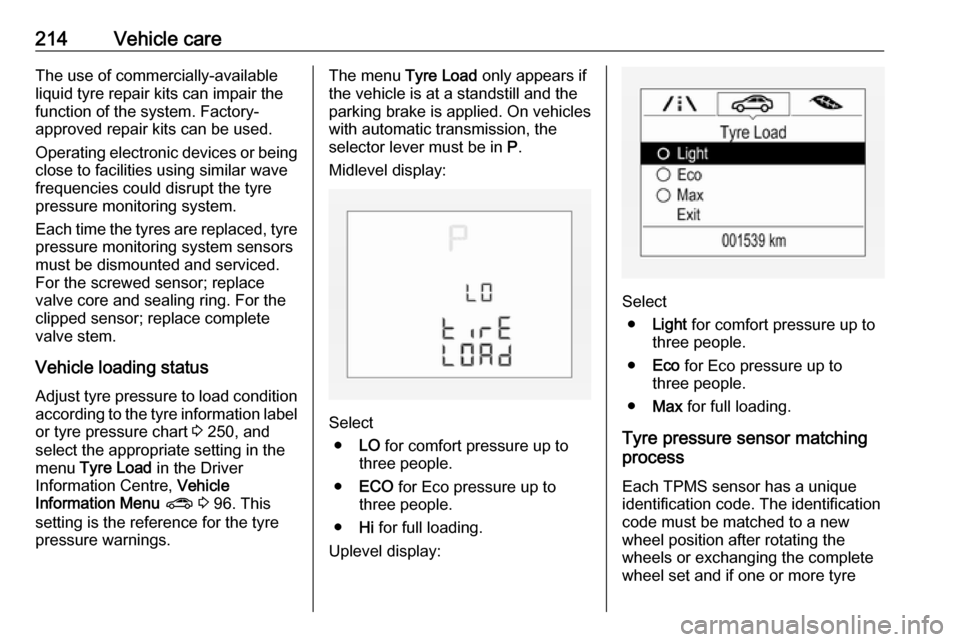
Vehicle loading status
Adjust tyre pressure to load condition according to the tyre information labelor tyre pressure chart 3 250, and
select the appropriate setting in the menu Tyre Load in the Driver
Information Centre, Vehicle
Information Menu ? 3 96. This
setting is the reference for the tyre
pressure warnings.The menu Tyre Load only appears if
the vehicle is at a standstill and the
parking brake is applied. On vehicles
with automatic transmission, the
selector lever must be in P.
Midlevel display:
Select ● LO for comfort pressure up to
three people.
● ECO for Eco pressure up to
three people.
● Hi for full loading.
Uplevel display:
Select ● Light for comfort pressure up to
three people.
● Eco for Eco pressure up to
three people.
● Max for full loading.
Tyre pressure sensor matching process
Each TPMS sensor has a unique
identification code. The identification
code must be matched to a new
wheel position after rotating the
wheels or exchanging the complete
wheel set and if one or more tyre
Page 217 of 265
Vehicle care215pressure sensors were replaced. The
tyre pressure sensor matching
process should also be performed
after replacing a spare wheel with a
road wheel containing a tyre pressure sensor.
The malfunction light w and the
warning message or code should
extinguish at the next ignition cycle.
The sensors are matched to the
wheel positions, using a relearn tool,
in the following order: left side front
wheel, right side front wheel, right
side rear wheel and left side rear
wheel. The turn signal light at the
current active position is illuminated
until sensor is matched.
Consult a workshop for service or
purchase a relearn tool. There are
two minutes to match the first wheel
position, and five minutes overall to
match all four wheel positions. If it
takes longer, the matching process
stops and must be restarted.
The tyre pressure sensor matching
process is:
1. Apply the parking brake.
2. Turn the ignition on.3. On vehicles with automatic transmission: set the selector
lever to P.
On vehicles with manual
transmission automated: Keep
brake pedal depressed. Move and hold the selector lever for five
seconds to position N until P is
displayed in the Driver
Information Centre. P indicates
that the tyre pressure sensor
matching process can be started.
On vehicles with manual
transmission: select neutral.
4. Use MENU on the turn signal
lever to select the Vehicle
Information Menu ? in the
Driver Information Centre.
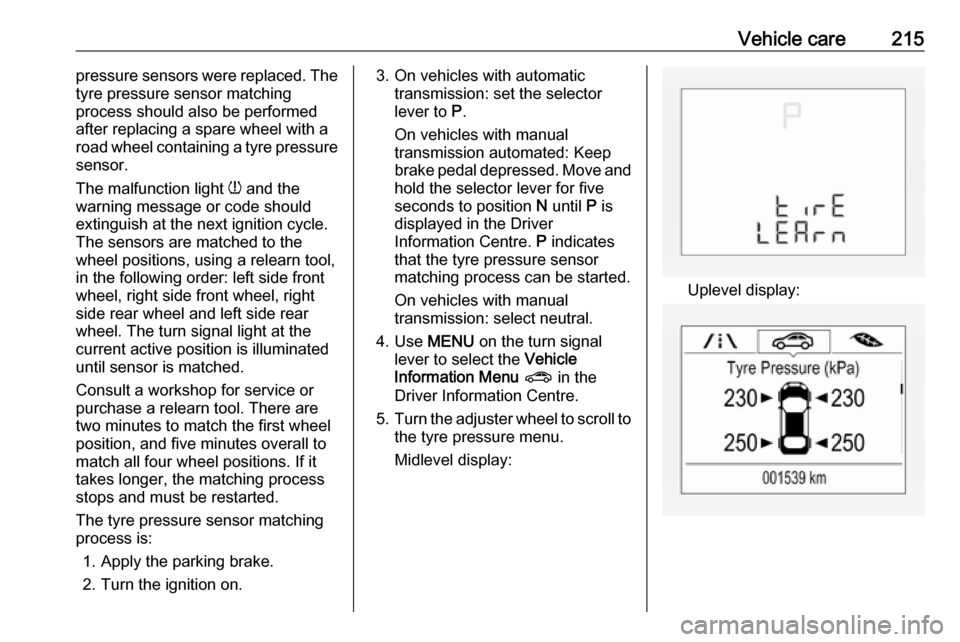
5. Turn the adjuster wheel to scroll to
the tyre pressure menu.
Midlevel display:
Uplevel display:
Page 236 of 265

234Service and maintenanceService and
maintenanceGeneral information ...................234
Service information ..................234
Recommended fluids, lubricants
and parts .................................... 235
Recommended fluids and lubricants ................................ 235General information
Service information In order to ensure economical and
safe vehicle operation and to
maintain the value of your vehicle, it
is of vital importance that all
maintenance work is carried out at the proper intervals as specified.
The detailed, up-to-date service
schedule for your vehicle is available
at the workshop.
Service display 3 86.
European service intervals
Maintenance of your vehicle is
required every 20,000 miles or after
one year, whichever occurs first, unless otherwise indicated in theservice display.
A shorter service interval can be valid for severe driving behaviour, e.g. for
taxis and police vehicles.
The European service intervals are
valid for the following countries:Andorra, Austria, Belgium, Bosnia-
Herzegovina, Bulgaria, Croatia,
Cyprus, Czech Republic, Denmark,
Estonia, Finland, France, Germany,
Greece, Greenland, Hungary,
Iceland, Ireland, Italy, Latvia,
Liechtenstein, Lithuania,
Luxembourg, Macedonia, Malta,
Monaco, Montenegro, Netherlands,
Norway, Poland, Portugal, Romania, San Marino, Serbia, Slovakia,
Slovenia, Spain, Sweden,
Switzerland, United Kingdom.
Service display 3 86.
International service intervals
Maintenance of your vehicle is
required every 10,000 miles or after
one year, whichever occurs first, unless otherwise indicated in the
service display.
The international service intervals are valid for the countries which are notlisted in the European service
intervals.
Service display 3 86.