wheel VAUXHALL CORSA 2016 Owner's Guide
[x] Cancel search | Manufacturer: VAUXHALL, Model Year: 2016, Model line: CORSA, Model: VAUXHALL CORSA 2016Pages: 267, PDF Size: 7.79 MB
Page 72 of 267

70Storage
To remove the three other segments
(order 1 to 3) lift at the rear,
disengage, twist and remove.
Fitting
Install the segments in the order 3 to
1. Engage segments in recesses at
the side.
The segments overlap at the
connecting points when they are
closed.
To install rear cover, engage cover in side guides and fold downwards.
Attach retaining straps to tailgate.
Rear floor storage cover
Rear floor cover
Lift up rear floor cover to gain access
to emergency breakdown equipment.
Tools 3 211.
In models with a tyre repair kit on the
right side in the load compartment,
the spare wheel recess may be used
as an additional stowage
compartment. Tyre repair kit 3 219.
Double load-bay floor
The double load-bay floor can be
inserted in the load compartment in
two positions:
● directly above the cover for the spare wheel recess or the floor
cover
● or in the upper openings in the load compartment
To remove, lift the load-bay floor
using the recess and pull backwards.
To insert, push the load-bay floor
forwards in the corresponding guide,
then lower.
If mounted in the upper position, the
space between the load-bay floor and
the spare wheel well cover can be
used as a stowage compartment.
Page 77 of 267

Instruments and controls75Instruments and
controlsControls ....................................... 76
Steering wheel adjustment ........76
Steering wheel controls .............76
Heated steering wheel ...............76
Horn ........................................... 77
Windscreen wiper/washer .........77
Rear window wiper/washer .......79
Outside temperature ..................79
Clock ......................................... 80
Power outlets ............................. 82
Cigarette lighter ......................... 82
Ashtrays .................................... 83
Warning lights, gauges and indi‐ cators ........................................... 83
Instrument cluster ......................83
Speedometer ............................. 83
Odometer .................................. 83
Trip odometer ............................ 83
Tachometer ............................... 84
Fuel gauge ................................ 85
Fuel selector .............................. 85
Engine coolant temperature gauge ....................................... 86
Service display .......................... 86Control indicators ......................87
Turn signal ................................. 89
Seat belt reminder .....................90
Airbag and belt tensioners .........90
Airbag deactivation ....................91
Charging system .......................91
Malfunction indicator light ..........91
Service vehicle soon .................91
Brake and clutch system ...........92
Operate pedal ............................ 92
Antilock brake system (ABS) .....92
Gear shifting .............................. 92
Power steering .......................... 92
Lane departure warning ............92
Ultrasonic parking assist ...........93
Electronic Stability Control off ...93
Electronic Stability Control and Traction Control system ...........93
Traction Control system off .......93
Preheating ................................. 93
Diesel particle filter ....................93
Tyre pressure monitoring system ...................................... 94
Engine oil pressure ....................94
Low fuel ..................................... 94
Immobiliser ................................ 94
Reduced engine power .............94
Autostop .................................... 95
Exterior light .............................. 95
High beam ................................. 95High beam assist.......................95
Fog light ..................................... 95
Rear fog light ............................. 95
Cruise control ............................ 95
Vehicle detected ahead .............95
Speed limiter ............................. 95
Traffic sign assistant ..................95
Door open .................................. 95
Information displays .....................96
Driver Information Centre ..........96
Colour-Info-Display ..................101
Graphic-Info-Display ................102
Vehicle messages ......................103
Warning chimes .......................105
Battery voltage ........................ 106
Vehicle personalisation ..............106
OnStar® system ........................110
Page 78 of 267
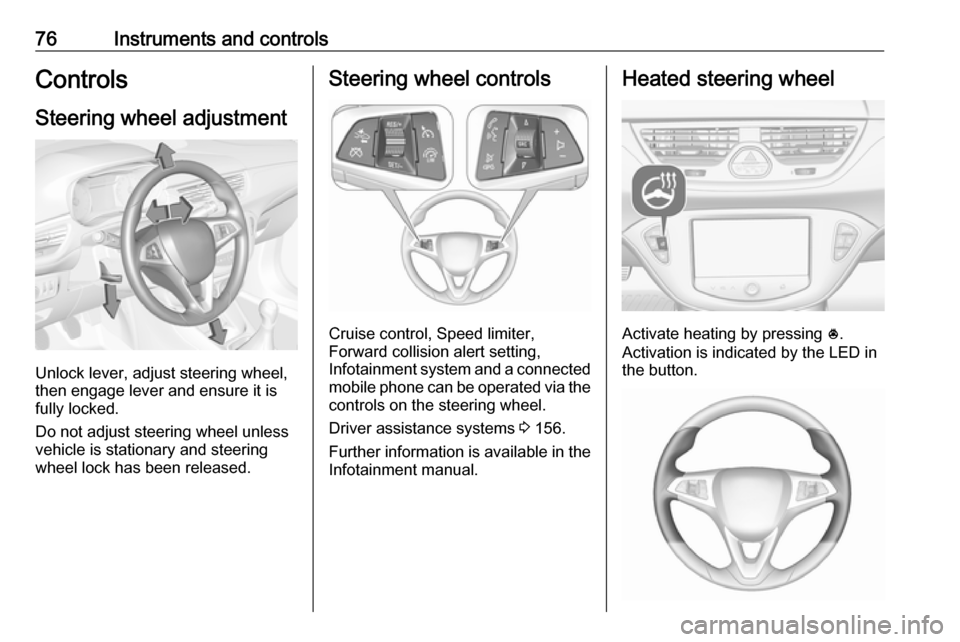
76Instruments and controlsControlsSteering wheel adjustment
Unlock lever, adjust steering wheel,
then engage lever and ensure it is
fully locked.
Do not adjust steering wheel unless
vehicle is stationary and steering
wheel lock has been released.
Steering wheel controls
Cruise control, Speed limiter,
Forward collision alert setting,
Infotainment system and a connected
mobile phone can be operated via the controls on the steering wheel.
Driver assistance systems 3 156.
Further information is available in the
Infotainment manual.
Heated steering wheel
Activate heating by pressing *.
Activation is indicated by the LED in
the button.
Page 79 of 267
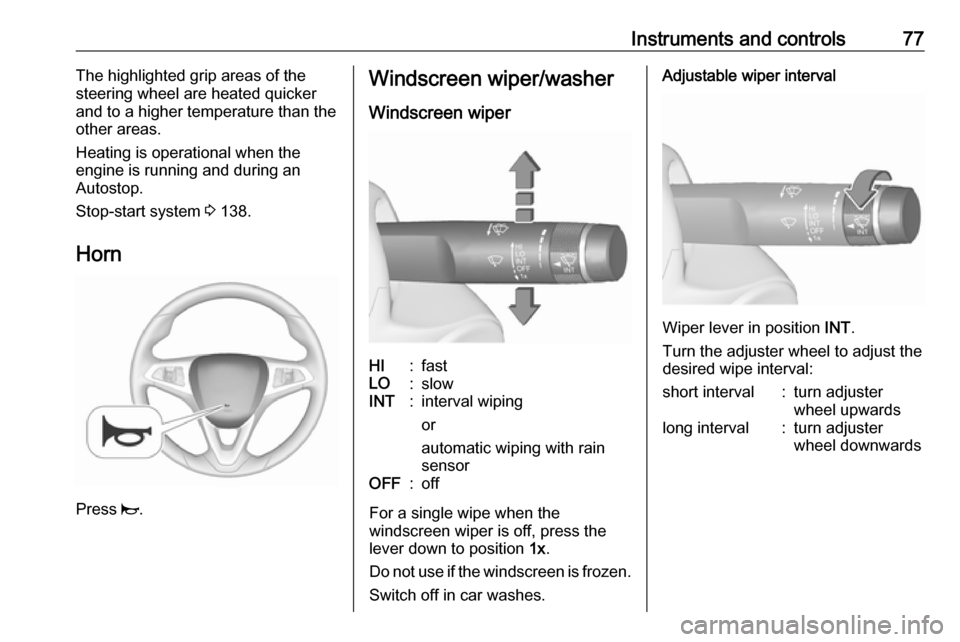
Instruments and controls77The highlighted grip areas of the
steering wheel are heated quicker and to a higher temperature than the
other areas.
Heating is operational when the
engine is running and during an
Autostop.
Stop-start system 3 138.
Horn
Press j.
Windscreen wiper/washer
Windscreen wiperHI:fastLO:slowINT:interval wiping
or
automatic wiping with rain
sensorOFF:off
For a single wipe when the
windscreen wiper is off, press the
lever down to position 1x.
Do not use if the windscreen is frozen.
Switch off in car washes.
Adjustable wiper interval
Wiper lever in position INT.
Turn the adjuster wheel to adjust the
desired wipe interval:
short interval:turn adjuster
wheel upwardslong interval:turn adjuster
wheel downwards
Page 80 of 267
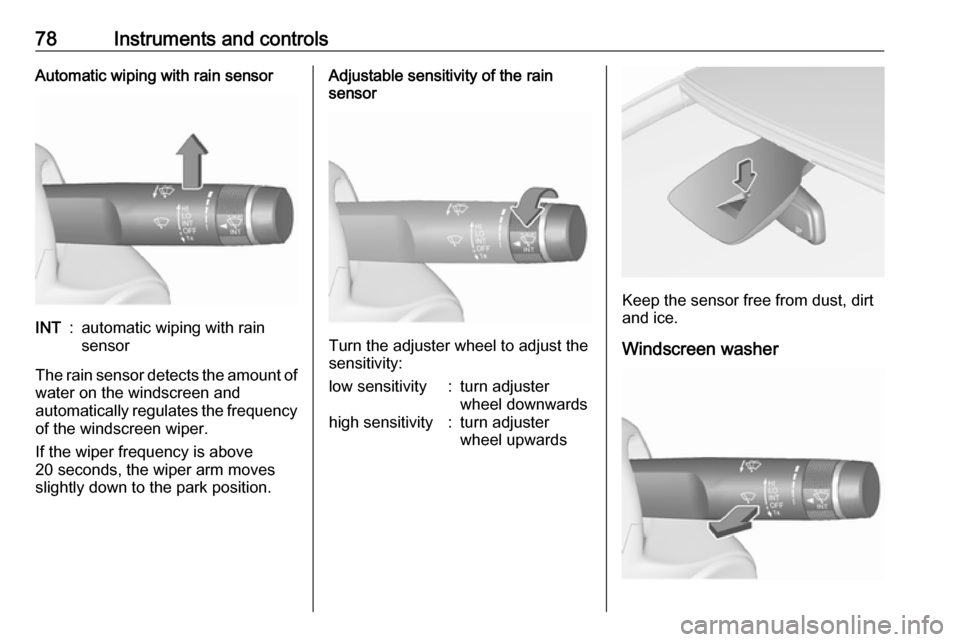
78Instruments and controlsAutomatic wiping with rain sensorINT:automatic wiping with rain
sensor
The rain sensor detects the amount of water on the windscreen and
automatically regulates the frequency
of the windscreen wiper.
If the wiper frequency is above
20 seconds, the wiper arm moves
slightly down to the park position.
Adjustable sensitivity of the rain
sensor
Turn the adjuster wheel to adjust the
sensitivity:
low sensitivity:turn adjuster
wheel downwardshigh sensitivity:turn adjuster
wheel upwards
Keep the sensor free from dust, dirt
and ice.
Windscreen washer
Page 86 of 267

84Instruments and controlsBaselevel and Midlevel display
To reset, press SET/CLR on the turn
signal lever for a few seconds
3 96.
Uplevel display
Two trip odometer are selectable for
different trips.
Select menu Trip/Fuel Information
Menu ; by pressing Menu on the
turn signal lever. Turn adjuster wheel
on turn signal lever and select Trip 1
or Trip 2 . Each trip odometer can be
reset separately by pressing
SET/CLR on the turn signal lever for
a few seconds on the respective
menu.
Tachometer
Displays the engine speed.
Drive in a low engine speed range for each gear as much as possible.
Caution
If the needle is in the red warning
zone, the maximum permitted
engine speed is exceeded. Engine at risk.
Page 88 of 267
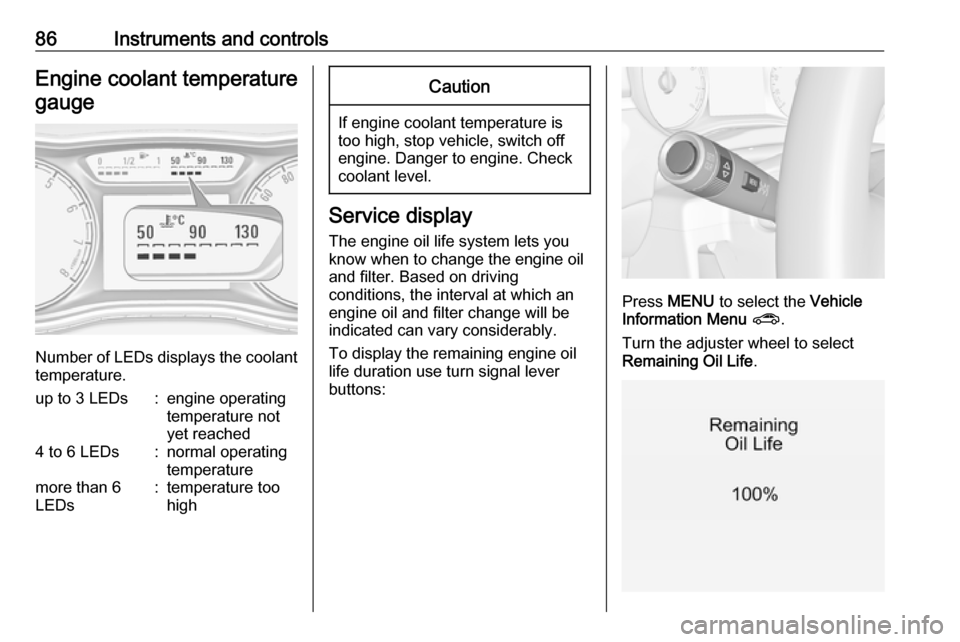
86Instruments and controlsEngine coolant temperaturegauge
Number of LEDs displays the coolant temperature.
up to 3 LEDs:engine operating
temperature not
yet reached4 to 6 LEDs:normal operating
temperaturemore than 6
LEDs:temperature too
highCaution
If engine coolant temperature is
too high, stop vehicle, switch off
engine. Danger to engine. Check
coolant level.
Service display
The engine oil life system lets you
know when to change the engine oil
and filter. Based on driving
conditions, the interval at which an
engine oil and filter change will be
indicated can vary considerably.
To display the remaining engine oil
life duration use turn signal lever
buttons:
Press MENU to select the Vehicle
Information Menu ? .
Turn the adjuster wheel to select
Remaining Oil Life .
Page 96 of 267
94Instruments and controlsTyre pressure monitoringsystem
w illuminates or flashes yellow.
Illuminates
Tyre pressure loss. Stop immediately
and check tyre pressure.
Flashes
Fault in system or tyre without
pressure sensor mounted ( e.g. spare
wheel). After 60-90 seconds the
control indicator illuminates
continuously. Consult a workshop.
Tyre pressure monitoring system3 213.
Engine oil pressure
I illuminates red.
Illuminates when the ignition is
switched on and extinguishes shortly
after the engine starts.Illuminates when the engine is
runningCaution
Engine lubrication may be
interrupted. This may result in
damage to the engine and/or
locking of the drive wheels.
1. Depress the clutch.
2. Set selector lever to neutral.
3. Move out of the flow of traffic as quickly as possible without
impeding other vehicles.
4. Switch off the ignition.
9 Warning
When the engine is off,
considerably more force is needed
to brake and steer.
During an Autostop, the brake
servo unit will still be operational.
Do not remove key until vehicle is stationary, otherwise the steeringwheel lock could engage
unexpectedly.
Check oil level before seeking the
assistance of a workshop 3 192.
Low fuel
Y illuminates or flashes yellow.
Illuminates
Level in fuel tank is too low.
Flashes
Fuel used up. Refuel immediately.
Never run the fuel tank dry.
Refuelling 3 180.
Catalytic converter 3 143.
Bleeding the diesel fuel system
3 197.
Immobiliser d flashes yellow.
Fault in the immobiliser system. The
engine cannot be started.
Reduced engine power
# illuminates yellow.
Page 98 of 267
96Instruments and controlsInformation displaysDriver Information Centre The Driver Information Centre is
located in the instrument cluster.
Depending on the version and
equipment, the Driver Information
Centre is available as Baselevel
display, Midlevel display or Uplevel
display.
Following menus are selectable in the
Driver Information Centre using the
buttons on the turn signal lever:
● trip odometer 3 83
● vehicle information and settings, see below
● trip/fuel information, see below ● economic information, see below
● navigation information
Following indication appears if
required:
● warning messages 3 103
● gear shift indication 3 92
● drive mode indication 3 143,
3 148
● tyre pressure warning 3 213● seat belt reminder indication
3 90
● Autostop indication 3 138
● service information 3 91
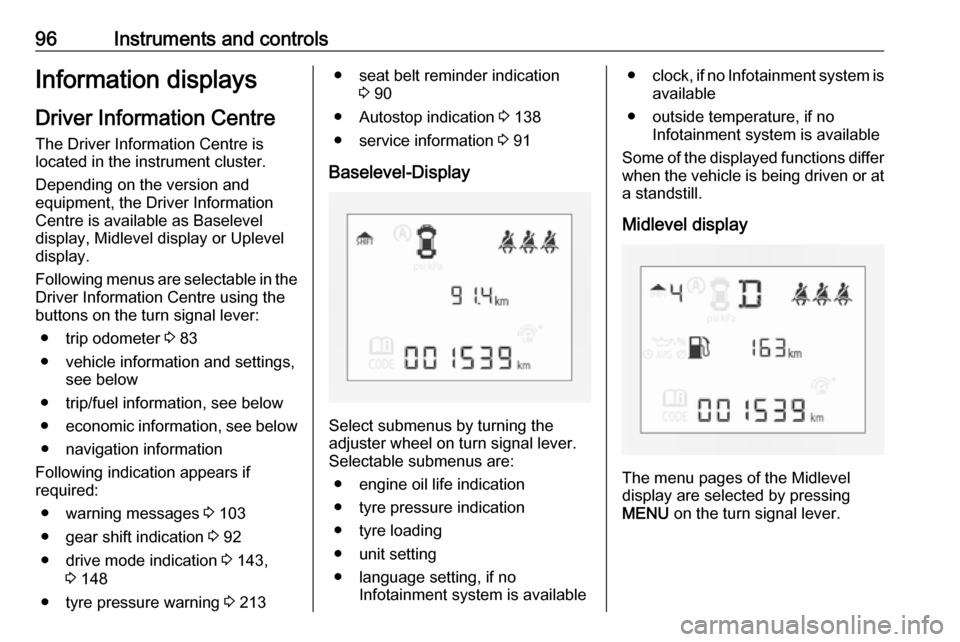
Baselevel-Display
Select submenus by turning the
adjuster wheel on turn signal lever. Selectable submenus are:
● engine oil life indication
● tyre pressure indication
● tyre loading
● unit setting
● language setting, if no Infotainment system is available
●clock, if no Infotainment system is
available
● outside temperature, if no Infotainment system is available
Some of the displayed functions differ
when the vehicle is being driven or at a standstill.
Midlevel display
The menu pages of the Midlevel
display are selected by pressing
MENU on the turn signal lever.
Page 99 of 267
Instruments and controls97Selectable menu pages of Midlevel
display are:
● Trip/Fuel Information Menu
menu, see description below
● Vehicle Information Menu menu,
see description below
Some of the displayed functions differ
when the vehicle is being driven or at
a standstill. Some functions are only
available when the vehicle is being
driven.
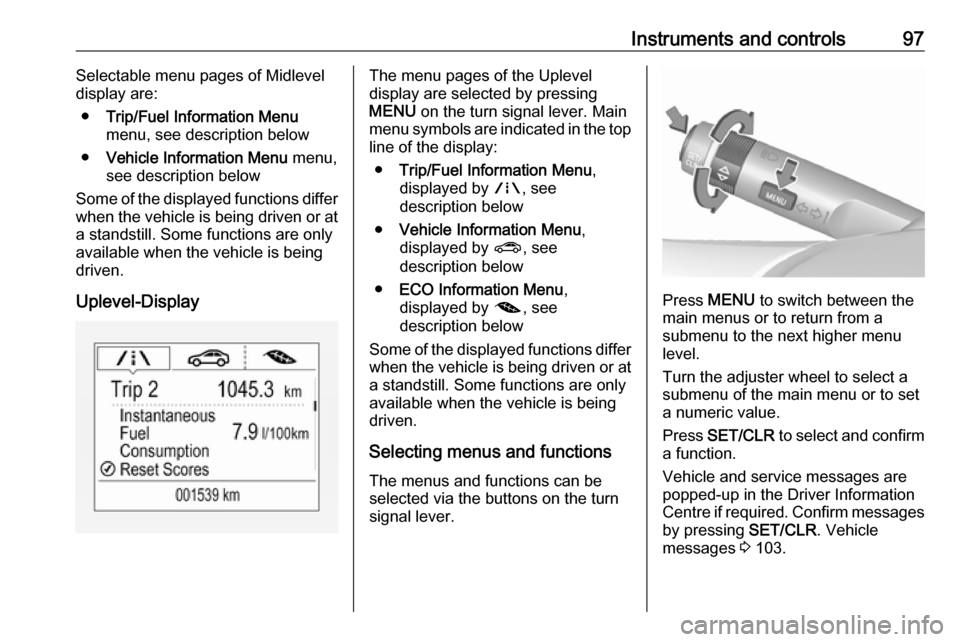
Uplevel-DisplayThe menu pages of the Uplevel
display are selected by pressing
MENU on the turn signal lever. Main
menu symbols are indicated in the top line of the display:
● Trip/Fuel Information Menu ,
displayed by ;, see
description below
● Vehicle Information Menu ,
displayed by ?, see
description below
● ECO Information Menu ,
displayed by @, see
description below
Some of the displayed functions differ
when the vehicle is being driven or at
a standstill. Some functions are only
available when the vehicle is being
driven.
Selecting menus and functions The menus and functions can be
selected via the buttons on the turn
signal lever.
Press MENU to switch between the
main menus or to return from a
submenu to the next higher menu
level.
Turn the adjuster wheel to select a
submenu of the main menu or to set
a numeric value.
Press SET/CLR to select and confirm
a function.
Vehicle and service messages are
popped-up in the Driver Information
Centre if required. Confirm messages by pressing SET/CLR. Vehicle
messages 3 103.