wheel VAUXHALL CORSA 2016 Workshop Manual
[x] Cancel search | Manufacturer: VAUXHALL, Model Year: 2016, Model line: CORSA, Model: VAUXHALL CORSA 2016Pages: 267, PDF Size: 7.79 MB
Page 158 of 267
156Driving and operatingoff. In this case, switch on ignition andturn steering wheel once from lock to
lock.
If control indicators c and b do not
extinguish after calibration, seek the
assistance of a workshop.Driver assistance
systems9 Warning
Driver assistance systems are
developed to support the driver
and not to replace the driver's
attention.
The driver accepts full
responsibility when driving the
vehicle.
When using driver assistance
systems, always take care
regarding the current traffic
situation.
Cruise control
The cruise control can store and
maintain speeds of approx. 20 to
120 mph. Deviations from the stored
speeds may occur when driving uphill or downhill.
For safety reasons, the cruise control cannot be activated until the brake
pedal has been operated once.
Activating in first gear is not possible.
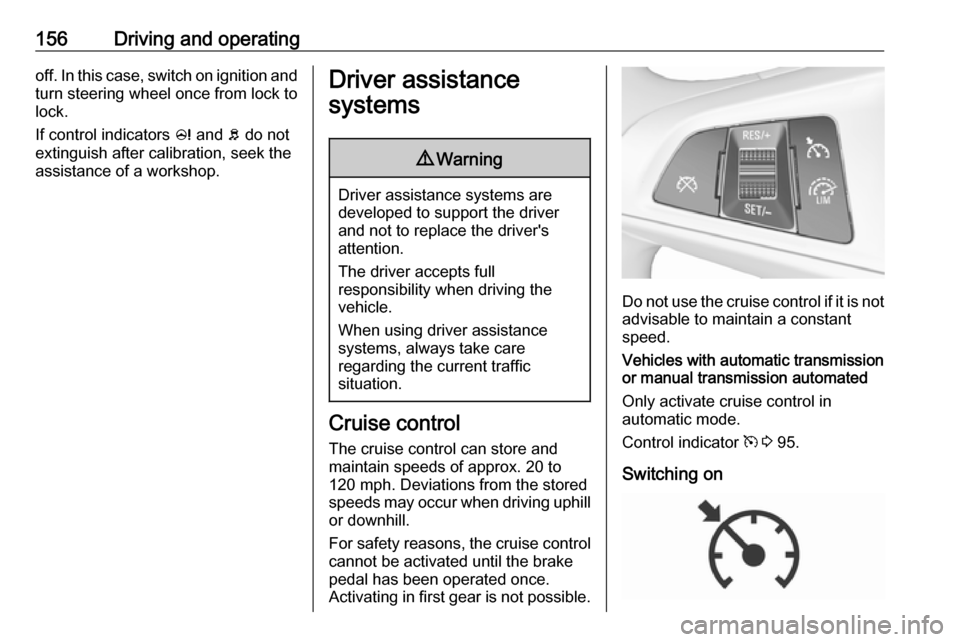
Do not use the cruise control if it is not advisable to maintain a constant
speed.
Vehicles with automatic transmission
or manual transmission automated
Only activate cruise control in
automatic mode.
Control indicator m 3 95.
Switching on
Page 159 of 267

Driving and operating157Press m; control indicator m in
instrument cluster illuminates white.
Activation
Accelerate to the desired speed and
turn thumb wheel to SET/-, the
current speed is stored and
maintained. Control indicator m in
instrument cluster illuminates green. Accelerator pedal can be released.
Vehicle speed can be increased by depressing the accelerator pedal.
When the accelerator pedal is
released, the previously stored speed
is resumed.
Cruise control remains activated
while gearshifting.
Increase speed
With cruise control active, hold thumb
wheel turned to RES/+ or briefly turn
to RES/+ repeatedly: speed
increases continuously or in small
increments.
Alternatively accelerate to the desired speed and store by turning to SET/-.
Reduce speed
With cruise control active, hold thumb
wheel turned to SET/- or briefly turn to
SET/- repeatedly: speed decreases
continuously or in small increments.
Deactivation
Press y; control indicator m in
instrument cluster illuminates white.
Cruise control is deactivated. Last
stored speed remains in memory for
later speed resume.
Automatic deactivation:
● Vehicle speed is below approx. 20 mph.
● Vehicle speed above approx. 125 mph.
● The brake pedal is depressed.
● The clutch pedal is depressed for
a few seconds.
● The selector lever is in N.
● Engine speed is in a very low range.
● The Traction Control system or Electronic Stability Control is
operating.
Resume stored speed
Turn thumb wheel to RES/+ at a
speed above 20 mph. The stored
speed will be obtained.
Switching off
Press m, control indicator m in
instrument cluster extinguishes. The
stored speed is deleted.
Page 160 of 267

158Driving and operatingPressing L to activate the speed
limiter or switching off the ignition also switches off cruise control and
deletes the stored speed.
Speed limiter
The speed limiter prevents the
vehicle exceeding a preset maximum
speed.
The maximum speed can be set at a
speed above 15 mph.
The driver can only accelerate up to
the preset speed. Deviations from the limited speed may occur when driving
downhill.
The preset speed limit is displayed in
the Driver Information Centre when
the system is active.Activation
Press L. If cruise control has been
activated before, it is switched off when speed limiter is activated and
control indicator m extinguishes.
Set speed limit With speed limiter active, hold thumb
wheel turned to RES/+ or briefly turn
to RES/+ repeatedly until the desired
maximum speed is displayed in the
Driver Information Centre.
Alternatively, accelerate to the
desired speed and briefly turn thumb
wheel to SET/-: the current speed is
stored as maximum speed. Speed
limit is displayed in the Driver
Information Centre.
Change speed limit
With speed limiter active, turn thumb
wheel to RES/+ to increase or SET/-
to decrease the desired maximum
speed.
Exceeding the speed limit
In the event of an emergency, it is
possible to exceed the speed limit by
depressing the accelerator pedal
firmly beyond the point of resistance.
The limited speed will flash in the
Driver Information Centre and a
chime sounds during this period.
Release the accelerator pedal and the speed limiter function is
reactivated once a speed lower than
the limit speed is obtained.
Page 161 of 267
Driving and operating159DeactivationPress y: speed limiter is deactivated
and the vehicle can be driven without
speed limit.
The limited speed will be stored and
is indicated in brackets in the Driver
Information Centre. Additionally, a
corresponding message appears.
Resume limit speed
Turn thumb wheel to RES/+. The
stored speed limit will be obtained.
Switching off
Press L, the speed limit indication
extinguishes in the Driver Information Centre. The stored speed is deleted.
By pressing m to activate cruise
control, speed limiter is also
deactivated and the stored speed is
deleted.
By switching off the ignition, speed
limiter is also deactivated, but the
speed limit will be stored for next
speed limiter activation.Forward collision alert
The forward collision alert can help to
avoid or reduce the harm caused by
front-end crashes.
Forward collision alert uses the front
camera system in the windscreen to
detect a vehicle directly ahead, in
your path, within a distance of approx. 60 metres.
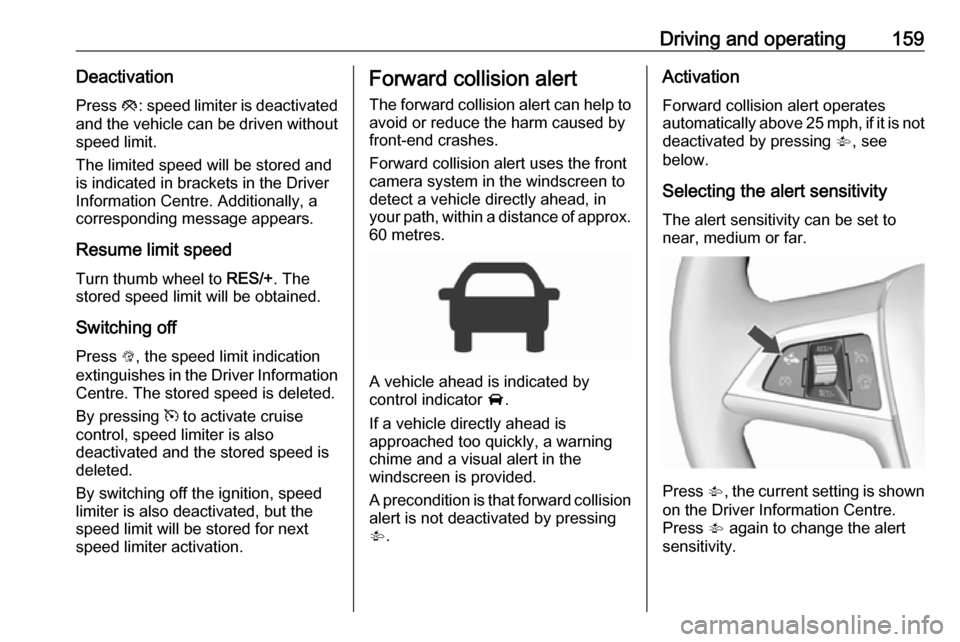
A vehicle ahead is indicated by
control indicator A.
If a vehicle directly ahead is
approached too quickly, a warning
chime and a visual alert in the
windscreen is provided.
A precondition is that forward collision
alert is not deactivated by pressing
V .
Activation
Forward collision alert operates
automatically above 25 mph, if it is not
deactivated by pressing V, see
below.
Selecting the alert sensitivity
The alert sensitivity can be set to
near, medium or far.
Press V
, the current setting is shown
on the Driver Information Centre.
Press V again to change the alert
sensitivity.
Page 163 of 267

Driving and operating161The complete attention of the
driver is always required while
driving. The driver must always be
ready to take action and apply the
brakes.
System limitations
The system is designed to warn of vehicles only, but may react also to
other objects.
In the following cases, forward
collision alert may not detect a vehicle ahead or sensor performance is
limited:
● on winding roads
● when weather limits visibility, e.g.
fog, rain, or snow
● when the sensor is blocked by snow, ice, slush, mud, dirt, or
windscreen damage
Following distance
indication
The following distance indication
displays the distance to a preceding
moving vehicle. The front camera in
the windscreen is used to detect the
distance of a vehicle directly ahead in
the vehicle's path. It is active at
speeds above 25 mph.
When a preceding vehicle is detected
ahead, the distance is indicated in
seconds, displayed on a page in the
Driver Information Centre 3 96 . Press
MENU on the turn signal lever to
select Vehicle Information
Menu ? and turn the adjuster
wheel to choose following distance
indication page.
The minimum indicated distance is
0.5 seconds.
If there is no vehicle ahead or the vehicle ahead is out of range, two
dashes will be displayed: -.- sec.
Parking assist Rear parking assist9 Warning
It is the driver who bears full
responsibility for the parking
manoeuvre.
Always check the surrounding
area while reversing and using the rear parking assist system.
The rear parking assist makes
parking easier by measuring the
distance between the vehicle and
rear obstacles. It informs and warns
the driver by giving acoustic signals
and display indication.
Page 171 of 267

Driving and operating169When a slot is detected, a visual
feedback on the Colour-Info-Display
and an acoustic signal is given.
If the driver does not stop the vehicle
within ten metres for parallel parking
slots or six metres for perpendicular parking slots after a parking slot is
proposed, the system starts to search
for another suitable parking slot.Park guiding mode
The parking slot suggestion of the
system is accepted when the vehicle
is stopped by the driver within ten
metres for parallel parking slots or six metres for perpendicular parking slots
after the Stop message is given. The
system calculates the optimal path
into the parking slot.
A brief vibration in the steering wheel
after engaging reverse gear indicates
that the steering is controlled by the
system. Then the vehicle is steered
into the slot automatically by giving
the driver detailed instructions for braking, accelerating and gear
shifting. The driver must keep hands
away from the steering wheel.Always pay attention to the sound of
the front-rear parking assist.
Continuous sound indicates that the
distance to an obstacle is less than
approx. 30 cm.
If, for any reason, the driver must take over control of the steering, hold the
steering wheel only at the outer edge. Automatic steering is cancelled in thisevent.Changing the parking side
The system is configured to detect
parking slots by default on the
passenger side. To detect parking
slots on the driver side, switch on turn
signal indicator on the driver side for
the duration of the search.
As soon as the turn signal indicator is
switched off, the system searches for
parking slots on the passenger side
again.Display indication
The instructions on the display show:
● General hints and warning messages.
● A hint when driving faster than 18 mph during parking slot
searching mode, or 5 mph in
guiding mode.
● The demand to stop the vehicle, when a parking slot is detected.
● The direction of driving during the
parking manoeuvre.
● The demand to shift into reverse or first gear.
● The demand to accelerate or brake.
● For some of the instructions a progress bar is shown in the
Driver Information Centre.
● The successful completion of the
parking manoeuvre indicated by
a pop-up symbol and a chime.
● The cancelling of a parking manoeuvre.
Page 172 of 267
170Driving and operatingDisplay priorities
Advanced parking assist indication in the Driver Information Centre can beinhibited by vehicle messages with a
higher priority. After approving the
message by pressing SET/CLR on
the turn signal lever, advanced
parking assist instructions appear
again and the parking manoeuvre can
be continued.
Deactivation
The system is deactivated by:
● a long press of D
● parking manoeuvre successfully ended
● driving faster than 18 mph during
parking slot search
● driving faster than 5 mph during parking guidance
● driver interference on steering wheel detected
● exceeding number of maximum gear changes: eight cycles when
parallel parking or five cycles
when perpendicular parking
● switching off the ignitionDeactivation by the driver or by the
system during manoeuvring will be
indicated by Parking Deactivated on
the display. Additionally, an acoustic
signal sounds.
Fault
A message appears when:
● There is a fault in the system.
● The driver did not successfully complete the parking
manoeuvre.
● The system is not operational.
● Any of the deactivation reasons described above apply.
If an object is detected during parking
instructions, Stop is indicated on the
display. Removing the object will
resume the parking manoeuvre. If the
object is not removed, the system will be deactivated. A long press of D
will activate the system and search for
a new parking slot.Basic notes on parking assist
systems9 Warning
Under certain circumstances,
various reflective surfaces on
objects or clothing as well as
external noise sources may cause the system to fail to detect
obstacles.
Special attention must be paid to
low obstacles which can damage
the lower part of the bumper.
Caution
Performance of the system can be reduced when sensors are
covered, e.g. by ice or snow.
Performance of the parking assist
system can be reduced due to
heavy loading.
Special conditions apply if there
are taller vehicles in the vicinity
(e.g. off-road vehicles, mini vans,
vans). Object identification and
Page 177 of 267

Driving and operating175
An exclamation mark in a frame
indicates that there is an additional
sign detected which cannot be
recognised by the system.
The system is active up to a speed of
124 mph depending on the lighting
conditions.
As soon as vehicle speed becomes
slower than 34 mph, the display will
be reset and the content of the traffic
sign page will be cleared, e.g. when
entering a city zone. The next
recognized speed indication will be
displayed.
Display indication
Traffic signs are displayed on the
page Traffic sign detection in the
Driver Information Centre. Choose
Vehicle Information Menu ? via
MENU and select Traffic sign
detection with the adjuster wheel on
the turn signal lever 3 96.
When another page on the Driver
Information Centre menu was
selected then Traffic sign detection
page is reselected, the last
recognised traffic sign will be
displayed.
Alert function
Once activated, speed limit and no
passing signs are displayed as pop-
up alerts in the Driver Information
Centre.
Page 188 of 267

186Driving and operatingGeneral
If the permitted rear axle load is
exceeded a maximum speed of
60 mph applies. If lower national
maximum speeds are specified for
trailer operation, they must be
complied with.
Towing equipmentCaution
When operating without a trailer,
remove the coupling ball bar.
Stowage of coupling ball bar
The coupling ball bar is stowed in a
bag in the spare wheel well and
secured to the lashing eyes in the
load compartment.
When inserting, fit protective cap over rotary knob with key.
Fitting the coupling ball bar
Disengage and fold down the socket. Remove the sealing plug from the
opening for the coupling ball bar and
stow it.
Checking the tensioning of the
coupling ball bar
● The rotary knob rests on the
coupling ball bar.
● Green marking on the rotary knob is not visible.
● Locking pin at the top of the coupling ball bar is set inwards.
● The key is in the lock.
Page 190 of 267

188Driving and operatingEye for break-away stopping cable
Attach breakaway stopping cable to
eye.
Check that the coupling ball bar is correctly installed
● Green marking on rotary knob is visible.
● There must be no gap between the rotary knob and the coupling
ball bar.
● The coupling ball bar must be firmly engaged in the opening.
● The coupling ball bar must be locked and the key removed.
9Warning
Towing a trailer is permitted only
when a coupling ball bar is fitted correctly. If the coupling ball bardoes not engage correctly, seekthe assistance of a workshop.
Dismounting the coupling ball bar
Insert the key in the lock and unlock
the coupling ball bar.
Push the rotary knob onto the
coupling ball bar and rotate right while pressed down until it engages. Pull
out the ball bar downwards.
Insert sealing plug in opening for
coupling ball bar. Fold away socket.
Trailer stability assist
If the system detects snaking
movements, engine power is reduced
and the vehicle/trailer combination is
selectively braked until the snaking ceases. While system is working keep
steering wheel as still as possible.
Trailer stability assist is a function of
the Electronic Stability Control 3 154.