Screen VAUXHALL CROSSLAND X 2020 Owner's Guide
[x] Cancel search | Manufacturer: VAUXHALL, Model Year: 2020, Model line: CROSSLAND X, Model: VAUXHALL CROSSLAND X 2020Pages: 245, PDF Size: 21.85 MB
Page 115 of 245

Climate control113Notice
If à is pressed while the engine is
running, an Autostop will be inhibited
until à is pressed again.
If à is pressed while the engine is in
an Autostop, the engine will restart
automatically.
Stop-start system 3 126.
Air recirculation system 4
Press 4 to activate air recirculation
mode, LED is indicated.
Select air recirculation to assist in
cooling the interior or in blocking
outside odours or exhaust.
Press 4 again to deactivate air
recirculation mode.9 Warning
The exchange of fresh air is
reduced in air recirculation mode.
In operation without cooling, the
air humidity increases, so the
windows may mist up from inside.
The quality of the passenger
compartment air deteriorates,
which may cause the occupants to
feel drowsy.
In warm and very humid ambient air
conditions, the windscreen may mist
up from outside when cold air is
directed towards it. If windscreen
mists up from outside, activate
windscreen wiper and deactivate l.
Maximum cooling
Briefly open the windows so that hot
air can disperse quickly.
● Switch on air conditioning A/C.
● Press 4 for air recirculation
system on.
● Press M for air distribution.
● Set temperature control £ to
coldest level.
● Set fan speed Z to highest level.
● Open all vents.
Heated rear window b 3 37.
Heated exterior mirrors b 3 34.
Heated windscreen , 3 38.
Page 116 of 245
114Climate controlHeated seats ß 3 44.
Electronic climate control system
The dual zone climate control allows
different temperatures for driver side
and front passenger side.
In automatic mode, temperature, fan
speed and air distribution are
regulated automatically.
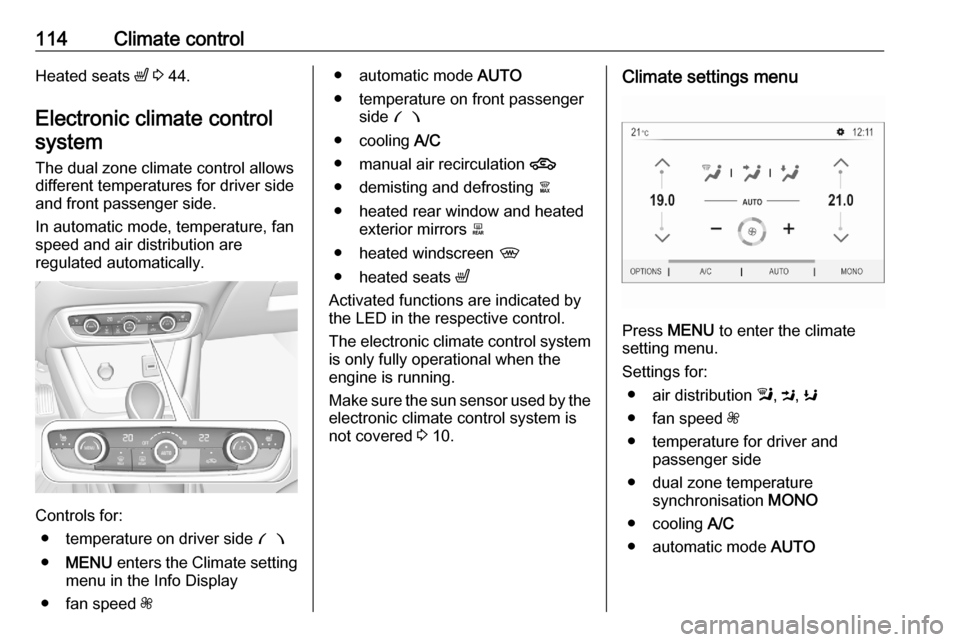
Controls for:
● temperature on driver side £
● MENU enters the Climate setting
menu in the Info Display
● fan speed Z
● automatic mode AUTO
● temperature on front passenger side £
● cooling A/C
● manual air recirculation 4
● demisting and defrosting à
● heated rear window and heated exterior mirrors b
● heated windscreen ,
● heated seats ß
Activated functions are indicated by the LED in the respective control.
The electronic climate control system
is only fully operational when the
engine is running.
Make sure the sun sensor used by the
electronic climate control system is
not covered 3 10.Climate settings menu
Press MENU to enter the climate
setting menu.
Settings for: ● air distribution l, M , K
● fan speed Z
● temperature for driver and passenger side
● dual zone temperature synchronisation MONO
● cooling A/C
● automatic mode AUTO
Page 118 of 245

116Climate controlAir distribution l, M , K
Press MENU .
Touch
l:to windscreen and front door
windowsM:to head area and rear seats via
adjustable air ventsK:to front and rear foot well and
windscreen
To return to automatic air distribution,
press AUTO .
Temperature preselection £
Set the preselected temperatures
separately for driver and front
passenger to the desired value using
the left and right controls. The dial on
the passenger side changes the
temperature for the passenger side.
The dial on the driver's side changes
the temperature for the driver's side or for both sides depending on
activation of synchronisation MONO
in the climate settings menu. Press
MENU to enter the menu.
Recommended temperature is 22 °C .
Temperature is indicated in displays
beside the controls and in the climate settings menu.
If the minimum temperature Lo is set,
the climate control system runs at
maximum cooling, if cooling A/C is
switched on.
If the maximum temperature Hi is set,
the climate control system runs at
maximum heating.
Notice
If A/C is switched on, reducing the
set cabin temperature can cause the engine to restart from an Autostop or
inhibit an Autostop.
Stop-start system 3 126.
Dual zone temperature
synchronisation MONO or SYNC
Press MENU to enter the menu.
Touch MONO or SYNC to link
passenger side temperature setting
to the driver side.
When passenger side rotary knob will be adjusted, synchronisation is
deactivated.
Page 119 of 245

Climate control117Cooling A/C
Press A/C to switch on cooling. The
LED in the button illuminates to
indicate activation. Cooling is only
functional when the engine is running and climate control fan is switched on.
Press A/C again to switch off cooling.
The air conditioning system cools and
dehumidifies (dries) when outside
temperature is above a specific level. Therefore condensation may form
and drip from under the vehicle.
If no cooling or drying is required,
switch off the cooling system for fuel
saving reasons.
Manual air recirculation 4
Press 4 to activate the air
recirculation mode. The LED in the
button illuminates to indicate
activation.
Press 4 again to deactivate
recirculation mode.
9 Warning
The exchange of fresh air is
reduced in air recirculation mode.
In operation without cooling, the
air humidity increases, so the
windows may mist up from inside.
The quality of the passenger
compartment air deteriorates,
which may cause the occupants to
feel drowsy.
In warm and very humid ambient air
conditions, the windscreen may mist
up from outside, when cold air is
directed towards it. If windscreen
mists up from outside, activate
windscreen wiper and deactivate l.
Page 120 of 245
118Climate controlDemisting and defrosting the
windows à
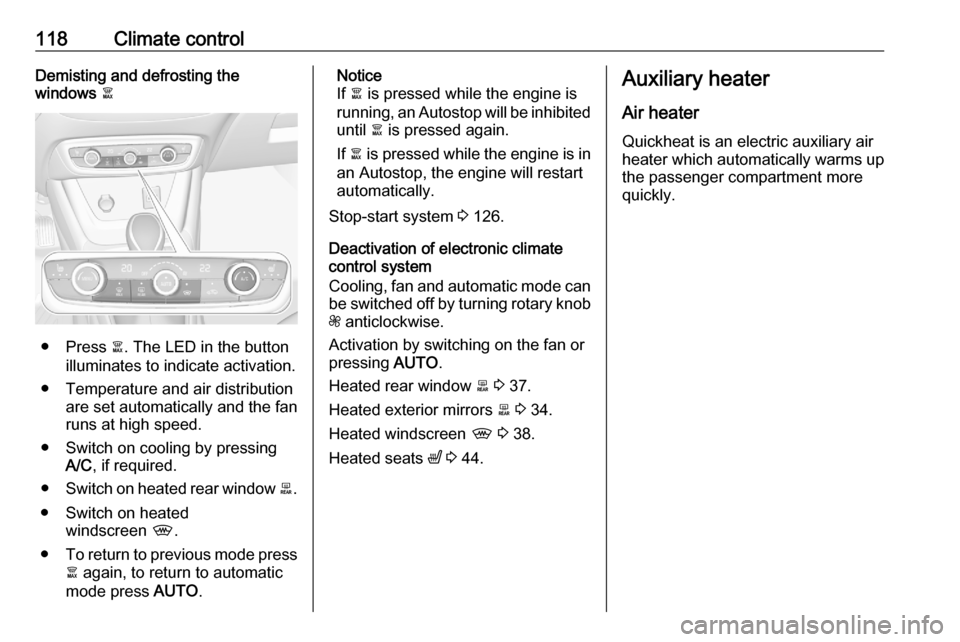
● Press à. The LED in the button
illuminates to indicate activation.
● Temperature and air distribution are set automatically and the fan
runs at high speed.
● Switch on cooling by pressing A/C , if required.
● Switch on heated rear window b.
● Switch on heated windscreen ,.
● To return to previous mode press
à again, to return to automatic
mode press AUTO.
Notice
If à is pressed while the engine is
running, an Autostop will be inhibited until à is pressed again.
If à is pressed while the engine is in
an Autostop, the engine will restart
automatically.
Stop-start system 3 126.
Deactivation of electronic climate control system
Cooling, fan and automatic mode can
be switched off by turning rotary knob
Z anticlockwise.
Activation by switching on the fan or
pressing AUTO.
Heated rear window b 3 37.
Heated exterior mirrors b 3 34.
Heated windscreen , 3 38.
Heated seats ß 3 44.Auxiliary heater
Air heater
Quickheat is an electric auxiliary air
heater which automatically warms up
the passenger compartment more
quickly.
Page 121 of 245
Climate control119Air vents
Adjustable air vents At least two air vents must be open
while cooling is on.9 Warning
Do not attach any objects to the
slats of the air vents. Risk of
damage and injury in case of an
accident.
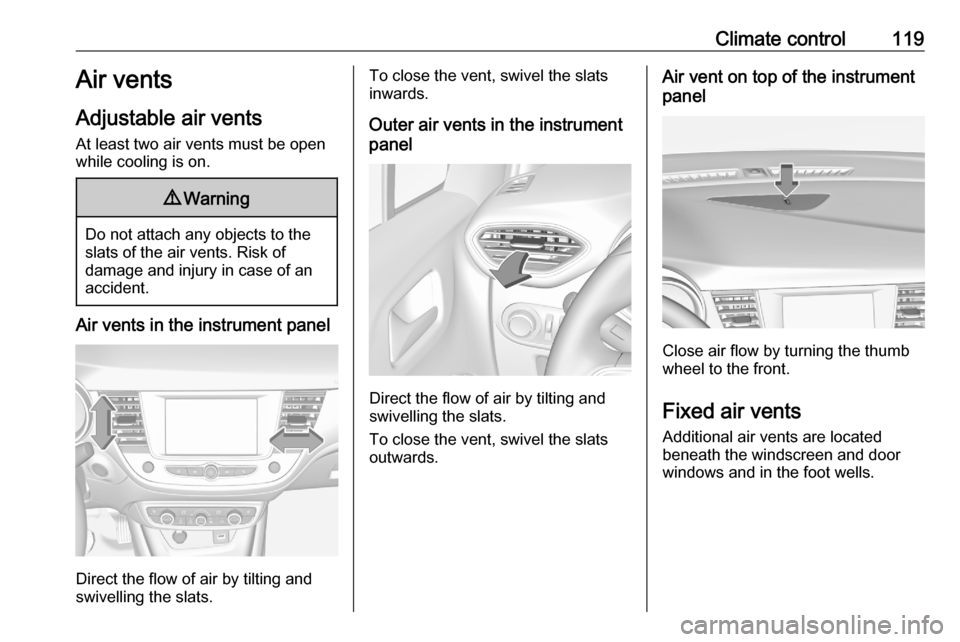
Air vents in the instrument panel
Direct the flow of air by tilting and
swivelling the slats.
To close the vent, swivel the slats
inwards.
Outer air vents in the instrument
panel
Direct the flow of air by tilting and
swivelling the slats.
To close the vent, swivel the slats
outwards.
Air vent on top of the instrument
panel
Close air flow by turning the thumb
wheel to the front.
Fixed air vents Additional air vents are located
beneath the windscreen and door
windows and in the foot wells.
Page 122 of 245
120Climate controlMaintenanceAir intake
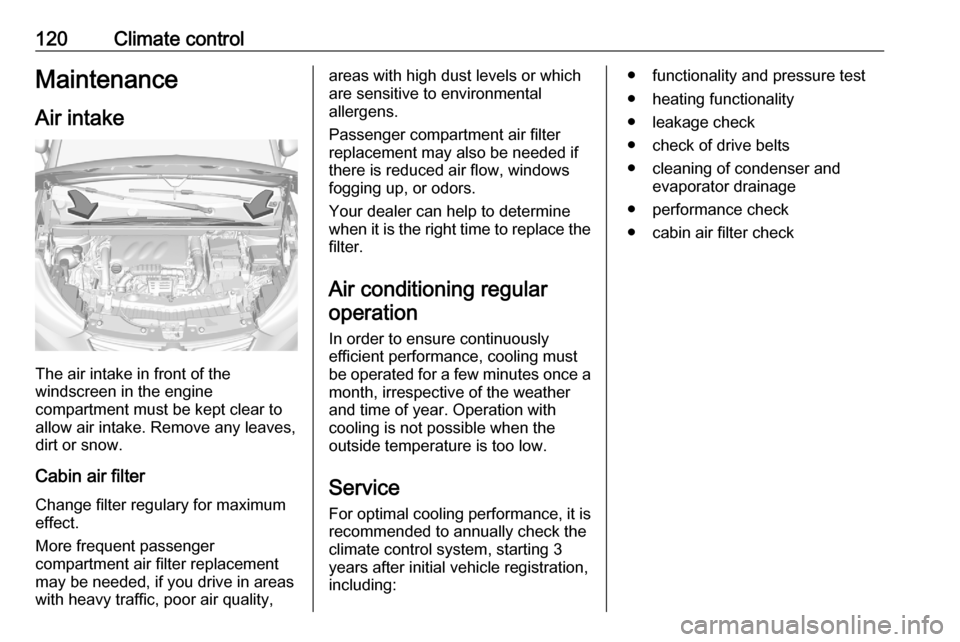
The air intake in front of the
windscreen in the engine
compartment must be kept clear to
allow air intake. Remove any leaves,
dirt or snow.
Cabin air filter
Change filter regulary for maximum
effect.
More frequent passenger
compartment air filter replacement
may be needed, if you drive in areas
with heavy traffic, poor air quality,
areas with high dust levels or which
are sensitive to environmental
allergens.
Passenger compartment air filter
replacement may also be needed if
there is reduced air flow, windows
fogging up, or odors.
Your dealer can help to determine
when it is the right time to replace the
filter.
Air conditioning regularoperation
In order to ensure continuously
efficient performance, cooling must
be operated for a few minutes once a month, irrespective of the weather
and time of year. Operation with
cooling is not possible when the
outside temperature is too low.
Service For optimal cooling performance, it is
recommended to annually check the
climate control system, starting 3
years after initial vehicle registration, including:● functionality and pressure test
● heating functionality
● leakage check
● check of drive belts
● cleaning of condenser and evaporator drainage
● performance check
● cabin air filter check
Page 144 of 245

142Driving and operatingAdopting speed by the speed limit
recognition
The intelligent speed adaptation
informs the driver when a speed limit
is detected by the speed limit
recognition. The detected speed limit
can be used as new value for the
cruise control.
Using the camera at the top of the
windscreen, this system detects and
reads speed limit and end of speed
limit signs.
If the cruise control is active: ● in the uplevel Driver Information Centre the recognised speed
limit will be displayed and MEM
illuminates.
● in the midlevel Driver Information
Centre the recognised speed
limit will be displayed on the
digital speed indication page
along with an instruction
message.
Press MEM on the steering wheel to
request saving of the suggested
speed.Press MEM on the steering wheel
once more to confirm and save the
new speed setting.
This speed is the new value for the
cruise control.
This function can be deactivated or activated in the personalisation menu
3 96.
Exceeding the set speed
Vehicle speed can be increased by
depressing the accelerator pedal. When the accelerator pedal is
released, the previously stored speed
is resumed.
Deactivation of the functionality
Press Ñ: cruise control is in pause
mode and a message is displayed. The vehicle is driven without cruise
control.
Cruise control is deactivated, but not
switched off. Last stored speed
remains in memory for later speed
resume.Cruise control is deactivated
automatically when:
● The brake pedal is depressed.
● Vehicle speed is below 25 mph.
● The Traction Control system or Electronic Stability Control is
operating.
● The manual transmission is in N,
first or second gear.
● The automatic transmission is in position M and first gear.
Resume stored speed
Move thumb wheel to RES/+ at a
speed above 25 mph. The stored
speed will be obtained.
Switching off the system
Press m: the cruise control mode is
deselected and the cruise control
indication extinguishes in the Driver
Information Centre.
Pressing ß to activate the speed
limiter deactivates cruise control.
Switching off the ignition cancels any
programmed speed value.
Page 146 of 245

144Driving and operatingAccelerate to the desired speed and
move thumb wheel briefly to SET/-.
The current speed is stored as
maximum speed.
The preset maximum speed can be changed by moving thumb wheel toRES/+ to increase or to SET/- to
decrease the desired maximum
speed. Move thumb wheel repeatedly
to change speed in small steps, move and hold to change speed in large
steps.
Speed value is indicated in the Driver
Information Centre.
Press Ñ to activate speed limiter.
Adopting speed by the speed limit recognition
The intelligent speed adaptation
informs the driver when a speed limit
is detected by the speed limit
recognition. The detected speed limit
can be used as new value for the
speed limiter.
Using the camera at the top of the
windscreen, this system detects and
reads speed limit and end of speed
limit signs.
If the speed limiter is active:
● in the uplevel Driver Information Centre the recognised speed
limit will be displayed and MEM
illuminates.
● in the midlevel Driver Information
Centre the recognised speed
limit will be displayed on the
digital speed indication page
along with an instruction
message.
Press MEM on the steering wheel to
request saving of the suggested
speed limit.
Press MEM on the steering wheel
once more to confirm and save the
new speed setting.
This speed is the new value for the
speed limiter.
This function can be deactivated or activated in the personalisation menu
3 96.
Page 147 of 245

Driving and operating145Exceeding the speed limit
In the event of an emergency, it is
possible to exceed the speed limit by
depressing the accelerator pedal
fully. In this case the preset speed
value flashes.
Release the accelerator pedal and the speed limiter function is
reactivated once a speed lower than the limit speed is obtained.
Deactivation of the functionality
Press Ñ, speed limiter is in pause
mode and a message is displayed.
The vehicle is driven without speed
limiter.
Speed limiter is deactivated, but not
switched off. Last stored speed
remains in memory for later speed
resume.
Resume limit speed
Press Ñ. The stored speed limit will
be obtained.Switching off the system
Press ß, the speed limiter mode is
deselected and the speed limit
indication extinguishes in the Driver
Information Centre.
Pressing m to activate cruise control
deactivates speed limiter.
The preset speed remains in the
memory when the ignition is switched
off.
Fault
In the event of a speed limiter fault,
the speed is cleared resulting in
flashing of the dashes.
The speed limit recognition may not
operate correctly if traffic signs do not comply with the Vienna Convention
on Road Signs and Signals.
Forward collision alert The forward collision alert may help toavoid or reduce the harm caused by
front-end crashes.The forward collision alert uses the
front camera in the windscreen to
detect a preceding vehicle directly
ahead, in your path.
If a vehicle directly ahead is
approached too quickly, a warning
chime and alert in the Driver
Information Centre is provided.9 Warning
Forward collision alert is just a
warning system and does not
apply the brakes. When
approaching a vehicle ahead too
rapidly, it may not provide you
enough time to avoid a collision.
The driver accepts full
responsibility for the appropriate
following distance based on traffic, weather and visibility conditions.
The complete attention of the
driver is always required while
driving. The driver must always be
ready to take action and apply the
brakes.