audio VAUXHALL GRANDLAND X 2018.5 Infotainment system
[x] Cancel search | Manufacturer: VAUXHALL, Model Year: 2018.5, Model line: GRANDLAND X, Model: VAUXHALL GRANDLAND X 2018.5Pages: 127, PDF Size: 2.35 MB
Page 28 of 127
28External devicesCaution
Avoid disconnecting the device
during playback. This may
damage the device or the
Infotainment system.
Bluetooth audio streaming
Streaming allows you to listen to
music from your smartphone.
For a detailed description on how to
establish a Bluetooth connection
3 46.
If audio playback does not start
automatically, it may be necessary to
start the playback on the smartphone.
First adjust the volume on your
smartphone (to a high level). Then
adjust the volume of Infotainment
system.
File formats
The audio equipment supports
different file formats.
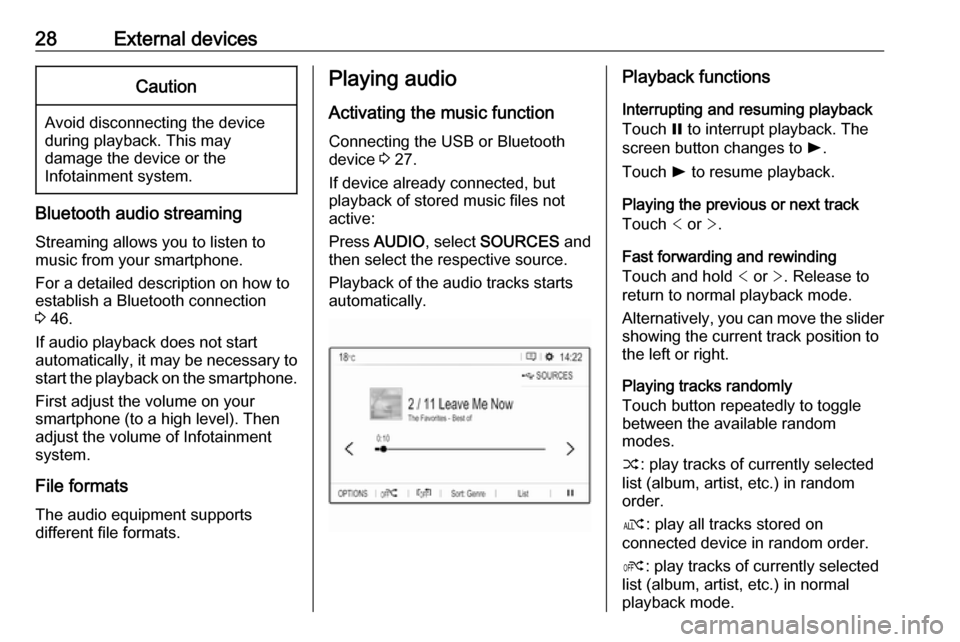
Playing audio
Activating the music function
Connecting the USB or Bluetooth
device 3 27.
If device already connected, but
playback of stored music files not
active:
Press AUDIO , select SOURCES and
then select the respective source.
Playback of the audio tracks starts
automatically.Playback functions
Interrupting and resuming playback
Touch = to interrupt playback. The
screen button changes to l.
Touch l to resume playback.
Playing the previous or next track
Touch < or >.
Fast forwarding and rewinding
Touch and hold < or >. Release to
return to normal playback mode.
Alternatively, you can move the slider
showing the current track position to
the left or right.
Playing tracks randomly
Touch button repeatedly to toggle
between the available random
modes.
” : play tracks of currently selected
list (album, artist, etc.) in random
order.
æ : play all tracks stored on
connected device in random order.
Ý : play tracks of currently selected
list (album, artist, etc.) in normal
playback mode.
Page 29 of 127

External devices29Repeating tracks
Touch button repeatedly to switch
repeat mode on or off.
– : repeat tracks of currently selected
list (album, artist, etc.).
Þ : play tracks of currently selected
list (album, artist, etc.) in normal
playback mode.
Browse music functions
(only available for devices connected via USB)
You can have your music files sorted
according to different criteria. Two
options are available for browsing the
music files stored on the connected
USB device.
Browsing via main menu
If you want to change the currently
active USB source, select
SOURCES and then select the
desired source. The respective main
menu is displayed.Select the button showing the
currently selected sorting criteria, e.g.
Sort: Album or Sort: Artist , and then
select the desired new sorting criteria. A sorting process is performed.
Select List and then select the desired
track.
Playback of the selected track is
started.
Browsing via device menu
Select OPTIONS and then select
Music files .
If you want to change the currently
active USB source, select Other.
Select the desired sorting criteria, e.g.
Albums or Artists , and then select the
desired track.
Playback of the selected track is
started.
Displaying pictures
You can view pictures stored on a
USB device.
Activating the picture viewer Connecting the USB device 3 27.If device already connected, but
picture viewer not active:
Press AUDIO , select OPTIONS and
then select Managing photos .
Select the desired picture.
A slide show of all stored picture files starts automatically.
Touch the screen to display the menu
bar.
Function buttons
Viewing the previous or next picture
Touch l or m.
Page 30 of 127

30External devicesStarting or stopping a slide show
Select l to view the pictures stored
on the USB device in a slide show.
Touch / to end the slide show.
Using smartphone applications
Phone projection
The phone projection applications
Apple CarPlay and Android Auto
display selected apps from your
smartphone on the Info Display and
allow their operation directly via the
Infotainment controls.
Check with the device's manufacturer if this function is compatible with your
smartphone and if this application is
available in the country you are in.
Preparing the smartphone
iPhone ®
: Make sure Siri ®
is activated
on your phone.
Android phone: Download the
Android Auto app to your phone from the Google Play™ Store.Connecting the smartphoneiPhone
Connect the phone to the USB port
3 27.
If the phone is already connected via
Bluetooth, upon connecting to the
USB port and launching Apple
CarPlay , the Bluetooth connection
will disconnect.Android phone
Connect the phone via Bluetooth
3 46 and then connect the phone to
the USB port 3 27.
Starting phone projection
Press Ì and then touch CarPlay or
AndroidAuto .
The phone projection screen
displayed depends on your
smartphone and software version.
Returning to the Infotainment screen
Press, e.g., the AUDIO button on the
control panel.
Page 43 of 127

Speech recognition43E.g., if the display is currently set to
English and you want to enter the
name of a city located in France, you
need to change the display language
to French.
For changing the display language,
see "Language" in chapter "System
settings" 3 18.Input order for destination addresses
The order in which the parts of an
address need to be entered using the speech recognition system is
dependent on the country where the
destination is located.
If the speech recognition system
rejects your address entry, repeat the
command with a different order of the
address parts.
Voice pass-thru application
The voice pass-thru application of the Infotainment system allows access tothe speech recognition commands on
your smartphone.
Voice pass-through is available via
the phone projection applications
Apple CarPlay and Android Auto
3 30.
Usage
Embedded speech recognition Activating speech recognition Notice
Speech recognition is not available
during an active phone call.Activation via the w button on the
steering wheel
Press w on the steering wheel.
The audio system mutes, a voice
output message prompts you to say a command, and help menus with the
most important commands currently
available are shown on the display.
The speech recognition is ready for
voice input, after a beep has been
given.
You can now say a voice command to
initiate a system function (e.g. playing
a preset radio station).Adjusting the volume of voice
prompts
Press volume button on the steering wheel upwards (increase volume)
À or downwards (decrease volume)
Á .
Interrupting a voice prompt
As an experienced user, you can
interrupt a voice prompt by briefly
pressing w on the steering wheel.
Alternatively you can say "Set
dialogue mode as expert".
A beep is heard immediately, and a
command can be stated without
having to wait.
Cancelling a dialogue sequence
To cancel a dialogue sequence and
to deactivate the speech recognition,
press v on the steering wheel.
If you do not say any command for a
certain period of time, or if you say
commands that are not recognised by
the system, a dialogue sequence is
automatically cancelled.
Page 46 of 127

46Phoneinterference is caused by the
mobile phone or if dangerous
situations can occur.
Bluetooth
The phone function is certified by theBluetooth Special Interest Group
(SIG).
You can find further information about the specification on the internet at
http://www.bluetooth.com.
Bluetooth connection
Bluetooth is a radio standard for the
wireless connection of e.g. mobile
phones, smartphones or other
devices.
Pairing a device
During the pairing process, PIN code
exchange between the Bluetooth
device and the Infotainment system and connection of the Bluetooth
devices to the Infotainment system
are carried out.
Important information
● Two paired Bluetooth devices can be connected to the
Infotainment system at the same time. One device in hands-freemode, the other in audio
streaming mode, see description
on Bluetooth profile settings
below.
However, two devices cannot be
used in hands-free mode at the
same time.
● Pairing only needs to be carried out once, unless the device is
deleted from the list of paired
devices. If the device has been connected previously, the
Infotainment system establishes
the connection automatically.
● Bluetooth operation considerably
drains the device's battery.
Therefore, connect the device to
the USB port for charging.Pairing a new device
1. Activate the Bluetooth function of the Bluetooth device. For further
information, see the operating
instructions for the Bluetooth
device.
2. If another Bluetooth device is already connected:
Press v, select OPTIONS , select
Bluetooth connection and then
touch o Search .
If no Bluetooth device is currently connected:
Press v and then touch Bluetooth
search .
A search for all Bluetooth devices
in the near environment is
performed.
3. Select the Bluetooth device you wish to pair from the displayed list.
4. Confirm the pairing procedure: ● If SSP (secure simple pairing) is supported:
Page 50 of 127
50PhoneConnect a USB device with the
desired photo stored on it to the USB
port 3 27, touch the photo frame and
then select the desired photo.
Confirm your selection to download
the selected photo to the system.
Using the call history
All incoming, outgoing, or missed
calls are registered.
Select Calls and then select the
desired list.
Select the desired list entry to initiate
a call.
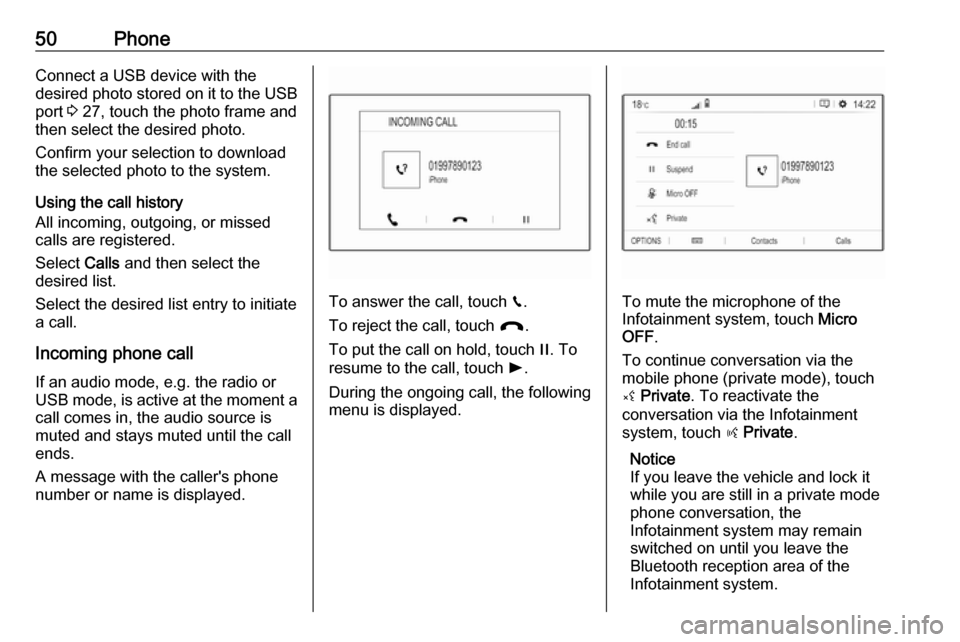
Incoming phone call If an audio mode, e.g. the radio or
USB mode, is active at the moment a
call comes in, the audio source is
muted and stays muted until the call
ends.
A message with the caller's phone
number or name is displayed.
To answer the call, touch v.
To reject the call, touch @.
To put the call on hold, touch /. To
resume to the call, touch l.
During the ongoing call, the following
menu is displayed.To mute the microphone of the
Infotainment system, touch Micro
OFF .
To continue conversation via the
mobile phone (private mode), touch
ý Private . To reactivate the
conversation via the Infotainment
system, touch ÿ Private .
Notice
If you leave the vehicle and lock it
while you are still in a private mode
phone conversation, the
Infotainment system may remain
switched on until you leave the
Bluetooth reception area of the
Infotainment system.
Page 52 of 127

52IndexAActivating Bluetooth music ...........28
Activating CD player .....................26
Activating phone ........................... 48
Activating radio ............................. 21
Activating the navigation system ..32
Activating USB audio ....................28
Activating USB picture ..................29
Address book................................ 35 Adjust time and date .....................18
Audio files ..................................... 27
Auto volume.................................. 17
B Balance......................................... 17
Basic operation ............................. 14
Bluetooth Bluetooth connection ................46
Bluetooth music menu ..............28
Connecting device ....................27
General information................... 27
Pairing ....................................... 46
Phone ........................................ 48
Bluetooth connection ....................46
C
Call Functions during a call ..............48
Incoming call ............................. 48
Initiating a phone call ................48
Ring tone ................................... 48Call history.................................... 48
CD player...................................... 26
Change display language .............18
Contacts ................................. 35, 48
Control elements Infotainment system ....................8
Steering wheel ............................ 8
Control elements overview .............8
D DAB FM-DAB Linking ........................23
Date adjust......................................... 18
Destination input ..........................35
Digital audio broadcasting ............23
Display adjust brightness .......................18
change language ......................18
Displaying pictures .......................29
Display settings ............................ 29
E Emergency call ............................. 47
Equaliser....................................... 17
F Factory default settings ................18
Fader ............................................ 17
File formats ................................... 27
Page 53 of 127

53Audio files.................................. 27
Picture files................................ 27
G
General information 26, 27 , 31 , 42 , 45
Bluetooth ................................... 27
DAB ........................................... 23
Infotainment system ....................6
Navigation ................................. 31
Phone ........................................ 45
Smartphone applications ..........27
USB ........................................... 27
Guidance ..................................... 39
I
Infotainment control panel ..............8
M Maps ............................................. 32
Menu operation............................. 14
Mobile phones and CB radio equipment ................................ 51
Mute.............................................. 10
N Navigation Contacts .................................... 35
Current location ......................... 32
Destination input .......................35
Map display ............................... 32
Map manipulation ......................32Map update............................... 31
Recent destinations ..................35
Route guidance ......................... 39
TMC stations ....................... 31, 39
Traffic incidents ......................... 39
Turn list ..................................... 39
Waypoint trip ............................. 35
O Operation ...................................... 48
CD ............................................. 26
External devices ........................27
Menu ......................................... 14
Navigation system .....................32
Phone ........................................ 48
Radio ......................................... 21
P
Pairing .......................................... 46
Personal settings ..........................18
Phone Bluetooth ................................... 45
Bluetooth connection ................46
Call history ................................ 48
Contacts .................................... 48
Emergency calls ........................47
Entering a number ....................48
Functions during a call ..............48
General information................... 45
Incoming call ............................. 48Phone book............................... 48
Phone main menu .....................48
Phone book .................................. 48
Phone projection .......................... 30
Picture files ................................... 27
Playing audio ................................ 28
POIs.............................................. 35
Presets Retrieving stations..................... 21
Storing stations ......................... 21
Profile settings .............................. 18
R Radio Activating................................... 21
Configuring DAB .......................23
Configuring RDS .......................23
DAB announcements ................23
Digital audio broadcasting
(DAB) ........................................ 23
Presets ...................................... 21
Radio data system (RDS) .........23
Regional .................................... 23
Regionalisation ......................... 23
Retrieving stations..................... 21
Selecting the waveband ............21
Station search ........................... 21
Station tuning ............................ 21
Storing stations ......................... 21
Usage ........................................ 21
Page 54 of 127

54Radio data system .......................23
RDS .............................................. 23
Regional ....................................... 23
Regionalisation ............................. 23
Retrieving stations ........................21
Ring tone ...................................... 48
Ring tone volume ......................17
Route guidance ............................ 39
S Smartphone .................................. 27
Phone projection .......................30
Speech output volume ..................17
Speech recognition .......................42
Storing stations ............................. 21
Switching the Infotainment system on .................................. 10
System settings ............................ 18
T
Time adjust......................................... 18
TMC stations ................................ 31
Tone settings ................................ 17
Touch beep volume ......................17
Traffic incidents ............................ 39
Turn list ......................................... 39
U Update software ........................... 18
Usage ................... 10, 21, 26, 32, 43Bluetooth................................... 27
CD ............................................. 26
Menu ......................................... 14
Navigation system .....................32
Phone ........................................ 48
Radio ......................................... 21
USB ........................................... 27
USB Connecting device ....................27
General information................... 27
USB audio menu .......................28
USB picture menu .....................29
Using smartphone applications ....30
V Voice guidance ............................. 32
Voice recognition ..........................42
Volume Auto volume .............................. 17
Mute function............................. 10
Ring tone volume ......................17
Setting the volume ....................10
Speech output ........................... 17
Speed compensated volume ....17
Touch beep volume ..................17
Volume settings ............................ 17
W
Waveband selection .....................21
Waypoint trip................................. 35
Page 56 of 127

56IntroductionIntroductionGeneral information.....................56
Theft-deterrent feature .................57
Control elements overview ..........58
Usage .......................................... 61General information
The Infotainment system provides
you with state-of-the-art in-car
infotainment.
Using radio tuner functions, you may
register up to 25 stations on five
favourite lists.
You can connect external data
storage devices to the Infotainment
system as further audio sources,
either via cable or via Bluetooth ®
.
In addition, the Infotainment system
allows comfortable and safe use of
your mobile phone in the vehicle.
You can also operate specific
smartphone applications via the
Infotainment system.
Optionally, the Infotainment system
can be operated using the touch
screen and buttons on the control
panel, the controls on the steering
wheel, or - if provided by your mobile
phone - via speech recognition.
The well-thought-out design of the
control elements, the touch screen
and the clear display enable you to
control the system easily and
intuitively.Notice
This manual describes all options
and features available for the
various Infotainment systems.
Certain descriptions, including those
for display and menu functions, may not apply to your vehicle due to
model variant, country
specifications, special equipment or
accessories.
Important information on
operation and traffic safety9 Warning
The Infotainment system must be
used so that the vehicle can be
driven safely at all times. If in
doubt, stop the vehicle and
operate the Infotainment system
while the vehicle is stationary.