towing VAUXHALL GRANDLAND X 2018 Owner's Manual
[x] Cancel search | Manufacturer: VAUXHALL, Model Year: 2018, Model line: GRANDLAND X, Model: VAUXHALL GRANDLAND X 2018Pages: 263, PDF Size: 7.41 MB
Page 36 of 263
34Keys, doors and windowsRemove all obstacles before
resuming normal power operation.
If the vehicle is equipped with factory- fitted towing equipment and a trailer
is electrically connected, the power
tailgate can only be opened with the
touchpad switch or closed with T in
the open tailgate. Ensure that there
are no obstacles in the moving area.
Overload
If the power tailgate is repeatedly
operated at short intervals, the
function is disabled for some time.
Move tailgate manually into end
position to reset the system.
Initialising power tailgate
If the power tailgate cannot be
operated automatically (e.g. after
disconnecting the vehicle battery), a
warning message is displayed in the
Driver Information Centre.
Activate electronics as follows: 1. Open tailgate manually.
2. Close tailgate manually.
3. Switch on ignition.Seek the assistance of a workshop if
the problem is not solved.
General hints for operating
tailgate9 Danger
Do not drive with the tailgate open
or ajar, e.g. when transporting
bulky objects, since toxic exhaust
gases, which cannot be seen or
smelled, could enter the vehicle.
This can cause unconsciousness
and even death.
Caution
Before opening the tailgate, check overhead obstructions, e.g. a
garage door, to avoid damage to
the tailgate. Always check the
moving area above and behind the
tailgate.
Notice
The installation of certain heavy
accessories onto the tailgate may
affect its ability to remain open.
Notice
The operation of the power tailgate
is disabled under low vehicle battery
conditions. In this case, the tailgate
may not even by manually operable.
Notice
With the power tailgate disabled and all doors unlocked, the tailgate can
only be operated manually. In this
event, manually closing the tailgate
requires significantly greater force.
Notice
At low outside temperatures the
tailgate may not open fully by itself.
In this case lift the tailgate manually
to its normal end position.
Page 121 of 263
Lighting119Front fog lights
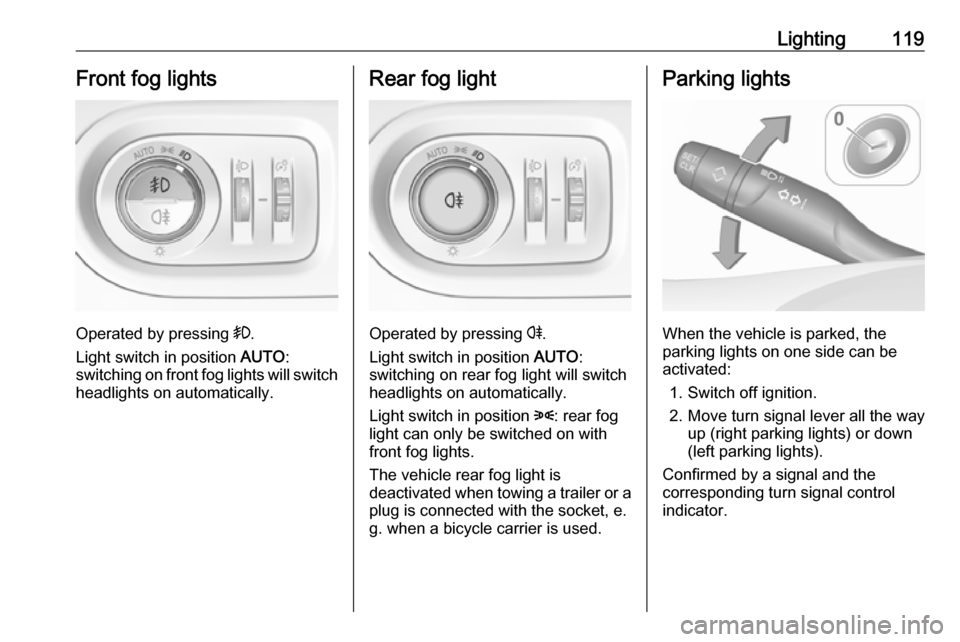
Operated by pressing >.
Light switch in position AUTO:
switching on front fog lights will switch headlights on automatically.
Rear fog light
Operated by pressing r.
Light switch in position AUTO:
switching on rear fog light will switch
headlights on automatically.
Light switch in position 8: rear fog
light can only be switched on with
front fog lights.
The vehicle rear fog light is
deactivated when towing a trailer or a
plug is connected with the socket, e.
g. when a bicycle carrier is used.
Parking lights
When the vehicle is parked, the
parking lights on one side can be
activated:
1. Switch off ignition.
2. Move turn signal lever all the way up (right parking lights) or down
(left parking lights).
Confirmed by a signal and the
corresponding turn signal control
indicator.
Page 135 of 263

Driving and operating133Driving and
operatingDriving hints ............................... 134
Control of the vehicle ...............134
Steering ................................... 134
Starting and operating ...............134
New vehicle running-in ............134
Ignition switch positions ...........134
Power button ........................... 135
Power saving mode .................136
Starting the engine ..................137
Overrun cut-off ........................ 138
Stop-start system ....................139
Parking .................................... 141
Engine exhaust .......................... 142
Diesel particle filter ..................142
Catalytic converter ...................143
AdBlue ..................................... 143
Automatic transmission ..............146
Transmission display ...............146
Selector lever .......................... 147
Manual mode ........................... 148
Electronic driving programmes 148
Fault ........................................ 148
Interruption of power supply ....149Manual transmission ..................149
Brakes ........................................ 150
Antilock brake system .............150
Parking brake .......................... 151
Brake assist ............................. 153
Hill start assist ......................... 153
Ride control systems .................153
Electronic Stability Control and Traction Control system .........153
Selective ride control ...............155
Sport mode .............................. 157
Driver assistance systems .........158
Cruise control .......................... 158
Speed limiter ........................... 160
Adaptive cruise control ............162
Forward collision alert .............169
Active emergency braking .......170
Front pedestrian protection .....173
Parking assist .......................... 174
Advanced parking assist .........177
Side blind spot alert .................182
Panoramic view system ...........184
Rear view camera ...................187
Lane departure warning ..........188
Lane keep assist .....................190
Driver alert ............................... 192
Fuel ............................................ 193
Fuel for petrol engines .............193
Fuel for diesel engines ............194Refuelling ................................ 195
Fuel consumption - CO 2-
Emissions .............................. 196
Trailer hitch ................................ 197
General information .................197
Driving characteristics and towing tips .............................. 197
Trailer towing ........................... 197
Towing equipment ...................198
Trailer stability assist ...............200
Page 145 of 263
Driving and operating143Catalytic converter
The catalytic converter reduces the
amount of harmful substances in the
exhaust gases.Caution
Fuel grades other than those listed on pages 3 193, 3 243 could
damage the catalytic converter or
electronic components.
Unburnt petrol will overheat and
damage the catalytic converter.
Therefore avoid excessive use of the starter, running the fuel tank
dry and starting the engine by
pushing or towing.
In the event of misfiring, uneven
engine running, a reduction in engine performance or other unusual
problems, have the cause of the fault
rectified by a workshop as soon as
possible. In an emergency, driving
can be continued for a short period,
keeping vehicle speed and engine
speed low.
AdBlue
General information
The selective catalytic reduction
(BlueInjection) is a method to
substantially reduce the nitrogen
oxides in the exhaust emission. This
is achieved by injecting a Diesel
Exhaust Fluid (DEF) into the exhaust
system. The ammonia released by
the fluid reacts with nitrous gases
(NO x) from the exhaust and turns it
into nitrogen and water.
The designation of this fluid is
AdBlue ®
. It is a non-toxic, non-
flammable, colourless and odourless
fluid which consists of 32% urea and
68% water.9 Warning
Avoid contact of your eyes or skin
with AdBlue.
In case of eye or skin contact,
rinse off with water.
Caution
Avoid contact of the paintwork with AdBlue.
In case of contact, rinse off with water.
AdBlue freezes at a temperature of
approx. -11 °C. As the vehicle is
equipped with an AdBlue pre-heater,
the emissions reduction at low
temperatures is ensured. The AdBlue
pre-heater works automatically.
The typical AdBlue consumption is
approx. 0.85 l per 600 miles, but can
also be higher depending on driving
behaviour (e.g. high load or towing).
AdBlue tank
At a remaining volume of approx. five litres, there is a liquid level switch.
Warning messages are displayed
only below that threshold. Tank
volume 3 245.
Page 169 of 263
Driving and operating167System limits9Warning
The system's automatic brake
force does not permit hard braking and the braking level may not be
sufficient to avoid a collision.
● After a sudden lane change, the system needs a certain time to
detect the next preceding
vehicle. So if a new vehicle is
detected, the system may
accelerate instead of braking.
● Adaptive cruise control does ignore the oncoming traffic.
● Adaptive cruise control does not consider pedestrians and
animals for braking and driving
off.
● Adaptive cruise control considers
stopped vehicles only at low
speed.
● Do not use adaptive cruise control when towing a trailer.
● Do not use adaptive cruise control on roads with an incline ofmore than 10%.
As the radar's field of detection is
quite narrow, it is possible that the
system may not detect:
● Vehicles of reduced width (motorcycles, scooters...).
● Vehicles not running in the middle of the lane,
● Vehicles entering a corner.
● Vehicles suddenly pulling out.
Bends
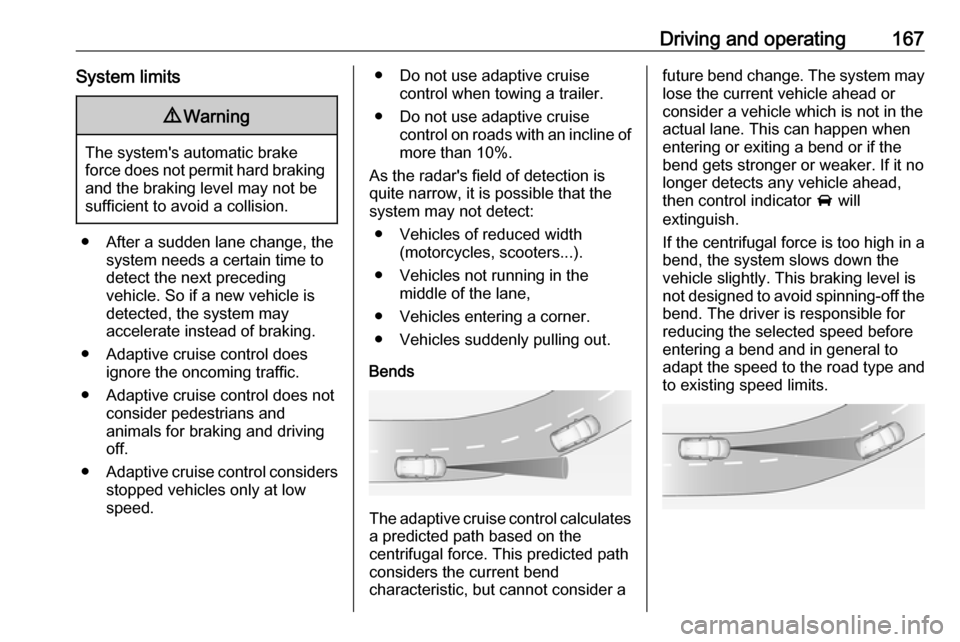
The adaptive cruise control calculates
a predicted path based on the
centrifugal force. This predicted path
considers the current bend
characteristic, but cannot consider a
future bend change. The system may lose the current vehicle ahead or
consider a vehicle which is not in the
actual lane. This can happen when
entering or exiting a bend or if the
bend gets stronger or weaker. If it no
longer detects any vehicle ahead,
then control indicator A will
extinguish.
If the centrifugal force is too high in a bend, the system slows down the vehicle slightly. This braking level is
not designed to avoid spinning-off the
bend. The driver is responsible for
reducing the selected speed before
entering a bend and in general to
adapt the speed to the road type and
to existing speed limits.
Page 183 of 263

Driving and operating181●The direction of driving during the
parking manoeuvre.
● The demand to shift into reverse or first gear.
● The demand to stop or to drive slowly.
● The successful completion of the
parking manoeuvre indicated by
a pop-up symbol and a chime.
● The cancelling of a parking manoeuvre.
Deactivation The current park assist manoeuvre is
cancelled via the button to return to
the previous screen in the Colour-
Info-Display. To deactivate the
system completely, press ¼ in the
centre console.
The system is deactivated
automatically:
● if the ignition is switched off
● if stalling the engine
● if no manoeuvre is started within 5 minutes of selection of the type
of manoeuvre● after a prolonged stop of the vehicle during a manoeuvre
● if the electronic stability control (ESC) is triggered
● if the speed of the vehicle exceeds the stated limit
● when the driver interrupts movement of the steering wheel
● after 4 manoeuvre cycles (a manoeuvre cycle consists of one
rear move and one forward
move)
● on opening the driver's door ● if one of the front wheels encounters an obstacle
● parking manoeuvre successfully ended
Deactivation by the driver or by the system during manoeuvring will be indicated on the display. Additionally,
an acoustic signal sounds.
The system is switched off
automatically when towing a
electrically connected trailer.
Contact your dealer to switch off the
system for a prolonged period.Fault
In the event of a fault, a message is
displayed in the Colour Info Display, accompanied by an acoustic signal.
In the event of a fault in the power
steering, H illuminates and a
message is displayed in the Driver
Information Centre.9 Warning
Under certain circumstances,
various reflective surfaces on
objects or clothing as well as
external noise sources may cause the system to fail to detect
obstacles.
Special attention must be paid to
low obstacles which can damage
the lower part of the bumper.
Page 186 of 263
184Driving and operatingThe state of the system is stored
when switching off the ignition.
The system is automatically
deactivated when towing an
electrically connected trailer.
Due to adverse weather conditions
such as heavy rain, false detections
may occur.
Fault
In the event of a fault, B flashes for a
few moments in the instrument panel,
accompanied by F and a
display message. Contact a dealer or a qualified workshop to have the
system checked.
Panoramic view system
This system allows views of the
vehicle's surroundings to be
displayed as a nearly 360° picture in
the Info display, like a bird's eye view.
The system uses: ● rear camera, installed in the tailgate
● ultrasonic parking sensors in the rear bumper●front camera, installed in the front
grill below the enblem
● ultrasonic parking sensors in the front bumper
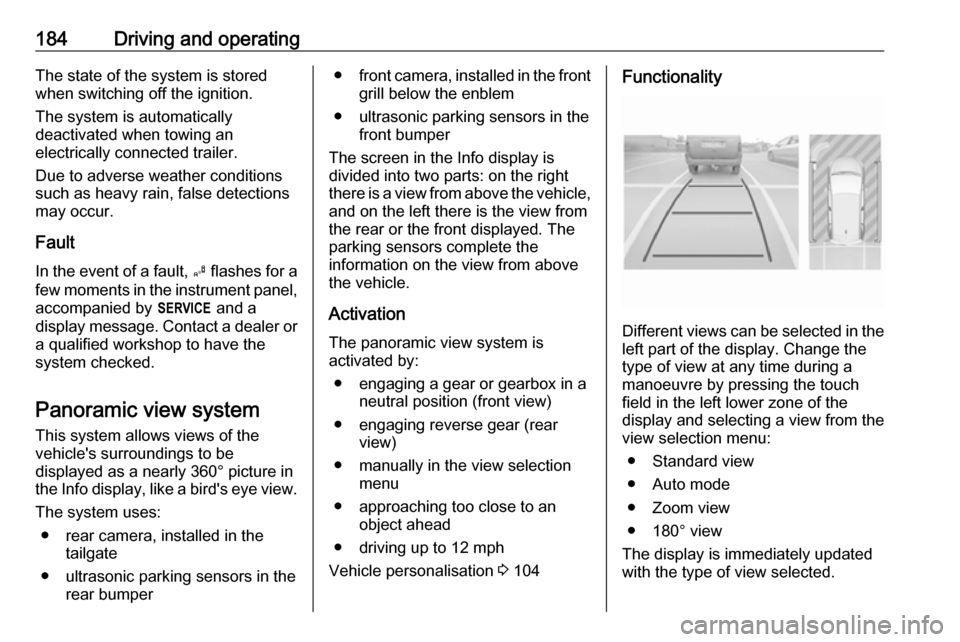
The screen in the Info display is
divided into two parts: on the right
there is a view from above the vehicle,
and on the left there is the view from
the rear or the front displayed. The
parking sensors complete the
information on the view from above
the vehicle.
Activation
The panoramic view system is
activated by:
● engaging a gear or gearbox in a neutral position (front view)
● engaging reverse gear (rear view)
● manually in the view selection menu
● approaching too close to an object ahead
● driving up to 12 mph
Vehicle personalisation 3 104Functionality
Different views can be selected in the
left part of the display. Change the
type of view at any time during a
manoeuvre by pressing the touch
field in the left lower zone of the
display and selecting a view from the
view selection menu:
● Standard view
● Auto mode
● Zoom view
● 180° view
The display is immediately updated
with the type of view selected.
Page 189 of 263
Driving and operating187The panoramic view system may not
operate properly when:
● The surrounding is dark.
● The sun or the beam of headlights is shining directly into
the camera lenses.
● During nighttime driving.
● Weather limits visibility, such as fog, rain, or snow.
● The camera lenses are blocked by snow, ice, slush, mud, dirt.
● The vehicle is towing a trailer.
● The vehicle had an accident.
● There are extreme temperature changes.
Rear view camera The rear view camera assists the
driver when reversing by displaying a view of the area behind the vehicle.
The view of the camera is displayed
in the Info-Display.9 Warning
The rear view camera does not
replace driver vision. Note that
objects that are outside the
camera's field of view and the
parking assist sensors, e.g. below
the bumper or underneath the
vehicle, are not displayed.
Do not reverse or park the vehicle
using only the rear view camera.
Always check the surrounding of
the vehicle before driving.
Switching on
Rear view camera is automatically
activated when reverse gear is
engaged.
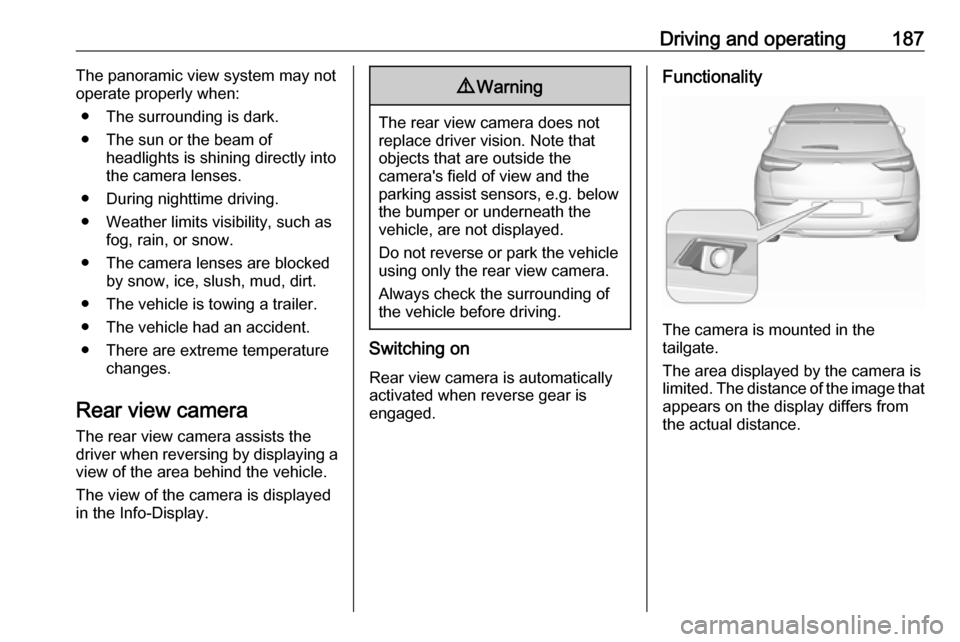
Functionality
The camera is mounted in the
tailgate.
The area displayed by the camera is
limited. The distance of the image that
appears on the display differs from
the actual distance.
Page 190 of 263
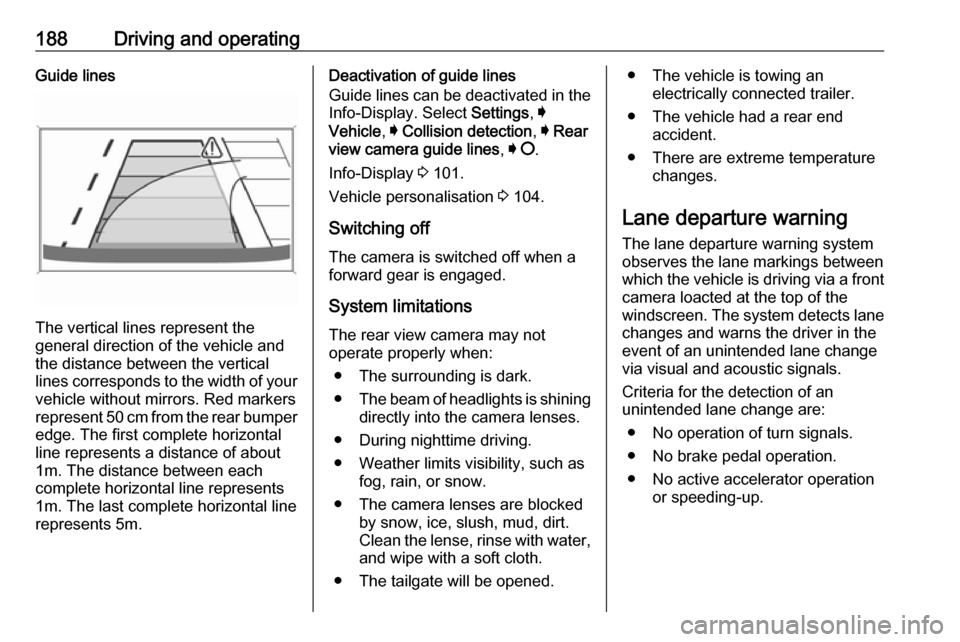
188Driving and operatingGuide lines
The vertical lines represent the
general direction of the vehicle and
the distance between the vertical
lines corresponds to the width of your vehicle without mirrors. Red markers
represent 50 cm from the rear bumper
edge. The first complete horizontal
line represents a distance of about
1m. The distance between each
complete horizontal line represents
1m. The last complete horizontal line
represents 5m.
Deactivation of guide lines
Guide lines can be deactivated in the Info-Display. Select Settings, I
Vehicle , I Collision detection , I Rear
view camera guide lines , I § .
Info-Display 3 101.
Vehicle personalisation 3 104.
Switching off
The camera is switched off when a
forward gear is engaged.
System limitations The rear view camera may not
operate properly when:
● The surrounding is dark.
● The beam of headlights is shining
directly into the camera lenses.
● During nighttime driving.
● Weather limits visibility, such as fog, rain, or snow.
● The camera lenses are blocked by snow, ice, slush, mud, dirt.
Clean the lense, rinse with water,
and wipe with a soft cloth.
● The tailgate will be opened.● The vehicle is towing an electrically connected trailer.
● The vehicle had a rear end accident.
● There are extreme temperature changes.
Lane departure warning The lane departure warning system
observes the lane markings between which the vehicle is driving via a front camera loacted at the top of the
windscreen. The system detects lane
changes and warns the driver in the
event of an unintended lane change via visual and acoustic signals.
Criteria for the detection of an
unintended lane change are:
● No operation of turn signals.
● No brake pedal operation.
● No active accelerator operation or speeding-up.
Page 194 of 263

192Driving and operatingvehicle and is always required tokeep the hands on the steeringwheel while driving.
Using the system while towing a
trailer or on slippery roads could
cause loss of control of the vehicle
and a crash. Switch the system off.
Driver alert
The driver alert system monitores the driving time and the vigilance of the
driver. Monitoring the vigilance of the
driver is based on the trajectory
variations of the vehicle compared to
the lane markings.
The system includes a driving time
alert combined with driver drowsiness
detection.
9 Warning
The system cannot replace the
need for vigilance on the part of
the driver. It is recommended that
you take a break as soon as you
feel tired or at least every two
hours. Do not take the wheel if you are tired.
Activation or Deactivation
The system can be activated or
deactivated in the vehicle
personalisation 3 104
The state of the system stays in
memory when the ignition is switched
off.
Driving time alert The driver gets notified by a pop-upreminder symbol € in the Driver
Information Centre simultaneously with a acoustic alert if the driver has
not taken a break after two hours of
driving at a speed above 40 mph. The alert is repeated hourly until the
vehicle is stopped, no matter how
vehicle speed evolves.
The counting of driving time alert is
reset when the ignition has been
switched off for a few minutes.
Driver drowsiness detection
The system monitors the driver's level
of vigilance. A camera at the top of the windscreen detects variations in
trajectory compared to the lanemarkings. This system is particularly
suited to fast roads (speed higher
than 40 mph).
If the trajectory of the vehicle
suggests a certain level of
drowsiness or inattention by the
driver, the system triggers the first
level of alert. The driver is notified by
a message and an audible signal is
given.
After three first level alerts, the
system triggers a new alert with a
message, accompanied by a more
pronounced audible signal.
In certain driving conditions (poor
road surface or strong winds), the
system may give alerts independent of the driver's level of vigilance.
The driver drowsiness detection is reinitialised when the ignition hasbeen switched off for a few minutes or
the speed remains below 40 mph for
a few minutes.