remote start VAUXHALL INSIGNIA 2014 User Guide
[x] Cancel search | Manufacturer: VAUXHALL, Model Year: 2014, Model line: INSIGNIA, Model: VAUXHALL INSIGNIA 2014Pages: 321, PDF Size: 8.83 MB
Page 151 of 321
Driving and operating149
Ignition on power mode: press and
hold Engine Start/Stop button for
6 seconds without operating clutch or brake pedal. The green LED in the
button illuminates, diesel engine is
preheating. Control indicators light up
and the most electrical functions are
operable.
Engine start: operate clutch pedal
(manual transmission) or brake pedal (automatic transmission) and press
Engine Start/Stop button once more.
Release button after starting
procedure begins.
Ignition off: press Engine Start/Stop
button briefly in each mode or when
engine is running. Some functions
remain active until driver's door is
opened, if ignition was on before.
Steering wheel lock
The steering wheel lock activates
automatically when:
■ the vehicle is stationary and
■ the ignition has been switched off and
■ the driver's door is opened.To release steering wheel lock, open
and close driver's door and switch on accessory mode or start the engine
directly.9 Warning
If the vehicle battery is discharged,
the vehicle must not be towed,
tow-started or jump-started as the
steering wheel lock cannot be
disengaged.
Emergency operation on
vehicles with electronic key
system
If either the electronic key fails or the
battery of the electronic key is weak,
the Driver Information Centre may
display No Remote Detected or
Replace Battery in Remote Key when
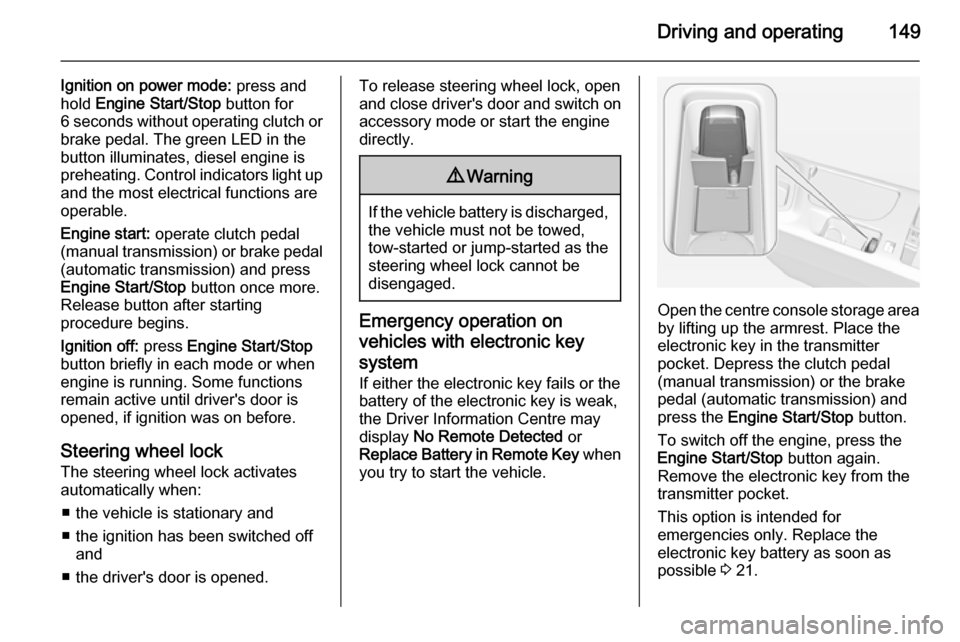
you try to start the vehicle.Open the centre console storage area by lifting up the armrest. Place the
electronic key in the transmitter
pocket. Depress the clutch pedal
(manual transmission) or the brake
pedal (automatic transmission) and
press the Engine Start/Stop button.
To switch off the engine, press the Engine Start/Stop button again.
Remove the electronic key from the
transmitter pocket.
This option is intended for
emergencies only. Replace the
electronic key battery as soon as
possible 3 21.
Page 152 of 321
150Driving and operating
For unlocking or locking the doors see
fault in radio remote control unit or
electronic key system 3 22.
Retained power off
The following electronic systems can
work until the driver's door is opened
or for 10 minutes after the ignition is
switched off:
■ Power windows
■ Sunroof
■ Power outlets
Power to the Infotainment system will continue to operate for 30 minutes
when ignition is off, regardless of
whether any door will be opened.Starting the engine
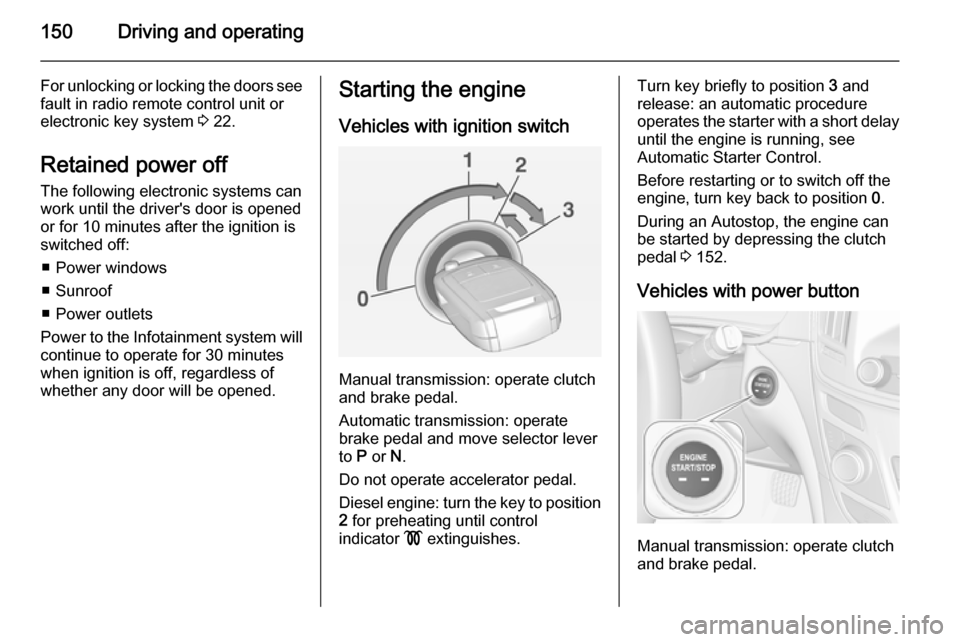
Vehicles with ignition switch
Manual transmission: operate clutch
and brake pedal.
Automatic transmission: operate
brake pedal and move selector lever
to P or N.
Do not operate accelerator pedal.
Diesel engine: turn the key to position 2 for preheating until control
indicator ! extinguishes.
Turn key briefly to position 3 and
release: an automatic procedure operates the starter with a short delay
until the engine is running, see
Automatic Starter Control.
Before restarting or to switch off the
engine, turn key back to position 0.
During an Autostop, the engine can
be started by depressing the clutch
pedal 3 152.
Vehicles with power button
Manual transmission: operate clutch
and brake pedal.
Page 210 of 321

208Driving and operating
General informationThe official fuel consumption and
specific CO 2 emission figures quoted
relate to the EU base model with
standard equipment.
Fuel consumption data and CO 2
emission data are determined
according to regulation R (EC) No.
715/2007 (in the version respectively
applicable), taking into consideration
the vehicle weight in running order, as
specified by the regulation.
The figures are provided only for the
purpose of comparison between different vehicle variants and mustnot be taken as a guarantee for the
actual fuel consumption of a
particular vehicle. Additional
equipment may result in slightly
higher results than the stated
consumption and CO 2 figures.
Furthermore, fuel consumption is
dependent on personal driving style as well as road and traffic conditions.Trailer hitch
General information The factory-fitted towing equipment is
folded up under the rear bumper
fascia.
Entrust retrofitting of towing
equipment to a workshop. It may be
necessary to make changes that
affect the cooling system, heat
shields or other equipment. Only use
towing equipment that has been
approved for your vehicle.
To avoid vehicle damage, the power
tailgate cannot be operated with the
radio remote control when a trailer is
electrically connected.
Fitting of towing equipment could
cover the opening of the towing eye. If this is the case use the coupling ball
bar for towing.Driving characteristics and
towing tips Before attaching a trailer, lubricate
the coupling ball. However, do not do
so if a stabiliser, which acts on the coupling ball, is being used to reduce snaking movements.
For trailers with low driving stability
and trailers with a permitted gross
vehicle weight of more than 1400 kg
(Front-wheel drive)/1600 kg (All-
wheel drive) the use of a stabiliser is
strongly recommended when driving
above 50 mph.
If the trailer starts snaking, drive more slowly, do not attempt to correct the
steering and brake sharply if
necessary.
When driving downhill, drive in the
same gear as if driving uphill and
drive at a similar speed.
Adjust tyre pressure to the value
specified for full load 3 288.
Page 314 of 321

312Customer information
■ Vehicle reactions in particulardriving situations (e.g. inflation of
an airbag, activation of the stability
regulation system)
■ Environmental conditions (e.g. temperature)
These data are exclusively technical
and help identifying and correcting
errors as well as optimizing vehicle
functions.
Motion profiles indicating travelled
routes cannot be created with these
data.
If services are used (e.g. repair
works, service processes, warranty
cases, quality assurance),
employees of the service network
(manufacturer included) are able to
read out this technical information
from the event and error data storage
modules applying special diagnostic
devices. If required, you will receive
further information at these
workshops. After an error has been
corrected, the data are deleted from
the error storage module or they are
constantly overwritten.When using the vehicle, situations
may occur in which these technical
data related to other information
(accident report, damages on the
vehicle, witness statements etc.) may be associated with a specific person -
possibly, with the assistance of an
expert.
Additional functions contractually
agreed upon with the client (e.g.
vehicle location in emergency cases)
allow the transmission of particular vehicle data from the vehicle.Radio Frequency
Identification (RFID) RFID technology is used in somevehicles for functions such as tyre
pressure monitoring and ignition
system security. It is also used in
connection with conveniences such
as radio remote controls for door
locking/unlocking and starting, and in-
vehicle transmitters for garage door
openers. RFID technology in
Vauxhall vehicles does not use or
record personal information or link with any other Vauxhall system
containing personal information.
Page 319 of 321

317
Parking lights ............................. 128
Performance .............................. 270
Performing work ........................213
Pollen filter ................................. 145
Power button .............................. 148
Power outlets ............................... 87
Power seat adjustment .................49
Power windows ............................ 39
Preheating ................................. 103
Puncture ..................................... 247
Q
Quickheat ................................... 144
R Radio Frequency Identification (RFID) ..................................... 312
Radio remote control ...................20
Reading lights ............................ 129
Rear cross traffic alert ................195
Rear floor storage cover ..............71
Rear fog light ............................. 105
Rear fog lights ........................... 128
Rear seats .................................... 53
Rear view camera ...................... 193
Rear window wiper/washer .......... 85
Recommended fluids and lubricants ........................ 261, 265
Refuelling ................................... 204
Retained power off .....................150Reversing lights .........................128
Ride control systems ..................165
Roller blinds ................................. 41
Roof .............................................. 41
Roof load ...................................... 79
Roof rack ..................................... 78
S
Safety belts ................................... 53
Safety net .................................... 75
Seat adjustment ....................... 6, 46
Seat belt ........................................ 8
Seat belt reminder .......................99
Seat belts ..................................... 53 Seat position ................................ 46
Selector lever ............................. 157
Service ............................... 146, 260
Service display ............................ 97
Service information ....................260
Side airbag system ......................58
Side blind spot alert ....................190
Sidelights .................................... 121
Side turn signal lights ................229
Smartphone controller ................115
Spare wheel ............................... 249
Speed limiter....................... 105, 171
Speedometer ............................... 95
Starting and operating ................148
Starting off ................................... 16
Starting the engine ....................150Steering...................................... 147
Steering wheel adjustment ......9, 81
Steering wheel controls ...............81
Stop-start system........................ 152
Storage ......................................... 66
Storage compartments .................66
Sunroof ........................................ 41
Sunvisor lights ........................... 130
Sun visors .................................... 41
Symbols ......................................... 4
T Tachometer ................................. 96
Tail lights ................................... 227
Three-point seat belt .................... 54
Tools .......................................... 238
Top-tether fastening eyes ............65
Tow bar....................................... 208
Towing ................................ 208, 253
Towing another vehicle .............255
Towing equipment .....................209
Towing the vehicle .....................253
Traction Control system ............. 165
Traction Control system off......... 103
Traffic sign assistant ...........106, 197
Trailer coupling ........................... 208
Trailer stability assist .................211
Trailer towing ............................. 209
Transmission ............................... 16
Transmission display .................156