low oil pressure VAUXHALL INSIGNIA 2014 Owner's Manual
[x] Cancel search | Manufacturer: VAUXHALL, Model Year: 2014, Model line: INSIGNIA, Model: VAUXHALL INSIGNIA 2014Pages: 321, PDF Size: 8.83 MB
Page 18 of 321
16In briefTransmission
Manual transmission
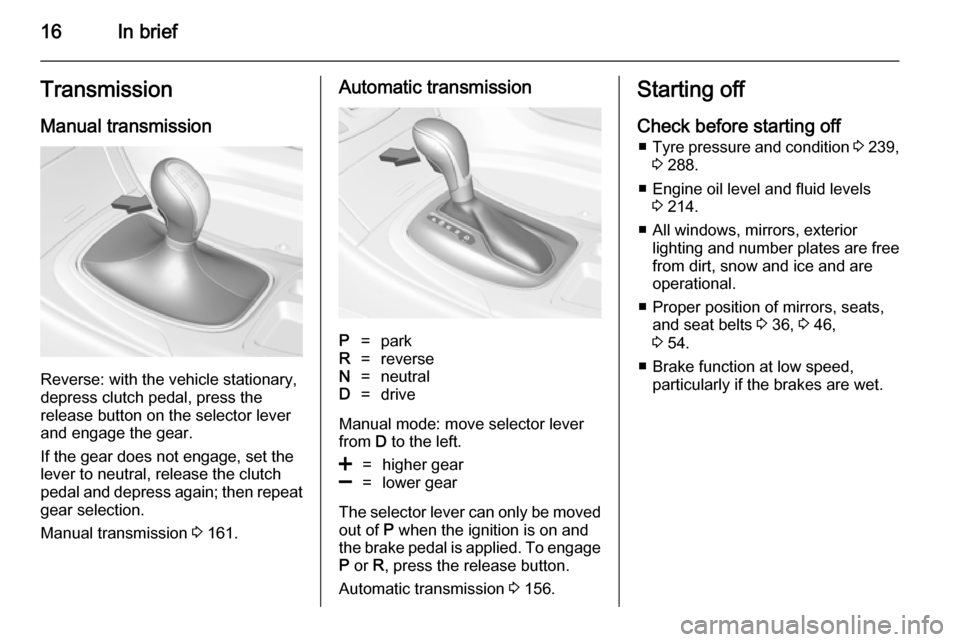
Reverse: with the vehicle stationary,
depress clutch pedal, press the
release button on the selector lever
and engage the gear.
If the gear does not engage, set the
lever to neutral, release the clutch
pedal and depress again; then repeat
gear selection.
Manual transmission 3 161.
Automatic transmissionP=parkR=reverseN=neutralD=drive
Manual mode: move selector lever
from D to the left.
<=higher gear]=lower gear
The selector lever can only be moved
out of P when the ignition is on and
the brake pedal is applied. To engage
P or R, press the release button.
Automatic transmission 3 156.
Starting off
Check before starting off ■ Tyre pressure and condition 3 239,
3 288.
■ Engine oil level and fluid levels 3 214.
■ All windows, mirrors, exterior lighting and number plates are free
from dirt, snow and ice and are
operational.
■ Proper position of mirrors, seats, and seat belts 3 36, 3 46,
3 54.
■ Brake function at low speed, particularly if the brakes are wet.
Page 106 of 321
104Instruments and controlsEngine oil pressure
I illuminates red.
Illuminates when the ignition is
switched on and extinguishes shortly
after the engine starts.
Illuminates when the engine isrunningCaution
Engine lubrication may be
interrupted. This may result in
damage to the engine and/or
locking of the drive wheels.
1. Depress clutch.
2. Select neutral gear, set selector lever to N.
3. Move out of the flow of traffic as quickly as possible without
impeding other vehicles.
4. Switch off ignition.
9 Warning
When the engine is off,
considerably more force is needed
to brake and steer. During an
Autostop the brake servo unit will still be operational.
Do not remove key until vehicle is stationary, otherwise the steeringwheel lock could engage
unexpectedly.
Check oil level before seeking
assistance of a workshop 3 214.
Low fuel
i or Y illuminates or flashes yellow.
Illuminates Level in fuel tank is too low.
Flashes
Fuel used up. Refuel immediately.
Never run the tank dry.
Catalytic converter 3 156.
Bleeding the diesel fuel system
3 220.
Immobiliser
d flashes yellow.
Fault in the immobiliser system. The
engine cannot be started.
Apply footbrake
- illuminates yellow.
Brake pedal needs to be depressed
to release the electric parking brake
3 163.
Autostop
D illuminates when engine is in an
Autostop.
Stop-start system 3 152.
Exterior light 8 illuminates green.
The exterior lights are on 3 121.
High beam
C illuminates blue.
Page 110 of 321
108Instruments and controls
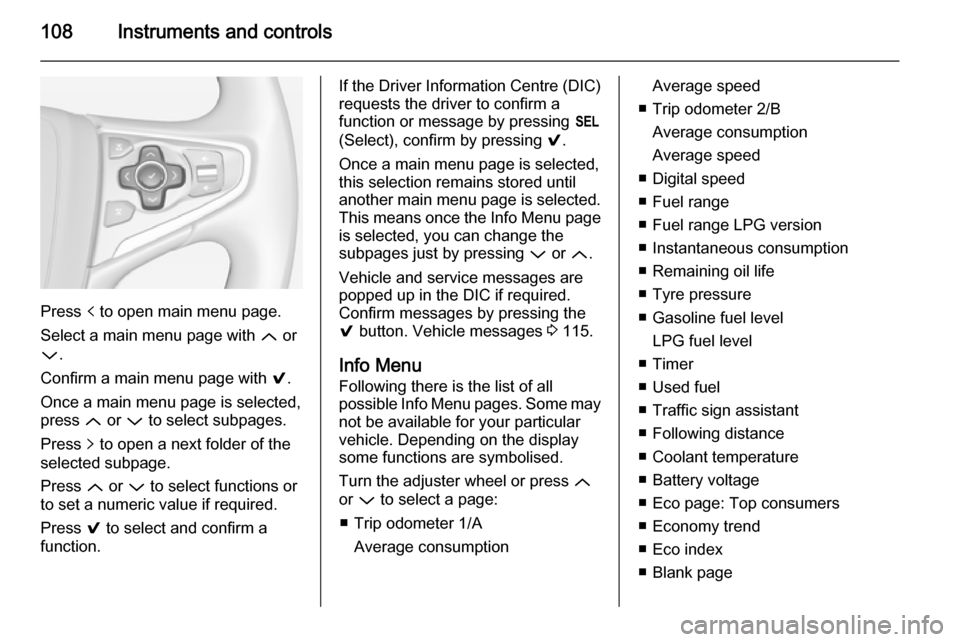
Press p to open main menu page.
Select a main menu page with Q or
P .
Confirm a main menu page with 9.
Once a main menu page is selected, press Q or P to select subpages.
Press q to open a next folder of the
selected subpage.
Press Q or P to select functions or
to set a numeric value if required.
Press 9 to select and confirm a
function.
If the Driver Information Centre (DIC) requests the driver to confirm a
function or message by pressing H
(Select), confirm by pressing 9.
Once a main menu page is selected,
this selection remains stored until
another main menu page is selected.
This means once the Info Menu page
is selected, you can change the
subpages just by pressing P or Q.
Vehicle and service messages are
popped up in the DIC if required.
Confirm messages by pressing the 9 button. Vehicle messages 3 115.
Info Menu Following there is the list of all
possible Info Menu pages. Some may
not be available for your particular
vehicle. Depending on the display
some functions are symbolised.
Turn the adjuster wheel or press Q
or P to select a page:
■ Trip odometer 1/A Average consumptionAverage speed
■ Trip odometer 2/B Average consumption
Average speed
■ Digital speed
■ Fuel range
■ Fuel range LPG version
■ Instantaneous consumption
■ Remaining oil life
■ Tyre pressure
■ Gasoline fuel level LPG fuel level
■ Timer
■ Used fuel
■ Traffic sign assistant
■ Following distance
■ Coolant temperature
■ Battery voltage
■ Eco page: Top consumers
■ Economy trend
■ Eco index
■ Blank page
Page 111 of 321

Instruments and controls109
On Baselevel display, the pages
"Remaining Oil Life ", "Tyre
Pressure", "Traffic Sign Assistant" and "Following distance indication"
are displayed in the Settings Menu
X . Select by pressing Menu
button.
On Baselevel display, the pages "Top consumers", "Economy trend" and
"Eco index" are displayed in the Eco
Menu s . Select by pressing
Menu button.
Trip odometer 1/A and 2/B
Trip odometer displays the current
distance since a certain reset.
Trip odometer counts up to a distance
of 2000 miles then restarts at 0.
To reset on Baselevel display, press
the SET/CLR button for a few
seconds, on Midlevel and Uplevel
display, press > and confirm with 9.
The information of trip odometer page
1/A and 2/B can be reset separately
for odometer, average consumption
and average speed while the
respective display is active.Average consumption
Display of average consumption. The measurement can be reset at any
time and starts with a default value.
To reset on Baselevel display, press
the SET/CLR button for a few
seconds, on Midlevel and Uplevel
display, press > and confirm with 9.
On vehicles with LPG engines,
average consumption is indicated for the currently selected mode, LPG or
Gasoline.
Average speed
Display of average speed. The
measurement can be reset at any
time.
To reset on Baselevel display, press
the SET/CLR button for a few
seconds, on Midlevel and Uplevel
display, press > and confirm with 9.
Digital speed Digital display of the instantaneous
speed.Fuel range
Range is calculated from current fuel
tank content and current
consumption. The display shows
average values.
After refuelling, the range is updated
automatically after a brief delay.
When the fuel level in the tank is low,
a message appears on the display
and the control indicator i or Y in the
fuel gauge illuminates.
When the tank has to be refuelled
immediately, a warning message
appears and remains on the display.
Additionally the control indicator i
or Y in the fuel gauge flashes 3 104.
Fuel range LPG version
Display of approximate fuel range
available with the remaining fuel in
each respective fuel tank of gasoline
and LPG fuel, along with a total range
of both fuel types together. Switch
between the modes by pressing SET/
CLR button or 9 button.
Page 112 of 321

110Instruments and controls
Instantaneous consumption
Display of the instantaneous
consumption.
On vehicles with LPG engines,
instantaneous consumption is
indicated for the currently selected
mode, LPG or Gasoline.
Remaining oil life
Indicates an estimate of the oil's
useful life. The number in % means
the remaining of current oil life 3 97.
Tire pressure
Checks tyre pressure of all wheels
during driving 3 240.
Gasoline fuel level/LPG fuel level
Displays the fuel level for the fuel not
currently being used (Gasoline or
LPG). A dedicated DIC cluster gauge
shows the fuel level for the fuel
currently being used.
Timer
To start and stop press 9. To reset,
press > and confirm Reset.Used fuel
Indicates used fuel since a certain
point of time. To reset, press > and
confirm Reset.
Traffic sign assistant
Displays the detected traffic signs for
the current route section 3 197.
Following distance
Displays the distance in seconds to a preceding moving vehicle 3 183. If
Adaptive cruise control is active this
page shows the following distance
setting instead.
Coolant temperature
Displays the coolant temperature.
Battery voltage
Displays the vehicle battery voltage.
Top consumers
List of top comfort consumers
currently switched on is displayed in
descending order. Fuel saving
potential is indicated. A switched-off
consumer disappears from the list
and the consumption value will be
updated.During sporadic driving conditions,
the engine will activate the rear
window defog automatically to
increase the engine load. In this
event, the rear window defog is
indicated as one of the top
consumers, without activation by the
driver.
Economy trend
Displays the average consumption
development over a distance of
50 miles. Filled segments display the
consumption in 5 mile steps and
shows the effect of topography or
driving behaviour on fuel
consumption.
Economy index
The current fuel consumption is
indicated on an economic scale. For
economical driving adapt your driving style to keep the indicator within the
Eco area. Indicator outside the Eco
area means higher fuel consumption.
On Baselevel display, the current
consumption value is indicated.
Page 113 of 321

Instruments and controls111
Shift indication: On Baselevel display
the current gear is indicated inside an
arrow. The figure above recommends upshifting for fuel saving reasons.
Blank page
shows a blank page without any
information.
Performance Menu Performance menu is only viewable
on Uplevel display.
The following is the list of all possible
Performance Menu pages. Some
may not be available for your
particular vehicle.
Turn the adjuster wheel or press Q
or P to select a page:
■ Friction bubble
■ Acceleration and braking
■ Oil temperature
■ Oil pressure
■ Battery voltage
■ Transmission fluid temperatureFriction bubble
A four quadrant visual display,
indicative of the four corners of the
car, with a “bubble” showing where
the most inertia is being exerted on
the vehicle.
Acceleration and braking
Displays the percentage amount of
brake or accelerator pressure applied
by the driver as a bar graph around
the outer perimeter of the DIC area.
The left side is for acceleration and
the right side is for braking.
Oil temperature
Displays the oil temperature in
degrees Celsius.
Oil pressure
Displays the oil pressure in kPa.
Battery voltage
Displays the vehicle battery voltage.
Transmission fluid temperature
Displays the transmission fluid
temperature in degrees Celsius.Audio Menu
Audio menu enables browsing for
music, selecting from favourites or
changing the audio source.
See Infotainment system manual.
Phone Menu
Phone menu enables managing and
performing of phone calls, scrolling through contacts or operating
handsfree phoning.
See Infotainment system manual.
Navigation Menu
Navigation menu enables route
guidance.
See Infotainment system manual.
Settings Menu The following list contains all possible
Settings Menu pages. Some may not be available for your particular
vehicle. Depending on the display
some functions are symbolised.
Page 204 of 321
202Driving and operatingCaution
Use of fuel that does not comply toEN 228 or E DIN 51626-1 or
equivalent can lead to deposits or
engine damage and may affect
your warranty.
Caution
Use of fuel with too low an octane
rating could lead to uncontrolled combustion and engine damage.
Fuel for diesel engines
Only use diesel fuel that complies
with EN 590.
In countries outside the European
Union use Euro-Diesel fuel with a
sulfur concentration below 50 ppm.
Caution
Use of fuel that does not comply to EN 590 or similar can lead to
engine powerloss, increased wear
or engine damage and may affect
your warranty.
Do not use marine diesel oils, heating
oils, Aquazole and similar diesel-
water emulsions. Diesel fuels must
not be diluted with fuels for petrol
engines.
Fuel for liquid gas
operation
Liquid gas is known as LPG
(Liquefied Petroleum Gas) or under
its French name GPL (Gaz de Pétrole Liquéfié). LPG is also known as
Autogas.
LPG consists mainly of propane and
butane. The octane rating is between
105 and 115, depending on the
butane proportion. LPG is stored
liquid at around 5 - 10 bar pressure.
The boiling point depends on the
pressure and mixing ratio. At ambient pressure, it is between -42 °C (pure
propane) and -0.5 °C (pure butane).Caution
The system works at an ambient
temperature of approx. -8 °C to
100 °C.
Full function of the LPG system can
only be guaranteed with liquid gas
which complies with the minimum
requirements of DIN EN 589.
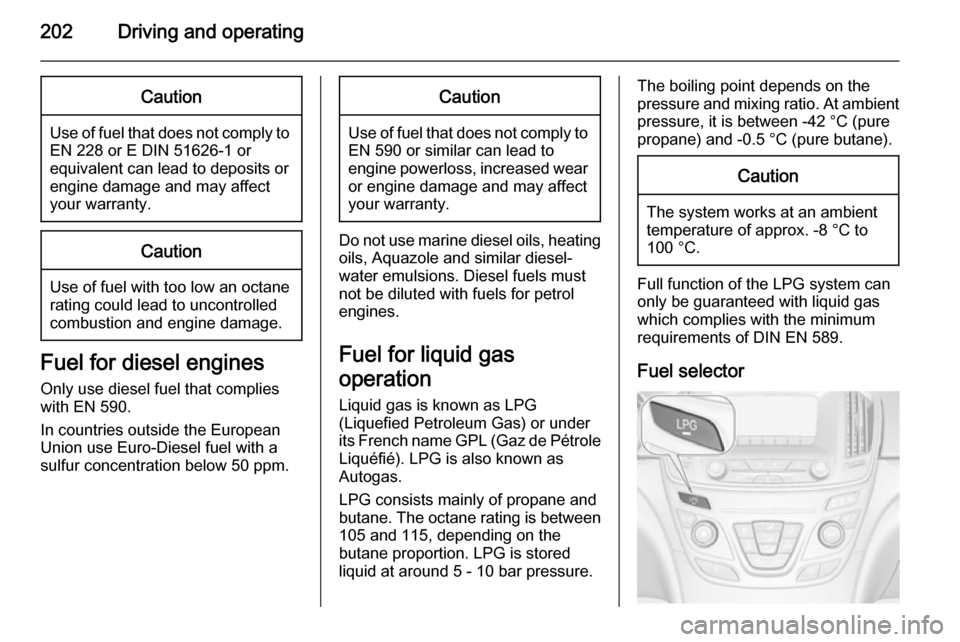
Fuel selector
Page 317 of 321

315
Child restraint installationlocations ................................... 62
Child restraints.............................. 61
Child restraint systems ................61
Cigarette lighter ........................... 88
Climate control ............................. 15
Climate control systems .............133
Clock............................................. 86
Colour-Info-Display .....................113
Control indicators.......................... 99
Control of the vehicle .................147
Controls ........................................ 81
Convex shape .............................. 36
Coolant and antifreeze ...............261
Cruise control ....................105, 170
Cupholders .................................. 66
Curtain airbag system .................. 59
Curve lighting.............................. 124
D Danger, Warnings and Cautions ...4
Daytime running lights ...............124
Declaration of conformity ............311
Diesel fuel system bleeding .......220
Diesel particle filter .............103, 155
Door open .................................. 106
Doors ............................................ 28
Driver assistance systems ..........170
Driver Information Centre ...........106Driving characteristics and
towing tips .............................. 208
Driving hints ................................ 147
Dual automatic climate control system ..................................... 139
E Electric adjustment ......................36
Electrical system......................... 232
Electric parking brake .................101
Electric parking brake fault .........101
Electronic driving programmes ..159
Electronic key system ...................21
Electronic Stability Control.......... 166
Electronic Stability Control and Traction Control system ..........103
Electronic Stability Control off..... 103
End-of-life vehicle recovery .......213
Engine compartment fuse box ...233
Engine coolant ........................... 216
Engine coolant temperature gauge ....................................... 97
Engine data ............................... 268
Engine exhaust .......................... 155
Engine identification ...................264
Engine oil ................... 214, 261, 265
Engine oil pressure ....................104
Entry lighting .............................. 130
Event data recorders ..................311
Exit lighting ................................ 131Exterior care .............................. 257
Exterior light ............................... 104
Exterior lighting ....................12, 121
Exterior mirrors ............................. 36
F
Fault ........................................... 159
First aid ......................................... 78
First aid kit ................................... 78
Fixed air vents ........................... 145
Fog light ..................................... 105
Fog lights ................................... 226
Folding mirrors ............................. 36
Following distance ......................102
Following distance indication ......183
Forward collision alert................. 180
Front airbag system .....................57
Front fog lights ........................... 127
Front seats.................................... 46
Front storage ................................ 67
Front turn signal light ..................222
Fuel............................................. 201
Fuel consumption - CO 2-
Emissions ............................... 207
Fuel for diesel engines ..............202
Fuel for liquid gas operation .......202
Fuel for petrol engines ...............201
Fuel gauge ................................... 96
Fuel selector ................................ 97
Fuses ......................................... 232