steering wheel VAUXHALL INSIGNIA 2015.5 User Guide
[x] Cancel search | Manufacturer: VAUXHALL, Model Year: 2015.5, Model line: INSIGNIA, Model: VAUXHALL INSIGNIA 2015.5Pages: 331, PDF Size: 9.08 MB
Page 89 of 331

Instruments and controls87Heated steering wheel
Activate heating by pressing *.
Activation is indicated by the LED in
the button.
The recommended grip areas of the
steering wheel are heated quicker
and to a higher temperature than the
other areas.
Heating is operational when the
engine is running and during an
Autostop.
Stop-start system 3 157.
Horn
Press j.
Page 103 of 331
Instruments and controls101
Midlevel and Uplevel instrument
cluster
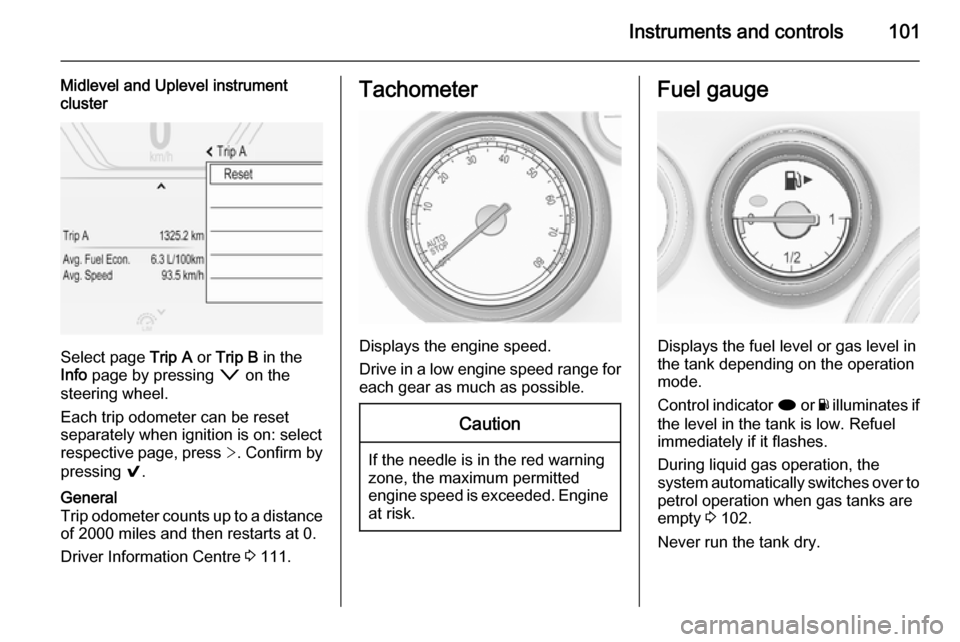
Select page Trip A or Trip B in the
Info page by pressing o on the
steering wheel.
Each trip odometer can be reset separately when ignition is on: select
respective page, press >. Confirm by
pressing 9.
General
Trip odometer counts up to a distance
of 2000 miles and then restarts at 0.
Driver Information Centre 3 111.Tachometer
Displays the engine speed.
Drive in a low engine speed range for each gear as much as possible.
Caution
If the needle is in the red warning
zone, the maximum permitted
engine speed is exceeded. Engine at risk.
Fuel gauge
Displays the fuel level or gas level in
the tank depending on the operation
mode.
Control indicator i or Y illuminates if
the level in the tank is low. Refuel
immediately if it flashes.
During liquid gas operation, the
system automatically switches over to
petrol operation when gas tanks are
empty 3 102.
Never run the tank dry.
Page 105 of 331
Instruments and controls103
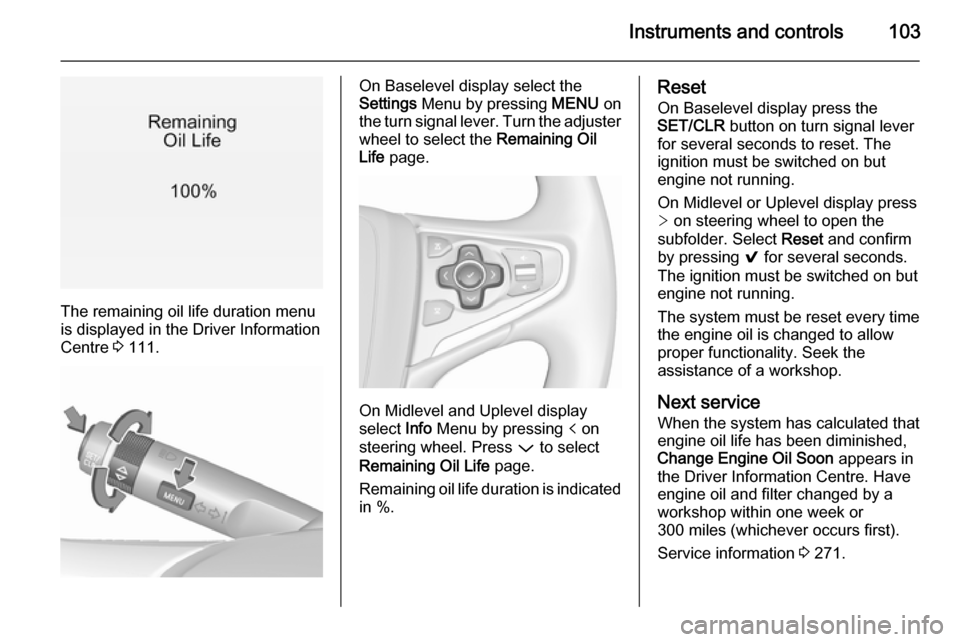
The remaining oil life duration menu
is displayed in the Driver Information
Centre 3 111.
On Baselevel display select the
Settings Menu by pressing MENU on
the turn signal lever. Turn the adjuster wheel to select the Remaining Oil
Life page.
On Midlevel and Uplevel display
select Info Menu by pressing p on
steering wheel. Press P to select
Remaining Oil Life page.
Remaining oil life duration is indicated
in %.
Reset
On Baselevel display press the
SET/CLR button on turn signal lever
for several seconds to reset. The
ignition must be switched on but
engine not running.
On Midlevel or Uplevel display press
> on steering wheel to open the
subfolder. Select Reset and confirm
by pressing 9 for several seconds.
The ignition must be switched on but
engine not running.
The system must be reset every time
the engine oil is changed to allow
proper functionality. Seek the
assistance of a workshop.
Next service
When the system has calculated that
engine oil life has been diminished,
Change Engine Oil Soon appears in
the Driver Information Centre. Have engine oil and filter changed by a
workshop within one week or
300 miles (whichever occurs first).
Service information 3 271.
Page 111 of 331
Instruments and controls109Tyre pressure monitoring
system
w illuminates or flashes yellow.
Illuminates Tyre pressure loss. Stop immediately
and check tyre pressure.
Flashes Fault in system or tyre without
pressure sensor mounted (e.g. spare
wheel). After 60-90 seconds the
control indicator illuminates
continuously. Consult a workshop.
Engine oil pressure
I illuminates red.
Illuminates when the ignition is
switched on and extinguishes shortly
after the engine starts.Illuminates when the engine is
runningCaution
Engine lubrication may be
interrupted. This may result in
damage to the engine and/or
locking of the drive wheels.
1. Depress clutch.
2. Select neutral gear, set selector lever to N.
3. Move out of the flow of traffic as quickly as possible without
impeding other vehicles.
4. Switch off ignition.
9 Warning
When the engine is off,
considerably more force is needed
to brake and steer. During an
Autostop the brake servo unit will still be operational.
Do not remove key until vehicle isstationary, otherwise the steeringwheel lock could engage
unexpectedly.
Check oil level before seeking
assistance of a workshop 3 224.
Low fuel
i or Y illuminates or flashes yellow.
Illuminates Level in fuel tank is too low.
Flashes
Fuel used up. Refuel immediately.
Never run the tank dry.
Catalytic converter 3 161.
Bleeding the diesel fuel system
3 230.
Immobiliser
d flashes yellow.
Fault in the immobiliser system. The
engine cannot be started.
Page 114 of 331
112Instruments and controls
Baselevel display
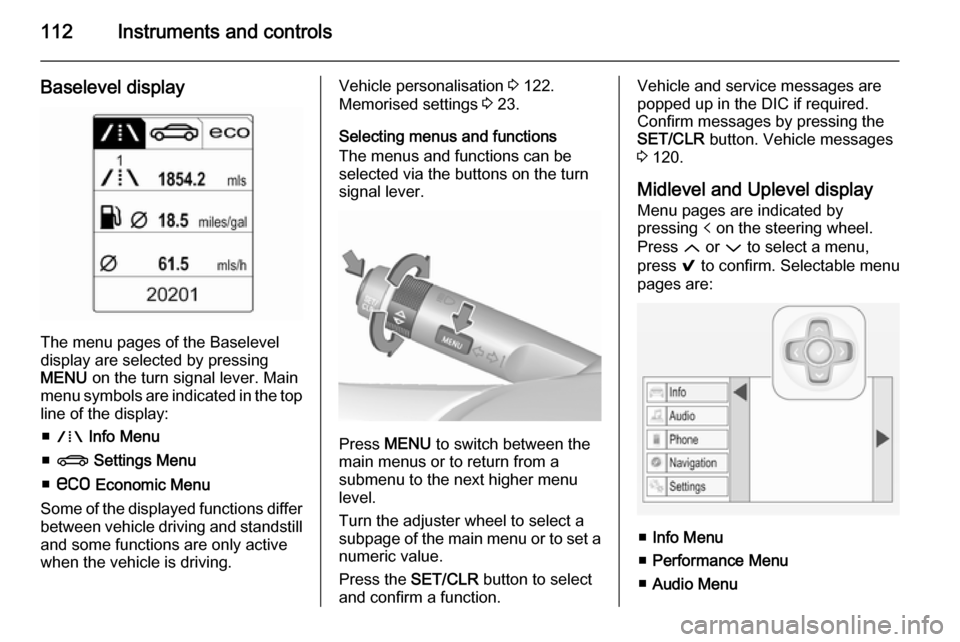
The menu pages of the Baselevel
display are selected by pressing
MENU on the turn signal lever. Main
menu symbols are indicated in the top line of the display:
■ W Info Menu
■ X Settings Menu
■ s Economic Menu
Some of the displayed functions differ
between vehicle driving and standstill and some functions are only active
when the vehicle is driving.
Vehicle personalisation 3 122.
Memorised settings 3 23.
Selecting menus and functions
The menus and functions can be
selected via the buttons on the turn signal lever.
Press MENU to switch between the
main menus or to return from a
submenu to the next higher menu
level.
Turn the adjuster wheel to select a
subpage of the main menu or to set a
numeric value.
Press the SET/CLR button to select
and confirm a function.
Vehicle and service messages are
popped up in the DIC if required.
Confirm messages by pressing the SET/CLR button. Vehicle messages
3 120.
Midlevel and Uplevel display Menu pages are indicated by
pressing p on the steering wheel.
Press Q or P to select a menu,
press 9 to confirm. Selectable menu
pages are:
■ Info Menu
■ Performance Menu
■ Audio Menu
Page 115 of 331
Instruments and controls113
■Phone Menu
■ Navigation Menu
■ Settings Menu
Some of the displayed functions differ
when the vehicle is being driven or at a standstill. Some functions are only
available when the vehicle is being
driven.
Uplevel instrument cluster can be
displayed as Sport mode or Tour
mode. See below: Settings Menu,
Display Themes.
Vehicle personalisation 3 122.
Memorised settings 3 23.
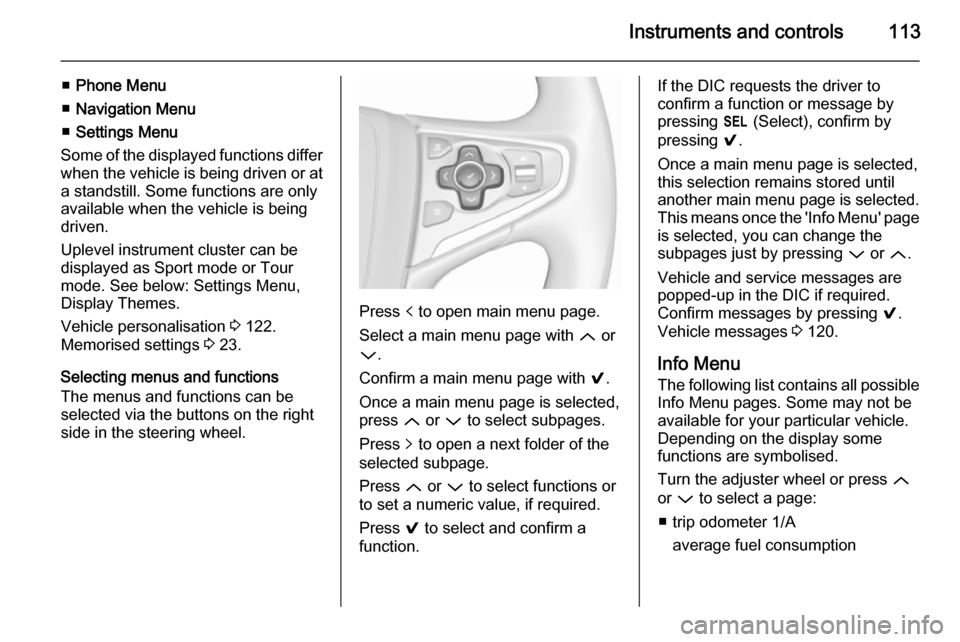
Selecting menus and functions
The menus and functions can be
selected via the buttons on the right
side in the steering wheel.
Press p to open main menu page.
Select a main menu page with Q or
P .
Confirm a main menu page with 9.
Once a main menu page is selected, press Q or P to select subpages.
Press q to open a next folder of the
selected subpage.
Press Q or P to select functions or
to set a numeric value, if required.
Press 9 to select and confirm a
function.
If the DIC requests the driver to
confirm a function or message by
pressing H (Select), confirm by
pressing 9.
Once a main menu page is selected, this selection remains stored until
another main menu page is selected.
This means once the 'Info Menu' page
is selected, you can change the
subpages just by pressing P or Q.
Vehicle and service messages are
popped-up in the DIC if required.
Confirm messages by pressing 9.
Vehicle messages 3 120.
Info Menu The following list contains all possible Info Menu pages. Some may not be
available for your particular vehicle.
Depending on the display some
functions are symbolised.
Turn the adjuster wheel or press Q
or P to select a page:
■ trip odometer 1/A average fuel consumption
Page 125 of 331

Instruments and controls123
■Voice
■ Display
■ Rear Camera
■ Return to Factory Settings
■ Software Information
■ TouchPad
In the corresponding submenus, the
following settings can be changed:
Time and Date
See 'Clock' 3 91.
Sport Mode
The driver can select the functions which will be activated in Sport mode
3 174.
■ Sport Mode Backlighting : Changes
the instrument illumination colour.
■ Engine Sport Performance :
Accelerator pedal and gear change
characteristics become more
responsive.
■ Sport Steering : Steering support is
reduced.■ Sport Suspension : Damping
becomes harder.
■ All Wheel Drive : Engine torque is
distributed to a greater extent to the rear axle.
Language (Language)
Selection of the desired language.
See Infotainment system manual.
Valet Mode
See Infotainment system manual.
Radio
See Infotainment system manual.
Vehicle ■ Climate and Air Quality
Auto Fan Speed : Modifies the level
of the cabin airflow of the climate control in automatic mode.
Air Conditioning Mode : Controls the
state of the cooling compressor
when the vehicle is started. Last
setting (recommended) or at
vehicle start is either always ON or
always OFF.
Auto Demist : Supports windscreen
dehumidification by automaticallyselecting the necessary settings and automatic air conditioning
mode.
Auto Rear Demist : Activates
automatically the heated rear
window.
■ Collision / Detection Systems
Park Assist : Activates or
deactivates the ultrasonic parking
assist.
Auto Collision Preparation :
Activates or deactivates the
automatic brake functionality of the
vehicle in the event of imminent
collision danger. The following is selectable: the system will take
over brake control, warn by chimes only or is deactivated completely.
Go Notifier : Activates or
deactivates the reminder function
of the adaptive cruise control.
Side Blind Zone Alert : Activates or
deactivates side blind zone alert.
Rear Cross Traffic Alert : Activates
or deactivates rear cross traffic alert.
Page 132 of 331
130Lighting
Playstreet lightingActivated automatically at low speed
up to approx. 20 mph. The light beam
is turned at an angle of 8° to the
roadside.
Town lighting
Activated automatically at a speed
range between approx. 25 and
34 mph and when street lights are
detected by the light sensor. The light
range is reduced by an extended light
distribution.
Country lighting
Activated automatically at a speed
range between approx. 34 and
70 mph. The beam of light and the
brightness is different between the left and the right side.
Motorway lighting
Activated automatically at a speed
above approx. 70 mph and minimal
steering movements. It switches on
after a delay or immediately when the vehicle is powerfully accelerated. The
light beam is longer and brighter.Adverse weather lighting
Activated automatically up to a speed of approx. 43 mph, when the rain
sensor recognizes condensation or
the wiper operates continuously. The
range, distribution and light intensity
is regulated variably depending on visibility.
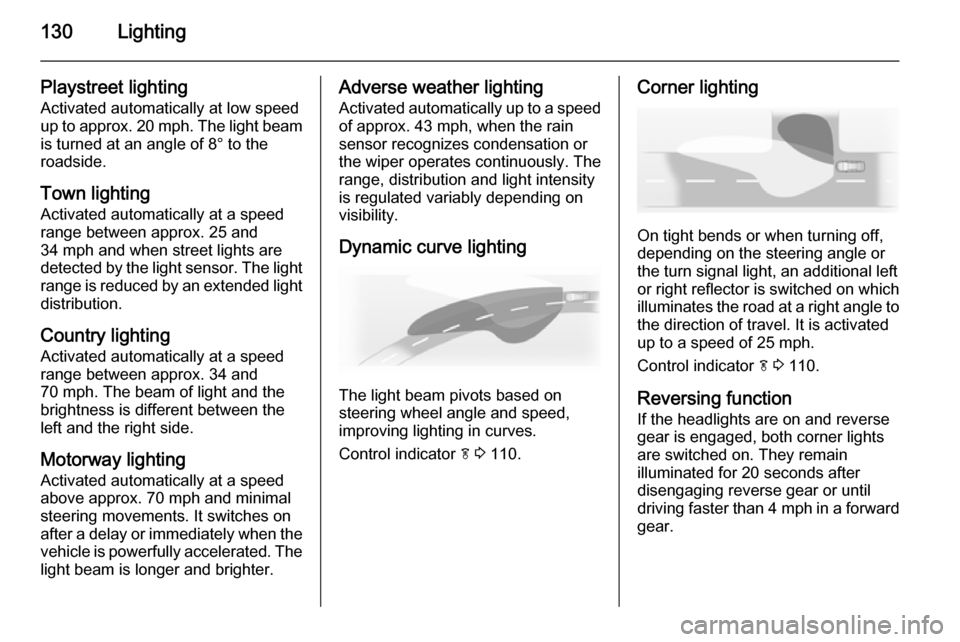
Dynamic curve lighting
The light beam pivots based on
steering wheel angle and speed,
improving lighting in curves.
Control indicator f 3 110.
Corner lighting
On tight bends or when turning off,
depending on the steering angle or
the turn signal light, an additional left
or right reflector is switched on which illuminates the road at a right angle to
the direction of travel. It is activated
up to a speed of 25 mph.
Control indicator f 3 110.
Reversing function If the headlights are on and reverse
gear is engaged, both corner lights
are switched on. They remain
illuminated for 20 seconds after disengaging reverse gear or until
driving faster than 4 mph in a forward
gear.
Page 134 of 331
132Lighting
Fault in Adaptive forward
lighting system When the system detects a failure in
the Adaptive forward lighting system,
the system moves to a preset position to avoid dazzling of oncoming traffic.
If this is not possible, the affected
headlight will be automatically
switched off. In any case, one
headlight will stay on. A warning is
displayed in the Driver Information
Centre.
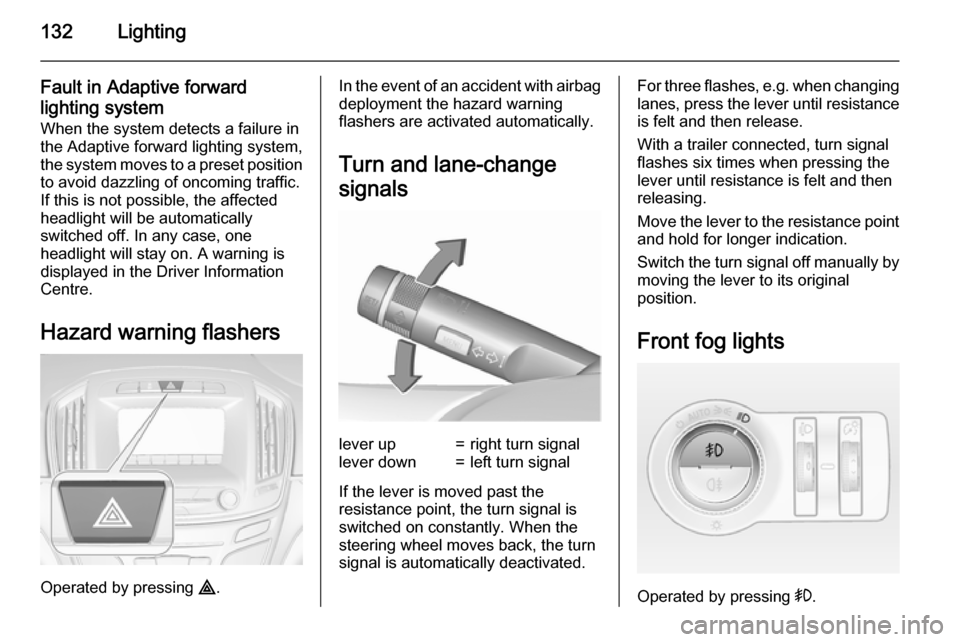
Hazard warning flashers
Operated by pressing ¨.
In the event of an accident with airbag
deployment the hazard warning
flashers are activated automatically.
Turn and lane-change
signalslever up=right turn signallever down=left turn signal
If the lever is moved past the
resistance point, the turn signal is
switched on constantly. When the
steering wheel moves back, the turn
signal is automatically deactivated.
For three flashes, e.g. when changing
lanes, press the lever until resistance
is felt and then release.
With a trailer connected, turn signal
flashes six times when pressing the lever until resistance is felt and then
releasing.
Move the lever to the resistance point
and hold for longer indication.
Switch the turn signal off manually by moving the lever to its original
position.
Front fog lights
Operated by pressing >.
Page 140 of 331
138Climate controlClimate controlClimate control systems ............. 138
Air vents ..................................... 149
Maintenance .............................. 150Climate control systems
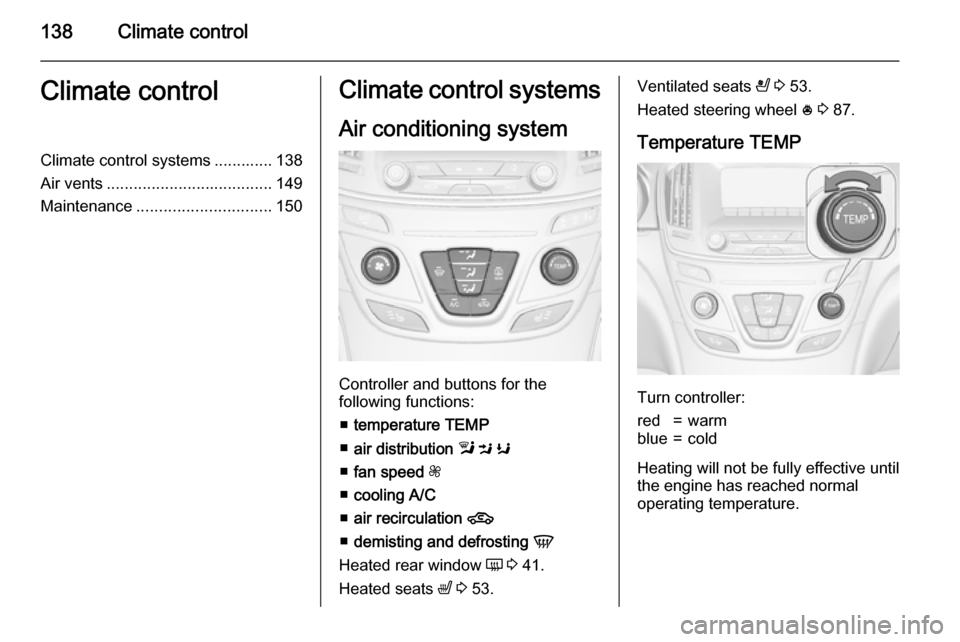
Air conditioning system
Controller and buttons for the
following functions:
■ temperature TEMP
■ air distribution l M K
■ fan speed Z
■ cooling A/C
■ air recirculation 4
■ demisting and defrosting V
Heated rear window Ü 3 41.
Heated seats ß 3 53.
Ventilated seats
A 3 53.
Heated steering wheel * 3 87.
Temperature TEMP
Turn controller:
red=warmblue=cold
Heating will not be fully effective until
the engine has reached normal
operating temperature.