lock VAUXHALL INSIGNIA 2015.5 Workshop Manual
[x] Cancel search | Manufacturer: VAUXHALL, Model Year: 2015.5, Model line: INSIGNIA, Model: VAUXHALL INSIGNIA 2015.5Pages: 331, PDF Size: 9.08 MB
Page 167 of 331
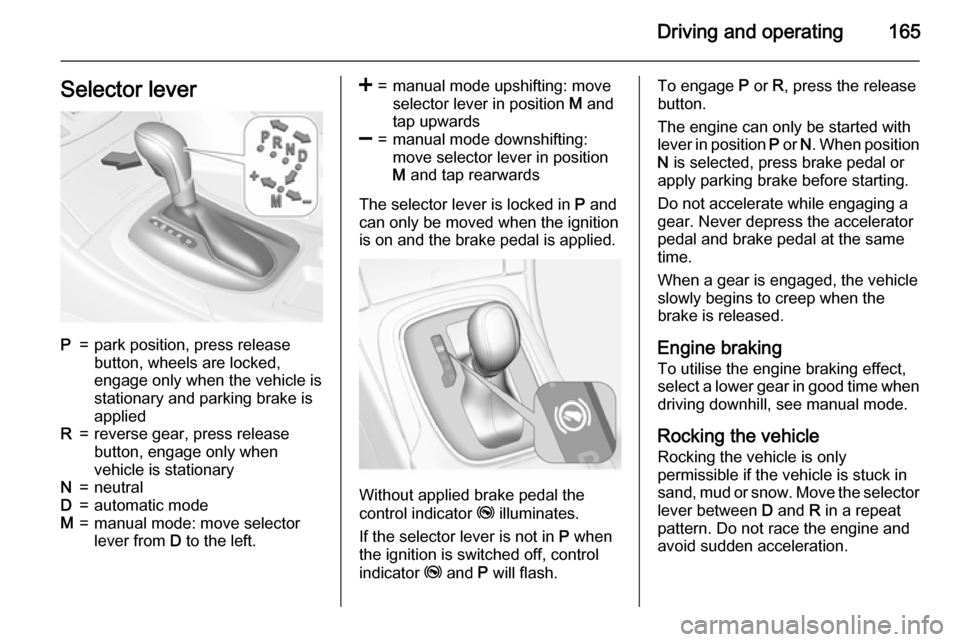
Driving and operating165Selector leverP=park position, press release
button, wheels are locked,
engage only when the vehicle is
stationary and parking brake is
appliedR=reverse gear, press release
button, engage only when
vehicle is stationaryN=neutralD=automatic modeM=manual mode: move selector
lever from D to the left.<=manual mode upshifting: move
selector lever in position M and
tap upwards]=manual mode downshifting:
move selector lever in position
M and tap rearwards
The selector lever is locked in P and
can only be moved when the ignition
is on and the brake pedal is applied.
Without applied brake pedal the
control indicator j illuminates.
If the selector lever is not in P when
the ignition is switched off, control
indicator j and P will flash.
To engage P or R, press the release
button.
The engine can only be started with
lever in position P or N. When position
N is selected, press brake pedal or
apply parking brake before starting.
Do not accelerate while engaging a
gear. Never depress the accelerator
pedal and brake pedal at the same
time.
When a gear is engaged, the vehicle
slowly begins to creep when the
brake is released.
Engine braking To utilise the engine braking effect,
select a lower gear in good time when
driving downhill, see manual mode.
Rocking the vehicle
Rocking the vehicle is only
permissible if the vehicle is stuck in
sand, mud or snow. Move the selector
lever between D and R in a repeat
pattern. Do not race the engine and
avoid sudden acceleration.
Page 170 of 331
168Driving and operatingInterruption of power
supply In the event of an interruption of
power supply, the selector lever
cannot be moved out of the P
position. The ignition key cannot be
removed from the ignition switch.
If the vehicle battery is discharged,
start the vehicle using jump leads
3 262.
If the vehicle battery is not the cause
of the fault, release the selector lever.
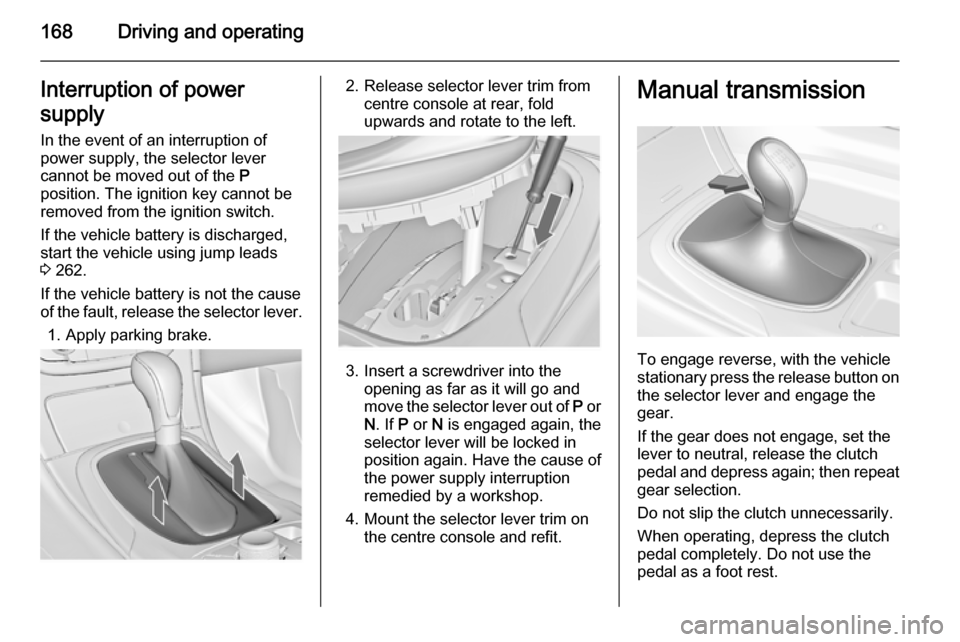
1. Apply parking brake.2. Release selector lever trim from centre console at rear, fold
upwards and rotate to the left.
3. Insert a screwdriver into the opening as far as it will go and
move the selector lever out of P or
N . If P or N is engaged again, the
selector lever will be locked in
position again. Have the cause of
the power supply interruption
remedied by a workshop.
4. Mount the selector lever trim on the centre console and refit.
Manual transmission
To engage reverse, with the vehicle
stationary press the release button on the selector lever and engage the
gear.
If the gear does not engage, set the
lever to neutral, release the clutch
pedal and depress again; then repeat
gear selection.
Do not slip the clutch unnecessarily.
When operating, depress the clutch
pedal completely. Do not use the
pedal as a foot rest.
Page 171 of 331

Driving and operating169Caution
It is not advisable to drive with thehand resting on the selector lever.
Gear shift indication 3 107.
Drive systems
All-wheel drive
The All-wheel drive system enhances
driving characteristics and stability,
and helps to achieve the best
possible driveability regardless of
ground surface. The system is always active and cannot be deactivated.
The torque is distributed steplessly
between the wheels of the front and rear axle, depending on the driving
conditions. Additionally the torque
between the rear wheels is distributed
depending on the surface.
For optimum system performance,
the vehicle's tyres should not have
varying degrees of wear.
If a service message is displayed in
the Driver Information Centre, the
system may have limited functionality
(or be completely disabled in some
cases, i.e. the vehicle switches to
Front-wheel drive). Seek the
assistance of a workshop.
Towing the vehicle 3 264.Brakes
The brake system comprises two independent brake circuits.
If a brake circuit fails, the vehicle can
still be braked using the other brake
circuit. However, braking effect is
achieved only when the brake pedal
is depressed firmly. Considerably
more force is needed for this. The
braking distance is extended. Seek the assistance of a workshop before
continuing your journey.
When the engine is not running, the
support of the brake servo unit
disappears once the brake pedal has
been depressed once or twice.
Braking effect is not reduced, but
braking requires significantly greater
force. It is especially important to bear this in mind when being towed.
Control indicator R 3 106.
Antilock brake system Antilock brake system (ABS)
prevents the wheels from locking.
Page 172 of 331
170Driving and operating
ABS starts to regulate brake pressureas soon as a wheel shows a tendency to lock. The vehicle remains
steerable, even during hard braking.
ABS control is made apparent
through a pulse in the brake pedal
and the noise of the regulation
process.
For optimum braking, keep the brake
pedal fully depressed throughout the
braking process, despite the fact that
the pedal is pulsating. Do not reduce
the pressure on the pedal.
After starting off, the system performs
a self-test which may be audible.
Control indicator u 3 107.
Adaptive brake light During full braking, all three brakelights flash for the duration of ABS
control.
Fault9 Warning
If there is a fault in the ABS, the
wheels may be liable to lock due
to braking that is heavier than
normal. The advantages of ABS are no longer available. During
hard braking, the vehicle can no longer be steered and may
swerve.
Have the cause of the fault remedied
by a workshop.
Parking brake
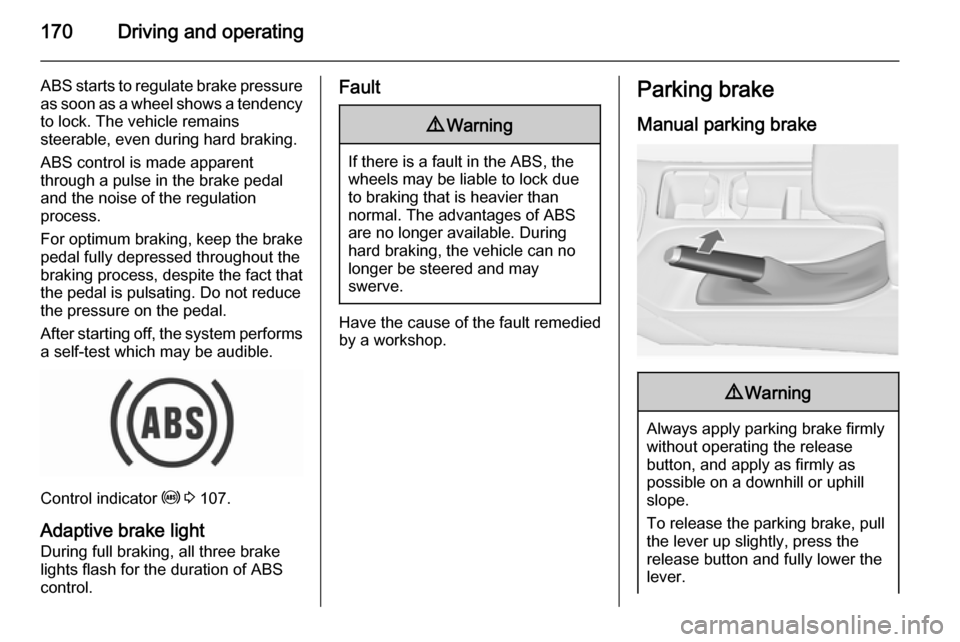
Manual parking brake9 Warning
Always apply parking brake firmly
without operating the release
button, and apply as firmly as
possible on a downhill or uphill
slope.
To release the parking brake, pull
the lever up slightly, press the
release button and fully lower the
lever.
Page 177 of 331
Driving and operating175
■ Antilock Brake System (ABS) withcornering brake control (CBC)
■ Automatic transmission
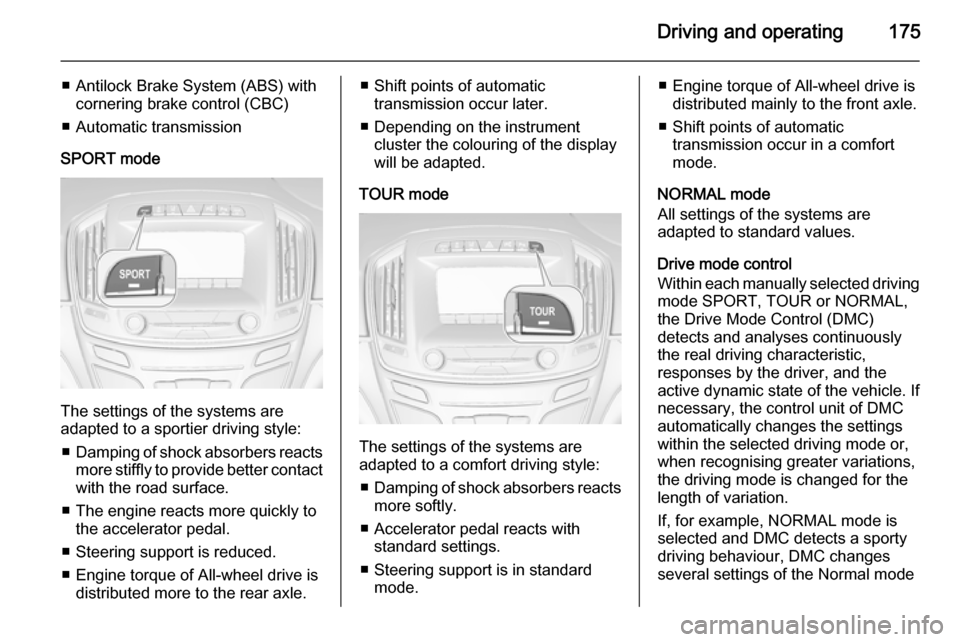
SPORT mode
The settings of the systems are
adapted to a sportier driving style:
■ Damping of shock absorbers reacts
more stiffly to provide better contact with the road surface.
■ The engine reacts more quickly to the accelerator pedal.
■ Steering support is reduced.
■ Engine torque of All-wheel drive is distributed more to the rear axle.
■ Shift points of automatictransmission occur later.
■ Depending on the instrument cluster the colouring of the display
will be adapted.
TOUR mode
The settings of the systems are
adapted to a comfort driving style:
■ Damping of shock absorbers reacts
more softly.
■ Accelerator pedal reacts with standard settings.
■ Steering support is in standard mode.
■ Engine torque of All-wheel drive isdistributed mainly to the front axle.
■ Shift points of automatic transmission occur in a comfort
mode.
NORMAL mode
All settings of the systems are
adapted to standard values.
Drive mode control
Within each manually selected driving mode SPORT, TOUR or NORMAL,
the Drive Mode Control (DMC)
detects and analyses continuously
the real driving characteristic,
responses by the driver, and the
active dynamic state of the vehicle. If
necessary, the control unit of DMC
automatically changes the settings
within the selected driving mode or,
when recognising greater variations,
the driving mode is changed for the
length of variation.
If, for example, NORMAL mode is
selected and DMC detects a sporty
driving behaviour, DMC changes
several settings of the Normal mode
Page 178 of 331
176Driving and operating
into sporty settings. The DMC
changes to SPORT mode in case of
very sporty driving behaviour.
If, for another example, TOUR mode
is selected and whilst driving on a
winding road a sudden hard brake is
necessary, DMC will detect the
dynamic vehicle condition and
changes the settings for suspension
to SPORT mode to increase vehicle
stability.
When the driving characteristic or the
dynamic vehicle state returns to the
former state, DMC will change the
settings to the preselected driving
mode.
Personalised settings in SPORT
mode
The driver can select the functions of
the SPORT mode when SPORT is
pressed.
Select the relevant settings in
Settings , I Sport Mode in the Colour-
Info-Display.
Colour-Info-Display 3 118.
Vehicle personalisation 3 122.Flex Ride - VXR Version
The VXR Version of Flex Ride system
works in the same way as the
standard Flex Ride system with the
difference that the modes have a
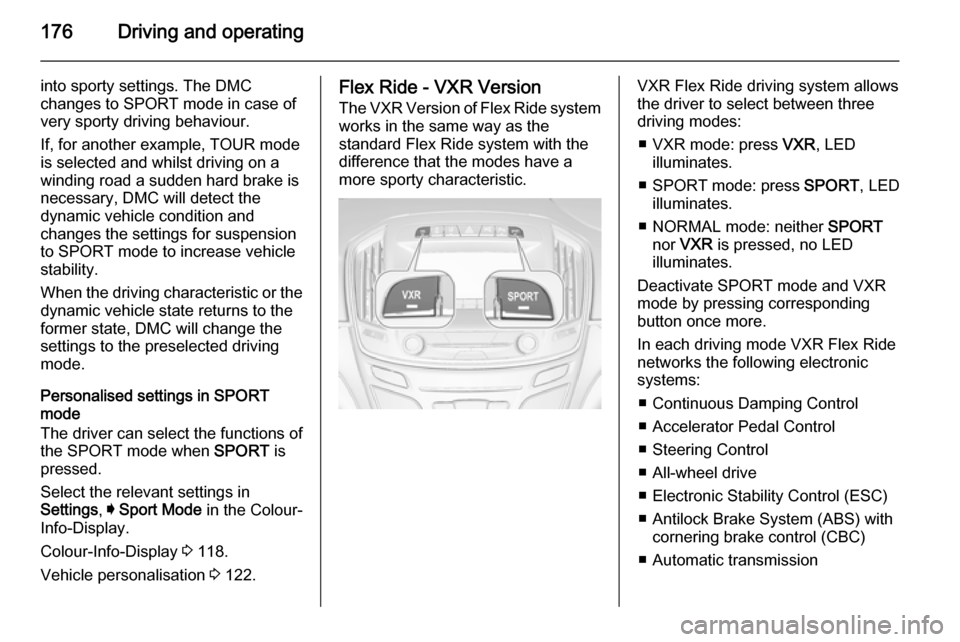
more sporty characteristic.VXR Flex Ride driving system allows
the driver to select between three
driving modes:
■ VXR mode: press VXR, LED
illuminates.
■ SPORT mode: press SPORT, LED
illuminates.
■ NORMAL mode: neither SPORT
nor VXR is pressed, no LED
illuminates.
Deactivate SPORT mode and VXR
mode by pressing corresponding
button once more.
In each driving mode VXR Flex Ride
networks the following electronic
systems:
■ Continuous Damping Control
■ Accelerator Pedal Control
■ Steering Control
■ All-wheel drive
■ Electronic Stability Control (ESC)
■ Antilock Brake System (ABS) with cornering brake control (CBC)
■ Automatic transmission
Page 186 of 331

184Driving and operating
Deactivation
Adaptive cruise control is deactivated by the driver when:
■ y is pressed.
■ Brake pedal is applied.
■ Clutch pedal is depressed for more
than four seconds.
■ Gear selector lever of automatic transmission is moved to N.
The system is also automatically
deactivated when:
■ Vehicle speed accelerates above 120 mph or slows down below9 mph (on vehicles with automatic
transmission it slows down to a stop
without deactivating within
two minutes).
■ The Traction Control system is operating.
■ The Electronic Stability Control is operating.
■ There is no traffic and nothing detected on the road sides for
several minutes. In this case there
are no radar echoes and the sensor may report that it is blocked.■ The collision imminent braking system is applying the brakes.
■ The radar sensor is blocked by an ice or water film.
■ A fault is detected in the radar, engine or brake system.
Additionally the system is
automatically deactivated on vehicles
with automatic transmission (full
speed range adaptive cruise control)
when:
■ The electric parking brake is applied.
■ The vehicle is being held to a stop by the system for more than
two minutes.
■ The vehicle stops, the driver safety
belt is released and the driver's
door is opened.
When adaptive cruise control is
deactivated automatically, the control indicator m or C illuminates white
and a warning message is displayed
as a pop-up in the Driver Information
Centre.
The stored speed is maintained.9 Warning
When adaptive cruise control is
deactivated, the driver must take
over full brake and engine control.
Switching off
Press C to switch off adaptive cruise
control. The control indicator m or C
extinguishes. The stored speed is
deleted.
Switching off the ignition also
switches off adaptive cruise control
and deletes the stored speed.
Driver's attention ■ Use adaptive cruise control carefully on bends or mountain
roads, as it can lose the vehicle
ahead and need time to detect it
again.
Page 187 of 331
Driving and operating185
■ Do not use the system on slipperyroads as it can create rapid
changes in tyre traction (wheel spinning), so that you could lose
control of the vehicle.
■ Do not use adaptive cruise control during rain, snow or heavy dirt, as
the radar sensor can be covered by
a water film, dust, ice or snow. This
reduces or suppresses completely
the visibility. In case of sensor
blockage, clean the sensor cover.
System limits ■ The system's automatic brake force
does not permit hard braking and
the braking level may not be
sufficient to avoid a collision.
■ After a sudden lane change, the system needs a certain time to
detect the next preceding vehicle.
So if a new vehicle is detected, the
system may accelerate instead of
braking.
■ Adaptive cruise control does ignore
the oncoming traffic.■ Adaptive cruise control does not brake for pedestrians, animals,
very slow speed driving or stopped
vehicles.
■ Don't use adaptive cruise control when towing a trailer.
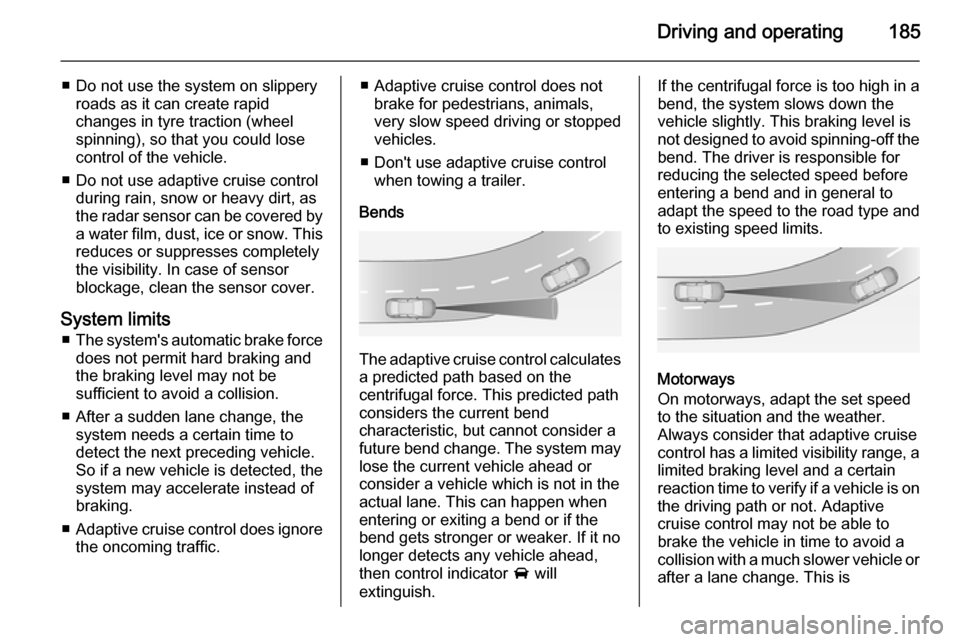
Bends
The adaptive cruise control calculates
a predicted path based on the
centrifugal force. This predicted path
considers the current bend
characteristic, but cannot consider a
future bend change. The system may lose the current vehicle ahead or
consider a vehicle which is not in the
actual lane. This can happen when
entering or exiting a bend or if the
bend gets stronger or weaker. If it no
longer detects any vehicle ahead,
then control indicator A will
extinguish.
If the centrifugal force is too high in a bend, the system slows down the vehicle slightly. This braking level is
not designed to avoid spinning-off the
bend. The driver is responsible for
reducing the selected speed before
entering a bend and in general to
adapt the speed to the road type and
to existing speed limits.
Motorways
On motorways, adapt the set speed
to the situation and the weather.
Always consider that adaptive cruise
control has a limited visibility range, a
limited braking level and a certain
reaction time to verify if a vehicle is on
the driving path or not. Adaptive
cruise control may not be able to
brake the vehicle in time to avoid a
collision with a much slower vehicle or after a lane change. This is
Page 189 of 331
Driving and operating187consult a workshop to verify and
correct the adaptive cruise control sensor position.
Settings
Settings can be changed in the
vehicle personalisation menu in the
Colour-Info-Display.
Select the relevant setting in Settings,
I Vehicle in the Colour-Info-Display.
Colour-Info-Display 3 118.
Vehicle personalisation 3 122.
Fault If the adaptive cruise control does not
work due to temporary conditions
(e.g. blockage by ice) or if there is a
permanent system error, then a
message is displayed in the Driver
Information Centre.
Vehicle messages 3 120.
Forward collision alert
The forward collision alert can help to
avoid or reduce the harm caused by
front-end crashes.
A vehicle ahead is indicated by a
control indicator A.
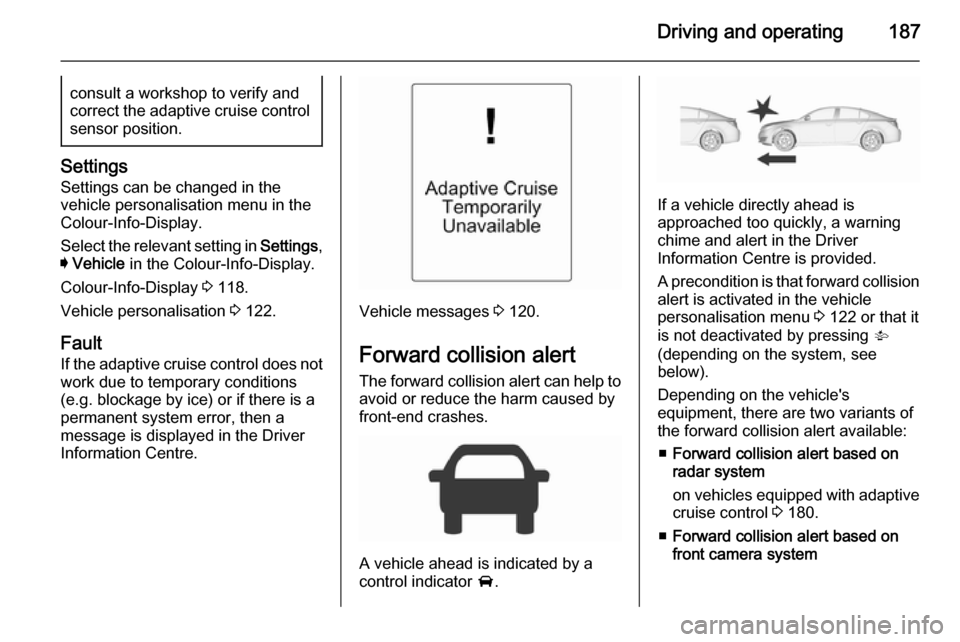
If a vehicle directly ahead is
approached too quickly, a warning
chime and alert in the Driver
Information Centre is provided.
A precondition is that forward collision
alert is activated in the vehicle
personalisation menu 3 122 or that it
is not deactivated by pressing V
(depending on the system, see
below).
Depending on the vehicle's
equipment, there are two variants of
the forward collision alert available:
■ Forward collision alert based on
radar system
on vehicles equipped with adaptive cruise control 3 180.
■ Forward collision alert based on
front camera system
Page 192 of 331

190Driving and operating
Alerting the driver
A green illuminated vehicle ahead
control indicator A illuminates in the
instrument cluster when the system has detected a vehicle in the driving
path.
When the distance to a preceding
moving vehicle gets too small or when
approaching another vehicle too
rapidly and a collision is imminent, the
collision alert symbol pops-up in the
Driver Information Centre.
Simultaneously, a warning chime
sounds. Depress the brake pedal, if it is required by the situation.
Deactivation
The system can be deactivated.
Press V repeatedly until Forward
Collision Alert Off appears in the
Driver Information Centre.
General information for both
variants of forward collision alert9 Warning
Forward collision alert is just a
warning system and does not
apply the brakes. When
approaching a vehicle ahead too
rapidly, it may not provide you
enough time to avoid a collision.
The driver accepts full
responsibility for the appropriate
following distance based on traffic, weather and visibility conditions.
The complete attention of the
driver is always required while
driving. The driver must always be
ready to take action and apply the
brakes.
System limitations
The system is designed to warn only for vehicles, but may react also to
other metallic objects.
In the following cases, forward
collision alert may not detect a vehicle ahead or sensor performance may be limited:
■ on winding roads
■ when weather limits visibility, e.g. fog, rain, or snow
■ when the sensor is blocked by snow, ice, slush, mud, dirt, or
windscreen damage
Following distance
indication
The following distance indication
displays the distance to a preceding
moving vehicle. The system uses,
depending on the vehicle equipment,
either the radar behind the radiator
grille or the front camera in the
windscreen to detect the distance of
a vehicle directly ahead in your lane.
It is active at speeds above 25 mph.
When a preceding vehicle is detected
ahead, the distance is indicated in
seconds, displayed on a page in the
Driver Information Centre 3 111.