light VAUXHALL INSIGNIA 2015 User Guide
[x] Cancel search | Manufacturer: VAUXHALL, Model Year: 2015, Model line: INSIGNIA, Model: VAUXHALL INSIGNIA 2015Pages: 321, PDF Size: 8.99 MB
Page 37 of 321

Keys, doors and windows35
AlarmWhen triggered, the alarm sounds via a separate battery-backed power
sounder, and the hazard warning
lights flash simultaneously. The
number and duration of alarm signals
are stipulated by legislation.
The anti-theft alarm system can be
deactivated only by pressing the
button c or by pressing the switch on
the door handle (electronic key
system) or switching on the ignition.
A triggered alarm, which has not been interrupted by the driver, will be
indicated by the hazard warning
lights. They will flash quickly three
times when the vehicle is unlocked
next time with the radio remote
control. Additionally a warning
message is displayed in the Driver
Information Centre after switching on
the ignition.
Vehicle messages 3 119.
If the vehicle's battery is to be
disconnected (e.g. for maintenance
work), the alarm siren must be
deactivated as follows: switch theignition on then off, then disconnect
the vehicle's battery within
15 seconds.
Immobiliser The system is part of the ignition
switch and checks whether the
vehicle is allowed to be started with
the key being used.
The immobiliser is activated
automatically after the key is removed
from the ignition switch.
If control indicator d flashes when the
ignition is on, there is a fault in the
system; the engine cannot be started. Switch off the ignition and repeat start
attempt.
If control indicator d continues
flashing, attempt to start the engine
using the spare key and seek the
assistance of a workshop.
Notice
The immobiliser does not lock the
doors. You should always lock the
vehicle after leaving it and switch on the anti-theft alarm system 3 22,
3 33.Control indicator d 3 108.
Page 38 of 321
36Keys, doors and windowsExterior mirrors
Convex shape
The convex exterior mirror contains
an aspherical area and reduces blind spots. The shape of the mirror makes
objects appear smaller, which will
affect the ability to estimate
distances.
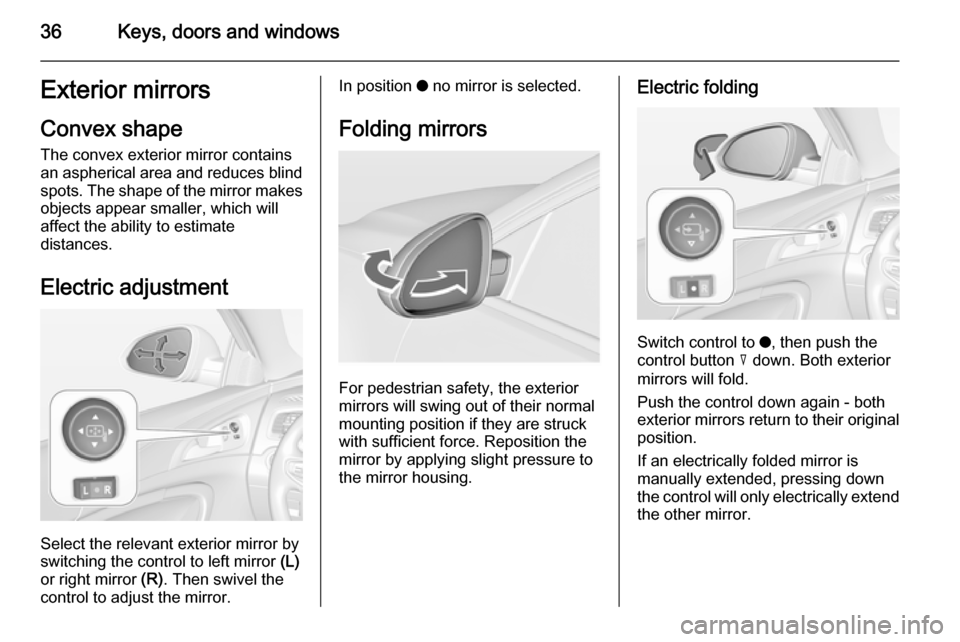
Electric adjustment
Select the relevant exterior mirror by
switching the control to left mirror (L)
or right mirror (R). Then swivel the
control to adjust the mirror.
In position o no mirror is selected.
Folding mirrors
For pedestrian safety, the exterior
mirrors will swing out of their normal
mounting position if they are struck
with sufficient force. Reposition the mirror by applying slight pressure tothe mirror housing.
Electric folding
Switch control to o, then push the
control button c down. Both exterior
mirrors will fold.
Push the control down again - both
exterior mirrors return to their original position.
If an electrically folded mirror is
manually extended, pressing down
the control will only electrically extend
the other mirror.
Page 43 of 321
Keys, doors and windows41Heated rear window
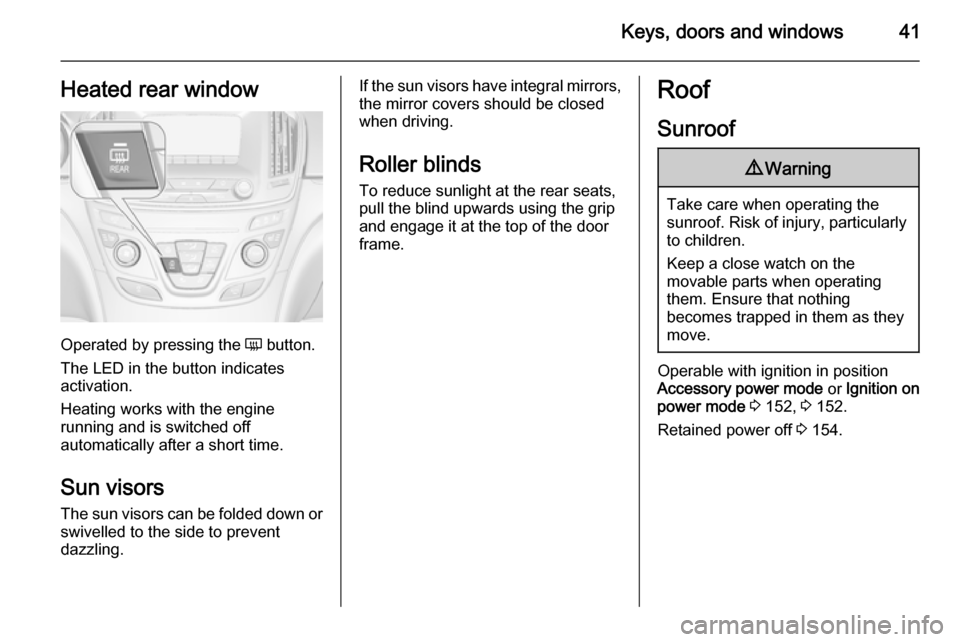
Operated by pressing the Ü button.
The LED in the button indicates
activation.
Heating works with the engine
running and is switched off
automatically after a short time.
Sun visors The sun visors can be folded down orswivelled to the side to prevent
dazzling.
If the sun visors have integral mirrors, the mirror covers should be closed
when driving.
Roller blinds To reduce sunlight at the rear seats,pull the blind upwards using the grip
and engage it at the top of the door
frame.Roof
Sunroof9 Warning
Take care when operating the
sunroof. Risk of injury, particularly to children.
Keep a close watch on the
movable parts when operating
them. Ensure that nothing
becomes trapped in them as they
move.
Operable with ignition in position
Accessory power mode or Ignition on
power mode 3 152, 3 152.
Retained power off 3 154.
Page 47 of 321
Seats, restraints45
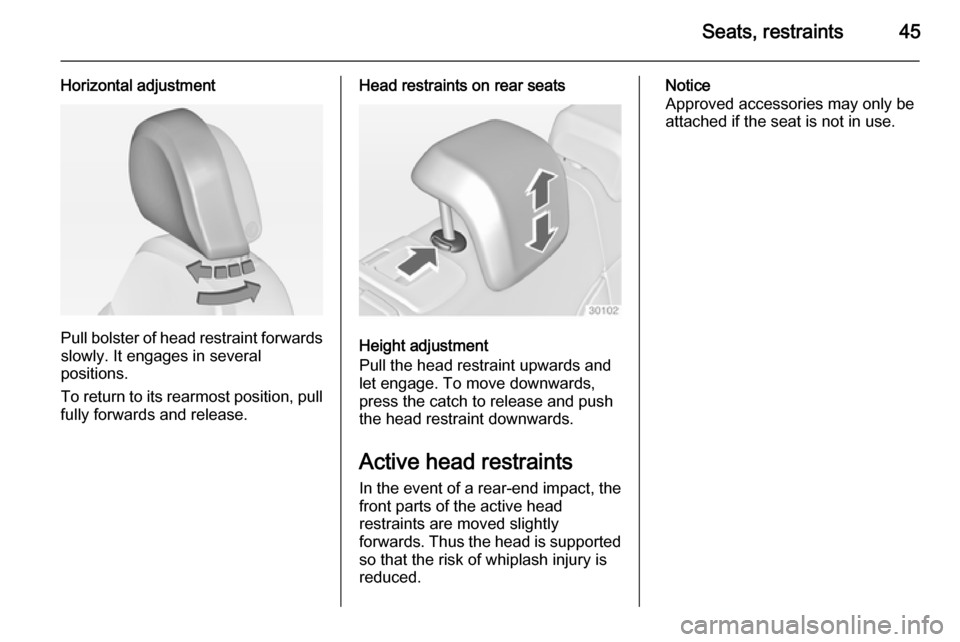
Horizontal adjustment
Pull bolster of head restraint forwardsslowly. It engages in several
positions.
To return to its rearmost position, pull
fully forwards and release.
Head restraints on rear seats
Height adjustment
Pull the head restraint upwards and
let engage. To move downwards, press the catch to release and push
the head restraint downwards.
Active head restraints
In the event of a rear-end impact, the front parts of the active head
restraints are moved slightly
forwards. Thus the head is supported
so that the risk of whiplash injury is
reduced.
Notice
Approved accessories may only be
attached if the seat is not in use.
Page 48 of 321
46Seats, restraintsFront seatsSeat position9 Warning
Only drive with the seat correctly
adjusted.
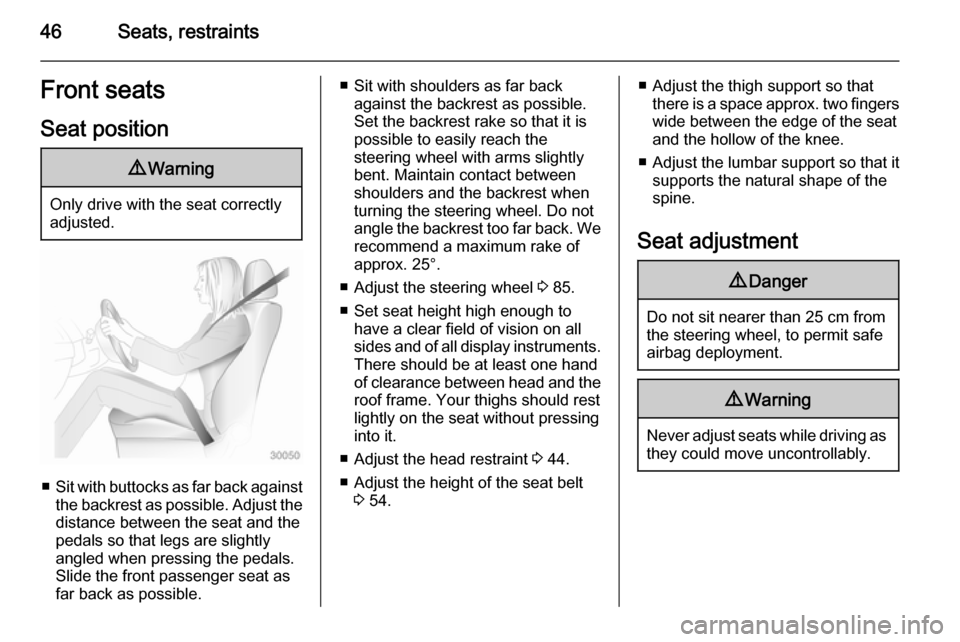
■ Sit with buttocks as far back against
the backrest as possible. Adjust the distance between the seat and the
pedals so that legs are slightly
angled when pressing the pedals.
Slide the front passenger seat as
far back as possible.
■ Sit with shoulders as far back against the backrest as possible.
Set the backrest rake so that it is possible to easily reach the
steering wheel with arms slightly bent. Maintain contact between
shoulders and the backrest when
turning the steering wheel. Do not
angle the backrest too far back. We recommend a maximum rake of
approx. 25°.
■ Adjust the steering wheel 3 85.
■ Set seat height high enough to have a clear field of vision on allsides and of all display instruments.
There should be at least one hand
of clearance between head and the
roof frame. Your thighs should rest
lightly on the seat without pressing
into it.
■ Adjust the head restraint 3 44.
■ Adjust the height of the seat belt 3 54.■ Adjust the thigh support so that
there is a space approx. two fingers
wide between the edge of the seat
and the hollow of the knee.
■ Adjust the lumbar support so that it
supports the natural shape of the
spine.
Seat adjustment9 Danger
Do not sit nearer than 25 cm from
the steering wheel, to permit safe
airbag deployment.
9 Warning
Never adjust seats while driving as
they could move uncontrollably.
Page 57 of 321
Seats, restraints55
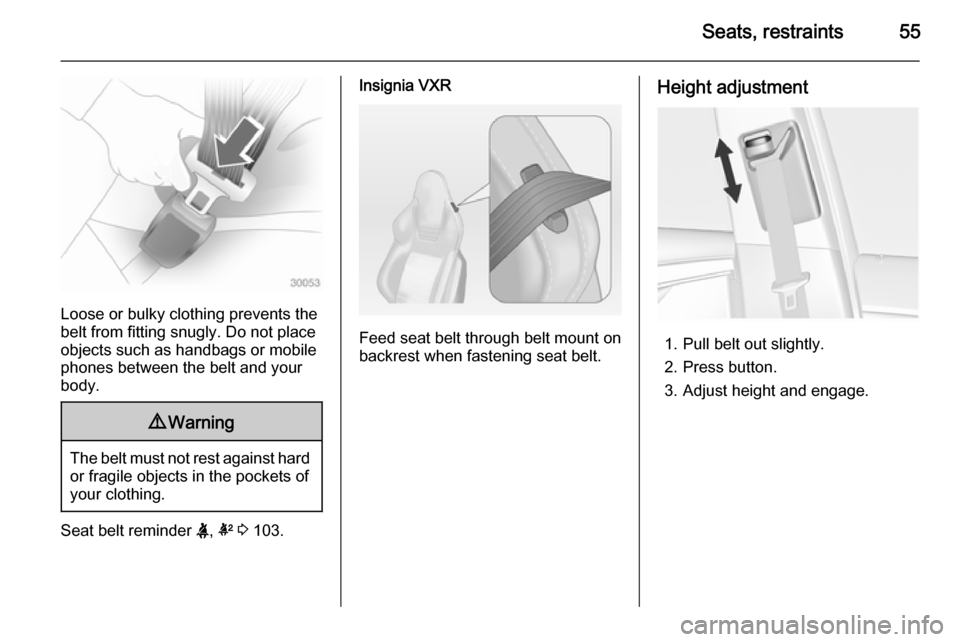
Loose or bulky clothing prevents the
belt from fitting snugly. Do not place
objects such as handbags or mobile
phones between the belt and your body.
9 Warning
The belt must not rest against hard
or fragile objects in the pockets of
your clothing.
Seat belt reminder X, k 3 103.
Insignia VXR
Feed seat belt through belt mount on
backrest when fastening seat belt.
Height adjustment
1. Pull belt out slightly.
2. Press button.
3. Adjust height and engage.
Page 64 of 321
62Seats, restraints9Warning
Keep the area in which the airbag
inflates clear of obstructions.
The hooks on the handles in the
roof frame are only suitable for
hanging up light articles of
clothing, without coat hangers. Do not keep any items in these
clothes.
Airbag deactivation
Front airbag and side airbag systems for the front passenger seat must be
deactivated if a child restraint system
is to be fitted on this seat. The curtain
airbag system, the belt pretensioners and all driver airbag systems will
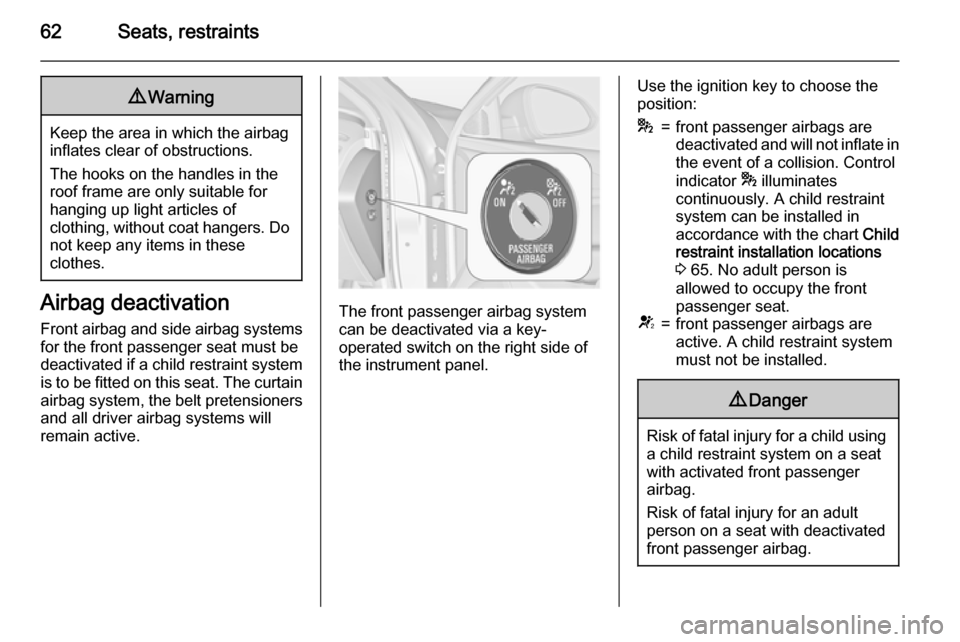
remain active.The front passenger airbag system
can be deactivated via a key-
operated switch on the right side of the instrument panel.
Use the ignition key to choose the
position:*=front passenger airbags are
deactivated and will not inflate in the event of a collision. Control
indicator * illuminates
continuously. A child restraint
system can be installed in
accordance with the chart Child
restraint installation locations
3 65. No adult person is
allowed to occupy the front
passenger seat.V=front passenger airbags are
active. A child restraint system
must not be installed.9 Danger
Risk of fatal injury for a child using
a child restraint system on a seat
with activated front passenger
airbag.
Risk of fatal injury for an adult
person on a seat with deactivated
front passenger airbag.
Page 77 of 321
Storage75
Blind at the tailgate
To cover the load compartment
completely, mount the blind at four
fixing points on the inside of the
tailgate.
Rear floor storage cover
Sliding floor cover (FlexFloor) For a convenient setting of the load
compartment, the floor cover can be
pulled out.
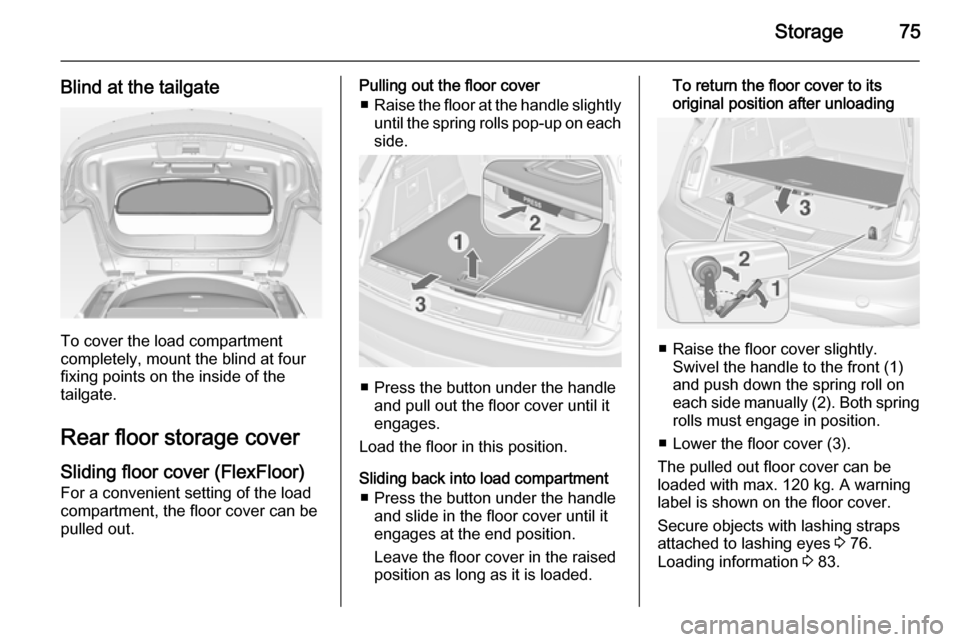
Pulling out the floor cover
■ Raise the floor at the handle slightly
until the spring rolls pop-up on each
side.
■ Press the button under the handle
and pull out the floor cover until it
engages.
Load the floor in this position.
Sliding back into load compartment ■ Press the button under the handle and slide in the floor cover until it
engages at the end position.
Leave the floor cover in the raised
position as long as it is loaded.
To return the floor cover to its
original position after unloading
■ Raise the floor cover slightly. Swivel the handle to the front (1)
and push down the spring roll on
each side manually (2). Both spring rolls must engage in position.
■ Lower the floor cover (3).
The pulled out floor cover can be
loaded with max. 120 kg. A warning
label is shown on the floor cover.
Secure objects with lashing straps
attached to lashing eyes 3 76.
Loading information 3 83.
Page 82 of 321
80Storage
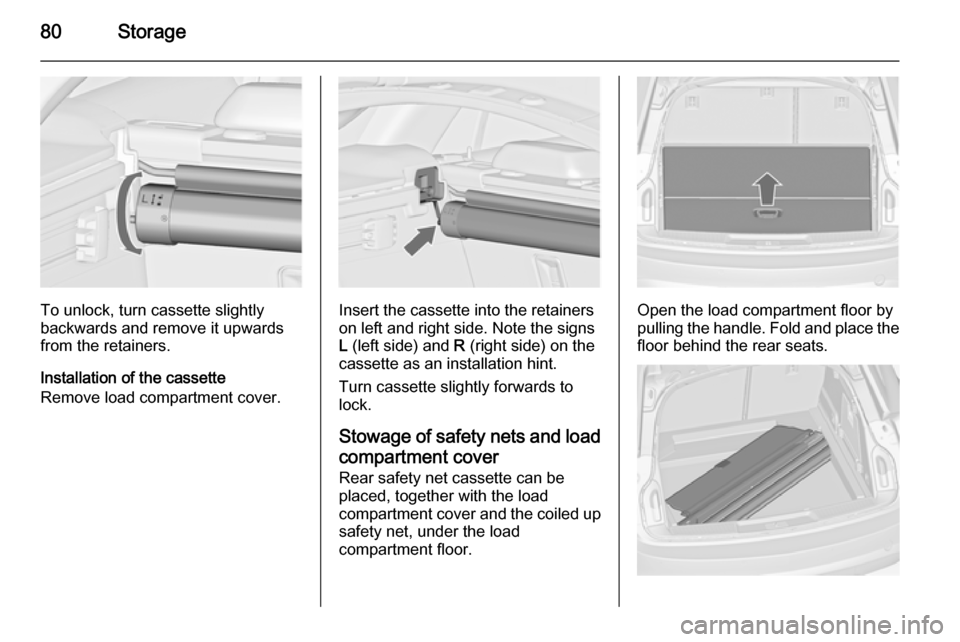
To unlock, turn cassette slightly
backwards and remove it upwards from the retainers.
Installation of the cassette
Remove load compartment cover.Insert the cassette into the retainers
on left and right side. Note the signs
L (left side) and R (right side) on the
cassette as an installation hint.
Turn cassette slightly forwards to
lock.
Stowage of safety nets and load
compartment cover Rear safety net cassette can be
placed, together with the load
compartment cover and the coiled up safety net, under the load
compartment floor.Open the load compartment floor by
pulling the handle. Fold and place the
floor behind the rear seats.
Page 87 of 321
Instruments and controls85Instruments and
controlsControls ....................................... 85
Warning lights, gauges and indi‐ cators ........................................... 94
Information displays ...................110
Vehicle messages ...................... 119
Vehicle personalisation ..............121Controls
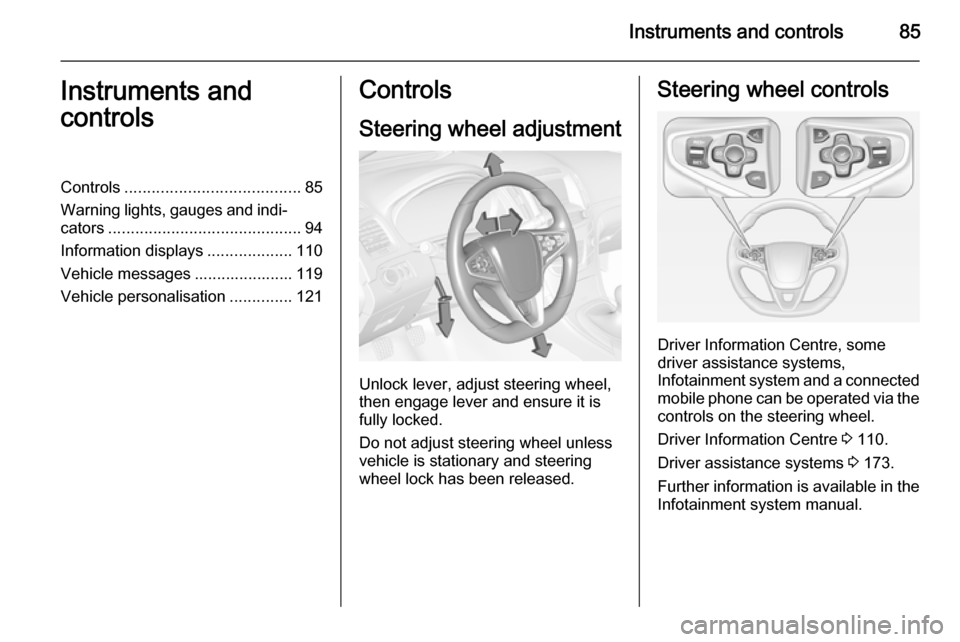
Steering wheel adjustment
Unlock lever, adjust steering wheel,
then engage lever and ensure it is fully locked.
Do not adjust steering wheel unless
vehicle is stationary and steering
wheel lock has been released.
Steering wheel controls
Driver Information Centre, some
driver assistance systems,
Infotainment system and a connected
mobile phone can be operated via the controls on the steering wheel.
Driver Information Centre 3 110.
Driver assistance systems 3 173.
Further information is available in the
Infotainment system manual.