light VAUXHALL INSIGNIA 2015 Owner's Guide
[x] Cancel search | Manufacturer: VAUXHALL, Model Year: 2015, Model line: INSIGNIA, Model: VAUXHALL INSIGNIA 2015Pages: 321, PDF Size: 8.99 MB
Page 90 of 321
88Instruments and controls
Adjustable sensitivity of the rain
sensor
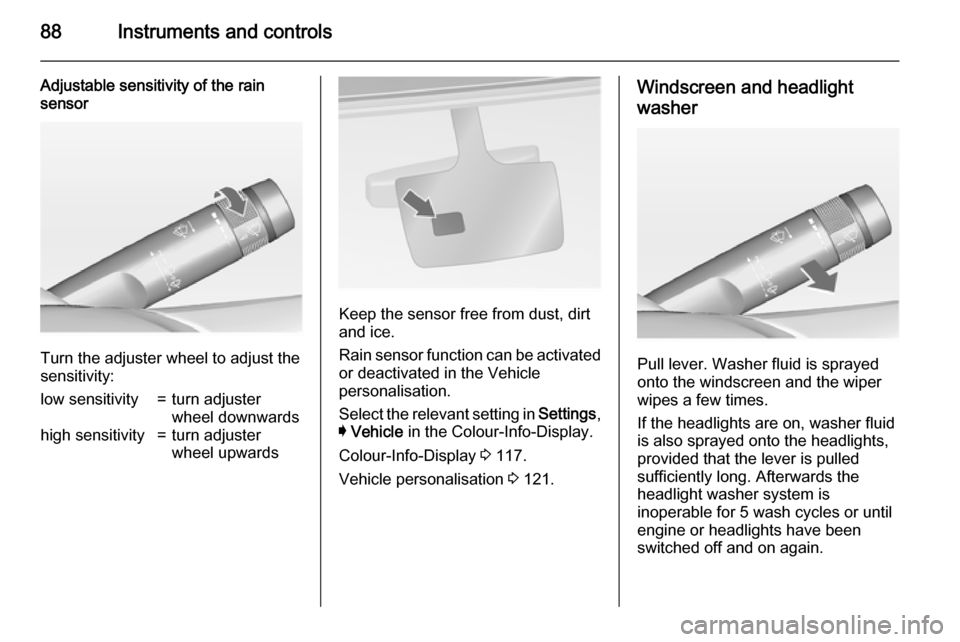
Turn the adjuster wheel to adjust the
sensitivity:
low sensitivity=turn adjuster
wheel downwardshigh sensitivity=turn adjuster
wheel upwards
Keep the sensor free from dust, dirt
and ice.
Rain sensor function can be activated or deactivated in the Vehicle
personalisation.
Select the relevant setting in Settings,
I Vehicle in the Colour-Info-Display.
Colour-Info-Display 3 117.
Vehicle personalisation 3 121.
Windscreen and headlight
washer
Pull lever. Washer fluid is sprayed
onto the windscreen and the wiper
wipes a few times.
If the headlights are on, washer fluid is also sprayed onto the headlights,
provided that the lever is pulled
sufficiently long. Afterwards the
headlight washer system is
inoperable for 5 wash cycles or until
engine or headlights have been
switched off and on again.
Page 96 of 321

94Instruments and controlsWarning lights, gauges
and indicators
Instrument cluster Depending on the version, three
instrument clusters are available:
■ Baselevel
■ Midlevel
■ Uplevel
Uplevel instrument cluster can be
displayed as Sport mode or Tour
mode.
Page 105 of 321

Instruments and controls103Control indicatorsThe control indicators described are
not present in all vehicles. The
description applies to all instrument
versions. Depending on the
equipment, the position of the control
indicators may vary. When the
ignition is switched on, most control
indicators will illuminate briefly as a functionality test.
The control indicator colours mean:red=danger, important reminderyellow=warning, information, faultgreen=confirmation of activationblue=confirmation of activationwhite=confirmation of activation
See all control indicators on different
instrument clusters 3 94.
Turn signal
O illuminates or flashes green.
Illuminates briefly The parking lights are switched on.
Flashes
A turn signal or the hazard warning
flashers are activated.
Rapid flashing: failure of a turn signal
light or associated fuse, failure of turn
signal light on trailer.
Bulb replacement 3 225, Fuses
3 235.
Turn signals 3 131.
Seat belt reminder Seat belt reminder on front
seats X for driver's seat illuminates or
flashes red in the instrument cluster.
k for front passenger seat illuminates
or flashes red in the centre console,
when seat is occupied.
Illuminates
After the ignition has been switched on until the seat belt has been
fastened.Flashes
After having started the engine for a maximum of 100 seconds until the
seat belt has been fastened.
Seat belt status on rear seats,
base level instrument cluster
X flashes or illuminates in the Driver
Information Centre.
Illuminates
After having started the engine when
the seat belt has been fastened.
Flashes
After starting off when the seat belt is
unfastened.
Fastening the seat belt 3 54.
Seat belt status on rear seats,
midlevel and uplevel instrument cluster
X illuminates red or green or grey in
the instrument cluster, after having
started the engine.
Illuminates red
Seat occupied and the seat belt is
unfastened.
Page 107 of 321
Instruments and controls105Malfunction indicator lightZ illuminates or flashes yellow.
Illuminates when the ignition is
switched on and extinguishes shortly
after the engine starts.
Illuminates when the engine is running
Fault in the emission control system. The permitted emission limits may be exceeded. Seek the assistance of a
workshop immediately.
Flashes when the engine is
running Fault that could lead to catalytic
converter damage. Ease up on the
accelerator until the flashing stops.
Seek the assistance of a workshop
immediately.
Brake and clutch system R illuminates red.
The brake and clutch fluid level is too low 3 221.9
Warning
Stop. Do not continue your
journey. Consult a workshop.
Illuminates after the ignition is
switched on if the manual parking
brake is applied 3 166.
Operate pedal - illuminates or flashes yellow.
Illuminates
Brake pedal needs to be depressed
to release the electric parking brake
3 166.
Clutch pedal needs to be depressed
to start the engine in Autostop mode.
Stop-start system 3 156.
Flashes
Clutch pedal needs to be depressed
for a main start of the engine 3 16,
3 154.
On Midlevel and Uplevel display the
operate pedal message is indicated in the Driver Information Display
3 119.
Electric parking brake
m illuminates or flashes red.
Illuminates
Electric parking brake is applied
3 166.
Flashes Electric parking brake is not fully
applied or released. Depress the brake pedal and attempt to reset thesystem by first releasing and then
applying the electric parking brake. If
m remains flashing, do not drive and
seek the assistance of a workshop.
Electric parking brake fault
j illuminates or flashes yellow.
Illuminates
Electric parking brake is operating
with degraded performance 3 166.
Page 110 of 321
108Instruments and controls
Flashes
Fault in system or tyre without
pressure sensor mounted (e.g. spare wheel). After 60-90 seconds the
control indicator illuminates
continuously. Consult a workshop.
Engine oil pressure I illuminates red.
Illuminates when the ignition is
switched on and extinguishes shortly
after the engine starts.
Illuminates when the engine is runningCaution
Engine lubrication may be
interrupted. This may result in
damage to the engine and/or
locking of the drive wheels.
1. Depress clutch.
2. Select neutral gear, set selector lever to N.
3. Move out of the flow of traffic as
quickly as possible without
impeding other vehicles.
4. Switch off ignition.9 Warning
When the engine is off,
considerably more force is needed
to brake and steer. During an
Autostop the brake servo unit will still be operational.
Do not remove key until vehicle is stationary, otherwise the steeringwheel lock could engage
unexpectedly.
Check oil level before seeking
assistance of a workshop 3 217.
Low fuel
i or Y illuminates or flashes yellow.
Illuminates Level in fuel tank is too low.
Flashes
Fuel used up. Refuel immediately.
Never run the tank dry.
Catalytic converter 3 160.
Bleeding the diesel fuel system
3 223.
Immobiliser
d flashes yellow.
Fault in the immobiliser system. The
engine cannot be started.
Autostop
D illuminates when engine is in an
Autostop.
Stop-start system 3 156.
Exterior light
8 illuminates green.
The exterior lights are on 3 125.
High beam
C illuminates blue.
Page 111 of 321

Instruments and controls109
Illuminated when high beam is on or
during headlight flash 3 126.
High beam assist
l illuminates green.
The high beam assist is activated,
see adaptive forward lighting 3 128.
Adaptive forward lighting
f illuminates or flashes yellow.
Illuminates Fault in the system.
Seek the assistance of a workshop.
Flashes
System is switched to symmetrical
low beam.
Control indicator f flashes for approx.
4 seconds after the ignition is
switched on as a reminder for
symmetrical headlight 3 128.
Fog light > illuminates green.The front fog lights are on 3 131.
Rear fog light
r illuminates yellow.
The rear fog light is on 3 132.
Cruise control
m illuminates white or green.
Illuminates white
The system is on.
Illuminates green
Cruise control is active. Set speed is
indicated on midlevel or uplevel
display near m symbol.
Cruise control 3 173.
Adaptive cruise control
C or m illuminates white or green.
Illuminates white
The system is on.Illuminates green
Adaptive cruise control is active. Set
speed is indicated near C or m
symbol.
Adaptive cruise control 3 175.
Vehicle detected ahead A illuminates green or yellow.
Illuminates green
A vehicle ahead is detected in the
same lane.
Illuminates yellow
The distance to a preceding moving
vehicle gets too small or when
approaching another vehicle too rapidly.
Forward collision alert 3 183,
Adaptive cruise control 3 175.
Speed limiter L illuminates white or green.
Illuminates white
The system is on.
Page 119 of 321

Instruments and controls117
is set, this feature can be turned off by
pressing 9 while viewing this page. If
the selected speed limit is exceeded,
a pop-up warning is displayed with a
chime.
Tyre loading
The tyre loading display selects tyre
pressure category according to the
actually inflated tyre pressure. Press
> while the page is displayed 3 243.
Select: ■ Light for comfort pressure up to
3 people
■ Eco for Eco pressure up to
3 people
■ Max for full loading
by pressing 9.
Software information
Displays the open source software
information.
Valet mode
Some functions of the Driver
Information Centre and the Colour-
Info-Display can be limited for some
drivers.Activation or deactivation of valet
mode can be set in the menu
Settings in the vehicle personalisation
menu.
Colour-Info-Display 3 117.
Vehicle personalisation 3 121.
For more information see
Infotainment system manual.
Colour-Info-Display
The Colour-Info-Display is located in
the instrument panel near the
instrument cluster.
Depending on the vehicle
configuration the vehicle has a
■ 4.2'' colour display
or
■ 8'' colour display with Touch-
Screen and Touch-Pad
functionality
The Info displays indicate: ■ time 3 90
■ outside temperature 3 89
■ date 3 90■ Infotainment system, see
description in the Infotainment
system manual
■ navigation, see description in the Infotainment system manual
■ system messages
■ vehicle messages 3 119
■ settings for vehicle personalisation 3 121
4.2'' Colour display Selecting menus and settings
Menus and settings are accessed via
the display.
Page 121 of 321
Instruments and controls119
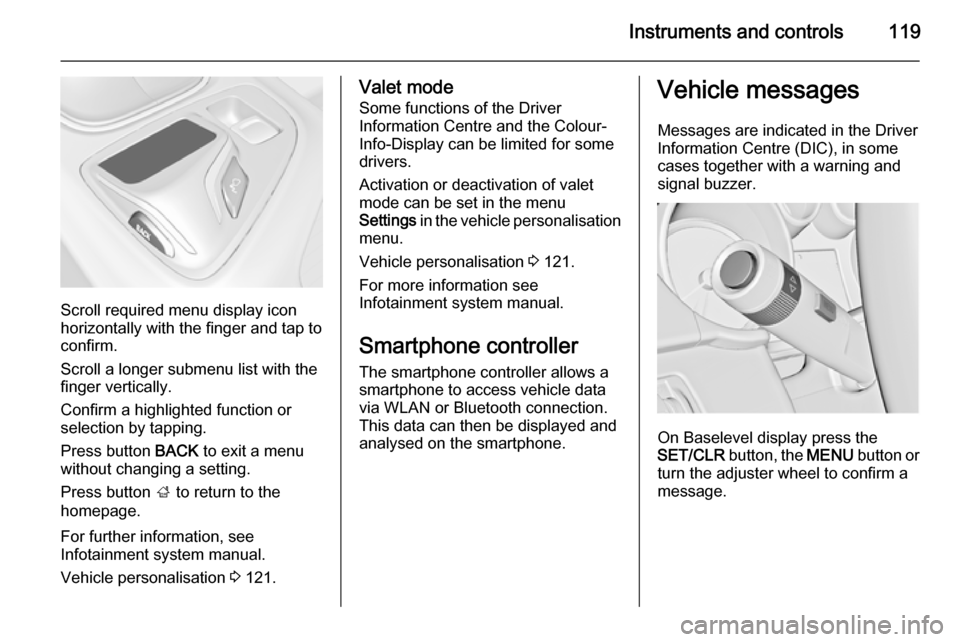
Scroll required menu display icon
horizontally with the finger and tap to
confirm.
Scroll a longer submenu list with the
finger vertically.
Confirm a highlighted function or
selection by tapping.
Press button BACK to exit a menu
without changing a setting.
Press button ; to return to the
homepage.
For further information, see
Infotainment system manual.
Vehicle personalisation 3 121.
Valet mode
Some functions of the Driver
Information Centre and the Colour-
Info-Display can be limited for some drivers.
Activation or deactivation of valet
mode can be set in the menu
Settings in the vehicle personalisation
menu.
Vehicle personalisation 3 121.
For more information see
Infotainment system manual.
Smartphone controller
The smartphone controller allows a
smartphone to access vehicle data
via WLAN or Bluetooth connection.
This data can then be displayed and
analysed on the smartphone.Vehicle messages
Messages are indicated in the Driver
Information Centre (DIC), in some
cases together with a warning and
signal buzzer.
On Baselevel display press the
SET/CLR button, the MENU button or
turn the adjuster wheel to confirm a
message.
Page 122 of 321

120Instruments and controls
On Midlevel and Uplevel display
press 9 button to confirm a message.
Vehicle and service messages
The vehicle messages are displayed
as text. Follow the instructions given
in the messages.
The system displays messages
regarding the following topics:
■ Service messages
■ Fluid levels
■ Anti-theft alarm system
■ Brakes
■ Drive systems
■ Ride control systems
■ Driver assistance systems
■ Cruise control
■ Speed limiter
■ Adaptive cruise control
■ Forward collision alert
■ Collision imminent braking system
■ Parking assist systems
■ Lighting, bulb replacement
■ Adaptive forward lighting
■ Wiper/washer system
■ Doors, windows
■ Side blind spot alert
■ Traffic sign assistant
■ Lane departure warning
■ Load compartment, boot lid
■ Radio remote control
■ Electronic key system
■ Keyless starting
■ Seat belts
■ Airbag systems
■ Engine and transmission
■ Tyre pressure■ Diesel particle filter
■ Vehicle battery status
Messages in the
Colour-Info-Display Some important messages may
appear additionally in the
Colour-Info-Display. Press the
multifunction knob to confirm a
message. Some messages only pop
up for a few seconds.
Warning chimes
When starting the engine or
whilst driving
Only one warning chime will sound at a time.
The warning chime regarding not
fastened seat belts has priority over
any other warning chime.
■ If seat belt is not fastened.
■ If a door or the tailgate is not fully closed when starting off.
■ If a certain speed is exceeded with parking brake applied.
Page 123 of 321

Instruments and controls121
■ If adaptive cruise controldeactivates automatically.
■ If approaching a vehicle ahead too closely.
■ If a programmed speed or speed limit is exceeded.
■ If a warning message appears in the Driver Information Centre.
■ If the electronic key is not in the passenger compartment.
■ If the parking assist detects an object.
■ If an unintended lane change occurs.
■ If the diesel particle filter has reached the maximum filling level.
When the vehicle is parked and/ or the driver's door is opened ■ When the key is in the ignition switch.
■ With exterior lights on.
■ If the trailer hitch is not engaged.
During an Autostop ■ If the driver's door is opened.Battery voltage
When the vehicle battery voltage is running low, a warning message will
appear in the Driver Information
Centre.
1. Switch off any electrical consumers which are not requiredfor a safe ride, e.g. seat heating,
heated rear window or other main consumers.
2. Charge the vehicle battery by driving continuously for a while or
by using a charging device.
The warning message will disappear
after the engine has been started
twice without a voltage drop.
If the vehicle battery cannot be
recharged, have the cause of the fault
remedied by a workshop.Vehicle personalisation
The vehicle's behaviour can be
personalised by changing the settings
in the Colour-Info-Display.
Some of the personal settings for
different drivers can be memorised
individually for each vehicle key.
Memorised settings 3 22.
Depending on vehicle equipment and
country-specific regulations some of
the functions described below might
not be available.
Some functions are only displayed or
active when the engine is running.
Personal settings Following the changing of personal
settings is described via the buttons
below the display. This is valid for
4.2'' as well as 8'' Colour-Info-Display.
Additionally the 8'' display is operable
as a touchscreen and with the
touchpad between the front seats. See description Colour-Info-Display
3 117 and the Infotainment system
manual.