brake light VAUXHALL INSIGNIA 2015 Owner's Manual
[x] Cancel search | Manufacturer: VAUXHALL, Model Year: 2015, Model line: INSIGNIA, Model: VAUXHALL INSIGNIA 2015Pages: 321, PDF Size: 8.99 MB
Page 13 of 321

In brief11
1Power windows .....................39
2 Central locking system ..........22
3 Exterior mirrors .....................36
4 Light switch ........................ 125
Headlight range
adjustment ......................... 127
Front/rear fog lights ............131
Instrument illumination .......133
5 Side air vents ...................... 148
6 Turn and lane-change
signals, headlight flash,
low/high beam, high beam
assist ................................... 131
Exit lighting ......................... 135
Parking lights ...................... 132
Buttons for Driver
Information Centre ..............110
7 Cruise control .....................173
Speed limiter ....................... 174
Adaptive cruise control .......175
Forward collision alert .........1838Instruments .......................... 99
Driver Information Centre .... 110
9 Buttons for Driver
Information Centre ..............110
10 Windscreen wiper and
washer, headlight washer,
rear wiper and washer .........87
11 Centre air vents .................. 148
12 Sport/Tour mode ................170
Traction Control system .....168
Electronic Stability Control . 169
Hazard warning flashers ....131
Parking assist/Advanced
parking aid ......................... 189
Lane departure warning .....203
13 Anti-theft alarm system
status LED ........................... 33
14 Colour-Info-Display ............117
15 Glovebox .............................. 69
Fuse box ............................ 23816Control indicator for airbag
activation/deactivation .......104
Control indicator for front
passenger seat belt ...........103
17 Controls for Colour-Info-
Display operation ................117
18 CD-slot
19 Climate control system ........ 137
20 Electric parking brake .........166
21 Touchpad ............................ 117
22 Manual transmission ..........164
Automatic transmission ......160
23 Storage ................................. 69
24 Eco button for stop-start
system ................................. 156
Fuel selector button ............101
25 Ignition/Power switch ..........152
26 Horn ..................................... 86
27 Steering wheel adjustment ..85
28 Bonnet release lever ..........217
29 Storage compartment ...........70
Page 18 of 321
16In briefTransmission
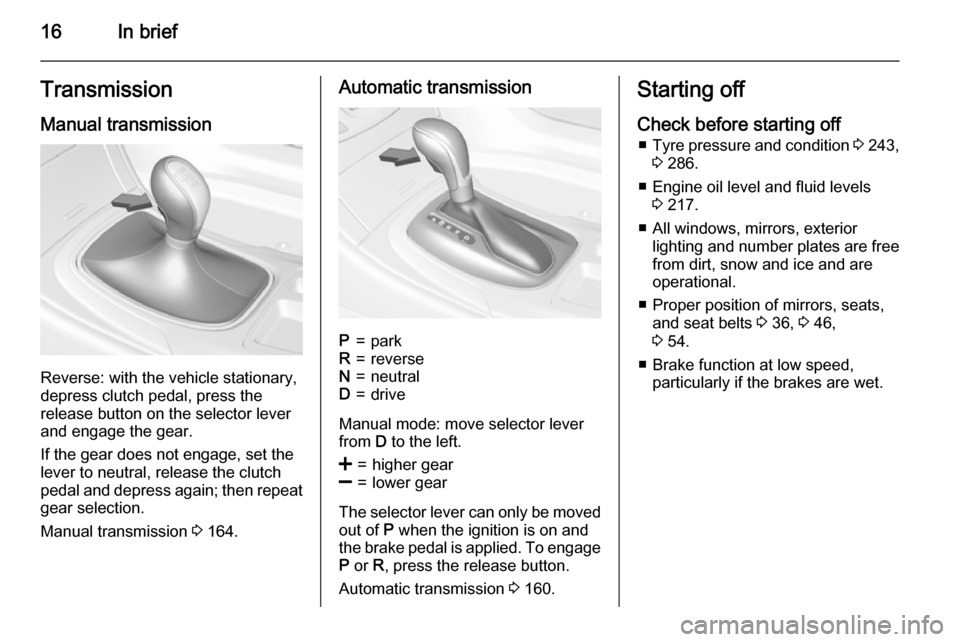
Manual transmission
Reverse: with the vehicle stationary,
depress clutch pedal, press the
release button on the selector lever
and engage the gear.
If the gear does not engage, set the
lever to neutral, release the clutch
pedal and depress again; then repeat
gear selection.
Manual transmission 3 164.
Automatic transmissionP=parkR=reverseN=neutralD=drive
Manual mode: move selector lever
from D to the left.
<=higher gear]=lower gear
The selector lever can only be moved
out of P when the ignition is on and
the brake pedal is applied. To engage
P or R, press the release button.
Automatic transmission 3 160.
Starting off
Check before starting off ■ Tyre pressure and condition 3 243,
3 286.
■ Engine oil level and fluid levels 3 217.
■ All windows, mirrors, exterior lighting and number plates are free
from dirt, snow and ice and are
operational.
■ Proper position of mirrors, seats, and seat belts 3 36, 3 46,
3 54.
■ Brake function at low speed, particularly if the brakes are wet.
Page 19 of 321
In brief17
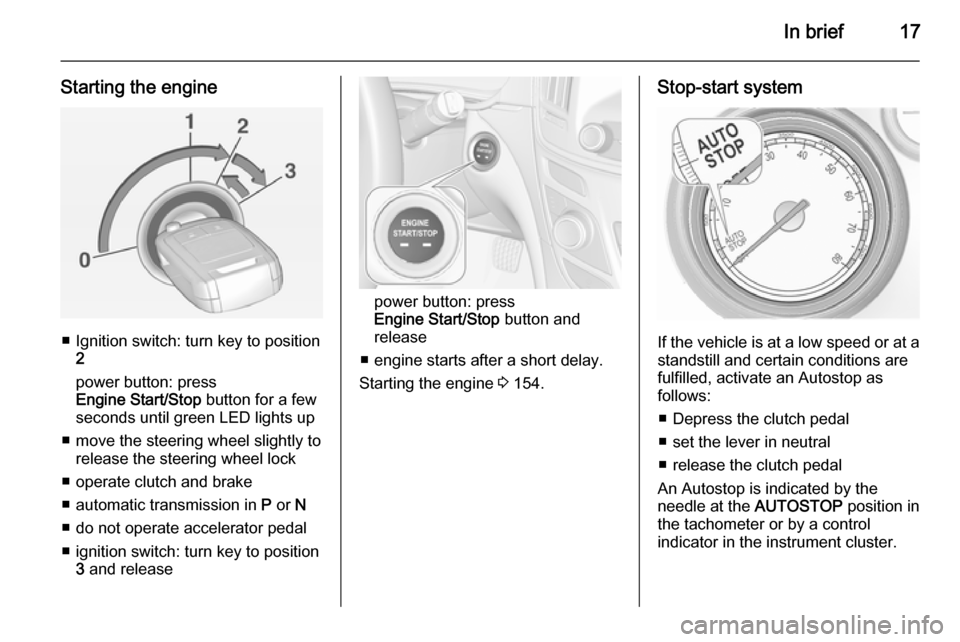
Starting the engine
■ Ignition switch: turn key to position2
power button: press
Engine Start/Stop button for a few
seconds until green LED lights up
■ move the steering wheel slightly to release the steering wheel lock
■ operate clutch and brake
■ automatic transmission in P or N
■ do not operate accelerator pedal
■ ignition switch: turn key to position 3 and release
power button: press
Engine Start/Stop button and
release
■ engine starts after a short delay.
Starting the engine 3 154.
Stop-start system
If the vehicle is at a low speed or at a
standstill and certain conditions are
fulfilled, activate an Autostop as
follows:
■ Depress the clutch pedal
■ set the lever in neutral
■ release the clutch pedal
An Autostop is indicated by the
needle at the AUTOSTOP position in
the tachometer or by a control
indicator in the instrument cluster.
Page 107 of 321

Instruments and controls105Malfunction indicator lightZ illuminates or flashes yellow.
Illuminates when the ignition is
switched on and extinguishes shortly
after the engine starts.
Illuminates when the engine is running
Fault in the emission control system. The permitted emission limits may be exceeded. Seek the assistance of a
workshop immediately.
Flashes when the engine is
running Fault that could lead to catalytic
converter damage. Ease up on the
accelerator until the flashing stops.
Seek the assistance of a workshop
immediately.
Brake and clutch system R illuminates red.
The brake and clutch fluid level is too low 3 221.9
Warning
Stop. Do not continue your
journey. Consult a workshop.
Illuminates after the ignition is
switched on if the manual parking
brake is applied 3 166.
Operate pedal - illuminates or flashes yellow.
Illuminates
Brake pedal needs to be depressed
to release the electric parking brake
3 166.
Clutch pedal needs to be depressed
to start the engine in Autostop mode.
Stop-start system 3 156.
Flashes
Clutch pedal needs to be depressed
for a main start of the engine 3 16,
3 154.
On Midlevel and Uplevel display the
operate pedal message is indicated in the Driver Information Display
3 119.
Electric parking brake
m illuminates or flashes red.
Illuminates
Electric parking brake is applied
3 166.
Flashes Electric parking brake is not fully
applied or released. Depress the brake pedal and attempt to reset thesystem by first releasing and then
applying the electric parking brake. If
m remains flashing, do not drive and
seek the assistance of a workshop.
Electric parking brake fault
j illuminates or flashes yellow.
Illuminates
Electric parking brake is operating
with degraded performance 3 166.
Page 110 of 321
108Instruments and controls
Flashes
Fault in system or tyre without
pressure sensor mounted (e.g. spare wheel). After 60-90 seconds the
control indicator illuminates
continuously. Consult a workshop.
Engine oil pressure I illuminates red.
Illuminates when the ignition is
switched on and extinguishes shortly
after the engine starts.
Illuminates when the engine is runningCaution
Engine lubrication may be
interrupted. This may result in
damage to the engine and/or
locking of the drive wheels.
1. Depress clutch.
2. Select neutral gear, set selector lever to N.
3. Move out of the flow of traffic as
quickly as possible without
impeding other vehicles.
4. Switch off ignition.9 Warning
When the engine is off,
considerably more force is needed
to brake and steer. During an
Autostop the brake servo unit will still be operational.
Do not remove key until vehicle is stationary, otherwise the steeringwheel lock could engage
unexpectedly.
Check oil level before seeking
assistance of a workshop 3 217.
Low fuel
i or Y illuminates or flashes yellow.
Illuminates Level in fuel tank is too low.
Flashes
Fuel used up. Refuel immediately.
Never run the tank dry.
Catalytic converter 3 160.
Bleeding the diesel fuel system
3 223.
Immobiliser
d flashes yellow.
Fault in the immobiliser system. The
engine cannot be started.
Autostop
D illuminates when engine is in an
Autostop.
Stop-start system 3 156.
Exterior light
8 illuminates green.
The exterior lights are on 3 125.
High beam
C illuminates blue.
Page 122 of 321

120Instruments and controls
On Midlevel and Uplevel display
press 9 button to confirm a message.
Vehicle and service messages
The vehicle messages are displayed
as text. Follow the instructions given
in the messages.
The system displays messages
regarding the following topics:
■ Service messages
■ Fluid levels
■ Anti-theft alarm system
■ Brakes
■ Drive systems
■ Ride control systems
■ Driver assistance systems
■ Cruise control
■ Speed limiter
■ Adaptive cruise control
■ Forward collision alert
■ Collision imminent braking system
■ Parking assist systems
■ Lighting, bulb replacement
■ Adaptive forward lighting
■ Wiper/washer system
■ Doors, windows
■ Side blind spot alert
■ Traffic sign assistant
■ Lane departure warning
■ Load compartment, boot lid
■ Radio remote control
■ Electronic key system
■ Keyless starting
■ Seat belts
■ Airbag systems
■ Engine and transmission
■ Tyre pressure■ Diesel particle filter
■ Vehicle battery status
Messages in the
Colour-Info-Display Some important messages may
appear additionally in the
Colour-Info-Display. Press the
multifunction knob to confirm a
message. Some messages only pop
up for a few seconds.
Warning chimes
When starting the engine or
whilst driving
Only one warning chime will sound at a time.
The warning chime regarding not
fastened seat belts has priority over
any other warning chime.
■ If seat belt is not fastened.
■ If a door or the tailgate is not fully closed when starting off.
■ If a certain speed is exceeded with parking brake applied.
Page 125 of 321

Instruments and controls123
selecting the necessary settingsand automatic air conditioning
mode.
Auto Rear Demist : Activates
automatically the heated rear
window.
■ Collision / Detection Systems
Park Assist : Activates or
deactivates the ultrasonic parking
assist.
Auto Collision Preparation :
Activates or deactivates the
automatic brake functionality of the
vehicle in the event of imminent
collision danger. The following is
selectable: the system will take
over brake control, warn by chimes
only or is deactivated completely.
Go Notifier : Activates or
deactivates the reminder function
of the adaptive cruise control.
Side Blind Zone Alert : Activates or
deactivates side blind zone alert.
Rear Cross Traffic Alert : Activates
or deactivates rear cross traffic
alert.■ Comfort and Convenience
Chime Volume : Changes the
volume of warning chimes.
Personalisation by Driver :
Activates or deactivates the
personalisation function.
Auto Memory Recall : Activates or
deactivates the recall of memorised settings for power seat adjustment
and exterior mirrors.
Easy Exit Driver Seat : Activates or
deactivates easy exit function of the
power seat.
Reverse Tilt Mirror : Activates or
deactivates the parking assist
function of the exterior mirror on the passenger side.
Auto Mirror Folding : Activates or
deactivates folding of the exterior
mirrors with the remote control.
Auto Wipe in Reverse Gear :
Activates or deactivates automatic switching on of the rear window
wiper when reverse gear is
engaged.Rainsense Wipers : Activates or
deactivates automatic wiping with
rain sensor.
■ Lighting
Exit Lighting : Activates or
deactivates and changes the
duration of exit lighting.
Vehicle Locator Lights : Activates or
deactivates the welcome lighting.
Adaptive Forward Lighting :
Activates or deactivates the
functions of the adaptive forward
lighting.
Left or Right Hand Traffic : Changes
between lighting for left or right
hand traffic.
■ Power Door Locks
Unlocked Door Anti-Lockout :
Activates or deactivates the
automatic driver's door locking
function when the door is open.
Delayed Door Lock : Activates or
deactivates the delayed door
locking function.
Auto Door Lock : Activates or
deactivates the automatic door
unlocking function after switching
Page 154 of 321
152Driving and operatingStarting and operating
New vehicle running-in Do not brake unnecessarily hard for
the first few journeys.
During the first drive, smoke may
occur because of wax and oil
evaporating off the exhaust system.
Park the vehicle in the open for a
while after the first drive and avoid
inhaling the fumes.
During the running-in period fuel and engine oil consumption may be
higher and the cleaning process of the diesel particle filter may take
place more often.
Diesel particle filter 3 159.
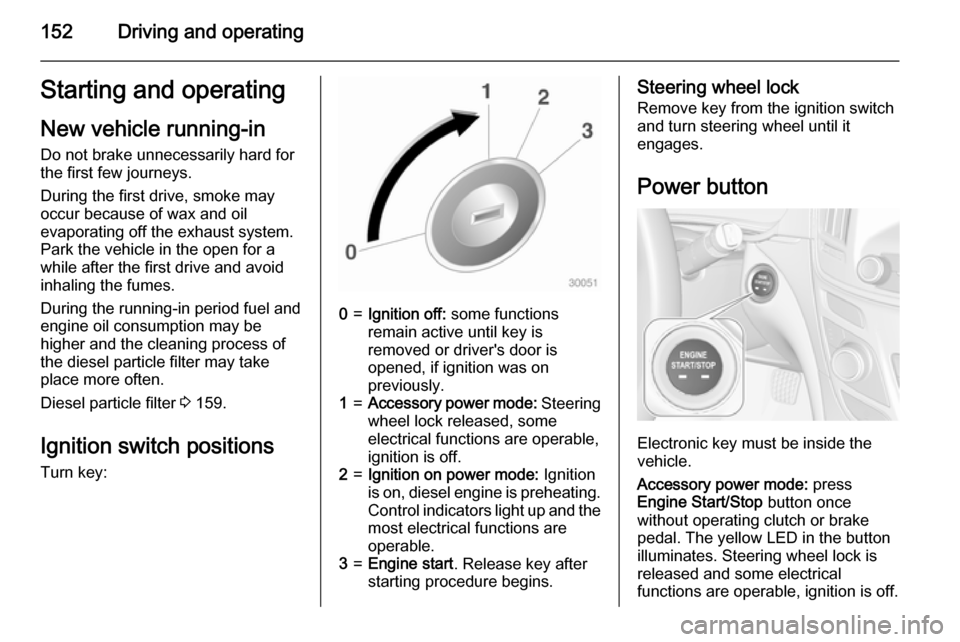
Ignition switch positions
Turn key:0=Ignition off: some functions
remain active until key is
removed or driver's door is
opened, if ignition was on
previously.1=Accessory power mode: Steering
wheel lock released, some
electrical functions are operable,
ignition is off.2=Ignition on power mode: Ignition
is on, diesel engine is preheating.
Control indicators light up and the
most electrical functions are
operable.3=Engine start . Release key after
starting procedure begins.Steering wheel lock
Remove key from the ignition switch
and turn steering wheel until it
engages.
Power button
Electronic key must be inside the
vehicle.
Accessory power mode: press
Engine Start/Stop button once
without operating clutch or brake pedal. The yellow LED in the button
illuminates. Steering wheel lock is
released and some electrical
functions are operable, ignition is off.
Page 155 of 321
Driving and operating153
Ignition on power mode: press and
hold Engine Start/Stop button for
6 seconds without operating clutch or brake pedal. The green LED in the
button illuminates, diesel engine is
preheating. Control indicators light up
and the most electrical functions are
operable.
Engine start: operate clutch pedal
(manual transmission) or brake pedal (automatic transmission) and press
Engine Start/Stop button once more.
Release button after starting
procedure begins.
Ignition off: press Engine Start/Stop
button briefly in each mode or when
engine is running. Some functions
remain active until driver's door is
opened, if ignition was on before.
Steering wheel lock
The steering wheel lock activates
automatically when:
■ the vehicle is stationary and
■ the ignition has been switched off and
■ the driver's door is opened.To release steering wheel lock, open
and close driver's door and switch on accessory mode or start the engine
directly.9 Warning
If the vehicle battery is discharged,
the vehicle must not be towed,
tow-started or jump-started as the
steering wheel lock cannot be
disengaged.
Emergency operation on
vehicles with electronic key
system
If either the electronic key fails or the
battery of the electronic key is weak,
the Driver Information Centre may
display No Remote Detected or
Replace Battery in Remote Key when
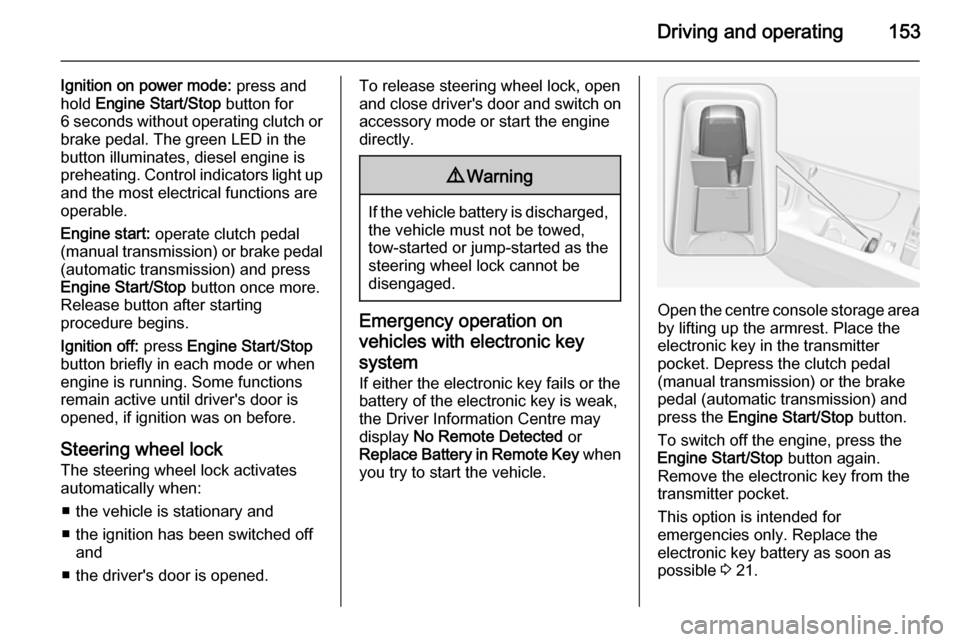
you try to start the vehicle.Open the centre console storage area by lifting up the armrest. Place the
electronic key in the transmitter
pocket. Depress the clutch pedal
(manual transmission) or the brake
pedal (automatic transmission) and
press the Engine Start/Stop button.
To switch off the engine, press the Engine Start/Stop button again.
Remove the electronic key from the
transmitter pocket.
This option is intended for
emergencies only. Replace the
electronic key battery as soon as
possible 3 21.
Page 158 of 321
156Driving and operatingStop-start systemThe stop-start system helps to save
fuel and to reduce the exhaust
emissions. When conditions allow, it
switches off the engine as soon as the
vehicle is at a low speed or at a
standstill, e.g. at a traffic light or in a
traffic jam. It starts the engine
automatically as soon as the clutch is depressed. A battery sensor ensures
that an Autostop is only performed if
the vehicle battery is sufficiently
charged for a restart.
Activation
The stop-start system is available as
soon as the engine is started, the
vehicle starts-off and the conditions
as stated below in this section are
fulfilled.Deactivation
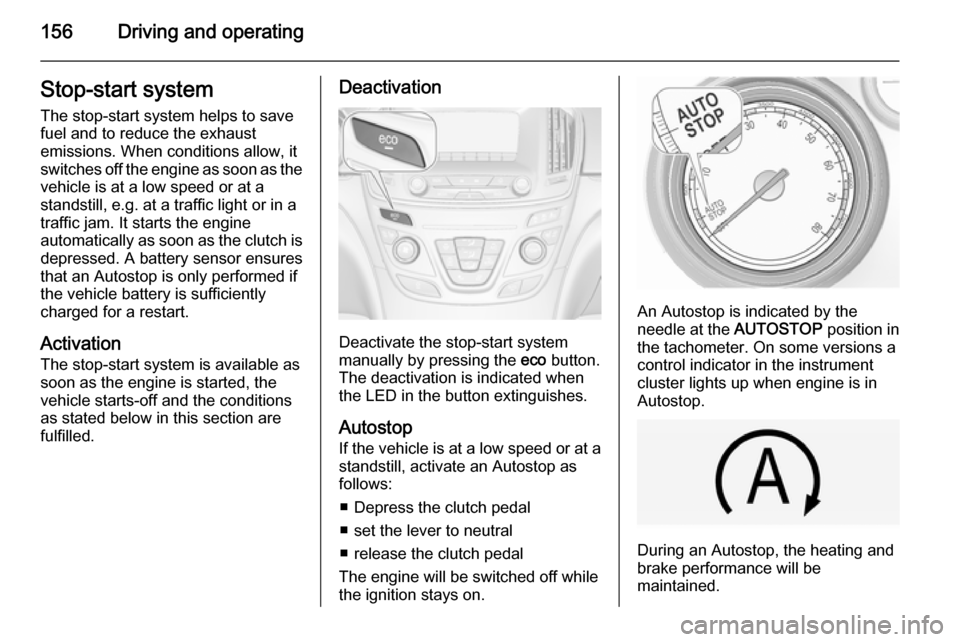
Deactivate the stop-start system
manually by pressing the eco button.
The deactivation is indicated when
the LED in the button extinguishes.
Autostop
If the vehicle is at a low speed or at a
standstill, activate an Autostop as
follows:
■ Depress the clutch pedal
■ set the lever to neutral
■ release the clutch pedal
The engine will be switched off while
the ignition stays on.
An Autostop is indicated by the
needle at the AUTOSTOP position in
the tachometer. On some versions a
control indicator in the instrument
cluster lights up when engine is in Autostop.
During an Autostop, the heating and
brake performance will be
maintained.