wheel VAUXHALL INSIGNIA 2017 Repair Manual
[x] Cancel search | Manufacturer: VAUXHALL, Model Year: 2017, Model line: INSIGNIA, Model: VAUXHALL INSIGNIA 2017Pages: 327, PDF Size: 9.34 MB
Page 200 of 327
198Driving and operating
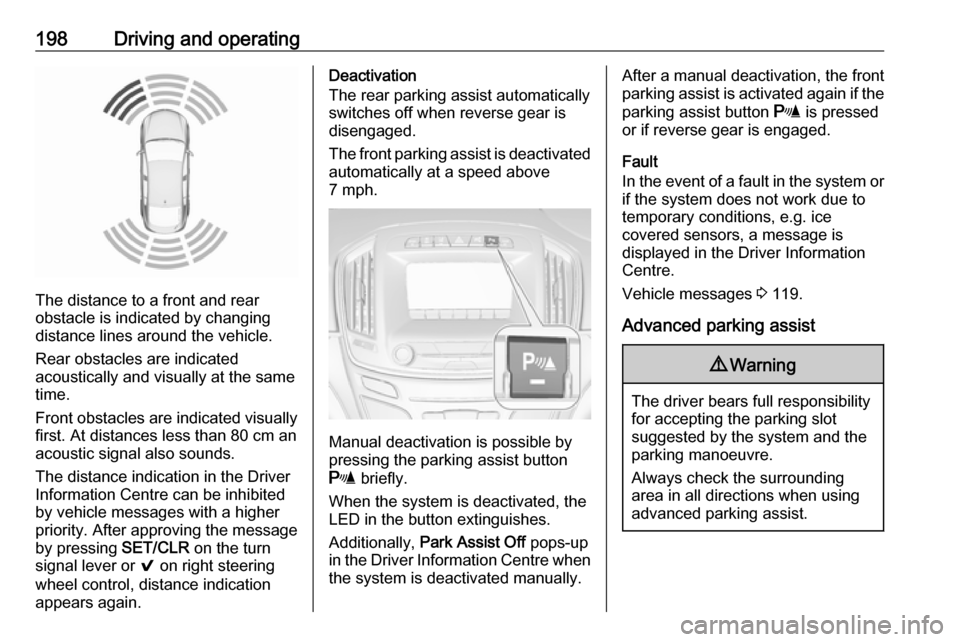
The distance to a front and rear
obstacle is indicated by changing
distance lines around the vehicle.
Rear obstacles are indicated
acoustically and visually at the same
time.
Front obstacles are indicated visually
first. At distances less than 80 cm an
acoustic signal also sounds.
The distance indication in the Driver
Information Centre can be inhibited
by vehicle messages with a higher
priority. After approving the message
by pressing SET/CLR on the turn
signal lever or 9 on right steering
wheel control, distance indication
appears again.
Deactivation
The rear parking assist automatically
switches off when reverse gear is
disengaged.
The front parking assist is deactivated
automatically at a speed above
7 mph.
Manual deactivation is possible by
pressing the parking assist button
r briefly.
When the system is deactivated, the
LED in the button extinguishes.
Additionally, Park Assist Off pops-up
in the Driver Information Centre when the system is deactivated manually.
After a manual deactivation, the front
parking assist is activated again if the
parking assist button r is pressed
or if reverse gear is engaged.
Fault
In the event of a fault in the system or if the system does not work due to
temporary conditions, e.g. ice
covered sensors, a message is
displayed in the Driver Information
Centre.
Vehicle messages 3 119.
Advanced parking assist9 Warning
The driver bears full responsibility
for accepting the parking slot
suggested by the system and the
parking manoeuvre.
Always check the surrounding
area in all directions when using
advanced parking assist.
Page 202 of 327
200Driving and operating
The parking slot suggestion of the
system is accepted when the vehicle is stopped by the driver within
10 metres after the "Stop" message is given. The system calculates the
optimal route into the parking slot. Then it manoeuvres the driver into the
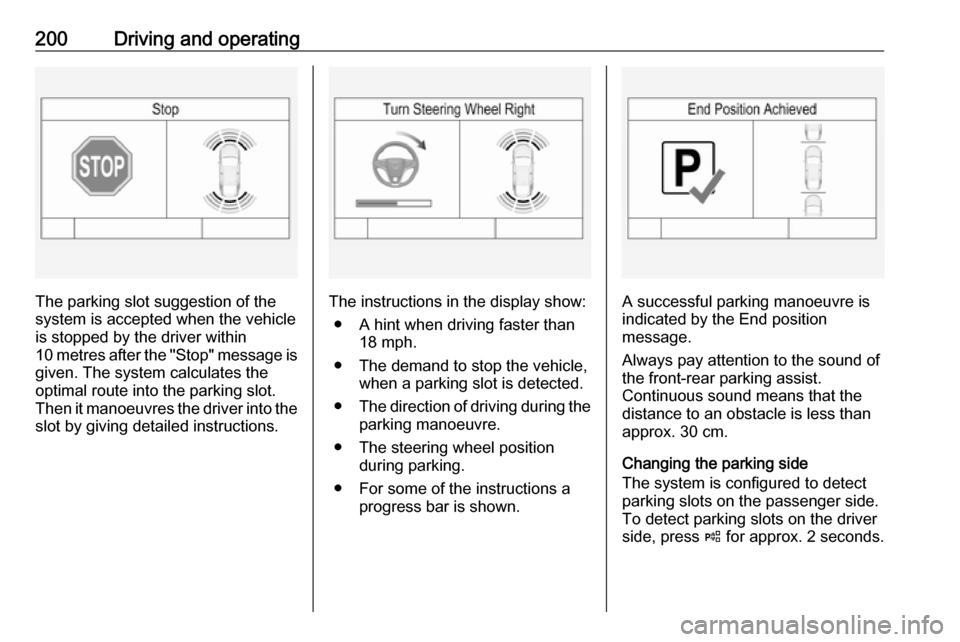
slot by giving detailed instructions.The instructions in the display show:
● A hint when driving faster than 18 mph.
● The demand to stop the vehicle, when a parking slot is detected.
● The direction of driving during the
parking manoeuvre.
● The steering wheel position during parking.
● For some of the instructions a progress bar is shown.A successful parking manoeuvre is
indicated by the End position
message.
Always pay attention to the sound of
the front-rear parking assist.
Continuous sound means that the
distance to an obstacle is less than approx. 30 cm.
Changing the parking side
The system is configured to detect parking slots on the passenger side.
To detect parking slots on the driver
side, press ( for approx. 2 seconds.
Page 203 of 327

Driving and operating201Display priorities
After activating the advanced parking
assist, a message appears in the
Driver Information Centre. Advanced
parking assist indication in the Driver
Information Centre can be inhibited
by vehicle messages with a higher
priority. After approving the message
by pressing SET/CLR on the turn
signal lever or the 9 button in the
steering wheel controls, advanced
parking assist instructions appear
again and the parking manoeuvre can
be continued.
Deactivation
The system is deactivated by:
● pressing (
● parking manoeuvre successfully ended
● driving faster than 18 mph
● switching off the ignition
Notice
If advanced parking assist is
deactivated manually or by the
system (e.g. parking manoeuvre
ended), the front and rear parking
assist is also deactivated.Reactivate front and rear parking
assist by pressing parking assist
button r or engaging reverse gear
once.
Deactivation by the driver or by the
system during manoeuvring will be
indicated by Parking Deactivated in
the Driver Information Centre.
Fault
A message appears in the Driver
Information Centre when:
● There is a fault in the system.● The driver did not successfully complete the parking
manoeuvre.
● The system is not operational.
If an object is detected during parking
instructions, Stop is indicated in the
Driver Information Centre. Removing
the object will resume the parking
manoeuvre. If the object is not
removed, the system will be
deactivated. Press ( to activate the
system and search for a new parking
slot.
Page 212 of 327
210Driving and operating
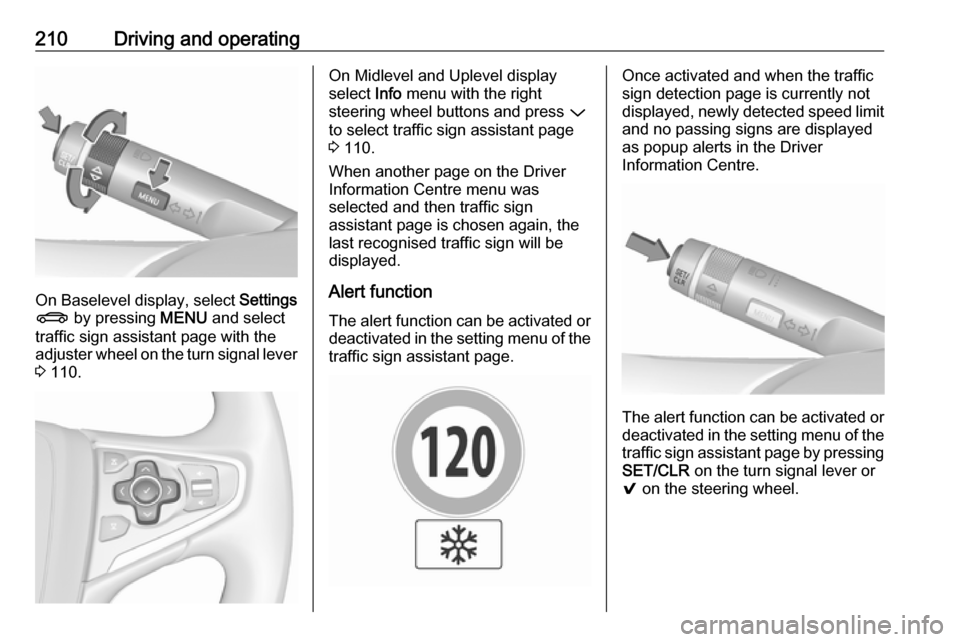
On Baselevel display, select Settings
X by pressing MENU and select
traffic sign assistant page with the adjuster wheel on the turn signal lever
3 110.
On Midlevel and Uplevel display
select Info menu with the right
steering wheel buttons and press P
to select traffic sign assistant page
3 110.
When another page on the Driver
Information Centre menu was
selected and then traffic sign
assistant page is chosen again, the
last recognised traffic sign will be
displayed.
Alert function The alert function can be activated or
deactivated in the setting menu of the
traffic sign assistant page.Once activated and when the traffic
sign detection page is currently not
displayed, newly detected speed limit
and no passing signs are displayed
as popup alerts in the Driver
Information Centre.
The alert function can be activated or
deactivated in the setting menu of the
traffic sign assistant page by pressing SET/CLR on the turn signal lever or
9 on the steering wheel.
Page 213 of 327
Driving and operating211
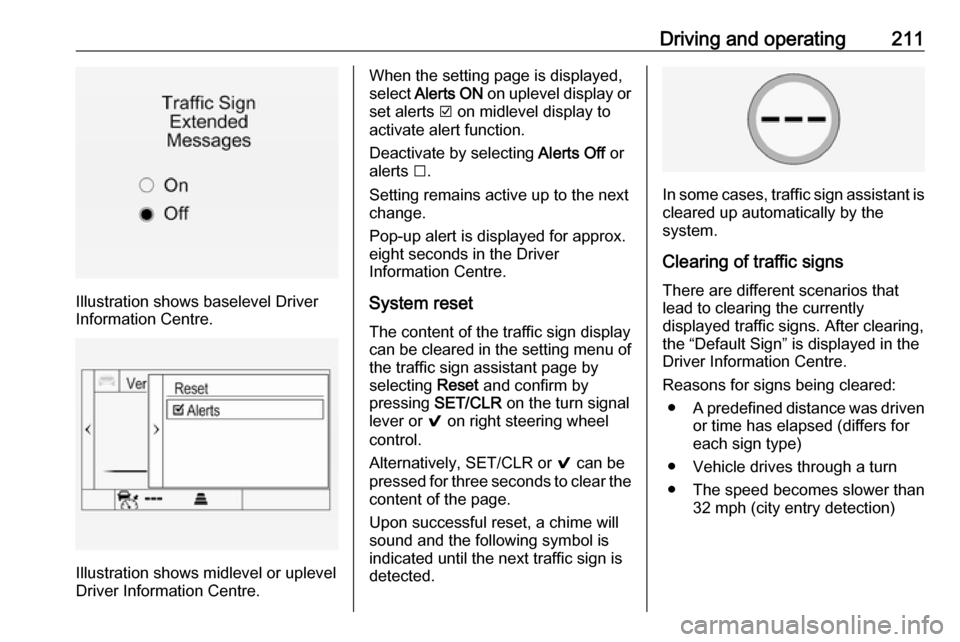
Illustration shows baselevel Driver
Information Centre.
Illustration shows midlevel or uplevel
Driver Information Centre.
When the setting page is displayed,
select Alerts ON on uplevel display or
set alerts J on midlevel display to
activate alert function.
Deactivate by selecting Alerts Off or
alerts I.
Setting remains active up to the next
change.
Pop-up alert is displayed for approx. eight seconds in the Driver
Information Centre.
System reset
The content of the traffic sign display
can be cleared in the setting menu of the traffic sign assistant page by
selecting Reset and confirm by
pressing SET/CLR on the turn signal
lever or 9 on right steering wheel
control.
Alternatively, SET/CLR or 9 can be
pressed for three seconds to clear the
content of the page.
Upon successful reset, a chime will
sound and the following symbol is indicated until the next traffic sign is
detected.
In some cases, traffic sign assistant is
cleared up automatically by the
system.
Clearing of traffic signs
There are different scenarios that
lead to clearing the currently
displayed traffic signs. After clearing,
the “Default Sign” is displayed in the
Driver Information Centre.
Reasons for signs being cleared: ● A predefined distance was driven
or time has elapsed (differs for
each sign type)
● Vehicle drives through a turn
● The speed becomes slower than 32 mph (city entry detection)
Page 218 of 327
216Driving and operating9Warning
If you smell gas in the vehicle or in
the immediate vicinity, switch to petrol mode immediately. No
smoking. No naked flames or
ignition sources.
If the gas odour persists, do not start
the engine. If possible, close the
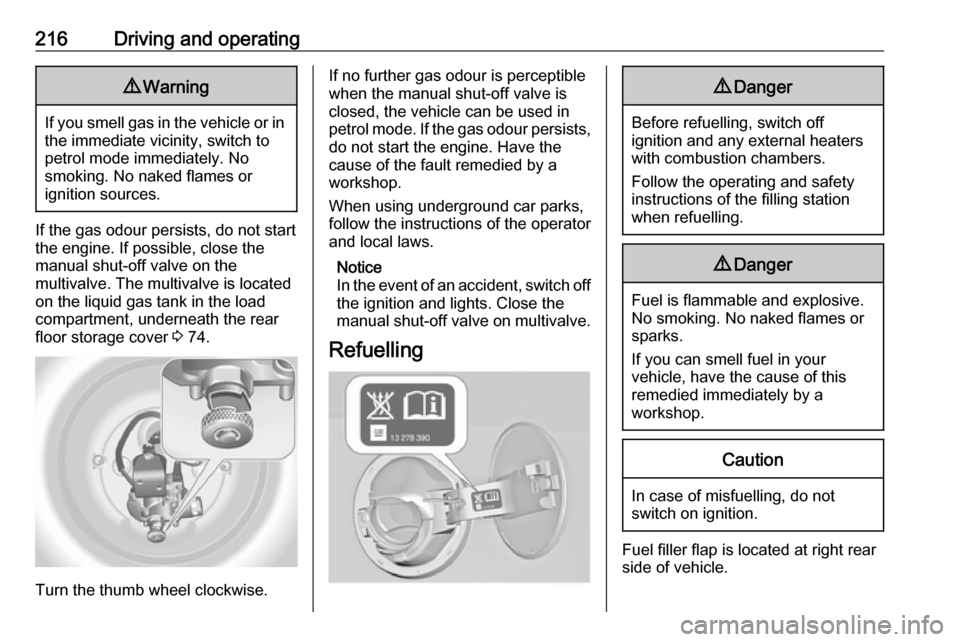
manual shut-off valve on the
multivalve. The multivalve is located
on the liquid gas tank in the load
compartment, underneath the rear
floor storage cover 3 74.
Turn the thumb wheel clockwise.
If no further gas odour is perceptible
when the manual shut-off valve is
closed, the vehicle can be used in
petrol mode. If the gas odour persists, do not start the engine. Have the
cause of the fault remedied by a workshop.
When using underground car parks,
follow the instructions of the operator
and local laws.
Notice
In the event of an accident, switch off
the ignition and lights. Close the
manual shut-off valve on multivalve.
Refuelling9 Danger
Before refuelling, switch off
ignition and any external heaters
with combustion chambers.
Follow the operating and safety
instructions of the filling station
when refuelling.
9 Danger
Fuel is flammable and explosive.
No smoking. No naked flames or
sparks.
If you can smell fuel in your
vehicle, have the cause of this
remedied immediately by a
workshop.
Caution
In case of misfuelling, do not
switch on ignition.
Fuel filler flap is located at right rear
side of vehicle.
Page 223 of 327

Driving and operating221The figures are provided only for the
purpose of comparison between
different vehicle variants and must
not be taken as a guarantee for the
actual fuel consumption of a
particular vehicle. Additional
equipment may result in slightly
higher results than the stated
consumption and CO 2 figures.
Furthermore, fuel consumption is
dependent on personal driving style as well as road and traffic conditions.Trailer hitch
General information
The factory-fitted towing equipment is folded up under the rear bumper
fascia.
Entrust retrofitting of towing
equipment to a workshop. It may be
necessary to make changes that
affect the cooling system, heat
shields or other equipment. Only use
towing equipment that has been
approved for your vehicle.
To avoid vehicle damage, the power
tailgate cannot be operated with the
radio remote control when a trailer is
electrically connected.
The bulb outage detection function for
trailer brake light cannot detect a
partial bulb outage, e.g. in case of four times five watt bulbs, the function onlydetects lamp outage when only a
single five Watt lamp remains or none
remain.
Fitting of towing equipment could
cover the opening of the towing eye. If this is the case use the coupling ball
bar for towing.Driving characteristics and
towing tips
Before attaching a trailer, lubricate
the coupling ball. However, do not do
so if a stabiliser, which acts on the coupling ball, is being used to reduce snaking movements.
For trailers with low driving stability
and trailers with a permitted gross
vehicle weight of more than 1400 kg
(Front-wheel drive)/1600 kg (All- wheel drive) the use of a stabiliser is
strongly recommended when driving
above 50 mph.
If the trailer starts snaking, drive more
slowly, do not attempt to correct the
steering and brake sharply if
necessary.
When driving downhill, drive in the
same gear as if driving uphill and
drive at a similar speed.
Adjust tyre pressure to the value
specified for full load 3 294.
Page 226 of 327
224Driving and operatingA buzzing tone sounds as a warning
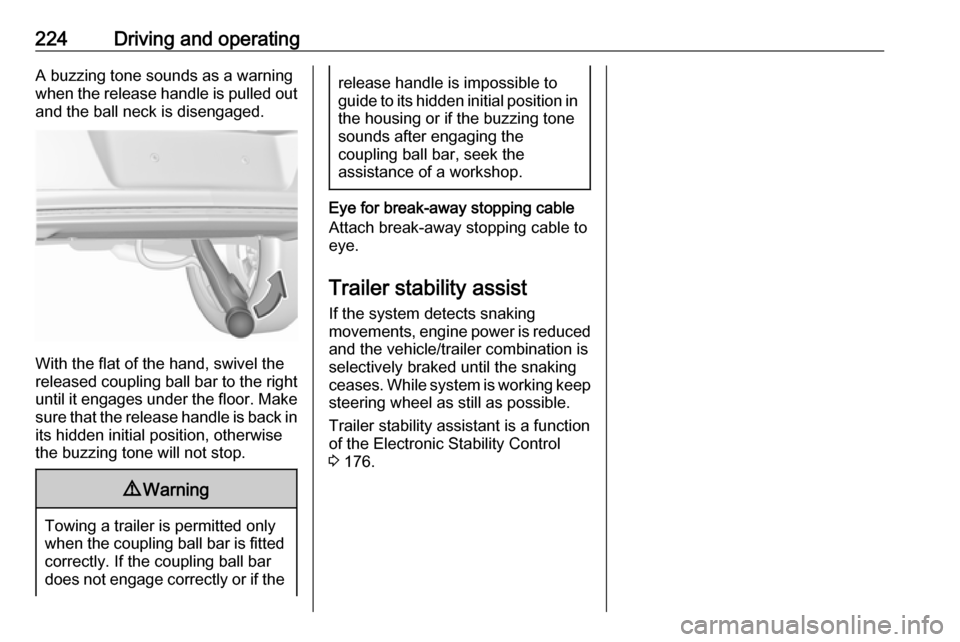
when the release handle is pulled out and the ball neck is disengaged.
With the flat of the hand, swivel the
released coupling ball bar to the right
until it engages under the floor. Make sure that the release handle is back inits hidden initial position, otherwise
the buzzing tone will not stop.
9 Warning
Towing a trailer is permitted only
when the coupling ball bar is fitted correctly. If the coupling ball bar
does not engage correctly or if the
release handle is impossible to guide to its hidden initial position in the housing or if the buzzing tone
sounds after engaging the
coupling ball bar, seek the
assistance of a workshop.
Eye for break-away stopping cable
Attach break-away stopping cable to
eye.
Trailer stability assist
If the system detects snaking
movements, engine power is reduced
and the vehicle/trailer combination is
selectively braked until the snaking ceases. While system is working keep steering wheel as still as possible.
Trailer stability assistant is a function
of the Electronic Stability Control
3 176.
Page 227 of 327

Vehicle care225Vehicle careGeneral Information...................226
Accessories and vehicle modifications .......................... 226
Vehicle storage ........................226
End-of-life vehicle recovery .....227
Vehicle checks ........................... 227
Performing work ......................227
Bonnet ..................................... 227
Engine oil ................................. 228
Automatic transmission fluid ....229
Engine coolant ......................... 230
Power steering fluid .................231
Washer fluid ............................ 231
Brakes ..................................... 232
Brake fluid ............................... 232
Vehicle battery ......................... 232
Diesel fuel system bleeding .....234
Wiper blade replacement ........234
Bulb replacement .......................235
Halogen headlights ..................236
Xenon headlights .....................238
Fog lights ................................. 240
Tail lights ................................. 241
Side turn signal lights ..............243
Number plate light ...................244Interior lights ............................ 245
Instrument panel illumination ...245
Electrical system ........................245
Fuses ....................................... 245
Engine compartment fuse box . 247
Instrument panel fuse box .......249
Load compartment fuse box ....250
Vehicle tools .............................. 252
Tools ........................................ 252
Wheels and tyres .......................253
Winter tyres ............................. 253
Tyre designations ....................253
Tyre pressure .......................... 253
Tyre pressure monitoring system .................................... 255
Tread depth ............................. 256
Changing tyre and wheel size . 257
Wheel covers ........................... 257
Tyre chains .............................. 258
Tyre repair kit .......................... 258
Wheel changing .......................261
Spare wheel ............................ 263
Jump starting ............................. 266
Towing ....................................... 267
Towing the vehicle ...................267
Towing another vehicle ...........269Appearance care .......................271
Exterior care ............................ 271
Interior care ............................. 273
Page 251 of 327
Vehicle care249No.Circuit62Heated steering wheel (only
vehicles without load compart‐
ment fuse box)63Rear window sensor64Adaptive forward lighting65Auxiliary pump (only on vehicles
with stop-start system)66Rear window washer system67Fuel system control module68–69Vehicle battery sensor70Rain sensor71Vehicle battery sensor
After changing of defective fuses,
close the fuse box cover and press
until it engages.
If the fuse box cover is not closed
correctly, malfunctions may occur.
Instrument panel fuse box
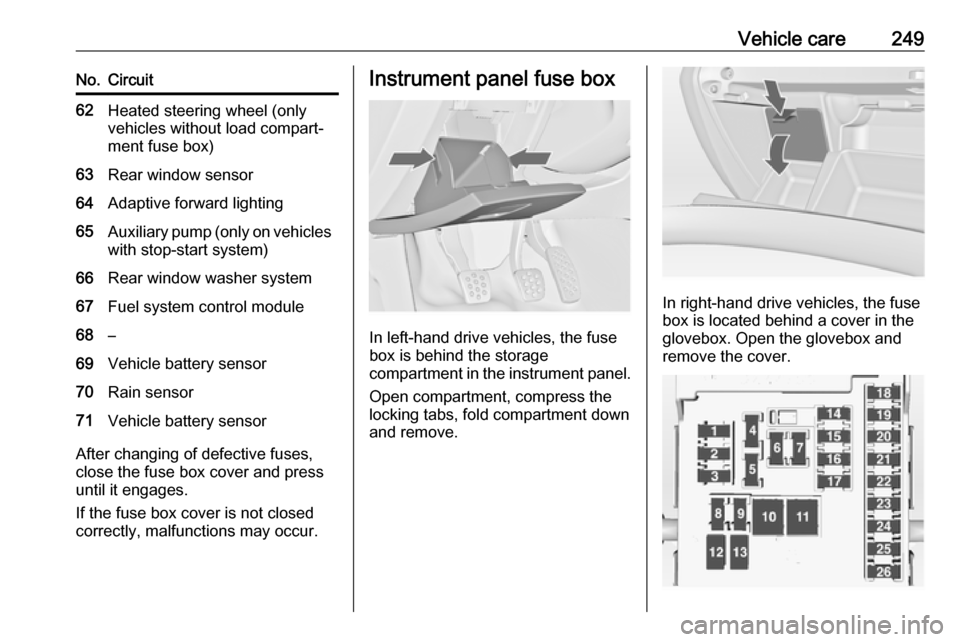
In left-hand drive vehicles, the fuse
box is behind the storage
compartment in the instrument panel.
Open compartment, compress the
locking tabs, fold compartment down and remove.
In right-hand drive vehicles, the fuse
box is located behind a cover in the
glovebox. Open the glovebox and
remove the cover.