phone VAUXHALL INSIGNIA 2019.5 Infotainment system
[x] Cancel search | Manufacturer: VAUXHALL, Model Year: 2019.5, Model line: INSIGNIA, Model: VAUXHALL INSIGNIA 2019.5Pages: 85, PDF Size: 1.79 MB
Page 51 of 85

External devices51External devicesGeneral information.....................51
Playing audio ............................... 53
Displaying pictures ....................... 54
Playing movies ............................. 55
Using smartphone applications ...56General information
A USB port for the connection of
external devices is located in the
centre console.
Notice
The USB port must always be kept
clean and dry.
USB port
An MP3 player, USB device, SD card (via USB connector / adapter) or
smartphone can be connected to the
USB port.
Up to two USB devices can be
connected to the Infotainment system at a time.
Notice
For the connection of two USB
devices, an external USB hub is
required.
The Infotainment system can play
audio files, show picture files or play
movie files contained in USB devices.When connected to the USB port,
various functions of the devices
mentioned above can be operated via
the controls and menus of the
Infotainment system.
Notice
Not all auxiliary devices are
supported by the Infotainment
system. Check the compatibility list
on our website.
Connecting / disconnecting a device
Connect one of the devices
mentioned above to the USB port. If
required, use the appropriate
connection cable. The music function starts automatically.
Notice
If a non-readable USB device is
connected, a corresponding error
message appears and the
Infotainment system automatically
switches to the previous function.
To disconnect the USB device, select
another function and then remove the USB device.
Page 52 of 85

52External devicesCaution
Avoid disconnecting the device
during playback. This may
damage the device or the
Infotainment system.
USB Auto Launch
By default, the USB audio menu is displayed automatically as soon as a
USB device is connected.
If desired, this function can be
deactivated.
Press ; and then select Settings to
open the settings menu.
Select Radio, scroll to USB Auto
Launch and touch the screen button
next to the function.
To reactivate the function, touch the
screen button again.
Bluetooth Devices which support the Bluetooth
music profiles A2DP and AVRCP can
be connected wirelessly to the
Infotainment system. The
Infotainment system can play music
files contained in these devices.
Connecting a device
For a detailed description on how to
establish a Bluetooth connection
3 74.
File formats and folders
The maximum capacity of a device
supported by the Infotainment system amounts to 5000 music files,
5000 picture files, 500 movie files,
5000 folders and 15 stages of folder
structure. Only devices formatted in
the FAT16 / FAT32 file system are
supported.
If there are images included in the audio metadata, these images are
displayed on the screen.
Notice
Some files may not be played
properly. This may be due to a
different recording format or the
condition of the file.
Files from online shops to which
Digital Rights Management (DRM)
has been applied cannot be played.
The Infotainment system can play the following audio, picture and movie
files stored on external devices.Audio files
The playable audio file formats are
MP3 (MPEG-1 Layer 3, MPEG-2
Layer 3), WMA, AAC, AAC+, ALAC
OGG WAF (PCM), AIFF, 3GPP
(audio only), Audio Books and LPCM.
iPod ®
and iPhone ®
devices play
ALAC, AIFF, Audio Books and LPCM.
When playing a file with ID3 tag
information, the Infotainment system
can display information, e.g. on the
track title and artist.
Picture files
The displayable picture file formats
are JPG, JPEG, BMP, PNG and GIF.
JPG files must be 64 to 5000 pixels in
width and 64 to 5000 pixels in height.
BMP, PNG and GIF files must be 64
to 1024 pixels in width and 64 to
1024 pixels in height.
The pictures should not exceed a file
size of 1MB.
Movie files
The playable movie file formats are
AVI and MP4.
Page 56 of 85
56External devicesReturning to the beginning of the
current movie
Touch d after five seconds of the
movie playing.
Fast forwarding and rewinding
Touch and hold d or c. Release to
return to normal playback mode.
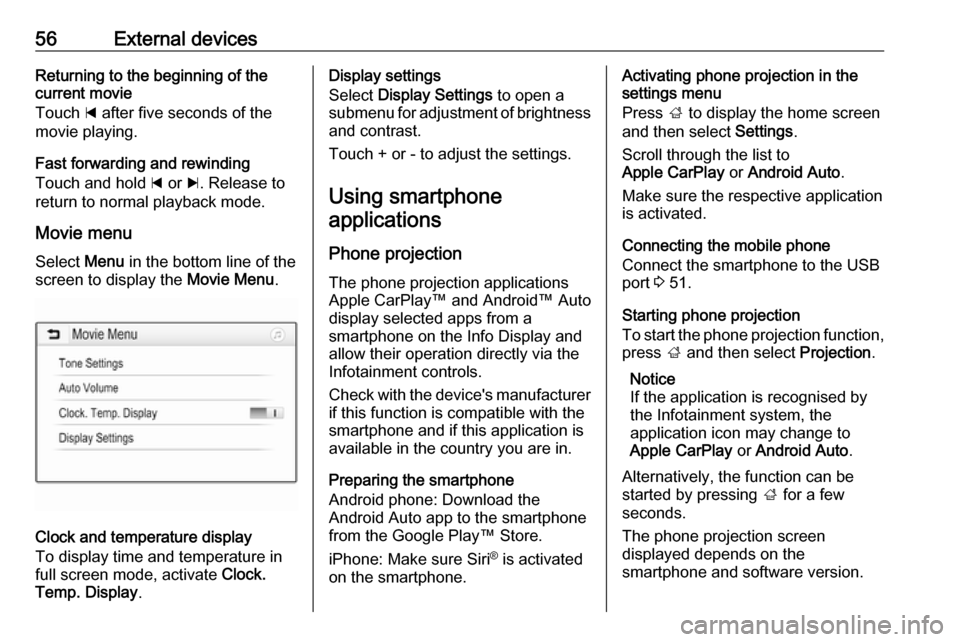
Movie menu Select Menu in the bottom line of the
screen to display the Movie Menu.
Clock and temperature display
To display time and temperature in
full screen mode, activate Clock.
Temp. Display .
Display settings
Select Display Settings to open a
submenu for adjustment of brightness and contrast.
Touch + or - to adjust the settings.
Using smartphone applications
Phone projection The phone projection applications
Apple CarPlay™ and Android™ Auto
display selected apps from a
smartphone on the Info Display and
allow their operation directly via the
Infotainment controls.
Check with the device's manufacturer
if this function is compatible with the
smartphone and if this application is
available in the country you are in.
Preparing the smartphone
Android phone: Download the
Android Auto app to the smartphone
from the Google Play™ Store.
iPhone: Make sure Siri ®
is activated
on the smartphone.Activating phone projection in the settings menu
Press ; to display the home screen
and then select Settings.
Scroll through the list to
Apple CarPlay or Android Auto .
Make sure the respective application
is activated.
Connecting the mobile phone
Connect the smartphone to the USB
port 3 51.
Starting phone projection
To start the phone projection function, press ; and then select Projection.
Notice
If the application is recognised by the Infotainment system, the
application icon may change to Apple CarPlay or Android Auto .
Alternatively, the function can be
started by pressing ; for a few
seconds.
The phone projection screen
displayed depends on the
smartphone and software version.
Page 57 of 85

External devices57Returning to the home screen
Press ;.
BringGo BringGo is a navigation app providinglocation search, map display and
route guidance.
Notice
Before downloading the app, check whether BringGo is available in this
vehicle.
Downloading the app
Before BringGo can be operated
using the controls and menus of the
Infotainment system, the respective
application must be installed on the
smartphone.
Download the app from App Store ®
or
Google Play Store.
Activating BringGo in the settings
menu
Press ; to display the home screen
and then select Settings.
Scroll through the list to BringGo.
Make sure the application is
activated.Connecting the mobile phone
Connect the smartphone to the USB
port 3 51.
Starting BringGo
To start the app, press ; and then
select the Nav icon.
The main menu of the application is
shown on the Info Display.
For further information on how to
operate the app, see the instructions
on the manufacturer's website.
Page 63 of 85

Navigation63Select L on the map to display the
Options menu. Select Navigation
Settings and then Time to Destination
Format .
Activate the desired option in the submenu.
Notice
During active route guidance, the
time indication can be changed by
simply tapping on the time indication
field on the screen.
Alert preferences
If desired, an additional notification in
specific traffic zones can be received.
Select L on the map to display the
Options menu. Select Navigation
Settings and then Alert Preferences .
If Safety camera is activated, a
warning will appear when
approaching a stationary speed
camera.
Notice
This function is only available if such an alert system corresponds to the
legal provisions applicable in the
country you are in.
Activate the desired option.Voice guidance
The route guidance process can be
supported by voice prompts given out by the system.
Notice
The navigation voice prompts
function is not supported for all
languages. If there are no voice
prompts available, the system
automatically plays a tone to
indicate a manoeuvre ahead.
Activation
The voice guidance function is
activated by default. To deactivate
the function, select L on the map to
display the Options menu and then
touch Voice Guidance . The screen
button changes.
Select the screen button again to reactivate the function.
Voice guidance settings
To define which system outputs may assist during active route guidance,
select L on the map, Navigation
Settings and then Voice Guidance .If Normal voice guidance is activated,
a voice announces the next turning
manoeuvre to be taken.
If Beep only is activated, only beep
tones are given out for notification.
In the submenu of Prompts during
Phone Call , the possible voice
outputs during a phone call can be
set.
Activate the desired options.
Notice
Voice guidance prompts are only
given out if Voice Guidance is
activated in the Options menu, see
above.
Information
Select L on the map to display the
Options menu. Select Navigation
Settings and then About.
The texts of the manufacturer's terms
and conditions or privacy statement can be accessed via the respective
menu items.
The navigation map version is
displayed.
Page 65 of 85
Navigation65
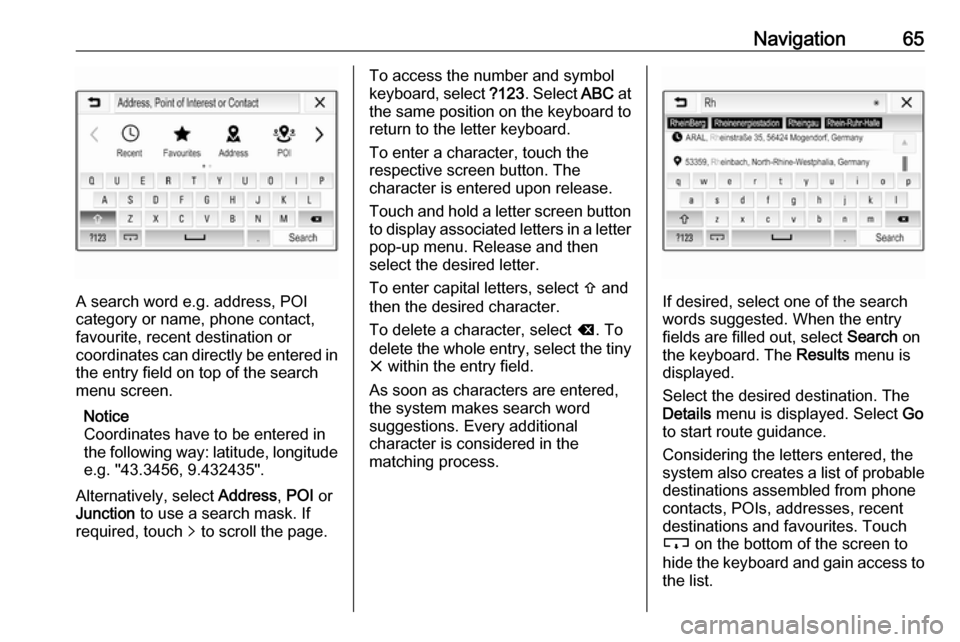
A search word e.g. address, POI
category or name, phone contact,
favourite, recent destination or
coordinates can directly be entered in
the entry field on top of the search
menu screen.
Notice
Coordinates have to be entered in the following way: latitude, longitude e.g. "43.3456, 9.432435".
Alternatively, select Address, POI or
Junction to use a search mask. If
required, touch q to scroll the page.
To access the number and symbol
keyboard, select ?123. Select ABC at
the same position on the keyboard to
return to the letter keyboard.
To enter a character, touch the
respective screen button. The
character is entered upon release.
Touch and hold a letter screen button to display associated letters in a letter
pop-up menu. Release and then
select the desired letter.
To enter capital letters, select b and
then the desired character.
To delete a character, select k. To
delete the whole entry, select the tiny
x within the entry field.
As soon as characters are entered,
the system makes search word
suggestions. Every additional
character is considered in the
matching process.
If desired, select one of the search
words suggested. When the entry
fields are filled out, select Search on
the keyboard. The Results menu is
displayed.
Select the desired destination. The
Details menu is displayed. Select Go
to start route guidance.
Considering the letters entered, the
system also creates a list of probable
destinations assembled from phone
contacts, POIs, addresses, recent
destinations and favourites. Touch
c on the bottom of the screen to
hide the keyboard and gain access to the list.
Page 66 of 85

66NavigationTo redisplay the keyboard, tap within
the entry field.
If desired, select a destination from
the list. The Details menu is
displayed. Select Go to start route
guidance.
Lists with selectable destinations
To access the lists, select ½ on the
map and, if required, touch q to scroll
the page.
Select one of the options:
● Recent : list of destinations
recently used
● Favourites : list of destinations
stored as favourites
● Contacts : list of addresses stored
in the phone book of the mobile
phone currently connected via
Bluetooth
To choose a destination from one of
the lists, scroll through the respective
list and select the desired destination. The Details menu is displayed. Select
Go to start route guidance.Recent destinations
The recent destinations list is
automatically filled with destinations
used in route guidance.
The addresses in the recent
destinations list can be stored as
favourites. Enter the recent
destinations list, select n next to the
desired address to display additional
function buttons and then select f. If
the icon is filled, the address is saved
in the favourites list.
Addresses can be deleted from the
recent destinations list. Enter the
recent destinations list, select n next
to the desired address and then
select e to delete the respective
address.
Favourites
Favourites can be added when a f
icon is displayed next to an address.
When the star icon is filled, the
respective address is stored as a
favourite.The position of a favourite in the list
can be changed. Enter the favourites list, select n next to the desired
favourite to display additional function buttons and then select Q or P.
The name of a favourite can be changed. Enter the favourites list,
select n next to the desired favourite
to display additional function buttons
and then select o. A keyboard is
displayed. Enter the desired name
and then select Done.
Favourites can be deleted. Enter the favourites list, select n next to the
desired favourite to display additional
function buttons and then select f.
The favourite is deactivated (unfilled
star). If the icon is selected again, the favourite is reactivated (filled star).
When leaving the favourites list while
favourites are deactivated, they are
deleted from the list.
Contacts
The keyboard can be used to search
for addresses within the list. Enter the first letters of the desired word (name
Page 68 of 85

68NavigationIf sorting by distance is activated, thedestinations are given accordingly to
their distance to the current location.
Details menu
After a destination has been selected, the Details menu is displayed.
Storing favourites
To store the respective destination as
a favourite, activate Favourite (filled
star: favourite saved, unfilled star:
favourite not saved).
The destination is stored as a
favourite and may then be accessed
via the favourites list.
Initiating a phone call
In some cases, e.g. when a POI has
been selected, a phone number might
be available for the respective
destination. To call this phone
number, select y.
Setting the route
In case the system finds more than
one possible route, the desired route
can be chosen.
Select Routes to display a list of all
routes detected by the system.
Activate the desired route and then
select Go to start route guidance.
Routes with several destinations After route guidance has been
started, it is possible to add
destinations to the active route, e.g.
to pick up a friend on the way or stop
at a petrol station.
Notice
Up to five destinations can be
combined in one route.
Start route guidance to the desired destination.To add another destination, select L
on the map and then select Add
Destination . The destination search
menu is displayed.
Navigate to the desired destination.
The Details menu is displayed. Select
Add .
Notice
If Go is selected, route guidance to
the destination first selected is
stopped and route guidance to the
new destination is started.
The destinations are arranged in the
order in which they are entered while
the last destination added is the first
to be guided to. In order to check or
confirm while driving, the name of the next destination is displayed above
the arrival time and distance.
The order of the destinations can be
changed 3 68.
Guidance Route guidance is provided by the
navigation system through visual
instructions and voice prompts (voice guidance).
Page 69 of 85
Navigation69Visual instructions
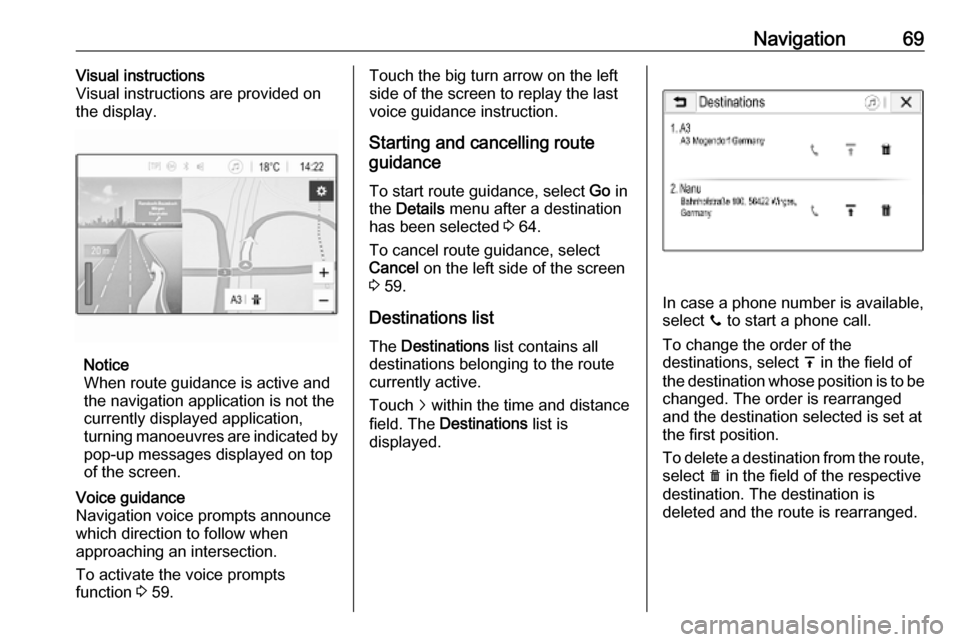
Visual instructions are provided on
the display.
Notice
When route guidance is active and
the navigation application is not the
currently displayed application,
turning manoeuvres are indicated by
pop-up messages displayed on top
of the screen.
Voice guidance
Navigation voice prompts announce
which direction to follow when
approaching an intersection.
To activate the voice prompts
function 3 59.Touch the big turn arrow on the left
side of the screen to replay the last voice guidance instruction.
Starting and cancelling route
guidance
To start route guidance, select Go in
the Details menu after a destination
has been selected 3 64.
To cancel route guidance, select
Cancel on the left side of the screen
3 59.
Destinations list
The Destinations list contains all
destinations belonging to the route
currently active.
Touch j within the time and distance
field. The Destinations list is
displayed.
In case a phone number is available,
select y to start a phone call.
To change the order of the
destinations, select h in the field of
the destination whose position is to be changed. The order is rearranged
and the destination selected is set at
the first position.
To delete a destination from the route,
select e in the field of the respective
destination. The destination is
deleted and the route is rearranged.
Page 72 of 85

72Speech recognitionSpeech recognitionGeneral information.....................72
Usage .......................................... 72General information
The voice pass-thru application of the Infotainment system allows access tothe speech recognition commands on
a smartphone. See the smartphone
manufacturer's operating instructions
to find out whether the smartphone
supports this feature.
In order to use the voice pass-thru
application, the smartphone must be
connected to the Infotainment system
via USB cable 3 51 or via Bluetooth
3 74.
Usage
Activating speech recognition Press and hold g on the control panel
or qw on the steering wheel to start
a speech recognition session. A voice
command message is displayed on
the screen.
As soon as a beep is heard, a
command can be said. For
information on the commands
supported, see the operating
instructions of the smartphone.Adjusting the volume of voice
prompts
Turn m on the control panel or press
+ / - on the right side of the steering
wheel to increase or decrease the
volume of voice prompts.
Deactivating speech recognition
Press xn on the steering wheel.
The voice command message
disappears and the speech
recognition session is ended.