Parking VAUXHALL INSIGNIA 2019 User Guide
[x] Cancel search | Manufacturer: VAUXHALL, Model Year: 2019, Model line: INSIGNIA, Model: VAUXHALL INSIGNIA 2019Pages: 345, PDF Size: 9.61 MB
Page 108 of 345

106Instruments and controlsThe front passenger airbag is
activated.
* illuminates yellow.
The front passenger airbag is
deactivated.
Airbag deactivation 3 62.
Charging system
p illuminates red.
Illuminates when the ignition is
switched on and extinguishes shortly after the engine starts.
Illuminates when the engine is
running
Stop, switch off engine. Vehicle
battery is not charging. Engine
cooling may be interrupted. The
brake servo unit may cease to be effective. Seek the assistance of a
workshop.
Malfunction indicator light
Z illuminates or flashes yellow.Illuminates when the ignition is
switched on and extinguishes shortly
after the engine starts.
Illuminates when the engine is
running
Fault in the emission control system.
The permitted emission limits may be
exceeded.
The cleaning process of the exhaust
filter is potentially not possible.
Seek the assistance of a workshop
immediately.
Flashes when the engine is
running
Fault that could lead to catalytic
converter damage. Ease up on the accelerator until the flashing stops.
Seek the assistance of a workshop
immediately.
Brake and clutch system
R illuminates red.
The brake and clutch fluid level is too low.9 Warning
Stop. Do not continue your
journey. Consult a workshop.
Electric parking brake
m illuminates or flashes red.
Illuminates
Electric parking brake is applied
3 194.
Flashes
Electric parking brake is not fully applied or released. Depress the
brake pedal and attempt to reset the system by first releasing then
applying the electric parking brake. If
m remains flashing, do not drive and
seek the assistance of a workshop.
Electric parking brake fault
j illuminates or flashes yellow.
Illuminates
Electric parking brake is operating
with degraded performance 3 194.
Page 109 of 345

Instruments and controls107Flashes
Electric parking brake is in service
mode. Stop vehicle, apply and
release the electric parking brake to
reset.9 Warning
Have the cause of the fault
remedied immediately by a
workshop. Avoid parking on
inclines until the cause of the fault has been remedied.
Antilock brake system
(ABS)
u illuminates yellow.
Illuminates for a few seconds after the
ignition is switched on. The system is ready for operation when the control
indicator extinguishes.
If the control indicator does not go out after a few seconds, or if it illuminates while driving, there is a fault in the
ABS. The brake system remains
operational but without ABS
regulation.
Antilock brake system 3 193.
Gear shifting
R or S with the number of a higher or
lower gear is indicated, when up- or
downshifting is recommended for fuel
saving reasons.
Following distance
E indicates the following distance
setting of the alert timing sensitivity
for the forward collision alert using
filled distance bars.
Forward collision alert 3 214.
Lane keep assist a illuminates green or yellow, or
flashes yellow.
Illuminates green
The system is switched on and ready
to operate.Illuminates yellow
The system approaches a detected
lane marking without using the turn
signal in that direction.
Flashes yellow
The system recognizes that the lane
is departed significantly.
Lane keep assist 3 242
Electronic Stability Control
off
t illuminates yellow.
The system is deactivated.
Electronic Stability Control
and Traction Control system
b illuminates or flashes yellow.
Illuminates A fault in the system is present.
Continued driving is possible. Driving
stability, however, may deteriorate
depending on road surface
conditions.
Page 120 of 345
118Instruments and controlsThe Info Display can indicate:● time 3 91
● outside temperature 3 91
● date 3 91
● Infotainment system 3 148
● climate control settings 3 166
● rear view camera 3 235
● panoramic view system 3 232
● parking assist instructions 3 223
● rear cross traffic 3 236
● Flex Ride visualisation menu 3 199
● navigation 3 154
● system messages
● settings for vehicle personalisation 3 1238'' Info Display
Selecting menus and settings
There are three options to operate the display:
● via buttons below the display
● by touching the touchscreen with
the finger
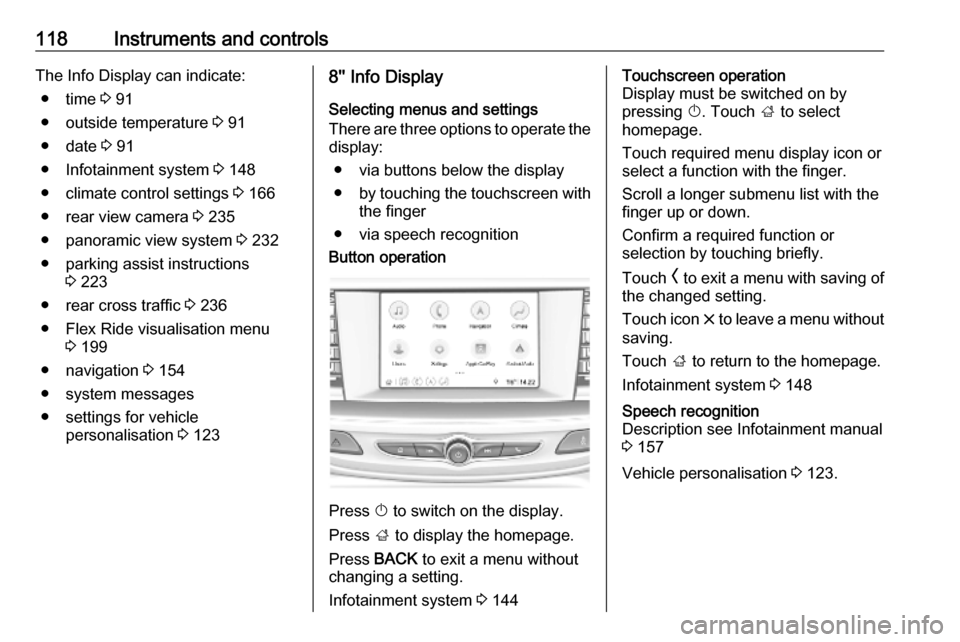
● via speech recognitionButton operation
Press X to switch on the display.
Press ; to display the homepage.
Press BACK to exit a menu without
changing a setting.
Infotainment system 3 144
Touchscreen operation
Display must be switched on by
pressing X. Touch ; to select
homepage.
Touch required menu display icon or select a function with the finger.
Scroll a longer submenu list with the
finger up or down.
Confirm a required function or
selection by touching briefly.
Touch O to exit a menu with saving of
the changed setting.
Touch icon & to leave a menu without
saving.
Touch ; to return to the homepage.
Infotainment system 3 148Speech recognition
Description see Infotainment manual
3 157
Vehicle personalisation 3 123.
Page 124 of 345
122Instruments and controlsVehicle messagesMessages are indicated in the Driver
Information Centre, in some cases
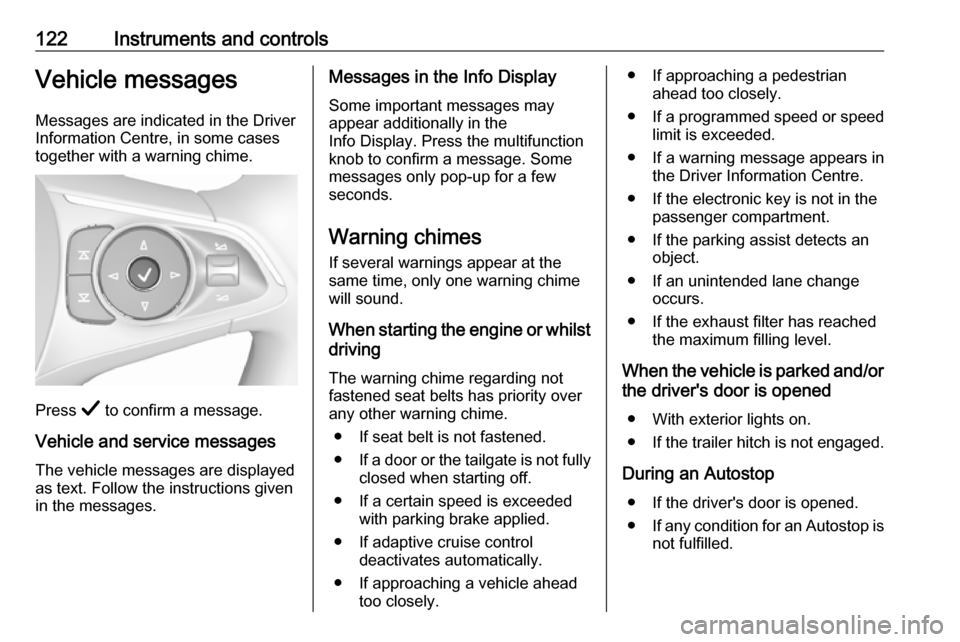
together with a warning chime.
Press Å to confirm a message.
Vehicle and service messages
The vehicle messages are displayed
as text. Follow the instructions given
in the messages.
Messages in the Info Display
Some important messages may
appear additionally in the
Info Display. Press the multifunction
knob to confirm a message. Some messages only pop-up for a few
seconds.
Warning chimes If several warnings appear at thesame time, only one warning chime
will sound.
When starting the engine or whilst driving
The warning chime regarding not
fastened seat belts has priority over
any other warning chime.
● If seat belt is not fastened.
● If a door or the tailgate is not fully
closed when starting off.
● If a certain speed is exceeded with parking brake applied.
● If adaptive cruise control deactivates automatically.
● If approaching a vehicle ahead too closely.● If approaching a pedestrian ahead too closely.
● If a programmed speed or speed
limit is exceeded.
● If a warning message appears in the Driver Information Centre.
● If the electronic key is not in the passenger compartment.
● If the parking assist detects an object.
● If an unintended lane change occurs.
● If the exhaust filter has reached the maximum filling level.
When the vehicle is parked and/or the driver's door is opened
● With exterior lights on.
● If the trailer hitch is not engaged.
During an Autostop ● If the driver's door is opened.
● If any condition for an Autostop is
not fulfilled.
Page 126 of 345

124Instruments and controlsApps
Infotainment system 3 148
Vehicle ● Sport Mode Custom. / Auto Mode
Customisation
Changes the settings of the
Interactive driving system modes 3 199.
● Climate and Air Quality
Auto Fan Speed : Modifies the
level of the cabin airflow of the
climate control in automatic
mode.
Auto heated seats : Automatically
activates the seat heating.
Auto Demist : Supports
windscreen dehumidification by
automatically selecting the
necessary settings and
automatic air conditioning mode.
Auto Rear Demist : Automatically
activates heated rear window.
● Collision/Detection Systems
Forward Collision System :
Deactivates the system
completely, activates warning
chimes only or warning chimes incombination with automatic
brake functionality.
Front Pedestrian Detection :
Activates warning chimes only or warning chimes in combination
with automatic brake functionality
or deactivates the system
completely.
Adaptive Cruise Go Notifier :
Activates or deactivates the
reminder message to drive off
when the adaptive cruise control
holds the vehicle at standstill.
Lane Change Alert : Activates or
deactivates side blind zone alert.
Park Assist : Activates or
deactivates the parking assist.
Activation is selectable with or
without attached trailer coupling.
Rear Cross Traffic Alert :
Activates or deactivates rear
cross traffic alert.
● Comfort and Convenience
Auto Memory Recall : Changes
the settings to the recall of
memorised settings for power
seat adjustment.Easy Exit Driver\'s Seat :
Activates or deactivates easy exit
function of the power seat.
Chime Volume : Changes the
volume of warning chimes.
Reverse Tilt Mirror : Activates or
deactivates the parking assist function of the exterior mirrors.
Auto Mirror Folding : Activates or
deactivates folding of the exterior
mirrors with the remote control.
Personalisation by Driver :
Activates or deactivates the
personalisation function,
depending on which key is being
used.
Rain Sense Wipers : Activates or
deactivates automatic wiping with rain sensor.
Auto Wipe in Reverse Gear :
Activates or deactivates
automatic switching on of the
rear window wiper when reverse gear is engaged.
Extended Hill Start Assist :
Toggles between hill start assist
and extended hold hill start assist
Page 133 of 345
Lighting131LightingExterior lighting.......................... 131
Light switch .............................. 131
Automatic light control .............132
High beam ............................... 132
High beam assist .....................132
Headlight flash ......................... 133
Headlight range adjustment ....133
Headlights when driving abroad .................................... 134
Daytime running lights .............134
LED headlights ........................ 134
Hazard warning flashers ..........137
Turn lights ................................ 138
Front fog lights ......................... 138
Rear fog light ........................... 138
Parking lights ........................... 139
Reversing lights .......................139
Misted light covers ...................139
Interior lighting ........................... 139
Instrument panel illumination control ..................................... 139
Interior lights ............................ 140
Reading lights .......................... 140
Sunvisor lights ......................... 141Lighting features ........................141
Centre console lighting ............141
Entry lighting ............................ 141
Exit lighting .............................. 141
Battery discharge protection ....142Exterior lighting
Light switch
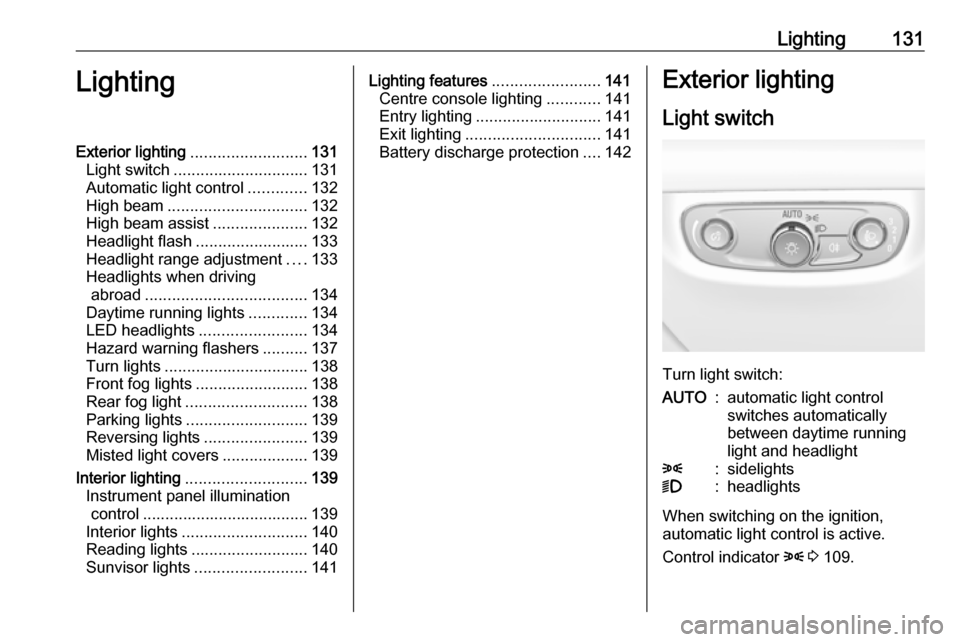
Turn light switch:
AUTO:automatic light control
switches automatically
between daytime running
light and headlight8:sidelights9:headlights
When switching on the ignition,
automatic light control is active.
Control indicator 8 3 109.
Page 137 of 345
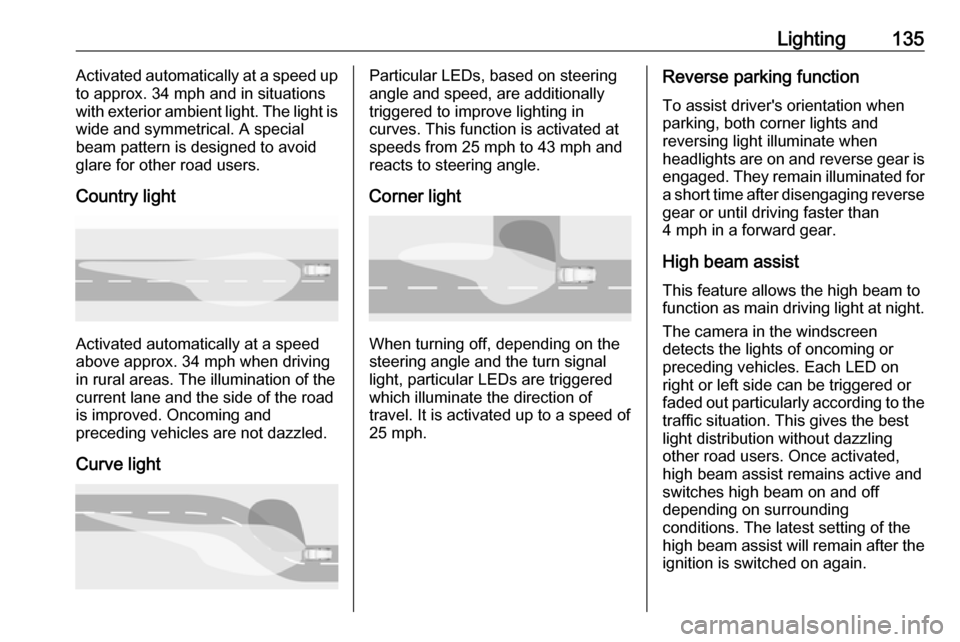
Lighting135Activated automatically at a speed up
to approx. 34 mph and in situations
with exterior ambient light. The light is wide and symmetrical. A special
beam pattern is designed to avoid
glare for other road users.
Country light
Activated automatically at a speed
above approx. 34 mph when driving
in rural areas. The illumination of the current lane and the side of the roadis improved. Oncoming and
preceding vehicles are not dazzled.
Curve light
Particular LEDs, based on steering
angle and speed, are additionally
triggered to improve lighting in
curves. This function is activated at
speeds from 25 mph to 43 mph and
reacts to steering angle.
Corner light
When turning off, depending on the
steering angle and the turn signal light, particular LEDs are triggered
which illuminate the direction of
travel. It is activated up to a speed of
25 mph.
Reverse parking function
To assist driver's orientation when
parking, both corner lights and
reversing light illuminate when
headlights are on and reverse gear is engaged. They remain illuminated for
a short time after disengaging reverse gear or until driving faster than
4 mph in a forward gear.
High beam assistThis feature allows the high beam to
function as main driving light at night.
The camera in the windscreen
detects the lights of oncoming or
preceding vehicles. Each LED on
right or left side can be triggered or
faded out particularly according to the traffic situation. This gives the best
light distribution without dazzling
other road users. Once activated,
high beam assist remains active and switches high beam on and off
depending on surrounding
conditions. The latest setting of the
high beam assist will remain after the ignition is switched on again.
Page 141 of 345
Lighting139Parking lights
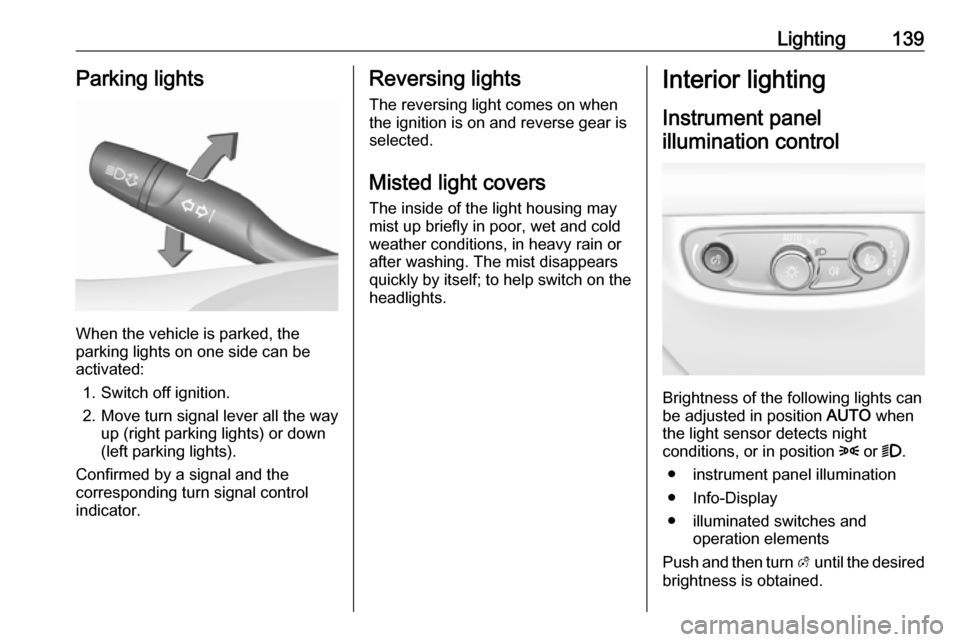
When the vehicle is parked, the
parking lights on one side can be
activated:
1. Switch off ignition.
2. Move turn signal lever all the way up (right parking lights) or down
(left parking lights).
Confirmed by a signal and the
corresponding turn signal control
indicator.
Reversing lights
The reversing light comes on when
the ignition is on and reverse gear is
selected.
Misted light covers
The inside of the light housing may
mist up briefly in poor, wet and cold weather conditions, in heavy rain or
after washing. The mist disappears
quickly by itself; to help switch on the
headlights.Interior lighting
Instrument panel illumination control
Brightness of the following lights can
be adjusted in position AUTO when
the light sensor detects night
conditions, or in position 8 or 9.
● instrument panel illumination
● Info-Display
● illuminated switches and operation elements
Push and then turn A until the desired
brightness is obtained.
Page 157 of 345
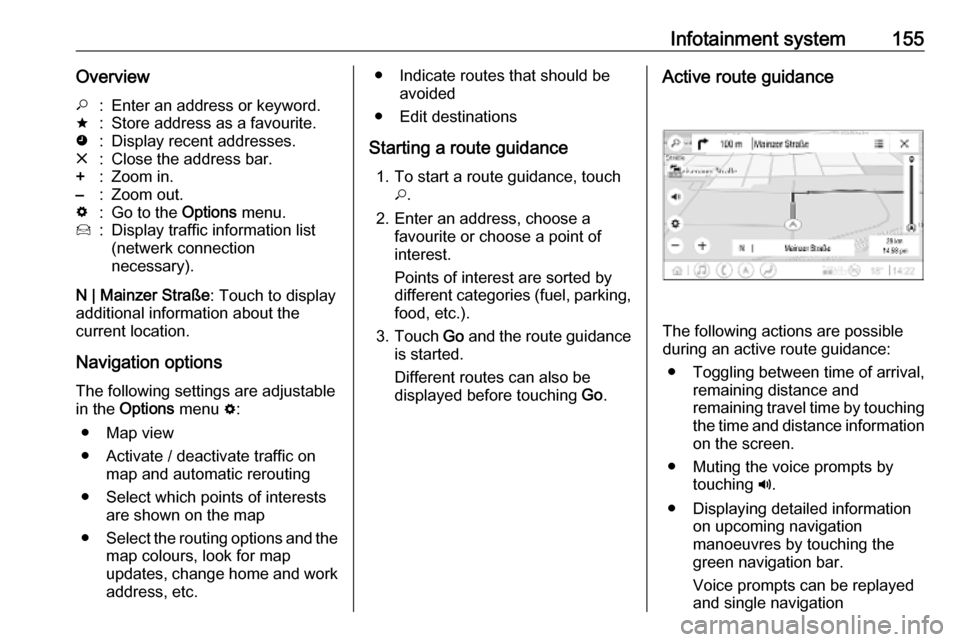
Infotainment system155Overview*:Enter an address or keyword.;:Store address as a favourite.':Display recent addresses.&:Close the address bar.+:Zoom in.–:Zoom out.%:Go to the Options menu.7:Display traffic information list
(netwerk connection
necessary).
N | Mainzer Straße : Touch to display
additional information about the
current location.
Navigation optionsThe following settings are adjustable
in the Options menu %:
● Map view
● Activate / deactivate traffic on map and automatic rerouting
● Select which points of interests are shown on the map
● Select the routing options and the
map colours, look for map
updates, change home and work
address, etc.
● Indicate routes that should be avoided
● Edit destinations
Starting a route guidance 1. To start a route guidance, touch *.
2. Enter an address, choose a favourite or choose a point of
interest.
Points of interest are sorted by
different categories (fuel, parking,
food, etc.).
3. Touch Go and the route guidance
is started.
Different routes can also be
displayed before touching Go.Active route guidance
The following actions are possible
during an active route guidance:
● Toggling between time of arrival, remaining distance and
remaining travel time by touching
the time and distance information on the screen.
● Muting the voice prompts by touching ?.
● Displaying detailed information on upcoming navigation
manoeuvres by touching the
green navigation bar.
Voice prompts can be replayed
and single navigation
Page 158 of 345

156Infotainment systemmanoeuvres can be deleted bytouching /. The route will be
recalculated.
Stopping a route guidance To stop an active route guidance,touch & next to the green navigation
bar.
Connected navigation
The connected navigation function
includes live traffic information,
personalised search and routing,
predictive navigation as well as
parking and fuel price information.
Live traffic The connected navigation function
indicates real-time traffic information
like traffic jams and road works. To
display the traffic information list,
touch 7 on the navigation screen.
Traffic information along the route
and nearby will be displayed as a list.
On the navigation screen, road works
will be indicated by road signs and
traffic density will be indicated by
orange and red roads. Traffic densitywill also be indicated when the traffic
information list is empty due to no
incidents like road works or accidents.
Notice
Using the connected navigation
function consumes OnStar data or
mobile data. Additional costs could
emerge.
Network connection
To use the connected navigation
function, a network connection is
necessary. OnStar or a mobile
hotspot, e.g. mobile phone, can be
used.
When connected to a hotspot, the Wi-
Fi symbol will appear in the bottom
bar. If a mobile phone is connected
via Bluetooth, the Wi-Fi symbol will
only appear for a few seconds but the Wi-Fi symbol will appear in the
extended status view.
Connected navigation will be
indicated by the word LIVE on the
traffic symbol 7 on the navigation
screen.Notice
When no traffic information are
available although LIVE is indicated
on the traffic symbol 7, the network
connection might be interrupted.
Wait some minutes until the network
connection is built up again.
Personalised search and routing
The connected navigation function
includes personalised search and
routing. The system learns the
driver's pattern and suggests routes
and points of interest that fit the
driver's individual needs and
interests.
Predictive navigation
Predictive navigation is a
personalised and increasingly useful
function that detects common
destinations like home and work.
Additionally, the predictive navigation function understands the driver's
patterns and uses historical driving
and traffic data to predict usual traffic
conditions.