open VAUXHALL INSIGNIA 2019 Service Manual
[x] Cancel search | Manufacturer: VAUXHALL, Model Year: 2019, Model line: INSIGNIA, Model: VAUXHALL INSIGNIA 2019Pages: 345, PDF Size: 9.61 MB
Page 142 of 345
140LightingInterior lights
During entry and exit of the vehicle,
the front and rear courtesy lights
automatically switch on and then off
after a delay.
Notice
In the event of an accident with airbag deployment the courtesy
lights are turned on automatically.
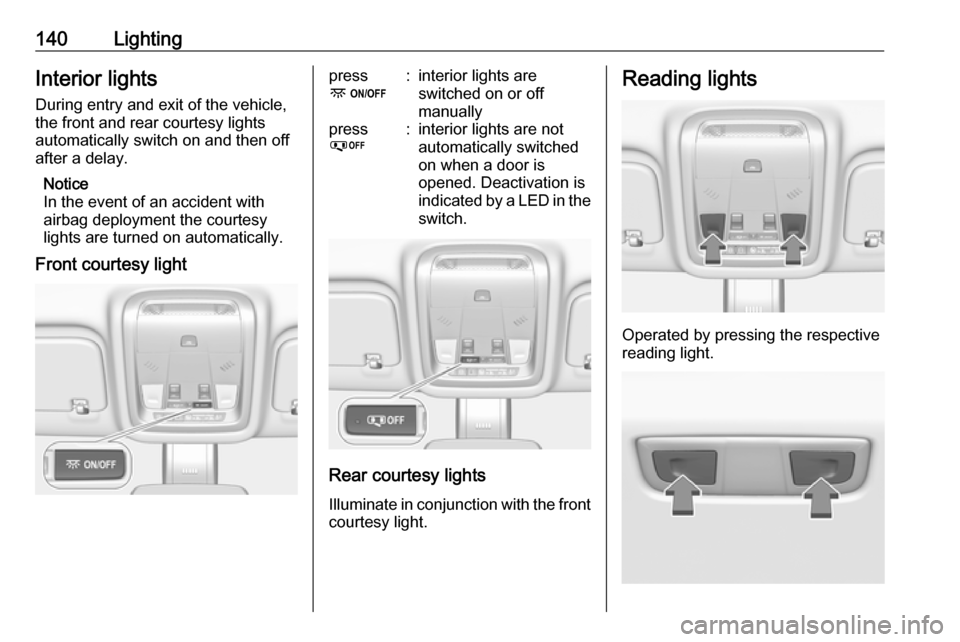
Front courtesy lightpress
-:interior lights are
switched on or off
manuallypress
%:interior lights are not
automatically switched
on when a door is
opened. Deactivation is
indicated by a LED in the switch.
Rear courtesy lights
Illuminate in conjunction with the front courtesy light.
Reading lights
Operated by pressing the respective
reading light.
Page 143 of 345

Lighting141Illustration shows rear reading light.Sunvisor lights
Illuminates when the cover is opened.Lighting features
Centre console lighting Spotlight incorporated in the interiorlighting comes on when headlights
are switched on.
Entry lighting
Welcome lighting
The following lights are switched on
for a short time by unlocking the
vehicle with the electronic key:
● headlights
● puddle lights in both outside mirrors
● tail lights
● number plate lights
● instrument panel light
● interior lights
Some functions are only operable
when it is dark outside to facilitate locating the vehicle.
The lighting switches off immediately
when the ignition is switched on.
Starting off 3 17.This function can be activated or
deactivated in the vehicle
personalisation.
Select the relevant setting in Settings,
I Vehicle in the Info-Display.
Info-Display 3 117.
Vehicle personalisation 3 123.
The settings can be saved for the key being used 3 24.
The following lights will additionally
switch on when the driver's door is opened:
● illumination of some switches
● Driver Information Centre
● door pocket lights
Exit lighting
The following lights will switch on
when the ignition is switched off:
● interior lights
● instrument panel light
● puddle lights in both outside mirrors
Page 144 of 345

142LightingThey will switch off automatically after
a delay. This function works only in
the dark. Theatre lighting is activated
if the driver's door is opened during
this time.
Path lighting Headlights, tail lights and number
plate lights illuminate the surrounding
area for an adjustable time after
leaving the vehicle.
ActivatingHalogen headlights
1. Switch off the ignition.
2. Open the driver's door.
3. Pull the turn signal lever.
4. Close the driver's door.
If the driver's door is not closed, the
lights switch off after two minutes.
Exit lighting is switched off
immediately if the turn signal lever is pulled while the driver's door is open.LED headlights
Path lighting is activated, when the
ignition is switched off and the driver's door is opened.
This function can be activated or
deactivated in the vehicle
personalisation.
Select the relevant setting in Settings,
I Vehicle in the Info-Display.
Info-Display 3 117.
Vehicle personalisation 3 123.
The settings can be saved for the key being used 3 24.
Battery discharge protection
Vehicle battery state of charge
function
The function guarantees longest
vehicle battery life via a generator
with controllable power output and
optimised power distribution.
To prevent discharge of the vehicle
battery when driving, the following
systems are reduced automatically in two stages and finally switched off:
● auxiliary heater
● heated rear and front window
● heated steering wheel
● heated mirrors
● heated seats
● fan
In the second stage, a message
which confirms the activation of the
vehicle battery discharge protection
will be displayed in the Driver
Information Centre.
Page 149 of 345
Infotainment system147●OnStar Services : Display the
OnStar Services screen if
available.
● Wi-Fi Hotspot : Display the Wi-Fi
hotspot settings if available.
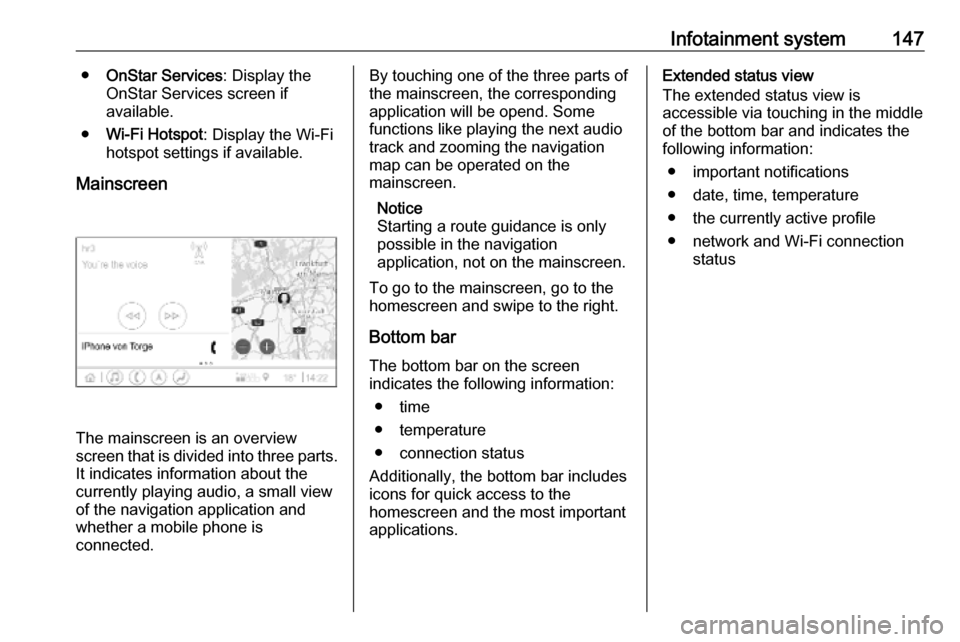
Mainscreen
The mainscreen is an overview
screen that is divided into three parts.
It indicates information about the
currently playing audio, a small view
of the navigation application and
whether a mobile phone is
connected.
By touching one of the three parts of the mainscreen, the corresponding
application will be opend. Some
functions like playing the next audio
track and zooming the navigation
map can be operated on the
mainscreen.
Notice
Starting a route guidance is only possible in the navigation
application, not on the mainscreen.
To go to the mainscreen, go to the
homescreen and swipe to the right.
Bottom bar The bottom bar on the screen
indicates the following information:
● time
● temperature
● connection status
Additionally, the bottom bar includes
icons for quick access to the
homescreen and the most important
applications.Extended status view
The extended status view is
accessible via touching in the middle
of the bottom bar and indicates the
following information:
● important notifications
● date, time, temperature
● the currently active profile
● network and Wi-Fi connection status
Page 152 of 345

150Infotainment systemReturning to the homescreen
To return to the homescreen,
touch ;.
Wi-Fi connection
The Infotainment system can be
connected to a Wi-Fi network, e.g. the hotspot of a mobile phone, or activate
an own Wi-Fi hotspot if OnStar is
available.
Connecting to a Wi-Fi network
To connect to a Wi-Fi network, go to
the homescreen and select Settings.
Then go to the System tab and select
Wi-Fi Networks .
A list of all available Wi-Fi networks is displayed. After choosing a Wi-Fi
network, it might be necessary to log
in by entering a corresponding
password on the Info Display. In this
case, a corresponding window will
pop up.Activating the Wi-Fi hotspot
If OnStar is available, a Wi-Fi hotspot
can be activated. There are two ways
to go to the Wi-Fi hotspot menu:
● Go to the homescreen and select
the Wi-Fi Hotspot icon.
● Go to the homescreen and select
Settings . Then go to the System
tab and select Wi-Fi Hotspot.
In the Wi-Fi Hotspot menu, the Wi-Fi
hotspot can be activated or deactivated and the name and the
password of the Wi-Fi hotspot can be changed. Also the connected devicesare indicated.
System settings To go to the system settings menu, go
to the homescreen and select
Settings . The settings are divided into
System and Apps .
The following settings can be
changed under System:
● Time/Date
● Language
● Phones : Display connected / not
connected phones or add a
phone.● Wi-Fi Networks : Connect to an
available Wi-Fi network.
● Wi-Fi Hotspot : Activate /
deactivate Wi-Fi services and display name, password and
connected devices.
● Display : Select display mode,
calibrate touchscreen and turn
display off.
● Privacy : Activate / deactivate
location services and data
services.
● Sounds : Set maximum startup
volume, activate / deactivate audio cues and audible touch
feedback.
● Voice : Set prompt lenght, audio
feedback speed and activate /
deactivate tutorial mode.
● Favourites : Manage favourites
and set number of audio
favourites.
● About : Display information about
open soure software and device registration.
Page 159 of 345

Infotainment system157The predictive navigation function
can be activated or deactivated in the
Settings menu. To go to the Settings
menu, go to the Options menu % on
the navigation screen and select
Settings .
Parking information and fuel
prices
The connected navigation function
indicates parking and fuel price
information. When the vehicle is
reaching a densely populated
destination, and if the system
determines that parking may be
limited then it will attempt to display nearby parking destinations with price
information if available. The function
also indicates real-time fuel prices if
available.
To display the parking and fuel prices
as well as opening hours and
telephone numbers, if available,
touch the point of interest on the map or see the results of the points of
interest search.Online map updates
The navigation map can be updated
when a new version is available. The
updates are also based on the driver's driving patterns by considering
updates of typically driven places.
To update the navigation map, a
network connection is necessary.
Whether the map content is up to
date, is indicated in the Settings menu
in the Options menu %. If desired,
automatic map updates can be
activated. Additionally, a message
will be displayed if the update
exceeds 250 MB.Speech recognition
General information
Embedded speech recognition
This application is only applicable to
Multimedia Navi Pro.
The embedded speech recognition of the Infotainment system enables
operation of various functions of the
Infotainment system via voice input. It
recognises commands and numeric
sequences. The commands and
numeric sequences can be spoken
without a voice pause between the
individual words.
In the event of incorrect operation or
commands, the speech recognition
gives visual and / or acoustic
feedback and requests to re-enter the desired command. Apart from this,
the speech recognition
acknowledges important commands
and will enquire if necessary.
In general, there are different ways to
speak commands for performing the
desired actions.
Page 163 of 345

Infotainment system161Bluetooth connection
Pairing a phone To pair a mobile phone, proceed asfollows:
1. Enable Bluetooth on the mobile phone and ensure it is visible for
other devices.
2. In the phone menu on the Info Display, select the Phones tab.
3. If no phone is paired yet, touch Connect Phone .
4. Touch Add Phone .
5. Select the Infotainment system from the Bluetooth device list on
the mobile phone.
6. Compare and confirm the shown code on the mobile phone and on
the Info Display. Touch Pair on the
Info Display.
Some mobile phones require
access to certain phone features, follow the instructions.
Once the mobile phone is
successfully paired, it will be
connected automatically and shown
as Connected .Connecting
If several paired mobile phones enter
the range of the system at the same
time:
● only the phone first detected by the system will be connected
automatically or
● the mobile phone assigned as First to Connect is connected
automatically or
● Secondary Phone is enabled and
two phones are allowed to
connect at the same time
First to Connect
Assign a phone as First to Connect:
1. In the phone menu on the Info Display, select Phones.
2. Touch / next to the paired mobile
phone to open the settings menu.
3. Enable First to Connect .
Secondary Phone
It is possible to connect a second mobile phone alongside the primary
phone to the system.Allow two phones to connect at the
same time via Bluetooth:
1. In the phone menu on the Info Display, select Phones.
2. Touch / next to the paired mobile
phone to open the settings menu.
3. Enable Secondary Phone .
The phone that has been connected
first will automatically be assigned as
primary phone. The primary phone is
able to operate outgoing calls and to
receive incoming calls. It also
provides access to its contact list.
The secondary phone is only able to
receive incoming calls via the
Infotainment system. However, it is
possible to operate an outgoing call
via the secondary mobile phone itself,
but using the vehicle's microphone.
Switching mobile phone
assignment
It is possible to switch the phone
assignment of the mobile phones
from either primary to secondary
phone or vice versa.
Page 164 of 345

162Infotainment systemPrecondition is that Secondary
Phone is enabled for both mobile
phones.
To switch the mobile phone
assignment:
1. In the phone menu on the Info Display, select Phones.
2. Touch on the respective mobile phone.
3. The mobile phone assignment changes from either primary to
secondary phone or vice versa.
When First to Connect is enabled for
one mobile phone, this phone will
automatically be connected as
primary phone.
Disconnecting a connected
mobile phone
1. In the phone menu on the Info Display, select Phones.
2. Touch / next to the paired mobile
phone to open the settings menu.
3. Touch Disconnect .Deleting a paired mobile phone
1. In the phone menu on the Info Display, select Phones.
2. Touch / next to the paired mobile
phone to open the settings menu.
3. Touch Forget Phone .
Using smartphone applications
The phone projection applications
Apple CarPlay and Android Auto
display selected applications from a
smartphone on the Infotainment
screen and allow their operation
directly via the Infotainment controls.
Check with the device's manufacturer if this function is compatible with your
smartphone and if this application is
available in the country you are in.
Preparing the smartphone Android phone: Download the
Android Auto application to the
smartphone from the Google Play
Store.
iPhone ®
: Make sure Siri ®
is activated
on the smartphone.Activating phone projection in the
settings menu
Press ;, select Settings on the
homescreen and go to Apps.
Scroll through the list and select
Apple CarPlay or Android Auto .
Make sure the respective application is activated.
Connecting the mobile phone
Connect the smartphone to the USB
port via an original cable provided by
the manufacturer of the smartphone.
Returning to the Infotainment
screen
Press ;.
Page 167 of 345
Climate control165● Open side air vents as requiredand direct them towards the doorwindows.
● For maximum demisting and defrosting set fan speed to
highest level.
Notice
If á is pressed while the engine is
running, an Autostop will be inhibited
until á is pressed again.
If á is pressed while the engine is in
an Autostop, the engine will restart
automatically.
Stop-start system 3 180.
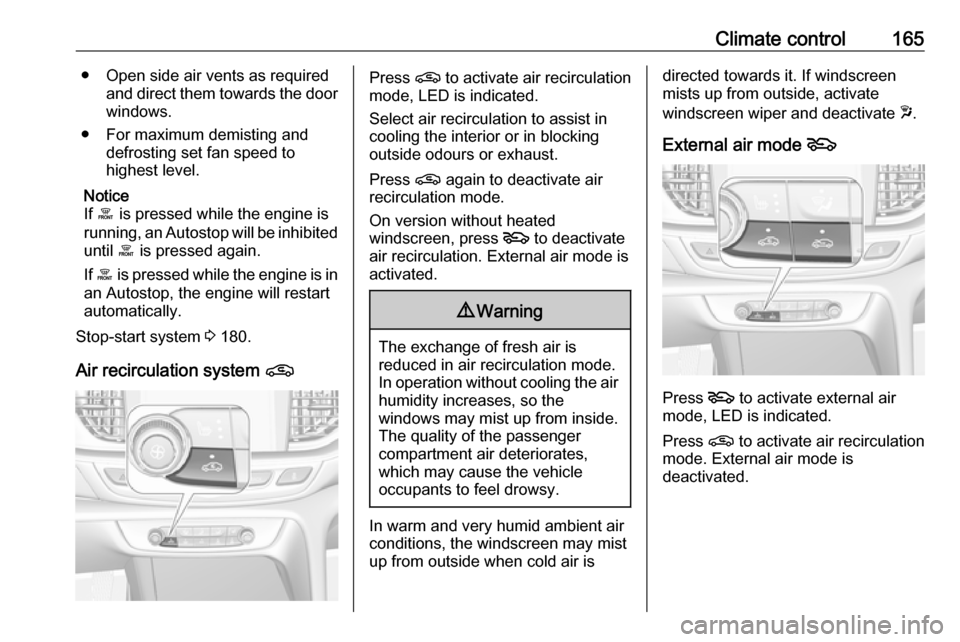
Air recirculation system nPress n to activate air recirculation
mode, LED is indicated.
Select air recirculation to assist in
cooling the interior or in blocking
outside odours or exhaust.
Press n again to deactivate air
recirculation mode.
On version without heated
windscreen, press 5 to deactivate
air recirculation. External air mode is activated.9 Warning
The exchange of fresh air is
reduced in air recirculation mode.
In operation without cooling the air humidity increases, so the
windows may mist up from inside.
The quality of the passenger
compartment air deteriorates,
which may cause the vehicle
occupants to feel drowsy.
In warm and very humid ambient air conditions, the windscreen may mist
up from outside when cold air is
directed towards it. If windscreen
mists up from outside, activate
windscreen wiper and deactivate w.
External air mode 5
Press 5 to activate external air
mode, LED is indicated.
Press n to activate air recirculation
mode. External air mode is
deactivated.
Page 168 of 345
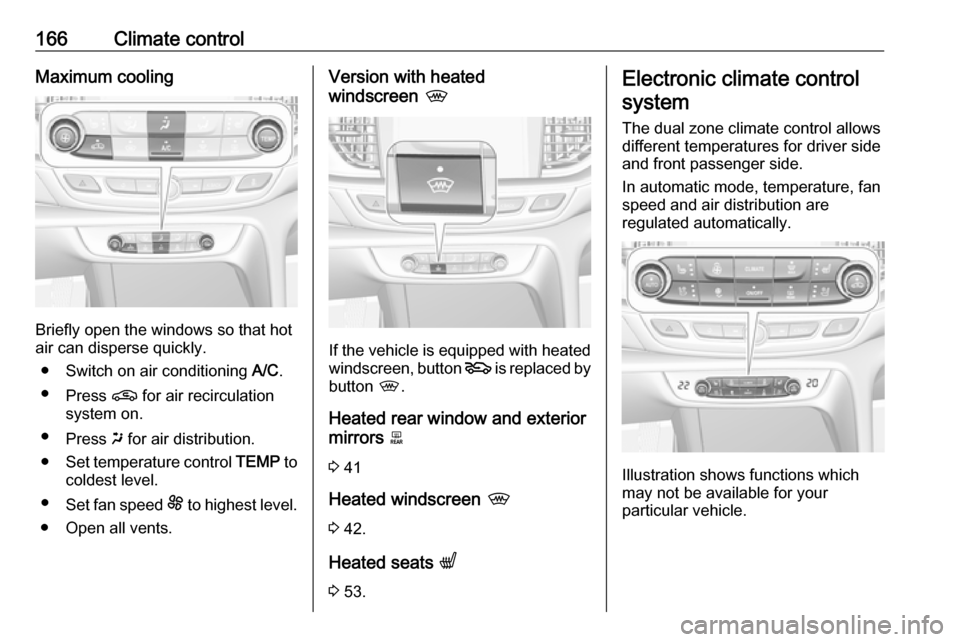
166Climate controlMaximum cooling
Briefly open the windows so that hot
air can disperse quickly.
● Switch on air conditioning A/C.
● Press n for air recirculation
system on.
● Press x for air distribution.
● Set temperature control TEMP to
coldest level.
● Set fan speed E to highest level.
● Open all vents.
Version with heated
windscreen ,
If the vehicle is equipped with heated
windscreen, button 5 is replaced by
button ,.
Heated rear window and exterior mirrors b
3 41
Heated windscreen ,
3 42.
Heated seats q
3 53.
Electronic climate control
system
The dual zone climate control allows
different temperatures for driver side
and front passenger side.
In automatic mode, temperature, fan
speed and air distribution are
regulated automatically.
Illustration shows functions which
may not be available for your
particular vehicle.