tow VAUXHALL INSIGNIA 2020 User Guide
[x] Cancel search | Manufacturer: VAUXHALL, Model Year: 2020, Model line: INSIGNIA, Model: VAUXHALL INSIGNIA 2020Pages: 313, PDF Size: 9.32 MB
Page 116 of 313
114Instruments and controlsLane keep assist 3 217.
AdBlue Level
Displays the level of the AdBlue tank
3 161.
Eco information menu, @
● Top Consumers
● Economy Trend
● ECO Index
On Uplevel display the pages Top
Consumers , Economy Trend and
ECO Index are displayed in the Info
Menu, see above.
Top Consumers
List of top comfort consumers
currently switched on is displayed in
descending order. Fuel saving
potential is indicated.
During sporadic driving conditions,
the engine will activate the heated
rear window automatically to increase
the engine load. In this event, the
heated rear window is indicated as
one of the top consumers, without
activation by the driver.Economy Trend
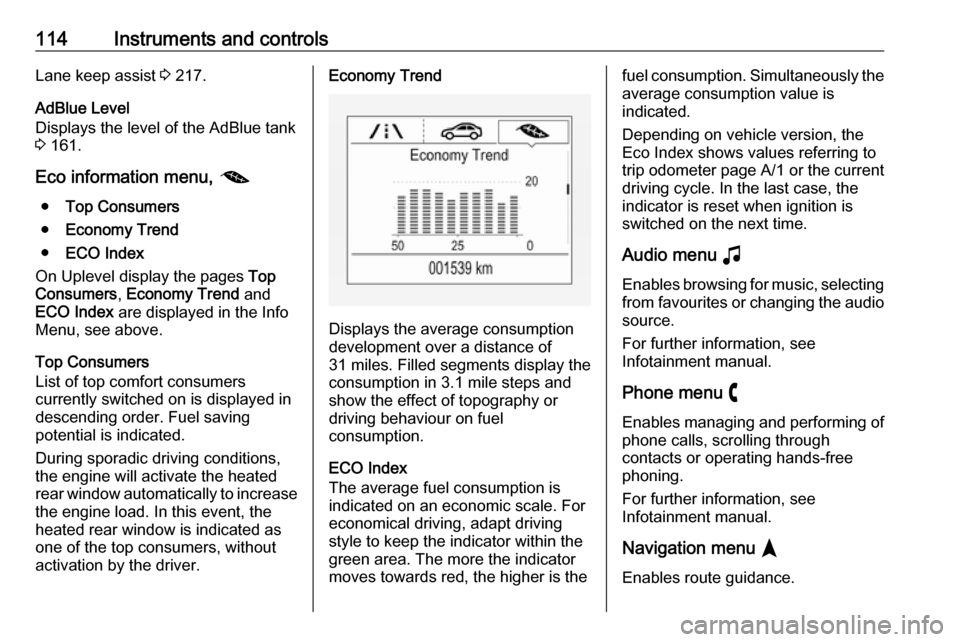
Displays the average consumption
development over a distance of
31 miles. Filled segments display the
consumption in 3.1 mile steps and
show the effect of topography or
driving behaviour on fuel
consumption.
ECO Index
The average fuel consumption is indicated on an economic scale. For
economical driving, adapt driving
style to keep the indicator within the
green area. The more the indicator
moves towards red, the higher is the
fuel consumption. Simultaneously the
average consumption value is
indicated.
Depending on vehicle version, the
Eco Index shows values referring to
trip odometer page A/1 or the current
driving cycle. In the last case, the
indicator is reset when ignition is
switched on the next time.
Audio menu G
Enables browsing for music, selecting
from favourites or changing the audio source.
For further information, see
Infotainment manual.
Phone menu $
Enables managing and performing of
phone calls, scrolling through
contacts or operating hands-free
phoning.
For further information, see
Infotainment manual.
Navigation menu §
Enables route guidance.
Page 120 of 313
118Instruments and controlsThe information appears as an image
projected from a lense in the
instrument panel onto the windscreen
directly ahead in driver's view. The
image appears focused out toward
the front of the vehicle.
Depending on the equipment head-
up display can indicate:
● general driving information
● alerts from driver assistance systems
● automatic transmission selector lever position
● gear shift indication
● audio / phone information
● turn-by-turn navigation information if equipped with
navigation Infotainment.
There are three controls above the
light switch to operate the head-up
display.
Switching on
Lift up button & briefly.
Display views
Different views are selectable in the
head-up display by pressing /
button. Each press will change the
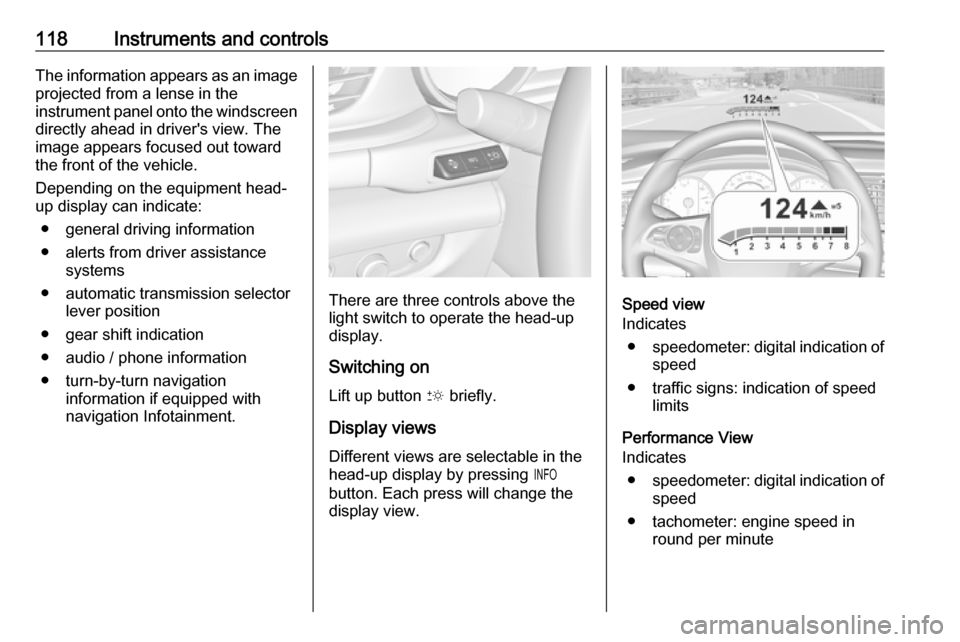
display view.Speed view
Indicates
● speedometer: digital indication of
speed
● traffic signs: indication of speed limits
Performance View
Indicates
● speedometer: digital indication of
speed
● tachometer: engine speed in round per minute
Page 134 of 313

132LightingEvery time the ignition is switched on,
f flashes for approx. 4 seconds as a
reminder.
To deactivate, use the same
procedure as described above. f will
not flash when function is deactivated.
Control indicator f 3 109.
Daytime running lights Daytime running lights increase
visibility of the vehicle during daylight.
They are switched on automatically
during daytime when engine is
running.
The system switches between
daytime running lights and headlights
automatically, depending on the
lighting conditions.
Automatic light control 3 129.
LED headlights
LED headlight system contains a
variety of particular LEDs in each
headlight which enables the control of different lighting programmes.Light distribution and intensity of light
are variably triggered depending on the lighting conditions, road type and
driving situation. The vehicle adapts
the headlights automatically to the
situation to enable optimal light
performance for the driver.
Some functions of the LED headlights
can be deactivated or activated in the vehicle personalisation menu. Select
the relevant setting in Settings I
Vehicle in the Info Display.
Vehicle personalisation 3 122.
The following lighting functions are
available with light switch in position
AUTO or 9.
Town light
Activated automatically at a speed up to approx. 31 mph. The beam is
shaped broadly and designed to
avoid glare of other road users.
Country light
Activated automatically at a speed
above approx. 31 mph. The
illumination of the current lane and
the side of the road is improved. Oncoming and preceding vehicles
are not dazzled.
Curve light
Particular LEDs, based on steering
angle and speed, are additionally
triggered to improve lighting in
curves. This function is activated at
speeds from 25 mph to 43 mph. High
beam increases the intensity of the
curve lighting.
Page 136 of 313

134LightingTurn lightslever up:right turn lightlever down:left turn light
A resistance point can be felt when
moving the lever.
Constant flashing is activated when
the lever is being moved beyond the
resistance point. It is deactivated
when the steering wheel is moved in
the opposite direction or lever is
manually moved back to its neutral
position.
Activate temporary flashing by
holding the lever just before the
resistance point. Turn lights will flash
until lever is being released.
To activate three flashes, tap the
lever briefly without passing the
resistance point. With a trailer
connected, the turn light flashes
six times and tone frequency
changes.
Front fog lights
Operated by pressing >.
Light switch in position AUTO:
switching on front fog lights will switch headlights on automatically.
Rear fog light
Operated by pressing ø.
Light switch in position AUTO:
switching on rear fog light will switch
headlights on automatically.
Light switch in position 8: rear fog
light can only be switched on with
front fog lights.
The vehicle rear fog light is
deactivated when towing a trailer or a
plug is connected with the socket, e.
g. when a bicycle carrier is used.
Page 142 of 313

140Climate controlAir distribution ",x and y
Press:":to windscreen and front door
windowsx:to head area and rear seats via
adjustable air ventsy:to front and rear foot well and
windscreen
Combinations are possible.
Air conditioning A/C
Press A/C to switch on cooling.
Activation is indicated by the LED in
the button. Cooling is only functional
when the engine is running and
climate control fan is switched on.
Press A/C again to switch off cooling.
The air conditioning system cools and
dehumidifies (dries) as soon as the
outside temperature is slightly above the freezing point. Therefore
condensation may form and drip from under the vehicle.
If no cooling or drying is required,
switch off the cooling system for fuel
saving reasons.
Activated cooling may inhibit
Autostops.
Stop-start system 3 156.
Demisting and defrosting the
windows á● Press á: fan automatically
switches to higher speed, the air
distribution is directed towards
the windscreen.
● Set temperature controller TEMP to warmest level.
● Switch on air conditioning A/C if
required.
● Switch on heated rear window b.
● Switch on heated windscreen , if available.
● Open side air vents as required and direct them towards the doorwindows.
● For maximum demisting and defrosting set fan speed to
highest level.
Notice
If á is pressed while the engine is
running, an Autostop will be inhibited until á is pressed again.
If á is pressed while the engine is in
an Autostop, the engine will restart
automatically.
Stop-start system 3 156.
Page 143 of 313

Climate control141Air recirculation system n
Press n to activate air recirculation
mode, LED is indicated.
Select air recirculation to assist in
cooling the interior or in blocking
outside odours or exhaust.
Press n again to deactivate air
recirculation mode.
On version without heated
windscreen, press ( to deactivate
air recirculation. External air mode is
activated.
9 Warning
The exchange of fresh air is
reduced in air recirculation mode.
In operation without cooling the air humidity increases, so the
windows may mist up from inside.
The quality of the passenger
compartment air deteriorates,
which may cause the vehicle
occupants to feel drowsy.
In warm and very humid ambient air conditions, the windscreen may mist
up from outside when cold air is
directed towards it. If windscreen
mists up from outside, activate
windscreen wiper and deactivate w.
External air mode (
Press (to activate external air
mode, LED is indicated.
Press n to activate air recirculation
mode. External air mode is
deactivated.
Page 148 of 313

146Climate controlManual air recirculation n
Press n to activate the air
recirculation mode. The LED in the
button illuminates to indicate
activation.
Press n again to deactivate
recirculation mode.
9 Warning
The exchange of fresh air is
reduced in air recirculation mode.
In operation without cooling the air
humidity increases, so the
windows may mist up from inside.
The quality of the passenger
compartment air deteriorates,
which may cause the vehicle
occupants to feel drowsy.
In warm and very humid ambient air conditions, the windscreen may mist
up from outside, when cold air is
directed towards it. If windscreen
mists up from outside, activate
windscreen wiper and deactivate w.
Automatic air recirculation
An air humidity sensor switches
automatically to external air if internal air humidity is too high.
Demisting and defrosting the
windows à
● Press à. The LED in the button
illuminates to indicate activation.
● Temperature and air distribution are set automatically and the fan
runs at high speed.
● Activate air condition: Press CLIMATE to show climate control
menu in the Info Display, then
select A/C.
● Switch on heated rear window b.
Page 152 of 313

150Driving and operatingDriving and
operatingDriving hints ............................... 151
Control of the vehicle ...............151
Steering ................................... 151
Starting and operating ...............151
New vehicle running-in ............151
Ignition switch positions ...........151
Power button ........................... 152
Retained power off ..................154
Starting the engine ..................154
Overrun cut-off ........................ 156
Stop-start system ....................156
Parking .................................... 158
Engine exhaust .......................... 159
Exhaust filter ............................ 159
Catalytic converter ...................161
AdBlue ..................................... 161
Automatic transmission ..............164
Transmission display ...............164
Gear selection ......................... 164
Manual mode ........................... 165
Electronic driving programmes 166
Fault ........................................ 167
Interruption of power supply ....167Manual transmission ..................168
Drive systems ............................ 169
All-wheel drive ......................... 169
Brakes ........................................ 169
Antilock brake system .............169
Parking brake .......................... 170
Brake assist ............................. 172
Hill start assist ......................... 172
Ride control systems .................173
Traction Control system ..........173
Electronic Stability Control ......174
Interactive driving system ........175
Driver assistance systems .........177
Cruise control .......................... 177
Speed limiter ........................... 179
Adaptive cruise control ............180
Forward collision alert .............189
Following distance indication ...192
Active emergency braking .......193
Front pedestrian protection .....196
Parking assist .......................... 198
Side blind spot alert .................205
Lane change alert ....................206
Panoramic view system ...........208
Rear view camera ...................210
Rear cross traffic alert .............212
Traffic sign assistant ................213
Lane keep assist .....................217Fuel............................................ 220
Fuel for petrol engines .............220
Fuel for diesel engines ............221
Refuelling ................................ 222
Trailer hitch ................................ 224
General information .................224
Driving characteristics and towing tips .............................. 224
Trailer towing ........................... 224
Towing equipment ...................225
Trailer stability assist ...............227
Page 154 of 313

152Driving and operating0:ignition off: Some functions
remain active until key is
removed or driver's door is
opened, provided the ignition was
on previously1:accessory power mode: Steering wheel lock released, some
electrical functions are operable,
ignition is off2:ignition on power mode: Ignition
is on, diesel engine is preheating.
Control indicators illuminate and
most electrical functions are
operable. To turn the key from
position 2 to 1 or 0, first push the
key all the way in towards the steering column.3:engine start: Release key after
starting procedure begins
Steering wheel lock
Remove key from ignition switch and
turn steering wheel until it engages.
9 Danger
Never remove the key from
ignition switch during driving as
this will cause steering wheel lock.
Power button
Electronic key must be inside the
vehicle.
Accessory power mode
Press Engine Start/Stop once without
operating clutch or brake pedal. The yellow LED in the button illuminates.
Steering wheel lock is released and
some electrical functions are
operable, ignition is off.Ignition on power mode
Press and hold Engine Start/Stop for
six seconds without operating clutch
or brake pedal. The green LED in the button illuminates, diesel engine is
Page 155 of 313

Driving and operating153preheating. Control indicators
illuminate and most electrical
functions are operable.Engine start
Press Engine Start/Stop briefly while:
● manual transmission: operating clutch pedal,
● automatic transmission: operating brake pedal with
selector lever in P or N.
Starting the engine 3 154.Ignition off
Press Engine Start/Stop briefly when
Autostop is activated or when engine is running and vehicle is stationary.
Automatic transmission: apply the
parking brake and engage P.
Press Engine Start/Stop briefly
without operating clutch or brake pedal when in ignition on power
mode.
Some functions remain active until
driver's door is opened, provided the
ignition was on previously.Emergency engine shut off during
driving
Press Engine Start/Stop for more
than 2 seconds or press twice briefly
within 5 seconds 3 154.
Steering wheel lock The steering wheel lock activates
automatically when:
● The vehicle is stationary.
● The ignition has been switched off.
● The driver's door is opened.
To release steering wheel lock, open
and close driver's door and switch on accessory mode or start the engine
directly.9 Warning
If the vehicle battery is discharged,
the vehicle must not be towed,
tow-started or jump-started as the
steering wheel lock cannot be
disengaged.
Operation on vehicles with
electronic key system in case of
failure
If either the electronic key fails or the
battery of the electronic key is weak,
the Driver Information Centre may
display No Remote Detected or
Replace Battery in Remote Key when
you try to start the vehicle.
Open the cover of the centre console
in front of the selector lever. Place the
electronic key across with buttons
upside in the transmitter pocket
beside the power outlet, as shown in
the illustration.