wheel VAUXHALL INSIGNIA 2020 Owner's Guide
[x] Cancel search | Manufacturer: VAUXHALL, Model Year: 2020, Model line: INSIGNIA, Model: VAUXHALL INSIGNIA 2020Pages: 313, PDF Size: 9.32 MB
Page 113 of 313
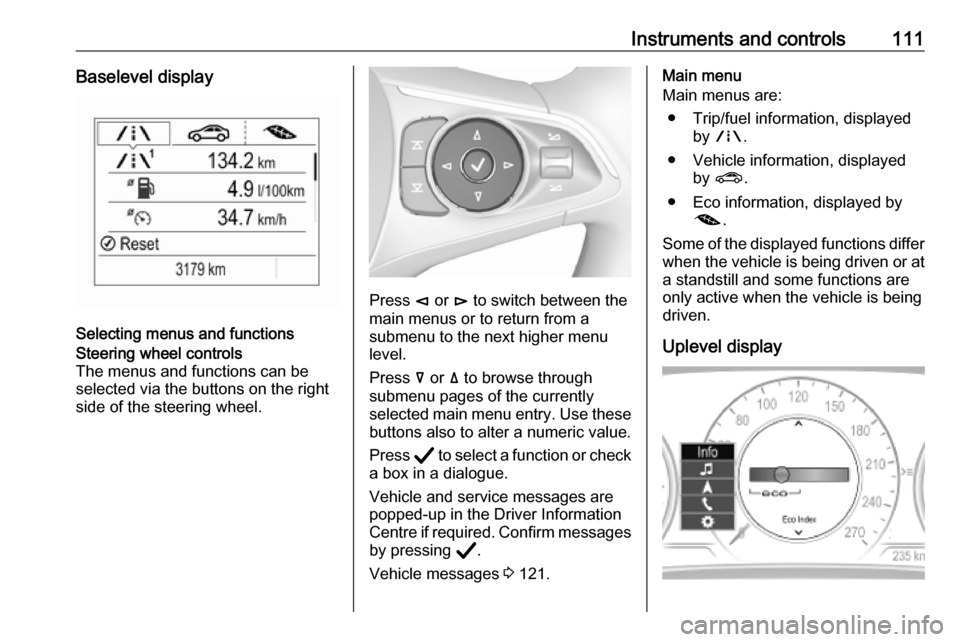
Instruments and controls111Baselevel display
Selecting menus and functions
Steering wheel controls
The menus and functions can be selected via the buttons on the right
side of the steering wheel.
Press è or é to switch between the
main menus or to return from a
submenu to the next higher menu
level.
Press å or ä to browse through
submenu pages of the currently
selected main menu entry. Use these
buttons also to alter a numeric value.
Press Å to select a function or check
a box in a dialogue.
Vehicle and service messages are
popped-up in the Driver Information
Centre if required. Confirm messages by pressing Å.
Vehicle messages 3 121.
Main menu
Main menus are:
● Trip/fuel information, displayed by ; .
● Vehicle information, displayed by ? .
● Eco information, displayed by @ .
Some of the displayed functions differ
when the vehicle is being driven or at
a standstill and some functions are
only active when the vehicle is being
driven.
Uplevel display
Page 114 of 313

112Instruments and controlsSelecting menus and functions
The menus and functions can be
selected via the buttons on the right
side of the steering wheel.
Press è to open main menu page.
Browse through main menu by
pressing è or é.
Confirm a main menu page with Å.
Press å or ä to browse through
submenu pages of the currently
selected main menu entry. Use these
buttons also to alter a numeric value.
Press Å to select a function or check
a box in a dialogue.
Vehicle and service messages are
popped-up in the Driver Information
Centre if required. Confirm messages by pressing Å.
Vehicle messages 3 121.
Main menu
Main menus are:
● Trip / fuel information, displayed by Info .
● Audio information, displayed by Audio .
● Navigation information, displayed by Navigation.
● Phone information, displayed by Phone .
● Vehicle information, displayed by
Options .
Some of the displayed functions differ
when the vehicle is being driven or at
a standstill and some functions are
only active when the vehicle is being
driven.
Uplevel instrument cluster can be
displayed as Sport mode or Tour
mode. See Options menu, Display.Info Menu, ; or "
The following list contains all possible Info Menu pages. Some may not be
available for your particular vehicle.
Depending on the display some
functions are symbolised.
● Speed
● Trip 1 / Trip A , containing:
Distance
Fuel Economy / Average Fuel
Economy
Average Speed
● Trip 2 / Trip B , containing:
Distance
Fuel Economy / Average Fuel
Economy
Average Speed
● Fuel / Fuel Information ,
containing:
Fuel Range
Instant Fuel Economy
● Oil Life
● Tyre Pressure
● Timer
● Traffic Sign Memory
Page 115 of 313

Instruments and controls113●Following Distance
● Driver Assistance
● Top Consumers
● Economy Trend
● ECO Index
● AdBlue Level
On Baselevel display, the pages Oil
Life , Tyre Pressure , Following
Distance , Traffic Sign Memory ,
AdBlue Level , Tyre Load and Speed
Warning are displayed in the Vehicle
information menu, select ?.
Speed
Digital display of the instantaneous
speed.
Trip 1/A or 2/B
Two independent pages 1/A and 2/B
display the current distance, average
fuel consumption and average speed
since a certain reset.
The distance indicator counts up to a
distance of 9,999 miles then restarts
at 0.
To reset on Baselevel, press Å and
confirm reset. On Uplevel display,
press é and confirm with Å. Thisonly resets the values on the current
displayed page. The other Trip page
stays unaffected.
Fuel /Fuel InformationFuel Range
Range is calculated from current fuel
tank level and current consumption.
The display shows average values.
After refuelling, the range is updated
automatically after a brief delay.
When the fuel level in the tank is low,
a message appears on the display
and control indicator Y in the fuel
gauge illuminates.
When the tank must be refuelled
immediately, a warning message
appears and remains on the display.
Additionally, control indicator Y in the
fuel gauge flashes 3 108.Instant Fuel Economy
Display of the instantaneous
consumption.
Oil Life
Indicates an estimate of the oil's
useful life. The number in % means
the remaining of current oil life 3 103.
Tyre Pressure
Checks tyre pressure of all wheels
during driving 3 255.
Timer
Baselevel display: start and stop
timer with Å. To reset, hold Å when
timer is not running.
Uplevel display: To start or stop timer, press Å and Å again. To reset,
press Å, choose Reset and confirm
with Å.
Traffic Sign Memory
Displays the detected traffic signs for
the current route section 3 213.
Following Distance
Displays the distance in seconds to a
preceding moving vehicle 3 192. If
Adaptive cruise control is active this
page shows the following distance
setting instead.
Driver Assistance
Displays the status of several driver
assistance systems:
Adaptive cruise control 3 180.
Forward collision alert 3 189.
Page 122 of 313

120Instruments and controlsThe image can temporarily light up
depending on angel and position of
sunlight.
Adjust rotation Select Options /% in the Driver
Information Center main menu.
Select submenu page
Head-Up Display . Press é on the
steering wheel to open adjustment
dialogue. Press ä or å to turn
projection clockwise or counter-
clockwise. Press è to leave
adjustment dialogue.
Switching off
Hold down & to turn the head-up
display off.
Language Preferred language can be set invehicle personalisation menu 3 122.
Units Units can be changed in the settingsmenu of the Driver Information Centre 3 110.Care of head-up display
Clean the inside of the windscreen as needed to remove any dirt or film that
could reduce the sharpness or clarity
of the head-up image.
Clean the head-up display lens in the
instrument panel with a soft cloth
sprayed with glass cleaner. Wipe the
lens gently, then dry it.
System limitations
Head-up display may not operate
properly when:
● The lens in the instrument panel is covered by objects or
windscreen and lens are not
clean.
● Display brightness is too dim or bright.
● Image is not adjusted to the proper height.
● The driver wears polarised sunglasses.
If the head-up image is not correct for other reasons, contact a workshop.
The windscreen is part of the head-up display system.Windscreen replacement 3 40.
Page 136 of 313

134LightingTurn lightslever up:right turn lightlever down:left turn light
A resistance point can be felt when
moving the lever.
Constant flashing is activated when
the lever is being moved beyond the
resistance point. It is deactivated
when the steering wheel is moved in
the opposite direction or lever is
manually moved back to its neutral
position.
Activate temporary flashing by
holding the lever just before the
resistance point. Turn lights will flash
until lever is being released.
To activate three flashes, tap the
lever briefly without passing the
resistance point. With a trailer
connected, the turn light flashes
six times and tone frequency
changes.
Front fog lights
Operated by pressing >.
Light switch in position AUTO:
switching on front fog lights will switch headlights on automatically.
Rear fog light
Operated by pressing ø.
Light switch in position AUTO:
switching on rear fog light will switch
headlights on automatically.
Light switch in position 8: rear fog
light can only be switched on with
front fog lights.
The vehicle rear fog light is
deactivated when towing a trailer or a
plug is connected with the socket, e.
g. when a bicycle carrier is used.
Page 152 of 313

150Driving and operatingDriving and
operatingDriving hints ............................... 151
Control of the vehicle ...............151
Steering ................................... 151
Starting and operating ...............151
New vehicle running-in ............151
Ignition switch positions ...........151
Power button ........................... 152
Retained power off ..................154
Starting the engine ..................154
Overrun cut-off ........................ 156
Stop-start system ....................156
Parking .................................... 158
Engine exhaust .......................... 159
Exhaust filter ............................ 159
Catalytic converter ...................161
AdBlue ..................................... 161
Automatic transmission ..............164
Transmission display ...............164
Gear selection ......................... 164
Manual mode ........................... 165
Electronic driving programmes 166
Fault ........................................ 167
Interruption of power supply ....167Manual transmission ..................168
Drive systems ............................ 169
All-wheel drive ......................... 169
Brakes ........................................ 169
Antilock brake system .............169
Parking brake .......................... 170
Brake assist ............................. 172
Hill start assist ......................... 172
Ride control systems .................173
Traction Control system ..........173
Electronic Stability Control ......174
Interactive driving system ........175
Driver assistance systems .........177
Cruise control .......................... 177
Speed limiter ........................... 179
Adaptive cruise control ............180
Forward collision alert .............189
Following distance indication ...192
Active emergency braking .......193
Front pedestrian protection .....196
Parking assist .......................... 198
Side blind spot alert .................205
Lane change alert ....................206
Panoramic view system ...........208
Rear view camera ...................210
Rear cross traffic alert .............212
Traffic sign assistant ................213
Lane keep assist .....................217Fuel............................................ 220
Fuel for petrol engines .............220
Fuel for diesel engines ............221
Refuelling ................................ 222
Trailer hitch ................................ 224
General information .................224
Driving characteristics and towing tips .............................. 224
Trailer towing ........................... 224
Towing equipment ...................225
Trailer stability assist ...............227
Page 154 of 313

152Driving and operating0:ignition off: Some functions
remain active until key is
removed or driver's door is
opened, provided the ignition was
on previously1:accessory power mode: Steering wheel lock released, some
electrical functions are operable,
ignition is off2:ignition on power mode: Ignition
is on, diesel engine is preheating.
Control indicators illuminate and
most electrical functions are
operable. To turn the key from
position 2 to 1 or 0, first push the
key all the way in towards the steering column.3:engine start: Release key after
starting procedure begins
Steering wheel lock
Remove key from ignition switch and
turn steering wheel until it engages.
9 Danger
Never remove the key from
ignition switch during driving as
this will cause steering wheel lock.
Power button
Electronic key must be inside the
vehicle.
Accessory power mode
Press Engine Start/Stop once without
operating clutch or brake pedal. The yellow LED in the button illuminates.
Steering wheel lock is released and
some electrical functions are
operable, ignition is off.Ignition on power mode
Press and hold Engine Start/Stop for
six seconds without operating clutch
or brake pedal. The green LED in the button illuminates, diesel engine is
Page 155 of 313

Driving and operating153preheating. Control indicators
illuminate and most electrical
functions are operable.Engine start
Press Engine Start/Stop briefly while:
● manual transmission: operating clutch pedal,
● automatic transmission: operating brake pedal with
selector lever in P or N.
Starting the engine 3 154.Ignition off
Press Engine Start/Stop briefly when
Autostop is activated or when engine is running and vehicle is stationary.
Automatic transmission: apply the
parking brake and engage P.
Press Engine Start/Stop briefly
without operating clutch or brake pedal when in ignition on power
mode.
Some functions remain active until
driver's door is opened, provided the
ignition was on previously.Emergency engine shut off during
driving
Press Engine Start/Stop for more
than 2 seconds or press twice briefly
within 5 seconds 3 154.
Steering wheel lock The steering wheel lock activates
automatically when:
● The vehicle is stationary.
● The ignition has been switched off.
● The driver's door is opened.
To release steering wheel lock, open
and close driver's door and switch on accessory mode or start the engine
directly.9 Warning
If the vehicle battery is discharged,
the vehicle must not be towed,
tow-started or jump-started as the
steering wheel lock cannot be
disengaged.
Operation on vehicles with
electronic key system in case of
failure
If either the electronic key fails or the
battery of the electronic key is weak,
the Driver Information Centre may
display No Remote Detected or
Replace Battery in Remote Key when
you try to start the vehicle.
Open the cover of the centre console
in front of the selector lever. Place the
electronic key across with buttons
upside in the transmitter pocket
beside the power outlet, as shown in
the illustration.
Page 156 of 313

154Driving and operatingOther objects, e.g. other keys,
transponder, tags, coins etc. must be removed from the pocket.
Depress the clutch pedal (manual
transmission), the brake pedal and
press Engine Start/Stop . Release the
button after starting procedure
begins.
To switch off the engine, press
Engine Start/Stop again. Remove the
electronic key from the transmitter
pocket.
This option is intended for
emergencies only. Replace the
electronic key battery as soon as
possible 3 22.
For unlocking or locking the doors,
see fault in radio remote control unit
or electronic key system 3 25.
Retained power off
The following electronic systems can
work until the driver's door is opened
or for 10 minutes after the ignition is
switched off:● power windows
● sunroof
● power outlets
Starting the engine
Vehicles with ignition switch
Turn key to position 1 to release the
steering wheel lock.
Manual transmission: operate clutch
and brake pedal.
Automatic transmission: operate
brake pedal and move selector lever
to P or N.
Do not operate accelerator pedal.
Diesel engines: turn the key to
position 2 for preheating and wait until
control indicator ! extinguishes.
Turn key briefly to position 3 and
release: an automatic procedure operates the starter with a short delay
until the engine is running, see
Automatic Starter Control.
Manual transmission: during an
Autostop, the engine can be started
by depressing the clutch pedal
3 156.
Automatic transmission: during an
Autostop, the engine can be started
by releasing the brake pedal 3 156.
Vehicles with power button
Page 161 of 313

Driving and operating159● If the vehicle is on a levelsurface or uphill slope, engage
first gear or set the selector
lever to position P before
removing the ignition key or
switching off ignition on
vehicles with power button. On an uphill slope, turn the front
wheels away from the kerb.
If the vehicle is on a downhill
slope, engage reverse gear or
set the selector lever to position P before removing the ignition
key or switching off ignition on
vehicles with power button.
Turn the front wheels towards
the kerb.
● Close the windows and the sunroof.
● Remove the ignition key from the ignition switch or switch off
ignition on vehicles with power
button. Turn the steering wheel
until the steering wheel lock is
felt to engage.
For vehicles with automatic
transmission, the key can onlybe removed when the selector
lever is in position P.
● Lock the vehicle by pressing the
button on the door handle or the
button e on the remote control.
● Activate the anti-theft alarm system.
● The engine cooling fans may run
after the engine has been
switched off 3 230.
Caution
After running at high engine
speeds or with high engine loads,
operate the engine briefly at a low load or run in neutral for
approx. 30 seconds before
switching off, in order to protect
the turbocharger.
Notice
In the event of an accident with airbag deployment, the engine is
turned off automatically if the vehicle
comes to a standstill within a certain time.
Engine exhaust9 Danger
Engine exhaust gases contain
poisonous carbon monoxide,
which is colourless and odourless and could be fatal if inhaled.
If exhaust gases enter the interior
of the vehicle, open the windows.
Have the cause of the fault
rectified by a workshop.
Avoid driving with an open load
compartment, otherwise exhaust
gases could enter the vehicle.
Exhaust filter
The exhaust filter is a particle filter for diesel and petrol engines.