lock VAUXHALL MERIVA 2015 Owner's Guide
[x] Cancel search | Manufacturer: VAUXHALL, Model Year: 2015, Model line: MERIVA, Model: VAUXHALL MERIVA 2015Pages: 245, PDF Size: 7.76 MB
Page 106 of 245

104Instruments and controls
Turn■ To mark a menu option
■ To set a numeric value or to display
a menu option
Press (the outer ring) ■ To select or activate the marked option
■ To confirm a set value
■ To switch a system function on/off
BACK button
Press button to: ■ exit a menu without changing settings
■ return from a submenu to a higher menu level
■ delete the last character in a character sequence
Press and hold the button for a few
seconds to delete the entire entry.
Vehicle personalisation 3 111,
Memorised settings 3 21.Vehicle messages
Messages are indicated mainly in the
Driver Information Centre (DIC), in
some cases together with a warning
and signal buzzer.
Press the SET/CLR button, the
MENU button or turn the adjuster
wheel to confirm a message.
Vehicle messages on the
Midlevel-Display
The vehicle messages are displayed
as code numbers.
No.Vehicle message2No radio remote control
detected, depress clutch pedal
for a restart3Engine coolant level low4Air conditioning off5Steering wheel is locked
Page 107 of 245

Instruments and controls105
No.Vehicle message6Depress brake pedal to release
electrical parking brake7Turn steering wheel, switch
ignition off and then on9Turn steering wheel, start
engine again12Vehicle overloaded13Compressor overheated15Centre high-mounted brake
light failure16Brake light failure17Headlight levelling malfunction18Left low beam failure19Rear fog light failure20Right low beam failure21Left sidelight failure22Right sidelight failure23Reversing light failureNo.Vehicle message24Number plate light failure25Left front turn signal failure26Left rear turn signal failure27Right front turn signal failure28Right rear turn signal failure29Check trailer brake light30Check trailer reversing light31Check left trailer turn signal32Check right trailer turn signal33Check trailer rear fog light34Check trailer rear light35Replace battery in radio remote
control48Clean side blind zone alert
system53Tighten gas cap54Water in diesel fuel filterNo.Vehicle message55Diesel particle filter is full
3 14056Tyre pressure imbalance on
front axle57Tyre pressure imbalance on
rear axle58Tyres without TPMS sensors
detected59Open and then close driver
window60Open and then close front
passenger window61Open and then close rear left
window62Open and then close rear right
window65Theft attempted66Service theft alarm system67Service steering wheel lock68Service power steering
Page 109 of 245

Instruments and controls107
Vehicle messages on the
Colour-Info-Display Some important messages appear
additionally in the
Colour-Info-Display. Press the
multifunction knob to confirm a
message. Some messages only pop- up for a few seconds.
Warning chimes Only one warning chime will sound at
a time.
The warning chime regarding
unfastened seat belts has priority
over any other warning chime.
When starting the engine or
whilst driving ■ If seat belt is not fastened.
■ If a door or the tailgate is not fully closed when starting-off.
■ If a certain speed is exceeded with parking brake applied.
■ If a programmed speed is exceeded.■ If a warning message or a warningcode appears in the Driver
Information Centre.
■ If the parking assist detects an object.
■ If reverse gear is engaged and the rear end carrier is extended.
■ If a fault in the automatic locking system is detected.
■ If the diesel particle filter has reached the maximum filling level.
When the vehicle is parked and/ or the driver's door is opened ■ When the key is in the ignition switch.
■ With exterior lights on.
During an Autostop ■ If the driver's door is opened.
Battery voltage
When the vehicle battery voltage is
running low, a warning message or
warning code 174 will appear in the
Driver Information Centre.1. Switch off immediately any electrical consumers which are
not required for a safe ride, e.g.
seat heating, heated rear window
or other main consumers.
2. Charge the vehicle battery by driving continuously for a while or
by using a charging device.
The warning message or warning
code will disappear after the engine
has been started twice consecutively
without a voltage drop.
If the vehicle battery cannot be
recharged, have the cause of the fault
remedied by a workshop.
Page 113 of 245
Instruments and controls111Vehicle personalisation
The vehicle's behaviour can be
personalised by changing the settings in the Info-Display.
Some of the personal settings for
different drivers can be memorised
individually for each vehicle key.
Memorised settings 3 21.
Depending on vehicle equipment and
country-specific regulations some of
the functions described below might
not be available.
Some functions are only displayed or
active when the engine is running.
Personal settings in the
Graphic-Info-Display
CD 300/CD 400/CD400plus
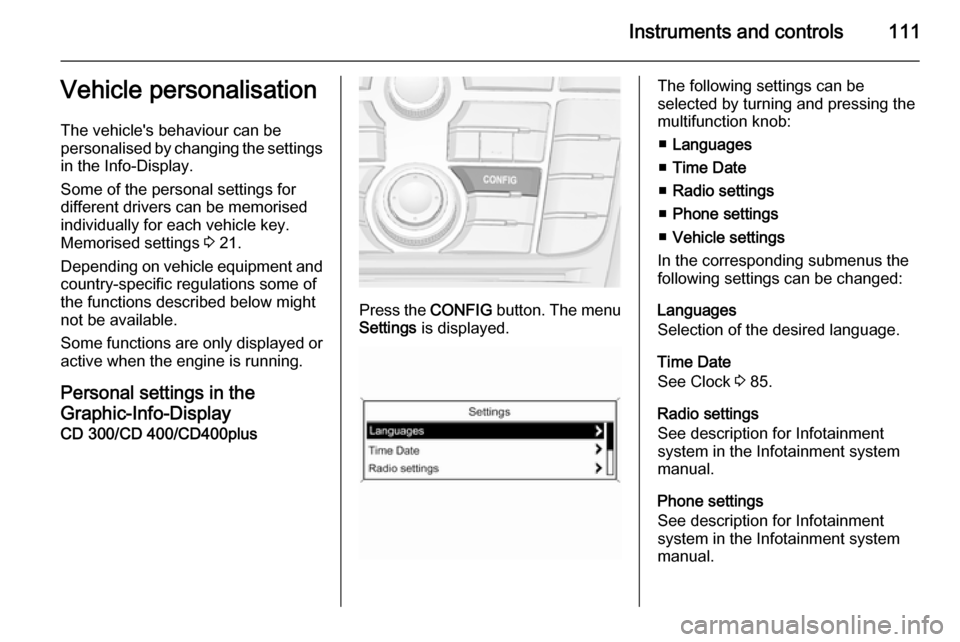
Press the CONFIG button. The menu
Settings is displayed.
The following settings can be
selected by turning and pressing the
multifunction knob:
■ Languages
■ Time Date
■ Radio settings
■ Phone settings
■ Vehicle settings
In the corresponding submenus the
following settings can be changed:
Languages
Selection of the desired language.
Time Date
See Clock 3 85.
Radio settings
See description for Infotainment
system in the Infotainment system
manual.
Phone settings
See description for Infotainment
system in the Infotainment system
manual.
Page 114 of 245
112Instruments and controls
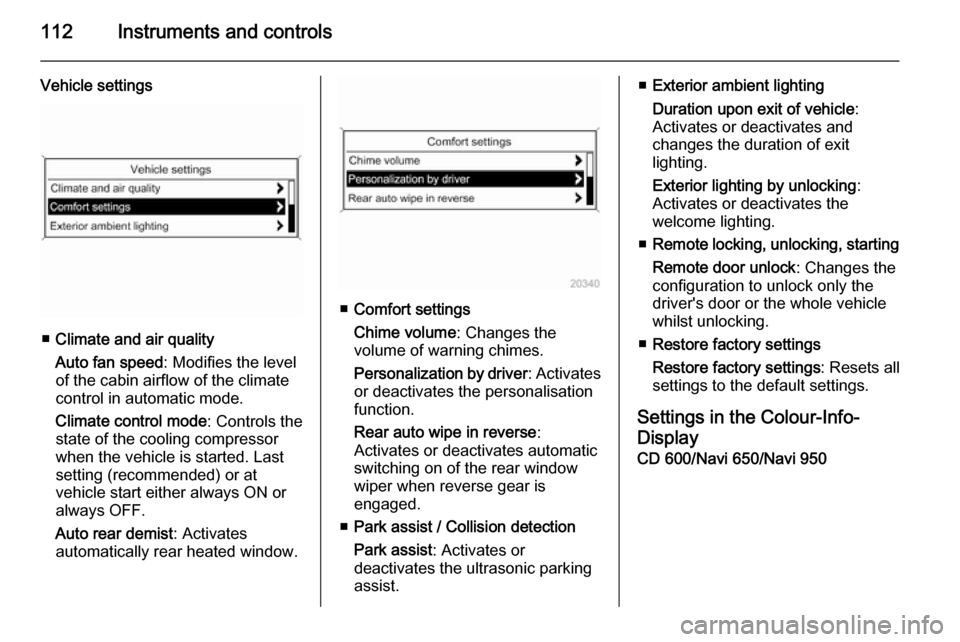
Vehicle settings
■Climate and air quality
Auto fan speed : Modifies the level
of the cabin airflow of the climate
control in automatic mode.
Climate control mode : Controls the
state of the cooling compressor
when the vehicle is started. Last
setting (recommended) or at
vehicle start either always ON or
always OFF.
Auto rear demist : Activates
automatically rear heated window.
■ Comfort settings
Chime volume : Changes the
volume of warning chimes.
Personalization by driver : Activates
or deactivates the personalisation
function.
Rear auto wipe in reverse :
Activates or deactivates automatic
switching on of the rear window
wiper when reverse gear is
engaged.
■ Park assist / Collision detection
Park assist : Activates or
deactivates the ultrasonic parking
assist.
■ Exterior ambient lighting
Duration upon exit of vehicle :
Activates or deactivates and
changes the duration of exit
lighting.
Exterior lighting by unlocking :
Activates or deactivates the
welcome lighting.
■ Remote locking, unlocking, starting
Remote door unlock : Changes the
configuration to unlock only the
driver's door or the whole vehicle
whilst unlocking.
■ Restore factory settings
Restore factory settings : Resets all
settings to the default settings.
Settings in the Colour-Info-
Display CD 600/Navi 650/Navi 950
Page 116 of 245

114Instruments and controls
■Display Off :
See Infotainment system manual
for further information.
■ Map Settings :
See Infotainment system manual
for further information.
Vehicle Settings ■ Climate and Air Quality
Auto Fan Speed : Modifies the fan
regulation. Changed setting will be active after switching the ignition off
and on again.
Air Conditioning Mode : Activates or
deactivates cooling when switching on the ignition or uses the last
chosen setting.
Auto Demist : Activates or
deactivates auto demist.
Auto Rear Demist : Activates
automatically the rear heated
window.
■ Comfort and Convenience
Chime Volume : Changes the
volume of warning chimes.Personalisation by Driver :
Activates or deactivates the
personalisation function.
Auto Reverse Gear Wiper :
Activates or deactivates
automatically switching on of the
rear window wiper when reverse gear is engaged.
■ Collision Detection Systems
Park Assist : Activates or
deactivates the ultrasonic sensors.
■ Lighting
Vehicle Locator Lights : Activates or
deactivates the entry lighting.
Exit Lighting : Activates or
deactivates and changes the
duration of exit lighting.
■ Remote Lock/Unlock/Start
Remote Door Unlock : Changes the
configuration to unlock only the
driver's door or the whole vehicle
whilst unlocking.
■ Return to Factory Settings? :
Resets all settings to the default
settings.
Page 119 of 245
Lighting117Headlight range
adjustment
Manual headlight range
adjustment
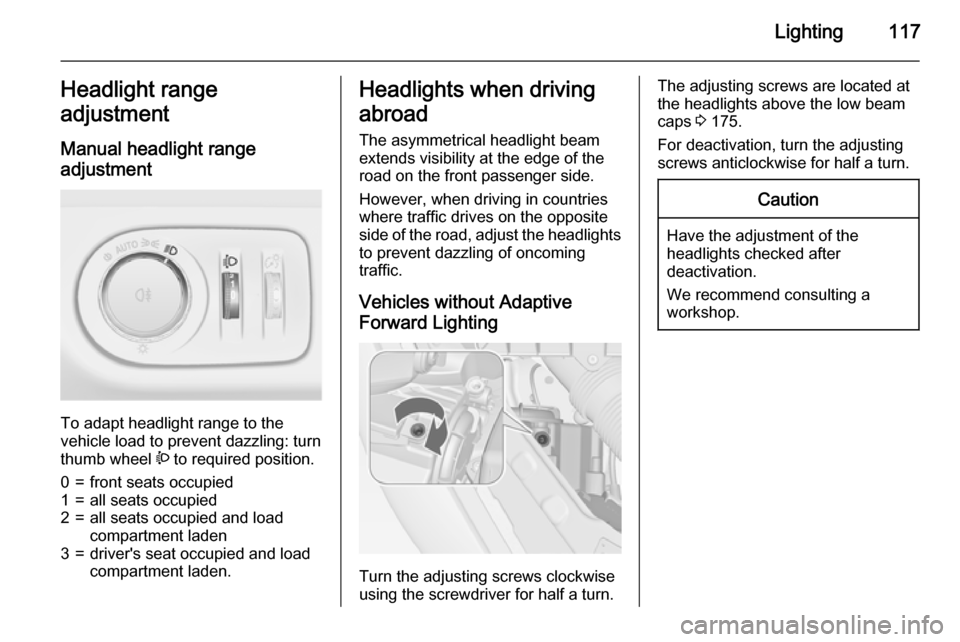
To adapt headlight range to the
vehicle load to prevent dazzling: turn
thumb wheel ? to required position.
0=front seats occupied1=all seats occupied2=all seats occupied and load
compartment laden3=driver's seat occupied and load
compartment laden.Headlights when driving
abroad
The asymmetrical headlight beam
extends visibility at the edge of the
road on the front passenger side.
However, when driving in countries
where traffic drives on the opposite
side of the road, adjust the headlights to prevent dazzling of oncoming
traffic.
Vehicles without Adaptive
Forward Lighting
Turn the adjusting screws clockwise
using the screwdriver for half a turn.
The adjusting screws are located at the headlights above the low beam
caps 3 175.
For deactivation, turn the adjusting
screws anticlockwise for half a turn.Caution
Have the adjustment of the
headlights checked after
deactivation.
We recommend consulting a
workshop.
Page 124 of 245
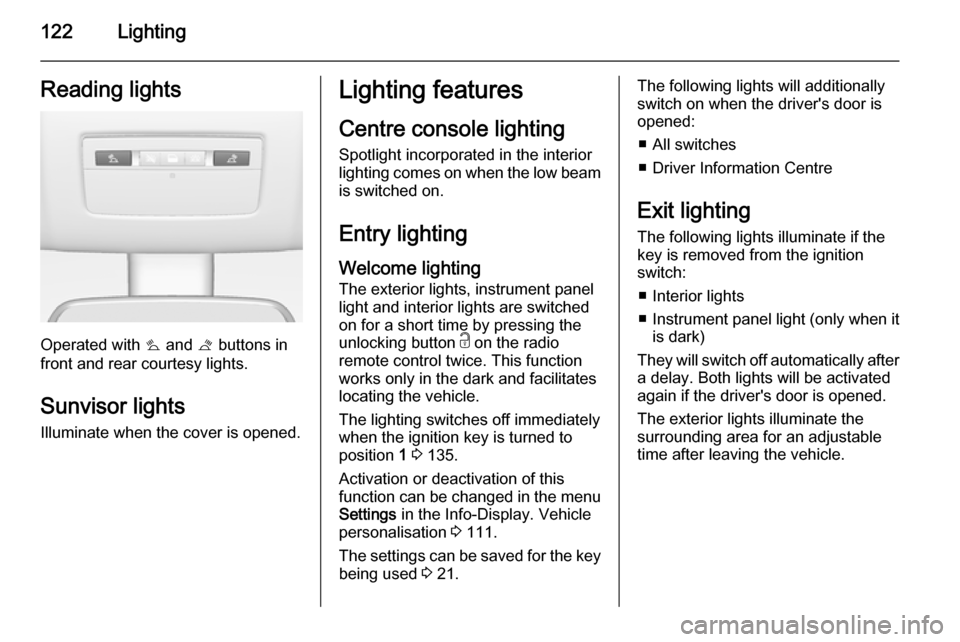
122LightingReading lights
Operated with s and t buttons in
front and rear courtesy lights.
Sunvisor lights
Illuminate when the cover is opened.
Lighting features
Centre console lighting
Spotlight incorporated in the interior
lighting comes on when the low beam
is switched on.
Entry lighting Welcome lighting
The exterior lights, instrument panel
light and interior lights are switched
on for a short time by pressing the
unlocking button c on the radio
remote control twice. This function
works only in the dark and facilitates
locating the vehicle.
The lighting switches off immediately
when the ignition key is turned to
position 1 3 135.
Activation or deactivation of this
function can be changed in the menu Settings in the Info-Display. Vehicle
personalisation 3 111.
The settings can be saved for the key
being used 3 21.The following lights will additionally
switch on when the driver's door is
opened:
■ All switches
■ Driver Information Centre
Exit lighting
The following lights illuminate if the
key is removed from the ignition
switch:
■ Interior lights
■ Instrument panel light (only when it
is dark)
They will switch off automatically after
a delay. Both lights will be activated
again if the driver's door is opened.
The exterior lights illuminate the
surrounding area for an adjustable
time after leaving the vehicle.
Page 137 of 245
Driving and operating135Starting and operating
New vehicle running-in Do not brake unnecessarily hard for
the first few journeys.
During the first drive, smoke may
occur because of wax and oil
evaporating off the exhaust system.
Park the vehicle in the open for a
while after the first drive and avoid
inhaling the fumes.
During the running-in period fuel and
engine oil consumption may be
higher and the cleaning process of the diesel particle filter may take
place more often. Autostop may be inhibited to allow for charging the
vehicle battery.
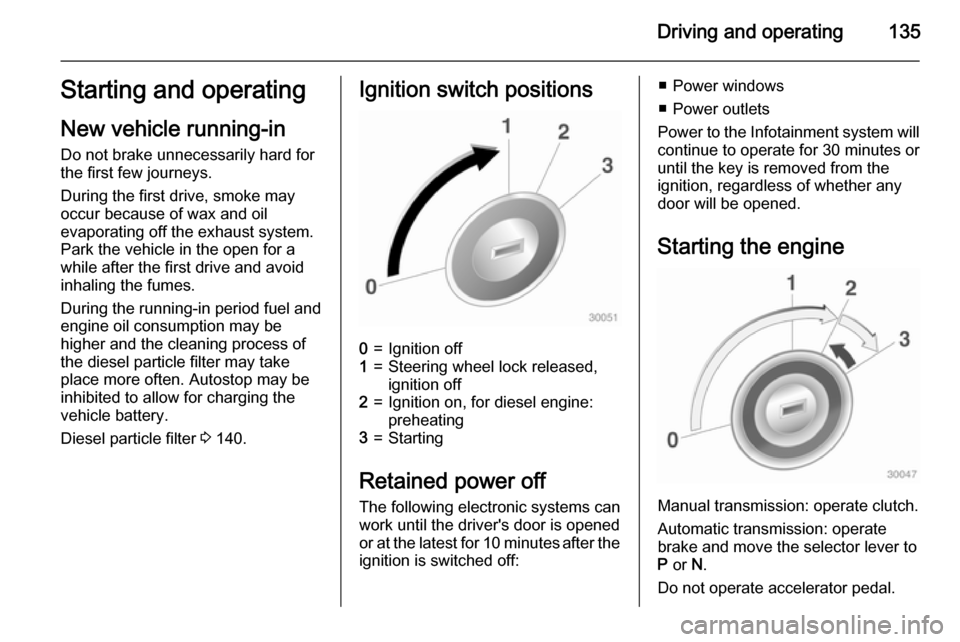
Diesel particle filter 3 140.Ignition switch positions0=Ignition off1=Steering wheel lock released,
ignition off2=Ignition on, for diesel engine:
preheating3=Starting
Retained power off
The following electronic systems can
work until the driver's door is opened
or at the latest for 10 minutes after the
ignition is switched off:
■ Power windows
■ Power outlets
Power to the Infotainment system will continue to operate for 30 minutes oruntil the key is removed from the
ignition, regardless of whether any
door will be opened.
Starting the engine
Manual transmission: operate clutch.
Automatic transmission: operate
brake and move the selector lever to
P or N.
Do not operate accelerator pedal.
Page 141 of 245

Driving and operating139
■ the engine temperature is too low
■ the vehicle battery is discharged
■ the brake vacuum is not sufficient
■ the vehicle starts to move
■ the climate control system requests
an engine start
■ the air conditioning is manually switched on
If the bonnet is not fully closed, a
warning message is displayed in the
Driver Information Centre.
If an electrical accessory, e.g. a
portable CD player, is connected to
the power outlet, a brief power drop
during restart might be noticeable.
Parking9 Warning
■ Do not park the vehicle on an
easily ignitable surface. The
high temperature of the exhaust system could ignite the surface.
■ Always apply parking brake.
Pull switch m for approx.
one second.
The electric parking brake is
applied when control indicator
m illuminates 3 95.
■ Switch off the engine.
■ If the vehicle is on a level surface or uphill slope, engage
first gear or set the selector lever to position P before removing
the ignition key. On an uphill
slope, turn the front wheels
away from the kerb.
If the vehicle is on a downhill
slope, engage reverse gear or
set the selector lever to position
P before removing the ignition
key. Turn the front wheels
towards the kerb.
■ Remove the ignition key. Turn the steering wheel until the
steering wheel lock is felt to
engage.
For vehicles with automatic
transmission, the key can onlybe removed when the selector
lever is in position P.
Lock the vehicle and activate the anti-
theft alarm system.
Notice
In the event of an accident with
airbag deployment, the engine is
turned off automatically if the vehicle
comes to a standstill within a certain
time.