warning VAUXHALL MERIVA 2015 Workshop Manual
[x] Cancel search | Manufacturer: VAUXHALL, Model Year: 2015, Model line: MERIVA, Model: VAUXHALL MERIVA 2015Pages: 245, PDF Size: 7.76 MB
Page 134 of 245
132Climate control
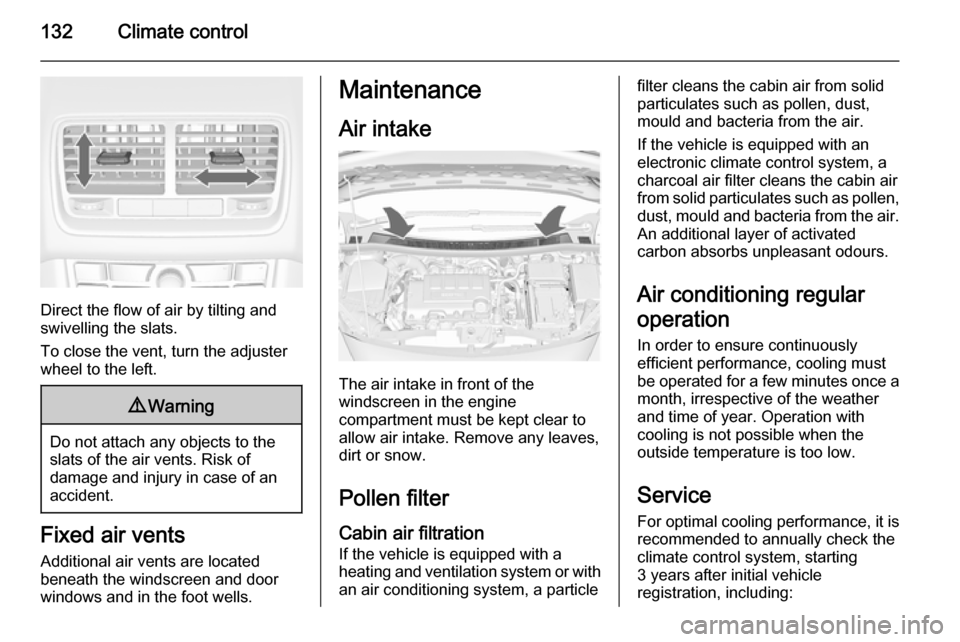
Direct the flow of air by tilting and
swivelling the slats.
To close the vent, turn the adjuster
wheel to the left.
9 Warning
Do not attach any objects to the
slats of the air vents. Risk of
damage and injury in case of an
accident.
Fixed air vents
Additional air vents are located
beneath the windscreen and door windows and in the foot wells.
Maintenance
Air intake
The air intake in front of the
windscreen in the engine
compartment must be kept clear to
allow air intake. Remove any leaves,
dirt or snow.
Pollen filterCabin air filtration
If the vehicle is equipped with a
heating and ventilation system or with an air conditioning system, a particle
filter cleans the cabin air from solidparticulates such as pollen, dust,
mould and bacteria from the air.
If the vehicle is equipped with an
electronic climate control system, a
charcoal air filter cleans the cabin air
from solid particulates such as pollen, dust, mould and bacteria from the air.
An additional layer of activated
carbon absorbs unpleasant odours.
Air conditioning regular
operation In order to ensure continuously
efficient performance, cooling must
be operated for a few minutes once a
month, irrespective of the weather
and time of year. Operation with
cooling is not possible when the
outside temperature is too low.
Service
For optimal cooling performance, it is recommended to annually check the
climate control system, starting
3 years after initial vehicle
registration, including:
Page 141 of 245

Driving and operating139
■ the engine temperature is too low
■ the vehicle battery is discharged
■ the brake vacuum is not sufficient
■ the vehicle starts to move
■ the climate control system requests
an engine start
■ the air conditioning is manually switched on
If the bonnet is not fully closed, a
warning message is displayed in the
Driver Information Centre.
If an electrical accessory, e.g. a
portable CD player, is connected to
the power outlet, a brief power drop
during restart might be noticeable.
Parking9 Warning
■ Do not park the vehicle on an
easily ignitable surface. The
high temperature of the exhaust system could ignite the surface.
■ Always apply parking brake.
Pull switch m for approx.
one second.
The electric parking brake is
applied when control indicator
m illuminates 3 95.
■ Switch off the engine.
■ If the vehicle is on a level surface or uphill slope, engage
first gear or set the selector lever to position P before removing
the ignition key. On an uphill
slope, turn the front wheels
away from the kerb.
If the vehicle is on a downhill
slope, engage reverse gear or
set the selector lever to position
P before removing the ignition
key. Turn the front wheels
towards the kerb.
■ Remove the ignition key. Turn the steering wheel until the
steering wheel lock is felt to
engage.
For vehicles with automatic
transmission, the key can onlybe removed when the selector
lever is in position P.
Lock the vehicle and activate the anti-
theft alarm system.
Notice
In the event of an accident with
airbag deployment, the engine is
turned off automatically if the vehicle
comes to a standstill within a certain
time.
Page 142 of 245

140Driving and operatingEngine exhaust9Danger
Engine exhaust gases contain
poisonous carbon monoxide,
which is colourless and odourless and could be fatal if inhaled.
If exhaust gases enter the interior
of the vehicle, open the windows.
Have the cause of the fault
rectified by a workshop.
Avoid driving with an open load
compartment, otherwise exhaust
gases could enter the vehicle.
Diesel particle filter
The diesel particle filter system filters
harmful soot particles out of the
exhaust gases. The system includes
a self-cleaning function that runs
automatically during driving without
any notification. The filter is cleaned
by periodically burning off the soot
particles at high temperature. This
process takes place automatically
under set driving conditions and may
take up to 25 minutes. Typically it
needs between 7 and 12 minutes.
Autostop is not available and fuel
consumption may be higher during
this period. The emission of smells
and smoke during this process is
normal.
Under certain driving conditions, e.g.
short distances, the system cannot
clean itself automatically.
If the cleaning of the filter is required
and if previous driving conditions did
not enable automatic cleaning, it will
be indicated by the control indicator
% . Simultaneously Diesel partic. filter
is full continue driving or warning
code 55 appears in the Driver
Information Centre.
% illuminates when diesel particle
filter is full. Start cleaning process as
soon as possible.
% flashes when diesel particle filter
has reached the maximum filling
level. Start cleaning process
immediately to avoid damage to the
engine.
Cleaning process
To activate cleaning process,
continue driving, keeping engine
speed above 2000 revolutions per
minute. Shift down if necessary.
Diesel particle filter cleaning is then
started.
If g illuminates additionally,
cleaning is not possible, seek the
assistance of a workshop.Caution
If the cleaning process is
interrupted, there is a risk of
provoking severe engine damage.
Page 148 of 245
146Driving and operating
Fault9Warning
If there is a fault in the ABS, the
wheels may be liable to lock due
to braking that is heavier than
normal. The advantages of ABS are no longer available. During
hard braking, the vehicle can no longer be steered and may
swerve.
Have the cause of the fault remedied
by a workshop.
Parking brake
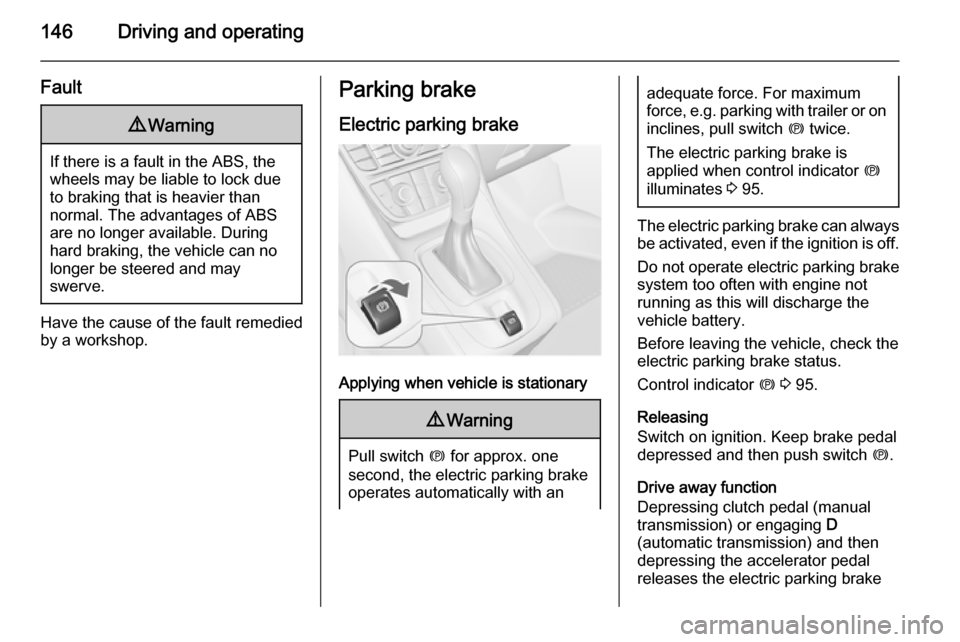
Electric parking brake
Applying when vehicle is stationary
9 Warning
Pull switch m for approx. one
second, the electric parking brake
operates automatically with an
adequate force. For maximum
force, e.g. parking with trailer or on
inclines, pull switch m twice.
The electric parking brake is
applied when control indicator m
illuminates 3 95.
The electric parking brake can always
be activated, even if the ignition is off.
Do not operate electric parking brake
system too often with engine not
running as this will discharge the
vehicle battery.
Before leaving the vehicle, check the electric parking brake status.
Control indicator m 3 95.
Releasing
Switch on ignition. Keep brake pedal
depressed and then push switch m.
Drive away function
Depressing clutch pedal (manual
transmission) or engaging D
(automatic transmission) and then
depressing the accelerator pedal
releases the electric parking brake
Page 150 of 245
148Driving and operatingRide control systems
Traction Control system
The Traction Control system (TC) is a
component of the Electronic Stability
Control system.
TC improves driving stability when
necessary, regardless of the type of
road surface or tyre grip, by
preventing the drive wheels from
spinning.
As soon as the drive wheels starts to spin, engine output is reduced and
the wheel spinning the most is braked individually. This considerably
improves the driving stability of the
vehicle on slippery road surfaces.
TC is operational as soon as the
control indicator b extinguishes.
When TC is active b flashes.9 Warning
Do not let this special safety
feature tempt you into taking risks
when driving.
Adapt speed to the road
conditions.
Control indicator b 3 96.
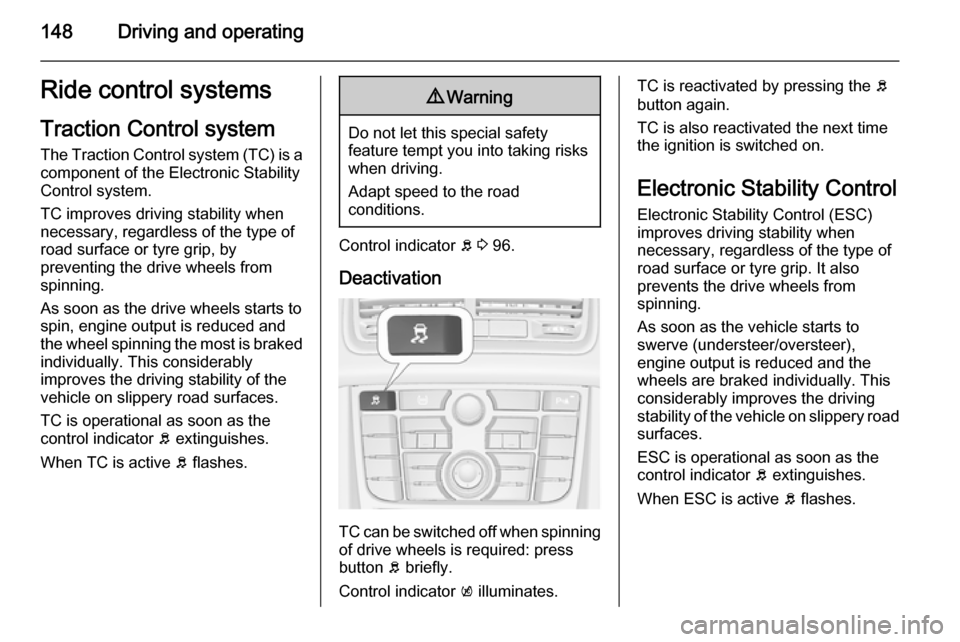
Deactivation
TC can be switched off when spinning of drive wheels is required: pressbutton b briefly.
Control indicator k illuminates.
TC is reactivated by pressing the b
button again.
TC is also reactivated the next time
the ignition is switched on.
Electronic Stability Control Electronic Stability Control (ESC)
improves driving stability when
necessary, regardless of the type of
road surface or tyre grip. It also
prevents the drive wheels from
spinning.
As soon as the vehicle starts to
swerve (understeer/oversteer),
engine output is reduced and the wheels are braked individually. This
considerably improves the driving
stability of the vehicle on slippery road
surfaces.
ESC is operational as soon as the
control indicator b extinguishes.
When ESC is active b flashes.
Page 151 of 245
Driving and operating1499Warning
Do not let this special safety
feature tempt you into taking risks
when driving.
Adapt speed to the road
conditions.
Control indicator b 3 96.
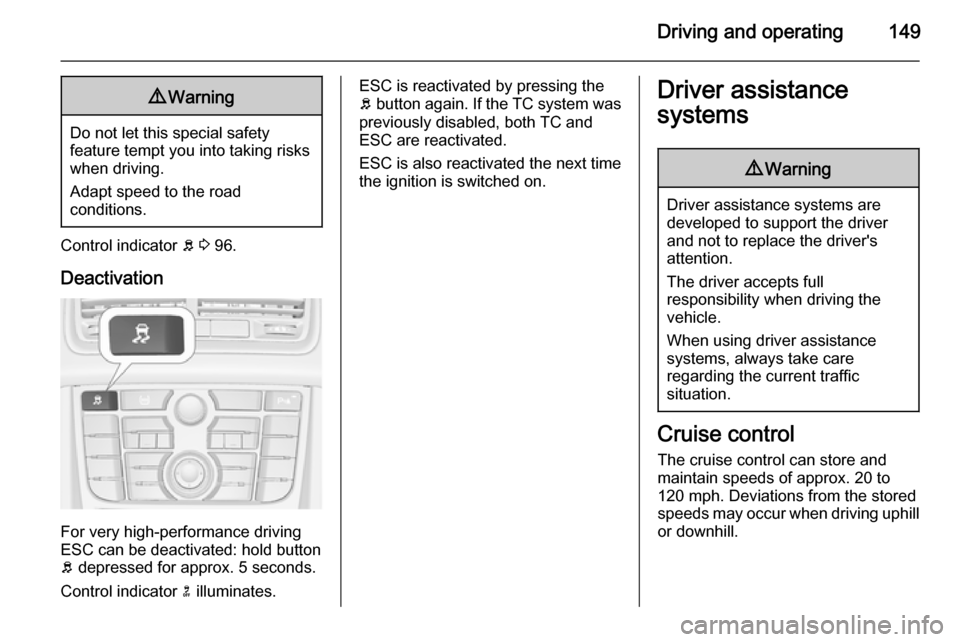
Deactivation
For very high-performance driving
ESC can be deactivated: hold button
b depressed for approx. 5 seconds.
Control indicator n illuminates.
ESC is reactivated by pressing the
b button again. If the TC system was
previously disabled, both TC and
ESC are reactivated.
ESC is also reactivated the next time
the ignition is switched on.Driver assistance
systems9 Warning
Driver assistance systems are
developed to support the driver
and not to replace the driver's
attention.
The driver accepts full
responsibility when driving the
vehicle.
When using driver assistance
systems, always take care
regarding the current traffic
situation.
Cruise control
The cruise control can store and
maintain speeds of approx. 20 to
120 mph. Deviations from the stored
speeds may occur when driving uphill or downhill.
Page 153 of 245

Driving and operating151
Switching off
Press rocker switch m at the lower
end, control indicator m extinguishes.
The stored speed is deleted.
Switching off the ignition also deletes
the stored speed.
Parking assist9 Warning
The driver bears full responsibility
for the parking manoeuvre.
Always check the surrounding
area when driving backwards or
forwards while using parking
assist system.
The parking assist makes parking easier by measuring the distance
between the vehicle and obstacles,
and giving acoustic signals.
The system consists of four ultrasonic parking sensors in the rear bumper. If
the vehicle is equipped with a front
parking assist, the system consists of
four additional ultrasonic parking
sensors in the front bumper.
Control indicator r 3 96.
Operation
When reverse gear is engaged, the
front and rear parking assist is ready
to operate.
An illuminated LED in the parking
assist button r indicates that the
system is ready to operate.
The front parking assist can also be activated at a speed up to 7 mph with
a brief press of the parking assist
button.
If the r button is switched on once
within an ignition cycle, the front
parking assist is deactivated at a speed above 7 mph. It will be
Page 154 of 245

152Driving and operating
reactivated if vehicle speed has not
exceeded 16 mph beforehand. If
vehicle speed has exceeded 16 mph
beforehand, front parking assist
remains deactivated when speed
drops below 7 mph.
When the system is deactivated, the
LED in the button extinguishes and
Park Assist Off pops-up in the Driver
Information Centre.
The system is deactivated
automatically when exceeding
16 mph.
If the vehicle is equipped with rear
parking assist only, the system
automatically switches off when
reverse gear is disengaged. Manual
deactivation is also possible by
pressing the parking assist button
r .
Indication An obstacle is indicated by a buzzing
sound. The interval between the
sounds becomes shorter as the
vehicle gets closer to the obstacle.
When the distance is less than
30 cm, the buzzing is continuous.Fault
In the event of a fault in the system,
r illuminates or a vehicle message
is displayed in the Driver Information
Centre.
Additionally, r illuminates or a
vehicle message is displayed in the Driver Information Centre if a
malfunction of the system due to
temporary conditions like snow
covered sensors is detected.
Vehicle messages 3 104.
Important hints for using the
parking assist systems9 Warning
Under certain circumstances,
various reflective surfaces on
objects or clothing as well as
external noise sources may cause the system to fail to detect
obstacles.
Special attention has to be paid to
low obstacles which can damage
the lower part of the bumper. If
such obstacles leave the detection area of the sensors during
approach of the vehicle, a
continuous warning tone will
sound.Caution
Performance of the sensors can
be reduced when sensors are
covered, e.g. by ice or snow.
Performance of the parking assist
systems can be reduced due to
heavy loading.
Special conditions apply if there
are taller vehicles involved (e.g.
off-road vehicles, mini vans,
vans). Object identification in the
upper part of these vehicles
cannot be guaranteed.
Objects with a very small reflection
cross-section, e.g. objects of
narrow size or soft materials, may
not be detected by the system.
Page 155 of 245

Driving and operating153Parking assist will not avoid a
collision with objects which are out
of the detection range of the
sensors.
Notice
The parking assist system
automatically detects factory-fitted
towing equipment. It is deactivated
when the connector is plugged in.
The sensor may detect a non-
existent object (echo disturbance)
caused by external acoustic or
mechanical disturbances.
Notice
If engaging a forward gear and
exceeding a certain speed, the rear
parking assist will be deactivated
when the rear carrier system is
extended.
If engaging reverse at first, the
parking assist will detect the rear
carrier system and provide a buzzing
sound. Press r briefly to
deactivate the parking assist.
Rear view camera
The rear view camera assists the
driver when reversing by displaying a view of the area behind the vehicle.
The view of the camera is displayed
in the Colour-Info-Display.9 Warning
The rear view camera does not
replace driver vision. Note that
objects that are outside the
camera's field of view and the
advanced parking assist sensors,
e.g. below the bumper or
underneath the vehicle, are not
displayed.
Do not reverse the vehicle by only looking at the Info-Display and
check the surrounding behind and
around the vehicle before
reversing.
Activation
Rear view camera is automatically
activated when reverse gear is
engaged.
Functionality
The camera is mounted in the tailgate handle and has a viewing angle of
130°.
Page 156 of 245

154Driving and operating
Due to the high position of the camera
the rear bumper can be seen on the
display as a guide to position.
The area displayed by the camera is
limited. The distance of the image that appears on the display differs from
the actual distance.
Guiding lines
Dynamic guiding lines are horizontal
lines in 1 metre intervals projected on
the picture to define the distance to
shown objects.Trajectory lane of the vehicle is
shown in accordance with the
steering angle.
The function can be deactivated in the
menu Settings in the Info-Display.
Vehicle personalisation 3 111.
Warning symbols
Warning symbols are indicated as
triangles 9 on the picture which show
obstacles detected by the rear
sensors of the advanced parking
assist.
Display settings
Brightness can be set with the up/
down buttons of the multifunction
knob.
Contrast can be set with left/right
buttons of the multifunction knob.
Deactivation
The camera is deactivated when a
certain forward speed is exceeded or if reverse gear is not engaged for
approx. 10 seconds.
Activation or deactivation of the rear
view camera can be changed in the menu Settings in the Info-Display.
Vehicle personalisation 3 111.