ad blue VAUXHALL MOKKA 2014 Infotainment system
[x] Cancel search | Manufacturer: VAUXHALL, Model Year: 2014, Model line: MOKKA, Model: VAUXHALL MOKKA 2014Pages: 221, PDF Size: 4.66 MB
Page 150 of 221
150Phone
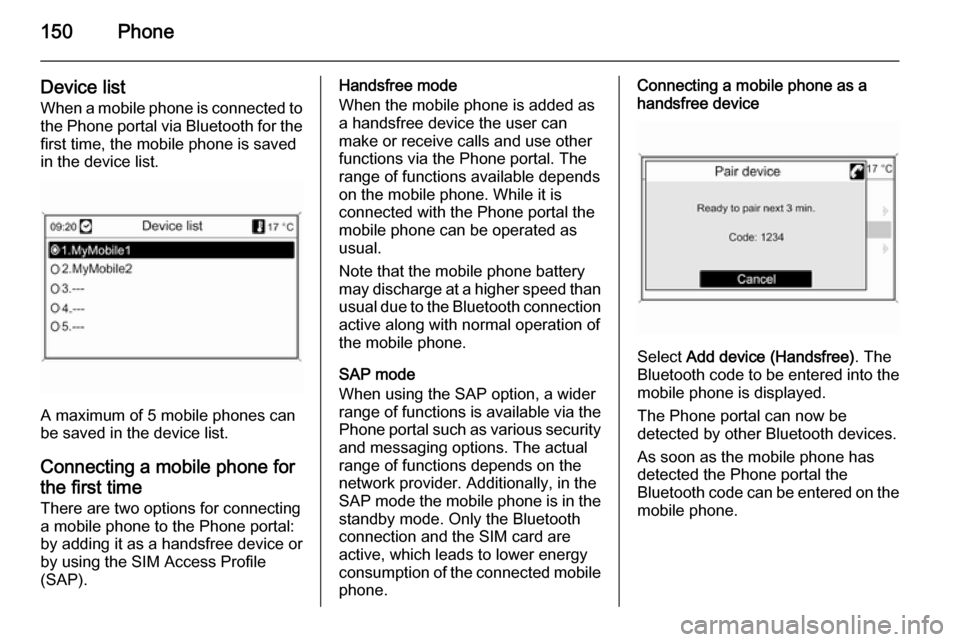
Device listWhen a mobile phone is connected tothe Phone portal via Bluetooth for the
first time, the mobile phone is saved
in the device list.
A maximum of 5 mobile phones can
be saved in the device list.
Connecting a mobile phone for the first time There are two options for connecting
a mobile phone to the Phone portal: by adding it as a handsfree device or
by using the SIM Access Profile
(SAP).
Handsfree mode
When the mobile phone is added as
a handsfree device the user can
make or receive calls and use other
functions via the Phone portal. The
range of functions available depends
on the mobile phone. While it is
connected with the Phone portal the
mobile phone can be operated as
usual.
Note that the mobile phone battery
may discharge at a higher speed than usual due to the Bluetooth connection
active along with normal operation of
the mobile phone.
SAP mode
When using the SAP option, a wider range of functions is available via the
Phone portal such as various security
and messaging options. The actual
range of functions depends on the
network provider. Additionally, in the
SAP mode the mobile phone is in the standby mode. Only the Bluetooth
connection and the SIM card are
active, which leads to lower energy
consumption of the connected mobile
phone.Connecting a mobile phone as a
handsfree device
Select Add device (Handsfree) . The
Bluetooth code to be entered into the
mobile phone is displayed.
The Phone portal can now be
detected by other Bluetooth devices.
As soon as the mobile phone has
detected the Phone portal the
Bluetooth code can be entered on the mobile phone.
Page 151 of 221
Phone151
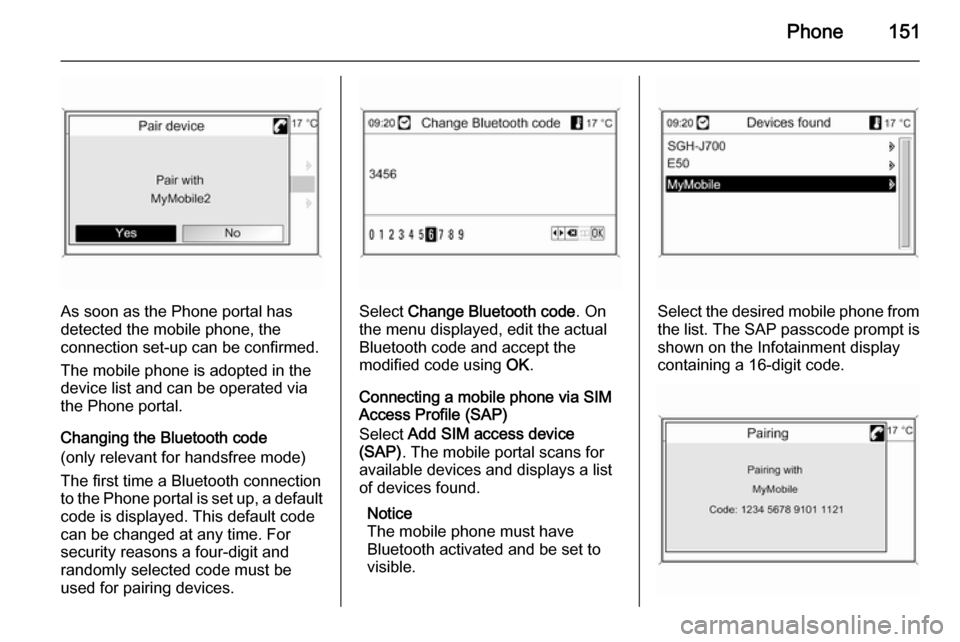
As soon as the Phone portal has
detected the mobile phone, the
connection set-up can be confirmed.
The mobile phone is adopted in the
device list and can be operated via
the Phone portal.
Changing the Bluetooth code
(only relevant for handsfree mode)
The first time a Bluetooth connection
to the Phone portal is set up, a default code is displayed. This default code
can be changed at any time. For
security reasons a four-digit and
randomly selected code must be
used for pairing devices.Select Change Bluetooth code . On
the menu displayed, edit the actual Bluetooth code and accept the
modified code using OK.
Connecting a mobile phone via SIM
Access Profile (SAP)
Select Add SIM access device
(SAP) . The mobile portal scans for
available devices and displays a list
of devices found.
Notice
The mobile phone must have
Bluetooth activated and be set to
visible.Select the desired mobile phone from
the list. The SAP passcode prompt is
shown on the Infotainment display
containing a 16-digit code.
Page 154 of 221

154Phonea sufficiently strong signal. Undercertain circumstances emergency
calls cannot be made on all mobile
phone networks; it is possible that
they cannot be made when certain network services and/or telephonefunctions are active. You can
enquire about this with the local
network operators.
The emergency call number can
differ depending on the region and
country. Please enquire
beforehand about the correct
emergency call number for the
relevant region.
Making an emergency call
Dial the emergency call number (e.g.
112 ).
The telephone connection to the
emergency call centre is set up.
Answer when the service personnel
questions you about the emergency.
9 Warning
Do not end the call until you are
requested to do so by the
emergency call centre.
Operation
Introduction As soon as a connection via
Bluetooth has been set up between
your mobile phone and the
Infotainment system, you can also
operate many functions of your
mobile phone via the Infotainment
system.
Via the Infotainment system, you can,
e.g., set up a connection to the
telephone numbers stored in your
mobile phone or change the
telephone numbers.
Notice
In the handsfree mode mobile phone
operation continues to be possible,
e. g. taking a call or adjusting the
volume.
After setup of a connection between
the mobile phone and the
Infotainment system the mobile
phone data is transmitted to the
Infotainment system. This can take
some time depending on the phone
model. During this period operation of
the mobile phone is possible via the
Infotainment system only to a limited
extent.
Not every telephone supports all
functions of the Phone portal.
Therefore deviations from the range
of functions described with these
specific telephones are possible.
Setting the volume for hands-
free facility
Turn the m VOL knob of the
Infotainment system or press the
buttons + / - on the steering wheel.
Page 160 of 221

160IndexAActivating CD player .....................97
Activating speech recognition .....144
Activating the navigation system 106
Activating the radio .......................87
Address book.............................. 115
Address input.............................. 115
Autostore lists ............................... 88
B BACK button ................................. 82
Basic operation ............................. 82
Bluetooth .................................... 148
Bluetooth connection ..................149
C CD player activating ................................... 97
important information ................96
usage ........................................ 97
Configuring DAB ........................... 94
Configuring RDS........................... 92
Control elements overview ...........78
D
DAB .............................................. 94
Destination input ........................115
Digital audio broadcasting ............94
Dynamic guidance ......................136E
Emergency call ........................... 153
Enhanced Other Networks ...........92
EON .............................................. 92
F
Favourite lists ............................... 88
G
General information ...................
76 , 96 , 99 , 100 , 102 , 105 , 143 , 148
Guidance ................................... 129
H
Handsfree mode .........................149
Home address ............................ 106
I
Individual POIs ........................... 106
Infotainment system maximum startup volume ..........86
speed dependent volume ..........86
tone settings .............................. 84
volume of the traffic
announcements ........................ 86
volume settings ......................... 86
Page 161 of 221

161
M
Maps .......................................... 136
Map SD card handling .................................. 136
replace .................................... 136
Menu operation............................. 82
Mobile phones and CB radio equipment .............................. 157
Multifunction knob......................... 82
Mute.............................................. 81
myPOIs ....................................... 115
N Navigation activating ................................. 106
Address book .......................... 115
control elements ......................106
deleting Home address ...........106
deleting imported POIs ...........106
destination input ......................115
dynamic guidance ...........129, 136
fuel level low alert.................... 115
functioning ............................... 105
highway lane guidance ...........129
Home address ......................... 115
importing/exporting POIs ........106
map SD card ........................... 136
myPOIs ................................... 115
navigation display ...................106navigation options ...................129
navigation volume ...................106
Points of Interest .....................115
repeat last navigation
message.................................. 129
route blocking .......................... 129
route guidance ........................ 129
route list................................... 129
start navigation ........................ 129
symbols overview ....................139
TMC messages .......................129
usage ...................................... 106
using the speller function ........115
Navigation display ......................106
Navigation volume ......................106
O
Operation .................................... 154
P Phone adjusting ring tones .................149
Bluetooth ................................. 148
Bluetooth connection ..............149
call lists.................................... 154
control elements ......................148
dialling a number .....................154
emergency calls ......................153
functions during a call .............154
handsfree mode ......................149important information ..............148
messaging functions ...............154
recharging the battery .............148
setting the volume ...................154
SIM Access Profile (SAP) .......149
telephone book ....................... 154
Phone control ............................. 144
Playing saved audio files ............101
R Radio Radio data system (RDS) .........92
activating ................................... 87
autostore lists ............................ 88
Digital audio broadcasting
(DAB) ........................................ 94
favourite lists ............................. 88
selecting the waveband ............87
station lists ................................ 89
station search ............................ 87
usage ........................................ 87
waveband menus ......................89
Radio data system (RDS) ............92
RDS .............................................. 92
Recharging the phone battery ....148
Regionalization ............................. 92
Retrieving stations ........................88
Route guidance ..................129, 136
Page 164 of 221

164IntroductionIntroductionGeneral information...................164
Theft-deterrent feature ...............165
Control elements overview ........166
Operation ................................... 169
Personalisation .......................... 173General information
The Infotainment system provides
infotainment in your vehicle, using the
latest technology.
The radio can easily be used by
registering up to 36 FM, AM and DAB (Digital Audio Broadcasting) radio
stations with the 1 ~ 6 preset buttons
per every six pages. DAB is only available for Type A and Type D
models.
The integrated CD player can play
audio CD and MP3 (WMA) discs, and
the USB player can play connected
USB storage devices or iPod
products. The USB player is only
available for Type A and Type B
models.
The Bluetooth phone connection function allows for the use of wireless handsfree phone calls, as well as a
phone music player. The Bluetooth
phone connection function is only
available for Type A and Type B models.Connect a portable music player to
the exterior sound input and enjoy the rich sound of the Infotainment
system. The AUX function is only
available for Type A and Type B
models.
The digital sound processor provides
a number of preset equaliser modes
for sound optimisation.
The system can be easily adjusted
with the carefully designed adjusting
device, smart displayer, and
multifunctional menu dial regulator.
■ The "Overview" section provides a simple overview of the Infotainment
system's functions and a summary
of all regulatory devices.
■ The "Operation" section explains the basic controls of the
Infotainment system.
Notice
This manual describes all options
and features available for the
various Infotainment systems.
Certain descriptions, including those for display and menu functions, may
not apply to your vehicle due to
Page 165 of 221
Introduction165
model variant, country
specifications, special equipment or
accessories.
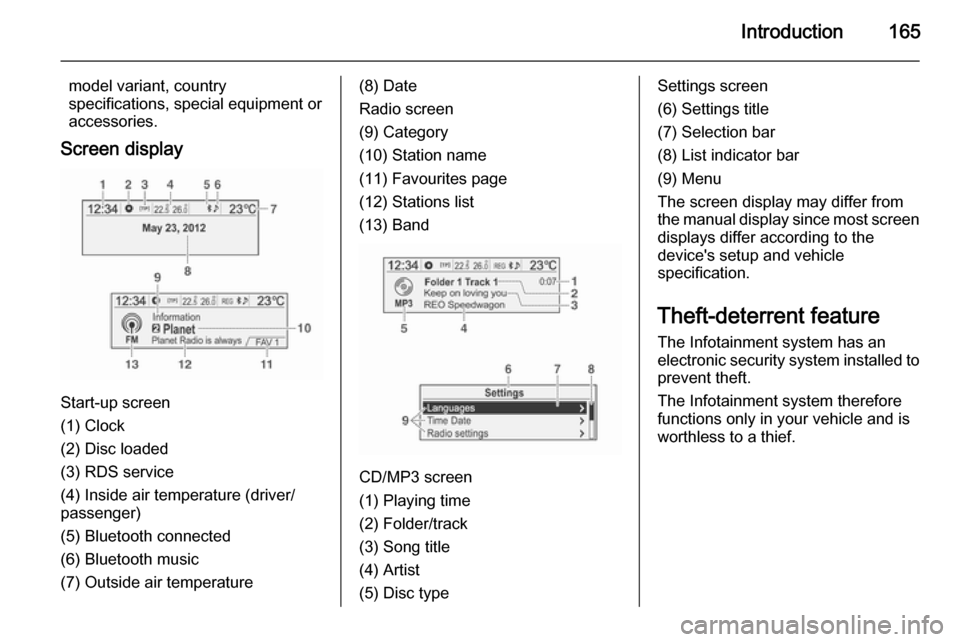
Screen display
Start-up screen
(1) Clock
(2) Disc loaded
(3) RDS service
(4) Inside air temperature (driver/
passenger)
(5) Bluetooth connected
(6) Bluetooth music
(7) Outside air temperature
(8) Date
Radio screen
(9) Category
(10) Station name
(11) Favourites page
(12) Stations list
(13) Band
CD/MP3 screen
(1) Playing time
(2) Folder/track
(3) Song title
(4) Artist
(5) Disc type
Settings screen
(6) Settings title
(7) Selection bar
(8) List indicator bar
(9) Menu
The screen display may differ from
the manual display since most screen displays differ according to the
device's setup and vehicle
specification.
Theft-deterrent feature The Infotainment system has an
electronic security system installed to
prevent theft.
The Infotainment system therefore functions only in your vehicle and is
worthless to a thief.
Page 167 of 221

Introduction167
Type A: Radio/DAB + CD/MP3 + AUX
+ USB/iPod + Bluetooth
Type B: Radio + CD/MP3 + AUX +
USB/iPod + Bluetooth
Type C: Radio + CD/MP3
Type D: Radio/DAB + CD/MP3
1. 1 ~ 6 preset buttons
◆ Hold down any of these buttons
to add the current radio station
to the current favourites page.
◆ Press any of these buttons to select the channel linked to that
button.
2. m button with VOL control knob
◆ Press this button to turn the power on and off.
◆ Turn the control knob to adjust the overall volume.
3. RADIO/BAND button
Select the FM, AM band radio or
DAB function.
4. CD button
Press this button to select the CD/
MP3 disc play function.5. AUX button
Press this button to select the
AUX/USB/iPod/Bluetooth audio
function.
6. O button
◆ Press this button to activate the
Bluetooth mode.
◆ Hold down this button to turn the
mute/pause function for CD andUSB/iPod on and off.
7. Disc slot This is the slot in which compactdiscs are inserted or taken out.
8. TONE button
Press this button to adjust/select
the sound setup mode.
9. P BACK button
Cancel the input content or return
to the previous menu.
10. Multifunction knob ◆ Press the button to display thecurrently functioning menu or
select the setup content and
setup values.◆ Turn the control knob to move/ change the setup content and
setup values.
◆ In the Bluetooth handsfree mode, take a call by pressing
the button. You can turn the control knob to answer or reject the call, and then press the
button to confirm.
11. CONFIG button
Press this button to enter the
system setup menu.
12. INFO button
◆ Press this button to view the file
information when using the CD/
MP3 and USB/iPod play
modes.
◆ View information about a radio station and the currently playingsong when using the radio
function.
13. R button
Press this button and take out the
disc.
Page 172 of 221
172Introduction
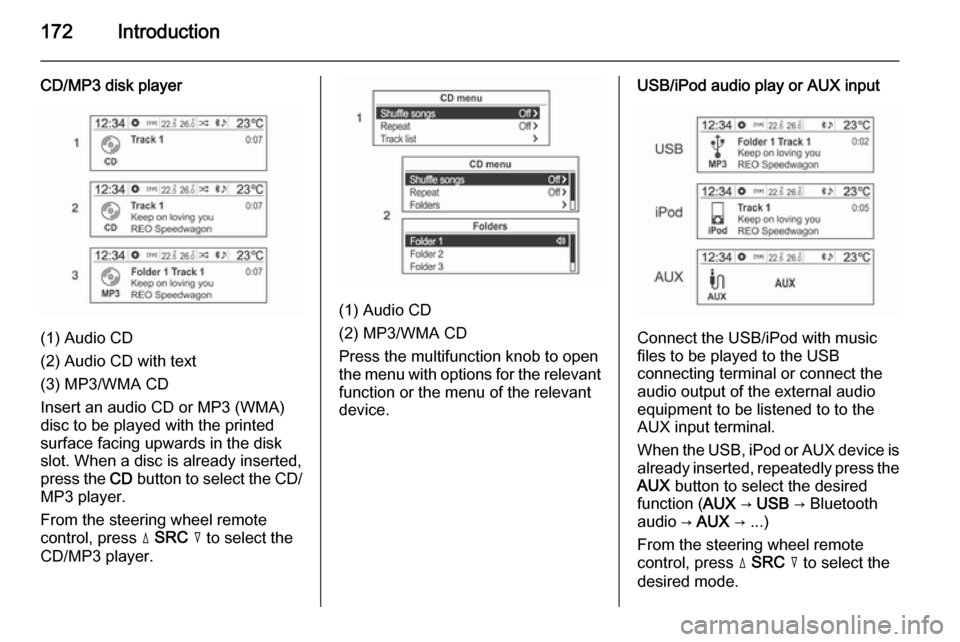
CD/MP3 disk player
(1) Audio CD
(2) Audio CD with text
(3) MP3/WMA CD
Insert an audio CD or MP3 (WMA)
disc to be played with the printed
surface facing upwards in the disk
slot. When a disc is already inserted,
press the CD button to select the CD/
MP3 player.
From the steering wheel remote
control, press d SRC c to select the
CD/MP3 player.
(1) Audio CD
(2) MP3/WMA CD
Press the multifunction knob to open
the menu with options for the relevant
function or the menu of the relevant
device.
USB/iPod audio play or AUX input
Connect the USB/iPod with music
files to be played to the USB
connecting terminal or connect the
audio output of the external audio
equipment to be listened to to the
AUX input terminal.
When the USB, iPod or AUX device is already inserted, repeatedly press the
AUX button to select the desired
function ( AUX → USB → Bluetooth
audio → AUX → ...)
From the steering wheel remote
control, press d SRC c to select the
desired mode.
Page 173 of 221
Introduction173
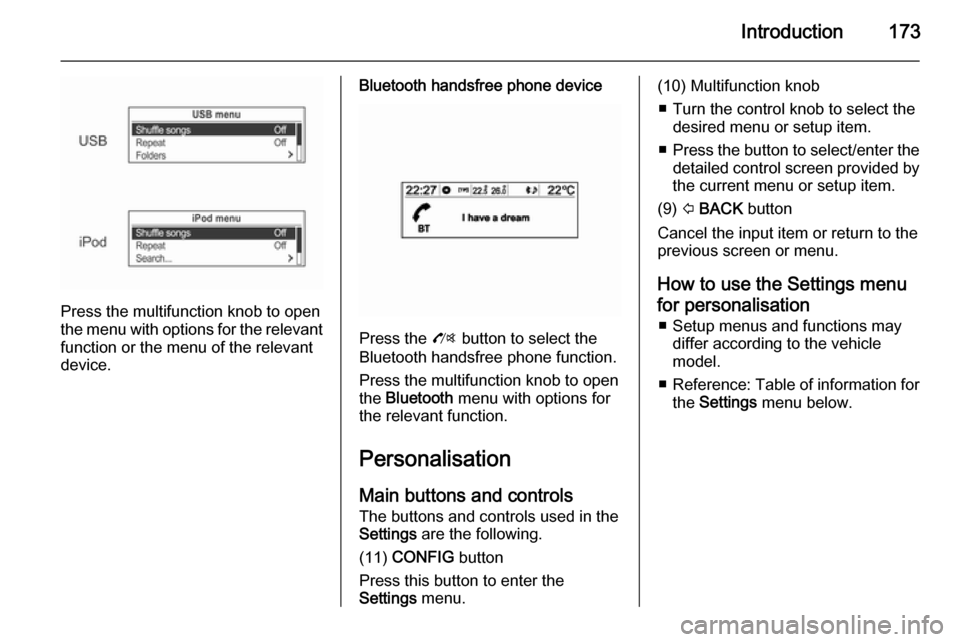
Press the multifunction knob to open
the menu with options for the relevant
function or the menu of the relevant
device.
Bluetooth handsfree phone device
Press the O button to select the
Bluetooth handsfree phone function.
Press the multifunction knob to open
the Bluetooth menu with options for
the relevant function.
Personalisation Main buttons and controls The buttons and controls used in the
Settings are the following.
(11) CONFIG button
Press this button to enter the
Settings menu.
(10) Multifunction knob
■ Turn the control knob to select the desired menu or setup item.
■ Press the button to select/enter the
detailed control screen provided by
the current menu or setup item.
(9) P BACK button
Cancel the input item or return to the previous screen or menu.
How to use the Settings menufor personalisation ■ Setup menus and functions may differ according to the vehicle
model.
■ Reference: Table of information for
the Settings menu below.