AUX VAUXHALL MOKKA 2016 Owner's Manual
[x] Cancel search | Manufacturer: VAUXHALL, Model Year: 2016, Model line: MOKKA, Model: VAUXHALL MOKKA 2016Pages: 231, PDF Size: 6.55 MB
Page 1 of 231
Vauxhall MokkaOwner's Manual
Page 5 of 231

Introduction3Vehicle specific dataPlease enter your vehicle's data on
the previous page to keep it easily
accessible. This information is
available in the sections "Service and
maintenance" and "Technical data"
as well as on the identification plate.
Introduction
Your vehicle is a designed
combination of advanced technology, safety, environmental friendliness
and economy.
This Owner's Manual provides you
with all the necessary information to
enable you to drive your vehicle
safely and efficiently.
Make sure your passengers are
aware of the possible risk of accident
and injury which may result from
improper use of the vehicle.
You must always comply with the
specific laws and regulations of the
country that you are in. These laws
may differ from the information in this Owner's Manual.
Disregarding the description given in
this manual may affect your warranty.When this Owner's Manual refers to a
workshop visit, we recommend your
Vauxhall Authorised Repairer. For
gas vehicles, we recommend a
Vauxhall Authorised Repairer
licensed to service gas vehicles.
All Vauxhall Authorised Repairers
provide first-class service at
reasonable prices. Experienced
mechanics trained by Vauxhall work according to specific Vauxhall
instructions.
The customer literature pack should
always be kept ready to hand in the
vehicle.
Using this manual ● This manual describes all options
and features available for this
model. Certain descriptions,
including those for display and
menu functions, may not apply to
your vehicle due to model
variant, country specifications,
special equipment or
accessories.
● The "In brief" section will give you
an initial overview.● The table of contents at the beginning of this manual and
within each section shows where the information is located.
● The index will enable you to search for specific information.
● This Owner's Manual depicts left-
hand drive vehicles. Operation is similar for right-hand drive
vehicles.
● The Owner's Manual uses the engine identifier code. The
corresponding sales designation
and engineering code can be
found in the section "Technical
data".
● Directional data, e.g. left or right, or front or back, always relate to
the direction of travel.
● The vehicle display screens may not support your specific
language.
● Display messages and interior labelling are written in bold
letters.
Page 6 of 231

4IntroductionDanger, Warnings andCautions9 Danger
Text marked 9 Danger provides
information on risk of fatal injury.
Disregarding this information may
endanger life.
9 Warning
Text marked 9 Warning provides
information on risk of accident or
injury. Disregarding this
information may lead to injury.
Caution
Text marked Caution provides
information on possible damage to
the vehicle. Disregarding this
information may lead to vehicle
damage.
Symbols
Page references are indicated with 3.
3 means "see page".
Page references and index entries
refer to the indented headings given
in the section table of content.
Thank you for choosing a Vauxhall.
We wish you many hours of
pleasurable driving.
Your Vauxhall Team
Page 13 of 231

In brief111Central locking system ..........21
2 Power windows .....................30
3 Exterior mirrors .....................27
4 Light switch ......................... 107
5 Cruise control ...................... 140
Speed limiter ....................... 141
Forward collision alert .........142
6 Side air vents ...................... 122
7 Turn and lane-change
signals ................................. 113
Headlight flash ....................109
Low beam and high beam ..108
Buttons for Driver
Information Centre ................88
8 Instruments ........................... 77
9 Steering wheel controls .......71
10 Windscreen wiper,
windscreen washer system ...72
Rear window wiper, rear
window washer system .........74
11 Centre air vents ................... 12212Electronic Stability Control
(ESC) .................................. 138
Hazard warning flashers ....112
Control indicator for airbag deactivation .......................... 83
13 Anti-theft alarm system
status LED ........................... 25
14 Info-Display .......................... 92
15 Instrument panel storage ......54
16 Glovebox .............................. 55
17 Infotainment system
18 Climate control system ........ 117
19 Stop-start system ................127
Fuel selector ......................... 78
20 AUX input, USB input, SD
card slot
21 Selector lever, manual
transmission ....................... 134
Automatic transmission ......131
22 Parking brake ......................136
23 Power outlet .......................... 76
24 Parking assist ..................... 144
Descent control system ......... 8525 Ignition switch with
steering wheel lock ............126
26 Horn ..................................... 72
Driver airbag ........................ 45
27 Steering wheel adjustment ..71
28 Bonnet release lever ..........165
29 Instrument panel storage ......54
Fuse box ............................ 181
Page 31 of 231

Keys, doors and windows29Automatic anti-dazzle
Dazzle from following vehicles at
night is automatically reduced.
Windows
Windscreen Heat-reflecting windscreenThe heat-reflecting windscreen has a
coating which reflects solar radiation.
Also data signals, e.g. from toll
stations, might be reflected.
The marked areas of the windscreen
behind the interior mirror are not
covered with the coating. Devices for
electronic data recording and fee
payment must be attached in these
areas. Otherwise data recording
malfunctions may occur.
Windscreen stickers
Do not attach stickers such as toll
road stickers or similar on the
windscreen in the area of the interior
mirror. Otherwise the detection zone
of the sensor and the view area of the camera in the mirror housing could be
restricted.
Windscreen replacementCaution
If the vehicle has a front-looking
camera sensor for the driver
assistance systems, it is very
important that any windscreen
replacement is performed
accurately according to Vauxhall
specifications. Otherwise, these systems may not work properly
and there is a risk of unexpected
behaviour and/or messages from
these systems.
Manual windows
The door windows can be opened or
closed with the window cranks.
Page 50 of 231

48Seats, restraintsChild restraintsChild restraint systems
We recommend the Vauxhall child
restraint system which is tailored
specifically to the vehicle.
When a child restraint system is being
used, pay attention to the following
usage and installation instructions
and also those supplied with the child restraint system.
Always comply with local or national
regulations. In some countries, the
use of child restraint systems is
forbidden on certain seats.9 Warning
When using a child restraint
system on the front passenger
seat, the airbag systems for the
front passenger seat must be
deactivated; if not, the triggering of the airbags poses a risk of fatal
injury to the child.
This is especially the case if rear-
facing child restraint systems are
used on the front passenger seat.
Airbag deactivation 3 47.
Airbag label 3 42.
Selecting the right system The rear seats are the most
convenient location to fasten a child
restraint system.
Children should travel facing
rearwards in the vehicle as long as
possible. This ensures that the child's backbone, which is still very weak, is
under less strain in the event of an
accident.
Suitable are restraint systems that
comply with valid UN ECE
regulations. Check local laws and
regulations for mandatory use of child restraint systems.
Ensure that the child restraint system
to be installed is compatible with the
vehicle type.
Ensure that the mounting location of
the child restraint system within the
vehicle is correct, see following
tables.
Allow children to enter and exit the
vehicle only on the side facing away
from the traffic.When the child restraint system is not in use, secure the seat with a seat beltor remove it from the vehicle.
Notice
Do not affix anything on the child
restraint systems and do not cover
them with any other materials.
A child restraint system which has
been subjected to stress in an
accident must be replaced.
Page 106 of 231

104Instruments and controlsNotice
The Wi-Fi hotspot functionality is not available for all markets.
Up to seven devices may be
connected.
To connect a mobile device with the
OnStar Wi-Fi hotspot:
1. Press j and then select Wi-Fi
settings on the Info-Display. The settings displayed include the Wi- Fi hotspot name (SSID),
password and connection type.
2. Start a Wi-Fi network search on your mobile device.
3. Select your vehicle hotspot (SSID) when listed.
4. When prompted, enter the password on your mobile device.
Notice
To change the SSID or password,
select Z and talk to an OnStar
advisor or logon to your account.
To switch off the Wi-Fi hotspot
functionality, press Z to call an
OnStar advisor.Smartphone app
With the My Vauxhall smartphone
app, some vehicle functions can be
operated via a smartphone.
The following functions are available: ● Lock or unlock doors.
● Honk horn or flash lights.
● Check fuel level, engine oil life and tyre pressure (only with tyre
pressure monitoring system).
● Send navigation destination to the vehicle, if equipped with a
built-in navigation system.
● Locate vehicle on a map.
● Manage Wi-Fi settings.
To operate these functions, download the app from the respective app store.
Remote service
If desired, use any phone to call an
OnStar advisor, who can remotely
operate specific vehicle functions.
Find the respective OnStar phone
number on our country-specific
website.The following functions are available:
● Lock or unlock doors.
● Provide information on the vehicle location.
● Honk horn or flash lights.
Stolen vehicle assistance
If a vehicle is stolen, the OnStar
stolen vehicle assistance service can
provide support in locating and
recovering the vehicle.Theft alert
When the anti-theft alarm system is triggered, a notification is sent to
OnStar. You are then informed about
this event by text message or email.
If required, report the theft to the
authorities and request OnStar stolen vehicle assistance. Use any phone to
call an OnStar advisor. Find the
respective OnStar phone number on
our country-specific website.Remote ignition block
By sending remote signals, OnStar can block the ignition cycle
preventing the vehicle from restarting once it has been turned off.
Page 119 of 231
Climate control117Climate controlClimate control systems.............117
Heating and ventilation system 117
Air conditioning system ...........118
Electronic climate control system .................................... 119
Auxiliary heater ........................121
Air vents ..................................... 122
Adjustable air vents .................122
Fixed air vents ......................... 122
Maintenance .............................. 122
Air intake ................................. 122
Pollen filter ............................... 122
Air conditioning regular
operation ................................ 123
Service .................................... 123Climate control systems
Heating and ventilation system
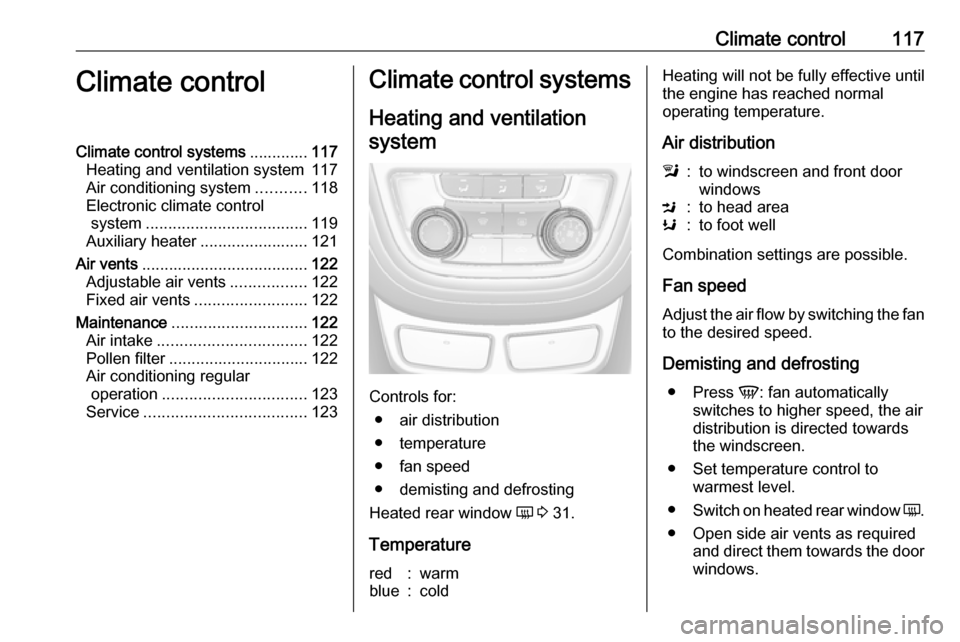
Controls for: ● air distribution
● temperature
● fan speed
● demisting and defrosting
Heated rear window Ü 3 31.
Temperature
red:warmblue:coldHeating will not be fully effective until
the engine has reached normal
operating temperature.
Air distributionl:to windscreen and front door
windowsM:to head areaK:to foot well
Combination settings are possible.
Fan speed
Adjust the air flow by switching the fan
to the desired speed.
Demisting and defrosting ● Press V: fan automatically
switches to higher speed, the air
distribution is directed towards
the windscreen.
● Set temperature control to warmest level.
● Switch on heated rear window Ü.
● Open side air vents as required and direct them towards the doorwindows.
Page 123 of 231

Climate control121To return to automatic mode: Press
AUTO .
Air distribution l, M , K
Press appropriate button for desired
adjustment. Activation is indicated by the LED in the button.l:to windscreen and front door
windows (air conditioning is
activated in the background to
help prevent windows from
fogging)M:to head areaK:to foot well
Combination of settings are possible.
Return to automatic air distribution:
Deactivate corresponding setting or
press AUTO .
Cooling n
Press n to switch on cooling.
Activation is indicated by the LED in
the button. Cooling is only functional
when the engine is running and
climate control fan is switched on.
Press n again to switch off cooling.
The air conditioning system cools and
dehumidifies (dries) when outside
temperature is above a specific level.
Therefore condensation may form
and drip from under the vehicle.
If no cooling or drying is required,
switch off the cooling system for fuel
saving reasons. Activated cooling
may inhibit an Autostop.
The display will indicate Eco when
cooling is deactivated.
Air recirculation mode 4
Press 4 once to activate the
manual air recirculation mode.9 Warning
The exchange of fresh air is
reduced in air recirculation mode.
In operation without cooling the air humidity increases, so the
windows may mist up from inside.
The quality of the passenger
compartment air deteriorates,
which may cause the vehicle
occupants to feel drowsy.
Air conditioning with the engine
not running
When ignition is off, the residual heat
or cooling in the system can be used for climate control in passenger
compartment.
Auxiliary heater Air heater Quickheat is an electric auxiliary air
heater which automatically warms up
the passenger compartment more
quickly.
Page 130 of 231

128Driving and operating
An Autostop is indicated by the
needle at the AUTOSTOP position in
the tachometer.
During an Autostop, the heating
performance, power steering and
brake performance will be
maintained.
Conditions for an Autostop
The stop-start system checks if each
of the following conditions is fulfilled:
● The stop-start system is not manually deactivated .
● The bonnet is fully closed.
● The driver's door is closed or the driver's seat belt is fastened.
● The battery is sufficientlycharged and in good condition.
● The engine is warmed up.
● The engine coolant temperature is not too high.
● The engine exhaust temperature is not too high, e.g. after driving
with high engine load.
● The ambient temperature is not too low.
● The climate control system allows an Autostop.
● The brake vacuum is sufficient.
● The self-cleaning function of the diesel particle filter is not active.
● The vehicle has moved since the
last Autostop.
Otherwise an Autostop will be
inhibited.
Ambient temperature near to the
freezing point can inhibit an Autostop.
Certain settings of the climate control
system may inhibit an Autostop. See
'Climate control' chapter for more
details.
Immediately after motorway driving
an Autostop may be inhibited.New vehicle running-in 3 125.
Battery discharge protection To ensure reliable engine restarts,
several battery discharge protection
features are implemented as part of
the stop-start system.
Power saving measures
During an Autostop, several electrical
features such as auxiliary electric
heater or rear window heating are
disabled or switched into a power
saving mode. The fan speed of the
climate control system is reduced to
save power.
Restart of the engine by the driver Depress the clutch pedal to restart the
engine.
The engine start is indicated by the
needle at the idle speed position in
the tachometer.
If the selector lever is shifted out of
neutral before depressing the clutch
first, control indicator - illuminates
or is shown as a message in the Driver Information Centre.
Control indicator - 3 84.