ECO mode VAUXHALL MOVANO_B 2014.5 Infotainment system
[x] Cancel search | Manufacturer: VAUXHALL, Model Year: 2014.5, Model line: MOVANO_B, Model: VAUXHALL MOVANO_B 2014.5Pages: 93, PDF Size: 1.45 MB
Page 4 of 93

4IntroductionIntroductionGeneral information.......................4
Control elements overview ............6
Theft-deterrent feature .................20
Usage .......................................... 20
Tone settings ............................... 24
Volume settings ........................... 27General information
The Infotainment system provides
state-of-the-art in-car information and entertainment.
The radio is equipped with assignable channel presets for FM, MW and LW
wavebands.
The audio player plays audio CDs,
MP3 CDs and also WMA CDs.
External data storage devices, e.g.
iPod, MP3 player or USB stick, or a
portable player can be connected to
the Infotainment system. External
audio sources can also be connected
via Bluetooth.
The digital sound processor provides
several preset equalizer modes for
sound optimisation.
The navigation system's dynamic route planning will reliably guide you
to your destination and can help avoid
traffic jams and other traffic problems.
Optionally, the Infotainment system
can be operated using controls on the steering column or via the voice
recognition system.In addition, the Infotainment system
can be equipped with a handsfree
phone system.
The well-thought-out design of the
controls and the clear displays enable
you to control the system easily and
intuitively.
Notice
This manual describes all options
and features available for the
various Infotainment systems.
Certain descriptions, including those for display and menu functions, may
not apply to your vehicle due to
model variant, country
specifications, special equipment or
accessories.
Important information on
operation and traffic safety9 Warning
Drive safely at all times when
using the Infotainment system.
If in doubt, stop the vehicle before operating the Infotainment
system.
Page 19 of 93
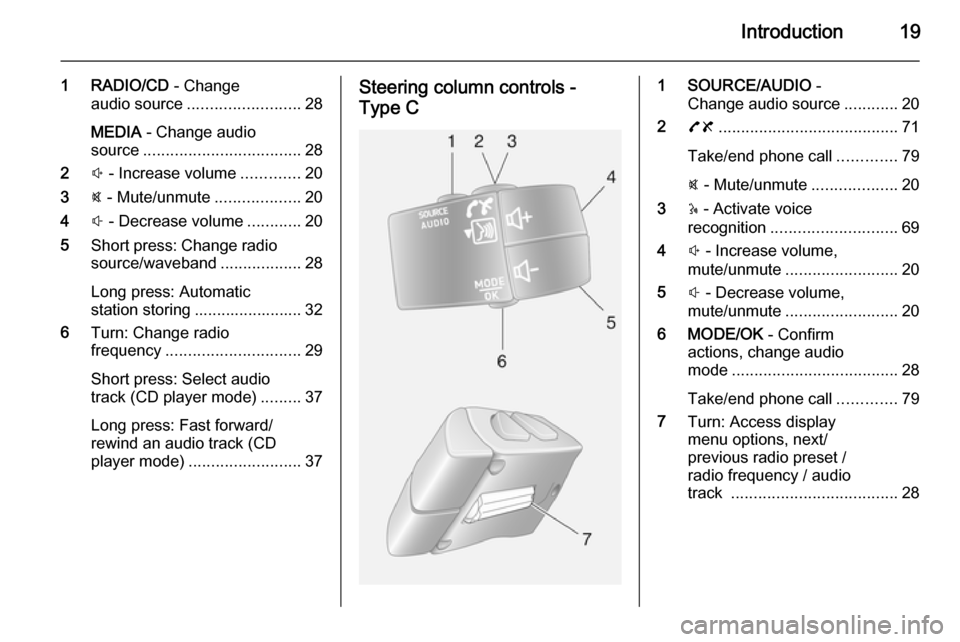
Introduction19
1 RADIO/CD - Change
audio source ......................... 28
MEDIA - Change audio
source ................................... 28
2 ! - Increase volume .............20
3 @ - Mute/unmute ...................20
4 # - Decrease volume ............20
5 Short press: Change radio
source/waveband ..................28
Long press: Automatic station storing ........................ 32
6 Turn: Change radio
frequency .............................. 29
Short press: Select audio
track (CD player mode) .........37
Long press: Fast forward/
rewind an audio track (CD
player mode) ......................... 37Steering column controls -
Type C1 SOURCE/AUDIO -
Change audio source ............20
2 78 ........................................ 71
Take/end phone call .............79
@ - Mute/unmute ...................20
3 5 - Activate voice
recognition ............................ 69
4 ! - Increase volume,
mute/unmute ......................... 20
5 # - Decrease volume,
mute/unmute ......................... 20
6 MODE/OK - Confirm
actions, change audio
mode ..................................... 28
Take/end phone call .............79
7 Turn: Access display
menu options, next/
previous radio preset /
radio frequency / audio
track ..................................... 28
Page 36 of 93

36CD PlayerCD PlayerGeneral information.....................36
Usage .......................................... 37General information
The Infotainment system's CD player
can playback audio CDs, MP3 CDs
and also WMA CDs.
CD15 BT, CD16 BT, CD 18BT and CD 30 BT only: AAC and WAV
formats can also be played.
Important information about
audio CDs and MP3/WMA CDsCaution
Under no circumstances place
DVDs, single-CDs with a diameter
of 8 cm or shaped CDs in the audio
player.
You must not put any stickers on
CDs. These discs can get jammed
in the CD drive and ruin the drive.
An expensive replacement of the
device will then be necessary.
■ Audio CDs with copy protection, which are not in compliance with
the audio CD standard, may not
play correctly or not at all.
■ Self-recorded CD-Rs and CD-RWs
and WMA files with Digital Rights
Management (DRM) from online
music shops may not play correctly
or not at all.
■ On mixed mode CDs (combinations
of audio and data, e.g. MP3), only
the audio tracks will be detected
and played.
■ Self-recorded CD-Rs and CD-RWs
are more vulnerable to mishandling than prerecorded CDs. Correct
handling, especially in the case of
self-recorded CD-Rs and CD-RWs,
must be ensured; see below.
■ Avoid leaving fingerprints when you
change CDs.
■ Put CDs back in their sleeves immediately after removing them
from the CD player, in order to
protect them from dirt and damage.
■ Dirt and liquids on CDs can smear the lens of the audio player inside
the device and cause faults.
■ Protect CDs from heat and direct sunlight.
Page 42 of 93

42AUX inputoff the player and the Infotainmentsystem, to avoid sound quality
issues and possible damage to the equipment.
Upon connection via the jack plug, thesystem detects the audio source
automatically. Depending on the
recording volume, there may be a
delay before the audio source is
heard.
The artist or track name are not
shown on the display screen.
R15 BT / CD15 BT, R16 BT /
CD16 BT, CD18 BT- AUX input
usage
Press the MEDIA or
AUDIO/SOURCE button to change
the audio source to AUX mode, then
switch on the auxiliary device. AUX
appears on the display screen.
AUX settings
Press the SETUP button to access
the settings menu.
Select AUX IN and turn the OK rotary
knob until the desired setting is
selected from:
■ HI (300 mV)
■ MID (600 mV)
■ LO (1200 mV)
CD30 BT - AUX input usage Press the RADIO/CD button to
activate the AUX mode, then switch
on the auxiliary device.
CD35 BT - AUX input usage Press the MEDIA button to activate
the AUX mode, then switch on the
auxiliary device. Jack appears on the
display screen.
Page 59 of 93

Navigation59
Image viewer
The system can be used to view
images. Select Image viewer in the
main menu; the image gallery opens
and an image can be selected.
To scroll through the images in
slideshow mode, select Slideshow
using the right soft button ⌟ and set
the seconds-per-slide when
prompted, using the directional
buttons.
To set the slideshow to manual mode, select Manual by moving to the far
right of the seconds-per-slide display,
then use the directional buttons to
scroll through the images manually.
Start the slideshow by pressing the
right soft button ⌟.
Images can be added or deleted when updating the Navigation
system.
Compatible image formats are: ■ JPG: Greyscale and RGB
■ BMP: 1-bit, 2 colours; 4-bit,16 colours; 8-bit, 256 colours and 24-
bit, 16.7 million coloursSetting up the Navigation
system
Navigation volume
To change the volume during a voice
instruction, turn the X knob or press
< or ].
Alternatively, press button ! or # on
the steering column controls to
change the volume.
To repeat a voice instruction, press
the left soft button ⌞.
System preferences
The system can be adjusted to suit
personal requirements. Select
Change preferences in the main
menu to view the adjustable
preferences.
Certain menu items can also be found more quickly in the Quick menu.
Press the central button on the
remote control to open the Quick
menu .Change Home location
To change the location of your
designated home.Manage favourites
To delete stored favourite
destinations. Select the desired entry followed by Done using the soft
button to delete the entry.Switch map
Used if installing several maps on the
SD card. To change map, select
Switch map , then select the map
required.Voice preferences
To select a voice used to give voice
instructions and to select either
human or synthesised voices.
The human voice instructions provide
simplified guidance only, while the
synthesised voice instructions
provide road directions plus
additional information (e.g. traffic
signs and traffic information etc.).Disable voice
To deactivate the voice instructions
and use only the map screen for
guidance.
Page 60 of 93

60Navigation
Turn off sound
To deactivate all sound, including
voice instructions and alerts etc.. To
turn the sound back on, select Turn
on sound .Safety preferences
To activate sound warnings during
driving (e.g. when exceeding a set
speed or when approaching schools
etc.). This option can also be used to
simplify the menus.Planning preferences
Five types of planning preferences
are selectable. The recommended preference is Fastest route.
After having selected the planning
criteria, the system permits the
activation of the IQ Routes™
function. If activated, this function
plans the best route taking the actual
road speeds into account.
Toll road preferences: After having
entered a destination, the system
asks if you wish to change this
request. Select one of the 3 types of
planning preferences, then finish
using the right soft button ⌟.Road types: Select preferences in
terms of particular sections of the
journey, such as unmade roads and
ferry transfers.Show lane images
When approaching a major road
change, the system may switch to a
close-up view of the junction with a
turn arrow and road signs. This
feature can be deactivated, if
preferred.Automatic zooming
During guidance, the display
gradually zooms in before each
change of direction. If preferred, this mode can be deactivated.Show POI on map
To select the points of interest (POIs) which appear on the map.Manage POIs
To add, modify or delete points of
interest (POIs) or POI categories.Set units
Units of distance: Select Miles or
Kilometres , then select Done using
the soft button.Clock display : Select from the 3 clock
display mode options, then select
Done using the soft button to move to
the next step.
Coordinates : Select from the 3
latitude and longitude display options, then select Done using the soft button
to move to the next step.Show/hide tips
When using the Navigation system,
the system will display tips to help get
the best use of the functions. These
can be deactivated by selecting Hide
tips . To reactivate, select Show tips.Change car symbol
Changes the style of the car symbol.2D map settings
To change the default map settings
between 2D and 3D.Compass preferences
Changes the compass display on the
map screen.Status bar preferences
Add to the list of options that appear
on the navigation map status bar.
Page 72 of 93

72Phoneprepared which you should makeyourself familiar with before youuse the telephone.
Bluetooth
The Phone portal is certified by the
Bluetooth Special Interest Group
(SIG).
You will find further information about the specification on the Internet at
http://www.bluetooth.com
Phone controls
The most important phone controls
are as follows:
Controls on Infotainment system or
steering column:
■ Button 6, or
■ Button TEL: Opens the Phone
menu.
Controls on steering column only: ■ 7, 8 : Take call, end/reject call.
■ MODE/OK : Take call, end/reject
call, confirm an action.
■ 5 or w: Activate/deactivate speech
recognition.
Some features of the handsfree
phone system can also be operated via voice recognition 3 69.
Display screen operation
R15 BT / CD15 BT, R16 BT /
CD16 BT, CD18 BT - Display screen
operation
■ To move up/down in the display: Turn the OK rotary knob.
■ To confirm actions: Press the OK
rotary knob.
■ To cancel actions (and return to previous menu): Press the /
button.
CD30 BT - Display screen operation ■ To move up/down in the display: Turn the rotary knob.
■ To move left/right in the display: Press button ⊲ or ⊳.
■ To confirm actions (and to move right only in the display):
Press the rotary knob.CD35 BT - Display screen operation
■ To move up/down in the display: Turn the central rotary knob.
■ To confirm actions: Press the central rotary knob.
■ To cancel actions (and return to previous menu): Press the /
button.
Operating keyboards in the
display
R15 BT / CD15 BT, R16 BT /
CD16 BT, CD18 BT - Operating
keyboards in the display
To move within and to enter
characters in the numerical keyboard
shown on the display screen: Turn
and press the OK rotary knob.
Entries can be corrected during input with the ← keyboard character.
Press the / button to stop using the
keyboard and return to the previous screen.
Page 79 of 93

Phone79
Select Emergency followed by Enter/
change number . Enter the
emergency call number (e.g. 112)
using the numerical keyboard 3 71.
Emergency call numbers vary
depending on the country or region.
Dialling the emergency call number
CD30 BT
Open the Phone menu by pressing
button 6 or TEL .
Select Emergency followed by Call to
start dialling the emergency call
number (e.g. 112).
A telephone connection to the
emergency call centre is set up.
Answer when the service personnel
questions you about the emergency.9 Warning
Do not end the call until you are
requested to do so by the
emergency call centre.
Operation
Introduction When a Bluetooth connection has
been set up between your mobile
phone and the handsfree phone
system, certain functions of your
mobile phone can be operated via the
Infotainment system controls.
It is then possible, e.g., to import the
contacts and telephone numbers stored in your mobile phone into the
handsfree phone system.
After connection, the mobile phone
data is transmitted to the handsfree
phone system. This can take some
time, depending on phone model. During this period, operation of the
mobile phone is possible via the
Infotainment system only to a limited extent.
Notice
Not every mobile phone supports
the functions of the handsfree phone
system. Therefore, deviations from
the range of functions described are possible.Phone menu
To display the Phone menu:
■ Press button 6, or
■ Press button TEL.
Volume control
R15 BT / CD15 BT, R16 BT /
CD16 BT, CD18 BT - Volume control
During a call, turn m rotary knob or
press ! or # (on the steering column
controls) to change the call volume.
CD30 BT - Volume control
To preset the volume for calls, voice
recognition or the ringtone, press the
0 button and select Phone settings
from the settings menu, followed by Volume .
Select the desired option (e.g.
Ringing volume ) and adjust the
volume with the m rotary knob (or
button ! or #). Press 0 again to save
changes and exit the menu.
During a call, turn m or press ! or #
to change the call volume.
Page 85 of 93

Phone85
To reject the call, depending on
vehicle configuration:
■ Press and hold the 8 button (on the
steering column controls)
■ Select the } icon in the display (by
turning and pressing the OK rotary
knob)
When receiving a call, the caller
number may be shown on the
Infotainment system display screen. If
the number is stored in the system
memory, the name is displayed
instead. If the number cannot be
displayed, the message Private
number is shown.
CD30 BT - Receiving calls
When receiving a call, various
functions are available, including:
■ Pick up
■ Hold
■ Refuse
When receiving a call, the caller
number may be shown on the
Infotainment system display screen. If the number is stored in the system
memory, the name is displayedinstead. If the number cannot be
displayed, the message Private
number is shown.
The handsfree phone system
ringtone is dependent upon the
phone model and mode (silent,
vibrate, etc.).
Automatic call waiting
For safety reasons, the automatic call waiting function is set by default. It isrecommended that this feature
remains activated.
When an incoming call arrives, a
message alerts the caller to the fact
that you are driving. The call starts
automatically and the length of the
call is shown on the Infotainment
system display screen. Pick up the
call only when it is safe to do so.
To deactivate automatic call waiting,
refer to Activate/deactivate automatic
call waiting in the Phone settings
section.
With automatic call waiting
deactivated, it is possible to reject the
call by selecting Refuse or by
pressing and holding the 8 orMODE/OK button. To place the caller
on hold, select Hold; the caller is
informed they are on hold via an
automatic message.
Temporarily override the automatic
call waiting feature by selecting Pick
up or press the 7 or MODE/OK button
to receive the call.
CD35 BT - Receiving calls
To accept the call, briefly press the 7 button (on the steering column
controls).
To reject the call: ■ Press and hold the 8 button (on the
steering column controls), or
■ Select Refuse in the display (by
turning and pressing the central
rotary knob)
When receiving a call, the caller
number may be shown on the
Infotainment system display screen. If the number is stored in the system
memory, the name is displayed
instead. If the number cannot be
displayed, the message Unknown is
shown.
Page 86 of 93

86Phone
The handsfree phone system
ringtone is dependent upon the
phone model and mode (silent,
vibrate, etc.).
Automatic call waiting
For safety reasons, the automatic call
waiting function is set by default. It is
recommended that this feature
remains activated.
When an incoming call arrives, a
message alerts the caller to the fact that you are driving. The call starts
automatically and the length of the
call is shown on the Infotainment
system display screen. Pick up the
call only when it is safe to do so.
To deactivate automatic call waiting,
refer to Activate/deactivate automatic
call waiting in the Phone settings
section.
With automatic call waiting
deactivated, it is possible to reject the
call by selecting Refuse or by
pressing and holding the 8 button. To
place the caller on hold, select
Pause ; the caller is informed they are
on hold via an automatic message.Temporarily override the automatic
call waiting feature by selecting
Resume or press the 7 button to
receive the call.
Functions during a telephonecall
R15 BT / CD15 BT, R16 BT /
CD16 BT, CD18 BT - Functions
during a telephone call
In addition to volume control, various
functions are available during a call,
including:
■ Switch the call to the mobile phone
■ Access the keyboard
■ End call
Turn and press the OK rotary knob to
select and confirm.
Switch the call from the handsfree
phone system to the mobile phone by selecting the mobile phone display
item. Some mobile phones may
become disconnected from the
handsfree phone system during the
switch to this mode.A number can also be entered on the numerical keyboard ( 3 71) e.g. to
control a voice server such as the
voicemail box. Select the #123
display item to access the numerical keyboard. Refer to Voicemail box for
further information.
To end the call, depending on vehicle
configuration:
■ Briefly press the 8 button
■ Press the TEL button
■ Select the } icon in the display
CD30 BT - Functions during a
telephone call
In addition to volume control, various
functions are available during a call,
including:
■ Pause / Pick up
■ Handset
■ Keyboard
■ Hang up
To put the caller on hold, select
Pause ; the caller is informed they are
on hold via an automatic message.
Select Pick up to resume the call.