steering VAUXHALL MOVANO_B 2014.5 Infotainment system
[x] Cancel search | Manufacturer: VAUXHALL, Model Year: 2014.5, Model line: MOVANO_B, Model: VAUXHALL MOVANO_B 2014.5Pages: 93, PDF Size: 1.45 MB
Page 4 of 93

4IntroductionIntroductionGeneral information.......................4
Control elements overview ............6
Theft-deterrent feature .................20
Usage .......................................... 20
Tone settings ............................... 24
Volume settings ........................... 27General information
The Infotainment system provides
state-of-the-art in-car information and entertainment.
The radio is equipped with assignable channel presets for FM, MW and LW
wavebands.
The audio player plays audio CDs,
MP3 CDs and also WMA CDs.
External data storage devices, e.g.
iPod, MP3 player or USB stick, or a
portable player can be connected to
the Infotainment system. External
audio sources can also be connected
via Bluetooth.
The digital sound processor provides
several preset equalizer modes for
sound optimisation.
The navigation system's dynamic route planning will reliably guide you
to your destination and can help avoid
traffic jams and other traffic problems.
Optionally, the Infotainment system
can be operated using controls on the steering column or via the voice
recognition system.In addition, the Infotainment system
can be equipped with a handsfree
phone system.
The well-thought-out design of the
controls and the clear displays enable
you to control the system easily and
intuitively.
Notice
This manual describes all options
and features available for the
various Infotainment systems.
Certain descriptions, including those for display and menu functions, may
not apply to your vehicle due to
model variant, country
specifications, special equipment or
accessories.
Important information on
operation and traffic safety9 Warning
Drive safely at all times when
using the Infotainment system.
If in doubt, stop the vehicle before operating the Infotainment
system.
Page 5 of 93

Introduction5
Radio receptionRadio reception may be disrupted by
static, noise, distortion or loss of
reception due to
■ changes in distance from the transmitter,
■ multi-path reception due to reflection,
■ shadowing.
In case of poor radio reception the
volume will automatically drop as to
minimize the disturbance effect.
Using this manual ■ This manual describes features that may or may not be on your
specific vehicle, either because
they are optional or due to changes subsequent to the printing of this
manual. Please refer to the
purchase documentation to confirm
each of the features found on the
vehicle.
■ Certain controls and descriptions, including symbols, displays and
menu functions may not apply toyour vehicle due to model variant,
country specifications, special
equipment or accessories.
■ The table of contents at the beginning of this manual and withineach section shows where the
information is located.
■ The index will enable you to search
for specific information.
■ The vehicle display screens may not support your specific language.
■ Display messages and interior labelling are written in bold letters.
■ The operations given within this manual refer to Infotainment
system controls. For equivalent
steering column controls, refer to
the control elements overview
3 6.Warnings and Cautions9 Warning
Text marked 9 Warning provides
information on risk of accident or
injury. Disregarding this
information may lead to injury.
Caution
Text marked Caution provides
information on possible damage to
the vehicle. Disregarding this
information may lead to vehicle
damage.
Symbols
Page references are indicated with 3.
3 means "see page".
Page 18 of 93
18Introduction
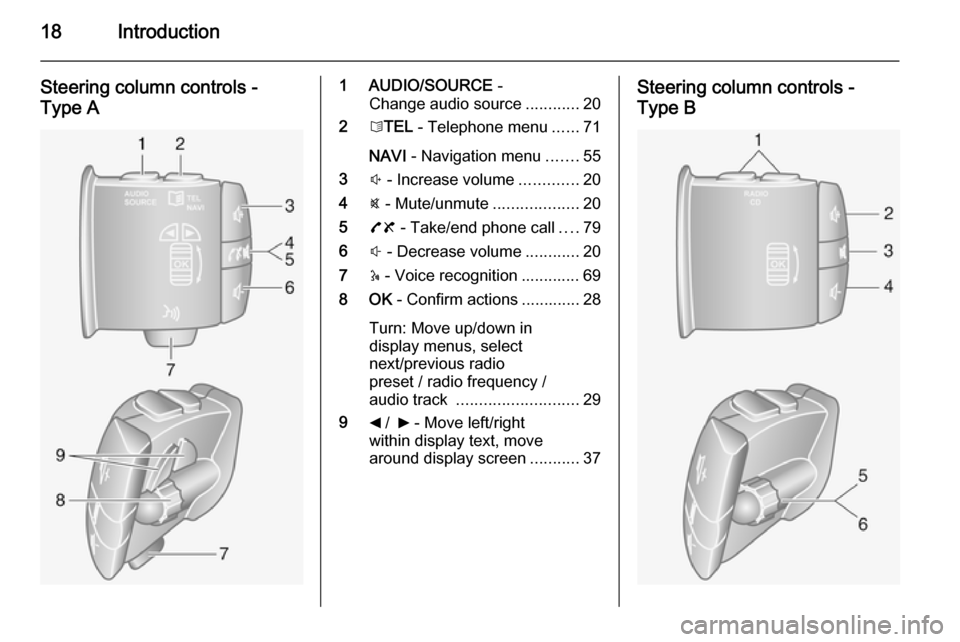
Steering column controls -
Type A1 AUDIO/SOURCE -
Change audio source ............20
2 6TEL - Telephone menu ......71
NAVI - Navigation menu .......55
3 ! - Increase volume .............20
4 @ - Mute/unmute ...................20
5 78 - Take/end phone call ....79
6 # - Decrease volume ............20
7 5 - Voice recognition ............. 69
8 OK - Confirm actions ............. 28
Turn: Move up/down in
display menus, select
next/previous radio
preset / radio frequency /
audio track ........................... 29
9 _ / 6 - Move left/right
within display text, move
around display screen ...........37Steering column controls -
Type B
Page 19 of 93
Introduction19
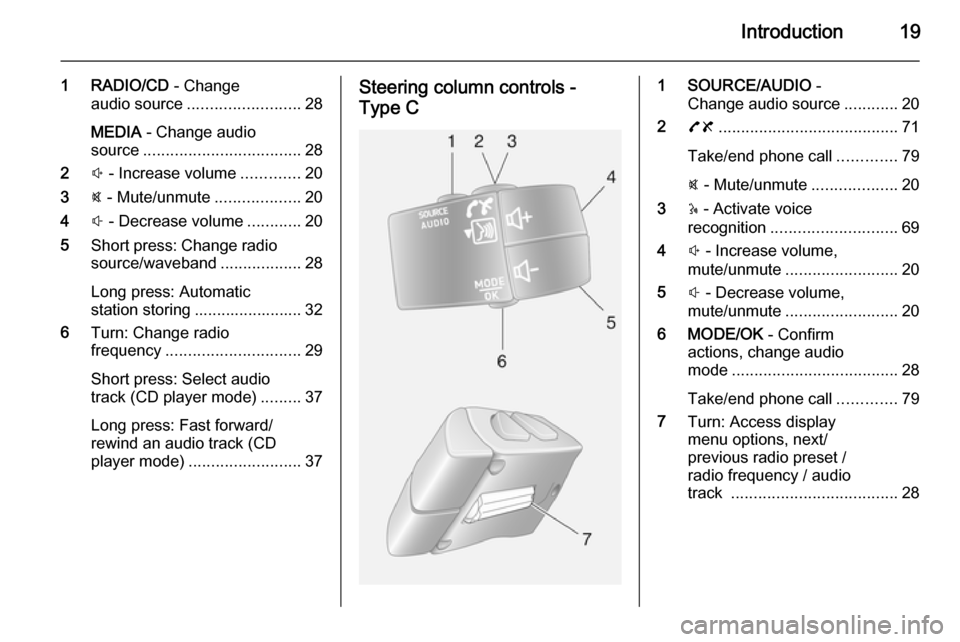
1 RADIO/CD - Change
audio source ......................... 28
MEDIA - Change audio
source ................................... 28
2 ! - Increase volume .............20
3 @ - Mute/unmute ...................20
4 # - Decrease volume ............20
5 Short press: Change radio
source/waveband ..................28
Long press: Automatic station storing ........................ 32
6 Turn: Change radio
frequency .............................. 29
Short press: Select audio
track (CD player mode) .........37
Long press: Fast forward/
rewind an audio track (CD
player mode) ......................... 37Steering column controls -
Type C1 SOURCE/AUDIO -
Change audio source ............20
2 78 ........................................ 71
Take/end phone call .............79
@ - Mute/unmute ...................20
3 5 - Activate voice
recognition ............................ 69
4 ! - Increase volume,
mute/unmute ......................... 20
5 # - Decrease volume,
mute/unmute ......................... 20
6 MODE/OK - Confirm
actions, change audio
mode ..................................... 28
Take/end phone call .............79
7 Turn: Access display
menu options, next/
previous radio preset /
radio frequency / audio
track ..................................... 28
Page 20 of 93

20IntroductionTheft-deterrent feature
An electronic security system is
included for the purpose of theft
deterrence. The Infotainment system
functions only in your vehicle and is therefore worthless to a thief.
The security code (supplied
separately) must be entered upon
first use of the system and after
prolonged interruptions to the power
supply.
Entering the security code
When first switching on the
Infotainment system, the message Radio code then 0000 appears on the
display screen.
To enter first digit of security code,
press numbered button 1 on the unit
repeatedly until desired number is
displayed. Enter second, third and
fourth digits using buttons 2, 3 and 4
in the same way.
When the full code is displayed, press and hold button 6 until an audible
signal sounds. The system is
unlocked when the correct code has
been entered.Incorrect code entered
When an incorrect code has been
entered, Error code then Wait 100 is
displayed.
Wait until the countdown has expired, then enter the correct code. Each
time the code is entered incorrectly,
the countdown time is doubled.
Changing the geographical area
When the security code is entered,
you may be prompted to choose a
geographical area, e.g.:
■ Europe
■ Asia
■ Arabia
■ America
Switch off the Infotainment system,
then simultaneously press button 1
and 5 and the m rotary knob. Then
press button _ or 6 until desired area
is highlighted on the display screen
and set with button 6.Usage
Infotainment controls
The Infotainment system is operated
via buttons, rotary knobs and display menus.
Inputs are made via: ■ the central control unit in the instrument panel 3 6, or
■ the controls on the steering column
3 6
■ the voice recognition system (if available) 3 69
Switching the Infotainment
system on or off
Press the X knob to switch the
Infotainment system on.
The previously used audio source is
active.
Press the X knob (or press and hold)
to switch the Infotainment system off.
Page 21 of 93

Introduction21
Automatic switch-off
With the ignition off, if the
Infotainment system is switched on
with the X knob, it will switch-off
automatically a short period after the
last user input. Depending on type
fitted, this may occur after approx.
5 minutes.
R16 BT / CD16 BT / CD18 BT:
20 minutes. Pressing the X knob
again will allow the Infotainment
system to remain on for a further 20 minutes.
Setting the volume
Turn the X rotary knob, or press
button < or ].
CD35 BT: Turn volume rotary knob.
Alternatively (with the steering
column controls), press button ! or
# .
Stored volume
When the Infotainment system is
switched off, the current volume is
stored.CD30 BT: If the volume was greater
than 15 when the system was
switched off, it will automatically be
reduced to 15 when switched on
again.
Speed dependent volume
When speed dependent volume
( 3 27) is activated, the volume is
adapted automatically to compensate
for road and wind noise.
Mute
To mute the current audio source,
press X knob briefly 1)
.
CD35 BT: Press volume rotary knob
briefly.
R16 BT / CD16 BT / CD18 BT : Press
volume rotary knob briefly.
Alternatively (with the steering
column controls), press the @ or 8
button or press ! and #
simultaneously.
Unmute
To unmute, briefly press (or turn) the
X knob again.CD35 BT: Press volume rotary knob
again.
Alternatively (with the steering
column controls): Press @ again or
press ! and # simultaneously again.
Display screen operation R15 BT / CD15 BT / R16 BT /
CD16 BT / CD18 BT
■ To move up/down in the display: Turn the OK rotary knob.
■ To confirm actions: Press the OK
rotary knob.
■ To cancel actions (and return to previous menu): Press the /
button.
CD30 BT ■ To move up/down in the display: Turn the rotary knob.
■ To move left/right in the display: Press button ⊲ or ⊳.
■ To confirm actions (and to move right only in the display):
Press the rotary knob.1) Not with R16 BT, CD16 BT, CD18 BT and CD30.
Page 56 of 93
56Navigation
Insert new batteries (Type: AAA /LR03 / UM4 1.5V) ensuring they are
installed correctly, then replace the
battery cover.
Activating the Navigation
system
Switching on
The Navigation system switches on
automatically when the ignition is
switched on. In other cases, press the
X knob.
With the ignition off, the Navigation
system can be used for approx.
20 minutes. Press the X knob to
switch on the Navigation system. The
system will automatically switch off
approx. 20 minutes after the last user
input.
Switching off
With the ignition off, the Navigation
system switches off automatically
when the driver's door is opened.
With the ignition on, press the X knob
to switch off the Navigation system.Switching between Navigation
system and Infotainment system
menus
With the Infotainment and Navigation
systems on, press the NAVI button
(on the steering column controls) to
switch between the Navigation
system and Infotainment system
screens.
When the Infotainment controls are
used to change, for example, the audio source, the Infotainment
system screen pops-up temporarily
over the Navigation system screen.
The display switches back after a
delay.
Clock The clock is displayed when switched
to the Infotainment system screen.
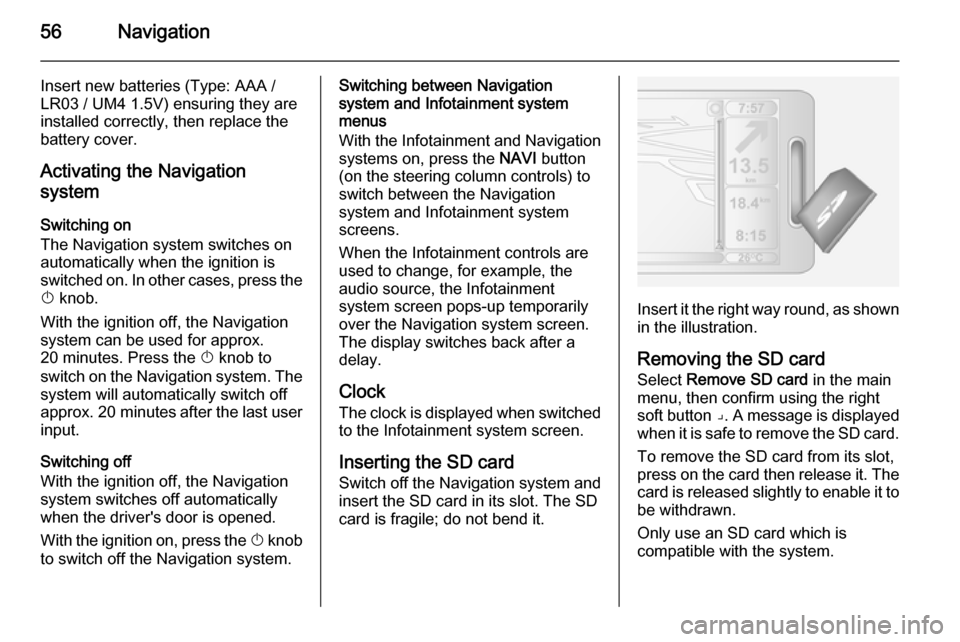
Inserting the SD card
Switch off the Navigation system and
insert the SD card in its slot. The SD
card is fragile; do not bend it.
Insert it the right way round, as shown in the illustration.
Removing the SD card
Select Remove SD card in the main
menu, then confirm using the right
soft button ⌟. A message is displayed
when it is safe to remove the SD card.
To remove the SD card from its slot,
press on the card then release it. The
card is released slightly to enable it to be withdrawn.
Only use an SD card which is
compatible with the system.
Page 59 of 93

Navigation59
Image viewer
The system can be used to view
images. Select Image viewer in the
main menu; the image gallery opens
and an image can be selected.
To scroll through the images in
slideshow mode, select Slideshow
using the right soft button ⌟ and set
the seconds-per-slide when
prompted, using the directional
buttons.
To set the slideshow to manual mode, select Manual by moving to the far
right of the seconds-per-slide display,
then use the directional buttons to
scroll through the images manually.
Start the slideshow by pressing the
right soft button ⌟.
Images can be added or deleted when updating the Navigation
system.
Compatible image formats are: ■ JPG: Greyscale and RGB
■ BMP: 1-bit, 2 colours; 4-bit,16 colours; 8-bit, 256 colours and 24-
bit, 16.7 million coloursSetting up the Navigation
system
Navigation volume
To change the volume during a voice
instruction, turn the X knob or press
< or ].
Alternatively, press button ! or # on
the steering column controls to
change the volume.
To repeat a voice instruction, press
the left soft button ⌞.
System preferences
The system can be adjusted to suit
personal requirements. Select
Change preferences in the main
menu to view the adjustable
preferences.
Certain menu items can also be found more quickly in the Quick menu.
Press the central button on the
remote control to open the Quick
menu .Change Home location
To change the location of your
designated home.Manage favourites
To delete stored favourite
destinations. Select the desired entry followed by Done using the soft
button to delete the entry.Switch map
Used if installing several maps on the
SD card. To change map, select
Switch map , then select the map
required.Voice preferences
To select a voice used to give voice
instructions and to select either
human or synthesised voices.
The human voice instructions provide
simplified guidance only, while the
synthesised voice instructions
provide road directions plus
additional information (e.g. traffic
signs and traffic information etc.).Disable voice
To deactivate the voice instructions
and use only the map screen for
guidance.
Page 69 of 93

Voice recognition69Voice recognitionGeneral information.....................69
Phone control ............................... 69General information
The voice recognition function of the handsfree phone system allows you
to operate certain functions of the
mobile phone via voice input.
Voice tags can be created for the
contacts in the vehicle phonebook
enabling you to call a contact without
manually selecting the caller name or number.
To ensure that conversations held
inside the vehicle do not start
unintentional calls to a saved contact,
the voice recognition function must
first be activated via the steering
column controls.
In the event of incorrect operation, the voice recognition function requests
you to repeat the desired command,
or plays back the available options.Phone control
Creating voice tags In addition to names and numbers,
voice tags can be created when new
contacts are added to the vehicle
phonebook. Refer to Operation in the
Phone section 3 79.
Voice tags can also be added or
modified afterwards by selecting the following menus and options:
■ Directory Management ,
■ Vehicle phonebook ,
■ Modify this contact .
Select the contact to be modified from
the list of contacts, then select the following menu options by turning and pressing the rotary knob:
■ (voice tag) ,
■ Launch voice tag recording ,
When prompted to record a voice tag,
speak after the tone. A message asks
for the voice tag to be repeated. If the system does not recognise the
repeated voice tag, it will request it to
Page 70 of 93

70Voice recognition
be repeated again. A message
confirms that the voice tag has been recorded successfully.
Upon completion, ensure the voice
tag is stored along with other contact
details by selecting Memorise.
Activating voice recognition To activate the voice recognition
function:
■ Press button 5 or
■ Press button w (on the steering
column controls)
After the tone, repeat the voice tag
previously recorded for the desired
contact to start the dialling process.
Say the voice tag directly, i.e. do not
say 'Call' before the voice tag.
If the system does not recognise the
voice tag, a message asks you to
repeat it. If the voice tag is still not
recognised, the list of recorded voice
tags is played back. Repeat the
desired voice tag when it is played
back, to start the dialling process.In the event the system still does not
recognise the voice tag, the voice
recognition function is automatically
deactivated.