USB port VAUXHALL MOVANO_B 2015.5 Infotainment system
[x] Cancel search | Manufacturer: VAUXHALL, Model Year: 2015.5, Model line: MOVANO_B, Model: VAUXHALL MOVANO_B 2015.5Pages: 139, PDF Size: 1.84 MB
Page 3 of 139

Introduction.................................... 4
Radio ........................................... 39
CD Player .................................... 50
AUX input ..................................... 54
USB port ...................................... 56
Bluetooth music ........................... 60
External devices .......................... 67
Navigation .................................... 69
Voice recognition .......................110
Phone ........................................ 113
Index .......................................... 134Contents
Page 4 of 139

4IntroductionIntroductionGeneral information.......................4
Control elements overview ............6
Theft-deterrent feature .................21
Usage .......................................... 22
Tone settings ............................... 31
Volume settings ........................... 33
System settings ........................... 34General information
The Infotainment system provides
state-of-the-art in-car information and entertainment.
The radio is equipped with assignable channel presets for FM, MW and LW
wavebands.
The audio player plays audio CDs,
MP3 CDs and also WMA CDs.
External data storage devices, e.g.
iPod, MP3 player or USB stick, or a
portable player can be connected to
the Infotainment system. External
audio sources can also be connected
via Bluetooth.
The digital sound processor provides
several preset equalizer modes for
sound optimisation.
The navigation system's dynamic route planning will reliably guide you
to your destination and can help avoid
traffic jams and other traffic problems.
Optionally, the Infotainment system
can be operated using controls on the steering column or via the voice
recognition system.In addition, the Infotainment system
can be equipped with a handsfree
phone system.
The well-thought-out design of the
controls and the clear displays enable
you to control the system easily and
intuitively.
Notice
This manual describes all options
and features available for the
various Infotainment systems.
Certain descriptions, including those for display and menu functions, may
not apply to your vehicle due to
model variant, country
specifications, special equipment or
accessories.
Important information on
operation and traffic safety9 Warning
Drive safely at all times when
using the Infotainment system.
If in doubt, stop the vehicle before operating the Infotainment
system.
Page 7 of 139

Introduction7
1m - Press: Switch on/off ........22
Press: Mute/unmute ..............22
Turn: Adjust volume ..............22
2 SETUP - Short press:
Settings menu ....................... 22
Display radio text
information ............................ 45
Long press: Automatic
station storing ........................ 44
3 Mute/unmute ......................... 22
4 3 - Radio, Short press:
Search for next radio
frequency .............................. 41
Long press: Automatic
station search ........................ 41
5 RADIO - Change audio
source, waveband .................39
6 / - Return to previous
menu, cancel an action .........22
7 MEDIA - Change audio
source ................................... 51
8 OK rotary knob ...................... 22
Press: Confirm an action ....... 22Turn: Access display
menu options ........................ 22
Turn: Change radio
frequency .............................. 41
9 TEL - Telephone menu .......113
10 USB port ............................... 56
11 AUX input .............................. 54
12 Station buttons 1...6 ..............41
Short press: Select station ....41
Long press: Save station ......41
13 2 - Radio, Short press:
Search for previous radio
frequency .............................. 41
Long press: Automatic
station search ........................ 41
Page 9 of 139

Introduction9
1m - Press: Switch on/off ........22
Turn: Adjust volume ..............22
2 Station buttons 1...6 ..............41
Short press: Select station ....41
Long press: Save station ......41
3 RADIO - Change audio
source, waveband .................39
4 MEDIA - Change audio
source ................................... 51
5 Rotary knob ........................... 22
Short press: Confirm an
action .................................... 22
Turn: Access display
menu options ........................ 22
6 / - Return to previous
menu, cancel an action .........22
7 3 - Radio, Short press:
Search for next radio
frequency .............................. 41
Long press: Automatic
station search ........................ 41Audio/MP3/WMA CD,
Short press: Skip track
forwards ................................ 51
Long press: Fast forward ......51
8 USB port ............................... 56
9 SETUP - Short press:
Settings menu ....................... 22
10 TEL - Telephone menu .......113
11 2 - Radio, Short press:
Search for previous radio
frequency .............................. 41
Long press: Automatic
station search ........................ 41
12 TEXT - Display radio text
information ............................ 45
13 AUX input .............................. 54
Page 11 of 139

Introduction11
1m - Press: Switch on/off ........22
Turn: Adjust volume ..............22
2 SETUP - Short press:
Settings menu ....................... 22
3 3 - Radio, Short press:
Search for next radio
frequency .............................. 41
Long press: Automatic
station search ........................ 41
Audio/MP3/WMA CD,
Short press: Skip track
forwards ................................ 51
Long press: Fast forward ......51
4 RADIO - Change audio
source, waveband .................39
5 MEDIA - Change audio
source ................................... 51
6 Rotary knob ........................... 22
Short press: Confirm an
action .................................... 22
Turn: Access display
menu options ........................ 22
7 TEL - Telephone menu .......1138Station buttons 1...6 ..............41
Short press: Select station ....41
Long press: Save station ......41
9 USB port ............................... 56
10 / - Return to previous
menu, cancel an action .........22
11 d - CD ejection .....................51
12 AUX input .............................. 54
13 2 - Radio, Short press:
Search for previous radio
frequency .............................. 41
Long press: Automatic
station search ........................ 41
Audio/MP3/WMA CD,
Short press: Skip track
backwards ............................. 51
Long press: Fast rewind .......51
Page 13 of 139

Introduction13
1m - Press: Switch on/off ........22
Turn: Adjust volume ..............22
2 OK rotary knob ...................... 22
Short press: Confirm an
action .................................... 22
Turn: Access display
menu options ........................ 22
3 RADIO - Change audio
source, waveband .................39
4 SETUP - Short press:
Settings menu ....................... 22
5 TEXT - Display radio text
information ............................ 45
6 USB port ............................... 56
7 Station buttons 1...6 ..............41
Short press: Select station ....41
Long press: Save station ......41
8 3 - Radio, Short press:
Search for next radio
frequency .............................. 41
Long press: Automatic
station search ........................ 41Audio/MP3/WMA CD,
Short press: Skip track
forwards ................................ 51
Long press: Fast forward ......51
9 / - Return to previous
menu, cancel an action .........22
10 2 - Radio, Short press:
Search for previous radio
frequency .............................. 41
Long press: Automatic
station search ........................ 41
Audio/MP3/WMA CD,
Short press: Skip track
backwards ............................. 51
Long press: Fast rewind .......51
11 AUX input .............................. 54
12 d - CD ejection .....................51
13 TEL - Telephone menu .......113
14 MEDIA - Change audio
source ................................... 51
Page 15 of 139

Introduction15
1m - Press: Switch on/off ........22
2 Volume rotary knob -
Press: Mute/unmute ..............22
Turn: Adjust volume ..............22
3 RADIO - Change audio
source, waveband .................39
4 Central rotary knob ...............22
Press: Confirm an action ....... 22
Turn: Access display
menu options ........................ 22
Turn: Access the stored
radio station list .....................39
Turn: Select next/previous
station ................................... 41
Turn: Change CD/MP3
track ...................................... 51
5 MEDIA - Change audio
source ................................... 51
6 EJECT - CD ejection .............5172 - Radio, Short press:
Search for previous radio
frequency .............................. 41
Long press: Automatic
station search ........................ 41
Audio/MP3/WMA CD,
Short press: Skip track
backwards ............................. 51
Long press: Fast rewind .......51
8 3 - Radio, Short press:
Search for next radio
frequency .............................. 41
Long press: Automatic
station search ........................ 41
Audio/MP3 CD, Short
press: Skip track forwards ..... 51
Long press: Fast forward ......51
9 USB port ............................... 56
10 AUX input .............................. 54
11 Station buttons 1...6 ..............41
Short press: Select station ....41
Long press: Save station ......41
12 TEL - Telephone menu .......11313 SETUP / TEXT - Short
press: Settings menu ............22
Long press: Display radio
text information .....................45
Long press: Display CD
text information .....................51
14 / - Return to previous
menu, cancel an action .........22
Page 17 of 139
![VAUXHALL MOVANO_B 2015.5 Infotainment system Introduction17
1m - Press: Switch on/off ........22
2 ]: Decrease volume .............22
3 <: Increase volume ............... 22
4 USB port ............................... 56
5 AUX input .............](/img/38/19554/w960_19554-16.png "VAUXHALL MOVANO_B 2015.5 Infotainment system Introduction17
1m - Press: Switch on/off ........22
2 ]: Decrease volume .............22
3 <: Increase volume ............... 22
4 USB port ............................... 56
5 AUX input .............")
Introduction17
1m - Press: Switch on/off ........22
2 ]: Decrease volume .............22
3 <: Increase volume ............... 22
4 USB port ............................... 56
5 AUX input .............................. 54
6 Clock ..................................... 22
7 PHONE : Telephone menu ..113
8 SETTINGS : Audio
settings, e.g. "Tone
settings" ................................ 31
"Volume settings" ..................33
Bluetooth settings .................22
Display settings .....................22
System settings ..................... 34
9 ☾Dark : Darken screen
(only clock and audio
system information are
displayed) .............................. 22
10 NAVI : Navigation menu ........69
11 MAP : View map .................... 69
12 RADIO : Change audio
source to radio ......................3913 MEDIA: Change audio
source - USB, iPod ...............56
BT (Bluetooth) .......................60
AUX ....................................... 54
Page 24 of 139
24Introduction
CD35 BT USB - Display screen
operation
■ To move up/down in the display: Turn the central rotary knob.
■ To confirm actions: Press the central rotary knob.
■ To cancel actions (and return to previous menu): Press the /
button.
NAVI 50 - Display screen operation
Use the touchscreen for the following displayed menus as described in
each section:
■ è RADIO
Refer to "Radio" section 3 39.
■ t MEDIA
Refer to "USB port" section 3 56.
■ g PHONE
Refer to "Phone" section 3 113.
■ F MAP
Refer to "Navigation" section
3 69.■ y NAVI
Refer to "Navigation" section
3 69.
■ t SETTINGS
Refer to (NAVI 50) "Tone settings" 3 31, "Volume settings" 3 33
and "System settings" 3 34.
When the home screen ; is
displayed, it is possible to hide these menus from the display (only clock
and audio system information are
shown) by pressing ☾ Dark. Press
anywhere on the screen to display
these menus again.
NAVI 80 - Display screen operation
Use the touchscreen for the following
displayed menus as described in
each section.
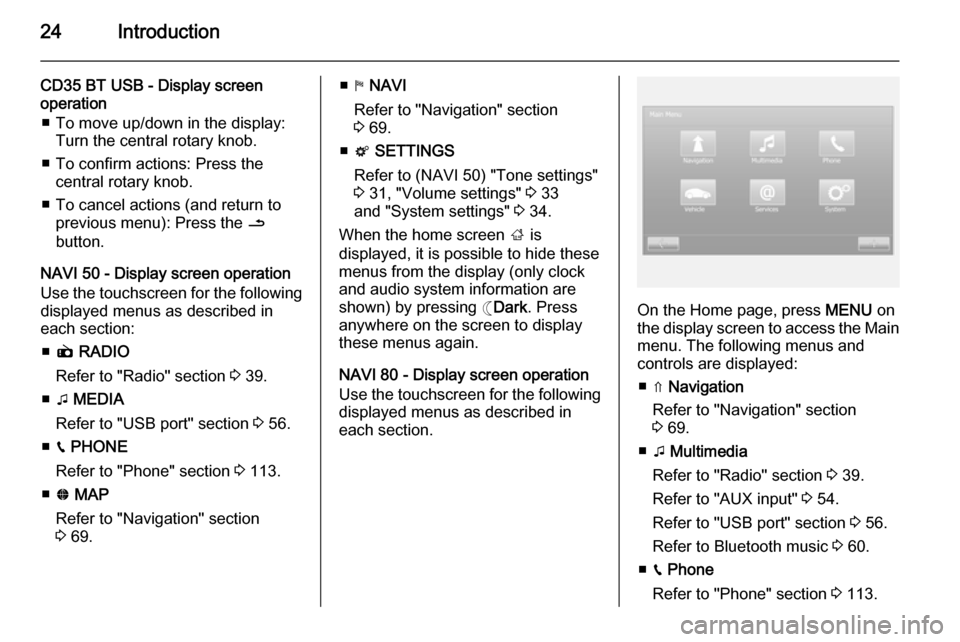
On the Home page, press MENU on
the display screen to access the Main menu. The following menus and
controls are displayed:
■ ⇑ Navigation
Refer to "Navigation" section
3 69.
■ t Multimedia
Refer to "Radio" section 3 39.
Refer to "AUX input" 3 54.
Refer to "USB port" section 3 56.
Refer to Bluetooth music 3 60.
■ g Phone
Refer to "Phone" section 3 113.
Page 26 of 139

26Introduction
Multimedia followed by Media on the
display screen. Select auxiliary
source from the display list.R15 BT USB, R16 BT USB
Detailed descriptions of:
■ AUX input functions 3 54
■ USB port functions 3 56
■ Bluetooth music operation 3 60CD16 BT USB, CD18 BT USB
Detailed descriptions of:
■ CD player functions 3 51
■ AUX input functions 3 54
■ USB port functions 3 56
■ Bluetooth music operation 3 60CD35 BT USB
Detailed descriptions of:
■ CD player functions 3 51
■ AUX input functions 3 54
■ USB port functions 3 56
■ Bluetooth music operation 3 60NAVI 50
Detailed descriptions of:
■ AUX input functions 3 54
■ USB port functions 3 56
■ Bluetooth music operation 3 60NAVI 80
Detailed descriptions of:
■ AUX input functions 3 54
■ USB port functions 3 56
■ Bluetooth music operation 3 60
NAVIGATION, MAP
(CD35 BT USB NAVI, NAVI 50,
NAVI 80)
Detailed description of the Navigation system 3 69, Browse map 3 98.
PHONE
Use the display options in the
following menus to connect mobile
phones, make telephone calls, create
contacts lists and adjust various
settings.
Detailed description of the handsfree
phone system functions 3 113.
R15 BT USB, R16 BT USB,
CD16 BT USB, CD18 BT USB -
Phone
To access the Phone menu: Press
the 6 or TEL button.
To access the phone settings menu: Press the TEL button and select
Phone settings .CD35 BT USB - Phone
To access the Phone menu: Press
the 6 or TEL button.
To access the phone settings menu:
Press the SETUP / TEXT button and
select Phone settings .NAVI 50 - Phone
To access the Phone menu at any
time: Press the Home button ;
followed by PHONE on the display
screen.NAVI 80 - Phone
To access the Phone menu from the
Home page, press MENU followed by
Phone on the display screen.