service indicator VAUXHALL MOVANO_B 2016.5 Owner's Manual
[x] Cancel search | Manufacturer: VAUXHALL, Model Year: 2016.5, Model line: MOVANO_B, Model: VAUXHALL MOVANO_B 2016.5Pages: 239, PDF Size: 5.64 MB
Page 76 of 239

74Instruments and controlsInstruments and
controlsControls ....................................... 75
Steering wheel adjustment ........75
Steering wheel controls .............75
Horn ........................................... 75
Steering column controls ...........75
Windscreen wiper/washer .........76
Outside temperature ..................77
Clock ......................................... 77
Power outlets ............................. 78
Cigarette lighter ......................... 78
Ashtrays .................................... 79
Warning lights, gauges and indi‐ cators ........................................... 79
Instrument cluster ......................79
Speedometer ............................. 79
Odometer .................................. 80
Trip odometer ............................ 80
Tachometer ............................... 80
Fuel gauge ................................ 80
Engine coolant temperature gauge ....................................... 81
Engine oil level monitor .............81
Service display .......................... 82
Transmission display .................82Control indicators ......................83
Turn signal ................................. 86
Seat belt reminder .....................86
Airbag and belt tensioners .........86
Airbag deactivation ....................86
Charging system .......................87
Malfunction indicator light ..........87
Service vehicle soon .................87
Stop engine ............................... 88
Brake system ............................. 88
Antilock brake system (ABS) .....88
Upshift ....................................... 88
Lane departure warning ............88
Electronic Stability Program ......89
Electronic Stability Program off ............................................. 89
Engine coolant temperature ......89
Preheating ................................. 89
AdBlue ....................................... 89
Tyre pressure monitoring system ...................................... 89
Engine oil pressure ....................90
Low fuel ..................................... 90
Stop-start system ......................90
Exterior light .............................. 91
High beam ................................. 91
High beam assist .......................91
Fog light ..................................... 91
Rear fog light ............................. 91
Cruise control ............................ 91Tachograph............................... 91
Door open .................................. 91
Information displays .....................92
Driver Information Centre ..........92
Info display ................................ 92
Vehicle messages ........................92
Warning chimes .........................93
Trip computer ............................... 94
Tachograph .................................. 96
Page 84 of 239
82Instruments and controlsAs the oil level diminishes, the
squares in the display are replaced
with dashes.▢▢▢▢▢▢:maximum level▢▢▢- - -:intermediate level- - - - - -:minimum level
If the minimum engine oil level is
reached TOP-UP OIL LEVEL is
displayed in combination with control
indicator A after the ignition is
switched on for 30 seconds. Check
and top up engine oil 3 160.
To exit the oil level monitor display,
press either trip computer button.
Trip computer 3 94.
Service display
When the ignition is switched on, the
remaining distance before the next
service is due may be shown briefly in the Driver Information Centre (DIC).Based on driving conditions, the
interval at which a service will be
indicated can vary considerably.
When the remaining distance before
the next service is less than
1800 miles or 2 months, SERVICE
IN appears in the DIC.
When the distance reaches 0 miles or the service date is due, control
indicators o and A illuminate in the
instrument cluster and SERVICE
DUE appears in the DIC.
The vehicle needs a service. Seek the
assistance of a workshop.
Resetting the service displayAfter a service, the service display
must be reset: if available, select the
distance before service display in the
DIC, then press and hold button on
end of wiper lever for approx.
10 seconds until the distance before
service is displayed continuously.
Trip computer 3 94.
Driver Information Centre (DIC)
3 92.
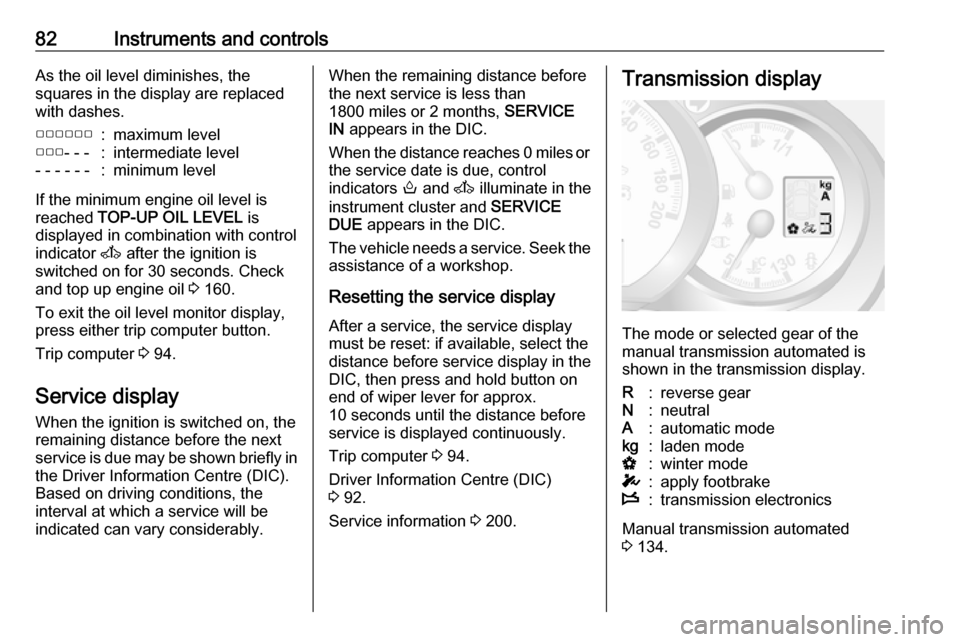
Service information 3 200.Transmission display
The mode or selected gear of the
manual transmission automated is shown in the transmission display.
R:reverse gearN:neutralA:automatic modekg:laden modeV:winter modeT:apply footbrakeW:transmission electronics
Manual transmission automated
3 134.
Page 87 of 239
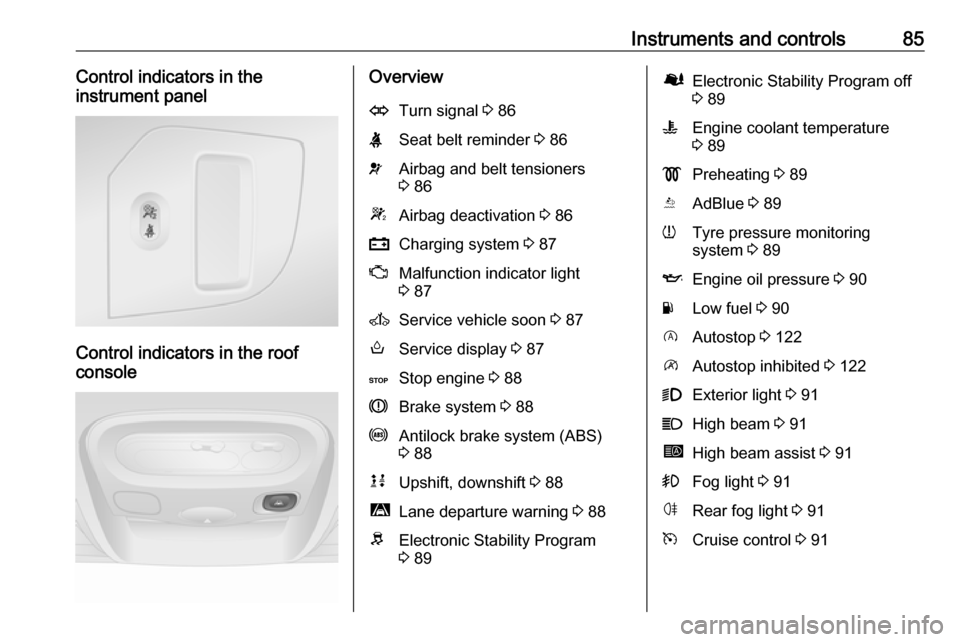
Instruments and controls85Control indicators in the
instrument panel
Control indicators in the roof
console
OverviewOTurn signal 3 86XSeat belt reminder 3 86vAirbag and belt tensioners
3 86WAirbag deactivation 3 86pCharging system 3 87ZMalfunction indicator light
3 87AService vehicle soon 3 87oService display 3 87CStop engine 3 88RBrake system 3 88uAntilock brake system (ABS)
3 88kjUpshift, downshift 3 88ìLane departure warning 3 88RElectronic Stability Program
3 89ØElectronic Stability Program off
3 89WEngine coolant temperature
3 89!Preheating 3 89YAdBlue 3 89wTyre pressure monitoring
system 3 89IEngine oil pressure 3 90YLow fuel 3 90DAutostop 3 122\Autostop inhibited 3 1229Exterior light 3 91CHigh beam 3 91íHigh beam assist 3 91>Fog light 3 91øRear fog light 3 91mCruise control 3 91
Page 89 of 239
Instruments and controls879Danger
Risk of fatal injury for a child using
a child restraint system together
with activated front passenger
airbag.
Risk of fatal injury for an adult
person with deactivated front
passenger airbag.
Airbag system 3 51, belt tensioners
3 48, airbag deactivation 3 55.
Charging system p illuminates red.
Illuminates when the ignition is
switched on and extinguishes shortly after the engine starts.
Illuminates when the engine is
running
Stop, switch off engine. Vehicle
battery is not charging. Engine
cooling may be interrupted. The
brake servo unit may cease to be
effective. Seek the assistance of a
workshop.
Malfunction indicator light
Z illuminates or flashes yellow.
Illuminates briefly when the ignition is
switched on.
Illuminates when the engine is
running
Fault in the emission control system. The permitted emission limits may be exceeded. Seek the assistance of a
workshop immediately.
If Z illuminates in combination with
A , stop vehicle and switch off engine
as soon as possible.9 Warning
Have the cause of the fault
remedied immediately by a
workshop.
Flashes when the engine is
running
Fault that could lead to catalytic
converter damage. Ease up on the
accelerator until the flashing stops.
Seek the immediate assistance of a
workshop.
Service vehicle soon
A illuminates yellow.
Illuminates briefly when the ignition is
switched on.
The vehicle needs a service.
May illuminate in combination with
another control indicator or a
message in the Driver Information
Centre (DIC) 3 92.
Illuminates if cleaning of the diesel particle filter is required and
automatic cleaning does not occur
3 127.9 Warning
Have the cause of the fault
remedied immediately by a
workshop.
Service display
Control indicator o also illuminates in
the DIC when the remaining distance
before the next service reaches
0 miles or the service date is due.
The message SERVICE DUE also
appears in the DIC.
Page 90 of 239
88Instruments and controlsService display 3 82.
Stop engine
C illuminates red.
Illuminates briefly when the ignition is
switched on.
If C illuminates (possibly in
combination with W and/or R), stop
vehicle and switch off engine as soon
as possible.9 Warning
Have the cause of the fault
remedied immediately by a
workshop.
Depending on the type of fault, a
warning message may also appear in the Driver Information Centre (DIC)3 92.
Brake system
R illuminates red.
Control indicator R remains
illuminated after the ignition is
switched on if the parking brake is
applied and extinguishes when the
parking brake is released 3 138.
When the parking brake is released, R illuminates (possibly in
combination with C) if the brake fluid
level is too low 3 163.9 Warning
Stop. Do not continue your
journey. Consult a workshop.
Brake system 3 137.
Antilock brake system (ABS)
u illuminates yellow.
Illuminates briefly when the ignition is
switched on. The system is ready for
operation when u extinguishes.
If control indicators u and A
illuminate with the messages CHECK
ABS and CHECK ESP in the Driver
Information Centre (DIC) 3 92,
there is a fault in the ABS. The brake
system remains operational but
without ABS regulation.
If control indicators u, A , R and
C illuminate, the ABS and ESP are
deactivated and the message
BRAKING FAULT is displayed. Seek
the assistance of a workshop.
Antilock brake system 3 137.
Upshift
k or j illuminates yellow.
Illuminates when gearshifting is
recommended for fuel saving
reasons.
ECO mode 3 119.
Lane departure warning
ì illuminates white.
Illuminates briefly when the ignition is switched on and the system is ready
to operate.
A warning chime sounds in
conjunction with ì when the system
recognises an unintended lane
change.
Page 94 of 239
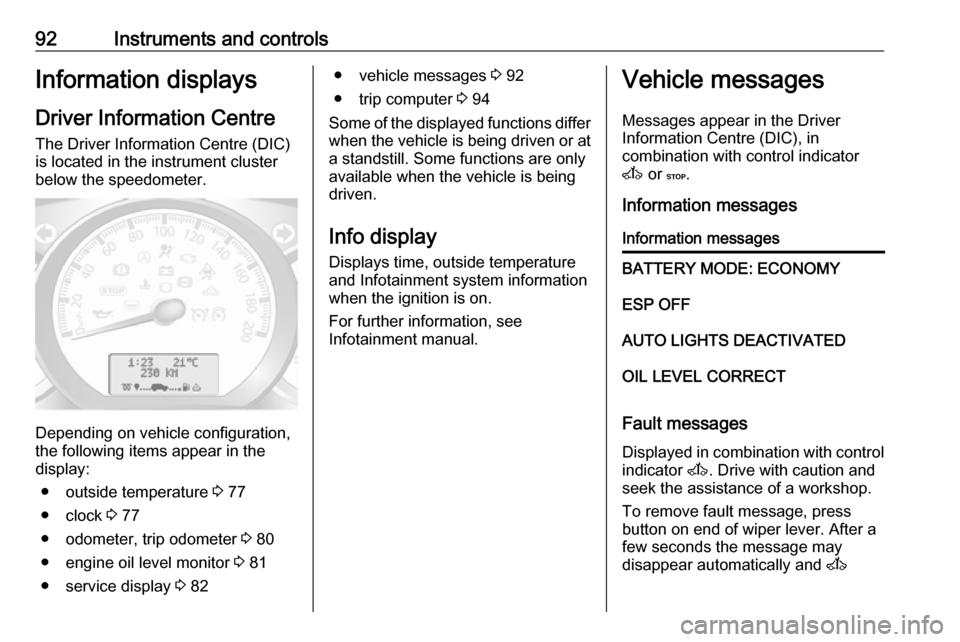
92Instruments and controlsInformation displaysDriver Information Centre The Driver Information Centre (DIC)
is located in the instrument cluster
below the speedometer.
Depending on vehicle configuration,
the following items appear in the
display:
● outside temperature 3 77
● clock 3 77
● odometer, trip odometer 3 80
● engine oil level monitor 3 81
● service display 3 82
● vehicle messages 3 92
● trip computer 3 94
Some of the displayed functions differ
when the vehicle is being driven or at a standstill. Some functions are only
available when the vehicle is being
driven.
Info display
Displays time, outside temperature
and Infotainment system information
when the ignition is on.
For further information, see
Infotainment manual.Vehicle messages
Messages appear in the Driver
Information Centre (DIC), in
combination with control indicator
A or C.
Information messagesInformation messagesBATTERY MODE: ECONOMYESP OFFAUTO LIGHTS DEACTIVATEDOIL LEVEL CORRECT
Fault messages Displayed in combination with control
indicator A. Drive with caution and
seek the assistance of a workshop.
To remove fault message, press
button on end of wiper lever. After a
few seconds the message may
disappear automatically and A
Page 128 of 239
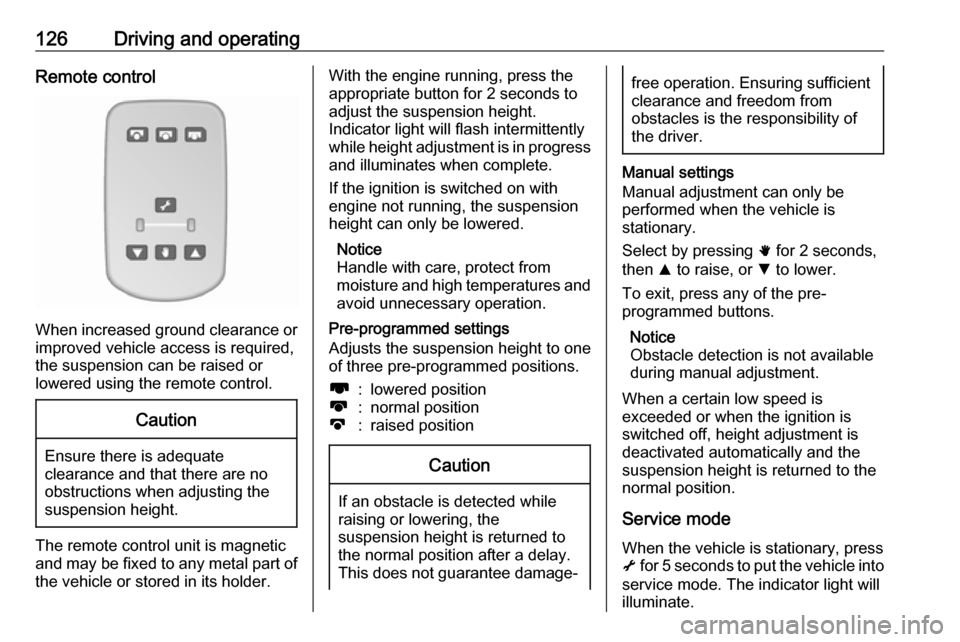
126Driving and operatingRemote control
When increased ground clearance orimproved vehicle access is required,the suspension can be raised or
lowered using the remote control.
Caution
Ensure there is adequate
clearance and that there are no
obstructions when adjusting the
suspension height.
The remote control unit is magnetic
and may be fixed to any metal part of the vehicle or stored in its holder.
With the engine running, press theappropriate button for 2 seconds to
adjust the suspension height.
Indicator light will flash intermittently
while height adjustment is in progress
and illuminates when complete.
If the ignition is switched on with
engine not running, the suspension
height can only be lowered.
Notice
Handle with care, protect from
moisture and high temperatures and
avoid unnecessary operation.
Pre-programmed settings
Adjusts the suspension height to one
of three pre-programmed positions.l:lowered positionk:normal positionj:raised positionCaution
If an obstacle is detected while
raising or lowering, the
suspension height is returned to the normal position after a delay.
This does not guarantee damage-
free operation. Ensuring sufficient
clearance and freedom from
obstacles is the responsibility of the driver.
Manual settings
Manual adjustment can only be
performed when the vehicle is
stationary.
Select by pressing h for 2 seconds,
then R to raise, or S to lower.
To exit, press any of the pre-
programmed buttons.
Notice
Obstacle detection is not available
during manual adjustment.
When a certain low speed is
exceeded or when the ignition is
switched off, height adjustment is deactivated automatically and the
suspension height is returned to the
normal position.
Service mode
When the vehicle is stationary, press
i for 5 seconds to put the vehicle into
service mode. The indicator light will
illuminate.
Page 129 of 239
Driving and operating127When service mode has been
activated, the air suspension master
switch must be turned off.
To exit service mode, press i again
for 5 seconds.
Fault
If a fault is detected, i will flash
intermittently. If service mode has
been activated and there is a fault, h,
S and R will flash simultaneously.
Have the cause of the fault remedied
by a workshop.Engine exhaust9 Danger
Engine exhaust gases contain
poisonous carbon monoxide,
which is colourless and odourless and could be fatal if inhaled.
If exhaust gases enter the interior
of the vehicle, open the windows.
Have the cause of the fault
rectified by a workshop.
Avoid driving with an open load
compartment, otherwise exhaust
gases could enter the vehicle.
Diesel particle filter
The diesel particle filter system filters
harmful soot particles out of the
exhaust gases. The system includes
a self-cleaning function that runs
automatically during driving without
any notification.
The filter is cleaned by periodically
burning off the soot particles at high
temperature. This process takes
place automatically under set driving
conditions. Autostop is not available
and fuel consumption may be higher
during this period. The emission of
smells and smoke during this process is normal.
Under certain driving conditions, e.g.
short distances, the system cannot
clean itself automatically.
If cleaning of the filter is required and
if previous driving conditions did not
enable automatic cleaning, it will be
indicated by illumination of control
indicator A 3 87. Seek the
assistance of a workshop
immediately.Caution
If the cleaning process is
interrupted, there is a risk of
provoking severe engine damage.
Cleaning takes place quickest at high engine speeds and loads.
Catalytic converter
The catalytic converter reduces the
amount of harmful substances in the
exhaust gases.
Page 185 of 239
Vehicle care183A spare wheel or temporary spare
wheel is not equipped with pressure
sensors. TPMS is not operational for
these wheels. For the further three wheels, TPMS remains operational.
Control indicator w and the
corresponding message appears at
each ignition cycle until the tyres are
inflated to the correct tyre pressure.
Driver Information Centre (DIC) 3 92.
Vehicle messages 3 92.
Puncture A puncture or severely under-inflated
tyre is indicated by illumination of
control indicator w together with C
3 88 and a corresponding message
appears in the DIC. Stop vehicle and
switch off engine.
Tyre pressure 3 225, Tyre repair kit
3 185, Spare wheel 3 190, Wheel
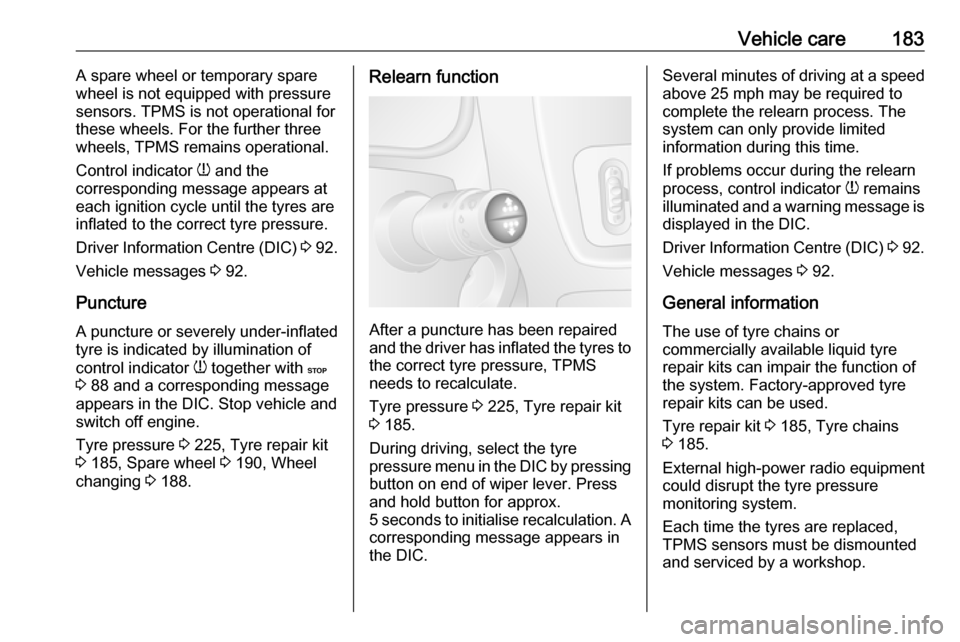
changing 3 188.Relearn function
After a puncture has been repaired
and the driver has inflated the tyres to
the correct tyre pressure, TPMS
needs to recalculate.
Tyre pressure 3 225, Tyre repair kit
3 185.
During driving, select the tyre
pressure menu in the DIC by pressing button on end of wiper lever. Press
and hold button for approx.
5 seconds to initialise recalculation. A
corresponding message appears in
the DIC.
Several minutes of driving at a speed above 25 mph may be required tocomplete the relearn process. The
system can only provide limited
information during this time.
If problems occur during the relearn
process, control indicator w remains
illuminated and a warning message is
displayed in the DIC.
Driver Information Centre (DIC) 3 92.
Vehicle messages 3 92.
General information The use of tyre chains or
commercially available liquid tyre
repair kits can impair the function of
the system. Factory-approved tyre
repair kits can be used.
Tyre repair kit 3 185, Tyre chains
3 185.
External high-power radio equipment
could disrupt the tyre pressure
monitoring system.
Each time the tyres are replaced,
TPMS sensors must be dismounted
and serviced by a workshop.