USB VAUXHALL MOVANO_B 2016 Infotainment system
[x] Cancel search | Manufacturer: VAUXHALL, Model Year: 2016, Model line: MOVANO_B, Model: VAUXHALL MOVANO_B 2016Pages: 147
Page 14 of 147
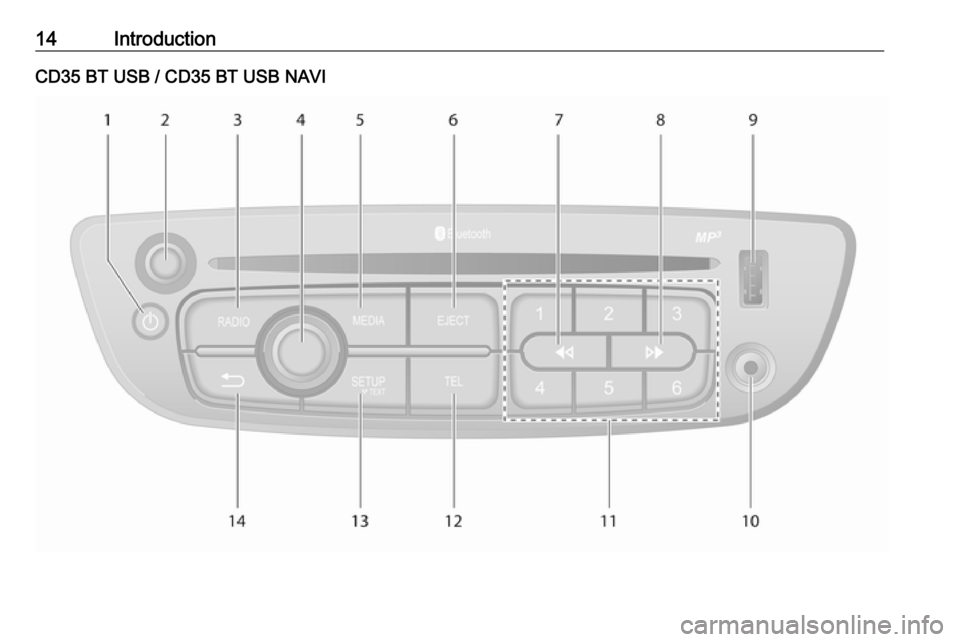
14IntroductionCD35 BT USB / CD35 BT USB NAVI
Page 15 of 147

Introduction151m - Press: Switch on/off ........24
2 Volume rotary knob -
Press: Mute/unmute ..............24
Turn: Adjust volume ..............24
3 RADIO - Change audio
source, waveband .................45
4 Central rotary knob ...............24
Press: Confirm an action ....... 24
Turn: Access display
menu options ........................ 24
Turn: Access the stored
radio station list .....................45
Turn: Select next/previous
station ................................... 47
Turn: Change CD/MP3
track ...................................... 56
5 MEDIA - Change audio
source ................................... 56
6 EJECT - CD ejection .............56
7 2 - Radio, Short press:
Search for previous radio
frequency .............................. 47
Long press: Automatic
station search ........................ 47Audio/MP3/WMA CD,
Short press: Skip track
backwards ............................. 56
Long press: Fast rewind .......56
8 3 - Radio, Short press:
Search for next radio
frequency .............................. 47
Long press: Automatic
station search ........................ 47
Audio/MP3 CD, Short
press: Skip track forwards ..... 56
Long press: Fast forward ......56
9 USB port ............................... 61
10 AUX input .............................. 59
11 Station buttons 1...6 ..............47
Short press: Select station ....47
Long press: Save station ......47
12 TEL - Telephone menu .......12213 SETUP / TEXT - Short
press: Settings menu ............24
Long press: Display radio
text information .....................51
Long press: Display CD
text information .....................56
14 / - Return to previous
menu, cancel an action .........24
Page 17 of 147
![VAUXHALL MOVANO_B 2016 Infotainment system Introduction171m: Switch on/off ....................24
2 ]: Decrease volume .............24
3 <: Increase volume ............... 24
4 USB port ............................... 61
5 AUX input ..........](/img/38/19556/w960_19556-16.png "VAUXHALL MOVANO_B 2016 Infotainment system Introduction171m: Switch on/off ....................24
2 ]: Decrease volume .............24
3 <: Increase volume ............... 24
4 USB port ............................... 61
5 AUX input ..........")
Introduction171m: Switch on/off ....................24
2 ]: Decrease volume .............24
3 <: Increase volume ............... 24
4 USB port ............................... 61
5 AUX input .............................. 59
6 Clock ..................................... 24
7 yPHONE : Telephone
menu ................................... 122
8 ÿSETTINGS : Audio
settings, e.g. "Tone
settings" ................................ 36
"Volume settings" ..................39
Bluetooth settings .................24
Display settings .....................24
System settings ..................... 40
9 æDark : Darken screen
(only clock and audio
system information are
displayed) .............................. 24
10 yNAVI : Navigation menu ......74
11 sMAP : View map .................74
12 èRADIO : Change audio
source to radio ......................4513tMEDIA : Change audio
source - USB, iPod ...............61
BT (Bluetooth) .......................65
AUX ....................................... 59
Page 19 of 147
![VAUXHALL MOVANO_B 2016 Infotainment system Introduction191m: Switch on/off ....................24
2 ]: Decrease volume .............24
3 <: Increase volume ............... 24
4 USB port ............................... 61
5 AUX input ..........](/img/38/19556/w960_19556-18.png "VAUXHALL MOVANO_B 2016 Infotainment system Introduction191m: Switch on/off ....................24
2 ]: Decrease volume .............24
3 <: Increase volume ............... 24
4 USB port ............................... 61
5 AUX input ..........")
Introduction191m: Switch on/off ....................24
2 ]: Decrease volume .............24
3 <: Increase volume ............... 24
4 USB port ............................... 61
5 AUX input .............................. 59
6 Clock ..................................... 24
7 Outside temperature .............24
8 Ý: Phone reception ...........122
Ü : Battery life .................... 122
9 yPhone : Telephone menu . 122
10 ÿSetting : Audio settings,
e.g. "Tone settings" ...............36
"Volume settings" ..................39
Bluetooth settings .................24
Display settings .....................24
System settings ..................... 40
11 ýNav : Navigation menu ........74
12 (Depending on current
mode) ßSet Time :
Remote engine start-up ........24
7 : Go to Home page ............24q/r : Press to return to
previous screen - or -
press and hold to go to
Home page ........................... 24
y : Return to Navigation
menu ..................................... 78
13 ðDriving eco2 : Driving
economy ............................... 24
14 ñRadio : Change audio
source to radio ......................45
15 üMedia : Change audio
source - USB, iPod ...............61
BT (Bluetooth) .......................65
AUX ....................................... 59
AhaⓇ application ..................24
16 æDark : Darken screen
(only clock and audio
system information are
displayed) .............................. 24
Page 21 of 147
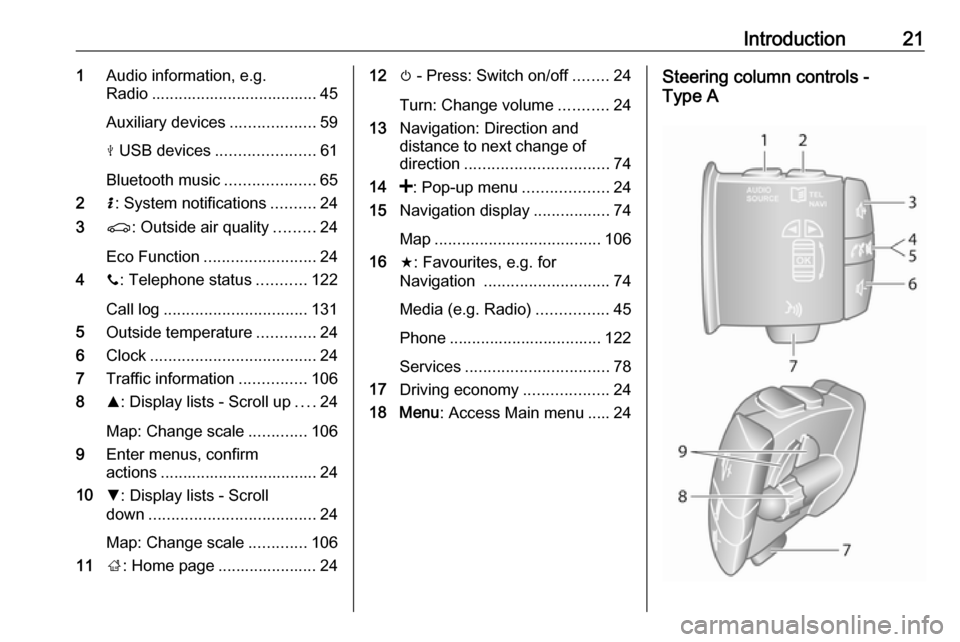
Introduction211Audio information, e.g.
Radio ..................................... 45
Auxiliary devices ...................59
M USB devices ...................... 61
Bluetooth music ....................65
2 H: System notifications ..........24
3 r: Outside air quality .........24
Eco Function ......................... 24
4 y: Telephone status ...........122
Call log ................................ 131
5 Outside temperature .............24
6 Clock ..................................... 24
7 Traffic information ...............106
8 R: Display lists - Scroll up ....24
Map: Change scale .............106
9 Enter menus, confirm
actions ................................... 24
10 S: Display lists - Scroll
down ..................................... 24
Map: Change scale .............106
11 ;: Home page ...................... 2412 m - Press: Switch on/off ........24
Turn: Change volume ...........24
13 Navigation: Direction and
distance to next change of
direction ................................ 74
14 <: Pop-up menu ...................24
15 Navigation display .................74
Map ..................................... 106
16 f: Favourites, e.g. for
Navigation ............................ 74
Media (e.g. Radio) ................45
Phone .................................. 122
Services ................................ 78
17 Driving economy ...................24
18 Menu : Access Main menu ..... 24Steering column controls -
Type A
Page 23 of 147
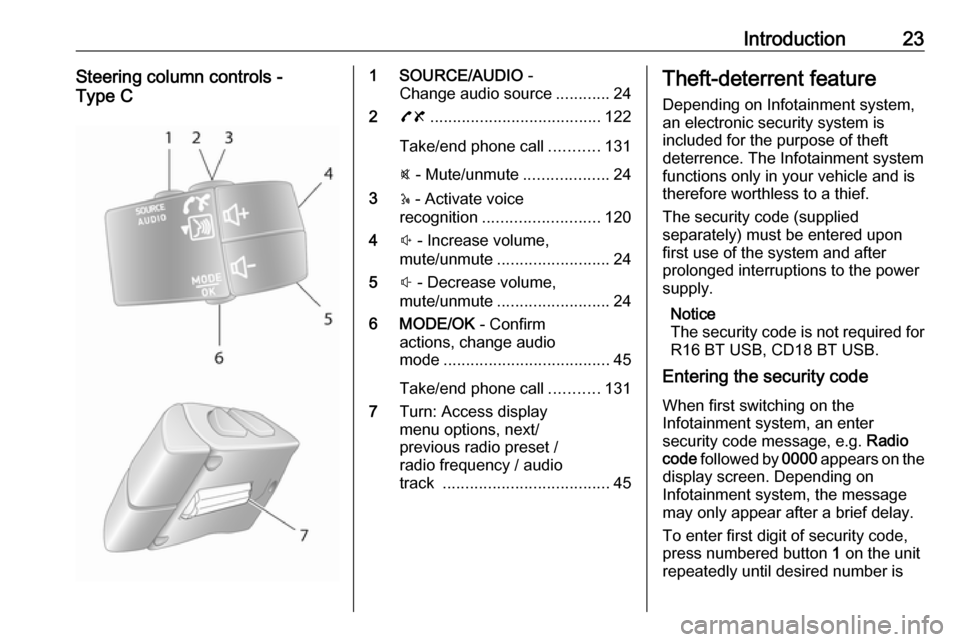
Introduction23Steering column controls -
Type C1 SOURCE/AUDIO -
Change audio source ............24
2 78 ...................................... 122
Take/end phone call ...........131
@ - Mute/unmute ...................24
3 5 - Activate voice
recognition .......................... 120
4 ! - Increase volume,
mute/unmute ......................... 24
5 # - Decrease volume,
mute/unmute ......................... 24
6 MODE/OK - Confirm
actions, change audio
mode ..................................... 45
Take/end phone call ...........131
7 Turn: Access display
menu options, next/
previous radio preset /
radio frequency / audio
track ..................................... 45Theft-deterrent feature
Depending on Infotainment system,
an electronic security system is
included for the purpose of theft
deterrence. The Infotainment system functions only in your vehicle and istherefore worthless to a thief.
The security code (supplied
separately) must be entered upon
first use of the system and after
prolonged interruptions to the power
supply.
Notice
The security code is not required for
R16 BT USB, CD18 BT USB.
Entering the security code
When first switching on the
Infotainment system, an enter
security code message, e.g. Radio
code followed by 0000 appears on the
display screen. Depending on
Infotainment system, the message
may only appear after a brief delay.
To enter first digit of security code,
press numbered button 1 on the unit
repeatedly until desired number is
Page 26 of 147

26IntroductionAlternatively (with the steering
column controls), press @ or 8 or
press ! and # simultaneously.
Unmute
To unmute (depending on
Infotainment system), briefly press
X again or turn clockwise.
Alternatively (with the steering
column controls): Press @ again or
press ! and # simultaneously again.
Notice
When a traffic announcement is
broadcast, the system is
automatically unmuted.
For further information, refer to
"Radio data system" 3 51.
Display screen operation
R15 BT USB, R16 BT USB,
CD16 BT USB, CD18 BT USB -
Display screen operation
● To move up/down in the display: Turn OK.
● To confirm actions: Press OK.
● To cancel actions (and return to previous menu): Press /.CD35 BT USB - Display screen
operation
● To move up/down in the display: Turn the central rotary knob.
● To confirm actions: Press the central rotary knob.
● To cancel actions (and return to previous menu): Press /.
NAVI 50 - Display screen operation Use the touchscreen for the following displayed menus as described in
each section:
● è/ñ RADIO
Refer to "Radio" section 3 45.
● t/ü MEDIA
Refer to "USB port" section
3 61.
● yPHONE
Refer to "Phone" section 3 122.
● sMAP
Refer to "Navigation" section
3 74.
● yNAVI / ýNav
Refer to "Navigation" section
3 74.● ðDriving eco2
Refer to "Additional features
(NAVI 50)" in the "Modes of
operation" section below.
● ÿSETTINGS
Refer to (NAVI 50) "Tone
settings" 3 36, "Volume
settings" 3 39 and "System
settings" 3 40.
When the Home page 7 is displayed,
it is possible to hide these menus from
the display (only clock and audio
system information may be shown) by
pressing æDark . Press anywhere on
the screen to display these menus
again.
NAVI 80 - Display screen operation
Use the touchscreen for the following displayed menus as described in
each section.
Page 27 of 147
Introduction27
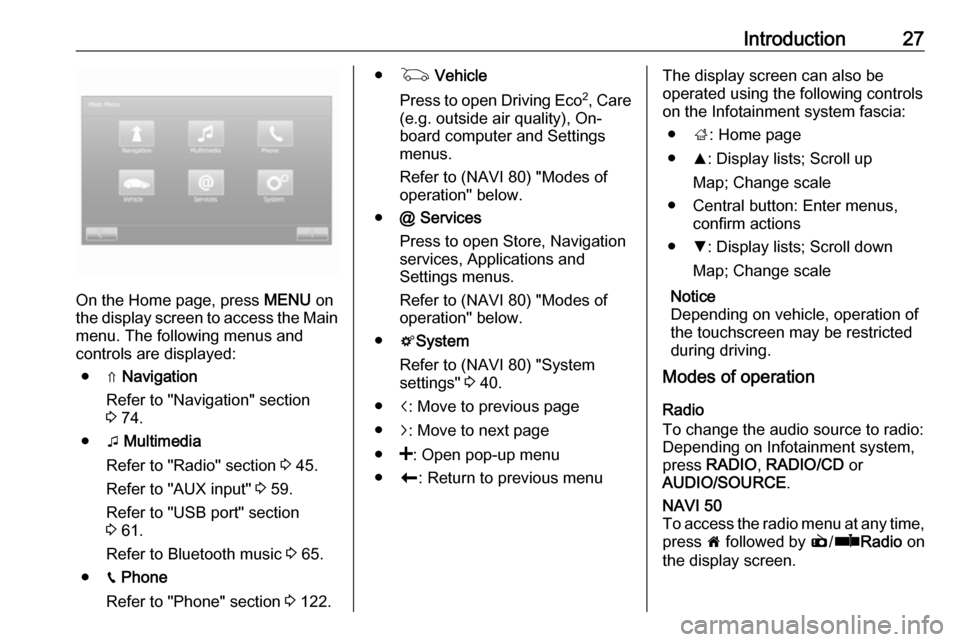
On the Home page, press MENU on
the display screen to access the Main
menu. The following menus and
controls are displayed:
● ⇑ Navigation
Refer to "Navigation" section
3 74.
● t Multimedia
Refer to "Radio" section 3 45.
Refer to "AUX input" 3 59.
Refer to "USB port" section
3 61.
Refer to Bluetooth music 3 65.
● g Phone
Refer to "Phone" section 3 122.
● G Vehicle
Press to open Driving Eco 2
, Care
(e.g. outside air quality), On- board computer and Settings
menus.
Refer to (NAVI 80) "Modes of operation" below.
● @ Services
Press to open Store, Navigation
services, Applications and
Settings menus.
Refer to (NAVI 80) "Modes of
operation" below.
● tSystem
Refer to (NAVI 80) "System
settings" 3 40.
● i: Move to previous page
● j: Move to next page
● <: Open pop-up menu
● r: Return to previous menuThe display screen can also be
operated using the following controls on the Infotainment system fascia:
● ;: Home page
● R: Display lists; Scroll up
Map; Change scale
● Central button: Enter menus, confirm actions
● S: Display lists; Scroll down
Map; Change scale
Notice
Depending on vehicle, operation of
the touchscreen may be restricted
during driving.
Modes of operation
Radio
To change the audio source to radio:
Depending on Infotainment system, press RADIO , RADIO/CD or
AUDIO/SOURCE .NAVI 50
To access the radio menu at any time, press 7 followed by è/ñ Radio on
the display screen.
Page 28 of 147

28IntroductionNAVI 80
To access the radio menu from the Home page, press MENU then
Multimedia followed by Radio on the
display screen
Detailed description of the radio
functions 3 45.
Audio players
To change the audio source to CD,
USB , AUX , Bluetooth or iPod (where
applicable): Depending on
Infotainment system, press MEDIA,
RADIO/CD or AUDIO/SOURCE .
NAVI 50 : To access the menu for
connected auxiliary devices ( USB,
iPod , BT (Bluetooth) or AUX) at any
time, press 7 followed by t/
ü Media on the display screen. Press
S in top left corner and select
auxiliary source.
For Aha Ⓡ application (available
depending on version), refer to
"Additional features (NAVI 50)"
below.
NAVI 80 : To access the menu for
auxiliary devices (USB, SD card, AUX
input, Audio CD, Bluetooth) from the
Home page, press MENU thenMultimedia followed by Media on the
display screen. Select auxiliary
source from the display list.R15 BT USB, R16 BT USB
Detailed descriptions of:
● AUX input functions 3 59
● USB port functions 3 61
● Bluetooth music operation 3 65CD16 BT USB, CD18 BT USB
Detailed descriptions of:
● CD player functions 3 56
● AUX input functions 3 59
● USB port functions 3 61
● Bluetooth music operation 3 65CD35 BT USB
Detailed descriptions of:
● CD player functions 3 56
● AUX input functions 3 59
● USB port functions 3 61
● Bluetooth music operation 3 65NAVI 50
Detailed descriptions of:
● AUX input functions 3 59
● USB port (including iPod) functions 3 61
● Bluetooth music operation 3 65NAVI 80
Detailed descriptions of:
● AUX input functions 3 59
● USB port functions 3 61
● Bluetooth music operation 3 65
Navigation, Map
(CD35 BT USB NAVI, NAVI 50,
NAVI 80)
Detailed description of the Navigation system 3 74, Browse map 3 106.
Phone
Use the display options in the
following menus to connect mobile
phones, make telephone calls, create
contacts lists and adjust various
settings.
Detailed description of the handsfree
phone system functions 3 122.
Page 29 of 147

Introduction29R15 BT USB, R16 BT USB,
CD16 BT USB, CD18 BT USB -
Phone
To access the Phone menu: Press
6 or TEL .
To access the phone settings menu: Press TEL and select Phone settings .CD35 BT USB - Phone
To access the Phone menu: Press
6 or TEL.
To access the phone settings menu:
Press SETUP / TEXT and select
Phone settings .NAVI 50 - Phone
To access the Phone menu at any
time: Press 7 followed by yPhone on
the display screen.NAVI 80 - Phone
To access the Phone menu from the
Home page, press MENU followed by
Phone on the display screen.
Vehicle information (NAVI 80)
To access the Vehicle menu from the
Home page, press MENU followed by
Vehicle on the display screen.
Depending on vehicle, the following
menus are displayed:
● Driving Eco 2
● Care
● On-board computer
● SettingsDriving Eco 2
The following features are available: ● Trip report
Displays the following data from the last journey:
Average fuel consumption,
average speed, total fuel
consumption, recovered energy
or mileage completed, average
environmental driving
performance, braking
anticipation, ability to manage
vehicle speed.
To save journey data: Press
'Save' then select the journey
type from the following list:
Home/work, holiday, weekend,
trip, personal.
To reset journey data: Press 'Reset'. Confirm or cancel with
'Yes' or 'No'.● My preferred trips
Displays changes in your driving style (when journey data has
been saved).
The 'Summary' tab displays the
following: Total route distance,
distance covered, date of
information update, average
rating out of 100.
The 'Details' tab displays journey
record information.
● Eco coaching
Displays advice for reducing fuel consumption
Scroll through the pages and
familiarise yourself with the
advice.Care
The following features are available:
● Ioniser : Select 'Clean' mode to
help reduce bacteria and
allergens in the air, or select
'Relax' mode to improve the
driving environment through the
emission of ions. Operation stops
automatically after 30 minutes.
Switch off if not required.